2AG6ZK166-1053Kanex Compact Bluetooth Keyboard with Stand Cover
Kanex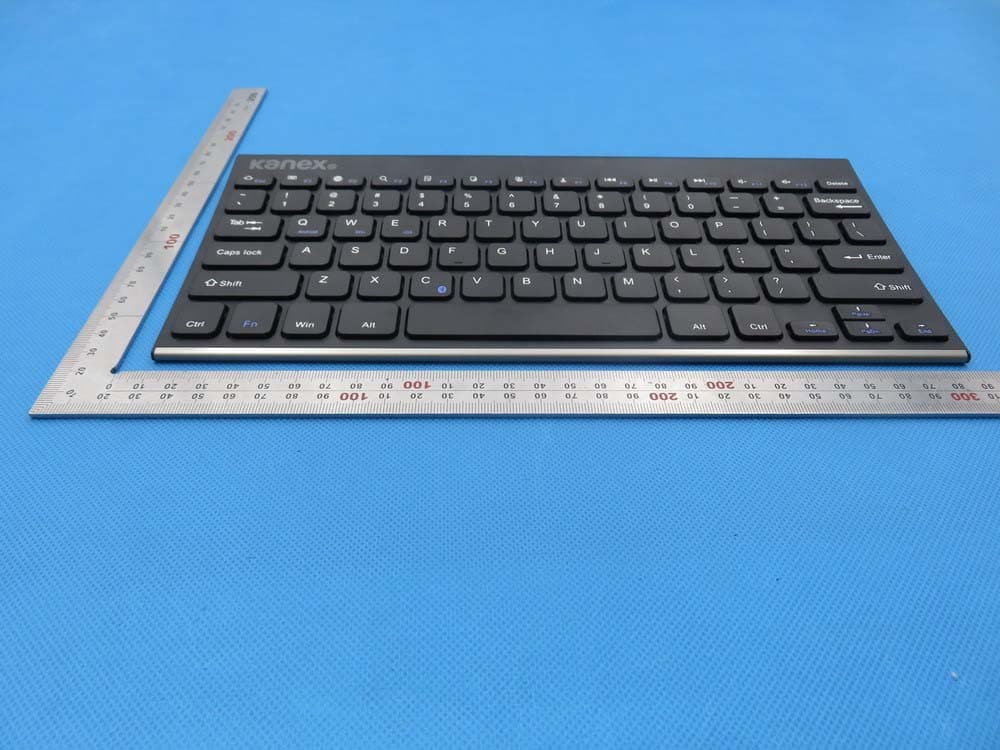
Click to zoom
Application Details
- Equipment Class
- DXX - Part 15 Low Power Communication Device Transmitter
- Date of Grant
- Jan 26, 2016
- Application Purpose
- Original Equipment
- Date of Application
- Jan 26, 2016
- Equipment Note
- Kanex Compact Bluetooth Keyboard with Stand Cover
- Frequency Range
- 2402.00000000 - 2480.00000000
- Company
- Kanex
- Country
- United States
Documents & Files
Document Text
Text extracted from the exhibit documents filed with the FCC. Open a document above to read the original.
Users Manual
BluetoothKeyboardforAndroid/Windows/IOStablets&laptops Packingcontents: 1.Cordlesskeyboard 2.USBpowerchargingcable 3.Usermanual BluetoothKeyboardSpecification 1.Built-inBroadcomBluetooth3.0keyboard. 2.Modernslimkeyboardbacksidewithbrushedsteel. 3.Chocolatekeycapwithscissorsstructure,goodtouchfeeling. 4.SuitableforAndroid/Windows/IOStablets,laptops,desktops,andallsmartphones. 5.Built-inrechargeablelithiumbattery,lastforapproximately60hourspercharge. 6.Lightweight,quietkeystrokes,water-proof,dust-proof. 7.Energysavingkeyboardsleepmode. 8.Keyboardsize:281.7*135*4.3MM BluetoothKeyboardSpecificationandPairingInstruction: BluetoothKeyboardSpecification 1.Bluetooth3.0interfacestandard 2.OperatingDistanceto10meters 3.ModulatingSystem:GFSK 4.OperationVoltage:3.0-4.2V 5.WorkingCurrent:<2.5mA 6.StandbyCurrent:0.3-0.5mA 7.SleepingCurrent:<40uA 8.ChargingCurrent:>200uA 9.StandbyTime:>100days 10.ChargingTime:>2hours 11.LithiumBatteryCapacity:280mA 12.UninterruptedWorkingTime:>64hours 13.LithiumBatteryLife:3year 14.LithiumBatterySpecification:38*20*35mm 15.KeyStrength:50g~80g 16.Keylife:<3millionstrokes 17.OperatingTemperature:-10-+55C BluetoothKeyboardPairing Step1:Turnonthepowertoggleswitch.Thestateindicatorlightwillbeonfor10seconds,and thenthelightwillgooff. Step2:Presson“FN+C”buttontogetheronkeyboard,theindicatorlightwillbeblinking. Step3:TurnonBluetoothsettinginyourdevice,yourdevicewillautomaticallyfind“Bluetooth 3.0Keyboard”,thenconnectit. Step4:DeviceshowedBluetoothhadconnected,keyboardstateindicatorlightwillturnoff. Model:K166-1053 FCC ID:2AG6ZK166-1053 SpecialNote: ForotherBluetoothenableddevice,pleaseverifytheBluetoothStandard&compatibilitybefore attemptingtoconnecttothekeyboard. Battery Thelong-lastingrechargeablebatterycanserviceyouforseveralweeks Withnomemoryeffect,thelithiumbatterycanbechargedatanytime. Inordertoextendservicelife,werecommendyouturnthekeyboardoffwhenthereislongtime withnointeractive. Charging Whenthebatterypowerislow,the[power]indicatorlightwillstartblinking,itistimetorecharge thekeyboard. Step1:ConnectUSB-BofthenativeUSBpowercabletothekeyboardcharginginterface. Step2:ConnectUSB-Atothepoweradapterorcomputer'sUSBinterface. Step3:theredindicatorlightwillstayonwhenthekeyboardischarging.Onceitfinishedcharging theindicatorlightwillturngreencolor. EnergySavingSleepMode Thekeyboardwillkickintosleepmodewhenitisinactivefor10minutesandthekeyboard [power]indicatororlightwillgooff.Toactivatefromsleepmode,justpressanykeyandwait 3seconds,thekeyboardwillcomebackon. SafetyCaution 1.Keeptheitemawayfromsharpobjects. 2.Donotplaceheavyobjectontopofthekeyboard. 3.DonotMicrowavetheitem. 4.Donotforceordistortedthekeyboard 5.Keepawayfromoil.chemicaloranyotherorganicliquid. Cleaning Cleanthesiliconekeyboardwithwater,alcoholoralcoholbaseddisinfectant Troubleshooting A,Unabletoconnect 1.Makesurethepowerswitchison. 2.Makesurethekeyboardiswithintheoperatingdistance. 3.Makesurethebatteryischarged. 4.MakesureyourdeviceBluetoothsettingison. 5.Makesurewirelesskeyboardisconnectedtoyourdevice. 6.Makesurewirelesskeyboardhasbeenpairedwithyourdevice. B.UnabletoChargeKeyboard 1.MakesuretheUSBpowercableisconnectedproperlytothekeyboardandthepowersource. 2.Makesurethewallchargerisplugintothepoweroutlet. SpecialKeysDescription LongpressFnandcombinationwithF1-F12andinsertkeystotheshiftmultimediakeys,and mainlybeusedintheoperationofAndroidsystemmultimedia. SpecialFeaturesandOptions PleasenotethattheKeyboardCaseismadefromsteelwithahighgradefinishsimilartothefinish onmanypopulardevices Options:Asetoffourrubberfeethadpastedonthefourcorners,whichcanhelpprevent scratchinghigh-gradefinishoftheKeyboardCase. WhatdoyouthinkaboutourBluetoothkeyboard Pleasetakeaminutetotellus. Thanksforpurchasingourproduct. http://www.bow.cn ProductEndofLife: Keyboardbatterydisposal 1.Insertscrewdriverbetweenplastictopandmetalcaseatkeyboardtoporbottom 2.Pryupplastictopandremoveitcompletely.Thisactiondestroyskeyboard 3.Turntopoverandremovetapefrombattery. 4.Separatebatteryfromcircuitboard 5.Disposeofbatteryaccordingtolocallaws.Recycleremainingkeyboardparts. TableofToxicandHazardousSubstance/ElementsandTheirContent Ingredients(Pb)(Hg)(Cd)(Cr(VI))(PBB)(PBDE) CableXOOOOO PWAsXOOOOO PlasticpartsOOOOOO MembraneOOOOOO MeterpartsXOOOOO RubberdomeOOOOOO Ostandsforthistoxicandhazardouscontentinhomogeneousmaterialisunderthe SJ/T11363-2006Standardslimits Xstandsforthistoxicandhazardouscontentinhomogeneousmaterialisbeyondthe SJ/T11363-2006Standardslimits Undertheingredientswith'X'intheformallareuptoROHS; “on27January2003t heEuropeanparliamentandthecouncilannounceelectronicequipmentin limitingtheuseofcertainhazardoussubstancesdirective2002/95/EC” Note:theenvironmentalprotectionusingperiodreferencestandarddependsontheproductof theregularworktemperatureandhumidityconditions。 N OTE : This equipment has been tested and found to comply with the limits for a Class B digital device, pursuant to part 15 of the FCC Rules. These limits are designed to provide reasonable protection against harmful interference in a residential installation. This equipment generates, uses and can radiate radio frequency energy and, if not installed and used in accordance with the instructions, may cause harmful interference to radio communications. However, there is no guarantee that interference will not occur in a particular installation. If this equipment does cause harmful interference to radio or television reception, which can be determined by turning the equipment off and on, the user is encouraged to try to correct the interference by one or more of the following measures: —Reorient or relocate the receiving antenna. —Increase the separation between the equipment and receiver. —Connect the equipment into an outlet on a circuit different from that to which the receiver is connected. —Consult the dealer or an experienced radio/TV technician for help. This device complies with part 15 of the FCC rules. Operation is subject to the following two conditions: (1) this device may not ca…
Text truncated - open the document above for the full version.
Attestation Statements
Kanex 1405 Pioneer Street, Brea CA92821,United States TEL: 714-592-4123 FAX: 714-592-7021 Federal Communications Commission Authorization and Evaluation Division Equipment Authorization Branch 7435 Oakland Mills Road Columbia, MD 21046 1/21/2016 To whom it may concern: We, the undersigned, hereby authorize Eurofins Product Service GmbH to act on our behalf in all matters relating to applications for equipment authorization FCC ID: 2AG6ZK166-1053 including the signing of all documents related to these matters. Any and all acts carried out by Eurofins Product Service GmbH on our behalf shall have the same effect as acts of our own. We also hereby certify that no party to this application is subject to a denial of benefits, including FCC benefits, pursuant to Section 5301 of the Anti-Drug Abuse Act of 1988, 21 U.S.C. 862. Sincerely, Signature Kanex Contact person: Richard Liang Title: Sr. Product Manager
Cover Letter(s)
Kanex 1405 Pioneer Street, Brea CA92821,United States TEL: 714-592-4123 FAX: 714-592-7021 Federal Communications Commission Equipment Authorization Branch 7435 Oakland Mills Road Columbia, MD 21046 1/21/2016 Request for Confidentiality Company name: Kanex FCC ID: 2AG6ZK166-1053 FCC Part 15 Certification Gentlemen, In accordance with CFR 47 § 0.459, Kanex hereby requests confidentiality of following attachments: (1) schematic diagrams, (2) detailed block diagrams, (3) detailed operational descriptions, (4) detailed parts list These documents contain detailed system and equipment description and related information about the product which Kanex considers to be proprietary, confidential and a custom design and otherwise would not release to the general public. Since the design is a basis from which future technological products will evolve, Kanex considers that this information would be of benefit to its competitors and that the disclosure of the information in these documents would give competitors an unfair advantage in the market. Sincerely, Signature [Richard Liang] [Sr. Product Manager] Kanex 1405 Pioneer Street, Brea CA92821, United States
External Photos
External Photos TOTAL VIEW OF EUT TOP VIEW OF EUT BOTTOM VIEW OF EUT FRONT VIEW OF EUT BACK VIEW OF EUT LEFT VIEW OF EUT RIGHT VIEW OF EUT VIEW OF EUT (PORT)
ID Label/Location Info
FCC ID Label Location Bluetooth Keyboard Brand: Kanex Model: K166-1053 FCC ID: 2AG6ZK166-1053 This device complies with part 15 of the FCC rules. Operation is subject to the following two conditions: (1) this device may not cause harmful interference, and (2) this device must accept any interference received, including interference that may cause undesired operation.
Internal Photos
Internal Photos OPEN VIEW OF EUT INTERNAL VIEW OF EUT-1 INTERNAL VIEW OF EUT-2 INTERNAL VIEW OF EUT-3 INTERNAL VIEW OF EUT-4 INTERNAL VIEW OF EUT-5 Antenna
Operational Description
Kanex 1405 Pioneer Street, Brea CA92821,United States TEL: 714-592-4123 FAX: 714-592-7021 Declaration concerning Antenna Specification It is hereby declared that the product Model No.: K166-1053 FCC ID: 2AG6ZK166-1053 fulfills the requirement in FCC test relating to the antenna type. The device specified above confirms to the FCC recommendations for internal antenna type described below: Model No. of antenna: N/A Type of antenna: PCB Antenna Gain of the antenna: 0 dBi Frequency range: 2402-2480 MHz The mounting of the antenna is fixed to the radio module and no other antenna should be used. Company name: Kanex Address: 1405 Pioneer Street, Brea, City: CA ZIP / Postal code: 92821 Country: United States Place: Shenzhen Date: Jan.21,2016 Signature:
RF Exposure Info
RF Exposure evaluation Product Description:Kanex Compact Bluetooth Keyboard with Stand Cover Model Number: K166-1053 FCC ID: 2AG6ZK166-1053 According to 447498 D01 General RF Exposure Guidance v05 The 1-g and 10-g SAR test exclusion thresholds for 100 MHz to 6 GHz at test separation distances ≤ 50 mm are determined by: [(max. power of channel, including tune-up tolerance, mW)/(min. test separation distance, mm)] ·[√f(GHz)] ≤ 3.0 for 1-g SAR and ≤ 7.5 for 10-g extremity SAR, where f(GHz) is the RF channel transmit frequency in GHz Power and distance are rounded to the nearest mW and mm before calculation According to the follow transmitter output power(P t )formula: P t =(E x d) 2 /(30 x g t ) P t =transmitter output power in watts g t =numeric gain of the transmitting antenna (unitess) E=electric field strength in V/m d=measurement distance in meters (m) According to the above test data, Emax=93.18dBuv/m=0.046V/m,d=3m,g t =1 P t =(E x d) 2 /(30 x g t )=(0.046x3) 2 /(30x1)=0.000635W=0.64mW The result is rounded to one decimal place for comparison Worse case is as below: [2441MHz -0.6mW output power] (0.6mW /5mm) .[√2.441(GHz)]= 0.187<3.0 for 1-g SAR Then SAR evaluation is not required NOTE: For the maximum power, you can refer FCC test report.
Contact Information
Applicant
Richard Liang
Test Firm
Dongguan Precise Testing Service Co., Ltd.Chris Du
Technical Specifications
| # | Rule Parts | Frequency Range | Power Output |
|---|---|---|---|
| 1 | 15C | 2.40 GHz - 2.48 GHz | - |