2AGESC300Bluetooth Headset
Cynoon Networks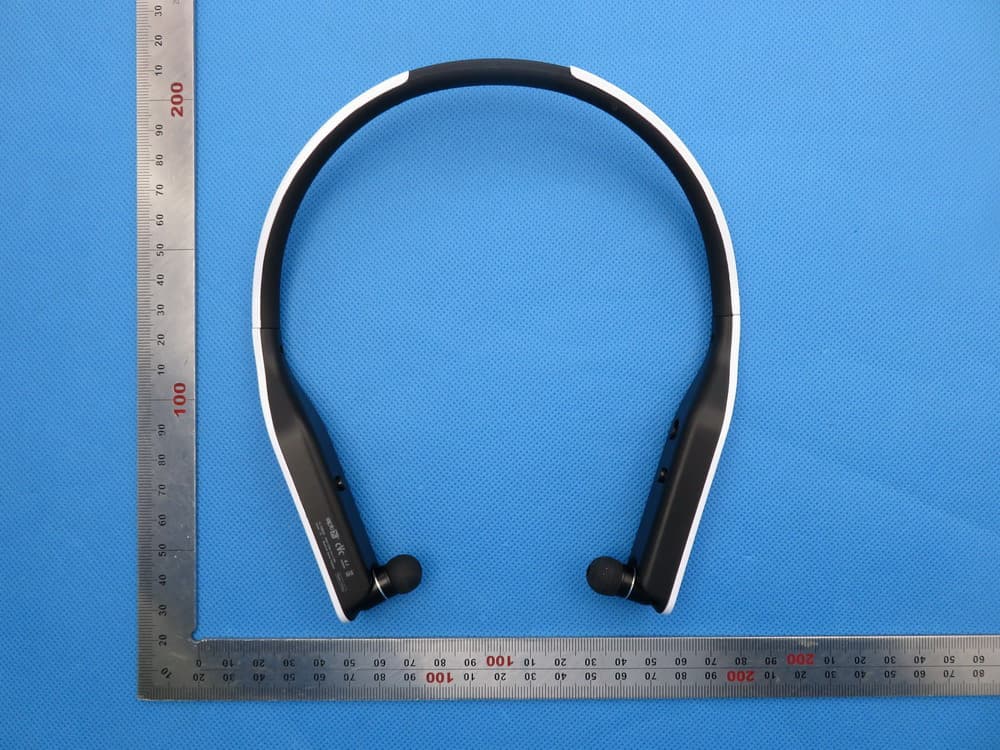
Click to zoom
Application Details
- Equipment Class
- DXX - Part 15 Low Power Communication Device Transmitter
- Date of Grant
- Dec 21, 2015
- Application Purpose
- Original Equipment
- Date of Application
- Dec 21, 2015
- Equipment Note
- Bluetooth Headset
- Frequency Range
- 2402.00000000 - 2480.00000000
- Company
- Cynoon Networks
- Country
- South Korea
Documents & Files
Document Text
Text extracted from the exhibit documents filed with the FCC. Open a document above to read the original.
Users Manual
Composition or performance of the product may be subject to change without prior notification to ensure the performance or quality of the product. User manual USB charging cable 2 sets of ear caps C300 main body Power switch Earphone retractable button Battery charger terminal Next song button Previous song button Mic. Play/Stop button Right earphone Left earphone Call button Volume (-) button Volume (+) button Line-Out terminal LED light indicator Please submit proof of purchase for after-sales service. Warranty period will commence from the time of the first date of the product release, in the event that you are unable to provide proof of purchase. Warranty period of batteries and earphone cords is six months. Please be sure to thoroughly read user manual before using this product. It may be subject to change without prior notification to ensure the improvement of product and reflect changes to specifications. Cysound Bluetooth Stereo Earbud Headset Model name : C300 Search devices in the Bluetooth menu of the phone settings then select <C300> and connect it. You will be required to enter a Pin Code: Enter: 0000 Blue LED lights will become bright every three seconds with the voice message stating, “It is now connected to your phone” when the pairing is completed. Registration can be difficult due to crosstalk, interference and repeated registration. To solve this problem, reboot your mobile phone and try the registration process again. It will be automatically connected when you turn on the power of the nearby paired devices after the first connection. Red LED lights will be bright for one second then changed to blue when you turn on the power of <C300> from OFF to ON. This will start the pairing mode. Situate the compatible device within 1m and activate Bluetooth mode. You can use it after registration of compatible device. The pairing process will only have to be done once per device that you wish to connect. Please follow the steps in the user manual. Later, it will be automatically connected to the same mobile phone. Charge the battery fully before use. A 120-150 minutes of charge time can be expected if the battery is fully discharged. Red light will flash with the voice message stating, “The battery is low”, when there is not enough power. You will need to then charge it. Charge through the enclosed USB charging cable. Red light will become bright when the charging is started. Violet light will become bright when the charging is finished. Pair the mobile phone<1> according to the pairing process on page 3 of the user manual. Deactivate Bluetooth after completing pairing of the mobile phone<1>. Pair the mobile phone<2> again according to page 3 of the pairing process Activate Bluetooth of the mobile phone<1> after pairing of the mobile phone<2>. The mobile phone<1> will be automatically connected and the mobile phone<1> and <2> will be paired to <C300> What is voice prompt? Push the power switch to the right to turn on. Blue LED lights will become bright after the red LED lights up for one second with a vibration and voice prompt stating, “Power on (info message).” Push power switch to the left to turn off. You can hear a voice prompt stating, “Power off (info message)”, along with a vibration. You will be notified of an incoming call by a ringing sound and vibration. To accept the call, simply press the call button quickly. It instructs about aspects concerning power, call and battery. It also provides information about Bluetooth aspects with Korean voice messaging. To hang up, press the call button again.. Paired mobile phone plays music. Music will be stop if you press Play/Stop button and it will be played again if you press it once more in the middle of listening to the music You can adjust volume by pressing Volume+ or Volume- button once or several times.(You can hear a long “beep” sound for the protection of hearing in the max./min. volume when you adjust volume.) You can hear the next song if you press Next Song button. To hear the first part of the song, press Previous Song button once. To hear previous song, press Previous Song button twice. If you wish to decline a call, press and hold the Call button for 2 seconds then the call will be declined upon hearing a “beep” sound. You can dial to the number you called upon hearing the voice message, “Call to the last number”, if you quickly press the Call button twice. To adjust volume press Volume + or Volume – once or several times. (You can hear a long “beep” sound for the protection of hearing in the max./min. volume when you adjust volume.) You can place a call on hold by quickly pressing the Call button twice. To place a call again, quickly press the Call button twice again. But your mobile phone should be registered with Call on Hold service. You will be notified of an incoming call by vibration and a ringing sound. To accept a call, quickly press Call button. Music will be paused and you can receive a call. To end a call, quickly press Call button. To refuse a call, press and hold call button for 2 seconds. Line-out function Upon connecting earphone and speaker, device connected to main body of earphone plays a sound at the same time since 3.5mm Aux terminal is built in. NORMAL, POP, BASE MODE NORMAL > POP > BASE MODE will appear in order with a “beep” sound, if you hold down Volume+ and Volume- buttons at the same time for 2 seconds. NORMAL MODE is set for the delivery. EQ function cannot be supported depending on some devices and OS version compatibility. Bluetooth many have interference with devices that use the same frequency, such as industrial, scientific and medical devices and low power wireless devices, including microwave and WLAN. Use Bluetooth more than 5m away with WLAN. Abnormal operation or noises may be emitted according to the mobile phone service environment. Static may be emitted if signal strength is impaired by obstacles, such as walls, corners and partitions. Bluetooth will be automatically conne…
Text truncated - open the document above for the full version.
Attestation Statements
Federal Communications Commission Authorization and Evaluation Division Equipment Authorization Branch 7435 Oakland Mills Road Columbia, MD 21046 12/18/2015 To whom it may concern: We, the undersigned, hereby authorize Eurofins Product Service GmbH to act on our behalf in all matters relating to applications for equipment authorization FCC ID: 2AGESC300 including the signing of all documents related to these matters. Any and all acts carried out by Eurofins Product Service GmbH on our behalf shall have the same effect as acts of our own. We also hereby certify that no party to this application is subject to a denial of benefits, including FCC benefits, pursuant to Section 5301 of the Anti-Drug Abuse Act of 1988, 21 U.S.C. 862. Sincerely, Signature Company Officer: Go yongju Company address: 28, Saebeol-ro, Bupyeong-gu, Incheon, Korea Email: [email protected]
External Photos
External Photos TOP VIEW OF EUT BOTTOM VIEW OF EUT FRONT VIEW OF EUT BACK VIEW OF EUT LEFT VIEW OF EUT RIGHT VIEW OF EUT VIEW OF EUT (USB) VIEW OF EUT (AUX)
ID Label/Location Info
FCC ID Label Location FCC ID: 2AGESC300 C300
Internal Photos
Internal Photos OPEN VIEW OF EUT INTERNAL VIEW OF EUT-1 INTERNAL VIEW OF EUT-2 INTERNAL VIEW OF EUT-3 INTERNAL VIEW OF EUT-4 INTERNAL VIEW OF EUT-5 Antenna
Operational Description
Declaration concerning Antenna Specification It is hereby declared that the product Model No.: C300 FCC ID: 2AGESC300 fulfills the requirement in FCC test relating to the antenna type. The device specified above confirms to the FCC recommendations for PCB antenna type described below: Model No. of antenna: N/A Type of antenna: Ceramic antenna permanently attached Gain of the antenna: -2.2dBi Frequency range: 2402-2480 MHz The mounting of the antenna is fixed to the radio module and no other antenna should be used. Company name: Cynoon Networks Address: 28, Saebeol-ro, Bupyeong-gu, Incheon, City: Incheon ZIP / Postal code: 21315 Country: Korea Place: Incheon Date: 2015-11-28 Signature:
RF Exposure Info
RF Exposure evaluation Product Description:Bluetooth Headset Model Number: C300 FCC ID: 2AGESC300 According to 447498 D01 General RF Exposure Guidance v05 The 1-g and 10-g SAR test exclusion thresholds for 100 MHz to 6 GHz at test separation distances ≤ 50 mm are determined by: [(max. power of channel, including tune-up tolerance, mW)/(min. test separation distance, mm)] ·[√f(GHz)] ≤ 3.0 for 1-g SAR and ≤ 7.5 for 10-g extremity SAR, where f(GHz) is the RF channel transmit frequency in GHz Power and distance are rounded to the nearest mW and mm before calculation According to the follow transmitter output power(P t )formula: P t =(E x d) 2 /(30 x g t ) P t =transmitter output power in watts g t =numeric gain of the transmitting antenna (unitess) E=electric field strength in V/m d=measurement distance in meters (m) According to the above test data, Emax=98.28dBuv/m=0.082V/m,d=3m,g t =0.6 P t =(E x d) 2 /(30 x g t )=(0.082x3) 2 /(30x0.6)=0.003362W=3.36mW The result is rounded to one decimal place for comparison Worse case is as below: [2480MHz -3.36mW output power] (3.36mW /5mm) .[√2.480(GHz)]= 1.06<3.0 for 1-g SAR Then SAR evaluation is not required NOTE: For the maximum power, you can refer FCC test report.
RF Exposure Info
RF Exposure evaluation Product Description:Bluetooth Headset Model Number: C300 FCC ID: 2AGESC300 According to 447498 D01 General RF Exposure Guidance v05 The 1-g and 10-g SAR test exclusion thresholds for 100 MHz to 6 GHz at test separation distances ≤ 50 mm are determined by: [(max. power of channel, including tune-up tolerance, mW)/(min. test separation distance, mm)] ·[√f(GHz)] ≤ 3.0 for 1-g SAR and ≤ 7.5 for 10-g extremity SAR, where f(GHz) is the RF channel transmit frequency in GHz Power and distance are rounded to the nearest mW and mm before calculation According to the follow transmitter output power(P t )formula: P t =(E x d) 2 /(30 x g t ) P t =transmitter output power in watts g t =numeric gain of the transmitting antenna (unitess) E=electric field strength in V/m d=measurement distance in meters (m) According to the above test data, Emax=98.28dBuv/m=0.082V/m,d=3m,g t =0.6 P t =(E x d) 2 /(30 x g t )=(0.082x3) 2 /(30x0.6)=0.003362W=3.36mW The result is rounded to one decimal place for comparison Worse case is as below: [2480MHz -3.36mW output power] (3.36mW /5mm) .[√2.480(GHz)]= 1.06<3.0 for 1-g SAR Then SAR evaluation is not required NOTE: For the maximum power, you can refer FCC test report.
Test Report
Page 1 of 68 FCC Test Report Report No.: AGC01610151101FE03 FCC ID : 2AGESC300 APPLICATION PURPOSE : Original Equipment PRODUCT DESIGNATION : Bluetooth Headset BRAND NAME : Cynoon Networks MODEL NAME : C300, Z3 CLIENT : Cynoon Networks DATE OF ISSUE : Nov.11,2015 STANDARD(S) TEST PROCEDURE(S) : FCC Part 15 Rules REPORT VERSION : V1.0 Attestation of Global Compliance (Shenzhen) Co., Ltd CAUTION: This report shall not be reproduced except in full without the written permission of the test laboratory and shall not be quoted out of context. Report No.: AGC01610151101FE03 Page 2 of 68 Report Revise Record Report Version Revise Time Issued Date Valid Version Notes V1.0 / Nov.11,2015 Valid Original Report Report No.: AGC01610151101FE03 Page 3 of 68 TABLE OF CONTENTS 1. VERIFICATION OF CONFORMITY ...................................................................................... 4 2. GENERAL INFORMATION .................................................................................................. 5 2.1. PRODUCT DESCRIPTION ........................................................................................................... 5 2.2. TABLE OF CARRIER FREQUENCYS .......................................................................................... 5 3. MEASUREMENT UNCERTAINTY........................................................................................ 7 4. DESCRIPTION OF TEST MODES ........................................................................................ 7 5. SYSTEM TEST CONFIGURATION ...................................................................................... 8 5.1. CONFIGURATION OF EUT SYSTEM .......................................................................................... 8 5.2. EQUIPMENT USED IN EUT SYSTEM ......................................................................................... 8 5.3. SUMMARY OF TEST RESULTS .................................................................................................. 8 6. TEST FACILITY .................................................................................................................... 9 7.ALL TEST EQUIPMENT LIST ............................................................................................... 9 8. RADIATED EMISSION ....................................................................................................... 10 8.1TEST LIMIT ................................................................................................................................... 10 8.2. MEASUREMENT PROCEDURE ................................................................................................ 11 8.3. TEST SETUP .............................................................................................................................. 13 8.4. TEST RESULT ............................................................................................................................ 15 9. BAND EDGE EMISSION .................................................................................................... 41 9.1. MEASUREMENT PROCEDURE ................................................................................................ 41 9.2 TEST SETUP ............................................................................................................................... 41 9.3 RADIATED TEST RESULT .......................................................................................................... 42 10. 20DB BANDWIDTH .......................................................................................................... 50 10.1. MEASUREMENT PROCEDURE .............................................................................................. 50 10.2. TEST SET-UP ........................................................................................................................... 50 10.3. LIMITS AND MEASUREMENT RESULTS ................................................................................ 50 11. FCC LINE CONDUCTED EMISSION TEST ..................................................................... 59 11.1. LIMITS OF LINE CONDUCTED EMISSION TEST ................................................................... 59 11.2. BLOCK DIAGRAM OF LINE CONDUCTED EMISSION TEST ................................................. 59 11.3. PRELIMINARY PROCEDURE OF LINE CONDUCTED EMISSION TEST .............................. 60 11.4. FINAL PROCEDURE OF LINE CONDUCTED EMISSION TEST ............................................. 60 11.5. TEST RESULT OF LINE CONDUCTED EMISSION TEST ....................................................... 60 APPENDIX A: PHOTOGRAPHS OF TEST SETUP ............................................................... 61 APPENDIX B: PHOTOGRAPHS OF EUT .............................................................................. 62 Report No.: AGC01610151101FE03 Page 4 of 68 1. VERIFICATION OF CONFORMITY Applicant Cynoon Networks Address 28, Saebeol-ro, Bupyeong-gu, Incheon, Korea (Postal code: 21315) Manufacturer Dongguan City Huirong Electronic Co., Ltd. Address 603, 6/F Yanfalou, No.2 Longpu Road, Longbeiling Village, Tangxia Town, Dongguan City, Guangdong Province, China(523710) Product Designation Bluetooth Headset Brand Name Cynoon Networks Test Model C300 Series Model Z3 Different Description All the same except for the model name Date of test Nov.07,2015 to Nov.10,2015 Deviation None Condition of Test Sample Normal Report Template AGCRT-US-BR/RF We hereby certify that: The above equipment was tested by Dongguan Precise Testing Service Co., Ltd. The test data, data evaluation, test procedures, and equipment configurations shown in this report were made in accordance with the procedures given in ANSI C63.4 (2009) and the energy emitted by the sample EUT tested as described in this report is in compliance with radiated emission limits of FCC Rules Part 15.249. Tested By Time Huang(Huang Nanhui) Nov.11,2015 Reviewed By Forrest Lei…
Text truncated - open the document above for the full version.
Test Setup Photos
Test Setup Photos FCC RADIATED EMISSION TEST SETUP
Contact Information
Applicant
Ko Young Ju
Test Firm
Dongguan Precise Testing Service Co., Ltd.Chris Du
Technical Specifications
| # | Rule Parts | Frequency Range | Power Output |
|---|---|---|---|
| 1 | 15C | 2.40 GHz - 2.48 GHz | - |