2AGLEE1Smart Watch
Shenzhen Eztechnic Co., Ltd.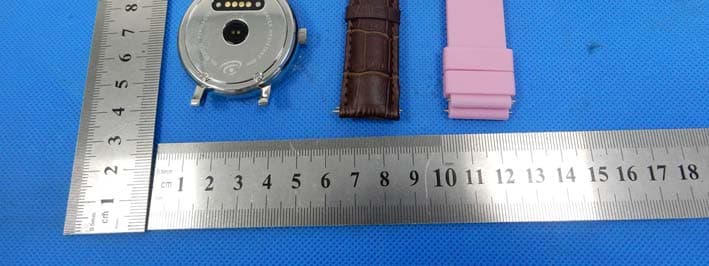
Click to zoom
Application Details
- Equipment Class
- DXT - Part 15 Low Power Transceiver, Rx Verified
- Date of Grant
- Dec 14, 2015
- Application Purpose
- Original Equipment
- Date of Application
- Dec 14, 2015
- Equipment Note
- Smart Watch
- Frequency Range
- 2402.00000000 - 2480.00000000
- Company
- Shenzhen Eztechnic Co., Ltd.
- Country
- China
Documents & Files
Document Text
Text extracted from the exhibit documents filed with the FCC. Open a document above to read the original.
Users Manual
Smart Watch User Guide Please read this manual before using V1.0 Attention before using: 1. Watchband tightness standards: cross the watchband, can be added into an index finger as the standard; 2. Pairing connection for the first time, using Bluetooth pairing method. 3. Use watchband for the first time, will be tight, hard to buckle into, please follow as below methods: Put right index finger inside of the watchband ,from the top push button in. 1. Safe instructions and main precautions 1.1 The company reserves the right to revised the manual without any prior notice. 1.2 Please charge more than 2 hours before first using. 2. Product Introduction 2.1 Introduction Power button: Turn on/off, Wake up, Shut down, Back; USB:Charging and data function; Touch screen: capacitive touch screen, the function can be operationed in capacitive touch screen. Heart rate monitor windows: check heart rate 2.2 Enter Quickly After turn on, finger drag left enter the next menu, drag right to return back the menu; Finger drag from the top to down, enter into the notification bar, from the bottom to top, back to the main menu. Drag distance need drag over half of the screen, if drag too short, will be mistaken for a click. The function icon can be place the position freely according to your ideas, click ok to sure. 2.3 Using the Clock screen Power button While using the Watch, press the Power button to open the Clock screen. Then click the central of screen to change clock type. 、 Setup ways: method 1: turn on,on the Clock screen,click the central of screen to change clock type.,there are 6 types can be selected. method 2: turn on,enter the menu, settings--Clock—Clock type menu --Unlock type selection. 2.4 Theme Settings Setting Method: Go into the smart watch menu: themes-theme Settings-select your theme 3. Operation Quickly 3.1 Download the synchronous software Methods 1、turn on the menu of watches - enter into QR Codes directory, using mobile phone QR code scanning software scan the QR code on the watch .。 Methods 2、Using mobile phone scans below QR code to download (Synchronous Bluetooth software) Method 3, using mobile browser, enter the following URL to download http://www.fundo.cc/other/download/FunDoWear/ After download, according the prompts to install the application. This Program only support synchronization between watch and smart phone, will not charge mobile phone network traffic. If you have downloaded relevant software from other website, please check the software version, please use the latest version of the synchronization software, to ensure the normal use of function. If software version has upgraded, please update synchronization software. 3.2 Installation and use synchronization software Android application software installation:: On smart phone, according to the normal android software installation, when installation complete, can be stored into the phone memory or synchronization assistant software installation can be used. Android applications use method: ( installed software already) (Smartphone)Enter the Settings --auxiliary Settings--Bluetooth notice (services) click enter, enable the service.(when start using, there will be a warning, please select "ok") software can be automatically run in the background, synchronizing function can be used .as following: Click on the bluetooth notice, choose "notification service", in the "notice”, choose to push personal application or system application you need; Telephone service function, including text messages and telephone;Looking for watch。 Note: when you use the back-end to clean up or close the back-end application software, please do not close this bluetooth notification service, if closed, sync will influence the watch with a mobile phone . 3.3 Bluetooth connectivity and synchronization function 3.3.1 from the mobile phone to connect Watch Enter Mobile phone settings - turn on bluetooth - search equipment, when find ES001, click choose matching, and select "yes" on the watch, matching success, when there is a phone book request, please click "ok", it is better choose "next time no longer prompt" at the same time, convenient for next time connection, the phone book will sync directly, not prompt again. Note: If has installed a synchronization software, pls also turn on this synchronization software on mobile phone in auxiliary function, after connection, within 2-5 seconds, the mobile phone terminal will show the bluetooth connected; on smart watch at the same time,will prompts you automatic synchronization cellphone time, it indicates that the synchronization function is enabled.When mobile phone have a new message coming , will synchronization to smart watches in timely. 3.3.2 From the smart watch to connect mobile phone On the smart watch, select the Bluetooth dialer - click to search bluetooth device - find your Smartphone (such as Samsung 9500) - click connection; the continue process operation as 3.3.1 Note: At the same time,the mobile phone need turn on the bluetooth and allow to be searched by around bluetooth products. 3.4 Function menu description 3.4.1 Message mobile phones synchronous message or smart watch message. 3.4.2 Bluetooth Set up the state of the Bluetooth, turn on or off. 3.4.3 Call Records After connecting the bluetooth, you can view your call status of the near term。 3.4.4 Bluetooth Dialer From the watches to connect the mobile phone for matching; 3.4.5 Remote Notification Synchronous Show the message from mobile phone terminal , such as: QQ, WeChat, messages, time, Twitter, Facebook etc.; 3.4.6 Remote Take Photos Controlling from the watch,using mobile phone camera take pictures;Need turn on the android mobile phone's camera advance. 3.4.7 Anti-lost Watch looking for mobile phone or mobile phone looking for watch. Two-way anti lost; 3.4.8 Setup Note: In the phone setting, you can set the clock type and theme;In the security Settings, the default security code: 1122 3.4.9 Pedometer In pedometer Settings, drag to…
Text truncated - open the document above for the full version.
Cover Letter(s)
SCS-F18: Project and Product Certification Representative Authorization Letter Page 1 of 2 Rev 5.0 775 Montague Expressway Milpitas, CA 95035 Tel: 408-526-1188 Fax: 408-526-1088 Email: [email protected] Project and Product Certification Representative Authorization Letter Reason for Amendment (current / obsolete) Revision History Approved Date From To Initial Release (obsolete) 1.0 1.0 Nov-14-2006 Revised wording (obsolete) 1.0 2.0 Sept–25-2007 Updated company template (obsolete) 2.0 3.0 Jan-31-2012 Updated letter information (obsolete) 3.0 4.0 May-23-2014 Added FCC ID field (current) 4.0 5.0 Sept 16 2014 SCS-F18: Project and Product Certification Representative Authorization Letter Page 2 of 2 Rev 5.0 Shenzhen Eztechnic Co., Ltd. 2015/11/22 To: SIEMIC, INC. 775 Montague Expressway, Milpitas, CA 95035 USA Dear Sir/Madam, Re: Product Certification Representative Authorization Letter We, Shenzhen Eztechnic Co., Ltd. hereby authorize SIEMIC, Inc. to act as a Certification Body for certifying for the following project(s): Product description: Smart Watch model name: E1 Trademark: N/A FCC ID: 2AGLEE1 Sincerely, Client’s signature Client’s name / title : Liu Shicai / Manager Contact information / address: 5/F, Block A, Building B5-1, Junfeng Industrial Park, Heping Community, Fuyong Street, Baoan District, Shenzhen, China
Cover Letter(s)
SCS-F19: Confidentiality Request Letter Page 1 of 2 Rev 5.0 775 Montague Expressway Milpitas, CA 95035 Tel: 408-526-1188 Fax: 408-526-1088 Email: [email protected] Confidentiality Request Letter Reason for Amendment (current / obsolete) Revision History Approved Date From To Initial Release (obsolete) 1.0 1.0 Nov-14-2006 Adding CFR 2.459 (obsolete) 1.0 2.0 August – 11 - 2008 Updated company template& Added text box (obsolete) 2.0 3.0 Jan-31-2012 Added IC confidentiality letter form (obsolete) 3.0 4.0 March-26-2015 Corrections to STC form. Added reference to KDB (current) 4.0 5.0 Nov 19 2015 SCS-F19: Confidentiality Request Letter Page 2 of 2 Rev 5.0 Shenzhen Eztechnic Co., Ltd. 2015/11/22 To: Federal Communications Commission Authorization and Evaluation Division 7435 Oakland Mills Road Columbia, MD Subject: Permanent Confidentiality Request for FCC ID: 2AGLEE1 Pursuant to sections 0.457 and 0.459 of CFR 47, we respectfully request permanent confidential treatment of the following Exhibits accompanying this application as: - e.g. Block Diagram - e.g. Schematics - e.g. Operational Description The above materials contain trade secrets and proprietary information not customarily released to the public. The public disclosure of these materials may be harmful to the applicant and provide unjustified benefits to its competitors. The applicant understands that disclosure of this application and all accompanying documentation will not be made before the date of the Grant for this application. Sincerely, Client’s name / title : Liu Shicai / Manager Contact information / address: 5/F, Block A, Building B5-1, Junfeng Industrial Park, Heping Community, Fuyong Street, Baoan District, Shenzhen, China
ID Label/Location Info
M/N: E1 FCC ID: 2AGLEE1 Label location
Internal Photos
Antenna location
Test Report
Shenzhen BCTC Technology Co., Ltd. Report No.: BCTC-151013206 FCC Report Tel: 400-788-9558 0755-33019988 Web:Http//www.bctc-lab.com Page 1 of 33 FCC Part 15C Test Report FCC ID: 2AGLEE1 Product Name: Smart Watch Trademark: N/A Model Name : E1 Prepared For : Shenzhen Eztechnic Co., Ltd. Address : 5/F, Block A, Building B5-1, Junfeng Industrial Park, Heping Community, Fuyong Street, Baoan District, Shenzhen, China Prepared By : Shenzhen BCTC Technology Co., Ltd. Address : No.101,Yousong Road,Longhua New District, Shenzhen,China Test Date: Oct. 28 – Nov. 10, 2015 Date of Report : Nov. 10, 2015 Report No.: BCTC-151013206 Shenzhen BCTC Technology Co., Ltd. Report No.: BCTC-151013206 FCC Report Tel: 400-788-9558 0755-33019988 Web:Http//www.bctc-lab.com Page 2 of 33 VERIFICATION OF COMPLIANCE Applicant’s name ................. : Shenzhen Eztechnic Co., Ltd. Address ................................. : 5/F, Block A, Building B5-1, Junfeng Industrial Park, Heping Community, Fuyong Street, Baoan District, Shenzhen, China Manufacture's Name ............ : Shenzhen Eztechnic Co., Ltd. Address ................................. : 5/F, Block A, Building B5-1, Junfeng Industrial Park, Heping Community, Fuyong Street, Baoan District, Shenzhen, China Product description Product name ........................... : Smart Watch Trademark: N/A Model Name: E1 Test procedure FCC Part15.249 Standards ANSI C63.10-2013 This device described above has been tested by BCTC, and the test results show that the equipment under test (EUT) is in compliance with the FCC requirements. And it is applicable only to the tested sample identified in the report. This report shall not be reproduced except in full, without the written approval of BCTC, this document may be altered or revised by BCTC, personal only, and shall be noted in the revision of the document. Test Result ............................................... : Pass Testing Engineer : (Eric Yang) Technical Manager : (Sophia Lee) Authorized Signatory : (Carson. Zhang) Shenzhen BCTC Technology Co., Ltd. Report No.: BCTC-151013206 FCC Report Tel: 400-788-9558 0755-33019988 Web:Http//www.bctc-lab.com Page 3 of 33 Table of Contents Page 1 . SUMMARY OF TEST RESULTS 4 1.1 TEST FACILITY 4 1.2 MEASUREMENT UNCERTAINTY 4 2 . GENERAL INFORMATION 5 2.1 GENERAL DESCRIPTION OF EUT 5 2.2 DESCRIPTION OF TEST MODES 6 2.3 TABLE OF PARAMETERS OF TEXT SOFTWARE SETTING 7 2.4 BLOCK DIGRAM SHOWING THE CONFIGURATION OF SYSTEM TESTED 7 2.5 EQUIPMENTS LIST FOR ALL TEST ITEMS 8 3 . EMC EMISSION TEST 9 3.1 RADIATED EMISSION MEASUREMENT 13 3.1.1 RADIATED EMISSION LIMITS 13 3.1.2 TEST PROCEDURE 14 3.1.3 DEVIATION FROM TEST STANDARD 14 3.1.4 TEST SETUP 15 3.1.5 EUT OPERATING CONDITIONS 16 3.1.6 TEST RESULTS 17 4 . BANDWIDTH TEST 23 4.1 APPLIED PROCEDURES / LIMIT 23 4.1.1 TEST PROCEDURE 23 4.1.2 DEVIATION FROM STANDARD 23 4.1.3 TEST SETUP 23 4.1.4 EUT OPERATION CONDITIONS 23 4.1.5 TEST RESULTS 24 5 . BANDWIDTH OF FREQUENCY BAND EDGE 28 5.1 DEVIATION FROM STANDARD 28 5.2 TEST SETUP 28 5.3 EUT OPERATION CONDITIONS 28 5.4 TEST RESULTS 29 6 . ANTENNA REQUIREMENT 30 6.1 STANDARD REQUIREMENT 30 6.2 EUT ANTENNA 30 7 . EUT TEST PHOTO 31 Shenzhen BCTC Technology Co., Ltd. Report No.: BCTC-151013206 FCC Report Tel: 400-788-9558 0755-33019988 Web:Http//www.bctc-lab.com Page 4 of 33 1. SUMMARY OF TEST RESULTS Test procedures according to the technical standards: FCC Part15 (15.249) , Subpart C Standard Section Test Item Judgment Remark 15.207 Conducted Emission PASS 15.249 Radiated Spurious Emission PASS 15.249 Bandwidth PASS 15.205 Band Edge Emission PASS 15.203 Antenna Requirement PASS NOTE: (1)” N/A” denotes test is not applicable in this Test Report 1.1 TEST FACILITY Shenzhen BCTC Technology Co., Ltd. Add.:No.101,Yousong Road,Longhua New District, Shenzhen,China FCC Registration No.:187086 1.2 MEASUREMENT UNCERTAINTY The reported uncertainty of measurement y ± U,where expended uncertainty U is based on a standard uncertainty multiplied by a coverage factor of k=2,providing a level of confidence of approximately 95 %。 No. Item Uncertainty 1 Conducted Emission Test ±1.38dB 2 RF power,conducted ±0.16dB 3 Spurious emissions,conducted ±0.21dB 4 All emissions,radiated(<1G) ±4.68dB 5 All emissions,radiated(>1G) ±4.89dB 6 Temperature ±0.5°C 7 Humidity ±2% Shenzhen BCTC Technology Co., Ltd. Report No.: BCTC-151013206 FCC Report Tel: 400-788-9558 0755-33019988 Web:Http//www.bctc-lab.com Page 5 of 33 2. GENERAL INFORMATION 2.1 GENERAL DESCRIPTION OF EUT Equipment Smart Watch Trade Name N/A Model Name E1 Product Description Operation Frequency: 2402~2480 MHz Modulation Type: GFSK,PI/4 DPSK,8DPSK Bit Rate of Transmitter 1M/2M/3Mbps Number Of Channel 79 CH Antenna Designation: Please see Note 3. Based on the application, features, or specification exhibited in User's Manual, the EUT is considered as an ITE/Computing Device. More details of EUT technical specification, please refer to the User's Manual. Channel List Please refer to the Note 2. Adapter DC 5V from adapter input AC 120V/60Hz Battery DC 3.7V Connecting I/O Port(s) Please refer to the User's Manual hardware version -- Software version -- Serial number -- Note: 1. For a more detailed features description, please refer to the manufacturer’s specifications or the User's Manual. 2. Channel List Channel Frequency (MHz) Channel Frequency (MHz) Channel Frequency (MHz) 00 2402 27 2429 54 2456 01 2403 28 2430 55 2457 02 2404 29 2431 56 2458 03 2405 30 2432 57 2459 04 2406 31 2433 58 2460 05 2407 32 2434 59 2461 06 2408 33 2435 60 2462 07 2409 34 2436 61 2463 08 2410 35 2437 62 2464 09 2411 36 2438 63 2465 10 2412 37 2439 64 2466 11 2413 38 2440 65 2467 12 2414 39 2441 66 2468 Shenzhen BCTC Technology Co., Ltd. Report No.: BCTC-151013206 FCC Report Tel: 400-788-9558 0755-33019988 Web:Http//www.bctc-lab.com Page 6 of 33 13 2415 40 2442 67 2469 14 2416 41 2443 68 2470 15 2417 42 2444 69 2471 16 2418 43 2445 70 2472 17 2419 44 2446 71 2473 18 2420 45 2447 72 2474 19 2421 46…
Text truncated - open the document above for the full version.
Test Setup Photos
Radiated Emission Conducted Emission
Contact Information
Applicant
Liu Shicai(Manager)
Test Firm
Shenzhen BCTC Technology Co., Ltd.James Zhang
Technical Specifications
| # | Rule Parts | Frequency Range | Power Output |
|---|---|---|---|
| 1 | 15C | 2.40 GHz - 2.48 GHz | - |