2AHFT893Smart Watch
Shenzhen DO Intelligent Technology Co., Ltd.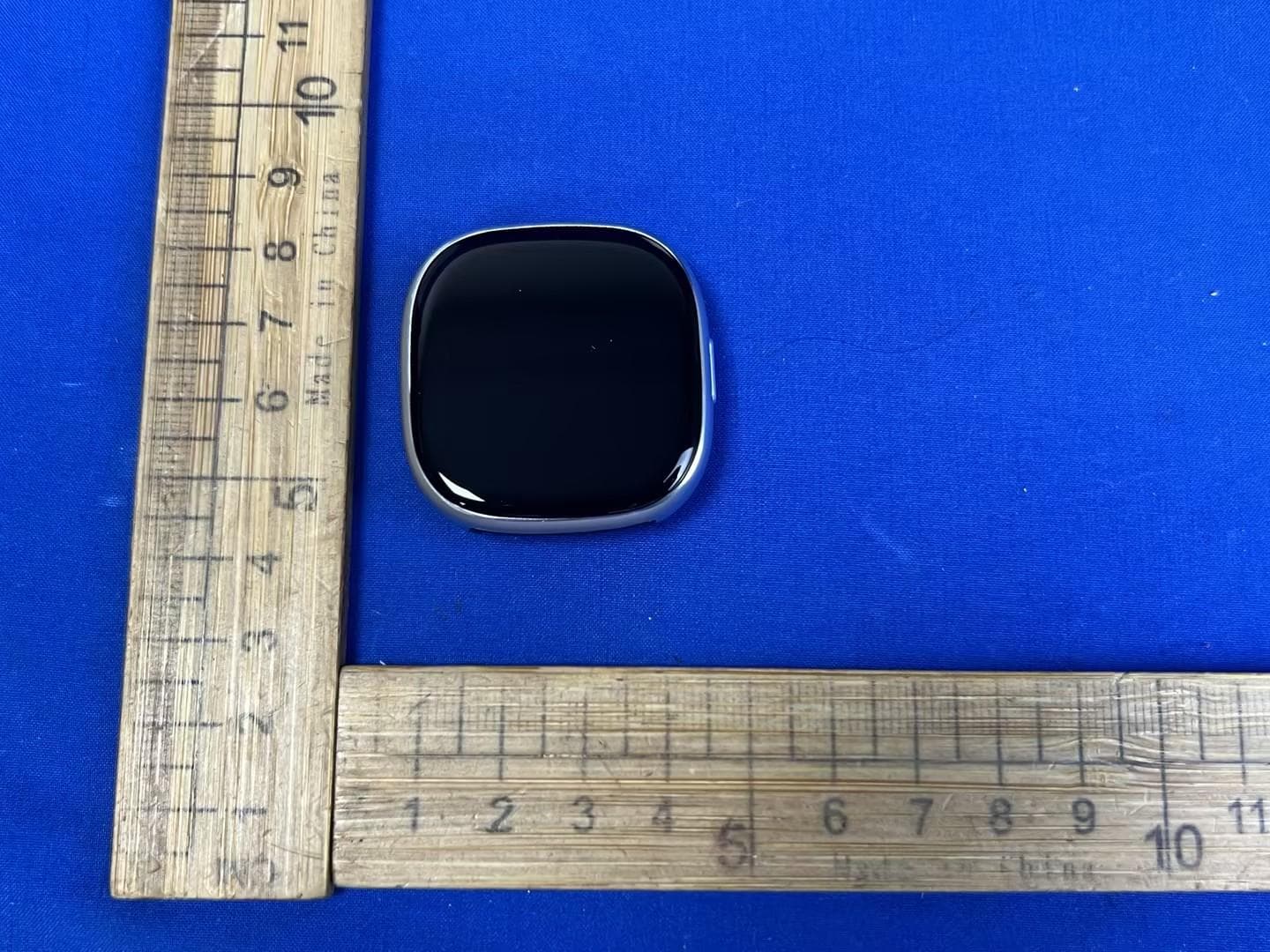
Click to zoom
Application Details
- Equipment Class
- DTS - Digital Transmission System
- Date of Grant
- Jul 07, 2026
- Application Purpose
- Original Equipment
- Equipment Note
- Smart Watch
- Frequency Range
- 2402.00000000 - 2480.00000000
- Country
- China
Documents & Files
Document Text
Text extracted from the exhibit documents filed with the FCC. Open a document above to read the original.
Users Manual
Swipe up/down 1. To toggle through menu. 2. To view long text/details. Swipe left/right 1. To toggle through menu. Screen operation Turn on VeryFit app -> Activate Bluetooth connection on your phone -> Search on the app for the device to pair with (or scan the QR code on the device) -> Finish binding on the app (or on the device). 1. App downloads Download and install the "VeryFit" app on the App Store, Google Play or by scanning the QR code below. 2. Pairing App downloads and pairing Do not place the product and its accessories at extreme temperatures, otherwise it may cause hazards such as product failure, fire or explosion. Protect the product from strong impacts or jolts, so as not to damage the product and its accessories, thus avoiding product failures. Do not disassemble or modify the product and its accessories by yourself. Contact us for after-sales service when the product fails. Safety instructions 1. Product overview Short press 1. To return. 2. To wake the screen when it is off. Long press 1. When powered off, press and hold for 2 seconds to power on. 2. When powered on, press and hold for 2 seconds to access the power off/restart screen. Press and hold for 8 seconds for a hard reboot. EN Quick start guide 本製品および付属品を極端な温度の場所に置かないでください。製 品の故障、火災、爆発などの危険を引き起こす原因になります。 強い衝撃や震動から本製品を保護し、本製品や付属品を損傷させな いようにして、製品の故障を回避してください。 本製品および付属品の分解・改造は、お客様ご自身で行わないでく ださい。製品が故障した時のアフターサービスは弊社までお問い合 わせください。 安全のための注意事項 上方向/下方向にスワイプ 1. メニューを切り替えます。 2. 長いテキスト/詳細を表示します。 右方向/左方向にスワイプ 1. メニューを切り替えます。 画面の操作 VeryFitアプリをオンにする -> スマホでBluetooth接続を有効にす る -> アプリでペアリングするデバイスを検索する(またはデバイ スのQRコードをスキャンする) -> アプリ(またはデバイス)で バインディングを完了します。 1. アプリのダウンロード App Store、Google Playから、または下のQRコー ドをスキャンして「VeryFit」アプリをダウンロー ドしてインストールしてください。 2. ペアリング アプリのダウンロードとペアリング Aufwärts/abwärts wischen 1. um das Menü zu durchlaufen. 2. um lange Texte/Details anzuzeigen. Nach links/rechts wischen 1. um das Menü zu durchlaufen. Bildschirmbedienung Schalten Sie die VeryFit-App ein -> Aktivieren Sie die Bluetooth-Verbindung auf Ihrem Handy -> Suchen Sie in der App nach dem Gerät, mit dem Sie koppeln möchten (oder scannen Sie den QR-Code auf dem Gerät) -> Schließen Sie die Kopplung in der App (oder auf dem Gerät) ab. 1. App herunterladen Laden Sie die App „VeryFit“ im App Store, bei Google Play oder durch Scannen des nachstehenden QR-Codes herunter und installieren Sie sie. 2. Koppeln App herunterladen und koppeln Scan the QR code for more function information GTX26 SMART WATCH Operation Manual Thanks for purchasing this product. Please read this Manual carefully befor e use. GTX26 3.85V/200mAh 2hours 3ATM -10°C-50°C 2402-2480MHz Model Battery Capacity Charging Time Waterproof level Operating Temperature Pr oduct Fr equency Screen Type Charging Voltage Battery Life Weight of Pr oduct Bluetooth Version Max. transmission Power Consumption 1.73" -AMOLED 5V±0.2v 5-7Day 38.8g 5.3 8.13 Physical button Microphone Magnetic charging contacts Heart rate sensor Speaker 物理ボタンの操作 1. 製品概要 短押し 1. 戻る 2. 画面がオフのときに起動する。 長押し 1. デバイスの電源がオフのときに2秒間長押しすると、電源がオン になります。 2. デバイスの電源がオンのときに2秒間長押しすると、シャットダ ウン/再起動画面が表示されます。8秒間長押しすると、ハードリ セットが実行されます。 JP クイックスタートガイド 物理ボタン マイク 磁気充電接点 心拍数センサー スピーカー Tastenfunktion 1. Produktübersicht Kurz drücken 1. Zurückkehren. 2. Den Bildschirm aktivieren, wenn er ausgeschaltet ist. Lang drücken 1. Im ausgeschalteten Zustand 2 Sekunden gedrückt halten, um den Bildschirm einzuschalten. 2. Im eingeschalteten Zustand 2 Sekunden gedrückt halten, um den Bildschirm zum Ausschalten/Neustarten aufzurufen. 8 Sekunden gedrückt halten, um einen Neustart durchzuführen. DE Kurzanleitung Taste Mikrofon Magnetische Ladekontakte Herzfrequenzsensor Lautsp-recher Physical button operation Tap the screen 1. To enter the menu. 2. To operate according to the prompts. Tap and hold on the screen 1. To switch between watch faces. GTX26 has features such as 3ATM water resistance, GPS, full-screen touch control, low latency, 100 workout modes and multiple cloud watch faces. It supports heart rate monitoring and stress detection throughout the day, blood oxygen detection and sleep monitoring, etc. For operating instructions and FAQs on these features, please turn on the app and go to "User Guide" section. Features Three suggestions for use and maintenance: 1. Keep the product clean; 2. Keep the product dry; 3. Do not wear the product too tight; * Do not use household cleansers when cleaning the product. Use soap-free cleansers instead. * For stubborn stains, it is recommended to remove by scrubbing with alcohol. Waterproof: Not suitable for use while diving, swimming in the sea, or in a sauna. Suitable for use in swimming pools, showers (cold water) and shallows. Care and maintenance Screen Physical button Auf den Bildschirm tippen 1. um das Menü aufzurufen. 2. um gemäß den Aufforderungen zu arbeiten. Bildschirm gedrückt halten 1. um zwischen Zifferblättern umzuschalten. Die GTX26 bietet Funktionen wie Wasserdichtigkeit bis 3ATM, GPS, Touchscreen-Bedienung, geringe Latenz, 100 Trainingsmodi und verschiedene Cloud-Zifferblätter. Sie unterstützt die Herzfrequenzmessung und Stresserkennung über den ganzen Tag, die Blutsauerstoffmessung und Schlafüberwachung. Bedienungsanleitungen und FAQs zu diesen Funktionen finden Sie in der App unter „Benutzerhandbuch“. Funktionen Setzen Sie das Produkt und sein Zubehör keinen extremen Temperaturen aus, da dies zu Gefahren wie Ausfall, Feuer oder Explosion führen kann. Schützen Sie das Produkt vor starken Stößen und Erschütterungen, um das Produkt und sein Zubehör nicht zu beschädigen und somit Produktausfälle zu vermeiden. Demontieren und verändern Sie das Produkt und sein Zubehör nicht selbst. Wenden Sie sich an den Kundendienst, wenn das Produkt ausfällt. Sicherheitshinweise Drei Ratschläge zur Verwendung und Pflege: 1. Halten Sie die Smartwatch sauber; 2. Halten Sie das Produkt trocken; 3. Tragen Sie das Produkt nicht zu eng am Handgelenk; * Verwenden Sie zur Reinigung des Produkts keine Haushaltsreiniger. Verwenden Sie stattdes…
Text truncated - open the document above for the full version.
Users Manual
Swipe up/down 1. To toggle through menu. 2. To view long text/details. Swipe left/right 1. To toggle through menu. Screen operation Turn on VeryFit app -> Activate Bluetooth connection on your phone -> Search on the app for the device to pair with (or scan the QR code on the device) -> Finish binding on the app (or on the device). 1. App downloads Download and install the "VeryFit" app on the App Store, Google Play or by scanning the QR code below. 2. Pairing App downloads and pairing Do not place the product and its accessories at extreme temperatures, otherwise it may cause hazards such as product failure, fire or explosion. Protect the product from strong impacts or jolts, so as not to damage the product and its accessories, thus avoiding product failures. Do not disassemble or modify the product and its accessories by yourself. Contact us for after-sales service when the product fails. Safety instructions 1. Product overview Short press 1. To return. 2. To wake the screen when it is off. Long press 1. When powered off, press and hold for 2 seconds to power on. 2. When powered on, press and hold for 2 seconds to access the power off/restart screen. Press and hold for 8 seconds for a hard reboot. EN Quick start guide Auf den Bildschirm tippen 1. um das Menü aufzurufen. 2. um gemäß den Aufforderungen zu arbeiten. Bildschirm gedrückt halten 1. um zwischen Zifferblättern umzuschalten. Die GTX26 Lite verfügt über Funktionen wie 3ATM Wasserbeständigkeit, ultralange Akkulaufzeit, Vollbild-Touch-Bedienung, geringe Latenz, 100 Trainingsmodi und mehrere Cloud-basierte Zifferblätter. Sie unterstützt Herzfrequenzüberwachung und Stresserkennung während des Tages, Blutsauerstofferkennung und Schlafüberwachung usw. Für eine Bedienungsanleitung und Häufig gestellte Fragen zu diesen Funktionen, aktivieren Sie bitte die App und besuchen Sie den Abschnitt „Bedienungsanleitung“. Funktionen Drei Ratschläge zur Verwendung und Pflege: 1. Halten Sie die Smartwatch sauber; 2. Halten Sie das Produkt trocken; 3. Tragen Sie das Produkt nicht zu eng am Handgelenk; * Verwenden Sie zur Reinigung des Produkts keine Haushaltsreini- ger. Verwenden Sie stattdessen ein seifenfreies Reinigungsmittel. * Bei hartnäckigen Flecken empfehlen wir, diese durch Abwischen mit Alkohol zu entfernen. Wasserdicht: Nicht zur Verwendung beim Tauchen, Schwimmen im Meer oder in der Sauna geeignet. Geeignet für den Einsatz in Schwimmbädern, Duschen (kaltes Wasser) und in Ufernähe. Pflege und Wartung 画面をタップする 1. メニューを表示します。 2. プロンプトに従って操作します。 画面をタップして長押しする 1. ウォッチフェイスを切り替えます。 上方向/下方向にスワイプ 1. メニューを切り替えます。 2. 長いテキスト/詳細を表示します。 右方向/左方向にスワイプ 1. メニューを切り替えます。 画面の操作 GTX26 Liteには、3ATM耐水性、超長寿命バッテリー、全画面タッ チコントロール、低レイテンシー、100種類のワークアウトモード 、複数のクラウドウォッチフェイスなどの特徴があります。1日中 の心拍数モニタリングやストレス検出、血中酸素の検出、睡眠モ ニタリングなどに対応しています。これらの機能の操作方法や FAQ(よくある質問)については、アプリをオンにして「ユーザ ーガイド」のセクションに進んでください。 機能 本製品および付属品を極端な温度の場所に置かないでください。製 品の故障、火災、爆発などの危険を引き起こす原因になります。 強い衝撃や震動から本製品を保護し、本製品や付属品を損傷させな いようにして、製品の故障を回避してください。 本製品および付属品の分解・改造は、お客様ご自身で行わないでく ださい。製品が故障した時のアフターサービスは弊社までお問い合 わせください。 安全のための注意事項 使用方法とメンテナンスについての3つのアドバイス: 1. 清潔に保つってください; 2. 乾燥した状態で保管してください; 3. バンドを締め付けすぎないようにしてください; * お手入れの際には、家庭用クレンザーを使用しないでください。代 わりに石けん成分不使用の洗浄剤を使用してください。 * 頑固な汚れには、アルコールでアルコールでこすり洗いするのをお 勧めします。 防水: ダイビング、海での水泳、またはサウナでの使用には適してい ません。スイミングプール、シャワー(冷水)、浅瀬での使用に適し ています。 お手入れとメンテナンス Setzen Sie das Produkt und sein Zubehör keinen extremen Temperaturen aus, da dies zu Gefahren wie Ausfall, Feuer oder Explosion führen kann. Schützen Sie das Produkt vor starken Stößen und Erschütterungen, um das Produkt und sein Zubehör nicht zu beschädigen und somit Produktausfälle zu vermeiden. Demontieren und verändern Sie das Produkt und sein Zubehör nicht selbst. Wenden Sie sich an den Kundendienst, wenn das Produkt ausfällt. Sicherheitshinweise VeryFitアプリをオンにする -> スマホでBluetooth接続を有効にす る -> アプリでペアリングするデバイスを検索する(またはデバイ スのQRコードをスキャンする) -> アプリ(またはデバイス)で バインディングを完了します。 1. アプリのダウンロード App Store、Google Playから、または下のQRコー ドをスキャンして「VeryFit」アプリをダウンロー ドしてインストールしてください。 2. ペアリング アプリのダウンロードとペアリング Aufwärts/abwärts wischen 1. um das Menü zu durchlaufen. 2. um lange Texte/Details anzuzeigen. Nach links/rechts wischen 1. um das Menü zu durchlaufen. Bildschirmbedienung Schalten Sie die VeryFit-App ein -> Aktivieren Sie die Bluetooth-Verbindung auf Ihrem Handy -> Suchen Sie in der App nach dem Gerät, mit dem Sie koppeln möchten (oder scannen Sie den QR-Code auf dem Gerät) -> Schließen Sie die Kopplung in der App (oder auf dem Gerät) ab. 1. App herunterladen Laden Sie die App „VeryFit“ im App Store, bei Google Play oder durch Scannen des nachstehenden QR-Codes herunter und installieren Sie sie. 2. Koppeln App herunterladen und koppeln Scan the QR code for more function information Fonctionnement du bouton physique 1. Synthèse du produit Appui court 1. Pour revenir en arrière. 2. Pour réactiver l'écran lorsqu'il est éteint. Appui long 1. Éteint, maintenez le bouton enfoncé pendant 2 secondes pour le rallumer. 2. Allumé, maintenez le bouton enfoncé pendant 2 secondes pour accéder à l'écran d'arrêt/redémarrage. Maintenez le bouton enfoncé pendant 8 secondes pour un redémarrage forcé. FR Guide de démarrage rapide Balayer vers le haut ou le bas. 1. pour faire défiler le menu. 2. pour afficher les longs textes/détails. Balayer vers la gauche/droite 1. pour faire défiler le menu. Fonctionnement de l’écran Activez l’application VeryFit -> Activez la connexion Bluetooth sur votre téléphone -> Recherchez dans l’application l’appareil à jumeler (ou scannez le code QR sur l’appareil) -> Terminez l’association dans l’application (ou sur l’appareil). 1. Téléchargements d’applications Téléchargez et installez l’application « VeryFit » à partir de l’App Store, de Google Play ou en scannant le code QR ci-dessous. 2. Jumelage Téléchargements d’applications et jumelage GTX26 Lite SMART WATCH Operation Manual Thanks for purchasing this product. Please read this Manual carefully befor e use. GTX26 Lite 3.85V/200mAh 2hours 3ATM -10°C-50°C 2402-2480MHz Model…
Text truncated - open the document above for the full version.
RF Exposure Info
Report No.: TSEA26040040901 Appendix C EX3DV4-SN 7812 DAE4-SN 1846 D2450V2-SN 1099
Test Setup Photos
Setupphotos 1Photographs-EUTTestSetup 1.1RadiatedSpuriousEmission 9kHz~30MHz: 30MHz~1GHz: Above1GHz: 1.2ConductedEmissionsTestSetup 1.3RFConductedmeasurement
Test Setup Photos
Report No.: TSEA26040041001 Appendix D 1. Test Sample Photo 1: Front View Photo 2: Back View Photo 3: Antenna Locations Report No.: TSEA26040041001 2. Test positions Photo 4: Front side 10mm Photo 5: Back side 0mm
Test Setup Photos
Report No.: TSEA26040040901 Appendix D 1. Test Sample Photo 1: Front View Photo 2: Back View Photo 3: Antenna Locations Report No.: TSEA26040040901 2. Test positions Photo 4: Front side 10mm Photo 5: Back side 0mm
Test Report
SHENZHENHUAXIATESTINGTECHNOLOGYCO.,LTD 102A,102B,Building2,ShanghenglangNewIndustrialZone,ShanghenglangCommunity, DalangStreet,LonghuaDistrict,Shenzhen,Guangdong,People’sRepublicofChina,518000 Telephone:+86-755-26648640 Fax:+86-755-26648637 Website:www.cqa-cert.com ReportTemplateVersion:V06 ReportTemplateRevisionDate:2026-01-30 TestReport Thetestreportiseffectiveonlywithbothsignatureandspecializedstamp,Theresult(s)showninthisreportreferonlyto thesample(s)tested.WithoutwrittenapprovalofCQA,thisreportcan’tbereproducedexceptinfull. ReportNo.:CQASZ20260300666E-01 Applicant:ShenzhenDOIntelligentTechnologyCo.,Ltd AddressofApplicant:11thFloor,3#Building,GuoleTechPark,LirongRoad,Dalang,Longhua District,Shenzhen,China EquipmentUnderTest(EUT): Product:SmartWatch ModelNo.:GTX26,GTX26Lite TestModelNo.:GTX26,GTX26Lite BrandName:IDO FCCID:2AHFT893 Standards:47CFRPart15,SubpartC KDB558074D0115.247MeasGuidancev05r02 ANSIC63.10:2020 DateofReceipt:2026-04-01 DateofTest:2026-04-01to2026-04-30 DateofIssue:2026-6-9 TestResult:PASS* *Intheconfigurationtested,theEUTcompliedwiththestandardsspecifiedabove. TestedBy: (LewisZhou) ReviewedBy: (TimoLei) ApprovedBy: (JackAi) SHENZHENHUAXIATESTINGTECHNOLOGYCO.,LTD ReportNo.:CQASZ20260300666E-01 Page: 2 of 66 1Version RevisionHistoryOfReport ReportNo.Version Description IssueDate CQASZ20260300666E-01Rev.01Initialreport2026-6-9 SHENZHENHUAXIATESTINGTECHNOLOGYCO.,LTD ReportNo.:CQASZ20260300666E-01 Page: 3 of 66 2TestSummary TestItemTestRequirementTestmethodResult AntennaRequirement 47CFRPart15,SubpartCSection 15.203/15.247(c) ANSI C63.10- 2020+Cor.1- 2023+C63.10a-2024+ ErratatoC63.10a-2024 PASS ACPowerLine Conducted Emission 47CFRPart15,SubpartCSection 15.207 ANSI C63.10- 2020+Cor.1- 2023+C63.10a-2024+ ErratatoC63.10a-2024 PASS ConductedPeakOutput Power 47CFRPart15,SubpartCSection 15.247(b)(3) ANSI C63.10- 2020+Cor.1- 2023+C63.10a-2024+ ErratatoC63.10a-2024 PASS 6dBOccupied Bandwidth 47CFRPart15,SubpartCSection 15.247(a)(2) ANSI C63.10- 2020+Cor.1- 2023+C63.10a-2024+ ErratatoC63.10a-2024 PASS PowerSpectralDensity 47CFRPart15,SubpartCSection 15.247(e) ANSI C63.10- 2020+Cor.1- 2023+C63.10a-2024+ ErratatoC63.10a-2024 PASS Band-edgeforRF ConductedEmissions 47CFRPart15,SubpartCSection 15.247(d) ANSI C63.10- 2020+Cor.1- 2023+C63.10a-2024+ ErratatoC63.10a-2024 PASS RFConductedSpurious Emissions 47CFRPart15,SubpartCSection 15.247(d) ANSI C63.10- 2020+Cor.1- 2023+C63.10a-2024+ ErratatoC63.10a-2024 PASS RadiatedSpurious Emissions 47CFRPart15,SubpartCSection 15.205/15.209 ANSI C63.10- 2020+Cor.1- 2023+C63.10a-2024+ ErratatoC63.10a-2024 PASS Restrictedbandsaround fundamentalfrequency (RadiatedEmission) 47CFRPart15,SubpartCSection 15.205/15.209 ANSI C63.10- 2020+Cor.1- 2023+C63.10a-2024+ ErratatoC63.10a-2024 PASS SHENZHENHUAXIATESTINGTECHNOLOGYCO.,LTD ReportNo.:CQASZ20260300666E-01 Page: 4 of 66 3Contents Page 1VERSION..........................................................................................................................................................................2 2TESTSUMMARY............................................................................................................................................................3 3CONTENTS......................................................................................................................................................................4 4GENERALINFORMATION...........................................................................................................................................5 4.1CLIENTINFORMATION.................................................................................................................................................5 4.2GENERALDESCRIPTIONOFEUT.................................................................................................................................5 4.3ADDITIONALINSTRUCTIONS........................................................................................................................................7 4.4TESTENVIRONMENT...................................................................................................................................................8 4.5DESCRIPTIONOFSUPPORTUNITS...............................................................................................................................8 4.6TESTCONFIGURATION................................................................................................................................................8 4.7STATEMENTOFTHEMEASUREMENTUNCERTAINTY....................................................................................................9 4.8TESTLOCATION........................................................................................................................................................10 4.9TESTFACILITY..........................................................................................................................................................10 4.10DEVIATIONFROMSTANDARDS................................................................................................................................10 4.11OTHERINFORMATIONREQUESTEDBYTHECUSTOMER..........................................................................................10 4.12EQUIPMENTLIST.....................................................................................................................................................11 5TESTRESULTSANDMEASUREMENTDATA.....................................................................................................12 5.1ANTENNAREQUIREMENT..........................................................................................................................................12 5.2CONDUCTEDEMISSIONS............................................................................................................................................13 5.3CONDUCTEDPEAKOUTPUTPOWER.......................................…
Text truncated - open the document above for the full version.
Test Report
SHENZHEN YUSHENG COMMUNICATION EQUIPMENT CO., LTD ANTENNA REPORT BT FPC ANTENNAGTX26 Lite 1. BT 2026-5-6 BT SWR BT efficiecy BT Gain=-4.23dBi FS BT 3D direction diagram Antenna size BT Thank you! SHENZHEN YUSHENG COMMUNICATION EQUIPMENT CO., LTD Add: 407-411, Floor 4, Building 2, Yuntai Chuanggu Park, southeast of the intersection of Guangming Avenue and Dongchang Road, Guangming District, Shenzhen
Test Report
SHENZHEN YUSHENG COMMUNICATION EQUIPMENT CO., LTD ANTENNA REPORT BT FPCGTX26 1. BT/GPS 2026-5-6 BT /GPS-L1 SWR GPS-L1 SWRBT SWR BT efficiecy BT Gain=-2.2dBi FS BT 3D direction diagram Antenna size BT Thank you! SHENZHEN YUSHENG COMMUNICATION EQUIPMENT CO., LTD Add: 407-411, Floor 4, Building 2, Yuntai Chuanggu Park, southeast of the intersection of Guangming Avenue and Dongchang Road, Guangming District, Shenzhen
RF Exposure Info
Report No.: TSEA26040040901 Appendix A System Check 2450 MHz Head Scans Setup Area ScanZoom Scan Grid Extents [mm]40.0 x 96.030.0 x 30.0 x 30.0 Grid Steps [mm]10.0 x 12.05.0 x 5.0 x 1.5 Sensor Surface [mm]3.01.4 Graded GridN/AYes Grading RatioN/A1.5 MAIAN/AN/A Surface DetectionVMS + 6pVMS + 6p Scan MethodMeasuredMeasured Measurement Results Area ScanZoom Scan Date2026-05-27, 08:382026-05-27, 08:44 psSAR1g [W/Kg]5.425.42 psSAR10g [W/Kg]2.532.53 Power Drift [dB]0.000.00 Power ScalingDisabledDisabled Scaling Factor [dB] TSL CorrectionNo correctionNo correction Test Laboratory: TOWE Lab System Performance Check Report Summary DipoleFrequency [MHz]TSLPower [dBm]Dev. 1g [%]Dev. 10g [%]Dev. Peak [%]Iso. Error [%] D2450V2 - SN10992450.0HSL20.05.56.18.01.3 Exposure Conditions Phantom Section, TSLTest Distance [mm]BandGroup, UIDFrequency [MHz], Channel NumberConversion FactorTSL Conductivity [S/m]TSL Permittivity Flat, Head Simulating Liquid10CW, 0--2450.000, 06.971.8239.9 Hardware Setup PhantomTSLProbe, Calibration DateDAE, Calibration Date Twin-SAM V8.0 (30deg probe tilt) - 2168HSL2450EX3DV4 - SN7858, 2026-02-20DAE4ip Sn1846, 2026-01-07
RF Exposure Info
Sushi TOWE Wireless Testing (Shenzhen) Co., Ltd. Report No.: TSEA26040041001 Sushi TOWE Wireless Testing(Shenzhen) Co., Ltd. Email: [email protected] Tel.: +86-755-27212361 TOWE-QP-15-F05 Rev.1.1 All rights reserved. Unless otherwise specified, no part of this report may be reproduced or utilized in any part, form or by any means, electronic or mechanical, including photocopying and microfilm, without permission in writing from TOWE. FCC SAR Test Report Applicant: Shenzhen DO Intelligent Technology Co., Ltd EUT Description: Smart Watch Model: GTX26 Brand: IDO FCC ID: 2AHFT893 Standards: FCC 47CFR §2.1093 Date of Receipt: 2026/04/30 Date of Test: 2026/05/27 Date of Issue: 2026/06/03 TOWE. tested the above equipment in accordance with the requirements set forth in the above standards. The test results show that the equipment tested is capable of demonstrating compliance with the requirements as documented in this report. the results documented in this report apply only the tested sample, under the conditions and modes of operation as described herein. It is the manufacturer's responsibility assure that additional production units of the model are manufactured with identical electrical and mechanical components. All sample tested were in good operating condition throughout the entire test program. Measurement Uncertainties are published for informational purposes only and were not taken into account unless noted otherwise. without written approval of TOWE, the test report shall not be reproduced except in full. Jim Huang Approved By: Jack Li Reviewed By: Page 2 / 23 Report No.: TSEA26040041001 Sushi TOWE Wireless Testing(Shenzhen) Co., Ltd. Email: [email protected] Tel.: +86-755-27212361 TOWE-QP-15-F05 Rev.1.1 All rights reserved. Unless otherwise specified, no part of this report may be reproduced or utilized in any part, form or by any means, electronic or mechanical, including photocopying and microfilm, without permission in writing from TOWE. Revision History Rev. Issue Date Description Revised by 01 2026/06/03 Original Jack Li Page 3 / 23 Report No.: TSEA26040041001 Sushi TOWE Wireless Testing(Shenzhen) Co., Ltd. Email: [email protected] Tel.: +86-755-27212361 TOWE-QP-15-F05 Rev.1.1 All rights reserved. Unless otherwise specified, no part of this report may be reproduced or utilized in any part, form or by any means, electronic or mechanical, including photocopying and microfilm, without permission in writing from TOWE. Table of Contents 1 Summary of Test Results .................................................................................................................................. 5 2 Guidance Applied ............................................................................................................................................... 6 3 Lab Information .................................................................................................................................................. 6 3.1 Testing Location ...................................................................................................................................................................... 6 3.2 Test Facility / Accreditations ................................................................................................................................................ 6 3.3 Ambient Condition .................................................................................................................................................................. 6 4 Client Information ............................................................................................................................................... 6 4.1 Applicant ................................................................................................................................................................................... 6 4.2 Manufacturer ............................................................................................................................................................................ 6 4.3 Factory ....................................................................................................................................................................................... 6 5 Product Information ........................................................................................................................................... 7 6 RF Exposure Limits ........................................................................................................................................... 8 7 Introduction ......................................................................................................................................................... 9 7.1 SAR Definition .......................................................................................................................................................................... 9 8 SAR Measurements System ........................................................................................................................... 10 8.1 The SAR Measurement Set-up ........................................................................................................................................... 10 8.2 E-Field Probe .......................................................................................................................................................................... 11 8.3 Data Acquisition Electronics (DAE) .................................................................................................................................. 11 8.4 Phantom .................................................................................................................................................................................. 12 8.5 Device Holder ..........................................................................................................…
Text truncated - open the document above for the full version.
RF Exposure Info
Sushi TOWE Wireless Testing (Shenzhen) Co., Ltd. Report No.: TSEA26040040901 Sushi TOWE Wireless Testing(Shenzhen) Co., Ltd. Email: [email protected] Tel.: +86-755-27212361 TOWE-QP-15-F05 Rev.1.1 All rights reserved. Unless otherwise specified, no part of this report may be reproduced or utilized in any part, form or by any means, electronic or mechanical, including photocopying and microfilm, without permission in writing from TOWE. FCC SAR Test Report Applicant: Shenzhen DO Intelligent Technology Co., Ltd EUT Description: Smart Watch Model: GTX26 Lite Brand: IDO FCC ID: 2AHFT893 Standards: FCC 47CFR §2.1093 Date of Receipt: 2026/04/30 Date of Test: 2026/05/27 Date of Issue: 2026/06/03 TOWE. tested the above equipment in accordance with the requirements set forth in the above standards. The test results show that the equipment tested is capable of demonstrating compliance with the requirements as documented in this report. the results documented in this report apply only the tested sample, under the conditions and modes of operation as described herein. It is the manufacturer's responsibility assure that additional production units of the model are manufactured with identical electrical and mechanical components. All sample tested were in good operating condition throughout the entire test program. Measurement Uncertainties are published for informational purposes only and were not taken into account unless noted otherwise. without written approval of TOWE, the test report shall not be reproduced except in full. Jim Huang Approved By: Jack Li Reviewed By: Page 2 / 23 Report No.: TSEA26040040901 Sushi TOWE Wireless Testing(Shenzhen) Co., Ltd. Email: [email protected] Tel.: +86-755-27212361 TOWE-QP-15-F05 Rev.1.1 All rights reserved. Unless otherwise specified, no part of this report may be reproduced or utilized in any part, form or by any means, electronic or mechanical, including photocopying and microfilm, without permission in writing from TOWE. Revision History Rev. Issue Date Description Revised by 01 2026/06/03 Original Jack Li Page 3 / 23 Report No.: TSEA26040040901 Sushi TOWE Wireless Testing(Shenzhen) Co., Ltd. Email: [email protected] Tel.: +86-755-27212361 TOWE-QP-15-F05 Rev.1.1 All rights reserved. Unless otherwise specified, no part of this report may be reproduced or utilized in any part, form or by any means, electronic or mechanical, including photocopying and microfilm, without permission in writing from TOWE. Table of Contents 1 Summary of Test Results .............................................................................................................................. 5 2 Guidance Applied ........................................................................................................................................... 6 3 Lab Information ............................................................................................................................................... 6 3.1 Testing Location ...................................................................................................................................................................... 6 3.2 Test Facility / Accreditations ................................................................................................................................................ 6 3.3 Ambient Condit…
Text truncated - open the document above for the full version.
Contact Information
Applicant
Wu Dajun
[email protected]Fax: 4006-123-56
Technical Contact
Test Firm
Shenzhen Huaxia Testing Technology Co., LtdJack Ai
Technical Specifications
| # | Rule Parts | Frequency Range | Power Output |
|---|---|---|---|
| 1 | 15C | 2.40 GHz - 2.48 GHz | 6.50 mW |