2AJ7PYMMKF005YHEMI KARAOKE MICROPHONE 2
Beijing Yueme Technology Co.,LTD.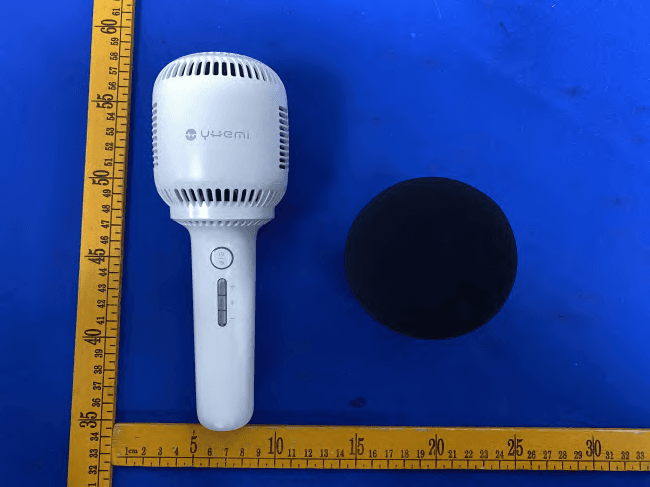
Click to zoom
Application Details
- Equipment Class
- DSS - Part 15 Spread Spectrum Transmitter
- Date of Grant
- Jul 04, 2021
- Application Purpose
- Original Equipment
- Date of Application
- Jul 04, 2021
- Equipment Note
- YHEMI KARAOKE MICROPHONE 2
- Frequency Range
- 2402.00000000 - 2480.00000000
- Country
- China
Documents & Files
Document Text
Text extracted from the exhibit documents filed with the FCC. Open a document above to read the original.
Users Manual
悦米科技 悦米K歌麦克风2-说明书 简体版20210510 20210510 选择正确的 方向图标拖 动到图纸里 纹理方向 色相正确、印迹牢固、 套印准确、各色套印 不露杂色,套印误差≤ 0.1mm 印刷+哑油+模切 京东太空梭105克无光铜 Pantone Coolgray 11C 模切走位≤±0.5mm 风琴折 图片中灰色使用30%的Coolgray 11CPantone Coolgray 11C 展开尺寸:720×130mm 成品尺寸:80×130mm 红线为折线(风琴折) 开关机 长按电源键2秒普通开机;长按键5秒为重置蓝牙开机。开 机状态下长按键2秒关机。 蓝牙连接 初次配对 麦克风开机后自动进入搜索配对模式,此时有提示音发出并伴有白 灯快闪。在移动设备的蓝牙设置页面找到“YM麦克风2”进行配对 连接。 自动配对 麦克风开机后自动连接到上一次成功配对的设备,连接后有提示 音。如回连不成功,则自动进入搜索配对模式。 重新配对 关机状态下长按电源键5秒重置开机将直接进入搜索配对模式。 有线连接 将音频连接线插入麦克风底部录音接口与手机音频接口连接,同时 打开手机K歌APP相关录音功能,即可以进行有线录音; 音效切换 当麦克风在开机状态下,短按电源按键即可切换麦克风音效,效果 依次为: 1.原声音效 2.流行音效 3.快歌音效 4.慢歌音效 5.民歌音效 6.说唱音效 7.主持音效 8.卡通音效 9.怪兽音效 一键消音 当麦克风开机并有音源输入时,长按切换键,即可实现消减歌曲中 人声部分,具体效果根据歌曲不同表现略有不同。 MIC与伴音调节 MIC与伴音切换 麦克风开机状态下单击切换按键,并伴有语音提示,即可实现MIC 与伴音调节的切换; MIC音量加减 麦克风开机状态下,并处于MIC音量调节模式下。每单击+一次MIC 音量加一格,或长按每0.3秒加一格,直至最大并伴有提示; 伴奏音量加减 麦克风开机状态下,并处于伴奏音量调节模式下。每单击+一次伴奏 音量加一格,或长按每0.3秒加一格,直至最大并伴有提示。 TWS功能 如有两台悦米K歌麦克风2即可进行TWS配对。先与设备配对上蓝牙 的麦克风为主机。同时长按音量加减键1秒进入TWS配对状态并伴有 提示音,另一台麦克风开机后长按TWS键2秒进入配对状态并伴有提 示音进入TWS配对状态,TWS配对成功后伴有提示音,主副机任意 一方长按两秒即退出TWS配对模式。 低电与充电功能 电池电量不足20%时,每隔5秒会有橙色指示灯提醒充电,并伴有提 示音,如没有及时充电,音箱将会因电量不足自动关机;将TYPE-C 充电线接入麦克风进行充电,充电时橙色灯常亮。 其他功能 1. 开机后15分钟无手机进行配对,音箱系统将自动关机。 2. 电池电量图标显示功能,目前只适用于IOS系统与MIUI系统,配对 成功后可由小图标显示音箱电池状态。 产品中有害物质的名称及含量 本表格依据SJ/T 11364的规定编制。○:表示该有害物质在该部件所有均质材料中的含量均在GB/T 26572规定的限量要求以下。 X :表示该有害物质至少在该部件的某一均质材料中的含量超出GB/T 26572规定的限量要求。 铅(Pb) XX ○○○○ 汞(Hg) ○○○○○○ 镉(Cd) ○○○○○○ 六价铬(Cr(VI)) ○○○○○○ 多溴联苯(PBB) ○○○○○○ 多溴二苯醚(PBDE) ○○○○○○ 有害物质 电路板塑料壳金属壳 咪 头电 池附 件 部件名称 基本参数 蓝牙版本:5.0 电池:3.7V 1500mAh 额定功率:5W 额定输入:5V 1A 充电接口类型:Type-C 尺寸(长×宽×高):86×86×218mm 重量:261g 警告:该产品含有锂电池,不得长时间暴露在诸如日照、密封的车 内、火烤或类似过热环境中。 产品性能故障表 性能故障 1. 不开机 2. 无声音 3. 不充电 4. 啸叫 5. 杂音 6. 按键功能失效 7. 无法连接蓝牙 名称 悦米K歌麦克风2 非保修条例 1. 未经授权的维修、误用、碰撞、疏忽、滥用、进液、事故、改动、 不正确的使用非本产品配件,或撕毁、涂改标贴、防伪标记; 2. 已超过三包有效期; 3. 因不可抗力造成的损坏; 4. 不符合《产品性能故障表》所列性能故障的情况; 5. 因人为原因导致产品产生《产品性能故障表》所列性能故障。 包装内容 产品介绍使用 制 造 商:北京悦米科技有限公司 地 址:北京市海淀区后屯路28号院1号楼1层105室 服务电话:400-601-5688 监听耳机接口 录音接口 充电接口 底 部 保修说明 按键功能表 加/减一级MIC音量 加/减一级伴奏音量 短按 切换MIC与伴音 切换音效 级/0.3秒 级/0.3秒 长按 一键消音 TWS配对或 退出TWS状态 开关机 长按5秒 重置开机 - - - 加/减按键 MIC状态 加/减按键 伴音状态 加/减按键同时按 按键 切换按键 电源键 指示灯说明 快闪 低电 蓝牙搜索模式/ TWS配对模式 慢闪 - TWS主机 长亮 充电状态 蓝牙配对成功/ TWS副机 熄灭 充电充满/关机 关机 橙灯 白灯 悦米K歌麦克风2售后服务严格依据《中华人民共和国消费者权益保 护法》、《中华人民共和国产品质量法》实行售后三包服务,服务 内容如下: 1. 自您签收次日起7日内,本产品出现《产品性能故障表》所列性能 故障的情况,经由悦米售后服务中心检测确定,可免费享受退货或 换货服务; 2. 自您签收次日起8日-15日内,本产品出现《产品性能故障表》所 列性能故障的情况,经由悦米售后服务中心检测确定,可免费享受 换货或者维修服务; 3. 自您签收次日起12个月内,本产品出现《产品性能故障表》所列 性能故障的情况,经由悦米售后服务中心检测确定,可免费享受维 修服务。 切换按键 指示灯 咪 头 电源按键 加减按键 悦米K歌麦克风2 使用说明书 使用产品前请仔细阅读说明书,并妥善保管 音频连接线×1USB 连接线×1 麦克风×1 说明书×1 Power on/off Pressfor 2 seconds to start normally; long pressfor 5 seconds to reset Bluetooth. When the micphone is power on, pressfor 2 seconds to shut down. Bluetooth pairing First pairing After the microphone is turned on, it will automatically enter the search pairing mode. At this time, a prompt sound will be issued and the white light will quickly flash. Find "YM microphone 2" on the Bluetooth settings page of the mobile device for pairing. Auto pairing After the microphone is turned on, it will be automatically connected to the last successfully paired device, and there will be a prompt tone after connection. If the connection is not successful, it will automatical- ly enter the search pairing mode. Reset pairing Long press the power button for 5 seconds in the power off state to reset the power on state, and the search pairing mode will be directly entered. Wired connection Connect the recording cable to the "icon" at the bottom of the microphone and the interface of the mobile phone. Nd then turn on the relevant recording functions of the mobile phone's karaoke app, you can conduct wired recording. Effect switch When the microphone is in the power on state, click the power button to switch the microphone sound effect. The effects are: 1.Original sound effect 2.Popular sound effect 3.Fast song sound effect 4. low song sound effect 5.Folk song sound effect 6.Rap sound effect 7.Host sound effect 8.Cartoon sound effect 9.Monster sound effect Remove the vocal When the microphone is turned on and there is a song input, Long press the Switch button to reduce the vocal part of the song. The specific effect is slightly different according to different songs. Mic volume and accompaniment volume adjustment Switching When the microphone is turned on, click the switch button with voice prompt to switch mic and sound adjustment; Mic volume up and down The microphone is turned on and in mic volume adjustment mode.� Mic + once per click Increase the volume by one grid, or press and hold for one grid every 0.3 seconds until it reaches the maximum with prompt; Accompaniment volume addition and subtraction The microphone is turned on and in the accompaniment volume adjustment mode. Every click + accompaniment Increase the volume by one grid, or press and hold for one grid every 0.3 seconds until it reaches the maximum with prompt. Low power and charging function When the battery power is less than 20%, there will be a prompt tone and an orange light to remind charging in time. If the battery power is not charged in time, the speaker will automatically shut down due to insufficient power; connect the typec charging cable to the microphone to charge the microphone, and the orange light will be on when charging. Other functions If there is no mobile phone pairing 15 minutes after power on, the speaker system will shut down automatically. Product components Product introductionOperation Headphone interface Recording interface Charging interface Bottom Button menubar +/- MIC volume +/- Accompaniment volume Short press Switch mic and Accompanying sound Switch sound effects Level/0.3s Level/0.3s Long press Remove the vocal On / off Press for 5 seconds Reset - - - +/- button in MIC states +/- button in Accompanying sound states Button Switch button Power button LED menubar LED flash Bluetooth searching / TWS Pairing Slow flash TWS main LED on Bluetooth pairing successful / TWS deputy LED off Power off Low power-ChargingFull chargeOrang…
Text truncated - open the document above for the full version.
Cover Letter(s)
C5266091_X8_Ed.1 1/1 LetterofAuthorization BeijingYuemeTechnologyCo.,Ltd. Company:BeijingYuemeTechnologyCo.,Ltd. Address:Room2057,F/2,Building1,No.2CuiweiRoad,Haidian District,Beijin,PRC ProductName:YHEMIKARAOKEMICROPHONE2 ModelNumber:YMMKF005 FCCID:2AJ7PYMMKF005 WeauthorizeLGAITechnologicalCenterS.A.,RondadelaFontdelCarme,s/n, 08193Bellaterra,Spain,toactonourbehalfonallmattersconcerningthe abovenamedequipment. AnyindividualwithinLGAITechnologicalCenterS.A.isauthorizedtoactonour behalfandtakeactionontheapplication. WedeclarethatauthorizeLGAITechnologicalCenterS.A.,RondadelaFontdel Carme,s/n,08193Bellaterra,Spain,isallowedtoforwardallinformation relatedtotheapprovalprojecttotheFederalCommunicationCommissionand todiscussanyissuesconcerningtheapprovalapplication.Anyandallacts carriedoutbyLGAITechnologicalCenterS.A.onourbehalfshallhavethe sameeffectasactsofourown. Name:WenxinFuDate:2021-06-28 Title:SeniorManagers Signatureofapplicant:
Internal Photos
ANT
RF Exposure Info
1 / 2 RFEXPOSUREEVALUATION ProductName:YHEMIKARAOKEMICROPHONE2 ModelName:YMMKF005 AdditionalmodelN/A BluetoothVersion:BT5.0BDR+EDR Operatingfrequency:2402-2480MHz NumbersofChannel:79channelsForBR+EDR;40channelsForBLE AntennaType:FPIAAntenna AntennaGain:1.8dBi TypeofModulation:GFSK,Π/4-DQPSK,8DPSKForDSS;GFSKForDTS; Powersupply: Adaptermodel:N/A Input:DC5V,1A(withDC3.7V,1500mAhBatteryinside) HardwareVersion:N/A SoftwareVersion:N/A StandardRequirement Accordingto§15.247(i)and§1.1307b(1),systemsoperatingundertheprovisionsofthis sectionshallbeoperatedinamannerthatensuresthatthepublicisnotexposedtoradio frequencyenergylevelsinexcessoftheCommission’sguidelines.SeeKDB447498D01 GeneralRFExposureGuidancev06,section4.3.1. The1-gand10-gSARtestexclusionthresholdsfor100MHzto6GHzattestseparation distances≤50mmaredeterminedby: [(max.powerofchannel,includingtune-uptolerance,mW)/(min.testseparationdistance, mm)]*[√f(GHz)]≤3.0for1-gSARand≤7.5for10-gSARextremitySAR,where f(GHz)istheRFchanneltransmitfrequencyinGHz PoweranddistanceareroundedtothenearestmWandmmbeforecalculation Theresultisroundedtoonedecimalplaceforcomparison. Thetestexclusionsareapplicableonlywhentheminimumtestseparationdistanceis≤ 50mmandfortransmissionfrequenciesbetween100MHzand6GHz.Whentheminimumtest separationdistanceis<5mm,adistanceof5mmisappliedtodetermineSARtestexclusion. 2 / 2 RoutineSARevaluationreferstothatspecificallyrequiredby§2.1093,usingmeasurements orcomputersimulation.WhenroutineSARevaluationisnotrequired,portabletransmitters withoutputpowergreaterthantheapplicablelowthresholdrequireSARevaluationtoquality forTCBapproval. Channel (MHz) Maximum output power (dBm) Tuneup tolerance (dBm) MaxTuneUp Power(dBm) Distance (mm) Calculation results Limit Operating Mode 2480 2.097 2.097 ±13.09750.632 3BDR+EDR 2480 1.32 1.32±1 2.3250.533 3BLE AccordingtoKDB447498,nostand-alonerequiredforBTantenna,andnosimultaneousSAR measurementisrequired. Signature ChrisDu EMCManager Date:2021-07-03
Test Report
ReportNo.:PTC21051805203E-FC01 Page 1 of 78 FCCTESTREPORT FCCID:2AJ7PYMMKF005 ProductName:YHEMIKARAOKEMICROPHONE2 ModelName:YMMKF005 BrandName:YHEMI ReportNo.:PTC21051805203E-FC01 Preparedfor BeijingYuemeTechnologyCo.,Ltd. Room2057,F/2,Building1,No.2CuiweiRoad,HaidianDistrict,Beijin,PRC Preparedby PreciseTesting&CertificationCo.,Ltd. Building1,No.6,TongxinRoad,DongchengStreet,Dongguan,Guangdong,China ReportNo.:PTC21051805203E-FC01 Page 2 of 78 1TESTRESULTCERTIFICATION Applicant’sname:BeijingYuemeTechnologyCo.,Ltd. Address: Room2057,F/2,Building1,No.2CuiweiRoad,HaidianDistrict, Beijin,PRC Manufacture'sname:BeijingYuemeTechnologyCo.,Ltd. Address: Room2057,F/2,Building1,No.2CuiweiRoad,HaidianDistrict, Beijin,PRC Productname:YHEMIKARAOKEMICROPHONE2 Modelname:YMMKF005 Standards:FCCCFR47Part15Section15.247 Testprocedure:ANSIC63.10:2013 TestDate:Jun.13,2021toJun.21,2021 DateofIssue:Jun.21,2021 TestResult:Pass ThisdevicedescribedabovehasbeentestedbyPTC,andthetestresultsshowthatthe equipmentundertest(EUT)isincompliancewiththeFCCrequirements.Anditisapplicable onlytothetestedsampleidentifiedinthereport. Thisreportshallnotbereproducedexceptinfull,withoutthewrittenapprovalofPTC,this documentmaybealteredorrevisedbyPTC,personalonly,andshallbenotedintherevision ofthedocument. TestEngineer: LeoYang/Engineer TechnicalManager: ChrisDu/Manager ReportNo.:PTC21051805203E-FC01 Page 3 of 78 Contents Page 1TESTRESULTCERTIFICATION................................................................................................................................2 2TESTSUMMARY...........................................................................................................................................................5 3TESTFACILITY..............................................................................................................................................................6 4GENERALINFORMATION..........................................................................................................................................7 4.1GENERALDESCRIPTIONOFE.U.T.....................................................................................................................7 4.2TESTMODE..........................................................................................................................................................8 5EQUIPMENTDURINGTEST.....................................................................................................................................10 5.1EQUIPMENTSLIST..............................................................................................................................................10 5.2MEASUREMENTUNCERTAINTY..........................................................................................................................12 5.3DESCRIPTIONOFSUPPORTUNITS....................................................................................................................13 6CONDUCTEDEMISSION...........................................................................................................................................14 6.1E.U.T.OPERATION............................................................................................................................................14 6.2EUTSETUP........................................................................................................................................................14 6.3TESTSET-UP(BLOCKDIAGRAMOFCONFIGURATION)..................................................................................15 6.4MEASUREMENTPROCEDURE:...........................................................................................................................15 6.5CONDUCTEDEMISSIONLIMIT............................................................................................................................15 6.6MEASUREMENTDESCRIPTION...........................................................................................................................15 6.7CONDUCTEDEMISSIONTESTRESULT..............................................................................................................15 7RADIATEDSPURIOUSEMISSIONS.......................................................................................................................18 7.1EUTOPERATION...............................................................................................................................................18 7.2TESTSETUP.......................................................................................................................................................19 7.3SPECTRUMANALYZERSETUP...........................................................................................................................20 7.4TESTPROCEDURE.............................................................................................................................................21 7.5SUMMARYOFTESTRESULTS...........................................................................................................................22 8MAXIMUMPEAKOUTPUTPOWERTEST............................................................................................................29 8.1TESTSTANDARDANDLIMIT..............................................................................................................................29 8.2TESTSETUP.......................................................................................................................................................29 8.3TESTPROCEDURE.............................................................................................................................................29 8.4TESTDATA.........................................................................................................................................................29 ReportNo.:PTC21051805203E-FC01 Page 4 of 78 920DBOCCUPYBANDWIDTHTEST.................…
Text truncated - open the document above for the full version.
Test Setup Photos
ConductedEmissions RadiatedSpuriousEmissions From30M-1GHz TestfrequencyfromAbove1GHz
Contact Information
Applicant
Wenxin Fu(Senior Managers)
Technical Contact
Test Firm
Precise Testing & Certification Co., LTD.Chris Du
[email protected]+86-769-38808222
Technical Specifications
| # | Rule Parts | Frequency Range | Power Output |
|---|---|---|---|
| 1 | 15C | 2.40 GHz - 2.48 GHz | 1.60 mW |
Other Applications from Beijing Yueme Technology Co.,LTD.
2AJ7P-DWXESUMA00
Aug 21, 2026HONOR CHOICE YHEMI MouseBuds Pro
Equipment Class
DSS - Part 15 Spread Spectrum Transmitter2AJ7P-EWXESUMA00
Aug 21, 2026HONOR CHOICE YHEMI MouseBuds Pro
Equipment Class
DTS - Digital Transmission System2AJ7P-WXESUMA00
Aug 14, 2026HONOR CHOICE YHEMI MouseBuds Pro
Equipment Class
DTS - Digital Transmission System
2AJ7P-WXJS01YM
Apr 28, 2022WXJS01YM
Equipment Class
DXX - Part 15 Low Power Communication Device Transmitter
2AJ7P-DXMWXSB01YM
Apr 28, 2022DXMWXSB01YM
Equipment Class
DXX - Part 15 Low Power Communication Device Transmitter