2AJ9T-7MWSmart Access Control Terminal
ZKTECO CO., LTD.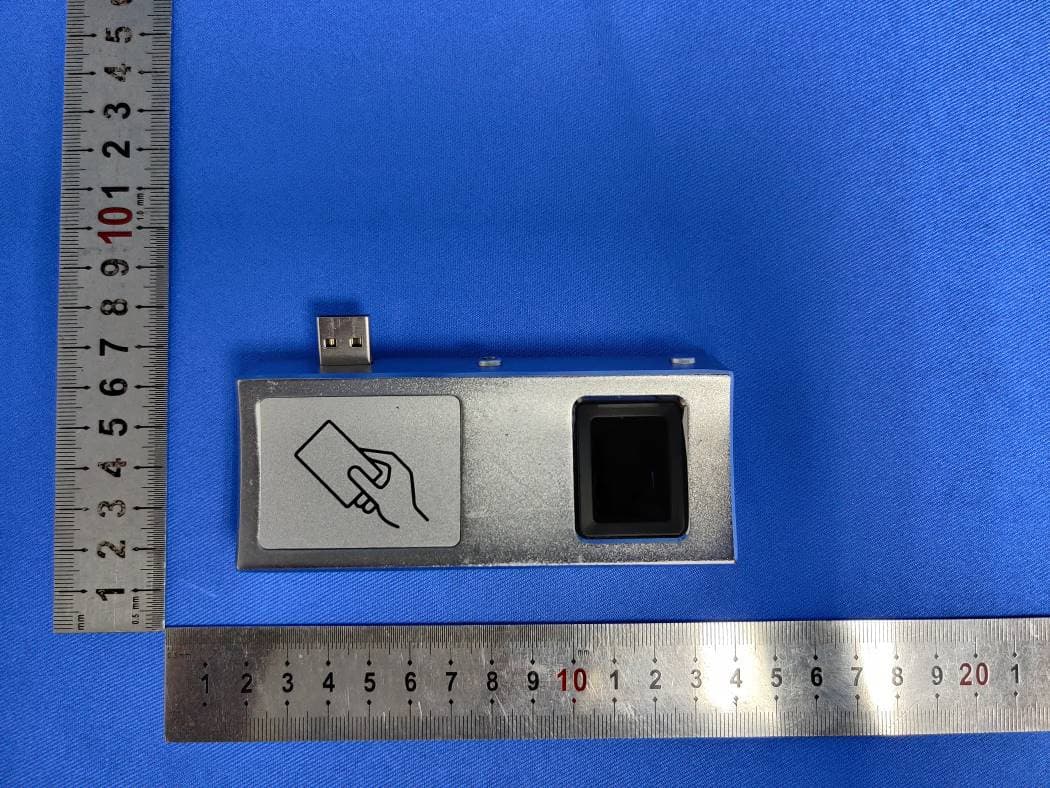
Click to zoom
Application Details
- Equipment Class
- DXX - Part 15 Low Power Communication Device Transmitter
- Date of Grant
- Jul 09, 2020
- Application Purpose
- Original Equipment
- Date of Application
- Jul 09, 2020
- Equipment Note
- Smart Access Control Terminal
- Frequency Range
- 13.56000000 - 13.56000000
- Company
- ZKTECO CO., LTD.
- Country
- China
Documents & Files
Document Text
Text extracted from the exhibit documents filed with the FCC. Open a document above to read the original.
Users Manual
Version: 1.1 Date: December 2019 Quick Start Guide FaceDepot 7BL- Power GND + 12V Overview Flash Camera 7 inch touch screen Microphone Fingerprint sensor Card reading area Magnetic tamper switch Speaker FP & RFID Reader (Optional) Connection interface Lock AUX Alarm Exit Button Sensor AL+ AL- NC COM NO BUT GND SEN GND Auxiliary input Wiegand In Wiegand Out +12V GND INWD0 INWD1 W0 D W1 D RS232 RS485 12V 485A GND TXD1 RXD1 GND TXD2 RXD2 RS232 485B Connection interface Reset USB port Network interface 1 Device Installation 1.5m 1 2 3 ①Attach the mounting template sticker to the wall, and drill holes according to the mounting paper. Fix the back plate on the wall using wall mounting screws. ②Attach the device to the back plate. ③Fasten the device to the back plate with a security screw. Method 1: Installation on the wall Please route the wire through the bracket before installation. 1. Drill a hole on the barrier gate. Insert the bracket into the hole and fix it with a nut.2. 3. Adjust the angle of the device. Method 2: Install on the barrier gate Adjust the device 1. Adjust the angle of the device. 2. Fix the screws. Note:If you want to install FP & RFID reader, please insert the reader after step.① 2 TCP/IP Alarm Smoke detector Lock Exit Button Door Sensor Card Reader ZKBioSecurity Standalone Installation AUX AL+ AL- NC COM NO BUT GND SEN GND + - Door Sensor, Exit Button & Alarm Connection Door Sensor Alarm Alarm's power switch Exit Button Smoke detector Note:On this document, we just guide you to connect some normal components, if you want more connection of SRB, external fingerprint reader and so on, please check user manual document. + - - + + - 3 Lock Relay Connection Wiegand Reader Connection The system supports Normally Opened Lock and Normally Closed Lock. F 107R AUX GND SEN GND BUT NO COM NC AL- AL+ The NO LOCK (normally opened at power on) is connected with 'NO' and 'COM' terminals, and the NC LOCK (normally closed at power on) is connected with 'NC' and 'COM' terminals. TNC Lockbelow:akeas an example Normally Closed Lock 1) Device not sharing power with the lock2) Device sharing power with the lock WD0 WD1 +12V GND Wiegand Reader +12V IDW1 IDW0 GND WD0 WD1 Access controller GND 12V DC12V DC12V F 107R AUX GND SEN GND BUT NO COM NC AL- AL+ Normally Closed Lock GND 12V DC12V 4 Barrier Connection Ethernet Connection Default IP address: 192.168.1.201 Subnet mask: 255.255.255.0 Click [COMM.] > [Ethernet] > [IP Address], input the IP address and click [OK]. IP address: 192.168.1.130 Subnet mask: 255.255.255.0 8 7 6 RJ 45 5 4 3 2 1 Note:In LAN, IP addresses of the server (PC) and the device must be in the same network segment when connecting to ZKBioSecurity software. Barrier gate ZKBioSecurity AUX GND SEN GND BUT NO COM NC AL- AL+ GND K1 5 User Registration GND 12V DC Recommended power supply 1) 12V ± 10%, at least00mA.30 2) To share the power with other devices, use a power supply with higher current ratings. Power Connection When there is no super administrator set in the device, click on to enter the menu. After setting the super administrator, the system will request for the administrator’s verification before entering the menu. For the security purpose, it is recommended to register a super administrator at the first time you use the device. Method1: Register on the device Click on>>[User Mgt.][New User] to register a new user. Settings include entering user ID and name, registering a fingerprint, face, password, badge (optional) and user photo, setting user role and access control role. 6 L L L Method2: Register on ZKBioSecurity software Please set the IP address and cloud service server address on the device. 1. Click [Access] > [Access Device] > [Device] > [Search Device] to add the device to the software. When the device has set the server address and port, it can be added automatically. 7 2. Click [Personnel] > [Person] > [New] to register users in the software. 3. Add users to access levels. 4. Click [Access] > [Device] > [Device Control] > [Synchronize All Data to Devices]. For more details, please refer to the ZKBioSecurity User Manual. Step 1 Step 2 Step 3 Step 4 Method3: Register on the phone Once ZKBioSecurity software installation, users could enroll face via browser application on their own mobile phone. 1. Click [Personnel] > [Parameters], input ‘’http://Server address:Port’’ in the QR Code UGL bar. The software will automatically generates a QR code. Scan the QR code or login onto ‘’http://Server address:Port/app/v1/adreg’’ by the mobile phone to register users. 8 2. The users will display in [Personnel] > [Temporary Personnel], click [Review]. Ethernet and Cloud Server Settings Click on> [COMM.] > [Ethernet] to set the network parameters. If the TCP/IP communication of the device is successful, the icon will be displayed in the upper right corner of the standby interface. Click on> [COMM.] > [Cloud Server Setting] to set the server address and server port, that is, the IP address and port number of the server after the software is installed. If the device communicates with the server successfully, the icon will be displayed in the upper right corner of the standby interface. 9 Access Control Settings Click onto enter the access control management interface and> [Access Control] set relevant parameters of access control. L L 10 ZK Building, Wuhe Road, Gangtou, Bantian, Buji Town, Longgang District, Shenzhen China 518129 Tel: +86 755-89602345 Fax: +86 755-89602394 www.zkteco.com Copyright©2019 ZKTECO CO., LTD. All rights reserved.
Users Manual
ZM系列桌面式考勤机用户手册 1 User Manual 5/7-inch Linux Visible Light Product Version: 1.0 Date: June 2019 Important Statement Thank you for choosing our product. Before using this product, please read this user manual carefully to avoid risks of danger to the users of this product or those nearby and damaging the device. Follow these instructions to ensure that your product functions properly and completes verifications in a timely manner. Unless authorized by our company, no group or individual shall take excerpts of or copy all or part of these instructions nor transmit the contents of these instructions by any means. The products described in this manual may include software that is copyrighted by our company and its possible licensors. No one may copy, publish, edit, take excerpts of, decompile, decode, reverse-engineer, rent, transfer, sublicense, or otherwise infringe upon the software's copyright unless authorized by the copyright holder(s). This is subject to relevant laws prohibiting such restrictions. As this product is regularly updated, we cannot guarantee exact consistency between the actual product and the written information in this manual. Our company claims no responsibility for any disputes that arise due to differences between the actual technical parameters and the descriptions in this document. The manual is subject to change without prior notice. About This Manual This manual introduces the operations, interfaces and functions of Linux Visible Light Product. For installation, please refer to the Quick Start Guide of the product accordingly. Features and parameters with ★ are not available in all devices. All pictures shown are for illustration purpose only. Pictures in this manual may not be exactly consistent with the actual products. I Contents 1 Notice for Use ............................................................................................................................................................................................................................... 1 1.1 Finger Positioning★ ................................................................................................................................................................................................. 1 1.2 Standing Position, Facial Expression and Standing Posture ........................................................................................................... 1 1.3 Face Registration ......................................................................................................................................................................................................... 2 1.4 Standby Interface ....................................................................................................................................................................................................... 3 1.5 Virtual Keyboard .......................................................................................................................................................................................................... 5 1.6 Verification Mode ........................................................................................................................................................................................................ 6 1.6.1 Fingerprint Verification★ ...................................................................................................................................................................... 6 1.6.2 Password Verification ............................................................................................................................................................................... 10 1.6.3 Facial Verification ........................................................................................................................................................................................ 13 1.6.4 Combined Verification ............................................................................................................................................................................ 16 2 Main Menu .................................................................................................................................................................................................................................... 17 3 User Management .................................................................................................................................................................................................................... 18 3.1 Adding Users ................................................................................................................................................................................................................ 18 3.2 Search for Users .......................................................................................................................................................................................................... 23 3.3 Edit Users ......................................................................................................................................................................................................................... 24 3.4 Deleting Users.............................................................................................................................................................................................................. 24 4 User Role ......................................................................................................................................................................................................................................... 25 5 Communication Settings ............................................................................................................................................................................…
Text truncated - open the document above for the full version.
External Photos
SGS-CSTC Standards Technical Services Co., Ltd. Shenzhen Branch Page: 1 of 9 External Photos for SZEM2001000109CR FCC ID: 2AJ9T-7MW SGS-CSTC Standards Technical Services Co., Ltd. Shenzhen Branch Page: 2 of 9 1 EUT Constructional Details SGS-CSTC Standards Technical Services Co., Ltd. Shenzhen Branch Page: 3 of 9 SGS-CSTC Standards Technical Services Co., Ltd. Shenzhen Branch Page: 4 of 9 SGS-CSTC Standards Technical Services Co., Ltd. Shenzhen Branch Page: 5 of 9 SGS-CSTC Standards Technical Services Co., Ltd. Shenzhen Branch Page: 6 of 9 SGS-CSTC Standards Technical Services Co., Ltd. Shenzhen Branch Page: 7 of 9 SGS-CSTC Standards Technical Services Co., Ltd. Shenzhen Branch Page: 8 of 9 SGS-CSTC Standards Technical Services Co., Ltd. Shenzhen Branch Page: 9 of 9
Internal Photos
SGS-CSTC Standards Technical Services Co., Ltd. Shenzhen Branch Page: 1 of 14 Internal Photos for SZEM2001000109CR FCC ID: 2AJ9T-7MW SGS-CSTC Standards Technical Services Co., Ltd. Shenzhen Branch Page: 2 of 14 1 EUT Constructional Details SGS-CSTC Standards Technical Services Co., Ltd. Shenzhen Branch Page: 3 of 14 SGS-CSTC Standards Technical Services Co., Ltd. Shenzhen Branch Page: 4 of 14 Wifi Antenna SGS-CSTC Standards Technical Services Co., Ltd. Shenzhen Branch Page: 5 of 14 SGS-CSTC Standards Technical Services Co., Ltd. Shenzhen Branch Page: 6 of 14 SGS-CSTC Standards Technical Services Co., Ltd. Shenzhen Branch Page: 7 of 14 SGS-CSTC Standards Technical Services Co., Ltd. Shenzhen Branch Page: 8 of 14 SGS-CSTC Standards Technical Services Co., Ltd. Shenzhen Branch Page: 9 of 14 NFC Antenna SGS-CSTC Standards Technical Services Co., Ltd. Shenzhen Branch Page: 10 of 14 SGS-CSTC Standards Technical Services Co., Ltd. Shenzhen Branch Page: 11 of 14 SGS-CSTC Standards Technical Services Co., Ltd. Shenzhen Branch Page: 12 of 14 SGS-CSTC Standards Technical Services Co., Ltd. Shenzhen Branch Page: 13 of 14 SGS-CSTC Standards Technical Services Co., Ltd. Shenzhen Branch Page: 14 of 14
Operational Description
OperationDescription Thewholesystemcircuitismainlycomposedofthemotherboard,camera module,LEDlightsupplementingmodule,fingerprintheadmodule,RFIDmodule, LCDdisplayscreen,TPtouchscreenandspeaker. Theworkingprincipleisasfollows: DC12Visusedtosupplypowertothemotherboard,andthevoltageisadjusted byDCtoDCmoduletosupplypowertovariousfunctionalmodules.Themotherboard isintegratedwithMCU(HI3516),EMMC,DDR,WIFImodule(RTL8723BS)andother functionalmodules,USBHUBextensionconnectionfingerprintmoduleandRFID module(IC01). ThecameracommunicateswiththeCPUthroughaserialport,fingerprint modulethroughtheUSBinterfacecommunicationwithCPU,WIFImodule communicateswiththeCPUthroughtheSDIOinterface,RFIDmoduleandfingerprint modulecommunicatewiththeCPUthroughtheUSBinterface,andtheLCDdisplay screencommunicateswiththeCPUthroughtheIICinterface.Eachmoduleofthe productinteractswiththeCPUaccordingtothecustomprotocoltoachieveall functionsoftheproduct. The EUT is working base on the MCU HI3516(Crystal: 24MHz, 32.768KHz). The EUT equipped with two GL852G (USB HUB) (Crystal: 12MHz). The EUT equipped with RTL8201F (RJ45) (Crystal: 25MHz). The EUT equipped with RF module RTL8723BS (WIFI) (Crystal: 26MHz). Wifi Antenna Type PIFA Antenna, 1.78dBi NFC Antenna Type LOOP Anetnna The EUT equipped with chip STM8S003F3P6 (Crystal:11.0592MHz) The EUT equipped with RFID Module IC01 (Crystal:32.768KHz, 25MHz) The main unit and the NFC part can not function separately.
RF Exposure Info
SGS-CSTC Standards Technical Services Co., Ltd. Shenzhen Branch Report No.: SZEM200100010904 Page: 1 of 7 Keny Xu EMC Laboratory Manager 1 Cover page RF Exposure Evaluation Report Application No.: SZEM2001000109CR Applicant: ZKTECO CO.,LTD. Address of Applicant: No.26,Pingshan 188 Industry zone,Tangxia Town,Dongguan City,Guangdong Province,China 523728 Manufacturer: ZKTECO CO.,LTD. Address of Manufacturer: No.26,Pingshan 188 Industry zone,Tangxia Town,Dongguan City,Guangdong Province,China 523728 Factory: ZKTECO CO.,LTD. Address of Factory: No.26,Pingshan 188 Industry zone,Tangxia Town,Dongguan City,Guangdong Province,China 523728 Equipment Under Test (EUT): EUT Name: Smart Access Control Terminal Model No.: FaceDepot-7BL, FaceDepot-7BL[CH], FaceDepot-7BL[WP] ♣ ♣ Please refer to section 4.1 of this report which indicates which model was actually tested and which were electrically identical. FCC ID: 2AJ9T-7MW Standards: 47 CFR PART 1, Subpart I, Section 1.1307 47 CFR PART 1, Subpart I, Section 1.1310 47 CRF PART 2, Subpart J, Section 2.1091 KDB 447498 D01 General RF Exposure Guidance v06 Date of Receipt: 2020-01-03 Date of Test: 2020-01-08 to 2020-05-29 Date of Issue: 2020-06-01 Test Result : Pass* * In the configuration tested, the EUT complied with the standards specified above. SGS-CSTC Standards Technical Services Co., Ltd. Shenzhen Branch Report No.: SZEM200100010904 Page: 2 of 7 2 Version Revision Record Version Chapter Date Modifier Remark 01 2020-06-01 Original Authorized for issue by: Damon Su /Project Engineer Eric Fu /Reviewer SGS-CSTC Standards Technical Services Co., Ltd. Shenzhen Branch Report No.: SZEM200100010904 Page: 3 of 7 3 Contents Page 1 COVER PAGE .....................................................................................................................................................1 2 VERSION..............................................................................................................................................................2 3 CONTENTS ..........................................................................................................................................................3 4 GENERAL INFORMATION ................................................................................................................................4 4.1 GENERAL DESCRIPTION OF EUT ..........................................................................................................................4 4.2 TEST LOCATION ..................................................................................................................................................5 4.3 TEST FACILITY ...................................................................................................................................................5 4.4 DEVIATION FROM STANDARDS ............................................................................................................................5 4.5 ABNORMALITIES FROM STANDARD CONDITIONS ..................................................................................................5 4.6 OTHER INFORMATION REQUESTED BY THE CUSTOMER .........................................................................................5 5 RF EXPOSURE EVALUATION ..........................................................................................................................6 5.1 RF EXPOSURE COMPLIANCE REQUIREMENT .........................................................................................................6 5.1.1 Limits .......................................................................................................................................................6 5.1.2 Test Procedure .......................................................................................................................................6 4.1.3 EUT RF EXPOSURE EVALUATION........................................................................................................................7 SGS-CSTC Standards Technical Services Co., Ltd. Shenzhen Branch Report No.: SZEM200100010904 Page: 4 of 7 4 General Information 4.1 General Description of EUT Power Supply: DC 12V 3A. Adapter Model: ADS-40SI-12-3 12036E Input: AC 100-240V 50/60Hz 1.0A Output: 12V 3A Cable: AC Cable:150cm unshielded WIFI Operation Frequency: 802.11b/g/n(HT20): 2412MHz to 2462MHz 802.11n(HT40): 2422MHz to 2452MHz Modulation Type: 802.11b: DSSS (CCK, DQPSK, DBPSK) 802.11g/n: OFDM (64QAM, 16QAM, QPSK, BPSK) Number of Channels: 802.11b/g/n(HT20):11 802.11n(HT40):7 Channel Spacing: 5MHz Antenna Gain: 1.78dBi Antenna Type: PIFA Antenna NFC Operation Frequency: 13.56MHz Modulation Type: ASK Antenna Type: Loop Antenna Declaration of EUT Family Grouping: Model No.: FaceDepot-7BL, FaceDepot-7BL[CH], FaceDepot-7BL[WP] Only the model FaceDepot-7BL was tested, since the electrical circuit design, layout, components used, internal wiring and functions were identical for the above models, with only difference on model. SGS-CSTC Standards Technical Services Co., Ltd. Shenzhen Branch Report No.: SZEM200100010904 Page: 5 of 7 4.2 Test Location All tests were performed at: SGS-CSTC Standards Technical Services Co., Ltd. Shenzhen Branch No. 1 Workshop, M-10, Middle section, Science & Technology Park, Shenzhen, Guangdong, China 518057 Telephone: +86 (0) 755 2601 2053 Fax: +86 (0) 755 2671 0594 No tests were sub-contracted. 4.3 Test Facility The test facility is recognized, certified, or accredited by the following organizations: • A2LA (Certificate No. 3816.01) SGS-CSTC Standards Technical Services Co., Ltd., Shenzhen EMC Laboratory is accredited by the American Association for Laboratory Accreditation(A2LA). Certificate No. 3816.01. • VCCI The 3m Fully-anechoic chamber for above 1GHz, 10m Semi-anechoic chamber for below 1GHz, Shielded Room for Mains Port Conducted Interference Measurement and Telecommunication Port Conducted Interference Measurement of SGS-CSTC Standar…
Text truncated - open the document above for the full version.
Test Report
SGS-CSTC Standards Technical Services Co., Ltd. Shenzhen Branch Report No.: SZEM200100010903 Page: 1 of 32 Keny Xu EMC Laboratory Manager TEST REPORT Application No.: SZEM2001000109CR Applicant: ZKTECO CO.,LTD. Address of Applicant: No.26,Pingshan 188 Industry zone,Tangxia Town,Dongguan City,Guangdong Province,China 523728 Manufacturer: ZKTECO CO.,LTD. Address of Manufacturer: No.26,Pingshan 188 Industry zone,Tangxia Town,Dongguan City,Guangdong Province,China 523728 Factory: ZKTECO CO.,LTD. Address of Factory: No.26,Pingshan 188 Industry zone,Tangxia Town,Dongguan City,Guangdong Province,China 523728 Equipment Under Test (EUT): EUT Name: Smart Access Control Terminal Model No.: FaceDepot-7BL, FaceDepot-7BL[CH], FaceDepot-7BL[WP] ♣ ♣ Please refer to section 2 of this report which indicates which model was actually tested and which were electrically identical. FCC ID: 2AJ9T-7MW Standard(s) : 47 CFR Part 15, Subpart C 15.225 Date of Receipt: 2020-01-03 Date of Test: 2020-01-08 to 2020-05-29 Date of Issue: 2020-06-01 Test Result: Pass* * In the configuration tested, the EUT complied with the standards specified above. SGS-CSTC Standards Technical Services Co., Ltd. Shenzhen Branch Report No.: SZEM200100010903 Page: 2 of 32 Revision Record Version Chapter Date Modifier Remark 01 2020-06-01 Original Authorized for issue by: Damon Su /Project Engineer Eric Fu /Reviewer SGS-CSTC Standards Technical Services Co., Ltd. Shenzhen Branch Report No.: SZEM200100010903 Page: 3 of 32 2 Test Summary Radio Spectrum Technical Requirement Item Standard Method Requirement Result Antenna Requirement 47 CFR Part 15, Subpart C 15.225 N/A 47 CFR Part 15, Subpart C 15.203 Pass Radio Spectrum Matter Part Item Standard Method Requirement Result Conducted Emissions at AC Power Line (150kHz-30MHz) 47 CFR Part 15, Subpart C 15.225 ANSI C63.10 (2013) Section 6.2 47 CFR Part 15, Subpart C 15.207 Pass 20dB Bandwidth 47 CFR Part 15, Subpart C 15.225 ANSI C63.10 (2013) Section 6.9 47 CFR Part 15, Subpart C 15.215 Pass Emission Mask 47 CFR Part 15, Subpart C 15.225 ANSI C63.10 (2013) Section 6.4 47 CFR Part 15, Subpart C 15.225(a)&(b)&(C ) Pass Frequency tolerance 47 CFR Part 15, Subpart C 15.225 ANSI C63.10 (2013) Section 6.8 47 CFR Part 15, Subpart C 15.225(e) Pass Radiated Emissions(9kHz- 30MHz) 47 CFR Part 15, Subpart C 15.225 ANSI C63.10 (2013) Section 6.4&6.5 47 CFR Part 15, Subpart C 15.225(d) & 15.209 Pass Radiated Emissions(30MHz- 1GHz) 47 CFR Part 15, Subpart C 15.225 ANSI C63.10 (2013) Section 6.4&6.5 47 CFR Part 15, Subpart C 15.225(d) & 15.209 Pass Declaration of EUT Family Grouping: Model No.: FaceDepot-7BL, FaceDepot-7BL[CH], FaceDepot-7BL[WP] Only the model FaceDepot-7BL was tested, since the electrical circuit design, layout, components used, internal wiring and functions were identical for the above models, with only difference on model. SGS-CSTC Standards Technical Services Co., Ltd. Shenzhen Branch Report No.: SZEM200100010903 Page: 4 of 32 3 Contents Page 1 COVER PAGE ..................................................................................................................................... 1 2 TEST SUMMARY ................................................................................................................................. 3 3 CONTENTS ......................................................................................................................................... 4 4 GENERAL INFORMATION .................................................................................................................. 6 4.1 DETAILS OF E.U.T. ......................................................................................................................... 6 4.2 DESCRIPTION OF SUPPORT UNITS .................................................................................................... 6 4.3 MEASUREMENT UNCERTAINTY ......................................................................................................... 6 4.4 TEST LOCATION ............................................................................................................................. 7 4.5 TEST FACILITY ............................................................................................................................... 7 4.6 DEVIATION FROM STANDARDS ......................................................................................................... 7 4.7 ABNORMALITIES FROM STANDARD CONDITIONS ................................................................................. 7 5 EQUIPMENT LIST ............................................................................................................................... 8 6 RADIO SPECTRUM TECHNICAL REQUIREMENT ............................................................................10 6.1 ANTENNA REQUIREMENT ................................................................................................................10 6.1.1 Test Requirement: ..................................................................................................................10 6.1.2 Conclusion ..............................................................................................................................10 7 RADIO SPECTRUM MATTER TEST RESULTS .................................................................................11 7.1 CONDUCTED EMISSIONS AT AC POWER LINE (150KHZ-30MHZ) ........................................................11 7.1.1 E.U.T. Operation .....................................................................................................................12 7.1.2 Test Setup Diagram ................................................................................................................12 7.1.3 Measurement Procedure and Data .........................................................................................12 7.2 20DB BANDWIDTH ......................................................................................…
Text truncated - open the document above for the full version.
Test Setup Photos
SGS-CSTC Standards Technical Services Co., Ltd. Shenzhen Branch Page: 1 of 3 Setup Photos for SZEM2001000109CR FCC ID: 2AJ9T-7MW SGS-CSTC Standards Technical Services Co., Ltd. Shenzhen Branch Page: 2 of 3 1 Photographs 1.1 Conducted Emissions at AC Power Line (150kHz-30MHz) Test Setup 1.2 Emission Mask Test Setup SGS-CSTC Standards Technical Services Co., Ltd. Shenzhen Branch Page: 3 of 3 1.3 Radiated Emissions(9kHz-30MHz) Test Setup 1.4 Radiated Emissions(30MHz-1GHz) Test Setup
Contact Information
Applicant
Zhonglie Ge(Engineer)
Technical Contact
SGS-CSTC Standards Technical Services Co., Ltd.Keny Xu
[email protected]86-755-25328629
No.1 Workshop, M-10, Middle Section · Shenzhen · China
Test Firm
SGS-CSTC Standards Technical Services Co., LtdDerek Yang
[email protected]+86 0135 6484 8721
Technical Specifications
| # | Rule Parts | Frequency Range | Power Output |
|---|---|---|---|
| 1 | 15C | 13.56 MHz - 13.56 MHz | - |
Other Applications from ZKTECO CO., LTD.
2AJ9T-21014
Jan 09, 2026Smart Access Control Terminal
Equipment Class
DCD - Part 15 Low Power Transmitter Below 1705 kHz
2AJ9T-75601
Dec 15, 2025Remote controller
Equipment Class
DSC - Part 15 Security/Remote Control Transmitter
2AJ9T-75501
Dec 15, 2025Smart Lock
Equipment Class
DXX - Part 15 Low Power Communication Device Transmitter
2AJ9T-10201
Sep 23, 2025Smart Identification Terminal
Equipment Class
DXX - Part 15 Low Power Communication Device Transmitter2AJ9T-107601
Sep 08, 2024Base Station
Equipment Class
DSS - Part 15 Spread Spectrum Transmitter