2AKJ2PM-0002Soccer sensor with Bluetooth
Motionize Israel LTD.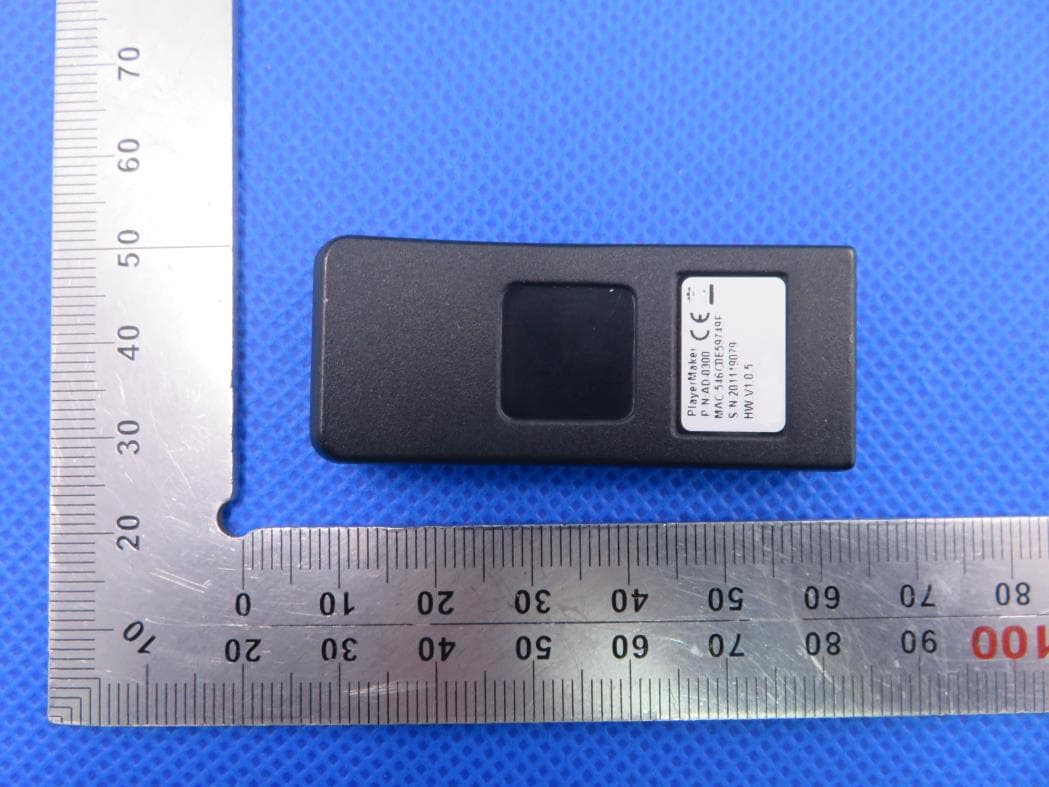
Click to zoom
Application Details
- Equipment Class
- DXX - Part 15 Low Power Communication Device Transmitter
- Date of Grant
- Jan 15, 2020
- Application Purpose
- Original Equipment
- Date of Application
- Jan 15, 2020
- Equipment Note
- Soccer sensor with Bluetooth
- Frequency Range
- 2402.00000000 - 2480.00000000
- Company
- Motionize Israel LTD.
- Country
- Israel
Documents & Files
Document Text
Text extracted from the exhibit documents filed with the FCC. Open a document above to read the original.
Users Manual
© 2018 PlayerMaker | Confidential & Proprietary O p e r a t i o n G u i d e © 2018 PlayerMaker | Confidential & Proprietary Table of Content Equipment overview...................p.3 Sensor operation.........................p.4 Wearing the sensors..................p.5 Operating process......................p.6 Before session.............................p.7 Arriving at session.....................p.8 After session................................p.9 Troubleshooting..........................p.10 Safety..............................................p .12 Customer support......................p.15 © 2018 PlayerMaker | Confidential & Proprietary E q u i p m e n t O v e r v i e w © 2018 PlayerMaker | Confidential & Proprietary 4 -Suitcase (charging station) -iPad -Sensors -L and R -2 Bags -L and R -Silicone straps -L and R Straps Men’s Size : Gray straps -1-6.5 UK (32-40 Euro) Black straps -6-13.5 UK (39-47 Euro) © 2018 PlayerMaker | Confidential & Proprietary 5 Power Button functions: 1.ON: Press once 2.Off: Press and hold for 6 seconds 3.Hard Reset: Press and hold for 12 seconds Led Gesture Battery Life: 100%= 4 hours, 75%= 2.5/3 hours, 50%= 1.5 hours Sensor Operation Power Button LED Charging Sensor Number & L/R © 2018 PlayerMaker | Confidential & Proprietary Step 1: •Put Right sensor into R strap & Left sensor into L strap •Sensor IDshould be visible from the inner side •The LED & Power Button match the strap holes on the exterior side Wearing The Sensors Step 2: •Wear R strap on Right foot and L strap on Left foot •Place the sensor on the outside part of the foot •The thickest part of the strap on the back, the short part on the bottom and the long part on the top (see picture below) NOTICE:Wearing the sensor correctly is NECESSARYfor accurate data. 6 Recommendation: Before the first time players use the sensors, demonstrate how to use and send the video tutorial. © 2018 PlayerMaker | Confidential & Proprietary Wearing The Sensors Thick part(back) Long part (top front) Sensor is on the Outer side of the foot Short part in front of the cleats (bottom front) Red sticker for Left sensor (Blue sticker for Right sensor) NOTICE:Wearing the sensor correctly is NECESSARYfor accurate data. LEDlight is visible “L” for Left strap (“R” for Right strap) 7 Recommendation: Before the first time players use the sensors, demonstrate how to use and send the video tutorial. © 2018 PlayerMaker | Confidential & Proprietary O p e r a t i o n P r o c e s s © 2018 PlayerMaker | Confidential & Proprietary 9 -Plug suitcase to a wall power outlet and make sure all sensors are charging: -LED gesture: Light is on with fast blink -iPad: Tap the “sensors drawer” and check charging state of each sensor’s battery level Before Session NOTICE: Sensors power off automatically after 60 minutes if not charging or used NOTICE: A “Low Battery” notification will pop up and show sensors with less than 50% Sensorsdrawer button Charging state -50 charging out of 50 available sensors Sensor’s battery level Green frame = Sensor is charging © 2018 PlayerMaker | Confidential & Proprietary •Turn ON all sensors by connecting suitcase to a power source or manually press the power button. •In iPad –PM app: •Log in and Select your team (Internet connection required for this step) •Press “Activate Sensors” •Wait for all participating players to go over from “Warming Up” to “Ready For Training” (see picture) Arriving at Session NOTICE: Do not use sensors with “Low Battery” notification NOTICE: Bluetooth is required. Make sure Bluetooth icon is blue. (Blue is On, Red is Off) © 2018 PlayerMaker | Confidential & Proprietary •Collect equipment from players •Sensors are placed in the suitcase (button side facing forward) •Straps are placed into the assigned bag •Connect to the Internet connection •Press on “End Session” then “Yes” •Players will go over from “Ending Session” (red) to “Ended Session” (green) •Once complete, open top left menu and press “Switch team” •Place suitcase on charge and make sure straps and sensors are clean and ready for the next session After Session 11 Sensors in suitcase -button side in front NOTICE: Internet connection is required for uploading the data. If “No Internet” notification appears -connect to the internet to complete the upload. Players go overfrom “Ending Session” to “Ended Session” © 2018 PlayerMaker | Confidential & Proprietary T r o u b l e s h o o t i n g © 2018 PlayerMaker | Confidential & Proprietary Before Session: Sensor is not charging 1.Push/Move sensor in port until LED gesture changes 2.Clean sensor’s & suitcase’s charging ports 3.Hard Reset: Press and hold power button for 12 seconds until light is off Sensor’s LED is constantly turned on or blinking rapidly 1.Hard Reset: Press and hold power button for 12 seconds until light is off 2.Turn on the sensor 3.Contact PlayerMakersupport After session: In App: if after “End Session” players have not switched from “Ending Session” to “Ended Session” 1.In iPad -turn Bluetooth OFF and ON 2.Press the “sensors drawer” and identify which sensors are not in idle mode (gray) 3.Make sure these sensors are ON. If LED is off, connect sensor to power source 4.If the sensor LED blinks rapidly -press 5 times on the power button then conduct “hard reset” and turn it back on 5.If not solved -don’tturn off the sensor and Call support Players’ data is missing in dashboard Contact PlayerMakersupport Arriving at session: In App: players are not “Ready For Training” 2 minutes after pressing “Activate Sensors” 1.Press the “sensors drawer” -identify which sensors are highlighted in red 2.Ensure the physical sensors are ON -LED with steady blink 3.Checksensors’ LED -if blinking rapidly conduct "Hard Reset” and turn on again 4.Turn Bluetooth off and on. 5.If sensor does not respond: a.Don’t use the sensor. Provide the player another pair of sensors b.Contact PlayerMakersupport 13 © 2018 PlayerMaker | Confidential & Proprietary S a f t e y © 2018 PlayerMaker | Confidential & Pro…
Text truncated - open the document above for the full version.
Cover Letter(s)
Jan. 03, 2020 Federal Communication Commission Authorization and Evaluation Division FCC ID: 2AKJ2PM-0002 Re: Confidentiality Request Pursuant to Sections 0.457 and 0.459 of the Commission’s Rules, the applicant hereby requests confidential treatment of information applied this application as outlined below: 1: Block Diagram 2: Schematics 3: Operational Description The above materials contain trade secrets and proprietary information not customarily released to the public. The public disclosure of these matters might be harmful to the applicant and provide unjustified benefits to its competitors. The Applicant understands that pursuant to Rules 0.457, disclosure of this Application and all accompanying documentation will not be made before the date of the Grant for this application. Sincerely, Motionize Israel LTD Contact person: Nadav Levy
External Photos
External Photos TOP VIEW OF EUT BOTTOM VIEW OF EUT FRONT VIEW OF EUT BACK VIEW OF EUT LEFT VIEW OF EUT RIGHT VIEW OF EUT
ID Label/Location Info
FCC ID Label Location FCC ID: 2AKJ2PM-0002
Internal Photos
Internal Photos OPEN VIEW OF EUT INTERNAL VIEW OF EUT-1 INTERNAL VIEW OF EUT-2 Antenna
Test Report
Page 1 of 33 FCC Test Report Report No.: AGC09637191201FE03 FCC ID : 2AKJ2PM-0002 APPLICATION PURPOSE : Original Equipment PRODUCT DESIGNATION : Soccer sensor BRAND NAME : Playermaker MODEL NAME : PM-0002 APPLICANT : Motionize Israel LTD. DATE OF ISSUE : Jan. 03, 2020 STANDARD(S) TEST PROCEDURE(S) : FCC Part 15 Rules REPORT VERSION : V1.0 Attestation of Global Compliance (Shenzhen) Co., Ltd CAUTION: This report shall not be reproduced except in full without the written permission of the test laboratory and shall not be quoted out of context. Report No.: AGC09637191201FE03 Page 2 of 33 REPORT REVISE RECORD Report Version Revise Time Issued Date Valid Version Notes V1.0 / Jan. 03, 2020 Valid Initial Release Report No.: AGC09637191201FE03 Page 3 of 33 TABLE OF CONTENTS 1. VERIFICATION OF CONFORMITY ............................................................................................................... 4 2. GENERAL INFORMATION ............................................................................................................................ 5 2.1. PRODUCT DESCRIPTION ..................................................................................................................... 5 2.2. TABLE OF CARRIER FREQUENCY ....................................................................................................... 5 3. MEASUREMENT UNCERTAINTY ................................................................................................................. 6 4. DESCRIPTION OF TEST MODES ................................................................................................................. 7 5. SYSTEM TEST CONFIGURATION ............................................................................................................... 8 5.1. CONFIGURATION OF EUT SYSTEM ..................................................................................................... 8 5.2 EQUIPMENT USED IN TESTED SYSTEM ............................................................................................... 8 5.3. SUMMARY OF TEST RESULTS .............................................................................................................. 8 6. TEST FACILITY ............................................................................................................................................. 9 7. RADIATED EMISSION ................................................................................................................................. 10 7.1TEST LIMIT ............................................................................................................................................. 10 7.2. MEASUREMENT PROCEDURE ............................................................................................................ 11 7.3. TEST SETUP ......................................................................................................................................... 13 7.4. TEST RESULT ....................................................................................................................................... 14 8. BAND EDGE EMISSION ............................................................................................................................. 20 8.1. MEASUREMENT PROCEDURE ........................................................................................................... 20 8.2 TEST SETUP .......................................................................................................................................... 20 8.3 RADIATED TEST RESULT ..................................................................................................................... 20 9. 20DB BANDWIDTH ..................................................................................................................................... 25 9.1. MEASUREMENT PROCEDURE ........................................................................................................... 25 9.2. TEST SET-UP (BLOCK DIAGRAM OF CONFIGURATION) ................................................................... 25 9.3. MEASUREMENT RESULTS .................................................................................................................. 26 APPENDIX A: PHOTOGRAPHS OF TEST SETUP ........................................................................................ 28 APPENDIX B: PHOTOGRAPHS OF THE EUT ............................................................................................... 29 Report No.: AGC09637191201FE03 Page 4 of 33 1. VERIFICATION OF CONFORMITY Applicant Motionize Israel LTD. Address Sderot Yehudit 35Tel Aviv-YafoIsrael Manufacturer Motionize Israel LTD. Address Sderot Yehudit 35Tel Aviv-YafoIsrael Factory Nistec Address Tuval 5 Ta'asiya St 1, Ma'alot-Tarshiha Product Designation Soccer sensor Brand Name Playermaker Test Model PM-0002 Date of test Dec. 12, 2019 to Jan. 03, 2020 Deviation No any deviation from the test method Condition of Test Sample Normal Test Result Pass Report Template AGCRT-US-BR/RF We hereby certify that: The above equipment was tested by Attestation of Global Compliance (Shenzhen) Co., Ltd. The test data, data evaluation, test procedures, and equipment configurations shown in this report were made in accordance with the procedures given in ANSI C63.10 (2013) and the energy emitted by the sample EUT tested as described in this report is in compliance with radiated emission limits of FCC Rules Part 15.249. Prepared By Nini Guo (Project Engineer) Jan. 03, 2020 Reviewed By Max Zhang (Reviewer) Jan. 03, 2020 Approved By Forrest Lei (Authorized Officer) Jan. 03, 2020 Report No.: AGC09637191201FE03 Page 5 of 33 2. GENERAL INFORMATION 2.1. PRODUCT DESCRIPTION A major technical description of EUT is described as following Operation Frequency 2.402 GHz to 2.480GHz Bluetooth Version V4.0 Maximum field strength 89.70dBuV/m(Peak)@3m Modulation GFSK Number of channels 40 Antenna Gain -1.9dBi Antenn…
Text truncated - open the document above for the full version.
Test Setup Photos
Test Setup Photos FCC RADIATED EMISSION TEST SETUP BELOW 1GHZ FCC RADIATED EMISSION TEST SETUP ABOVE 1GHZ
Contact Information
Applicant
Nadav Levy
Test Firm
Attestation of Global Compliance (Shenzhen) Co., LDoris Li
[email protected]+86-755-25234088
Technical Specifications
| # | Rule Parts | Frequency Range | Power Output |
|---|---|---|---|
| 1 | 15C | 2.40 GHz - 2.48 GHz | - |