2AL4D-T90OCR Multi-Player
SELVAS Healthcare, Inc.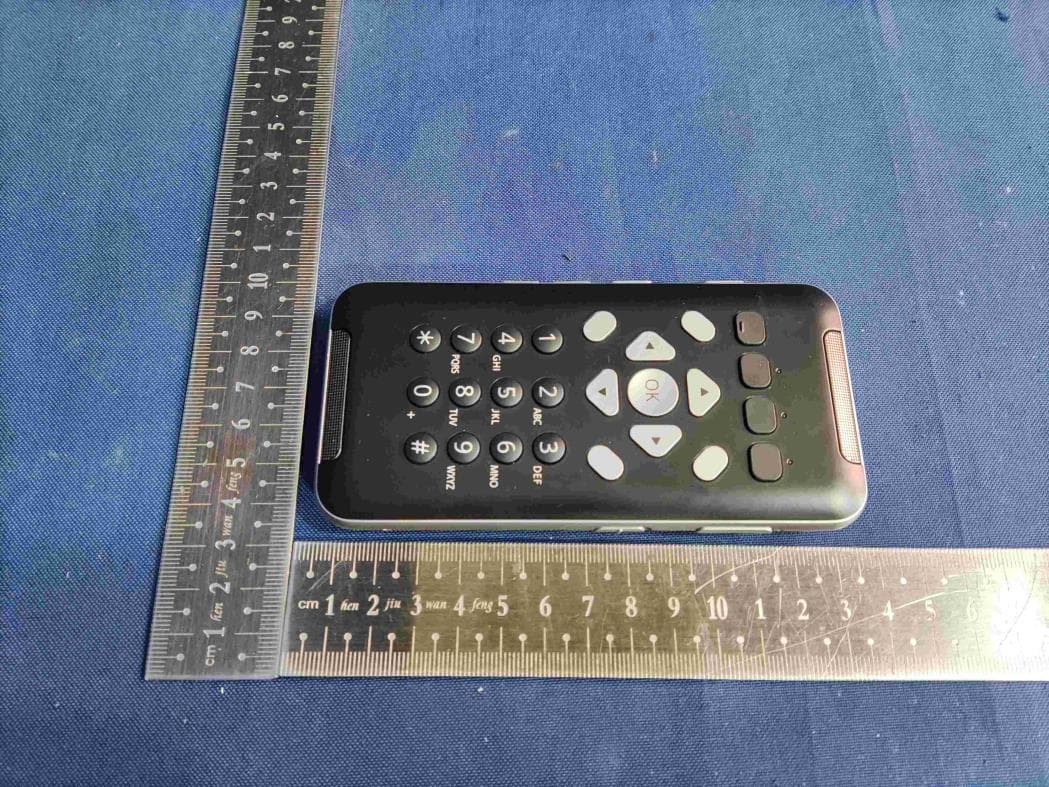
Click to zoom
Application Details
- Equipment Class
- NII - Unlicensed National Information Infrastructure TX
- Date of Grant
- Nov 21, 2022
- Application Purpose
- Original Equipment
- Date of Application
- Nov 21, 2022
- Equipment Note
- OCR Multi-Player
- Frequency Range
- 5745.00000000 - 5825.00000000
- Company
- SELVAS Healthcare, Inc.
- Country
- South Korea
Documents & Files
Document Text
Text extracted from the exhibit documents filed with the FCC. Open a document above to read the original.
Users Manual
SELVAS Healthcare SensePlayer – User Manual 1 SensePlayer User Manual (Model: T90ET) ENGLISH MANUAL for Software Version 1.0 (September, 2022) When there are any manual updates, the readme files or appendices will be added to the manual and website. SELVAS Healthcare, Inc. 155, Sinseong-ro, Yuseong-gu, Daejeon, 34109, Republic of KOREA Phone: +82-042-879-3000 Fax: +82-42-864-4462 Email: [email protected] Website: www.himsintl.com SELVAS Healthcare SensePlayer – User Manual 2 Congratulations on the purchase of your SensePlayer! The SensePlayer is capable of scanning printed material and reading DAISY content as well as many standard functions of portable mainstream media devices, – but with a tactile interface utilizing a full numeric keypad and a few other intuitively placed buttons rather than using a touch screen! Before using the SensePlayer, you should read the entire manual to familiarize yourself with the functions of the SensePlayer. The SensePlayer contains many programs with a variety of functions, thus, reading the entire manual will allow you to operate the SensePlayer to its fullest potential. If you are unable to find a solution to a problem within the manual, or if you need assistance with the SensePlayer, please contact the partner or dealer from which you purchased the sense Player. If they are unable to assist you, you may contact us at [email protected]. You may also visit us on the web at www.himsintl.com; or, you can call us at +82-042-879-3000. Copyright 2022. All RIGHTS reserved, SELVAS Healthcare, Inc. This User Manual is protected by copyright belonging to SELVAS Healthcare, Inc, with all rights reserved. The User Manual may not be copied in whole or part, without consent from SELVAS Healthcare. SELVAS Healthcare SensePlayer – User Manual 3 Safety Precautions For your safety and protection of the SensePlayer, please read and abide by the following safety precautions. 1. The input voltage of the AC adapter is 100V - 240V, and the output is DC 5V / 2A. 2. Seven Safety precautions for handling battery - High or low extreme temperatures that a battery can be subjected to during use, storage or transportation; and - Low air pressure at high altitude. - Replacement of a battery with an incorrect type that can defeat a safeguard (for example, in the case of some lithium battery types); - Disposal of a battery into fire or a hot oven, or mechanically crushing or cutting of a battery, that can result in an explosion; - Leaving a battery in an extremely high temperature surrounding environment that can result in an explosion or the leakage of flammable liquid or gas; and - A battery subjected to extremely low air pressure that may result in an explosion or the leakage of flammable liquid or gas. - CAUTION: “Risk of fire or explosion if the battery is replaced by an incorrect type” 3. When the SensePlayer is shipped, the battery may be packaged separate from the unit to avoid damage. When you use the SensePlayer for the first time, you may need to open the package, remove the battery, and insert it into the battery slot at the rear panel of the unit. (See section 1, introduction, for more details on inserting the battery.) It is possible that the dealer or distributor from whom you purchased the SensePlayer has already done this for you. The battery may not be fully charged when it is shipped. Before you use the SensePlayer, you should ensure the battery is fully charged. SELVAS Healthcare SensePlayer – User Manual 4 4. When you use the SensePlayer with the battery for the first time, the battery status may not be displayed accurately. To avoid this, leave the SensePlayer connected to the AC adapter for about three hours with the unit turned on. If you want to use the SensePlayer immediately, you may use it while it is charging. 5. If you want or need to remove the battery from the unit, power the unit off, and then remove the battery. If the unit is connected to AC power, before re-inserting the battery in to the unit, make certain that the power is off. There is a risk of explosion if battery is replaced by an incorrect type. Please make certain to use only battery packs produced specifically for the SensePlayer by HIMS. Please dispose of used batteries according to the instructions. 6. When you are using the SensePlayer on battery power, the status of the remaining battery power is announced when the battery charge is low. When the battery’s charge falls below 10 percent, connect the AC adapter to the unit for recharging. If the remaining battery charge drops to three percent, and the unit is not connected to the AC adapter, the SensePlayer shuts down one minute after the announcement of the battery’s status. The amount of battery life per charge varies depending on the options you have set and the number and type of tasks you are running. 7. Your SensePlayer needs to be handled with care. The SensePlayer is a very delicate machine. Please handle the unit in a proper, careful manner. The SensePlayer is very sensitive to dust. Make sure to keep the SensePlayer away from dusty environments. 8. Do not use the SensePlayer in a moisture-rich environment such as a bathroom or shower. This is to prevent damage caused by moisture getting into the device. Do not touch the AC adapter with wet hands. 9. Do not leave your SensePlayer in closed or high temperature environments such as inside a car on a hot summer day, as the battery attached to the SensePlayer may be SELVAS Healthcare SensePlayer – User Manual 5 damaged or catch fire. Please do not let your SensePlayer remain in such environments for long periods of time. 10. To prevent possible damage to your hearing, do not listen to audio at high volume levels for long periods. 11. If you connect the USB for a long time, the usage time may decrease. Please remove the USB when not in use. 12. Do not take apart the SensePlayer yourself. Do not have anyone else who is not authorized by SELVAS Healthcare take apart the …
Text truncated - open the document above for the full version.
Users Manual
SELVAS Healthcare SensePlayer – User Manual 1 SensePlayer User Manual (Model: T90EZ) ENGLISH MANUAL for Software Version 1.0 (October, 2022) When there are any manual updates, the readme files or appendices will be added to the manual and website. SELVAS Healthcare, Inc. 155, Sinseong-ro, Yuseong-gu, Daejeon, 34109, Republic of KOREA Phone: +82-042-879-3000 Fax: +82-42-864-4462 Email: [email protected] Website: www.himsintl.com SELVAS Healthcare SensePlayer – User Manual 2 Congratulations on the purchase of your SensePlayer! The SensePlayer is capable of reading DAISY content as well as many standard functions of portable mainstream media devices, – but with a tactile interface utilizing a full numeric keypad and a few other intuitively placed buttons rather than using a touch screen! Before using the SensePlayer, you should read the entire manual to familiarize yourself with the functions of the SensePlayer. The SensePlayer contains many programs with a variety of functions, thus, reading the entire manual will allow you to operate the SensePlayer to its fullest potential. If you are unable to find a solution to a problem within the manual, or if you need assistance with the SensePlayer, please contact the partner or dealer from which you purchased the sense Player. If they are unable to assist you, you may contact us at [email protected]. You may also visit us on the web at www.himsintl.com; or, you can call us at +82-042-879-3000. Copyright 2022. All RIGHTS reserved, SELVAS Healthcare, Inc. This User Manual is protected by copyright belonging to SELVAS Healthcare, Inc, with all rights reserved. The User Manual may not be copied in whole or part, without consent from SELVAS Healthcare. SELVAS Healthcare SensePlayer – User Manual 3 Safety Precautions For your safety and protection of the SensePlayer, please read and abide by the following safety precautions. 1. The input voltage of the AC adapter is 100V - 240V, and the output is DC 5V / 2A. 2. Seven Safety precautions for handling battery - High or low extreme temperatures that a battery can be subjected to during use, storage or transportation; and - Low air pressure at high altitude. - Replacement of a battery with an incorrect type that can defeat a safeguard (for example, in the case of some lithium battery types); - Disposal of a battery into fire or a hot oven, or mechanically crushing or cutting of a battery, that can result in an explosion; - Leaving a battery in an extremely high temperature surrounding environment that can result in an explosion or the leakage of flammable liquid or gas; and - A battery subjected to extremely low air pressure that may result in an explosion or the leakage of flammable liquid or gas. - CAUTION: “Risk of fire or explosion if the battery is replaced by an incorrect type” 3. When the SensePlayer is shipped, the battery may be packaged separate from the unit to avoid damage. When you use the SensePlayer for the first time, you may need to open the package, remove the battery, and insert it into the battery slot at the rear panel of the unit. (See section 1, introduction, for more details on inserting the battery.) It is possible that the dealer or distributor from whom you purchased the SensePlayer has already done this for you. The battery may not be fully charged when it is shipped. Before you use the SensePlayer, you should ensure the battery is fully charged. SELVAS Healthcare SensePlayer – User Manual 4 4. When you use the SensePlayer with the battery for the first time, the battery status may not be displayed accurately. To avoid this, leave the SensePlayer connected to the AC adapter for about three hours with the unit turned on. If you want to use the SensePlayer immediately, you may use it while it is charging. 5. If you want or need to remove the battery from the unit, power the unit off, and then remove the battery. If the unit is connected to AC power, before re-inserting the battery in to the unit, make certain that the power is off. There is a risk of explosion if battery is replaced by an incorrect type. Please make certain to use only battery packs produced specifically for the SensePlayer by HIMS. Please dispose of used batteries according to the instructions. 6. When you are using the SensePlayer on battery power, the status of the remaining battery power is announced when the battery charge is low. When the battery’s charge falls below 10 percent, connect the AC adapter to the unit for recharging. If the remaining battery charge drops to three percent, and the unit is not connected to the AC adapter, the SensePlayer shuts down one minute after the announcement of the battery’s status. The amount of battery life per charge varies depending on the options you have set and the number and type of tasks you are running. 7. Your SensePlayer needs to be handled with care. The SensePlayer is a very delicate machine. Please handle the unit in a proper, careful manner. The SensePlayer is very sensitive to dust. Make sure to keep the SensePlayer away from dusty environments. 8. Do not use the SensePlayer in a moisture-rich environment such as a bathroom or shower. This is to prevent damage caused by moisture getting into the device. Do not touch the AC adapter with wet hands. 9. Do not leave your SensePlayer in closed or high temperature environments such as inside a car on a hot summer day, as the battery attached to the SensePlayer may be SELVAS Healthcare SensePlayer – User Manual 5 damaged or catch fire. Please do not let your SensePlayer remain in such environments for long periods of time. 10. To prevent possible damage to your hearing, do not listen to audio at high volume levels for long periods. 11. If you connect the USB for a long time, the usage time may decrease. Please remove the USB when not in use. 12. Do not take apart the SensePlayer yourself. Do not have anyone else who is not authorized by SELVAS Healthcare take apart the SensePlayer. If an unqualified p…
Text truncated - open the document above for the full version.
Cover Letter(s)
Confidential Information Version 1.00 第1页/共计17页 Confidential Information Version 1.00 第2页/共计17页 Shenzhen Haotiancheng Wireless Technology Co. , Ltd. 名称Name:样品承认书Sample Approval 版本Ver:V1.0 日期date:2022.11.10 样品承认书 Sample Approval Sheet 项目名称Project Name: MS005 样品名称Sample Name: WIFI/BT天线 样品规格Sample SPEC:FPC material, gold-plated, 3M300 back glue 客户编码Customer PN.: 送样日期Transfer Date: 2022.11.10 供方确认 Supplier Confirm 项 目 Project 工 程 Engineer 质 量 Quality 肖强 黄振明 谷爽 确认日期date 2022.11.10 2022.11.10 2022.11.10 客户确认 Customer confirm 项 目 PM 电 子 Electron 结 构 MD 产 品 PD 品 质 QE 日期date 结论 conclusion □ 批量使用 MP □ 限量使用Limits use( )K □ ROHS 供方名称Supplier name:Shenzhen Haotiancheng Wireless Technology Co. , Ltd. 供方地址Supplier address:Bao'an District, Shenzhen City, Liuxian Road, erxiang, Century Science and Technology Park, Building 5E 电话Phone: 0755-23013857 传真Fax: 0755-23013857 E-mail: [email protected] Confidential Information Version 1.00 第3页/共计17页 目 录 1. An overview of the admission ............................................................... 错误!未定义书签。 2. Appearance ............................................................................................. 错误!未定义书签。 3. Electrical properties ............................................................................... 错误!未定义书签。 3.1. Antenna band ................................................................................ 错误!未定义书签。 3.2. Matching circuit ............................................................................ 错误!未定义书签。 3.3Impedance requirement ................................................................................................ 5 3.4 WIFI/BT Passive Standing Wave Diagram ................................................................ 5 3.5 Smith chart: ................................................................................................................ 6 3.6 Passive gain efficiency of antenna ............................................................................... 7 3.7 Apple Chart: ............................................................................................................... 9 3.8 Antenna test data: .................................................................................................... 12 4 Apparent structure ................................................................................. 错误!未定义书签。 4.1 Antenna material ...................................................................................................... 12 4.2 Structural drawing ................................................................................................... 13 5 BOM ................................................................................................................................... 14 6 Production flow chart .......................................................................................................... 15 7 Reliability test report ........................................................................................................... 16 8 GP test report for antenna and accessories(ROHS.SGS . MSDS): ......................... 16 9 Packing method .................................................................................................................... 17 Confidential Information Version 1.00 第4页/共计17页 1. An overview of the instrument of recognition The admission describes the condition of the built-in antenna of Mosse MS005, whose band WIFI BT is made by Shenzhen Haotiancheng Wireless Technology Co. , Ltd.. 2.Appearance 3.Electrical properties 3.1Antenna band WIFI/BT WIFI-5G TX(MHz) 2400~2500 5000 RX(MHz) 2400~2500 5800 3.2Matching circuit Confidential Information Version 1.00 第5页/共计17页 3.3 Impedance requirement 50 ohm 3.4 WIFI/BTPassive Standing Wave Diagram Confidential Information Version 1.00 第6页/共计17页 3.5 Smith chart: Confidential Information Version 1.00 第7页/共计17页 3.6 Passive gain efficiency of antenna 2400~2500MHZ 5000~5900MHZ Confidential Information Version 1.00 第8页/共计17页 Confidential Information Version 1.00 第9页/共计17页 3.7 Apple Chart: 2.4G: 11b Confidential Information Version 1.00 第10页/共计17页 11g Confidential Information Version 1.00 第11页/共计17页 11n Confidential Information Version 1.00 第12页/共计17页 3.8 Antenna test data: 4 Apparent structure 4.1 Structural drawing Antenna material: FPC antenna, black ink, gold-plated copper exposed area. Double sided release paper for substrate Confidential Information Version 1.00 第13页/共计17页 4.2 Structural drawing Confidential Information Version 1.00 第14页/共计17页 5 BOM Confidential Information Version 1.00 第15页/共计17页 6 Production flow chart Confidential Information Version 1.00 第16页/共计17页 7 Reliability test report 8 GP test report for antenna and accessories(ROHS.SGS . MSDS): Confidential Information Version 1.00 第17页/共计17页 9 Packing method FPC antenna a full-page shipment, stacked packaging, put into small boxes, a small box put two packages of antenna.
Cover Letter(s)
Federal Communication Commission Equipment Authorization Division, Application Processing Branch 7435 Oakland Mills Road Columbia, MD 21046 UNII Device Declaration Letter To whom it may concern: We have declared below featured for FCC equipment authorization, Device FCC ID: 2AL4D-T90 (1) DFS Device: Master Client with Radar detection capability N/A Client without radar detection capability, (2) Active / Passive Scanning , ad hoc mode access point capability Frequency Band (MHz) Active Scanning (the device can transmit a probe (beacon)) passive scanning (where the device is can listen only with no probes) Ad Hoc Mode capability Access point capability 2412-2462 Yes No Yes No Yes No Yes No 5745-5825 Yes No Yes No Yes No Yes No 5755-5795 Yes No Yes No Yes No Yes No 5775-5775 Yes No Yes No Yes No Yes No 5180-5240 Yes No Yes No Yes No Yes No 5190-5230 Yes No Yes No Yes No Yes No 5210-5210 Yes No Yes No Yes No Yes No 5260-5320 Yes No Yes No Yes No Yes No 5270-5310 Yes No Yes No Yes No Yes No 5500-5700 Yes No Yes No Yes No Yes No 5510-5670 Yes No Yes No Yes No Yes No (3) Country code selection ability Yes No If yes, please explain how it was implemented: (4) Meets 15.202 requirement Yes No pls check below : A master device is defined as a device operating in a mode in which it has the capability to transmit without receiving an enabling signal. In this mode it is able to select a channel and initiate a network by sending enabling signals to other devices A client device is defined as a device operating in a mode in which the transmissions of the device are under control of the master. A device in client mode is not able to initiate a network.
External Photos
Dongguan Dongdian Testing Service Co., Ltd. Case No.: DDT-R22051321 Page 1 of 23 AppendixI: Photos of the EUT Product Name : OCR Multi-Player Model Number : T90ET, T90EZ T90ET Dongguan Dongdian Testing Service Co., Ltd. Case No.: DDT-R22051321 Page 2 of 23 Dongguan Dongdian Testing Service Co., Ltd. Case No.: DDT-R22051321 Page 3 of 23 Dongguan Dongdian Testing Service Co., Ltd. Case No.: DDT-R22051321 Page 4 of 23 Dongguan Dongdian Testing Service Co., Ltd. Case No.: DDT-R22051321 Page 5 of 23 Dongguan Dongdian Testing Service Co., Ltd. Case No.: DDT-R22051321 Page 6 of 23 Dongguan Dongdian Testing Service Co., Ltd. Case No.: DDT-R22051321 Page 7 of 23 Dongguan Dongdian Testing Service Co., Ltd. Case No.: DDT-R22051321 Page 21 of 23 T90EZ Dongguan Dongdian Testing Service Co., Ltd. Case No.: DDT-R22051321 Page 22 of 23 Dongguan Dongdian Testing Service Co., Ltd. Case No.: DDT-R22051321 Page 23 of 23 END OF REPORT
Internal Photos
Dongguan Dongdian Testing Service Co., Ltd. Case No.: DDT-R22051321 Page 8 of 20 Dongguan Dongdian Testing Service Co., Ltd. Case No.: DDT-R22051321 Page 9 of 20 Dongguan Dongdian Testing Service Co., Ltd. Case No.: DDT-R22051321 Page 10 of 20 Dongguan Dongdian Testing Service Co., Ltd. Case No.: DDT-R22051321 Page 11 of 20 Dongguan Dongdian Testing Service Co., Ltd. Case No.: DDT-R22051321 Page 12 of 20 BT / WIFI Antenna Dongguan Dongdian Testing Service Co., Ltd. Case No.: DDT-R22051321 Page 13 of 20 BT / WIFI Antenna Port Dongguan Dongdian Testing Service Co., Ltd. Case No.: DDT-R22051321 Page 14 of 20 Dongguan Dongdian Testing Service Co., Ltd. Case No.: DDT-R22051321 Page 15 of 20 Dongguan Dongdian Testing Service Co., Ltd. Case No.: DDT-R22051321 Page 16 of 20 Dongguan Dongdian Testing Service Co., Ltd. Case No.: DDT-R22051321 Page 17 of 20 Dongguan Dongdian Testing Service Co., Ltd. Case No.: DDT-R22051321 Page 18 of 20 Dongguan Dongdian Testing Service Co., Ltd. Case No.: DDT-R22051321 Page 19 of 20 Dongguan Dongdian Testing Service Co., Ltd. Case No.: DDT-R22051321 Page 20 of 20 END OF REPORT
RF Exposure Info
Tianjin Dongdian Testing ServiceCo.,Ltd. Report No.: DDT-B22081501-1E01 Page 1 of 30 Appendix C Calibration Certification Tianjin Dongdian Testing ServiceCo.,Ltd. Report No.: DDT-B22081501-1E01 Page 2 of 30 Table of Contents 1. D2450V2-SN: 904 Calibration certification ........................................................................ 3 2. D5GHzV2-SN: 1148 Calibration certification ..................................................................... 9 3. DAE4-SN: 1366 Calibration certification.......................................................................... 19 4. EX3DV4-SN: 3906 Calibration certification ..................................................................... 22 Tianjin Dongdian Testing ServiceCo.,Ltd. Report No.: DDT-B22081501-1E01 Page 3 of 30 1. D2450V2-SN: 904 Calibration certification Tianjin Dongdian Testing ServiceCo.,Ltd. Report No.: DDT-B22081501-1E01 Page 4 of 30 Tianjin Dongdian Testing ServiceCo.,Ltd. Report No.: DDT-B22081501-1E01 Page 5 of 30 Tianjin Dongdian Testing ServiceCo.,Ltd. Report No.: DDT-B22081501-1E01 Page 6 of 30 Tianjin Dongdian Testing ServiceCo.,Ltd. Report No.: DDT-B22081501-1E01 Page 7 of 30 Tianjin Dongdian Testing ServiceCo.,Ltd. Report No.: DDT-B22081501-1E01 Page 8 of 30 Tianjin Dongdian Testing ServiceCo.,Ltd. Report No.: DDT-B22081501-1E01 Page 9 of 30 2. D5GHzV2-SN: 1148 Calibration certification Tianjin Dongdian Testing ServiceCo.,Ltd. Report No.: DDT-B22081501-1E01 Page 10 of 30 Tianjin Dongdian Testing ServiceCo.,Ltd. Report No.: DDT-B22081501-1E01 Page 11 of 30 Tianjin Dongdian Testing ServiceCo.,Ltd. Report No.: DDT-B22081501-1E01 Page 12 of 30 Tianjin Dongdian Testing ServiceCo.,Ltd. Report No.: DDT-B22081501-1E01 Page 13 of 30 Tianjin Dongdian Testing ServiceCo.,Ltd. Report No.: DDT-B22081501-1E01 Page 14 of 30 Tianjin Dongdian Testing ServiceCo.,Ltd. Report No.: DDT-B22081501-1E01 Page 15 of 30 Tianjin Dongdian Testing ServiceCo.,Ltd. Report No.: DDT-B22081501-1E01 Page 16 of 30 Tianjin Dongdian Testing ServiceCo.,Ltd. Report No.: DDT-B22081501-1E01 Page 17 of 30 Tianjin Dongdian Testing ServiceCo.,Ltd. Report No.: DDT-B22081501-1E01 Page 18 of 30 Tianjin Dongdian Testing ServiceCo.,Ltd. Report No.: DDT-B22081501-1E01 Page 19 of 30 3. DAE4-SN: 1366 Calibration certification Tianjin Dongdian Testing ServiceCo.,Ltd. Report No.: DDT-B22081501-1E01 Page 20 of 30 Tianjin Dongdian Testing ServiceCo.,Ltd. Report No.: DDT-B22081501-1E01 Page 21 of 30 Tianjin Dongdian Testing ServiceCo.,Ltd. Report No.: DDT-B22081501-1E01 Page 22 of 30 4. EX3DV4-SN: 3906 Calibration certification Tianjin Dongdian Testing ServiceCo.,Ltd. Report No.: DDT-B22081501-1E01 Page 23 of 30 Tianjin Dongdian Testing ServiceCo.,Ltd. Report No.: DDT-B22081501-1E01 Page 24 of 30 Tianjin Dongdian Testing ServiceCo.,Ltd. Report No.: DDT-B22081501-1E01 Page 25 of 30 Tianjin Dongdian Testing ServiceCo.,Ltd. Report No.: DDT-B22081501-1E01 Page 26 of 30 Tianjin Dongdian Testing ServiceCo.,Ltd. Report No.: DDT-B22081501-1E01 Page 27 of 30 Tianjin Dongdian Testing ServiceCo.,Ltd. Report No.: DDT-B22081501-1E01 Page 28 of 30 Tianjin Dongdian Testing ServiceCo.,Ltd. Report No.: DDT-B22081501-1E01 Page 29 of 30 Tianjin Dongdian Testing ServiceCo.,Ltd. Report No.: DDT-B22081501-1E01 Page 30 of 30
Test Report
Dongguan Dongdian Testing Service Co., Ltd. Report No.: DDT-R22051321-2E04 Page 1 of 181 FCC CERTIFICATION TEST REPORT FOR Issued By: Dongguan Dongdian Testing Service Co., Ltd. Add.: No. 17, Zongbu Road 2, Songshan Lake Sci&Tech, Industry Park, Dongguan City, Guangdong Province, China, 523808 Tel.: +86-0769-38826678, E-mail: [email protected], http://www.dgddt.com Applicant : SELVAS Healthcare, Inc. Address : 155, Sinseong-ro, Yuseong-gu, Daejeon, Republic of Korea Equipment under Test : OCR Multi-Player Model No. : T90ET, T90EZ Trade Mark : N/A FCC ID : 2AL4D-T90 Manufacturer : Shenzhen Moss Technology Co., Ltd. Address : Room 498, F1, TCL International E-City, 1001 Sun Yat-sen Garden Road, Xili Street, Nanshan District, Shenzhen Report No.: DDT-R22051321-2E04 Issued Date: Oct. 19, 2022 Dongguan Dongdian Testing Service Co., Ltd. Report No.: DDT-R22051321-2E04 Page 2 of 181 TABLE OF CONTENTS Test report declares........................................................................................................4 1. Summary of test results ................................................................................................. 6 2. General test information ................................................................................................. 7 2.1. Description of EUT ......................................................................................................... 7 2.2. Accessories of EUT ........................................................................................................ 8 2.3. Assistant equipment used for test .................................................................................. 8 2.4. Block diagram of EUT configuration for test .................................................................. 8 2.5. Deviations of test standard............................................................................................. 9 2.6. Test environment conditions ........................................................................................ 10 2.7. Test laboratory ............................................................................................................. 10 2.8. Measurement uncertainty ............................................................................................. 10 3. Equipment used during test ......................................................................................... 11 4. 26dB Bandwidth, 6dB Bandwidth and 99% Bandwidth ............................................... 12 4.1. Block diagram of test setup .......................................................................................... 12 4.2. Limits ............................................................................................................................ 12 4.3. Test Procedure ............................................................................................................. 12 4.4. Test Result ................................................................................................................... 13 4.5. Original test data .......................................................................................................... 14 5. Maximum Output Power ............................................................................................... 45 5.1. Block diagram of test setup .......................................................................................... 45 5.2. Limits ............................................................................................................................ 45 5.3. Test Procedure ............................................................................................................. 45 5.4. Test Result ................................................................................................................... 46 6. Power Spectral Density ................................................................................................ 48 6.1. Block diagram of test setup .......................................................................................... 48 6.2. Limits ............................................................................................................................ 48 6.3. Test Procedure ............................................................................................................. 48 6.4. Test Result ................................................................................................................... 49 6.5. Original test data .......................................................................................................... 49 7. Frequency Stability Measurement ............................................................................... 64 7.1. Limit of Frequency Stability .......................................................................................... 64 7.2. Measuring Instruments ................................................................................................. 64 7.3. Test Procedures ........................................................................................................... 64 7.4. Test Setup .................................................................................................................... 64 7.5. Test Result ................................................................................................................... 64 8. Emissions in restricted frequency bands ..................................................................... 75 8.1. Block diagram of test setup .......................................................................................... 75 Dongguan Dongdian Testing Service Co., Ltd. Report No.: DDT-R22051321-2E04 Page 3 of 181 8.2. Limit .................................................................................................................…
Text truncated - open the document above for the full version.
Contact Information
Applicant
ILHYUNG KIM
Test Firm
Guangdong Dongdian Testing Service Co., Ltd.Mr. Jamy Yu
[email protected]+86-0769-89201646
Technical Specifications
| # | Rule Parts | Frequency Range | Power Output |
|---|---|---|---|
| 4 | 15E | 5.75 GHz - 5.83 GHz | 32.73 mW |