2AM6P-F24G body worn camera
Shenzhen Grand Time Technology Co.,ltd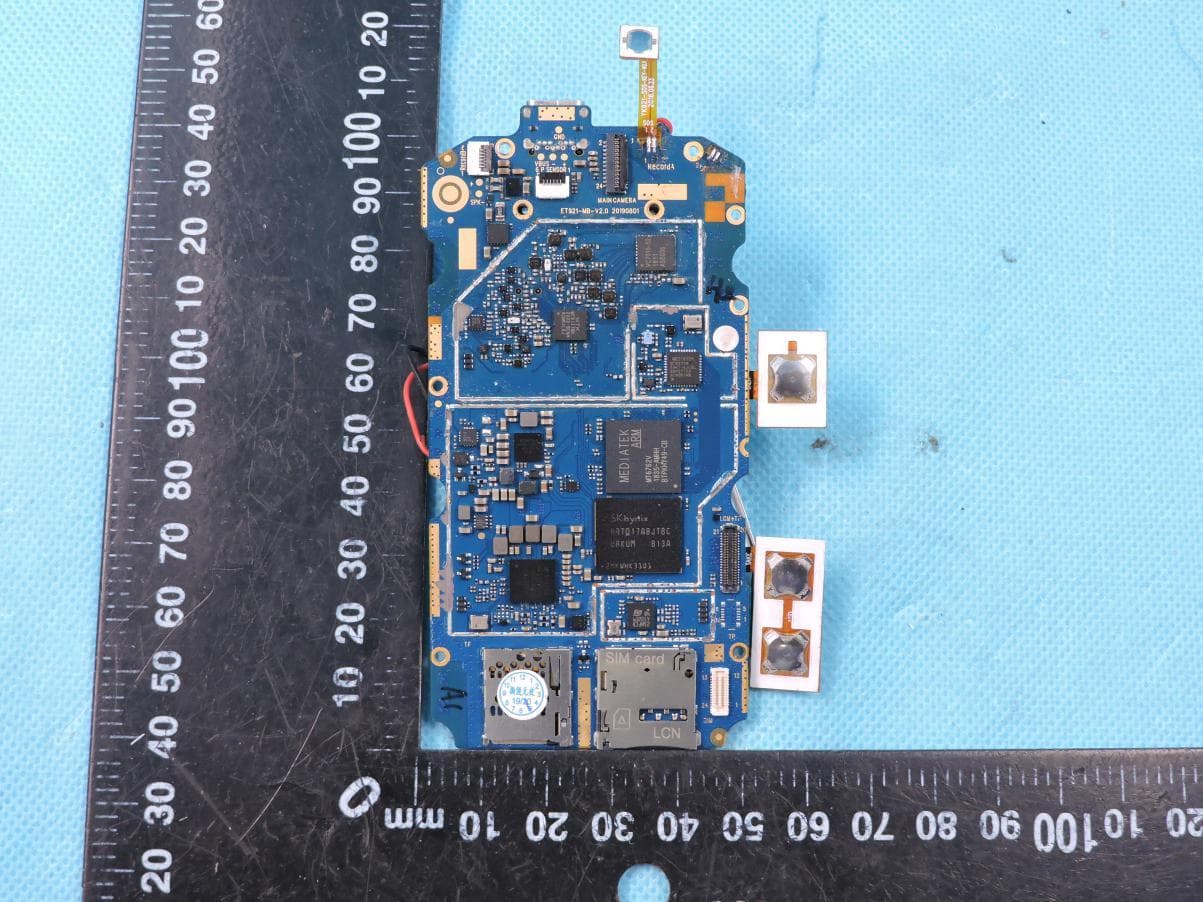
Click to zoom
Application Details
- Equipment Class
- DXX - Part 15 Low Power Communication Device Transmitter
- Date of Grant
- Oct 19, 2020
- Application Purpose
- Original Equipment
- Date of Application
- Oct 19, 2020
- Equipment Note
- 4G body worn camera
- Frequency Range
- 13.56000000 - 13.56000000
- Country
- China
Documents & Files
Document Text
Text extracted from the exhibit documents filed with the FCC. Open a document above to read the original.
Users Manual
User manual Product Name: 4G body worn camera Model: F2, F1, F1P, F1B, F1S, F2B, F2P, F2S, F3P, F3B, F3S, F4P, F4B, F4S, F5P, F5B, F5S, F6P, F6B, F6S Manufacture: Shenzhen Grand Time Technology Co.,ltd Please read this instruction manual carefully before using the product, and keep it in a safe place. Before using: ●Repairs can only be carried out by professional technicians. Do not disassemble them. ●Do not modify or adjust the equipment for any reason. ●Do not place the 4G Smart Intercom Law Enforcement Recorder near the heating appliance. ●Do not place the 4G Smart Intercom Law Enforcement Recorder in extreme dust, moisture and water splashes. Attached accessories: adapter cables user manual clip Precautions The following suggestions will help your equipment survive the warranty period and continue to use it for many years: 1) Keep the equipment dry. Avoid substances such as rain, moisture, and liquids that may contain corrosive electronic circuits. 2) Do not use or store the device in dusty places to avoid damage to its moving parts. 3) Do not store the device at a high temperature. High temperatures can shorten the life of electronic circuits and damage batteries and certain plastic parts. Terminal battery use The performance of the terminal battery is affected by many factors, including your wireless bearer network configuration, signal strength, temperature when using the device, frequency of use, and features selected for use. For optimal battery performance, please observe the following rules: 1) Only allow the original battery to be charged in the device to avoid damage caused by incorrect charging. 2) If the battery is found to have any strange smell or overheating, cracks, deformation or other types of damage, or if the electrolyte leaks, immediately deactivate the battery. 3) After long-term use, the battery will need to be charged for a long time due to the gradual loss, which is normal. Product icon: Remove battery icon: Battery installation diagram: Battery diagram: Button functions (power button, switch button, fingerprint button, self-timer button, video button, key file marker button, channel button, volume plus button, volume down button, SOS button, recording button, intercom button, camera button, flash button ) power button 1) Press and hold the power button for 3 seconds to turn it on. 2) Normal use, long press the power button for 3 seconds to shut down. 3) Normal use, short press the power button and wake up screen switch button 1) Press the toggle button to switch the camera function before and after self-timer button Short press this button when using the rear camera is the self-timer function fingerprint button 1) Touch unlock function video button 1) Press the video button in the status screen, the default is the front main video; enter the corresponding camera interface and press the video button to record the current camera. key file marker button 1) Press the key file mark button to start the key video file recording, press the record button or the screen record button to end the recording; if the key file name is “IMP_***” channel button 1) Press the channel switch button to switch the talkback group or the screen group button to select the corresponding group. volume button Press the volume up/down to adjust the terminal volume SOS button 1) Press this button in emergency mode to alarm the system and locate the alarm address. recording button 1) Press the record button or the screen main screen recording button to start recording; press the record button or the screen end recording button again to end the recording. PTT button 1) Press and hold the intercom button to start the intercom and release the end intercom. camera button 1) Press the camera button in the state of the interest screen, the default is the camera for the front camera; enter the camera interface and press the camera button to take the photo for the current camera. Flash button / fill light button 1) Single-press to turn off the flashlight function. 2) Press and hold the camera button for 3 seconds to turn on the warning light. 3) Press and hold the camera button for 3 seconds to turn off the warning light. ● indicator function (red, yellow, green) Red indicator light: always bright when recording Yellow indicator light: always bright when recording Green indicator light: 1) It is always on during the boot process, and is turned off after the boot is successful. Low flashing, slow flashing when charging, full of constant light. ● device boot 1) Press and hold the power button for 3 seconds to trigger the power on. When the power is turned on, the green light is fully illuminated and enter the preview interface. The main interface displays: positioning, signal, power, time, return button, camera trigger button, HOME button. 2) Return to the main menu interface on the touch screen: The front camera is activated by the preview button on the touch screen: H0ME button on the touch screen returns to the main interface 3) Press and hold the camera button or touch the TP icon to turn off the local camera function. Specific steps: 1) Press the camera button 2) Trigger voice announcement: “Now start ultra-clear camera” or “Now start high-definition camera”, “Now start standard-definition camera”. 3) There will be a fixed interval (30 seconds) “Don” sound during the recording, and the red indicator light will be on. 4) Press the camera button for 3 seconds to end the recording, save the camera file to the local, and broadcast the voice: “End of the camera, this recording time is XX minutes XX seconds”. 5) Touch the TPicon to turn on the front sub camera for close focus shooting 6) Touch the TP icon to enter the recording mode. 7) Touch the TP icon to enter this interface, you can check the recording, video, and photo. 8) Touch the TP icon to enter a group where you can switch to it as needed. 9) Touch the TPicon to enter this interfacefor sleep time setting, video clarity setting, laser position…
Text truncated - open the document above for the full version.
Cover Letter(s)
Differences Description We Shenzhen Grand Time Technology Co.,ltd state: Product: 4G body worn camera Model Name: F2, F1, F1P, F1B, F1S, F2B, F2P, F2S, F3P, F3B, F3S, F4P, F4B, F4S, F5P, F5B, F5S, F6P, F6B, F6S Trade Name: N/A FCC ID: 2AM6P-F2 The electrical circuit design, layout, components used and internal wiring for above models are identical, Only different in model name. Signatory Date 2020-09-08 Signature Name: Andy.Liu Title: Sales manager Company: Shenzhen Grand Time Technology Co.,ltd Address: Unit 1202, 12th floor, Konka R&D Building, Science and Technology South 12th Road, Nanshan District, Shenzhen, China.
Cover Letter(s)
Shenzhen Grand Time Technology Co.,ltd Agent Authorization Company: Shenzhen Grand Time Technology Co.,ltd Address: Unit 1202, 12th floor, Konka R&D Building, Science and Technology South 12th Road, Nanshan District, Shenzhen, China. Product Name: 4G body worn camera Model Number(s): F2, F1, F1P, F1B, F1S, F2B, F2P, F2S, F3P, F3B, F3S, F4P, F4B, F4S, F5P, F5B, F5S, F6P, F6B, F6S Product Description: 4G body worn camera With GSM/WCDMA/LTE/BT/2.4G WIFI/5G WIFI/GPS/NFC FCC ID: 2AM6P-F2 We authorize MiCOM Labs Inc., 575 Boulder Court, Pleasanton, California 94566, USA, to act on our behalf on all matters concerning the certification of above named equipment. We declare that MiCOM Labs Inc. is allowed to forward all information related to the approval and certification of equipment to the regulatory agencies as required and to discuss any issues concerning the approval application. Any and all acts carried out by MiCOM Labs on our behalf shall have the same effect as acts of our own. Signature: Date: 2020-09-08 Name: Andy.Liu Title: Sales manager Company: Shenzhen Grand Time Technology Co.,ltd
Cover Letter(s)
Shenzhen Grand Time Technology Co.,ltd Office of Engineering Technology Federal Communications Commission 7435 Oakland Mills Road Columbia, MD 21046 USA Date: 2020-09-08 Subject; Request for Confidentiality FCC ID: 2AM6P-F2 To Whom It May Concern, Pursuant to the provisions of the Commission’s rules Title 47 Sections §0.457 and §0.459, we are requesting the Commission to withhold the following attachment(s) as confidential documents from public disclosure indefinitely. These documents contain detailed system and equipment descriptions and are considered as proprietary information in operation of the equipment. The public disclosure of these documents might be harmful to our company and would give competitors an unfair advantage in the market. Schematic Diagram Block Diagram Operational Description Tune-up Procedure Part List SOFTWARE SECURITY REQUIREMENTS FOR U-NII DEVICES In additional to above mentioned documents, in order to comply with the marketing regulations in Title 47 CFR §2.803 and the importation rules in Title 47 CFR §2.1204, while ensuring that business sensitive information remains confidential until the actual marketing of newly authorized devices, we request Short Term Confidentiality of the following attachment(s); External Photos Test Setup Photos Internal Photos User Manual For 45 days, pursuant to Public Notice DA 04-1705. OR For 180 days pursuant to KDB 726920 D01. It is our understanding that all measurement test reports, FCC ID label format and correspondence during the certification review process cannot be granted as confidential documents and this information will be available for public review once the grant of equipment authorization is issued. Sincerely, Signature: Name: Andy.Liu Title: Sales manager
Internal Photos
Page 1 of 10 Report No.: STS2007325 APPENDIX-PHOTOGRAPHS OF EUT CONSTRUCTIONAL DETAILS Photo 1 Photo 2 GPS Antenna BT/WIF Antenna GSM/WCDMA/LTE Antenna LTE RX Antenna NFC Antenna Page 2 of 10 Report No.: STS2007325 Photo 3 Photo 4 Page 3 of 10 Report No.: STS2007325 Photo 5 Photo 6 Page 4 of 10 Report No.: STS2007325 Photo 7 Photo 8 GPS Antenna Page 5 of 10 Report No.: STS2007325 Photo 9 Photo 10 Page 6 of 10 Report No.: STS2007325 Photo 11 Photo 12 Page 7 of 10 Report No.: STS2007325 Photo 13 Photo 14 Page 8 of 10 Report No.: STS2007325 Photo 15 Photo 16 Page 9 of 10 Report No.: STS2007325 Photo 17 Photo 18 Page 10 of 10 Report No.: STS2007325 Photo 19
Contact Information
Applicant
Lyle Liu(Business Manager)
Technical Contact
Test Firm
SHENZHEN STS TEST SERVICES CO.,LTD.Bovey Yang
[email protected]+86 755-36886288
Technical Specifications
| # | Rule Parts | Frequency Range | Power Output |
|---|---|---|---|
| 1 | 15C | 13.56 MHz - 13.56 MHz | - |