2ANTM-MD44014Mobile POS System
NumberFour AG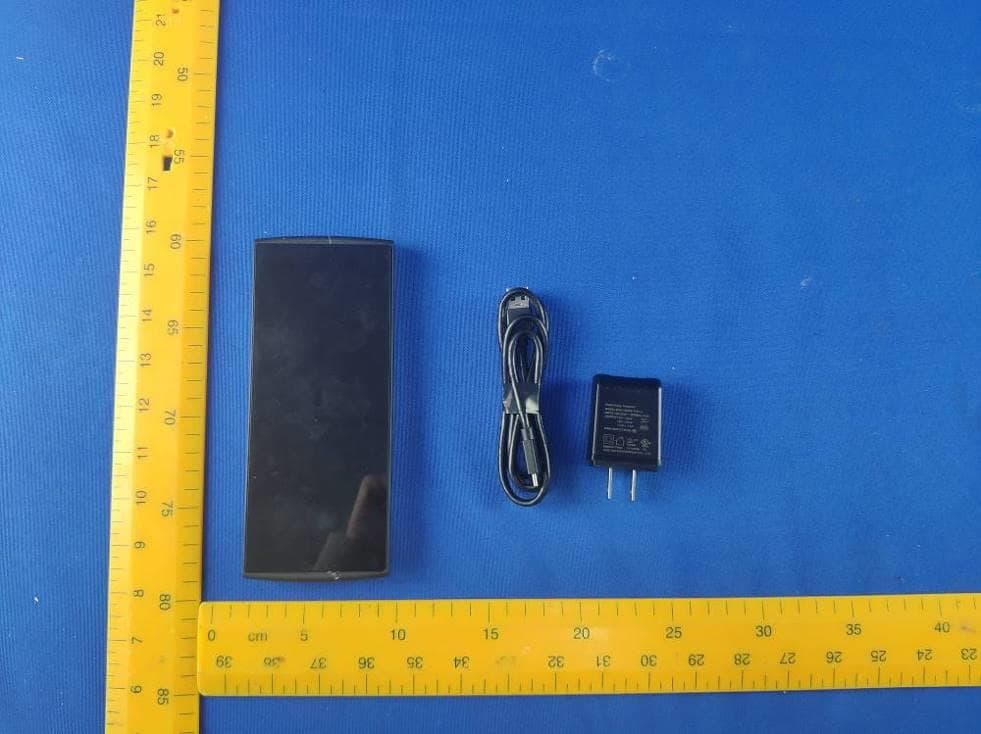
Click to zoom
Application Details
- Equipment Class
- NII - Unlicensed National Information Infrastructure TX
- Date of Grant
- Jan 19, 2020
- Application Purpose
- Original Equipment
- Date of Application
- Jan 14, 2020
- Equipment Note
- Mobile POS System
- Frequency Range
- 5745.00000000 - 5825.00000000
- Company
- NumberFour AG
- Country
- Germany
Documents & Files
Document Text
Text extracted from the exhibit documents filed with the FCC. Open a document above to read the original.
Users Manual
1 Mobile POS System Model: HVN:ED100, HVN:MD44014 2 Directions Meanings of icons: Forbidding: f orbid improper operations to avoid damaging the device. Caution: cautions f or operators to avoid potential damages. Please note and remember. Importance: important inf ormation, common notes, definitions, general knowledge and ref erences, etc. Other trademarks and trade name may be used in this manual to ref er to either the entities claiming the marks and names or their products. The manuf acture disclaims any proprietary interest in trademarks and trade names other than its own. Inf ormation in this manual is subject to change without notice. Reproduction in any manner whatsoever without the written permission from the manufacture is strictly forbidden. 3 Product images in this manual are for your reference only. Contents Directions ......................................................................... 2 Safety Precautions .......................................................... 5 1 Know Your Device........................................................ 7 2 Connect the Power Adapter ........................................ 9 3 Turn on the Device ..................................................... 10 4 Get to Know Your System ......................................... 11 4-1 Add screen shortcuts ............Error! Bookmark not defined. 4-2 Delete screen shortcuts/widgetsError! Bookmark not defined. 4-3 On-screen Keyboard .............Error! Bookmark not defined. 5 Settings ....................................................................... 12 5-1 Networks & internet ....................................................... 12 5-2 Connected devices ........................................................ 15 4 5-3 Apps & Notifications ...................................................... 21 5-4 Battery ........................................................................... 21 5-5 Display .......................................................................... 21 5-6 Storage .......................................................................... 22 5-7 Security & location ........................................................ 22 5-8 Accounts........................................................................ 22 5-9 Accessibility .................................................................. 22 5-10 System ........................................................................ 22 6 Camera ................................ Error! Bookmark not defined. 7 SCANDIT ............................. Error! Bookmark not defined. 8 Troubleshooting ......................................................... 19 9 Specifications ............................................................. 22 10 FCC Statements ....................................................... 34 5 Safety Precautions 1. DO NOT press the LCD Screen. DO NOT place the device with small items, they may scratch LCD Screen. 2. DO NOT expose the device to dirty or dusty environment. Keep the environment clean and dry. 3. DO NOT place the device on uneven or unstable work surf ace. 4. DO NOT place or drop objects on the top of the device. DO NOT shove any f oreign objects into the device. DO NOT cover the LCD Screen strongly. 5. DO NOT expose the device to strong magnetic or electrical fields; DO NOT place the floppy disk near or on the device, that may loss the data of the floppy disk. 6. DO NOT leave the device f acing the sun as it can damage the LCD Screen, especially in the car. 7. DO NOT expose the device to or use near liquids, rain, or moisture. Caution: Risk of explosion if battery is replaced by an incorrect type. Dispose of used batteries according to the instructions. 8. DO NOT throw the device in municipal waste. Check local regulations f or disposal of electronic products. 9. The device and the Adapter may occur some heat during operating or charging. DO NOT leave the device on your lap or any part of the body in order to prevent discomf ort or injury from heat exposure. 10. INPUT RATING: Ref er to the rating label on the device and be sure that the Power Adapter complies with the rating. Only use attachments or accessories specified by the manuf acturer. 11. Checking the connections between the main unit and attachments bef ore turning on the device. 6 12. DO NOT use the device during eating f ood avoid dirtying the device. 13. DO NOT insert anything into the device that may result in short circuit or damage the circuit. 14. Power off the device, if you want install or remove some external devices which are not support hot-plug. 15. Disconnect the device from the electrical outlet and remove any installed batteries bef ore cleaning. And Keep it away from children. 16. DO NOT disassemble the device, only a certified service technician should perf orm repairs on your device. Otherwise, problem may result and the manuf acturer should not hold responsibility for the damage. 17. T he device has some little metal flake to disperse heat. DO NOT place the device on soft objects (e.g.: bed, sof a, your lap), or else the device may become hot and halt the system operation. 18. The socket-outlet shall be installed near the equipment and shall be easily accessible. 19. If an equipment is provided with a replaceable battery, and if replacement by an incorrect type could result in an explosion (f or example, with some lithium batteries). 7 1 Know Your Device Back Panel 8 Front Panel 9 2 Connect the Power Adapter The device comes with a universal AC-DC adapter and the allowable input voltage of adapter is from 100V to 240V. The connection between T ablet and AC adapter is illustrated in below picture: Your device and the accessories may differ from the pictures shown above. The socket-outlet shall be installed near the equipment and shall be easily accessible. Use only the AC adapters, power cords and batteries that are approved for use with this device. Use of another type of battery or AC adapter m ay cause fire or e…
Text truncated - open the document above for the full version.
Cover Letter(s)
NumberFour AG Schoenhauser Allee 8,10119 Berlin, Germany Date: December 20, 2019 Difference of Declaration To whom it may concern, We, the undersigned MEDION AG , hereby declare the difference between Model: HVN: MD44014 and Model: HVN: ED100 are as below: The schematic and structure of each model is same, the only difference is the model name and trademark , but it will not affect the test result. If you have any question regarding the authorization, please don’t hesitate to contact us. Thank you! Sincerely yours, _________________________________ Name: Bernd. Scheibe Company name: NumberFour AG Tel.: +49 175 5920250 E-mail: [email protected]
Cover Letter(s)
NumberFour AG Date (25/11/2019) TUV SUD BABT TCB Octagon House, Segensworth Road, Fareham, Hampshire, PO15 5RL Confidentiality Request FCC ID: 2ANTM-MD44014 Pursuant to Sections 0.457(d)(1)(ii) and 0.459 of the Commission’s Rules, NumberFour AG hereby requests permanent confidential treatment of information accompanying this application as outlined below: Schematics Bill of Materials/Parts List Block Diagrams Theory of Operation] NumberFour AG also hereby requests short-term confidential treatment of information accompanying this application as outlined below for a period of 180 days: Internal Photos External Photos User Manual Test Set-up Photographs The above materials contain trade secrets and proprietary information not customarily released to the public. The public disclosure of these matters might be harmful to the Applicant and provide unjustified benefits to its competitors. The Applicant understands that pursuant to Rule 0.457(d)(1)(ii), disclosure of this Application and all accompanying materials will not be made before the date of the Grant for this Application. Yours sincerely, Company Officer: Bernd Scheibe Telephone Number: +49 175 5920250 Email: [email protected]
Cover Letter(s)
NumberFour AG 5G Wi-Fi Declaration Letter Federal Communications Commission 2019-11-25 Oakland Mills Road Columbia MD 21046 Model:HVN: ED100, HVN: MD44014 FCC ID: 2ANTM-MD44014 Subject: Software security requirements for U-NII device. The information within this section of the Operational Description is to show compliance against the Software Security Requirements laid out within KDB 594280 D02 U-NII Device Security v01r03. General Description 1. Describe how any software/firmware update will be obtained, downloaded, and installed. Software that is accessed through manufacturer’s website or device’s management system, must describe the different levels of security. The software/firmware will be obtained by the factory for production. The updates will not be obtained by the distributor. The software/firmware is a compiled binary, not readable, and no parameters can be changed after the file has been created. The upgrade program verifies the checksum of the binary and installs only if it's a valid one. The upgrade process proceeds automatically once user accepts to update and install. 2. Describe all the radio frequency parameters that are modified by any software/firmware without any hardware changes. Are these parameters in some way limited, such that, it will not exceed the authorized parameters? RF Parameters are determined by the binary image. The user cannot modify RF parameters. 3. Describe in detail the authentication protocols that are in place to ensure that the source of the software/firmware is legitimate. Describe in detail how the software is protected against modification. Checksum is used to verify the software/firmware is valid. 4. Describe in detail the verification protocols in place to ensure that installed software/firmware is legitimate. SFTP for image transmission NumberFour AG 5G Wi-Fi Declaration Letter 5. For a device that can be configured as a master and client (with active or passive scanning), explain how the device ensures compliance for each mode? In particular if the device acts as master in some band of operation and client in another; how is compliance ensured in each band of operation? Our device has two radios, one for 2.4G band and another for 5G band. When client mode is enabled, the working band also must be selected, and the master mode working on that band will be disabled automatically. When each mode is selected, the wireless driver will be configured with specific settings for selected mode to let it work in that mode 3rd Party Access Control 1. Explain if any third parties have the capability to operate a U.S.-sold device on any other regulatory domain, frequencies, or in any manner that may allow the device to operate in violation of the device’s authorization if activated in the U.S. No third parties have the capability to operate this device on any regulatory domain frequencies, or in any manner that may allow the device to operate in violation of the device’s authorization if activated in the United States 2. Describe, if the device permits third-party software or firmware installation, what mechanisms are provided by the manufacturer to permit integration of such functions while ensuring that the RF parameters of the device cannot be operated outside its authorization for operation in the U.S. In the description include what controls and/or agreements are in place with providers of third-party functionality to ensure the devices’ underlying RF parameters are unchanged and how the manufacturer verifies the functionality. Third-party software installation is not permitted on the device. 3. For Certified Transmitter modular devices, describe how the module grantee ensures that hosts manufactures fully comply with these software security requirements for U-NII devices. If the module is controlled through driver software loaded in the host, describe how the drivers are controlled and managed such that the modular transmitter parameters are not modified outside the grant of authorization. This is not modular devices. SOFTWARE CONFIGURATION DESCRIPTION 1. To whom is the UI accessible? (Professional installer, end user, other.) None of the mentioned parameters are viewable, thus not configurable (frequency of operation, power settings, antenna types, DFS settings, receiver thresholds, or country code settings. NumberFour AG 5G Wi-Fi Declaration Letter a) What parameters are viewable to the professional installer/end-user? No parameters are accessible or modifiable by any parties. b) What parameters are accessible or modifiable to the professional installer? No parameters are accessible or modifiable by professional installers or system integrators. i) Are the parameters in some way limited, so that the installers will not enter parameters that exceed those authorized? None of the mentioned parameters are adjustable or viewable. ii) What controls exist that the user cannot operate the device outside its authorization in the U.S.? None of the mentioned parameters are adjustable or viewable, thus not configurable. c) What configuration options are available to the end-user? None of the mentioned parameters are adjustable or viewable, thus not configurable (frequency of operation, power settings, antenna types, DFS settings, receiver thresholds, or country code settings). i) Are the parameters in some way limited, so that the installers will not enter parameters that exceed those authorized? Yes ii) What controls exist that the user cannot operate the device outside its authorization in the U.S.? None of the mentioned parameters are adjustable or viewable, thus not configurable (frequency of operation, power settings, antenna types, DFS settings, receiver thresholds, or country code settings ). d) Is the country code factory set? Can it be changed in the UI? Yes. It cannot be changed in UI. i) If so, what controls exist to ensure that the device can only operatewithin its authorization in the U.S.? None of the mentioned parameters are adjustable or vi…
Text truncated - open the document above for the full version.
ID Label/Location Info
Under the engineering mode, you can click the icon as below and enter the menus to find the FCC regulations.
Internal Photos
WCDMA/LTE Antenna Dviversity Antenna NFC Antenna
RF Exposure Info
CTC Laboratories, Inc. 2/F., Building 1 and 1-2/F., Building 2, Jiaquan Building, Guanlan High-Tech Park, Longhua District, Shenzhen, Guangdong, China Tel: +86-755- 27521059 Fax: +86-755- 27521011 Http://www.sz-ctc.com.cn TEST REPORT Report Reference No. .................... : GTI20191834E FCC ID ............................................. : 2ANTM-MD44014 Applicant’s name ........................... : NumberFour AG Address ............................................. : Schoenhauser Allee 8, 10119 Berlin, Germany Manufacturer......................................: NumberFour AG Address..............................................: Schoenhauser Allee 8, 10119 Berlin, Germany Test item description..................... : Mobile POS System Trade Mark ....................................... : - Model/Type reference ....................... : HVN:ED100 Listed Model(s) ................................. : HVN:MD44014 Standard ......................................... : FCC 47 CFR Part2.1093 IEEE 1528: 2013 ANSI/IEEE C95.1: 2005 Date of receipt of test sample..........: Aug.17, 2019 Date of testing..............................: Aug.17, 2019 to Aug.30, 2019 Date of issue...............................: Sept. 02, 2019 Result .................. ........................: PASS Compiled by ( position+printedname+signature) ... : Charley Wu Supervised by ( position+printedname+signature) ... : Eric Zhang Approved by ( position+printedname+signature) ... : Walter Chen Testing Laboratory Name ............. : CTC Laboratories,Inc. Address ............................................. : 2/F., Building 1 and 1-2/F., Building 2, Jiaquan Building, Guanlan High-Tech Park, Longhua District, Shenzhen, Guangdong, China CTC Laboratories,Inc. All rights reserved. This test report may be duplicated completely for legal use with the approval of the applicant.It should not be reproduced except in full, without the written approval of our laboratory. The client should not use it to claim product endorsement by CTC. The test results in the report only apply to the tested sample. The test report shall be invalid without all the signatures of testing engineers, reviewer and approver. Any objections must be raised to CTC within 15 days since the date when the report is received.It will not be taken into consideration beyond this limit. The test report merely correspond to the test sample. Page 2 of 88 Report No. GTI20191834E CTC Laboratories,Inc.. 2/F., Building 1 and 1-2/F., Building 2, Jiaquan Building, Guanlan High-Tech Park, Longhua District, Shenzhen, Guangdong, China Tel.: (86)755-27521059 Fax: (86)755-27521011 Http://www.sz-ctc.org.cn For anti-fake verification, please visit the official website of Certification and Accreditation Administration of the People’s Republic of China : yz.cnca.cn Contents 1. Test Standards and Report version 3 1.1. Test Standards 3 1.2. Report version 3 2. Summary 4 2.1. Client Information 4 2.2. Product Description 4 3. Test Environment 6 3.1. Test laboratory 6 3.2. Test Facility 6 4. Equipments Used during the Test 7 5. Measurement Uncertainty 8 6. SAR Measurements System Configuration 10 6.1. SAR Measurement Set-up 10 6.2. DASY5 E-field Probe System 11 6.3. Phantoms 12 6.4. Device Holder 12 7. SAR Test Procedure 13 7.1. Scanning Procedure 13 7.2. Data Storage and Evaluation 15 8. Position of the wireless device in relation to the phantom 17 8.1. Head Position 17 8.2. Body Position 18 8.3. Hotspot Mode Exposure conditions 18 9. System Check 19 9.1. Tissue Dielectric Parameters 19 9.2. SAR System Check 21 10. SAR Exposure Limits 31 11. Conducted Power Measurement Results 32 12. Maximum Tune-up Limit 53 13. Antenna Location 62 14. SAR Measurement Results 63 15. Simultaneous Transmission analysis 84 16. TestSetup Photos 88 17. External and Internal Photos of the EUT 88 Page 3 of 88 Report No. GTI20191834E CTC Laboratories,Inc.. 2/F., Building 1 and 1-2/F., Building 2, Jiaquan Building, Guanlan High-Tech Park, Longhua District, Shenzhen, Guangdong, China Tel.: (86)755-27521059 Fax: (86)755-27521011 Http://www.sz-ctc.org.cn For anti-fake verification, please visit the official website of Certification and Accreditation Administration of the People’s Republic of China : yz.cnca.cn 1. Test Standards and Report version 1.1. Test Standards The tests were performed according to following standards: FCC 47 Part 2.1093 Radiofrequency Radiation Exposure Evaluation:Portable Devices IEEE Std C95.1, 2005: IEEE Standard for Safety Levels with Respect to Human Exposure to Radio Frequency Electromagnetic Fields, 3 KHz to 300 GHz. IEEE Std 1528™-2013: IEEE Recommended Practice for Determining the Peak Spatial-Average Specific Absorption Rate (SAR) in the Human Head from Wireless Communications Devices: Measurement Techniques. KDB 865664 D01 SAR Measurement 100 MHz to 6 GHz v01r04: SAR Measurement Requirements for 100 MHz to 6 GHz KDB 865664 D02 RF Exposure Reporting v01r02: RF Exposure Compliance Reporting and Documentation Considerations KDB 447498 D01 General RF Exposure Guidance v06: Mobile and Portable Device RF Exposure Procedures and Equipment Authorization Policies KDB 248227 D01 802 11 Wi-Fi SAR v02r02: SAR Measurement Proceduresfor802.11 a/b/g Transmitters KDB 648474 D04 Handset SAR v01r03: SAR Evaluation Considerations for Wireless Handsets KDB 941225 D01 3G SAR Procedures v03r01: SAR Measurement Procedures for 3G Devices KDB 941225 D06 Hotspot Mode v02r01: SAR Evaluation Procedures for Portable Devices with Wireless Router Capabilities KDB 941225 D07 UMPC Mini Tablet v01r02: SAR Evaluation Procedures for UMPC Mini-tablet Devices. Report version KDB 941225 D05 SAR for LTE Devices v02r05: SAR Evaluation Considerations for LTE Devices 1.2. Report version Revision No. Date of issue Description N/A 2019-09-02 Original Page 4 of 88 Report No. GTI20191834E CTC Laboratories,Inc.. 2/F., Building 1 and 1-2/F., Building 2, Jiaquan Building, Guanlan High-Tech Park, Longhua District, Shenzhen, Guangdong, C…
Text truncated - open the document above for the full version.
RF Exposure Info
Appendix A: DAE & Probe & Dipole Calibration Certificate 1 of 68 1.1. DAE4 Calibration Certificate Appendix A: DAE & Probe & Dipole Calibration Certificate 2 of 68 Appendix A: DAE & Probe & Dipole Calibration Certificate 3 of 68 Appendix A: DAE & Probe & Dipole Calibration Certificate 4 of 68 1.2. Probe Calibration Certificate Appendix A: DAE & Probe & Dipole Calibration Certificate 5 of 68 Appendix A: DAE & Probe & Dipole Calibration Certificate 6 of 68 Appendix A: DAE & Probe & Dipole Calibration Certificate 7 of 68 Appendix A: DAE & Probe & Dipole Calibration Certificate 8 of 68 Appendix A: DAE & Probe & Dipole Calibration Certificate 9 of 68 Appendix A: DAE & Probe & Dipole Calibration Certificate 10 of 68 Appendix A: DAE & Probe & Dipole Calibration Certificate 11 of 68 Appendix A: DAE & Probe & Dipole Calibration Certificate 12 of 68 Appendix A: DAE & Probe & Dipole Calibration Certificate 13 of 68 Appendix A: DAE & Probe & Dipole Calibration Certificate 14 of 68 Appendix A: DAE & Probe & Dipole Calibration Certificate 15 of 68 1.3. D750V3 Dipole Calibration Certificate Appendix A: DAE & Probe & Dipole Calibration Certificate 16 of 68 Appendix A: DAE & Probe & Dipole Calibration Certificate 17 of 68 Appendix A: DAE & Probe & Dipole Calibration Certificate 18 of 68 Appendix A: DAE & Probe & Dipole Calibration Certificate 19 of 68
RF Exposure Info
Appendix A: DAE & Probe & Dipole Calibration Certificate 20 of 68 Appendix A: DAE & Probe & Dipole Calibration Certificate 21 of 68 Appendix A: DAE & Probe & Dipole Calibration Certificate 22 of 68 Appendix A: DAE & Probe & Dipole Calibration Certificate 23 of 68 1.4. D1750V2 Dipole Calibration Certificate Appendix A: DAE & Probe & Dipole Calibration Certificate 24 of 68 Appendix A: DAE & Probe & Dipole Calibration Certificate 25 of 68 Appendix A: DAE & Probe & Dipole Calibration Certificate 26 of 68 Appendix A: DAE & Probe & Dipole Calibration Certificate 27 of 68 Appendix A: DAE & Probe & Dipole Calibration Certificate 28 of 68 Appendix A: DAE & Probe & Dipole Calibration Certificate 29 of 68 Appendix A: DAE & Probe & Dipole Calibration Certificate 30 of 68 Appendix A: DAE & Probe & Dipole Calibration Certificate 31 of 68 1.5. D1900V2 Dipole Calibration Certificate Appendix A: DAE & Probe & Dipole Calibration Certificate 32 of 68 Appendix A: DAE & Probe & Dipole Calibration Certificate 33 of 68 Appendix A: DAE & Probe & Dipole Calibration Certificate 34 of 68 Appendix A: DAE & Probe & Dipole Calibration Certificate 35 of 68 Appendix A: DAE & Probe & Dipole Calibration Certificate 36 of 68 Appendix A: DAE & Probe & Dipole Calibration Certificate 37 of 68 Appendix A: DAE & Probe & Dipole Calibration Certificate 38 of 68 Appendix A: DAE & Probe & Dipole Calibration Certificate 39 of 68 1.6. D2450V2 Dipole Calibration Certificate Appendix A: DAE & Probe & Dipole Calibration Certificate 40 of 68 Appendix A: DAE & Probe & Dipole Calibration Certificate 41 of 68
RF Exposure Info
Appendix A: DAE & Probe & Dipole Calibration Certificate 42 of 68 Appendix A: DAE & Probe & Dipole Calibration Certificate 43 of 68 Appendix A: DAE & Probe & Dipole Calibration Certificate 44 of 68 Appendix A: DAE & Probe & Dipole Calibration Certificate 45 of 68 Appendix A: DAE & Probe & Dipole Calibration Certificate 46 of 68 Appendix A: DAE & Probe & Dipole Calibration Certificate 47 of 68 1.7. D2600V2 Dipole Calibration Certificate Appendix A: DAE & Probe & Dipole Calibration Certificate 48 of 68 Appendix A: DAE & Probe & Dipole Calibration Certificate 49 of 68 Appendix A: DAE & Probe & Dipole Calibration Certificate 50 of 68 Appendix A: DAE & Probe & Dipole Calibration Certificate 51 of 68 Appendix A: DAE & Probe & Dipole Calibration Certificate 52 of 68 Appendix A: DAE & Probe & Dipole Calibration Certificate 53 of 68 Appendix A: DAE & Probe & Dipole Calibration Certificate 54 of 68 Appendix A: DAE & Probe & Dipole Calibration Certificate 55 of 68 1.8. sD5GHzV2 Dipole Calibration Certificate Appendix A: DAE & Probe & Dipole Calibration Certificate 56 of 68 Appendix A: DAE & Probe & Dipole Calibration Certificate 57 of 68 Appendix A: DAE & Probe & Dipole Calibration Certificate 58 of 68 Appendix A: DAE & Probe & Dipole Calibration Certificate 59 of 68 Appendix A: DAE & Probe & Dipole Calibration Certificate 60 of 68 Appendix A: DAE & Probe & Dipole Calibration Certificate 61 of 68 Appendix A: DAE & Probe & Dipole Calibration Certificate 62 of 68 Appendix A: DAE & Probe & Dipole Calibration Certificate 63 of 68 Appendix A: DAE & Probe & Dipole Calibration Certificate 64 of 68 Appendix A: DAE & Probe & Dipole Calibration Certificate 65 of 68 Appendix A: DAE & Probe & Dipole Calibration Certificate 66 of 68 Appendix A: DAE & Probe & Dipole Calibration Certificate 67 of 68 Appendix A: DAE & Probe & Dipole Calibration Certificate 68 of 68
Test Report
Report Number: 68.950.19.2758.01 EMC_SZ_FR_24.00 FCC Release 2017-06-13 TÜV SÜD Certification and Testing (China) Co., Ltd. Shenzhen Branch Building 12&13, Zhiheng W isdomland Business Park, Nantou Checkpoint Road 2, Nanshan District, Shenzhen City, 518052, P. R. China Tel. +86 755 8828 6998, Fax: +86 755 8828 5299 Page 1 of 109 FCC - TEST REPORT Report Number : 68.950.19.2758.01 Date of Issue: Sept 9, 2019 Model : HVN: ED100, HVN: MD44014 Product Type : Mobile POS System Applicant : NumberFour AG Address : Schoenhauser Allee 8, 10119 Berlin, Germany Manufacturer : NumberFour AG Address : Schoenhauser Allee 8, 10119 Berlin, Germany Test Result : ◼ Positive Negative Total pages including Appendices : 109 TÜV SÜD Certification and Testing (China) Co., Ltd. Shenzhen Branch is a subcontractor to TÜV SÜD Product Service GmbH according to the principles outlined in ISO 17025. TÜV SÜD Certification and Testing (China) Co., Ltd. Shenzhen Branch reports apply only to the specific samples tested under stated test conditions. Construction of the actual test samples has been documented. It is the manufacturer's responsibility to assure that additional production units of this model are manufactured with identical electrical and mechanical components. The manufacturer/importer is responsible to the Competent Authorities in Europe for any modifications made to the production units which result in non-compliance to the relevant regulations. TÜV SÜD Certification and Testing (China) Co., Ltd. Shenzhen Branch shall have no liability for any deductions, inferences or generalizations drawn by the client or others from TÜV SÜD Certification and Testing (China) Co., Ltd. Shenzhen Branch issued reports. This report is the confidential property of the client. As a mutual protection to our clients, the public and ourselves, extracts from the test report shall not be reproduced except in full without our written approval. Report Number: 68.950.19.2758.01 EMC_SZ_FR_24.00 FCC Release 2017-06-13 TÜV SÜD Certification and Testing (China) Co., Ltd. Shenzhen Branch Building 12&13, Zhiheng W isdomland Business Park, Nantou Checkpoint Road 2, Nanshan District, Shenzhen City, 518052, P. R. China Tel. +86 755 8828 6998, Fax: +86 755 8828 5299 Page 2 of 109 1 Table of Contents 1 Table of Contents 2 2 Details about the Test Laboratory 3 3 Description of the Equipment Under Test 4 4 Summary of Test Standards 5 5 Summary of Test Results 6 6 General Remarks 7 7 Test setups 8 8 Systems test configuration 9 9 Technical Requirements 11 9.1 Conducted Emission AC Power Port 11 9.2 Emission bandwidth 14 9.3 Maximum Conducted Output Power 20 9.4 Maximum Peak Power Spectral Density 23 9.5 Unwanted Emissions 26 9.6 Band Edge 77 9.7 Duty Cycle 95 9.8 Frequency Stability 97 9.9 Dynamic Frequency Selection (DFS) 102 10 Test Equipment List 108 11 System Measurement Uncertainty 109 Report Number: 68.950.19.2758.01 EMC_SZ_FR_24.00 FCC Release 2017-06-13 TÜV SÜD Certification and Testing (China) Co., Ltd. Shenzhen Branch Building 12&13, Zhiheng W isdomland Business Park, Nantou Checkpoint Road 2, Nanshan District, Shenzhen City, 518052, P. R. China Tel. +86 755 8828 6998, Fax: +86 755 8828 5299 Page 3 of 109 2 Details about the Test Laboratory Details about the Test Laboratory Test Site 1 Company name: TÜV SÜD Certification and Testing (China) Co., Ltd. Shenzhen Branch Building 12&13, Zhiheng Wisdomland Business Park, Nantou Checkpoint Road 2, Nanshan District, Shenzhen City, 518052, P. R. China FCC Designation Number: CN5009 FCC Registration Number: 514049 Telephone: 86 755 8828 6998 Fax: 86 755 8828 5299 Report Number: 68.950.19.2758.01 EMC_SZ_FR_24.00 FCC Release 2017-06-13 TÜV SÜD Certification and Testing (China) Co., Ltd. Shenzhen Branch Building 12&13, Zhiheng W isdomland Business Park, Nantou Checkpoint Road 2, Nanshan District, Shenzhen City, 518052, P. R. China Tel. +86 755 8828 6998, Fax: +86 755 8828 5299 Page 4 of 109 3 Description of the Equipment Under Test Product: Mobile POS System Model no.: HVN: ED100, HVN: MD44014 FCC ID: 2ANTM-MD44014 Options and accessories: Charger and power Cable Rating: 3.85VDC, 2810mAh, (Supplied by Rechargeable Li-ion Battery) or 5VDC (Supplied by external adapter for Charging rechargeable battery) Adapter information: Model: DSA-18QFB FUS A Input:100-240VAC 50/60Hz, 0.8A, Output:5VDC,3A or 9V 2A or 12V 1.5A Manufacturer: Dee Van Enterprise Co., Ltd RF Transmission Frequency: 13.56MHz for NFC 2402MHz-2480MHz for Bluetooth 2412MHz-2462MHz for 802.11b/g/n20/n40 (WIFI) 5150-5350, 5470-5825MHz for 802.11a/n20/n40/ac20/ac40/ac80 (WIFI) No. of Operated Channel: 1 for NFC 79 for Bluetooth 11 for 802.11b/g/n20/n40 (WIFI) 43 for for 802.11a/n20/n40/ac20/ac40/ac80 (WIFI) Modulation: ASK for NFC GFSK, π/4-DQPSK, 8DPSK for Bluetooth DSSS, OFDM for WIFI Antenna Type: FPC antenna Antenna Gain: 1.2dBi max for 2.4GHz 2.0dBi max for 5GHz Description of the EUT: The Equipment Under Test (EUT) is a Mobile POS System which support WIFI at 2.4GHz and 5GHz, Bluetooth function operated at 2.4GHz Report Number: 68.950.19.2758.01 EMC_SZ_FR_24.00 FCC Release 2017-06-13 TÜV SÜD Certification and Testing (Ch…
Text truncated - open the document above for the full version.
Contact Information
Applicant
Bernd Scheibe(Vice President Hardware)
Test Firm
TUV SUD Cert & Testing (China) Co., Ltd.Harry Zhou
[email protected]86 755 3332 3281
Technical Specifications
| # | Rule Parts | Frequency Range | Power Output |
|---|---|---|---|
| 4 | 15E | 5.75 GHz - 5.83 GHz | 22.90 mW |