2AOIA-M1-WBLRobot Vacuum cleaner
Zhuhai Kaihao Electronics Co., Ltd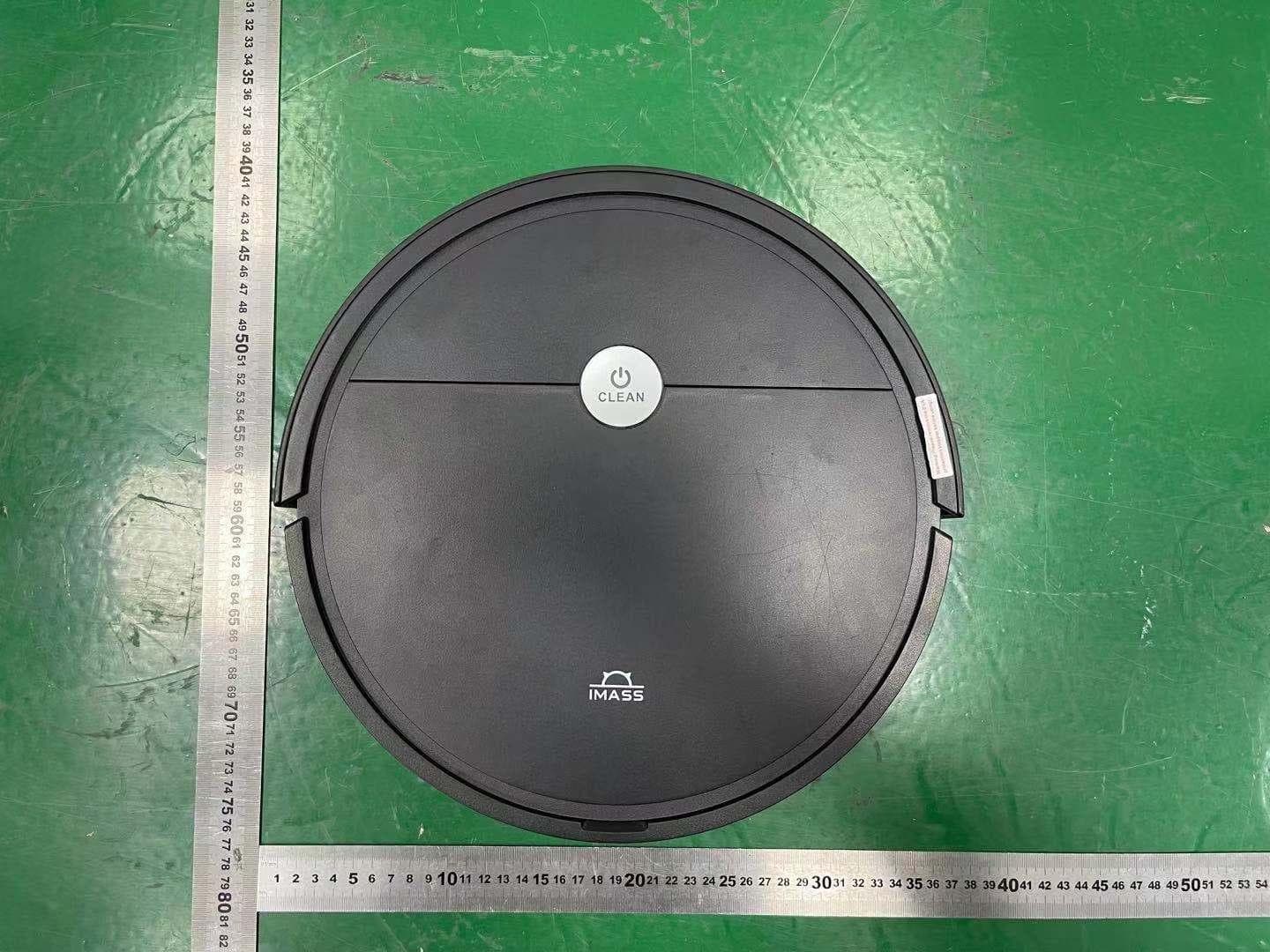
Click to zoom
Application Details
- Equipment Class
- DTS - Digital Transmission System
- Date of Grant
- Dec 14, 2022
- Application Purpose
- Original Equipment
- Date of Application
- Dec 14, 2022
- Equipment Note
- Robot Vacuum cleaner
- Frequency Range
- 2412.00000000 - 2462.00000000
- Country
- China
Documents & Files
Document Text
Text extracted from the exhibit documents filed with the FCC. Open a document above to read the original.
Users Manual
Robot Vacuum Cleaner Instruction Manual - M1 Series - Thank you for choosing our product Please read this instruction carefully before use CLEAN SO EXCELLENT CLEAN 01 02 (For the models with Charging dock only ) CLEAN C L E A N 007 009 011 012 013 APP instruction Turn off the device if the device will remain unused for a long period, by shut off the power switch which on the right side of the machine. Shut Shut robot use Check the adapter and plug are correctly connected before each use. overpass CLEAN Shock absorber Start / Pause Lid Dustbin & water tank On / Off Charging contact pin Wheel steering lateral brush (Right side lateral brush (Left side Battery cover Left wheel Right wheel Dust intake Base housing Mop wipes set (Optional) 65 mm 74 mm Power switch Charging contact pins Power indicator light Charging Dock (Optional) Remote Controller On/Off Forward Left Wi-Fi (Optional) Max Power Wall follow (Edge) Mode Recharge (Optional) Start / Pause Right Mini Room Mode Spot Cleaning Mode Lid Dustbin & Water tank Direct Charge plug in Power Switch Dustbin & Water Tank ( All-in-1) Water Inlet Air Filter HEPA Filter 0708 [ ON / PAUSE / OFF ] [ SLEEP MODE ] [ Remote control operation ] 1) Turn the robot’s Side Power Switch to the ON position, Robot will standby 2) Press the Clean Button on Robot or the START/STOP Button on the Remote Control. Robot starts to work immediately in AUTO Cleaning Mode.( Z-type cleaning as default) 3) Pause the Robot by press the Clean Button on Robot or the START/STOP Button on the Remote Control. (Robot will standby and save battery power) 4) If Robot not in use & not on the Charging Dock / not In Charging, it will goes to sleep mode, and it will have voice alert when battery power lower than 20%, to avoid any disturbing casued by that, please trun off the Robot when it is not in use for a long time. Sleep Mode means Robot under sleep, the Clean Button on the robot does not flash and buttons on the Remote Control are disabled. A) If Robot is Paused for more than 60 seconds it goes to sleep to save battery power B) press the Power Button on the Remote Control twice, Robot goes to sleep. Note: Before cleaning, please make sure the Robot is awake, and the Clean Button is in Green light. If Robot is not waken up, press Clean Buttuon on the Robot or “ ” Power Button on the remote control to wake it up. Please use 2 pcs AAA R03 batteries in the romote control, and turn the robot’s Power Switch to the ON position. 1) Press Power Button, Robot is waken up and standby, press the Power Button again, Robot under sleep mode. 2) Press Recharge Button, Robot return to the Charging Dock & recharge itself automatic, “Clean” Button on the Robot keep flashing. ( For the modeles with charging dock only) 3) Press Start/Pause Button to start cleaning, press again, Robot Stopped/Paused. 4) Forward, Left, Right, move the Robot to the setting direction. 5) Wi-Fi Button: ( For theWi-Fi models only) after turn on the Robot, press this button over 3 seconds after “DingDingDong” bell: Initialization module Smart phone WIFI setting Search Robot WIFI : IMA - xxxx, linked, control the Robot via smart phone APP anywhere at anytime. 6) Press Max power Button, Robot will trun to max suction power mode. 7) Mini Room cleaning : This mode is applicable for a small area of concentrated dirt or dust. Robot run with 1 meter width zigzag smart move. 8) Spot cleaning: This mode is applicable for an area of highly concentrated dirt or dust. Robot run in a smaller Z-type cleaning mode. stops or resumes auto cleaning when it completes spot cleaning. 9) “ ” Edge cleaning: This mode is good for cleaning the edges and corners of a room. In Edge Cleaning Mode, Robot cleans along a border (e.g. wall). 5) Please DO NOT put anything betw een the charge dock and floor 6) U se the original adapter only, do not use other s. ,nottub ” naelC/ tratS “ eht ot rewsna ylno lliw toboR eht ,gniegrahc rednu toboR eht nehW :etoN ( any o ther button will no reac tion.) Indicator of “ Clean” button during Charging: Indicator of “ Clean” button [ Charing Dock installation] ( For the models with charging dock only) 0910 Mini room cleaning mode ( These functions control by remote controller) Maintenance Lid Dustbin Open the lid and take the dustbin out [ Cleaning the dustbin and the filter] A) Open the lid and take the dustbin out B) Take out the filters from dustbin --- Empty the dustbin --- Wash the dustbin by water --- Dry the dustbin C) Rinse the air filter and dry it up D) Patting / blowing the HEPA to clean it, or use a brush to clean Remark: 1) Switch off the robot before cleaning the robot 2) Check if there are objects in the suction intake, clean the objects if there are any 3) The filters lasts for 24 months, please clean the filters once or twice per month 4) Make sure that the dustbin and filters are completely dry before replacing them ( Note: Do not expose the filters to direct sunlight for extended their working-life) [ Cleaning the lateral brushes] A) Use a soft wipes to clean the lateral brushes B) If the brushes hair come out of shape or loose, please take the lateral brushes out and put the brushes hair into boiled water to refresh it C) Replace the lateral brushes if they are damaged and out of function Note: Before replacing the lateral brushes, check the L&R markings on the two lateral brushes, make sure they match the corresponding markings on the base housing Charging contacts Cliff sensors Charing contact pin Charing contact pin [ Cleaning the cliff sensors and charging contacts] Use a soft dry cloth to gently clean the sensors’ window and the charging contacts. Note: Do not use water or liquid to clean the sensors or charging contacts. Note: for the models with GYRO navigation function only 1112 Specificatinos Trouble shootingSpecifications and packing list 11.1 V 15 W Li-ion 2000 mAh 15 V 0.8 A Remote controller 1 pcs ( For auto recharge function models only) 04 05 06 07 Shock absorber sensors erro (Red l…
Text truncated - open the document above for the full version.
Attestation Statements
Modeldifferencedeclarationletter DifferencesDescription WeZhuhaiKaihaoElectronicsCo.,Ltdstate: Product: RobotVacuumcleaner ModelName : M1-WBL,M1-BBL,M1-BWT,M1-GBL,M1-GWT,M1-WWT, M2-BBL,M2-BWT,M2-GBL,M2-GWT,M2-WBL, M2-WWT,M3-BBL,M3-BWT,M3-GBL,M3-GWT, M3-WBL,M3-WWT,M6-BBL,M6-BWT,M6-GBL, M6-GWT,M6-WBL,M6-WWT,M1(2\3\4\5\6)-ECO, M1(2\3\4\5\6)-GRO,M1(2\3\4\5\6)-SMT Theaboveproductwithsamecircuit,PCBlayout,electricalparts,materialsandwiring structures,thematerialsofdecorativeaccessoriesissame,Fortheproductappearance difference,thesizeisthesame,butthecoloroftheproductisdifferent Signatory Date:12-09-2022 Name:AIiceWangDate:Dec,2022 Title:Manager Signatureofapplicant:
Cover Letter(s)
C5266091_X8_Ed.1 1/1 ZhuhaiKaihaoElectronicsCo.,Ltd LetterofAuthorization Company:ZhuhaiKaihaoElectronicsCo.,Ltd Address:2ndFloor,BuildingC,No.3PinggongyiRoad,Zhuhai, Guangdong,China. ProductName:RobotVacuumcleaner ModelNumber:M1-WBL,M1-BBL,M1-BWT,M1-GBL,M1-GWT,M1-WWT,M2-BBL, M2-BWT,M2-GBL,M2-GWT,M2-WBL,M2-WWT,M3-BBL,M3-BWT,M3-GBL, M3-GWT,M3-WBL,M3-WWT,M6-BBL,M6-BWT,M6-GBL,M6-GWT,M6-WBL, M6-WWT,M1(2\3\4\5\6)-ECO,M1(2\3\4\5\6)-GRO,M1(2\3\4\5\6)-SMT FCCIdentifier:2AOIA-M1-WBL WeauthorizeLGAITechnologicalCenterS.A.,RondadelaFontdelCarme,s/n, 08193Bellaterra,Spain,toactonourbehalfonallmattersconcerningthe abovenamedequipment. AnyindividualwithinLGAITechnologicalCenterS.A.isauthorizedtoactonour behalfandtakeactionontheapplication. WedeclarethatauthorizeLGAITechnologicalCenterS.A.,RondadelaFontdel Carme,s/n,08193Bellaterra,Spain,isallowedtoforwardallinformation relatedtotheapprovalprojecttotheFederalCommunicationCommissionand todiscussanyissuesconcerningtheapprovalapplication.Anyandallacts carriedoutbyLGAITechnologicalCenterS.A.onourbehalfshallhavethe sameeffectasactsofourown. Name:AIiceWangDate:Dec9,2022 Title:Manager Signatureofapplicant:
Cover Letter(s)
C5266091_X10_Ed.2 1/1 ZhuhaiKaihaoElectronicsCo.,Ltd OfficeofEngineeringTechnology FederalCommunicationsCommission 7435OaklandMillsRoad Columbia,MD21046 Date:Dec9,2022 Subject:RequestforConfidentiality FCCID:2AOIA-M1-WBL ToWhomItMayConcern, PursuanttotheprovisionsofSections0.457and0.459ofCommission'srules (47CFR0.457,0.459),wearerequestingtheCommissiontowithholdthefollowing attachment(s)asconfidentialdocumentfrompublicdisclosure. ExhibitsLong-Term Confidentiality Short-Term Confidentiality NOTE2 IDLabel/LocationNoNo AttestationStatementNoNo ExternalPhotosNo ☐ BlockDiagram ☒☐ Schematics ☒☐ TestReportNoNo TestSetupPhotosNo ☐ User’sManual ☐ NOTE 1 ☐ InternalPhotos ☐ NOTE 1 ☐ PartsList/TuneUp ☐☐ RFExposureInfoNoNo OperationalDescription ☒☐ CoverLetter(s)NoNo SDRSoftware/SecurityInfo ☐ No NOTE1:Long-TermConfidentialitymaybepermittedunderspecialconditions(SeeII.LONG-TERM CONFIDENTIALITY,Section3ofKDB726920,uselastinforce) NOTE2:Short-TermConfidentialitycanberequestedforamaximumof180daysfromthedateofthegrant. Abovementioneddocumentcontainsdetailedsystemandequipmentdescriptionare consideredasproprietaryinformationinoperationoftheequipment.Thepublic disclosureofabovedocumentsmightbeharmfultoourcompanyandwouldgive competitoranunfairadvantageinthemarket. Incaseofshort-termConfidentiality,theapplicantrequeststheexhibitsselected abovearewithheldfrompublicviewforaperiodof______daysfromthedateofthe GrantofEquipmentAuthorizationandpriortomarketing. C5266091_X10_Ed.2 1/1 Itisourunderstandingthatallmeasurementtestreports,FCCIDlabelformatand correspondentduringcertificationreviewprocesscannotbegrantedasconfidential documentsandthoseinformationwillbeavailableforpublicreviewoncethegrantof equipmentauthorizationisissued. Sincerely, Name:AIiceWangDate:Dec9,2022 Title:Manager Signatureofapplicant:
External Photos
Page1of3ReportNo.:FCS202108027 Externalphotos Photo1 Photo2 Page2of3ReportNo.:FCS202108027 Photo3 Photo4 Page3of3ReportNo.:FCS202108027 Photo5 Photo6
ID Label/Location Info
LabelandLabelLocation FCCID:2AOIA-M1-WBL
Internal Photos
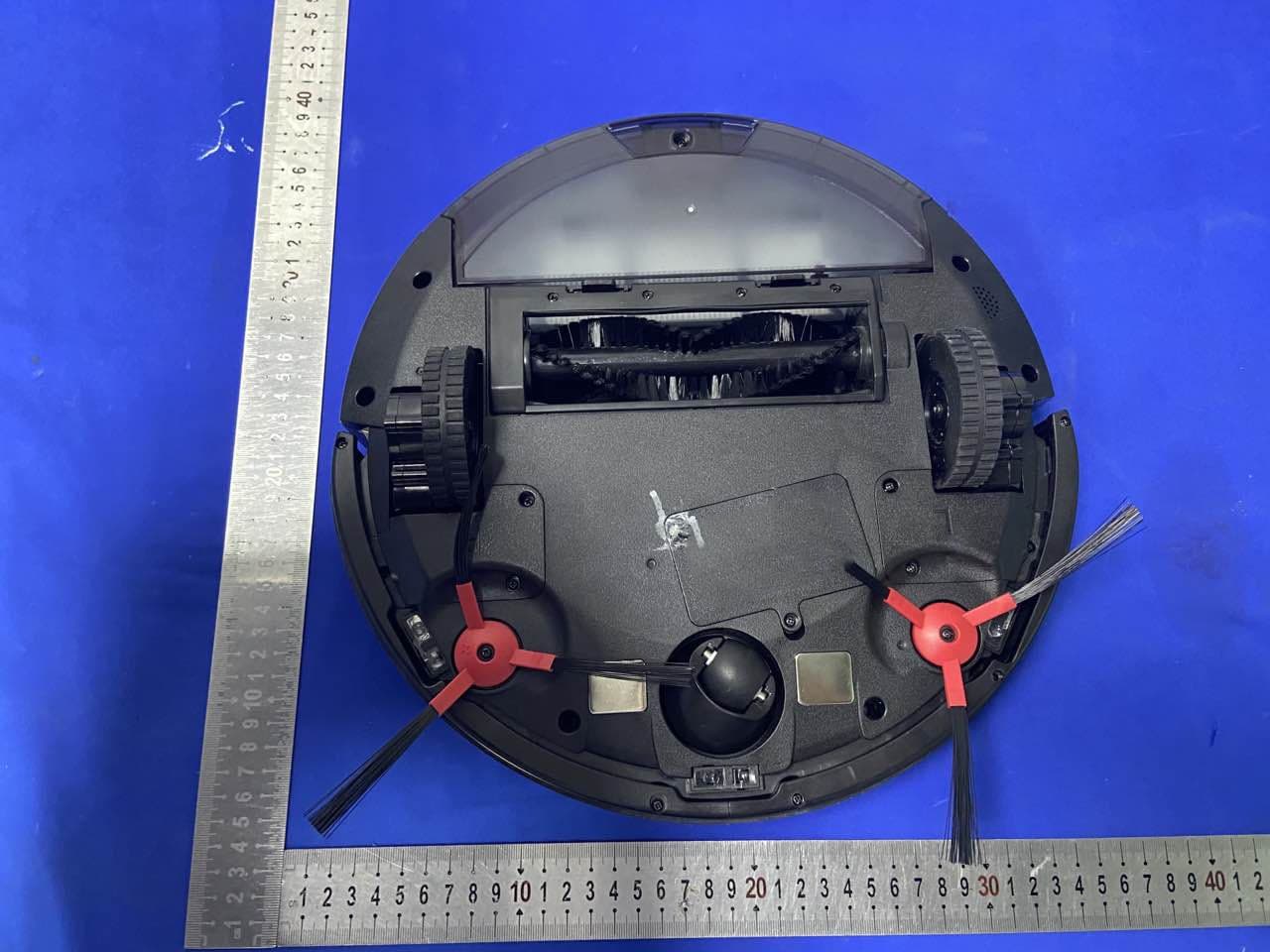
Page1of8ReportNo.:FCS202108027 Internalphotos Photo1 Photo2 Page2of8ReportNo.:FCS202108027 Photo3 Photo4 Page3of8ReportNo.:FCS202108027 Photo5 Photo6 Page4of8ReportNo.:FCS202108027 Photo7 Photo8 Page5of8ReportNo.:FCS202108027 Photo9 Photo10 Page6of8ReportNo.:FCS202108027 Photo11 Photo12 Page7of8ReportNo.:FCS202108027 Photo13 Photo14 Page8of8ReportNo.:FCS202108027 Photo15 PCBnatenna Photo16
RF Exposure Info
Page1of2ReportNo.:FCS202209074W01 FluxComplianceServiceLaboratory Room105FloorBaohaoTechnologyBuilding1NO.15GongyeWestRoadHi-TechIndustrial,SongshanlakeDongguan Tel:769-27280901Fax:769-27280901http://www.FCS-lab.com FCCRFExposure EUTDescription:RobotVacuumcleaner ModelNo.:M1-WBL FCCID:2AOIA-M1-WBL Equipmenttype:mobiledevice Testproceduresaccordingtothetechnicalstandards:KDB447498D01V06andFCC2.1091. 1.Limits Thecriterialistedinthefollowingtableshallbeusedtoevaluatetheenvironmentimpactof humanexposuretoradiofrequency(RF)radiationasspecifiedin1.1307(b) LimitsforMaximumPermissibleExposure(MPE) F=frequencyinMHz Formula:Pd=(Pout*G)/(4*π*r 2 ) Where: Pd=powerdensityinmW/cm 2 , Pout=outputpowertoantennainmW; G=gainofantennainlinearscale, π=3.14; R=distancebetweenobservationpointandcenteroftheradiatorincm PdidthelimitofMPE,1mW/cm2.Ifweknowthemaximumgainoftheantennaandthetotal powerinputtotheantenna,throughthecalculation,wewillknowthedistancerwheretheMPE limitisreached. 2.TestProcedure SoftwareprovidedbyclientenabledtheEUTtotransmitandreceivedataatlowest,middleand Page2of2ReportNo.:FCS202209074W01 FluxComplianceServiceLaboratory Room105FloorBaohaoTechnologyBuilding1NO.15GongyeWestRoadHi-TechIndustrial,SongshanlakeDongguan Tel:769-27280901Fax:769-27280901http://www.FCS-lab.com highestchannelindividually. 3.TestResultofRFExposureEvaluation Modulation Channel Freq. (MHz) Conduct edpower (dBm) Max tune-up power (mW) Antenna Gain (dBi) Antenna gainnumeric Evaluation result (mW/cm2) Power density Limits (mW/cm2) 802.11b 241211.2313.271.801.510.003981 243710.7811.971.801.510.003591 246210.7511.891.801.510.003571 802.11g 241210.9212.361.801.510.003711 243710.3310.791.801.510.003241 246210.6011.481.801.510.003451 802.11n 241210.8012.021.801.510.003611 243710.7011.751.801.510.003531 24629.899.751.801.510.002931 Conclusion:themaxresult:0.00398≤1.0compliancewithFCC'sRFExposure.
Test Report
Page 1 SHANGHAI DEMAN INFORMATION TECHNOLOGY CO.,LTD. MANUFACTURER: TUYA PRODUCT NAME:WBR3 ANTENNA ANTENNA TYPE:PCB WRITED: Long Wang DATE:20190520 VERSIONS:A Page 2 Measurement data Frequency (MHz) 240024502500 Return Loss-8.73-11.76-11.21 VSWR 2.161.711.77 Page 3 Antenna Size Test SetupAntenna Size Page 4 Directivity Diagram 2D YZ XY XZ Page 5 Freq.(MHz)Effi(%)Gain (dBi) 2400 52.29 1. 2 2410 52.17 1. 1 2420 53.14 1. 3 2430 54.16 1. 8 2440 57.62 . 2450 59.64 4 2460 61.55 .45 2470 60.64 . 2480 62.86 .54 2490 59.85 .30 2500 60.41 .49 Efficiency&Gain
Test Report
FCCTestReport ReportNo:FCS202108027W01 Issuedfor Applicant:ZhuhaiKaihaoElectronicsCo.,Ltd Address: 2ndFloor,BuildingC,No.3PinggongyiRoad,Zhuhai, Guangdong,China. ProductName: RobotVacuumcleaner BrandName: IMASS ModelName: M1-WBL SeriesModel: M1-BBL,M1-BWT,M1-GBL,M1-GWT,M1-WWT, M2-BBL,M2-BWT,M2-GBL,M2-GWT,M2-WBL, M2-WWT,M3-BBL,M3-BWT,M3-GBL,M3-GWT, M3-WBL,M3-WWT,M6-BBL,M6-BWT,M6-GBL, M6-GWT,M6-WBL,M6-WWT,M1(2\3\4\5\6)-ECO, M1(2\3\4\5\6)-GRO,M1(2\3\4\5\6)-SMT FCCID: 2AOIA-M1-WBL IssuedBy:FluxComplianceServiceLaboratory Add:Room105FloorBaohaoTechnologyBuilding1NO.15GongyeWestRoadHi-Tech Industrial,SongshanlakeDongguan Tel:769-27280901Fax:769-27280901http://www.FCS-lab.com Page 2 of54ReportNo.:FCS202108027W01 FluxComplianceServiceLaboratory Room105FloorBaohaoTechnologyBuilding1NO.15GongyeWestRoadHi-TechIndustrial,SongshanlakeDongguan Tel:769-27280901Fax:769-27280901http://www.FCS-lab.com TESTRESULTCERTIFICATION Applicant’sName......................: Address......................................: Manufacture'sName................: Address ...................................... : ProductDescription ProductName ........................... :RobotVacuumcleaner ModelName .............................. :IMASS BrandName.............................:M1-WBL SeriesModel .............................. :RefertoPage1 TestStandards .......................... :FCCPart15.247 TestProcedure .......................... 2ndFloor,BuildingC,No.3PinggongyiRoad,Zhuhai, Guangdong,China. ZhuhaiKaihaoElectronicsCo.,Ltd 2ndFloor,BuildingC,No.3PinggongyiRoad,Zhuhai, Guangdong,China. :ANSIC63.10-2013 ThisdevicedescribedabovehasbeentestedbyFluxComplianceServiceLaboratory,thetest resultsshowthattheequipmentundertest(EUT)isincompliancewiththeFCCrequirements.Andit isapplicableonlytothetestedsampleidentifiedinthereport. Thisreportshallnotbereproducedexceptinfull,withoutthewrittenapprovalofFluxCompliance ServiceLaboratory,thisdocumentmaybealteredorrevisedbyFluxComplianceService Laboratory,personalonly,andshallbenotedintherevisionofthedocument.. DateofTest .................................. : Date(s)ofperformanceoftests.:17Aug2021~Sep15,2022 DateofIssue.................................:Sep16,2022 TestResult....................................:Pass Testedby: (ScottShen) Reviewedby: (DukeQian) Approvedby: (JackWang) Zhuhai Kaihao Electronics Co.,Ltd Page 3 of54ReportNo.:FCS202108027W01 FluxComplianceServiceLaboratory Room105FloorBaohaoTechnologyBuilding1NO.15GongyeWestRoadHi-TechIndustrial,SongshanlakeDongguan Tel:769-27280901Fax:769-27280901http://www.FCS-lab.com TableofContentsPage 1.SUMMARYOFTESTRESULTS..............................................................................................6 1.1TESTFACTORY................................................................................................................7 1.2MEASUREMENTUNCERTAINTY....................................................................................7 2.GENERALINFORMATION......................................................................................................8 2.1GENERALDESCRIPTIONOFTHEEUT.........................................................................8 2.2BLOCKDIGRAMSHOWINGTHECONFIGURATIONOFSYSTEMTESTED.............10 2.3DESCRIPTIONOFNECESSARYACCESSORIESANDSUPPORTUNITS................11 2.4EQUIPMENTSLIST.........................................................................................................12 3.6DBBANDWIDTH..................................................................................................................13 3.1Limit......................................................................................................................................13 3.2TestProcedure.....................................................................................................................13 3.3Testsetup.............................................................................................................................13 3.4Testresults...........................................................................................................................14 4CONDUCTEDOUTPUTPOWER............................................................................................19 4.1limit...................................................................................................................................19 4.2testprocedure..................................................................................................................19 4.3TESTSETUP...................................................................................................................19 4.5testresults........................................................................................................................19 5.POWERSPECTRALDENSITY..............................................................................................20 5.1LIMIT................................................................................................................................20 5.2TESTPROCEDURE........................................................................................................20 5.3TESTSETUP.................................................................................................................20 5.4TESTRESULTS..............................................................................................................21 5.5originaltestdata...............................................................................................................22 6.Bandedgeandspurious(conducted).................................................................................27 6.1LIMIT................................................................................................................................27 6.2TESTPROCEDURE........................................................................................................27 6.3TESTSETUP..........................................................…
Text truncated - open the document above for the full version.
Test Setup Photos
Page 1 of2ReportNo.:FCS20210827 Blow1GHzforradiatedemissiontestsetup Above1GHzforradiatedemissiontestsetup Page 2 of2ReportNo.:FCS20210827 Conductedemissiontestsetup
Contact Information
Applicant
AIice Wang(Manager)
Technical Contact
Non-Technical Contact
Flux Compliance Service LaboratoryAndy yue
[email protected]86-769-27280901
Test Firm
Flux Compliance Service LaboratoryAndy Yue
[email protected]13510297284
Technical Specifications
| # | Rule Parts | Frequency Range | Power Output |
|---|---|---|---|
| 1 | 15C | 2.41 GHz - 2.46 GHz | 13.27 mW |
Other Applications from Zhuhai Kaihao Electronics Co., Ltd
2AOIA-A3
Apr 21, 2021Robot Vacuum Cleaner
Equipment Class
DTS - Digital Transmission System