2AOKB-T8160S330 eufyCam
Anker Innovations Limited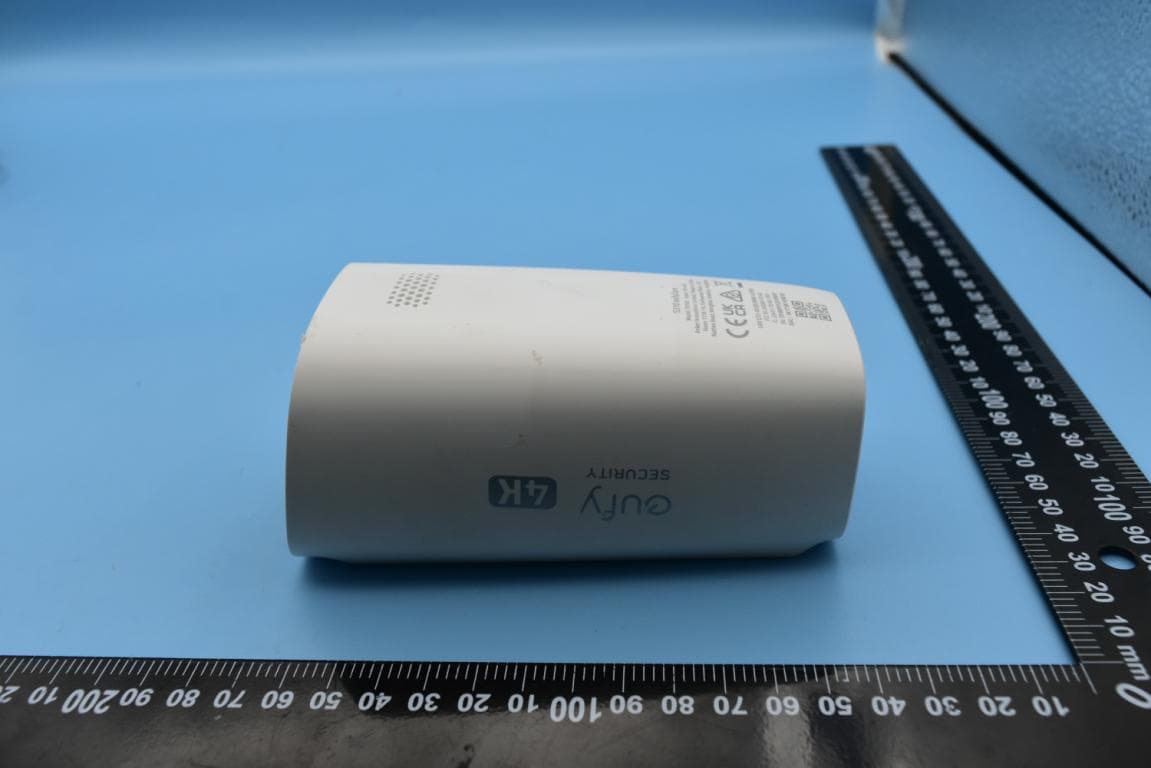
Click to zoom
Application Details
- Equipment Class
- DTS - Digital Transmission System
- Date of Grant
- Jun 07, 2022
- Application Purpose
- Original Equipment
- Date of Application
- Jun 06, 2022
- Equipment Note
- S330 eufyCam
- Frequency Range
- 2412.00000000 - 2462.00000000
- Company
- Anker Innovations Limited
- Country
- Hong Kong
Documents & Files
Document Text
Text extracted from the exhibit documents filed with the FCC. Open a document above to read the original.
Users Manual
51005003397 V01 S330 eufyCam QUICK START GUIDE Anker Innovations Limited. All rights reserved. eufy Security and eufy Security Logo are trademarks of Anker Innovations Limited, registered in the United States and other countries. All other trademarks are the property of their respective owners. 01 02 ① ② ③ ④ ⑩ ⑪ ⑤ ⑥ ⑦ ⑧ ⑨ ⑫ ① ④ ⑤ ⑥ ⑦ ⑧ ⑨ ② ③ AT A GLANCE S330 eufyCamS380 HomeBase Model: T8160Model: T8030 ① Spotlight ⑤ Solar Panel ⑨ Speaker ② Camera Lens ⑥ LED Indicator ⑩ SYNC Button ③ Photosensitive Sensor ⑦ Microphone 2 ⑪ Mounting Hole ④ Microphone 1 ⑧ Motion Sensor ⑫ USB-C Charging Port ① Status LED ④ Hard Drive Bracket ⑦ USB Port 2 ② Reset Hole ⑤ SYNC / ALARM OFF Button ⑧ Ethernet Port ③ Speaker ⑥ USB Port 1 ⑨ Power Port 03 04 Prepare Your Hard Drive Your hard drive must meet the following requirements: TypeHard disk drive (HDD) or solid state drive (SSD) that uses the SATA interface Size2.5 inch CapacityUnlimited RecommendedWestern Digital, Seagate, SAMSUNG, Kingston, PNY, Crucial, SanDisk EXPANDING STORAGE (OPTIONAL) S380 HomeBase comes with 16 GB of storage for saving video recordings and allows you to add an additional hard drive to expand the space. Transfer all the data in your hard drive to a secure location before adding it to S380 HomeBase. Install Your Hard Drive S380 HomeBase must be powered off when you install or remove a hard drive. 1. Push down the top lid to remove it. 2. Loosen the screw, then pull out the hard drive bracket. HARD DRIVE 05 06 3. Fix your hard drive to the bracket with the provided screws. HARD DRIVE 4. Insert and screw the bracket back to S380 HomeBase, then put the top lid back into place. • You can follow the steps above to expand the storage whenever necessary. • A new hard drive must be initialized through the eufy Security app to work with S380 HomeBase. SETTING UP 1. Power and connect S380 HomeBase to your router. The LED indicator will turn blue (This may take about 1 min) when S380 HomeBase is ready for setup. 2. Download and install the eufy Security app, then sign up for an account. 07 08 3. Follow on-screen instructions to add S380 HomeBase and the cameras to your device list ( *). * One S380 HomeBase can pair up to 16 cameras. CHARGING THE CAMERA Fully charge both cameras before first use. This may take about 8 hours for each. 5V USB Charger USB Port 1 LED IndicatorDescription BlueCharging OFFFully charged Option 1 Option 2 09 10 S330 eufyCam includes a solar panel that converts sunlight into electrical energy and keeps the built-in battery charged every day. The charging efficiency fluctuates according to the intensity of the sunlight. Don't worry when the battery level goes down. It happens when there isn't enough sunlight or the camera is consuming more power than usual. You don't need to charge the camera with a cable until a low battery alarm goes off. 2 HOURS PER DAY* * Make sure the solar panel can be fully exposed to direct sunlight for at least 2 hours per day. 11 12 Best places to install: - Wall without eaves -A pole or fence where sunlight is not blocked -Over eaves, if the eaves are below 3 m high Places not to install: - Inside your home or under the porch - Under or on a tree - Under slanted eaves MOUNTING THE CAMERA Select a Location Select a location where you can get the desired view. We recommend hanging the camera 7-10 ft (2-3 m) above the ground. Motion Detection Zone Camera Field-of-View Up to 26 ft (8 m) 7-10 ft (2 - 3 m) Motion Detection Zone 13 14 Mount the Camera 1. Turn the knob of the mounting bracket counterclockwise to loosen and disassemble it. 2. Drill holes with a 15/64 inch (6 mm) drill bit, then insert the anchors into the holes; anchors are necessary for walls that are made out of hard materials such as concrete, brick, or stucco. 3. Firmly screw the knob of the mounting bracket into the mounting hole. 4. Hold and screw the camera to the mounting bracket. Rotate the camera to adjust the view and check it using the live stream, which you can access in the eufy Security app. For troubleshooting, check Help on the eufy Security app. Refer to the app page for LED indicator status. 15 16 SAFETY - Do not use the device in the environment at a too high or too low temperature, never expose the device to strong sunshine or too wet environment. - The suitable temperature for T8030 and accessories is -10°C to 45°C . - The suitable temperature for T8160 and accessories is -20°C to 50°C (Charging temperature is 0°C to 45°C) . - It is recommended to supply the device in an environment with a temperature that ranges from 5°C~25°C. - When supplying, please place the device in an environment that has a normal room temperature and good ventilation. - The adapter shall be installed near the equipment and shall be easily accessible. - Please ensure to use only the adapter offered by the manufacturer. Using unauthorized adapter may cause danger and violate the authorization of the device and the guarantee article. - This adapter is for indoor use only. The adapter type (for S380 HomeBase) is KA2401A-1202000US, rated output voltage/current is 12 Vdc/2A. The plug is considered as disconnect device of adapter. Warning: - Replacement of a battery with an incorrect type can defeat a safeguard; - Disposal of a battery into fire or a hot oven, or mechanically crushing or cutting of a battery can result in an explosion; - Leaving a battery in an extremely high temperature surrounding environment can result in an explosion or the leakage of flammable liquid or gas; and - A battery subjected to extremely low air pressure may result in an explosion or the leakage of flammable liquid or gas. Attention: – remplacement d’une batterie par un type incorrect pouvant supprimer une protection – mise au rebut d’une batterie dans un feu ou dans un four chaud, ou écrasement mécanique ou coupure d’une batterie, susceptible de provoquer une explosion; – maintien d’une batterie dans un environnement à très haute température pouvant provoquer une expl…
Text truncated - open the document above for the full version.
External Photos
FCC ID: 2AOKB-T8160, IC: 23451-T8160 External Photos 1. EUT front view 2. EUT rear view 3. EUT left side view 4. EUT right side view 5. EUT top view 6. EUT bottom view 7. Accessories
ID Label/Location Info
1. Label 2. Label location
Internal Photos
FCC ID: 2AOKB-T8160, IC: 23451-T8160 Internal Photos 1. EUT uncover view 2. Antenna view 2.4G Wi-Fi Antenna
RF Exposure Info
NOTE: This document is issued by Shenzhen Morlab Communications Technology Co., Ltd., the test report shall not be reproduced except in full without prior written permission of the company. The test results apply only to the particular sample(s) tested and to the specific tests carried out which is available on request for validation and information confirmed at our website. MORLAB Shenzhen Morlab Communications Technology Co., Ltd. FL1-3, Building A, FeiYang Science Park, No.8 LongChang Road, Block67, BaoAn District, ShenZh en , GuangDong Province, P. R. China Tel: 86-755-36698555 Fax: 86-755-36698525 Http://www.morlab.cn E-mail: [email protected] Page 1 of 8 REPORT No.:SZ22040370S01 RF EXPOSURE EVALUATION REPORT APPLICANT : Anker Innovations Limited PRODUCT NAME : S330 eufyCam MODEL NAME :T8160 BRAND NAME : eufy SECURITY FCC ID : 2AOKB-T8160 STANDARD(S) : 47 CFR Part 2(2.1091) RECEIPT DATE : 2022-04-26 TEST DATE :2022-05-12 to 2022-05-21 ISSUE DATE :2022-06-01 Edited by: Zeng Xiaoying (Rapporteur) Approved by: Shen Junsheng (Supervisor) MORLAB Shenzhen Morlab Communications Technology Co., Ltd. FL1-3, Building A, FeiYang Science Park, No.8 LongChang Road, Block67, BaoAn District, ShenZhen , GuangDong Province, P. R. China Tel: 86-755-36698555 Fax: 86-755-36698525 Http://www.morlab.cn E-mail: [email protected] REPORT No.:SZ22040370S01 Page 2of 8 DIRECTORY 1. Technical Information ∙∙∙∙∙∙∙∙∙∙∙∙∙∙∙∙∙∙∙∙∙∙∙∙∙∙∙∙∙∙∙∙∙∙∙∙∙∙∙∙∙∙∙∙∙∙∙∙∙∙∙∙∙∙∙∙∙∙∙∙∙∙∙∙∙∙∙∙∙∙∙∙∙∙∙∙∙∙∙∙∙∙∙∙∙∙∙∙∙∙∙∙∙∙∙∙∙∙∙∙∙∙∙∙ 3 1.1 Applicant and Manufacturer Information ∙∙∙∙∙∙∙∙∙∙∙∙∙∙∙∙∙∙∙∙∙∙∙∙∙∙∙∙∙∙∙∙∙∙∙∙∙∙∙∙∙∙∙∙∙∙∙∙∙∙∙∙∙∙∙∙∙∙∙∙∙∙∙∙∙∙∙∙∙ 3 1.2 Equipment under Test (EUT) Description ∙∙∙∙∙∙∙∙∙∙∙∙∙∙∙∙∙∙∙∙∙∙∙∙∙∙∙∙∙∙∙∙∙∙∙∙∙∙∙∙∙∙∙∙∙∙∙∙∙∙∙∙∙∙∙∙∙∙∙∙∙∙∙∙∙∙∙∙ 3 1.3 Applied Reference Documents ∙∙∙∙∙∙∙∙∙∙∙∙∙∙∙∙∙∙∙∙∙∙∙∙∙∙∙∙∙∙∙∙∙∙∙∙∙∙∙∙∙∙∙∙∙∙∙∙∙∙∙∙∙∙∙∙∙∙∙∙∙∙∙∙∙∙∙∙∙∙∙∙∙∙∙∙∙∙∙∙∙∙∙∙∙ 4 2. Device Category and RF Exposure Limit ∙∙∙∙∙∙∙∙∙∙∙∙∙∙∙∙∙∙∙∙∙∙∙∙∙∙∙∙∙∙∙∙∙∙∙∙∙∙∙∙∙∙∙∙∙∙∙∙∙∙∙∙∙∙∙∙∙∙∙∙∙∙∙∙∙∙∙∙∙∙∙ 5 3. RF Output Power ∙∙∙∙∙∙∙∙∙∙∙∙∙∙∙∙∙∙∙∙∙∙∙∙∙∙∙∙∙∙∙∙∙∙∙∙∙∙∙∙∙∙∙∙∙∙∙∙∙∙∙∙∙∙∙∙∙∙∙∙∙∙∙∙∙∙∙∙∙∙∙∙∙∙∙∙∙∙∙∙∙∙∙∙∙∙∙∙∙∙∙∙∙∙∙∙∙∙∙∙∙∙∙∙∙∙∙∙∙∙∙∙ 6 4. RF Exposure Assessment ∙∙∙∙∙∙∙∙∙∙∙∙∙∙∙∙∙∙∙∙∙∙∙∙∙∙∙∙∙∙∙∙∙∙∙∙∙∙∙∙∙∙∙∙∙∙∙∙∙∙∙∙∙∙∙∙∙∙∙∙∙∙∙∙∙∙∙∙∙∙∙∙∙∙∙∙∙∙∙∙∙∙∙∙∙∙∙∙∙∙∙∙∙∙∙∙ 7 Annex A Testing Laboratory Information ∙∙∙∙∙∙∙∙∙∙∙∙∙∙∙∙∙∙∙∙∙∙∙∙∙∙∙∙∙∙∙∙∙∙∙∙∙∙∙∙∙∙∙∙∙∙∙∙∙∙∙∙∙∙∙∙∙∙∙∙∙∙∙∙∙∙∙∙∙∙∙∙∙∙∙∙∙ 8 Change History Version Date Reason for change 1.0 2022-06-01 First edition MORLAB Shenzhen Morlab Communications Technology Co., Ltd. FL1-3, Building A, FeiYang Science Park, No.8 LongChang Road, Block67, BaoAn District, ShenZhen , GuangDong Province, P. R. China Tel: 86-755-36698555 Fax: 86-755-36698525 Http://www.morlab.cn E-mail: [email protected] REPORT No.:SZ22040370S01 Page 3of 8 1. Technical Information Note: Provide by applicant. 1.1 Applicant and Manufacturer Information Applicant: Anker Innovations Limited Applicant Address: Room 1318-19, Hollywood Plaza, 610 Nathan Road, Mongkok, Kowloon, Hong Kong Manufacturer: Anker Innovations Limited Manufacturer Address: Room 1318-19, Hollywood Plaza, 610 Nathan Road, Mongkok, Kowloon, Hong Kong 1.2 Equipment under Test (EUT) Description Product Name: S330 eufyCam Sample No.: 1# Hardware Version: T8160-MAIN-V06 Software Version: V3.0.2.8 Modulation Technology: DSSS, OFDM Modulation Mode: 802.11b, 802.11g, 802.11n (HT20) Operating Frequency Range: 802.11b/g/ n (HT20): 2412MHz–2462MHz Antenna Type: FPC Antenna Antenna Gain: 2.94dBi MORLAB Shenzhen Morlab Communications Technology Co., Ltd. FL1-3, Building A, FeiYang Science Park, No.8 LongChang Road, Block67, BaoAn District, ShenZhen , GuangDong Province, P. R. China Tel: 86-755-36698555 Fax: 86-755-36698525 Http://www.morlab.cn E-mail: [email protected] REPORT No.:SZ22040370S01 Page 4of 8 1.3 Applied Reference Documents Leading reference documents for testing: Identity Document Title Method determination /Remark 47 CFR Part 2(2.1091) Radio Frequency Radiation Exposure Assessment: mobile devices No deviation KDB 447498 D01v06 General RF Exposure Guidance No deviation Note 1: Additions to, deviation, or exclusions from the method shall be judged in the "method determination" column of add, deviate or exclude from the specific method shall be explained in the "Remark" of the above table. Note 2: When the test result is a critical value, we will use the measurement uncertainty give the judgment result based on the 95% confidence intervals. MORLAB Shenzhen Morlab Communications Technology Co., Ltd. FL1-3, Building A, FeiYang Science Park, No.8 LongChang Road, Block67, BaoAn District, ShenZhen , GuangDong Province, P. R. China Tel: 86-755-36698555 Fax: 86-755-36698525 Http://www.morlab.cn E-mail: [email protected] REPORT No.:SZ22040370S01 Page 5of 8 2. Device Category and RF Exposure Limit Per user manual, based on 47 CFR 2.1091, this device belongs to mobile device category with General Population/Uncontrolled exposure. Mobile Devices: 47 CFR 2.1091(b) For purposes of this section, a mobile device is defined as a transmitting device designed to be used in other than fixed locations and to generally be used in such a way that a separation distance of at least 20 centimeters is normally maintained between the transmitter's radiating structure(s) and the body of the user or nearby persons. In this context, the term “fixed location” means that the device is physically secured at one location and is not able to be easily moved to another location. Transmitting devices designed to be used by consumers or workers that can be easily re-located, such as wireless devices associated with a personal computer, are considered to be mobile devices if they meet the 20 centimeter separation requirement. General Population/Uncontrolled Exposure: The general population/uncontrolled exposure limits are applicable to situations in which the general public may be exposed or in which persons who are exposed as a consequence of their employment may not be made fully aware of the potential for exposure or cannot…
Text truncated - open the document above for the full version.
Test Report
NOTE: This document is issued by Shenzhen Morlab Communications Technology Co., Ltd., the test report shall not be reproduced except in full without prior written permission of the company. The test results apply only to the particular sample(s) tested and to the specific tests carried out which is available on request for validation and information confirmed at our website. MORLAB Shenzhen Morlab Communications Technology Co., Ltd. FL1-3, Building A, FeiYang Science Park, No.8 LongChang Road, Block67, BaoAn District, ShenZh en , GuangDong Province, P. R. China Tel: 86-755-36698555 Fax: 86-755-36698525 Http://www.morlab.cn E-mail: [email protected] Page 1 of 68 REPORT No.:SZ22040370W01 TEST REPORT APPLICANT : Anker Innovations Limited PRODUCT NAME : S330 eufyCam MODEL NAME :T8160 BRAND NAME : eufy SECURITY FCC ID : 2AOKB-T8160 STANDARD(S) : 47 CFR Part 15 Subpart C RECEIPT DATE : 2022-04-26 TEST DATE :2022-05-12 to 2022-05-21 ISSUE DATE :2022-06-01 Edited by: Zeng Xiaoying (Rapporteur) Approved by: Shen Junsheng (Supervisor) MORLAB Shenzhen Morlab Communications Technology Co., Ltd. FL1-3, Building A, FeiYang Science Park, No.8 LongChang Road, Block67, BaoAn District, ShenZhen , GuangDong Province, P. R. China Tel: 86-755-36698555 Fax: 86-755-36698525 Http://www.morlab.cn E-mail: [email protected] Page 2 of 68 REPORT No.:SZ22040370W01 DIRECTORY 1. Technical Information ꞏꞏꞏꞏꞏꞏꞏꞏꞏꞏꞏꞏꞏꞏꞏꞏꞏꞏꞏꞏꞏꞏꞏꞏꞏꞏꞏꞏꞏꞏꞏꞏꞏꞏꞏꞏꞏꞏꞏꞏꞏꞏꞏꞏꞏꞏꞏꞏꞏꞏꞏꞏꞏꞏꞏꞏꞏꞏꞏꞏꞏꞏꞏꞏꞏꞏꞏꞏꞏꞏꞏꞏꞏꞏꞏꞏꞏꞏꞏꞏꞏꞏꞏ 3 1.1. Applicant and Manufacturer Information ꞏꞏꞏꞏꞏꞏꞏꞏꞏꞏꞏꞏꞏꞏꞏꞏꞏꞏꞏꞏꞏꞏꞏꞏꞏꞏꞏꞏꞏꞏꞏꞏꞏꞏꞏꞏꞏꞏꞏꞏꞏꞏꞏꞏꞏꞏꞏꞏꞏꞏꞏꞏꞏꞏꞏꞏ 3 1.2. Equipment Under Test (EUT) Description ꞏꞏꞏꞏꞏꞏꞏꞏꞏꞏꞏꞏꞏꞏꞏꞏꞏꞏꞏꞏꞏꞏꞏꞏꞏꞏꞏꞏꞏꞏꞏꞏꞏꞏꞏꞏꞏꞏꞏꞏꞏꞏꞏꞏꞏꞏꞏꞏꞏꞏꞏꞏꞏꞏꞏ 3 1.3. Modulation Type and Data Rate of EUT ꞏꞏꞏꞏꞏꞏꞏꞏꞏꞏꞏꞏꞏꞏꞏꞏꞏꞏꞏꞏꞏꞏꞏꞏꞏꞏꞏꞏꞏꞏꞏꞏꞏꞏꞏꞏꞏꞏꞏꞏꞏꞏꞏꞏꞏꞏꞏꞏꞏꞏꞏꞏꞏꞏꞏꞏꞏꞏ 4 1.4. The Channel Number and Frequency ꞏꞏꞏꞏꞏꞏꞏꞏꞏꞏꞏꞏꞏꞏꞏꞏꞏꞏꞏꞏꞏꞏꞏꞏꞏꞏꞏꞏꞏꞏꞏꞏꞏꞏꞏꞏꞏꞏꞏꞏꞏꞏꞏꞏꞏꞏꞏꞏꞏꞏꞏꞏꞏꞏꞏꞏꞏꞏꞏꞏꞏ 4 1.5. Test Standards and Results ꞏꞏꞏꞏꞏꞏꞏꞏꞏꞏꞏꞏꞏꞏꞏꞏꞏꞏꞏꞏꞏꞏꞏꞏꞏꞏꞏꞏꞏꞏꞏꞏꞏꞏꞏꞏꞏꞏꞏꞏꞏꞏꞏꞏꞏꞏꞏꞏꞏꞏꞏꞏꞏꞏꞏꞏꞏꞏꞏꞏꞏꞏꞏꞏꞏꞏꞏꞏꞏꞏꞏꞏꞏꞏ 5 1.6. Environmental Conditions ꞏꞏꞏꞏꞏꞏꞏꞏꞏꞏꞏꞏꞏꞏꞏꞏꞏꞏꞏꞏꞏꞏꞏꞏꞏꞏꞏꞏꞏꞏꞏꞏꞏꞏꞏꞏꞏꞏꞏꞏꞏꞏꞏꞏꞏꞏꞏꞏꞏꞏꞏꞏꞏꞏꞏꞏꞏꞏꞏꞏꞏꞏꞏꞏꞏꞏꞏꞏꞏꞏꞏꞏꞏꞏꞏꞏ 6 2. 47 CFR Part 15C Requirements ꞏꞏꞏꞏꞏꞏꞏꞏꞏꞏꞏꞏꞏꞏꞏꞏꞏꞏꞏꞏꞏꞏꞏꞏꞏꞏꞏꞏꞏꞏꞏꞏꞏꞏꞏꞏꞏꞏꞏꞏꞏꞏꞏꞏꞏꞏꞏꞏꞏꞏꞏꞏꞏꞏꞏꞏꞏꞏꞏꞏꞏꞏꞏꞏꞏꞏꞏꞏꞏꞏ 7 2.1. Antenna Requirement ꞏꞏꞏꞏꞏꞏꞏꞏꞏꞏꞏꞏꞏꞏꞏꞏꞏꞏꞏꞏꞏꞏꞏꞏꞏꞏꞏꞏꞏꞏꞏꞏꞏꞏꞏꞏꞏꞏꞏꞏꞏꞏꞏꞏꞏꞏꞏꞏꞏꞏꞏꞏꞏꞏꞏꞏꞏꞏꞏꞏꞏꞏꞏꞏꞏꞏꞏꞏꞏꞏꞏꞏꞏꞏꞏꞏꞏꞏꞏꞏꞏꞏ 7 2.2. Duty Cycle of Test Signal ꞏꞏꞏꞏꞏꞏꞏꞏꞏꞏꞏꞏꞏꞏꞏꞏꞏꞏꞏꞏꞏꞏꞏꞏꞏꞏꞏꞏꞏꞏꞏꞏꞏꞏꞏꞏꞏꞏꞏꞏꞏꞏꞏꞏꞏꞏꞏꞏꞏꞏꞏꞏꞏꞏꞏꞏꞏꞏꞏꞏꞏꞏꞏꞏꞏꞏꞏꞏꞏꞏꞏꞏꞏꞏꞏꞏꞏ 8 2.3. Maximum Peak and Average Conducted Output Power ꞏꞏꞏꞏꞏꞏꞏꞏꞏꞏꞏꞏꞏꞏꞏꞏꞏꞏꞏꞏꞏꞏꞏꞏꞏꞏꞏꞏꞏꞏꞏꞏꞏꞏꞏ 11 2.4. Bandwidth ꞏꞏꞏꞏꞏꞏꞏꞏꞏꞏꞏꞏꞏꞏꞏꞏꞏꞏꞏꞏꞏꞏꞏꞏꞏꞏꞏꞏꞏꞏꞏꞏꞏꞏꞏꞏꞏꞏꞏꞏꞏꞏꞏꞏꞏꞏꞏꞏꞏꞏꞏꞏꞏꞏꞏꞏꞏꞏꞏꞏꞏꞏꞏꞏꞏꞏꞏꞏꞏꞏꞏꞏꞏꞏꞏꞏꞏꞏꞏꞏꞏꞏꞏꞏꞏꞏꞏꞏꞏꞏꞏꞏꞏꞏꞏꞏꞏ 14 2.5. Conducted Spurious Emissions and Band Edge ꞏꞏꞏꞏꞏꞏꞏꞏꞏꞏꞏꞏꞏꞏꞏꞏꞏꞏꞏꞏꞏꞏꞏꞏꞏꞏꞏꞏꞏꞏꞏꞏꞏꞏꞏꞏꞏꞏꞏꞏꞏꞏꞏꞏ 21 2.6. Power Spectral Density ꞏꞏꞏꞏꞏꞏꞏꞏꞏꞏꞏꞏꞏꞏꞏꞏꞏꞏꞏꞏꞏꞏꞏꞏꞏꞏꞏꞏꞏꞏꞏꞏꞏꞏꞏꞏꞏꞏꞏꞏꞏꞏꞏꞏꞏꞏꞏꞏꞏꞏꞏꞏꞏꞏꞏꞏꞏꞏꞏꞏꞏꞏꞏꞏꞏꞏꞏꞏꞏꞏꞏꞏꞏꞏꞏꞏꞏꞏꞏ 31 2.7. Conducted Emission ꞏꞏꞏꞏꞏꞏꞏꞏꞏꞏꞏꞏꞏꞏꞏꞏꞏꞏꞏꞏꞏꞏꞏꞏꞏꞏꞏꞏꞏꞏꞏꞏꞏꞏꞏꞏꞏꞏꞏꞏꞏꞏꞏꞏꞏꞏꞏꞏꞏꞏꞏꞏꞏꞏꞏꞏꞏꞏꞏꞏꞏꞏꞏꞏꞏꞏꞏꞏꞏꞏꞏꞏꞏꞏꞏꞏꞏꞏꞏꞏꞏꞏ 38 2.8. Restricted Frequency Bands ꞏꞏꞏꞏꞏꞏꞏꞏꞏꞏꞏꞏꞏꞏꞏꞏꞏꞏꞏꞏꞏꞏꞏꞏꞏꞏꞏꞏꞏꞏꞏꞏꞏꞏꞏꞏꞏꞏꞏꞏꞏꞏꞏꞏꞏꞏꞏꞏꞏꞏꞏꞏꞏꞏꞏꞏꞏꞏꞏꞏꞏꞏꞏꞏꞏꞏꞏꞏꞏꞏꞏ 42 2.9. Radiated Emission ꞏꞏꞏꞏꞏꞏꞏꞏꞏꞏꞏꞏꞏꞏꞏꞏꞏꞏꞏꞏꞏꞏꞏꞏꞏꞏꞏꞏꞏꞏꞏꞏꞏꞏꞏꞏꞏꞏꞏꞏꞏꞏꞏꞏꞏꞏꞏꞏꞏꞏꞏꞏꞏꞏꞏꞏꞏꞏꞏꞏꞏꞏꞏꞏꞏꞏꞏꞏꞏꞏꞏꞏꞏꞏꞏꞏꞏꞏꞏꞏꞏꞏꞏꞏꞏ 52 Annex A Test Uncertainty ꞏꞏꞏꞏꞏꞏꞏꞏꞏꞏꞏꞏꞏꞏꞏꞏꞏꞏꞏꞏꞏꞏꞏꞏꞏꞏꞏꞏꞏꞏꞏꞏꞏꞏꞏꞏꞏꞏꞏꞏꞏꞏꞏꞏꞏꞏꞏꞏꞏꞏꞏꞏꞏꞏꞏꞏꞏꞏꞏꞏꞏꞏꞏꞏꞏꞏꞏꞏꞏꞏꞏꞏꞏꞏꞏꞏꞏꞏꞏꞏ 65 Annex B Testing Laboratory Information ꞏꞏꞏꞏꞏꞏꞏꞏꞏꞏꞏꞏꞏꞏꞏꞏꞏꞏꞏꞏꞏꞏꞏꞏꞏꞏꞏꞏꞏꞏꞏꞏꞏꞏꞏꞏꞏꞏꞏꞏꞏꞏꞏꞏꞏꞏꞏꞏꞏꞏꞏꞏꞏꞏꞏꞏꞏꞏꞏ 66 Change History Version Date Reason for change 1.0 2022-06-01 First edition MORLAB Shenzhen Morlab Communications Technology Co., Ltd. FL1-3, Building A, FeiYang Science Park, No.8 LongChang Road, Block67, BaoAn District, ShenZhen , GuangDong Province, P. R. China Tel: 86-755-36698555 Fax: 86-755-36698525 Http://www.morlab.cn E-mail: [email protected] Page 3 of 68 REPORT No.:SZ22040370W01 1. Technical Information Note: Provide by applicant. 1.1. Applicant and Manufacturer Information Applicant: Anker Innovations Limited Applicant Address: Room 1318-19, Hollywood Plaza, 610 Nathan Road, Mongkok, Kowloon, Hong Kong Manufacturer: Anker Innovations Limited Manufacturer Address: Room 1318-19, Hollywood Plaza, 610 Nathan Road, Mongkok, Kowloon, Hong Kong 1.2. Equipment Under Test (EUT) Description Product Name: S330 eufyCam Sample No.: 1# Hardware Version: T8160-MAIN-V06 Software Version: V3.0.2.8 Modulation Technology: DSSS, OFDM Modulation Mode: 802.11b, 802.11g, 802.11n (HT20) Operating Frequency Range: 802.11b/g/ n (HT20): 2412MHz–2462MHz Antenna Type: FPC Antenna Antenna Gain: 2.94dBi Accessory Information: Battery Brand Name: N/A Model No.: SW18650-34MP(1INR19/66-4) Serial No.: N/A Capacity: 13000mAh Rated Voltage: 3.6V Charge Limit: 4.2V Manufacturer: Guangdong Pow-Tech New Power Co., Ltd. Note 1: We use the dedicated software to control the EUT continuous transmission. Note 2: For a more detailed description, please refer to Specification or User’s Manual supplied by the applicant and/or manufacturer. MORLAB Shenzhen Morlab Communications Technology Co., Ltd. FL1-3, Building A, FeiYang Science Park, No.8 LongChang Road, Block67, BaoAn District, ShenZhen , GuangDong Province, P. R. China Tel: 86-755-36698555 Fax: 86-755-36698525 Http://www.morlab.cn E-mail: [email protected] Page 4 of 68 REPORT No.:SZ22040370W01 1.3. Modulation Type and Data Rate of EUT Modulation Technology Modulation Type Data Rate (Mbps) Note1 DSSS (802.11b) DBPSK 1 DQPSK 2 CCK 5.5/ 11 OFDM (802.11g) BPSK 6 / 9 QPSK 12 / 18 16QAM 24 / 36 64QAM 48 / 54 OFDM (802.11n (HT20)) BPSK 6.5 QPSK 13/19.5 16QAM 26/39 64QAM 52/58.5/65 Note1: The worst-case mode (bold face) in all data rates has been determined during the pre-scan, only the test data of the worst-case were recorded in this report. 1.4. The Channel Number and Frequency Test Mode Channel Frequency (MHz) Channel Frequency (MHz) 802.11b/g/n (HT20) 1 2412 8 2447 2 2417 9 2452 3 2422 10 2457 4 2427 11 2462 5 2432 6 2437 7 2442 Note 1: The black bold channels were selected for test. MORLAB Shenzhen Morlab Communications Technology Co., Ltd. FL1-3, Bu…
Text truncated - open the document above for the full version.
Test Setup Photos
FCC ID: 2AOKB-T8160, IC: 23451-T8160 Test Setup Photos 1. Conducted emission main’s port front view 2. Conducted emission main’s port side view 3. Radiated emission (9KHz-30MHz) 4. Radiated emission (30MHz-1GHz) 5. Radiated emission (above 1GHz) 6. RF measurement setup (WIFI 2.4G)
Contact Information
Applicant
Louis Qi
Technical Contact
Shenzhen Morlab Communications Technology Co., LtdWendy Zhan
[email protected]86 (0) 755 3669 8541
FL.1, Building A, FeiYang Science Park, No.8 · GuangDong Province · China
Non-Technical Contact
Shenzhen Morlab Communications Technology Co., LtdWendy Zhan
[email protected]86 (0) 755 3669 8541
Test Firm
Shenzhen Morlab Communications Technology Co. Ltd.Mr. Su Feng
[email protected]+86 755 36698566
Technical Specifications
| # | Rule Parts | Frequency Range | Power Output |
|---|---|---|---|
| 1 | 15C | 2.41 GHz - 2.46 GHz | 180.00 mW |
Other Applications from Anker Innovations Limited
2AOKB-D1105R
Aug 20, 2026ANKER AeroClip 2
Equipment Class
DTS - Digital Transmission System2AOKB-D1105L
Aug 20, 2026ANKER AeroClip 2
Equipment Class
DTS - Digital Transmission System
2AOKB-A110R
Aug 19, 2026Anker MagGo Power Bank 2 Pro
Equipment Class
DCD - Part 15 Low Power Transmitter Below 1705 kHz2AOKB-D1206R
Aug 05, 2026Anker soundcore Liberty Buds 2
Equipment Class
JBP - Part 15 Class B Computing Device Peripheral2AOKB-D1206L
Aug 05, 2026Anker soundcore Liberty Buds 2
Equipment Class
DTS - Digital Transmission System