2AOV6-HP135Bluetooth TWS Earbuds
Shenzhen Minsuo Industrial Co.,Ltd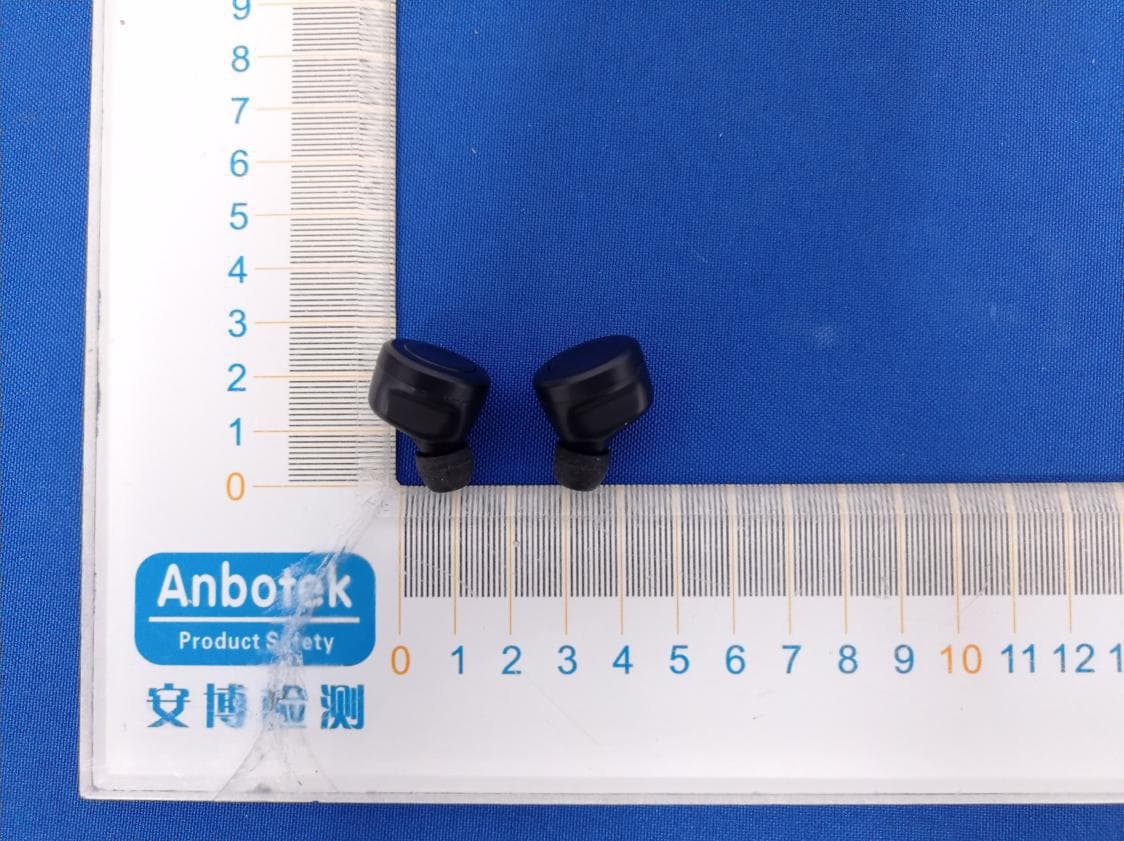
Click to zoom
Application Details
- Equipment Class
- DSS - Part 15 Spread Spectrum Transmitter
- Date of Grant
- Apr 11, 2021
- Application Purpose
- Original Equipment
- Date of Application
- Apr 11, 2021
- Equipment Note
- Bluetooth TWS Earbuds
- Frequency Range
- 2402.00000000 - 2480.00000000
- Country
- China
Documents & Files
Document Text
Text extracted from the exhibit documents filed with the FCC. Open a document above to read the original.
Users Manual
1 HP-135 TRUEWIRELESSDIGI-BUDS RECHARGABLESTEREOEARBUDS WITHDIGITALDISPLAYSTORAGECASE INSTRUCTIONMANUAL PLEASEREADALL INSTRUCTIONSCAREFULLY ANDRETAINFOR FUTUREUSE 2 GettingStarted •Removethe productfromthe box. •Pleaseretainall packagingand instructions.Checkthe contentsagainstthe Package Contentslist below. PackageContents •True WirelessBluetoothStereoEarbuds •RechargingCase •USB ChargingCable •InstructionManual Features •True WirelessBluetoothStereoEarbuds •ChargingCasewith LCD screen,helpsto showremainingbattery •Smalland elegantdesign,goodfit for your ears •SupportsAndroidor iOS •Supportshands-freecall pick-up •Supportswirelessstreamingof music •ChargingCaseincluded •Auto-pairsonceremovedfromthe case •Chargingtime:approx.1-2 hours;play time approx.2-3 hourson singlecharge •ChargingCaseprovidesup to 8 hoursof playbacktime •Rechargeablebatterycapacity:200mAh •Digitaldisplayshow •Earbudsbatterycapacity:40mAh SafetyInstructions Keepthe unit awayfromheat sources,directsunlight,humidity,waterand any otherliquids. Do not operatethe unit if it has beenexposedto water,moistureor any otherliquidsto preventagainstelectricshock,explosionand/orinjurytoyourselfand damageto the unit. Do not use the unit if it has beendroppedor damagedin any way. Repairsto electricalequipmentshouldonlybe performedby a qualifiedelectrician. Improperrepairsmay placethe user at seriousrisk. Do not use the unit with wet hands. Do not putobjectsinto any of the openings. Keepthe unit free fromdust,lint etc. Do not use this unit for anythingotherthanits intendeduse. Keepthe unit out of reachof children. This productis not a toy. Do not use the headsetat excessivevolumelevels,as damagetohearingmay occur. 3 Descriptionof Parts: INSTRUCTIONSFOR USE ChargingInstructions The RechargingCaseand BluetoothEarbudscomewitha built-inrechargeablebattery. Beforeusingit for the first timewe recommendyou chargethe batteryfully.Pleaserecharge the batterybyfollowingeithermethodseverytime they drainout. To chargethe RechargingCase(w ithoutBluetoothEarbuds) Plugthe MicroUSB end of the includedUSB chargingcableinto the chargingportof the RechargingCase . Plugthe otherend into a suitableUSBportsuchas the one on your computeror otherdevicesmadefor USB charging.The LCD screenwill flashwithbattery capacityvalueto indicatethat its beingcharged. It takesless than2 hoursfor the case to chargefully.Whenthe batteryis fully charged,the LCD screenwill displaybatterycapacityvalue100. To chargethe BluetoothEarbuds 1. Afterfully rechargingthe RechargingCase,disconnectit fromcharging. 2. Put the BluetoothEarbudsinto respectivechargingslotscorrectly. 3. The LED light indicatoron the Earbudsturnsred to indicatethat the batteryis being charged.It takesless than2 hoursfor the Earbudsto fully charge.Whenthe battery 1ChargingPort 2ChargingConnectors 3ChargingSlot 4RechargingCaseLCDScreen 5MF(Multi-Function)/PhoneButton 6LED Indicator/ Built-InMicrophone 4 is fully charged,the red LED light will turn off, and the LCD screenwill also turn off. Turningon/offthe BluetoothEarbuds Take out the Earbudfromthe RechargingCase,it will turn on automatically(Or, if the Earbud is not storedinsidethe RechargingCase,pressand hold theMFbuttonfor 3 secondsto turn ON.) Pressand holdthe MF buttonof the Earbudfor 6 secondsto turnOFF the device.(Or, put the Earbudbacktothe RechargingCase,it will turn off for rechargingautomatically.) PairingeitheroneBluetoothEarbudwithBluetoothdevices(phoneor tabletthat supportcall-answering) •Takeout one Earbudfromthe RechargingCase,it will turn on automaticallyand the LED flashesred and blue(Or, if the Earbudis not storedinsidethe RechargingCase, pressand holdtheMFbuttonfor 3 secondsto turn ON. An indicationtonewill be heardand the LED flashesred and blue.) •Placethe BluetoothEarbudand Bluetoothdevice(phoneor tabletthat supportcall answering)no furtherthan1m apartfromeachother; •Activatethe Bluetoothfunctionon yourmobiledevice.Pleasereferto the manufacturer’s instructionsfor instructionson enablingBluetoothonyourdevice. •Onceyou haveactivatedBluetoothon yourmobiledevice,selectthe “Digi- Buds” fromthe list of availableBluetoothdevices. •You mightbe promptedwith “Pair withDigi- Buds?” messageon yoursourcedevice, with “Cancel” and “OK” options.Pleaseclick “OK”. •Ifrequired,enterthe password‘0000’to confirm& finalizepairing. •Oncepairedsuccessfully,an indicationtonewill be heardand the LED will flashblue slowly. •You can now startto use the Earbud. •If pairingis unsuccessful,turnoff the devicefirst and thenre-pairfollowingthe abovesteps. •Onceyou havepairedthe BluetoothEarbudwitha mobiledevice,the earbudwill rememberthis mobiledeviceand will pairautomaticallywhenits Bluetoothis activatedwithinthe range,duringsubsequentlypairing.You do not needto re-pair any previouslyconnecteddevices. •The BluetoothEarbudwill attemptto automaticallyconnectto the last deviceit was pairedwith whenswitchedon. If you wantto pair it with a new device,pleasefollow the stepsoutlinedabove. Makinga call withthe BluetoothEarbudin Bluetoothmode Basicoperation FunctionOperationButton Answerincoming call IncomingCallShortpressthePhonebuttonto answeran incomingcall. 5 RejectIncomingCallIncomingCallPressandholdthePhonebuttonfor 1.5 secondsandrelease End callIncomingCallAfteryour phoneconversation,Shortpress thePhonebutton Rediallast numberStandbymodeand connectedto a device ShortpressthePhonebuttontwice Listeningto MusicWirelessly Pleaseensurethat yourdevice(iPhone,Tabletor OtherSmartPhone)is pairedwiththe BluetoothEarbudto streammusicwirelessly.Onceit is paired,play musicfromyour device. FunctionOperationButton PausePlayingmusicShortpresstheMFbuttonwill pausethe music PlayPausingShortpresstheMFbuttonwill resumethe music Previoustrack(for leftEarbudonly) PlayingmusicPressand hold theMFbuttonfor 1 secondand release Nexttrack(for rightEarbudonly) PlayingmusicPressand hold theMFbuttonfor 1 secondand release Note:Otherfunctionsincludingvolumeincrease/decrease,Nexttrackfor left Earbud, Prev…
Text truncated - open the document above for the full version.
External Photos
FCCID:2AOV6-HP135
ID Label/Location Info
LabelLocationOnEUT FCCID:2AOV6-HP135
Internal Photos
FCCID:2AOV6-HP135 ANT
Operational Description
version01 ShenzhenMinsuoIndustrialCo.,Ltd. DeclarationconcerningAntennaSpecification Itisherebydeclaredthattheproduct ModelNo.:HP-135 FCCID:2AOV6-HP135 fulfillstherequirementinFCCtestrelatingtotheantennatype. ThedevicespecifiedaboveconfirmstotheFCCrecommendationsfor internal antennatype(s) describedbelow: ModelNo.ofantenna:N/A Typeofantenna:PCBantenna Gainoftheantenna:0dBi Frequencyrange:2402-2480MHzMHz Themountingoftheantennaisfixedtotheradiomoduleandnootherantennashouldbeused. Companyname: ShenzhenMinsuoIndustrialCo.,Ltd. Address:12thfloor,BlockB,TengyaoBuilding,No.268Gushu2ndroad,XixiangTown, Bao'an,Shenzhen,China City:Shenzhen ZIP/Postalcode:N/A Country: China Place:Shenzhen,ChinaDate:4/9/2021 Signature:
RF Exposure Info
RFEXPOSUREEVALUATION FCCID:2AOV6-HP135 AccordingtoFCC1.1310:Thecriterialistedinthefollowingtableshallbeused toevaluatetheenvironmentimpactofhumanexposuretoradiofrequency(RF) Radiationasspecifiedin§1.1307(b): RoutineSARevaluationreferstothatspecificallyrequiredby§2.1093,using measurementsorcomputersimulation.WhenroutineSARevaluationisnot required,portabletransmitterswithoutputpowergreaterthantheapplicable lowthresholdrequireSARevaluationtoqualifyforTCBapproval. Channel (MHz) Maximum output power (dBm) Tuneup tolerance (dBm) MaxTuneUp Power(dBm) Distance (mm) Calculation results Limit Operating Mode 2402-0.443-0.443 ±1 0.557 5 0.352 3 BDR2441-0.196-0.196 ±10.804 5 0.376 3 2480-0.635-0.635 ±10.36550.3433 2402-0.981-0.981 ±1 0.019 5 0.311 3 EDR2441-0.964-0.964 ±10.036 5 0.315 3 2480-1.577-1.577 ±1-0.57750.2763 TestResults:PASS.
Test Report
Report No.: 18220WC10044101FCC ID: 2AOV6-HP135Page 1 of 65 Code:AB-RF-05-a FCC TEST REPORT Client Name:Shenzhen Minsuo Industrial Co.,Ltd. Address: 12th floor, Block B, Tengyao Building, No. 268 Gushu 2nd road, Xixiang Town, Bao'an, Shenzhen, China Product Name:Bluetooth TWS Earbuds Date:Apr. 09, 2021 Shenzhen Anbotek Compliance Laboratory Limited Report No.: 18220WC10044101FCC ID: 2AOV6-HP135Page 2 of 65 Code:AB-RF-05-a Contents 1. General Information ............................................................................................................................................... 5 1.1. Client Information ....................................................................................................................................... 5 1.2. Description of Device (EUT) ..................................................................................................................... 5 1.3. Auxiliary Equipment Used During Test ................................................................................................... 6 1.4. Description of Test Modes ........................................................................................................................ 6 1.5. List of channels ........................................................................................................................................... 7 1.6. Description Of Test Setup ......................................................................................................................... 8 1.7. Test Equipment List .................................................................................................................................... 9 1.8. Measurement Uncertainty ....................................................................................................................... 10 1.9. Description of Test Facility ...................................................................................................................... 10 2. Summary of Test Results ................................................................................................................................... 11 3. Conducted Emission Test ................................................................................................................................... 12 3.1. Test Standard and Limit .......................................................................................................................... 12 3.2. Test Setup .................................................................................................................................................. 12 3.3. Test Procedure .......................................................................................................................................... 12 3.4. Test Data .................................................................................................................................................... 12 4. Radiation Spurious Emission and Band Edge ................................................................................................ 17 4.1. Test Standard and Limit .......................................................................................................................... 17 4.2. Test Setup .................................................................................................................................................. 17 4.3. Test Procedure .......................................................................................................................................... 18 4.4. Test Data .................................................................................................................................................... 19 5. Maximum Peak Output Power Test .................................................................................................................. 27 5.1. Test Standard and Limit .......................................................................................................................... 27 5.2. Test Setup .................................................................................................................................................. 27 5.3. Test Procedure .......................................................................................................................................... 27 5.4. Test Data .................................................................................................................................................... 27 6. 20DB Occupy Bandwidth Test ........................................................................................................................... 31 6.1. Test Standard ............................................................................................................................................ 31 6.2. Test Setup .................................................................................................................................................. 31 6.3. Test Procedure .......................................................................................................................................... 31 6.4. Test Data .................................................................................................................................................... 31 7. Carrier Frequency Separation Test ................................................................................................................... 35 7.1. Test Standard and Limit .......................................................................................................................... 35 7.2. Test Setup .................................................................................................................................................. 35 7.3. Test Procedure ..................................................................................................................…
Text truncated - open the document above for the full version.
Test Setup Photos
FCCID:2AOV6-HP135 PhotoofConductedEmissionMeasurement PhotoofRadiationEmissionTest
Contact Information
Applicant
Henry Xu(manager)
Test Firm
Shenzhen Anbotek Compliance Laboratory LimitedJeff Zhu
Technical Specifications
| # | Rule Parts | Frequency Range | Power Output |
|---|---|---|---|
| 1 | 15C | 2.40 GHz - 2.48 GHz | 960.00 µW |
Other Applications from Shenzhen Minsuo Industrial Co.,Ltd
2AOV6-SP-198
Jan 20, 2026Sound-bar Speaker
Equipment Class
DSS - Part 15 Spread Spectrum Transmitter2AOV6-BLS-6-2388
Sep 04, 202415 INCHES LIGHT UP BLUETOOTH SOUNDBAR
Equipment Class
DSS - Part 15 Spread Spectrum Transmitter2AOV6-FMWC-12-2393
Aug 27, 20243-IN-1 FOLDABLE MAGNETIC WIRELESS CHARGER
Equipment Class
DCD - Part 15 Low Power Transmitter Below 1705 kHz2AOV6-CRGB-6-2392
Aug 27, 2024CHARGER WITH RGB LIGHTS
Equipment Class
DCD - Part 15 Low Power Transmitter Below 1705 kHz2AOV6-HP-555
Aug 17, 2024BT EARBUDS W TOUCH SCREEN CASE
Equipment Class
DSS - Part 15 Spread Spectrum Transmitter