
FCCID.CO- FCC ID Database
HomeCompaniesEquipment ClassesSearch

© 2026 FCC ID Database. All rights reserved.

AboutContactData sourced from FCC public records
  1. Home/
  2. DongGuan Luckysonics Co., Ltd/
  3. 2AQAB-SG30

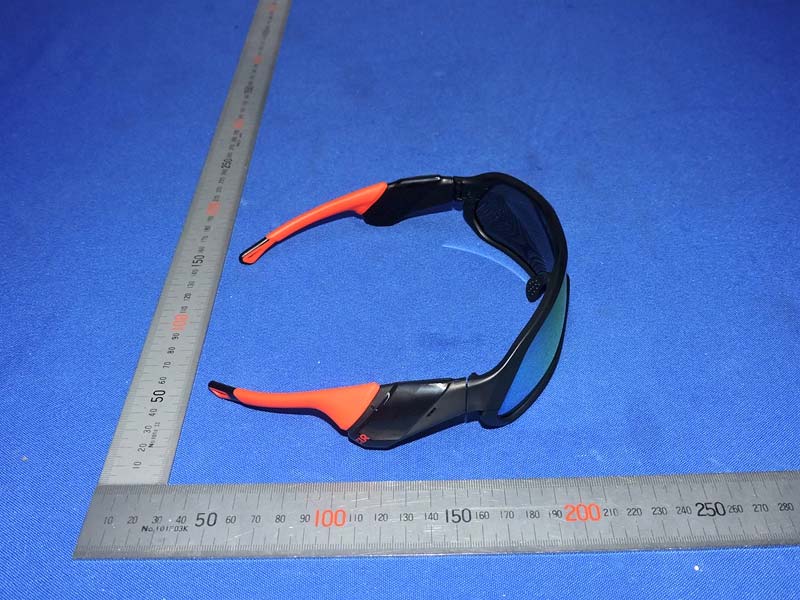
2AQAB-SG30Smart Glasses

DongGuan Luckysonics Co., Ltd
Smart Glasses - FCC ID 2AQAB-SG30 - DongGuan Luckysonics Co., Ltd
Click to zoom

Application Details

Equipment Class
DSS - Part 15 Spread Spectrum Transmitter
Date of Grant
Jul 29, 2021
Application Purpose
Original Equipment
Date of Application
Jul 29, 2021
Equipment Note
Smart Glasses
Frequency Range
2402.00000000 - 2480.00000000
Company
DongGuan Luckysonics Co., Ltd
Country
China

Documents & Files

Select a file to view
Users Manual

↗

Cover Letter(s)

↗

External Photos

↗

ID Label/Location Info

Internal Photos

↗

Test Report

↗

Test Setup Photos

↗

Document Text

Text extracted from the exhibit documents filed with the FCC. Open a document above to read the original.

Users Manual

SG30智能眼镜产品说明书 产品包含:SG30智能眼镜、充电线x1 眼镜布x1、包装盒x1、产品说明书x1 请保证眼镜电量充足。 无法开机 请长按电源键5秒以上关机,等待30秒,再次开机。 连接充电器,等待红色或者绿色指示灯亮起,断开充电线,再次开机。 其他故障 故障排除 a b a b 连接充电器,等待红色或者绿色指示灯亮起,拿掉充电线,再次开机。 正确 错误 电源键 电源键 感应区 感应区 SG30智能眼镜产品维修卡 保修条例 SG30智能眼镜售后服务承诺:严格按照《中华人民共国消费者权益 法》、《中华人民共和国产品质量法》实行售后三包服务,服务内容如下: 1.自购买日起7日内,产品出现《产品性能故障表》所列性能故障情况经吉声 技术售后服务中心检测确定,依照您的选择,免费办理退货、换货或者修理等 服务。 2.自购买日起8-15日内,产品出现《产品性能故障表》所列性能故障情况经吉 声技术售后服务中心检测确定,依照您的选择,免费办理换货或者修理等服 务。 3.自购买日起12个月内,产品出现《产品性能故障表》所列性能故障情况经吉 声技术售后服务中心检测确定,依照您的选择,免费进行修理。 非保修条例 产品性能故障表 1.未经授权维修、误用、滥用、改动、不正确的使用本产品; 2.已超过三包有限期; 3.因不可抗力造成的损坏; 4.不符合《产品性能故障表》中所列性能故障情况 5.人为原因导致产品及其配件产生《产品性能故障表》中所列性能故障。 因结构或材料因素造成的外壳、镜片裂损。 不能正常开关机。 相关指示灯不亮。 按键功能失效。 磁吸充电口无法充电。 蓝牙无法连接。 性能故障 名称 SG30 智能 眼镜 长按电源键5秒以上,直到红色指示灯点亮。 关机 自动关机 眼镜没有连接手机,5分钟后会自动关机。没有佩戴眼镜时,静止放置30分钟 后会自动关机。 长按电源键2秒以上,直到绿色指示灯点亮。 开机 配对 开关机/配对操作说明 基本操作 方法二:关机状态下长按电源键5秒以 上,绿色指示灯快闪烁,进入配对状态。 方法三:开机状态下快速配对,与已配对 手机断开蓝牙连接后,短按电源键1-2秒同 时有提示音:Pairing,直接进入配对状态。 方法一:首次开机时,绿色指示灯快闪 烁,进入配对状态。 打开手机的蓝牙,在列表中选择“SG30_LuckySonics”,完成配对。 拒接电话 接听电话 方法二:短按电源键。 方法一:连续敲击动作感应区2次。 挂断电话 短按电源键。 长按电源键1秒以上。 电话操作说明 连续敲击动作感应区2次。 音乐下一首 连续敲击动作感应区3次。 音乐上一首 音乐播放/暂停 方法一:短按电源键。 方法二:将眼镜倒放静置既可自动暂停。 音乐操作说明 配套APP使用 微信扫描下方二维码下载“318骑行”APP,或者在安卓、iOS应用平台搜索 “318骑行” 技术规格 输入电压/电流 持续工作时间 防水等级 工作温度 手机系统 DC5.0V/0.5A 4-6小时 重量 有效距离 47克 10 米 IPX4 -10°C - 40°C 安卓 5.0 或者 5.0以上; iOS 10.0或者10.0以上 保持干燥 不要高温存放小心轻放 可回收的 水平放置 室温存放 SG30智能眼镜,基于先进的定向音频技术,让您能享受到高品质的立体声音 频,同时不会阻碍耳朵接收周围环境音,保障运动的安全。 镜片维护 请使用温和皂液定期清洁镜片和镜框。 使用出厂提供的微纤维镜片布擦拭镜片。 磁吸充电端口 动作敲击感应区 出音口 电源键 指示灯麦克风 请勿使用纸巾、卫生纸或餐巾纸擦拭镜片。 请勿使用织物柔软剂洗涤过的毛巾擦拭镜片。 请勿向镜片吐唾沫。 请勿将眼镜置于热源上。 请勿使用洗涤剂类产品清洗眼镜。 镜片护理禁忌 产品电量低时,喇叭会发出“嘟-嘟-嘟”的提示音。此时需尽快充电。 产品充电 请使用随附的USB充电线为设备充电,只需将充电端磁吸到设备的 充电端口,另一端插入USB适配器或其他USB电源。 充电过程中红灯常亮,充满电后绿灯常亮。 注意 请按图示方向充电,切勿将充电针强制反插,以免眼镜短路损伤。 ! 微信扫描下方二维码关注“318运动”公众号 售后服务公众号 GRIFFIN AUDIO GLASSES USER MANUAL Accessories included in box:GRIFFIN glasses x1, Charging cablex1, Glasses cleaning cloth x1, Product manual x1 300 Delaware Avenue, Suite 210-A, Wilmington, DE 19801, County of New Castle. Griffin is a sunglasses with directional audio. Integrated with latest bluetooth V5.0 audio technology, with the exclusive customized speaker design and acoustic adjustment, you can enjoy high-quality stereo audio with open-ear, the surround voice can get you also. Microphone Indicator Light Charge Port Sound Outlet Power switch Induction Zone Please use mild soap to clean the lenses. Use the microfiber lens cloth to wipe the lens softly. LENS MAINTENANCE PROHIBITION Do not use paper towels、napkins to wipe the lenses. Do not use fabric softener to wipe the lens. Do not spit on the lens. Do not place the glasses on a heat source. Do not use detergent products to clean the glasses. Press and hold the power button about two seconds, the green indicator light is on, then prompt “power on”from device, now the device is powered on. Method 1: When initial power on the device, the green indicator flashes quickly, now the device is under pairing status. Method 2: When the device is off, press down the power button five seconds, the green indicator flashes quickly, then prompt “pairing” from device, now the device is under pairing status. Power on Pairing OPERATION Enable the bluetooth in the setup of mobile phone,search and select “SG30_LuckySonics” in the found device lists, then follow the information prompted in the phone to complete the pairing. Method 2: Press down the power button one time to answer the phone. Press and hold the power button for about five seconds until the red indicator light is on. The device will shut down automatically if disconnect with phone for five minutes , or keep motionless without operation for thirty minutes. When low battery in the device, it will prompt “du-du-du” sound, please charge it in time. Method 1: Click on the induction zone twice continually to answer the phone. Power off Automatic power off PHONE CALL To reject the phone call, press down and hold the power button more than one second. When phone call is over, press down the power button one time to turn off the phone. PHONE CALL REJECT PHONE CALL OFF Power switch Power switch Induction zone During music play, press down the power button one time to pause the music, press down the power button one more time to continue the play again; Make the device upside down as below instruction to pause the play also. Music Play/Pause Click on the induction zone twice continually during music play, switch to next song. Click on the induction zone three times continually during music play, switch to the previous song. Next song Previous song Induction zone Technical specifications Input voltage/current Continuous working time Waterproofing grade Operating temperature Mobile phone system Weight Effective distance DC5.0V/0.5A 4-6hours 47g 10 m IPX4 -10°C - 40°C Android 5.0 or above; iOS 10.0 or above Don’t store at high temperature Horizontal arrangementHandle with care Keep dryRoom temperature storageRecyclable PRODUCT CHARGE Please use the attached USB charging cable to charge the device, just magnetically adsorb the charging end to the charging port of the device, and plug another end into a USB adapter or other USB power source. The red light is on during charging, the green light is on when fully charged. Can not power on the device TROUBLE SHOOTING a b Other failures a b Normally just charge the device one time to reset it.When the charging indication led (red or green) is lit,remove the charge cable, press the power button to restart. Sometimes the battery is out of power, we need charge the device for a while, then restart again. Press the power button for more than five seconds to power off the device, waiting for 30 seconds again, then restart the device. Charge the device to reset it. When the charging indication led (red or green) is lit, remove the charge cable, press the power button to restart. NO TE ! The cable must operate correctly during charge, DO NOT rudely switch the contact pins of charge cable which will damage the device. Wrong Correct FCC Caution: An…

Text truncated - open the document above for the full version.

External Photos

Bay Area Compliance Laboratories Corp. (Shenzhen) Project No.: SZ4210429-14682E-RF Page 1 of 4 EXHIBIT B - EUT EXTERNAL PHOTOGRAPHS Bay Area Compliance Laboratories Corp. (Shenzhen) Project No.: SZ4210429-14682E-RF Page 2 of 4 Bay Area Compliance Laboratories Corp. (Shenzhen) Project No.: SZ4210429-14682E-RF Page 3 of 4 Bay Area Compliance Laboratories Corp. (Shenzhen) Project No.: SZ4210429-14682E-RF Page 4 of 4

Internal Photos

Bay Area Compliance Laboratories Corp. (Shenzhen) Project No.: SZ4210429-14682E-RF Page 1 of 4 EXHIBIT C - EUT INTERNAL PHOTOGRAPHS Bay Area Compliance Laboratories Corp. (Shenzhen) Project No.: SZ4210429-14682E-RF Page 2 of 4 Antenna Bay Area Compliance Laboratories Corp. (Shenzhen) Project No.: SZ4210429-14682E-RF Page 3 of 4 Bay Area Compliance Laboratories Corp. (Shenzhen) Project No.: SZ4210429-14682E-RF Page 4 of 4

Test Report

Note: This report may contain data that are not covered by the A2LA accreditation and are marked with an asterisk “★”. BACL is not responsible for the authenticity of any test data provided by the applicant. Data included from the applicant that may affect test results are marked with an asterisk ’*’. Customer model name, addresses, names, trademarks etc. are not considered data. This report cannot be reproduced except in full, without prior written approval of the Company. Unless otherwise stated the results shown in this test report refer only to the sample(s) tested. This report is valid only with a valid digital signature. The digital signature may be available only under the Adobe software above version 7.0. FCC PART 15.247 TEST REPORT For DongGuan Luckysonics Co., Ltd Room801,Building A1,Guangda WE Valley,Road2,Song Shan Lake, DongGuan City,GuangDong Province,China FCC ID: 2AQAB-SG30 Report Type: Original Report Product Type: Smart glasses Re port Number: SZ4210429-14682E-00B Re port Date: 2021-06-11 Reviewed B y: Jimmy Xiao RF Engineer Prepared By: Bay Area Compliance Laboratories Corp. (Shenzhen) 5F(B-West) , 6F, 7F, the 3rd Phase of Wan Li Industrial Building D, Shihua Rd, FuTian Free Trade Zone, Shenzhen, China Tel: +86-755-33320018 Fax: +86-755-33320008 www.baclcorp.com.cn Bay Area Compliance Laboratories Corp. (Shenzhen) Report No.: SZ4210429-14682E-00B FCC Part 15.247 Page 2 of 54 TABLE OF CONTENTS GENERAL INFORMATION ....................................................................................................................................... 4 PRODUCT DESCRIPTION FOR EQUIPMENT UNDER TEST (EUT) ..................................................................................... 4 OBJECTIVE ................................................................................................................................................................... 4 TEST METHODOLOGY .................................................................................................................................................. 4 MEASUREMENT UNCERTAINTY .................................................................................................................................... 5 TEST FACILITY ............................................................................................................................................................. 5 SYSTEM TEST CONFIGURATION .......................................................................................................................... 6 DESCRIPTION OF TEST CONFIGURATION ...................................................................................................................... 6 EUT EXERCISE SOFTWARE .......................................................................................................................................... 6 SPECIAL ACCESSORIES ................................................................................................................................................. 6 EQUIPMENT MODIFICATIONS ....................................................................................................................................... 6 SUPPORT EQUIPMENT LIST AND DETAILS .................................................................................................................... 6 EXTERNAL I/O CABLE .................................................................................................................................................. 6 BLOCK DIAGRAM OF TEST SETUP ................................................................................................................................ 7 SUMMARY OF TEST RESULTS ............................................................................................................................... 8 TEST EQUIPMENT LIST ........................................................................................................................................... 9 FCC§15.247 (i), §1.1307 (b) (1) &§2.1093 – RF EXPOSURE ...................................................................................... 10 APPLICABLE STANDARD ............................................................................................................................................ 10 FCC §15.203 – ANTENNA REQUIREMENT .......................................................................................................... 11 APPLICABLE STANDARD ............................................................................................................................................ 11 ANTENNA CONNECTOR CONSTRUCTION .................................................................................................................... 11 FCC §15.205, §15.209 & §15.247(d) – RADIATED EMISSIONS ........................................................................... 12 APPLICABLE STANDARD ............................................................................................................................................ 12 EUT SETUP ................................................................................................................................................................ 12 EMI TEST RECEIVER & SPECTRUM ANALYZER SETUP .............................................................................................. 13 TEST PROCEDURE ...................................................................................................................................................... 13 CORRECTED AMPLITUDE & MARGIN CALCULATION ................................................................................................. 13 TEST DATA ................................................................................................................................................................ 13 FCC §15.247(a) (1)-CHANNEL SEPARATION TEST .......................................................................................…

Text truncated - open the document above for the full version.

Test Setup Photos

Bay Area Compliance Laboratories Corp. (Shenzhen) Project No.: SZ4210429-14682E-RF EXHIBIT D - TEST SETUP PHOTOGRAPHS Radiated Emissions View (Below 1 GHz) Radiated Emissions View (Above 1 GHz)

Contact Information

Applicant

Michael Lee(HW Manager)
[email protected]13543764979Fax: 0769-22891970

Test Firm

Bay Area Compliance Laboratories Corp. (Shenzhen)Well Wang
[email protected]+86 (0) 755 33320018

Technical Specifications

#Rule PartsFrequency RangePower Output
115C2.40 GHz - 2.48 GHz80.00 µW
Confidentiality
Long Term
Grant Notes
Output power listed is conducted.

Other Applications from DongGuan Luckysonics Co., Ltd

Rhya - FCC ID 2AQAB-SG40 - DongGuan Luckysonics Co., Ltd
2AQAB-SG40

Rhya

Oct 31, 2020

Equipment Class

DSS - Part 15 Spread Spectrum Transmitter