2ARWS-DC1NXDocument Camera
Clear Touch Solutions, Inc.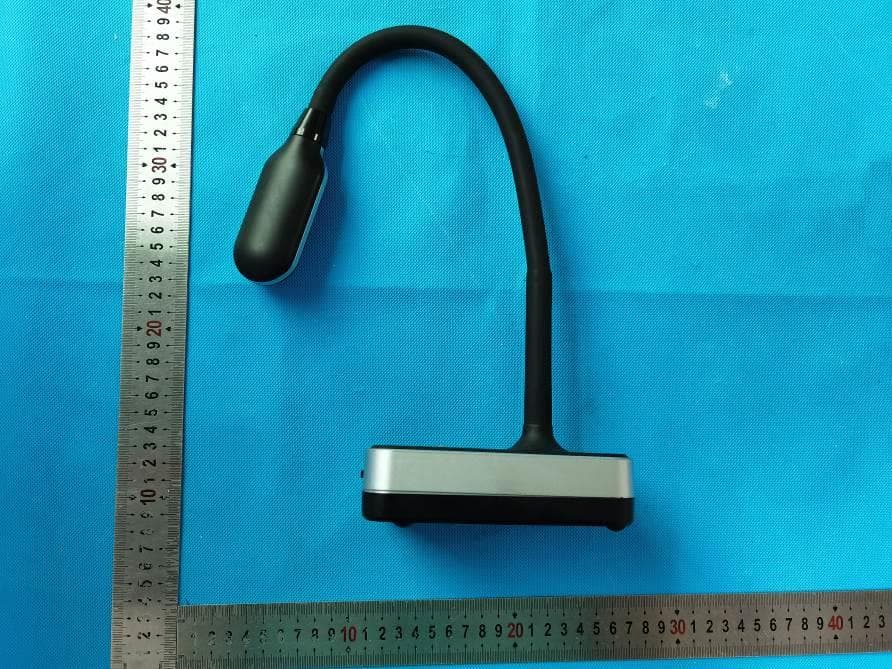
Click to zoom
Application Details
- Equipment Class
- NII - Unlicensed National Information Infrastructure TX
- Date of Grant
- Dec 01, 2020
- Application Purpose
- Original Equipment
- Date of Application
- Dec 01, 2020
- Equipment Note
- Document Camera
- Frequency Range
- 5745.00000000 - 5825.00000000
- Company
- Clear Touch Solutions, Inc.
- Country
- United States
Documents & Files
Document Text
Text extracted from the exhibit documents filed with the FCC. Open a document above to read the original.
Users Manual
This document camera is designed for use in classrooms and meeting rooms to display live objects and work, documents, drawings, and books with great visual detail to external displays such as interactive flat panels, tv displays, and projectors. Lens Goose Neck MIC Supplement Light Auto Focus Visualizer Design DC110 Specifications 1.Camera: Capture image and video 2. Supplement Light: Four white LED light 3. Gooseneck Design: Multidimensional rotate 4. WiFi Indicator Light: Green when power on, red for regular working 5. Working Modes Status: Green for USB mode, red for WiFi mode 6. Power Indicator Light: Red for low battery, Orange for under 50%, Green for full power 7. MIC: Microphone 8. Supplement Light: Three level light 9. MIC ON/OFF 10. Auto Focus 11. Anti-theft Lock 12. Power Supply: 5V/1.5A adapter 13. USB port: USB2.0 port connect to computer 14. USB Extended Port 15. Power: ON/OFF Included In The Box • Visualizer • Adapter • USB 2.0 Cable • User Manual getcleartouch.com Warnings & Precautions • Do not use this unit if any of the wires, plugs, or ports are loose or broken. • Be careful not to use this unit near water, for risk of shock or danger of fire. • Do not kink any of the wires as they may break over time. • Place this unit on even, level surfaces to minimize risk of damage due to falling or injury to you or someone else. • Adjust the camera head of this unit over the objects to be displayed until the best picture results are obtained. 4 10 5 9 6 8 7 1211 13 14 15 2 1 3 90mm90mm 110mm 139mm 515mm 40mm 36mm System Connection 1. USB Connect Mode Connect the power cable to the document camera and power on, then connect the document camera to the PC or Mac with the USB cable. Launch the Canvas software and click the camera tool to view the image. DC110 Wireless Set Up 1. On PC (Windows Only) Open network settings and choose the SSID that starts with “CTI” and connect to it. Default password: 1234567890 A. Computer uses Ethernet cable to connect to Network: Be sure computer’s WiFi is enabled and use it to connect to the camera’s hotspot. B. Computer uses WiFi to connect to Network: Plug in a secondary WiFi USB adapter (Windows will automatically create a new WiFi port) and then connect to the camera’s hotspot. 2. iOS and Android Devices Next, go to Settings > WiFi > CTI... and connect. First, from the App Store, download the Connect DC app to view images wirelessly from the document camera. 3. Open Connect DC APP View the image from the document camera. From the iOS and Android Connect DC app, you can change the SSID and password of the document camera as well as change the resolution of the camera. You can also grab snapshots and video from the camera to your iOS device. Note: Do not use the USB cable, rather you will connect your PC (Windows Only, Mac connects only by USB cable) to the document camera’s WiFi hotspot. Then launch Canvas software and click the camera tool to view the image. Resolution 3648 x 2736 Working Mode Supports online & WiFi mode Scan Range Doc, book, card, Passport 3D object, etc. Scanning Size A4 Scanning Speed 1S Focus Mode Auto Focus Frame Rate 40 fps Image Color 24 bits Image Control Brightness, exposure, saturation, contrast Image Format JPG, BMP, TIF, PNG Video Format AVI, WMV Sensor CMOS Light Source Natural light, LED light Driver Driverless MIC Optional Port USB 2.0, USB Extension Remote Control Non-Support Power USB 5V DC110 Product Specifications Disclaimer Thank you for using the Clear Touch Document Camera. Please read the manual carefully before using it for the best experience. The information contained in the is document is subject to change without notice. • Please don’t leave the document camera outside under the bright sun or near any sources of heat. • When cleaning this unit, wet a cloth with a non-corrosive cleaning agent rather than spraying directly onto the unit. Wipe down the unit with the wet cloth and then dry with a dry cloth. Do not immerse the unit in water. Doing so will cause the unit to malfunction and could pose an electrical shock risk. • Avoid placing the unit in highly humid or dusty locations. Please not the following environmental conditions that are acceptable for general use: Temperature: 0°C-40°C (32°F-104°F) Humidity: 30%-85% (No Condensation) • Treat the camera head of the unit with care when using it. • Do not stare at the LED light in close range to avoid injury to eyes. After-sale Service and Warranty Find the warranty statement for our document cameras online at getcleartouch.com/downloads Reach our Support Department at support.getcleartouch.com/portal/newticket, or call Support at 864-643-5045 No. ProblemDescriptionSolution 1.No ImageThe unit is connected by USB to the computer, but the image is not showing in the software 1. Check to see if the USB and power cables are connected properly. 2. Check to see if there is damage to the cables. 2.Unit indicator light is not onThe unit is connected by USB cable to the computer, but the indicator light is not on 1. Make sure the computer is working. 2. Check the USB cable, and re-plug it in if necessary. is defective. 3.Image quality issuesImage resolution, focus, or brightness are not correct needed, use the supplemental LED camera light. 4.Image DistortionImages appear oddly shaped Make sure the camera head is positioned parallel to the objects being viewed, and make sure objects are laying flat on a surface under the camera head. Troubleshooting System & Software System Requirements (Windows/Mac) • Intel Compatible PC/Mac • Dual Core 2.2 Ghz or better Processor • 2 GB or RM (4GB preferable and 8 GB for better performance) • Intel HD4000 or better or Nvidia Geforce GTX 650 or better graphics card (independent recommended over onboard) • Single, dual, or multitouch display Note: The system requirements listed here are only a guideline, and your results may vary. In general, the better the specifications of your computer, the better the results will be. Softwa…
Text truncated - open the document above for the full version.
Cover Letter(s)
Clear Touch Solutions, Inc. Agent Authorization Company:Clear Touch Solutions, Inc. Address: 561 Keystone Avenue, Suite 821,Reno, NV 89503 US A Product Name: Document Camera Model Number(s): DC110, DC100, DC200, DC400 We authorize MiCOM Labs Inc., 575 Boulder Court, Pleasanton, California 94566, USA, to act on our behalf on all matters concerning the certification of above named equipment. We declare that MiCOM Labs Inc. is allowed to forward all information related to the approval and certification of equipment to the regulatory agencies as required and to discuss any issues concerning the approval application. Any and all acts carried out by MiCOM Labs on our behalf shall have the same effect as acts of our own. Date: Nov. 27, 2020Signature: Name: Keone Trask Title: manager Company: Clear Touch Solutions, Inc.
Cover Letter(s)
FCC Software Configuration Control Declaration Rev1.1 Clear Touch Solutions, Inc. FCC Software Configuration Control Declaration Date: Nov. 17, 2020 Federal Communications Commission 7435 Oakland Mills Road Columbia, MD 21046 USA Attn: OET Dept. Product/ Model Number: Document Camera / DC110, DC100, DC200, DC400 Regarding FCC Country Code Selection guidelines identified in KDB 594280. “All applications for equipment authorization for transmitters that can have radio parameters, or other technical parameters, reported to the Commission set by software must have an attestation indicating that no third party will have software, or configuration control, to program the device out of compliance of the technical rules under which it has been certified.” We declare that no third party will have software, or configuration control, to program the device out of compliance of the technical rules under which it has been certified. Name: Date: 2020-11-27 Title: Keone Trask manager Signature of applicant
ID Label/Location Info
SIZE: 40*60mm Document Camera MODEL: DC110 FCC ID: 2ARWS-DC1NX This device complies with part 15 of the FCC Rules. Operation is subject to the following two conditions: (1) This device may not cause harmful interference, and (2) this device must accept any interference received, including interference that may cause undesired operation.
Internal Photos
WiFi Antenna
RF Exposure Info
RF Exposure Evaluation Clear Touch Solutions, Inc. For Document Camera Model No.: DC110, DC100, DC200, DC400 FCC ID: 2ARWS-DC1NX Prepared for : Clear Touch Solutions, Inc. 561 Keystone Avenue, Suite 821,Reno, NV 89503 USA Prepared By : Shenzhen HUAK Testing Technology Co., Ltd. 1F, B2 Building, Junfeng Zhongcheng Zhizao Innovation Park, Fuhai Street, Bao'an District, Shenzhen City, China Date of Test: Sep. 14, 2020 -- Sep. 24, 2020 Date of Report: Sep. 24, 2020 1 General Description of EUT Equipment Document Camera Model Name DC110 Serial No. DC100, DC200, DC400 Model Difference All model’s the function, software and electric circuit are the same, only model named different. Test sample model: DC110 Trade Mark ClearTouch FCC ID 2ARWS-DC1NX Hardware Version: V1.6.2 Software Version: V1.0 Frequency Range : Band Mode Operation frequency Channels BAND III IEEE802.11 a HT20 IEEE802.11 ac HT20 IEEE802.11 ac HT40 5745-5825 MHz 5745-5825 MHz 5755-5795 MHz 5 5 2 Antenna Type Internal antenna Antenna Gain Antenna: 2dBi Power Source DC 5.0V from adapter/pc or DC3.7V from battery 2 RF Exposure Compliance Requirement 2.2 Standard Requirement According to FCC Part1.1310: The criteria listed in the following table shall be used to evaluate the environment impact of human exposure to radio frequency (RF) radiation as specified in part1.1307(b) F= Frequency in MHz Friis Formula Friis transmission formula: Pd = (Pout*G)/(4* Pi * R 2) Where Pd = power density in mW/cm2 Pout = output power to antenna in mW G =gain of antenna in linear scale Pi = 3.1416 R = distance between observation point and center of the radiator in cm Pd id the limit of MPE . If we know the maximum gain of the antenna and the total power input to the antenna, through the calculation, we will know the distance r where the MPE limit is reached. 3 EUT RF Exposure Antenna Gain: 2Bi Antenna Gain: The maximum Gain measured in fully anechoic chamber is in linear scale. Output Power Into Antenna & RF Exposure Evaluation Distance: Measurement Data a (20MHz) mode Test channel Peak Output Power (dBm) Tune up tolerance (dBm) Maximum tune-up Power (dBm) (mW) Lowest(5745MHz) 7.101 7±1 8 6.310 Middle(5785MHz) 7.024 7±1 8 6.310 Highest(5825MHz) 6.937 7±1 8 6.310 ac (20MHz) mode Test channel Peak Output Power (dBm) Tune up tolerance (dBm) Maximum tune-up Power (dBm) (mW) Lowest(5745MHz) 8.575 8±1 9 7.943 Middle(5785MHz) 7.617 8±1 9 7.943 Highest(5825MHz) 8.672 8±1 9 7.943 ac (40MHz) mode Test channel Peak Output Power (dBm) Tune up tolerance (dBm) Maximum tune-up Power (dBm) (mW) Lowest(5755MHz) 8.257 8±1 9 7.943 Highest(5795MHz) 8.036 8±1 9 7.943 Maximum tune-up Power (mW) Antenna Gain (dBi) Power Density at R = 20 cm (mW/cm2) Limit Result 7.943 2 0.0025 1 PASS Remark: The Max Conducted Peak Output Power data refer to report Report No.: HK2009222672-E
Test Report
Report No.: HK2009222672-E FCC TEST REPORT Test report On Behalf of Clear Touch Solutions, Inc. For Document Camera Model No.: DC110, DC100, DC200, DC400 FCC ID: 2ARWS-DC1NX Prepared for : Clear Touch Solutions, Inc. 561 Keystone Avenue, Suite 821,Reno, NV 89503 USA Prepared By : Shenzhen HUAK Testing Technology Co., Ltd. 1F, B2 Building, Junfeng Zhongcheng Zhizao Innovation Park, Fuhai Street, Bao'an District, Shenzhen City, China Date of Test: Sep. 14, 2020 -- Sep. 24, 2020 Date of Report: Sep. 24, 2020 Report Number: HK2009222672-E Report No.: HK2009222672-E Page 2 of 44 TEST RESULT CERTIFICATION Applicant’s name ................. : Clear Touch Solutions, Inc. Address ................................. : 561 Keystone Avenue, Suite 821,Reno, NV 89503 USA Manufacture's Name ............ : SHENZHEN SHINYLOAM ELECTRONICS CO.,LTD Address ................................. : 2nd Building, Phase 1, Lianchuang Technical Zone, Bulan Road, Longgang, Shenzhen, Guangdong, China Product description Trade Mark ................................ : ClearTouch Product name ............................ : Document Camera Model and/or type reference : DC110, DC100, DC200, DC400 Standards ............................. : FCC Rules and Regulations Part 15 Subpart C Section 15.407 This publication may be reproduced in whole or in part for non-commercial purposes as long as the Shenzhen HUAK Testing Technology Co., Ltd. is acknowledged as copyright owner and source of the material. Shenzhen HUAK Testing Technology Co., Ltd. takes no responsibility for and will not assume liability for damages resulting from the reader's interpretation of the reproduced material due to its placement and context. Date of Test ........................................... : Date (s) of performance of tests ............. : Sep. 14, 2020 -- Sep. 24, 2020 Date of Issue .......................................... : Nov. 27, 2020 Test Result .............................................. : Pass Testing Engineer : (Gary Qian) Technical Manager : (Eden Hu) Authorized Signatory : (Jason Zhou) Report No.: HK2009222672-E Page 3 of 44 TABLE OF CONTENTS 1. Test Result Summary ............................................................................................................. 4 1.1. TEST PROCEDURES AND RESULTS ............................................................................. 4 1.2. TEST FACILITY ................................................................................................................ 4 1.3. Measurement Uncertainty ................................................................................................. 5 2. EUT Description ..................................................................................................................... 6 2.1. GENERAL DESCRIPTION OF EUT ................................................................................. 6 2.2. Operation Frequency each of channel .............................................................................. 6 2.3. Duty Cycles ...................................................................................................................... 7 2.4. EUT CONFIGURATION .................................................................................................... 7 2.5. DESCRIPTION OF TEST SETUP .................................................................................... 8 2.6. Description of Support Units ............................................................................................. 8 3. Test Results and Measurement Data ..................................................................................... 9 3.1. Conducted Emission ......................................................................................................... 9 3.2. Maximum Conducted Output Power ............................................................................... 13 3.3. -6dB Bandwidth .............................................................................................................. 15 3.4. Power Spectral Density................................................................................................... 22 3.5. Spurious Emission .......................................................................................................... 25 3.6. Frequency Stability Measurement ................................................................................... 32 3.7. ANTENNA REQUIREMENT ........................................................................................... 34 4. Photographs of Test Setup .................................................................................................. 35 5. PHOTOS OF THE EUT .......................................................................................................... 37 Report No.: HK2009222672-E Page 4 of 44 1. Test Result Summary 1.1. TEST PROCEDURES AND RESULTS Requirement CFR 47 Section Result Antenna requirement §15.203 PASS AC Power Line Conducted Emission §15.207 PASS Maximum Conducted Output Power §15.407(a) PASS 6dB Emission Bandwidth §15.407(e) PASS Power Spectral Density §15.407(a) PASS Band edge §15.407(b) PASS Radiated Emission §15.407(a) PASS Frequency Stability §15.407(g) PASS Note: 1. PASS: Test item meets the requirement. 2. Fail: Test item does not meet the requirement. 3. N/A: Test case does not apply to the test object. 4. The test result judgment is decided by the limit of test standard. 1.2. TEST FACILITY Test Firm : Shenzhen HUAK Testing Technology Co., Ltd. Address 1F, B2 Building, Junfeng Zhongcheng Zhizao Innovation Park, Fuhai Street, Bao'an District, Shenzhen City, China Report No.: HK2009222672-E Page 5 of 44 1.3. Measurement Uncertainty The reported uncertainty of measurement y ± U, where expended uncertainty U is based on a standard uncertainty multiplied by a coverage factor of k=2, providing a level of confidence of approximately 95 %. No. Item MU 1 Conducted Emission ±2.56dB 2 RF power, conducted ±0.12dB…
Text truncated - open the document above for the full version.
Contact Information
Applicant
Keone Trask
Technical Contact
Test Firm
Shenzhen HUAK Testing Technology Co., Ltd.Jason Zhou
[email protected]+86-755-23029901
Technical Specifications
| # | Rule Parts | Frequency Range | Power Output |
|---|---|---|---|
| 1 | 15E | 5.75 GHz - 5.83 GHz | 7.37 mW |