2AT2PKAI-KAIBOT1Kaibot
AUTONOMOUS WORKS LIMITED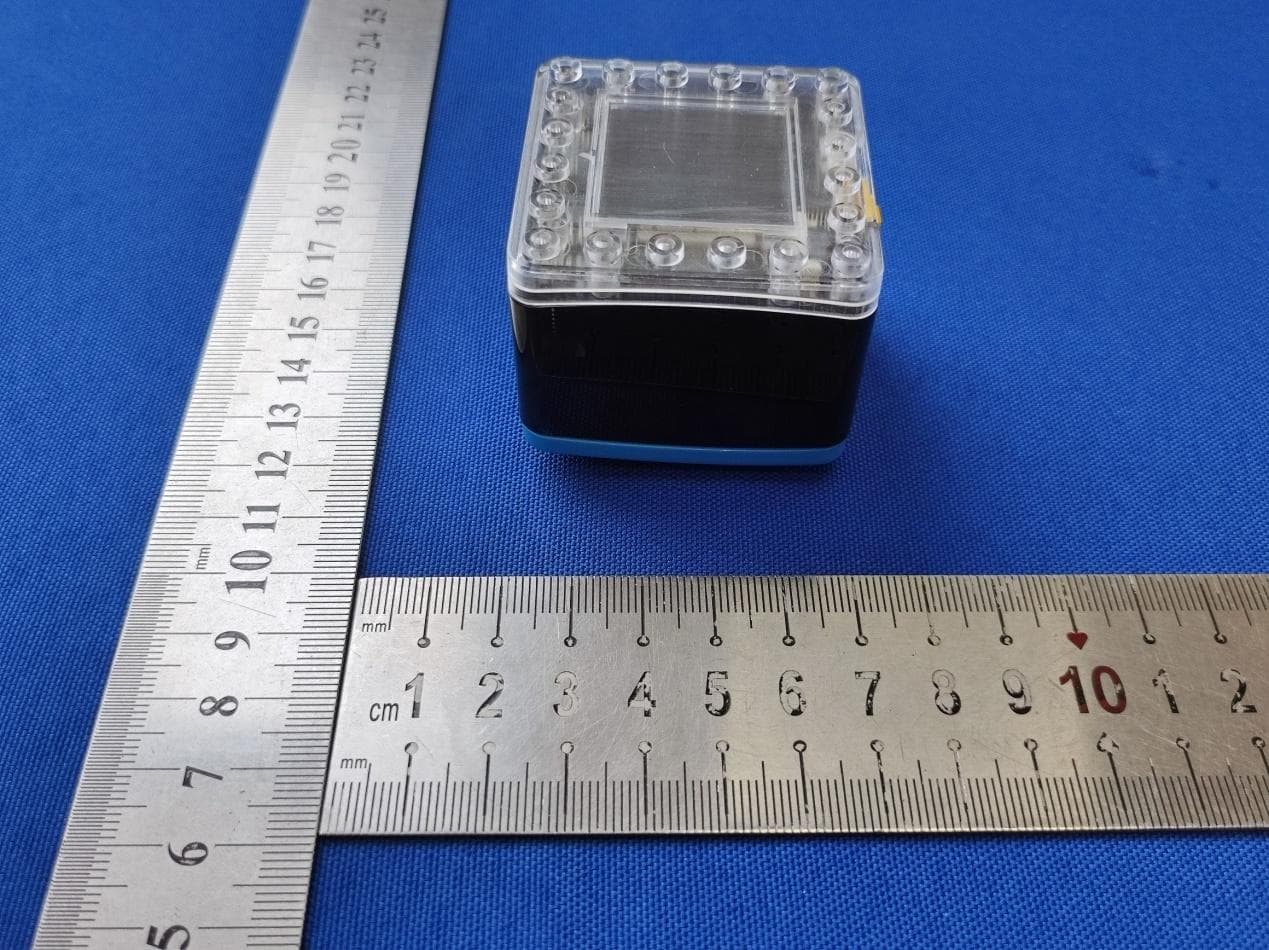
Click to zoom
Application Details
- Equipment Class
- DXX - Part 15 Low Power Communication Device Transmitter
- Date of Grant
- Dec 19, 2022
- Application Purpose
- Original Equipment
- Date of Application
- Dec 19, 2022
- Equipment Note
- Kaibot
- Frequency Range
- 2402.00000000 - 2480.00000000
- Company
- AUTONOMOUS WORKS LIMITED
- Country
- New Zealand
Documents & Files
Document Text
Text extracted from the exhibit documents filed with the FCC. Open a document above to read the original.
Users Manual
Human Interface Guide Designed and made by New Zealanders (also known as Kiwis) for their ❤ of teaching children computer science, coding & robotics. 1 Thank you for purchasing KaiBot. To get the most benefit from KaiBot please be sure to read all instructions thoroughly and share this document with others who will also use KaiBot. Disclaimer Autonomous Works Limited has made every effort to provide clear and accurate information in this Manual, which is provided solely for the user’s information. While thought to be accurate, the information in this document is provided strictly “as is” and Autonomous Works Limited will not be held responsible for issues arising from typographical errors or user’s interpretation of the language used herein that is different from that intended by Autonomous Works Limited. All safety and general information are subject to change due to changes in applicable laws. Autonomous Works Limited reserves the right to revise this Manual and make changes from time to time in the content hereof without obligation to notify any person of such revisions or changes. In no event shall Autonomous Works Limited, its employees, or authorized agents be liable to you for any damages or losses, direct or indirect, arising from the misuse of any technical or operational information contained in this document Symbols and Conventions This icon marks reference to other pages in this manual. Menu items, options, and messages are displayed in bold. Notices CC BY-NC-SA: This license allows users to distribute, remix, adapt, and build upon the material in any medium or format for non-commercial purposes only, and only so long as attribution is given to the creator. If you remix, adapt or build upon the material, you must license the modified material under identical terms. The kiwi is not only a fruit. There are three different meanings of Kiwi. A person who lives in New Zealand, a Kiwi bird is a flightless bird that is also used as the national symbol, and, lastly, there is the delicious fruit called Kiwi fruit. 2 Index Let’s do this! 4 1. Help KaiBot feel at home. 4 2. Power up. 4 3. Layout the Coding Cards 4 What’s included 5 Optional add-ons 6 KaiBot in the Classroom 6 Where do I start as a Teacher? 7 Introduction Activity 8 Level 1: Concrete to Abstract 9 Level 2: It’s time to introduce KaiBot 12 Getting to know KaiBot 12 How to Scan Coding Cards 13 Level 3: Add some Magnetic KaiTiles 15 Design different layouts with KaiTiles 15 Level 4: Pairing your KaiBot with Kainundrum.com 16 Progress students from screen free coding to block and text programming. 17 How to pair KaiBot to Kainundrum.com 18 Trouble Shooting the Pairing process 18 KaiBot is a versatile little guy 19 Human Robot Interface 20 Charging your KaiBot 21 Charging with a USB cable (included) 21 Charging with KaiBots Autonomous Charging Dock (optional) 21 Coding Cards 24 Elements of Coding Cards 24 Types of Coding Cards 25 The Structure of a Coding Card Program 25 How to correctly structure your coding cards 26 Basic Coding Card Explainer 27 Advanced Coding Card Pack (optional) 32 KaiBot in Kainundrum Cards 42 Debugging Code 43 Magnetic snap together Kai-Tiles 45 KaiBot without Kai-Tiles 45 KaiBot with Kai-Tiles 45 KaiBot firmware update 47 KaiBot in Kainundrum with Kai-Tiles 48 Coding Card Examples 50 Design your own code examples 58 3 Troubleshooting 58 Feature requests & bugs 59 Visionary Inspirators 60 Expert Contributors 61 4 Let’s do this! Everything you need is inside the box. Well, nearly everything... If you are going to pair KaiBot with your Chromebook, PC or MAC then that device is not inside the box, lol that would be funny if your computer was also in the box! The great thing about KaiBot is that it can work without your computer (screen-free) or it can work alongside it using Kainundrum.com. 1. Help KaiBot feel at home. KaiBot works best on clean, flat surfaces with or without his optional Kai-Tiles . He likes open spaces either on the floor or on a table. But he prefers his magnetic blue Kai-Tiles because he always knows where he is when he's placed on them. He’ll work fine without the blue magnetic tiles though. 2. Power up . Plugin the USB charge cable to the back of KaiBot to charge him up. He feels more secure if you have the optional Charge Dock as then he’ll be able to charge himself when he gets tired and be refreshed and ready for the day ahead. Do not use the robot during charging. KaiBot gets around 1-2 hours of play from a 30-minute charge when connected to a powered USB outlet. 3. Layout the Coding Cards Once you’ve got KaiBot charged, it’s time to teach him how to code and be ready for World Domination. (don’t forget to pack lunch). KaiBot acts as a computer interpreter. KaiBot interprets and translates the coding cards into machine code, instruction by instruction, and then KaiBots CPU executes each instruction before the internal interpreter moves on to translate/scan the next instruction. If KaiBot scans a coding card that is invalid the interpreted code will show an error Bug message on the screen as soon as it encounters a problem, so this makes it easier to debug your code. What’s included What’s in the box 5 KaiBot rechargeable robot USB to Micro USB charging cable *Optional autonomous charging dock available Deck of 33 Standard Coding Cards that KaiBot can scan & read *Optional Advanced Coding Cards available Various KaiBot character sleeves, to customize your robot Activities & lesson plans https://kaiseducation.com/lesson-plans/ 6 Optional add-ons KaiBots Autonomous Charging Dock , KaiBot becomes a mini-Roomba like a robot and can self-charge! When KaiBot is placed on the purple tile, KaiBot will automatically navigate to the charge dock. If you also have KaiTiles along with Kainundrum, then KaiBot will autonomously drive to the nearest available charge dock and fill up. Magnetic Kai-Tiles , to create physical maze layouts. Each tile is a unique number from 1 to 60. Kai-Tile packs …
Text truncated - open the document above for the full version.
Cover Letter(s)
< AUTONOMOUS WORKS LIMITED > Office of Engineering Technology Federal Communications Commission 7435 Oakland Mills Road Columbia, MD21046 Date: Dec. 19, 2022 Subject; Request for Long Term Confidentiality FCC ID: 2AT2PKAI-KAIBOT1 To Whom It May Concern, Pursuant to the provisions of Sections §0.457 and §0.459, we are requesting the Commission to withhold the following attachment(s) as confidential documents from public disclosure indefinitely. These documents contain detailed system and equipment descriptions and are considered as proprietary information in operation of the equipment. The public disclosure of these documents might be harmful to our company and would give competitors an unfair advantage in the market. Schematic Diagram Block Diagram Parts List Operational Description Tune-up Procedure It is our understanding that all measurement test reports, FCC ID label format and correspondence during the certification review process cannot be granted as confidential documents and this information will be available for public review once the grant of equipment authorization is issued. Sincerely, Signature: Name: Bruce Jackson Title: Manager
Cover Letter(s)
AUTONOMOUS WORKS LIMITED Letter of Authorization Company: AUTONOMOUS WORKS LIMITED Address: 2/10 Ben Lomond Cres, Pakuranga Heights, Auckland 2010, New Zealand Product name: Kaibot Trade name: Kaibot Model name: KAI-KAIBOT1, KAI-CHARGE1 FCC Identifier: 2AT2PKAI-KAIBOT1 We authorize MiCOM LabsInc, 575 Boulder Court, Pleasanton, California94566, USA, to act on our behalf on all matters concerning the above named equipment. Any individual within MiCOM Labs is authorized to act on our behalf and take action on the application. We declare that MiCOM LabsInc, 575 Boulder Court, Pleasanton, California 94566, USA, is allowed to forward all information related to the approval project to the Federal Communication Commission and to discuss any issues concerning the approval application. Any and all acts carried out by MiCOM Labs on our behalf shall have the same effect as acts of our own. Name: Bruce Jackson Date: Dec. 19, 2022 Title: Manager Signature of applicant:
Cover Letter(s)
Model Difference Declaration To Whom It May Concern, We, AUTONOMOUS WORKS LIMITED Product name: Kaibot Trade name: Kaibot Model name: KAI-KAIBOT1, KAI-CHARGE1 software and electric circuit are the same, only with a product color and model named different. Test sample model: KAI-KAIBOT1. Please contact me if you have any question. Name: Bruce Jackson Date: Dec. 19, 2022 Title: Manager Signature of applicant:
External Photos
Model: KAI-KAIBOT1 Model: KAI-KAIBOT1 Model: KAI-KAIBOT1 Model: KAI-KAIBOT1
ID Label/Location Info
FCC ID LABEL: Label Location: Long: 2cm Width: 0.5cm FCC ID: 2AT2PKAI-KAIBOT1
Internal Photos
Model: KAI-KAIBOT1 Model: KAI-KAIBOT1 Model: KAI-KAIBOT1 Model: KAI-KAIBOT1 Model: KAI-KAIBOT1 Model: KAI-KAIBOT1 Model: KAI-KAIBOT1 PCB Antenna
Test Report
NotRecommendedForNewDesigns(NRND) 18.00±0.15 0.85 0.90 10.50 10.29 3.10±0.15 0.80 Top View Side View Bottom View 0.90 0.85 0.1 Unit: mm 3.60 3.60 25.50±0.15 11.43 8.89 1.50 1.27 16.51 15.80 17.60 Ø0.50 0.90 0.45 6.19 1.05 6.19 Espr essif Systems23 Submit Documentation Feedback ESP32-WROOM-32D & ESP32-WROOM-32U Datasheet v2.3
Test Report
Page 1 of 30 Report No.: UNIA22112808ER-61 FCC RADIO TEST REPORT FCC ID: 2AT2PKAI-KAIBOT1 Sample: Kaibot Trade Name: Kaibot Main Model: KAI-KAIBOT1 Additional Model: KAI-CHARGE1 Report No.: UNIA22112808ER-61 Prepared for AUTONOMOUS WORKS LIMITED 2/10 Ben Lomond Cres, Pakuranga Heights, Auckland 2010, New Zealand Prepared by Shenzhen United Testing Technology Co., Ltd. 2F, Annex Bldg, Jiahuangyuan Tech Park, #365 Baotian 1 Rd, Tiegang Community, Xixiang Str, Bao'an District, Shenzhen, China Page 2 of 30 Report No.: UNIA22112808ER-61 TEST RESULT CERTIFICATION Applicant .............................. : AUTONOMOUS WORKS LIMITED Address ................................. : 2/10 Ben Lomond Cres, Pakuranga Heights, Auckland 2010, New Zealand Manufacturer ........................ : Heron Electronic & optical co,. Ltd. Address ................................. : Plant B, Guancheng Science and Technology Park, Dongguan City, Guangdong Province Product description Product ....................................... : Kaibot Trade Name ........................... : Kaibot Model Name .......................... : KAI-KAIBOT1, KAI-CHARGE1 Test Methods ........................ : FCC Rules and Regulations Part 15 Subpart C Section 15.249, ANSI C63.10: 2013 This device described above has been tested by Shenzhen United Testing Technology Co., Ltd., and the test results show that the equipment under test (EUT) is in compliance with the FCC requirements. And it is applicable only to the tested sample identified in the report. This report shall not be reproduced except in full, without the written approval of UNI, this document may be altered or revised by Shenzhen United Testing Technology Co., Ltd., personnel only, and shall be noted in the revision of the document. Date of Test ........................................... : Date (s) of performance of tests ............. : Nov. 28, 2022 ~ Dec. 12, 2022 Date of Issue .......................................... : Dec. 19, 2022 Test Result.............................................. : Pass Prepared by: Kahn yang/Supervisor Reviewer: Kelly Cheng/Supervisor Approved & Authorized Signer: Liuze/Manager Page 3 of 30 Report No.: UNIA22112808ER-61 Table of Contents Pages 1 TEST SUMMARY ........................................................................................................ 4 1.1 TEST PROCEDURES AND RESULTS .......................................................................... 4 1.2 TEST FACILITY ............................................................................................................ 4 1.3 MEASUREMENT UNCERTAINTY ................................................................................ 5 2 GENERAL INFORMATION ......................................................................................... 6 2.1 GENERAL DESCRIPTION OF EUT .............................................................................. 6 2.2 CARRIER FREQUENCY OF CHANNELS ..................................................................... 7 2.3 TEST MODE ................................................................................................................. 7 2.4 TEST SETUP ................................................................................................................ 8 2.5 EQUIPMENT USED IN TESTED SYSTEM ................................................................... 8 2.6 MEASUREMENT INSTRUMENTS LIST ....................................................................... 9 3 CONDUCTED EMISSION ......................................................................................... 10 3.1 TESTLIMIT .................................................................................................................. 10 3.2 TEST SETUP .............................................................................................................. 10 3.3 TEST PROCEDURE ................................................................................................... 11 3.4 TESTRESULT ............................................................................................................. 11 4 RADIATED EMISSION .............................................................................................. 14 4.1 TESTLIMIT .................................................................................................................. 14 4.2 TESTSETUP ............................................................................................................... 15 4.3 TEST PROCEDURE ................................................................................................... 16 4.4 TESTRESULT ............................................................................................................. 16 5 BAND EDGE ............................................................................................................. 22 5.1 TESTLIMIT .................................................................................................................. 22 5.2 TEST PROCEDURE ................................................................................................... 22 5.3 TESTRESULT ............................................................................................................. 22 6 OCCUPIED BANDWIDTH ......................................................................................... 25 6.1 TESTSETUP ............................................................................................................... 25 6.2 TEST PROCEDURE ................................................................................................... 25 6.3 TESTRESULT ............................................................................................................. 25 7 ANTENNA REQUIREMENT ...................................................................................... 28 8 PHOTO OF TEST ..................................................................................................... 29 8.1 RADIAT…
Text truncated - open the document above for the full version.
Test Setup Photos
Model: KAI-KAIBOT1 Radiated Emission test Model: KAI-KAIBOT1 Conducted Emission test
Contact Information
Applicant
Bruce Jackson
Technical Contact
Test Firm
Shenzhen United Testing Technology Co., Ltd.Liu Ze
[email protected]86-755-86180996
Technical Specifications
| # | Rule Parts | Frequency Range | Power Output |
|---|---|---|---|
| 1 | 15C | 2.40 GHz - 2.48 GHz | - |