FCCID.CO- FCC ID Database
HomeCompaniesEquipment ClassesSearch

© 2026 FCC ID Database. All rights reserved.

AboutContactData sourced from FCC public records
  1. Home/
  2. Buttons (Shanghai) Technology Limited/
  3. 2ATGI-AIRBTN20

2ATGI-AIRBTN20Buttons Air X

Buttons (Shanghai) Technology Limited
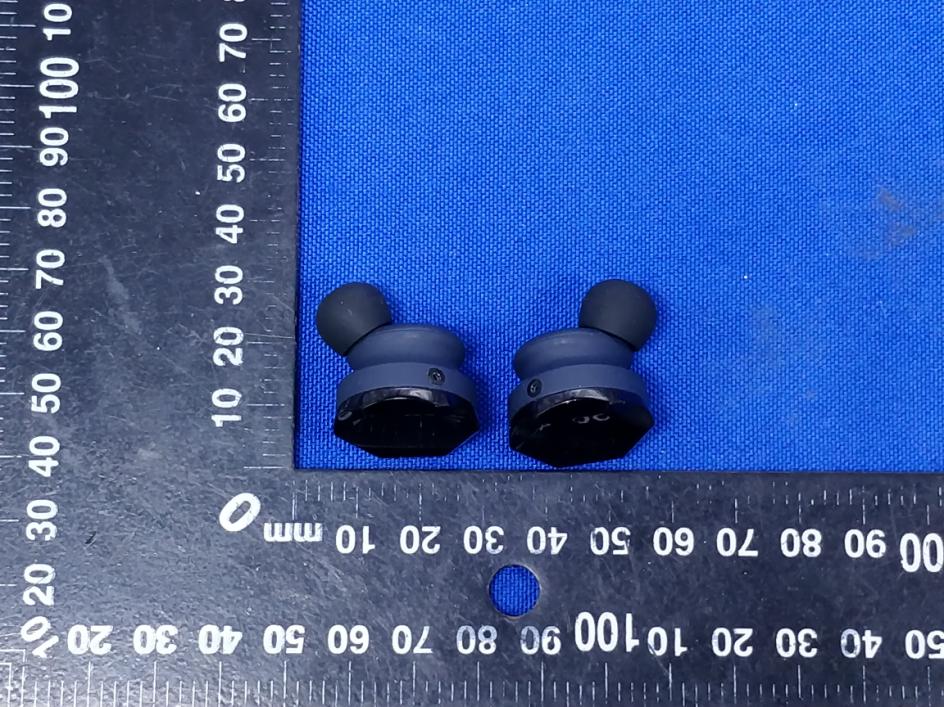
Buttons Air X - FCC ID 2ATGI-AIRBTN20 - Buttons (Shanghai) Technology Limited
Click to zoom

Application Details

Equipment Class
DSS - Part 15 Spread Spectrum Transmitter
Date of Grant
Jul 09, 2020
Application Purpose
Original Equipment
Date of Application
Jul 09, 2020
Equipment Note
Buttons Air X
Frequency Range
2402.00000000 - 2480.00000000
Company
Buttons (Shanghai) Technology Limited
Country
China

Documents & Files

Select a file to view
Users Manual

↗

Cover Letter(s)

↗

External Photos

↗

ID Label/Location Info

↗

Internal Photos

↗

RF Exposure Info

↗

Test Report

↗

Test Setup Photos

↗

Document Text

Text extracted from the exhibit documents filed with the FCC. Open a document above to read the original.

Users Manual

& BUTTONS TM Buttons Air X AIRBTN20 & 3 What's in the boxPairing On & Off USB Type A to Type C charging cable BUTTONS Air X Earphone User manual and warranty card Portable charging case Your earphones will power up automatically once taken out of the charging case; Andwill power off automatically and start charging after returned to the case. Before using the earphones for the first time, please charge the charging case and earphones. After the earphonesare connected, two "BUTTONS Air X" devices will appear on the list of paired devices; If the LED indicator turns to white and flashes rapidly with a long beep sound, the pairing has failed. You must put your earphones back into the charging case and repeat the above procedures; After the first connection, the earphones will automatically connect to the last connected device the next time; The earphones can also be used separately when next connected. Note: Note: 1. When taking your earphones out of the charging case, the red and white LED indicators on the earphones will flash alternately with a voice prompt of "Ready for pairing". Then, your earphones will enter pairing mode; 2. Turn on your mobile’s Bluetooth to find "BUTTONS Air X" on the list of Bluetooth devices and tap "Connect"; 3. The system pops up a dialog box stating "Bluetooth Pairing Request". Press the "Pair" button, and the earphone LED indicator will turn white and flash slowly with a voice prompt of "Connected", which indicates that the earphonesare connected. EN 4 Smart Noise Cancellation Music Control Call Control Wearing Detection & Sleep Mode Voice Assistant BUTTONS Air X Earphones are configuredwith three modes (ANC, ambient sound and standard), and you can switch between them as needed. ANC Mode: this mode achieves a noise reductionup to 35dB, eliminating most noise interference at low frequency bands, and giving the user a quiet listening experience; Ambient Sound Mode: in this mode, ambient sound is collected and played in the ears to improve the perception of the external environment so that the ambient sound outside the ears can be clearly heard; Standard Mode: in this mode, the active noise cancellation and ambient sound functions are disabled, and the earphones are only used as TWS earphones. Mode Switch: Play/Pause Answer Calls Track Switch Reject Calls Volume Control End Calls Call Volume Control Sleep Mode After connecting and wearing both earphones, tap the touch panel on the left earphone to switch between ANC / ambient sound / standard modes. Using both earphones: Tap the touch panel on the right-side earphone one time to pause & play music Using one earphone: Tap the touch panel on the earphone one time to pause & play music Using both earphones: Tap the touch panel on the right earphone one time to answer a call Using one earphone: Tap the touch panel on the earphone one time to answer a call Previous: Double-tap the touch panel on the left earphone Next: Double-tap the touch panel on the right earphone To reject a call, double-tap the touch panel on either earphone Volume Up: Press and hold the touch panel on the right earphone for 1s Volume Down: Press and hold the touch panel on the left earphone for 1s To end a call, tap the touch panel on either earphone during the call To enable the voice assistant, tap the touch panel on either earphone for three times Volume Up: Press and hold the touch panel on the right earphone for 1s Volume Down: Press and hold the touch panel on the left earphone for 1s Enter ANC Mode:your earphones issue a single beep tone and/or a voice prompt of “ANC on”; Enter Ambient Sound Mode: your earphones issue two beep tones and/or a voice prompt of "Ambient sound on"; Enter Standard Mode: your earphones issue three beep tones and/or a voice prompt of "Ambient sound off"; Y Y )0-% )0-% Y )0-% )0-% Y Y Y Y Wearing Detection While music is played, the music will automatically pause when you take off either one or both earphones and will resume when you put on the earphone(s) again. During a phone call, the telephone receiver will be enabled when you take off both earphones, and the earphone speakers will be enabled when you put on either or both earphones. Enter Sleep Mode: The earphones will automatically enter sleep mode in case of failing to pair with a Bluetooth device, being taken off and not used, or being out of bluetooth range for certain duration; Exit Sleep Mode: Put your earphones back into the charging case, and then take out again to exit sleep mode. Y The default mode of the earphones is ANC mode; Mode switch cannot be performed when only one earphone is used. The system will issue two beeps when the volume is adjusted to the maximum or minimum. Touch control is not supported if your earphones are detected not be worn. Note: Note: Note: EN x8 5s 5 Pair a new device Factory Reset Charge Eartips Here are the steps to follow when pairing your earphones with a new device: Put your earphones into the charging case, and wait until the charging LED indicators on the earphones are on, then immediately press and hold the touch panel on either earphone for 5s to take out the earphone; Your earphones will automatically enter the mandatory pairing mode, and you may pair with a device using the steps described in the "Paring" section. If your earphones fail to detect Bluetooth signals or connect via Bluetooth and other normal operations cannot be restored, follow these steps: Put your earphones into the charging case and wait until the charging LED indicators on the earphones are on, then rapidly and successively tap the touch panels on both earphones for 8 times, and take them out of the case; The LED indicators on both earphones turn red and slowly flash for 3 times, keep the two earphones close to each other for 10s; If the LED indicators on both earphones turn white and flash slowly, means factory reset is succeeded. Charge earphones Charge the charging case Put your earphones into the charging case and ensure the two…

Text truncated - open the document above for the full version.

Cover Letter(s)

Buttons (Shanghai) Technology Limited Agent Authorization Company: Buttons (Shanghai) Technology Limited Address: West District, 2nd Floor, No.707, Zhangyang Road, Pilot Free Trade Zone, Shanghai, China Product Name: Buttons Air X Model Number(s): AIRBTN20 Product Description: Buttons Air X We authorize MiCOM Labs Inc., 575 Boulder Court, Pleasanton, California 94566, USA, to act on our behalf on all matters concerning the certification of above named equipment. We declare that MiCOM Labs Inc. is allowed to forward all information related to the approval and certification of equipment to the regulatory agencies as required and to discuss any issues concerning the approval application. Any and all acts carried out by MiCOM Labs on our behalf shall have the same effect as acts of our own. Signature: Date: 2020-06-28 Name: Jiang Yu Title: General Manager Assistant Company: Buttons (Shanghai) Technology Limited

External Photos

Page 1 of 3 Appendix B: Photographs of EUT Product: Buttons Air X Model: AIRBTN20 External Photos Page 2 of 3 Page 3 of 3

ID Label/Location Info

Label Artwork and Location Model: AIRBTN20 Label: Location

Internal Photos

Page 1 of 5 Appendix B: Photographs of EUT Product: Buttons Air X Model: AIRBTN20 Internal Photos Antenna Feed point Page 2 of 5 Page 3 of 5 Page 4 of 5 Page 5 of 5

RF Exposure Info

RF exposure evaluation FCC ID: 2ATGI-AIRBTN20 §2.1093 Radiofrequency radiation exposure evaluation: Portable Devices. According to§15.247(i) and§1.1307b(1), systems operating under the provisions of this section shall be operated in a manner that ensures that the public is not exposed to radio frequency energy level in excess of the commission’s guidance. The 1-g SAR test exclusion thresholds for 100 MHz to 6 GHz at test separation distances ≤ 50 mm are determined by: [(max. power of channel, including tune-up tolerance, mW) / (min. test separation distance, mm)] · [√f(GHz)] ≤ 3.0 for 1-g SAR, where  f(GHz) is the RF channel transmit frequency in GHz  Power and distance are rounded to the nearest mW and mm before calculation  When the minimum test separation distance is < 5 mm, a distance of 5 mm according is applied to determine SAR test exclusion.  The result is rounded to one decimal place for comparison  For EDR+BDR: Channel Frequency (GHz) Max. Power (dBm) Tune up Power (dBm) Max. Tune up Power (dBm) Max. Tune up Power (mW) Test distance (mm) Result exclusion thresholds for 1-g SAR CH 78 2.480 1.86 1±1 2 1.58 5 0.50 3.0 For BLE: Channel Frequency (GHz) Max. Power (dBm) Tune up Power (dBm) Max. Tune up Power (dBm) Max. Tune up Power (mW) Test distance (mm) Result exclusion thresholds for 1-g SAR CH 39 2.480 3.56 3±1 4 2.51 5 0.79 3.0 Result: Base on the calculation value, No SAR measurement is required.

Test Report

Hotline: 400-6611-140 Tel: 86-755-27673339 Fax: 86-755-27673332 http://www.tct-lab.com TEST REPORT FCC ID: 2ATGI-AIRBTN20 Product: Buttons Air X Model No.: AIRBTN20 Additional Model No.: N/A Trade Mark: BUTTONS Report No.: TCT200519E020 Issued Date: Jun. 19, 2020 Issued for: Buttons (Shanghai) Technology Limited West District, 2nd Floor, No.707, Zhangyang Road, Pilot Free Trade Zone, Shanghai, China Issued By: Shenzhen Tongce Testing Lab. 1B/F., Building 1, Yibaolai Industrial Park, Qiaotou, Fuyong, Baoan District, Shenzhen, Guangdong, China TEL: +86-755-27673339 FAX: +86-755-27673332 Note: This report shall not be reproduced except in full, without the written approval of Shenzhen Tongce Testing Lab. This document may be altered or revised by Shenzhen Tongce Testing Lab. personnel only, and shall be noted in the revision section of the document. The test results in the report only apply to the tested sample. Report No.: TCT200519E020 Page 2 of 64 Hotline: 400-6611-140 Tel: 86-755-27673339 Fax: 86-755-27673332 http://www.tct-lab.com TABLE OF CONTENTS 1. Test Certification ..................................................................................... 3 2. Test Result Summary .............................................................................. 4 3. EUT Description ....................................................................................... 5 4. General Information ................................................................................. 6 4.1. Test environment and mode ................................................................................. 6 4.2. Description of Support Units ................................................................................ 6 5. Facilities and Accreditations .................................................................. 7 5.1. Facilities ................................................................................................................. 7 5.2. Location ................................................................................................................. 7 5.3. Measurement Uncertainty ..................................................................................... 7 6. Test Results and Measurement Data ..................................................... 8 6.1. Antenna requirement ............................................................................................ 8 6.2. Conducted Emission ............................................................................................. 9 6.3. Conducted Output Power ................................................................................... 13 6.4. 20dB Occupy Bandwidth .................................................................................... 18 6.5. Carrier Frequencies Separation ......................................................................... 23 6.6. Hopping Channel Number .................................................................................. 28 6.7. Dwell Time ............................................................................................................ 31 6.8. Pseudorandom Frequency Hopping Sequence ................................................ 36 6.9. Conducted Band Edge Measurement ................................................................ 37 6.10. Conducted Spurious Emission Measurement ................................................. 41 6.11. Radiated Spurious Emission Measurement .................................................... 45 Appendix A: Photographs of Test Setup Appendix B: Photographs of EUT Report No.: TCT200519E020 Page 3 of 64 Hotline: 400-6611-140 Tel: 86-755-27673339 Fax: 86-755-27673332 http://www.tct-lab.com 1. Test Certification Product: Buttons Air X Model No.: AIRBTN20 Additional Model No.: N/A Trade Mark: BUTTONS Applicant: Buttons (Shanghai) Technology Limited Address: West District, 2nd Floor, No.707, Zhangyang Road, Pilot Free Trade Zone, Shanghai, China Manufacturer: Shenzhen Grandsun Electronic Co., Ltd. Address: East Park, Gaoqiao Industry Zone, Pingdi Street, Longang, Shenzhen City, Guangdong Province, P.R. China Date of Test: May 20, 2020 – Jun. 18, 2020 Applicable Standards: FCC CFR Title 47 Part 15 Subpart C Section 15.247 FCC KDB 558074 D01 15.247 Meas Guidance v05r02 ANSI C63.10:2013 The above equipment has been tested by Shenzhen Tongce Testing Lab. and found compliance with the requirements set forth in the technical standards mentioned above. The results of testing in this report apply only to the product/system, which was tested. Other similar equipment will not necessarily produce the same results due to production tolerance and measurement uncertainties. Tested By: Date: Jun. 18, 2020 Rleo Reviewed By: Date: Jun. 19, 2020 Beryl Zhao Approved By: Date: Jun. 19, 2020 Tomsin Report No.: TCT200519E020 Page 4 of 64 Hotline: 400-6611-140 Tel: 86-755-27673339 Fax: 86-755-27673332 http://www.tct-lab.com 2. Test Result Summary Requirement CFR 47 Section Result Antenna Requirement §15.203/§15.247 (c) PASS AC Power Line Conducted Emission §15.207 PASS Conducted Peak Output Power §15.247 (b)(1) PASS 20dB Occupied Bandwidth §15.247 (a)(1) PASS Carrier Frequencies Separation §15.247 (a)(1) PASS Hopping Channel Number §15.247 (a)(1) PASS Dwell Time §15.247 (a)(1) PASS Radiated Emission §15.205/§15.209 PASS Band Edge §15.247(d) PASS Note: 1. PASS: Test item meets the requirement. 2. Fail: Test item does not meet the requirement. 3. N/A: Test case does not apply to the test object. 4. The test result judgment is decided by the limit of test standard. Report No.: TCT200519E020 Page 5 of 64 Hotline: 400-6611-140 Tel: 86-755-27673339 Fax: 86-755-27673332 http://www.tct-lab.com 3. EUT Description Product: Buttons Air X Model No.: AIRBTN20 Additional Model No.: N/A Trade Mark: BUTTONS Hardware Version: V07 Software Version: V1.1.0 Bluetooth Version: V5.0 (This report is for BDR+EDR) Operation Frequency: 2402MHz~2480MHz Transfer Rate: 1/2/3…

Text truncated - open the document above for the full version.

Test Setup Photos

Page 1 of 2 Appendix A: Photographs of Test Setup Product: Buttons Air X Model: AIRBTN20 Radiated Emission Page 2 of 2 Conducted Emission

Contact Information

Applicant

Liu Jianpeng(Engineering Program Director)
[email protected]010-85188716Fax: 010-85188716

Technical Contact

Buttons (Shanghai) Technology Limited
[email protected]

China

Test Firm

SHENZHEN TONGCE TESTING LABBeryl Zhao
[email protected]+8675527208735

Technical Specifications

#Rule PartsFrequency RangePower Output
115C2.40 GHz - 2.48 GHz1.50 mW
Confidentiality
Long Term
Grant Notes
Output power listed is conducted power.

Other Applications from Buttons (Shanghai) Technology Limited

BUTTONS Ease - FCC ID 2ATGI-EASEBTN30 - Buttons (Shanghai) Technology Limited
2ATGI-EASEBTN30

BUTTONS Ease

Apr 28, 2021

Equipment Class

DSS - Part 15 Spread Spectrum Transmitter