2ATYP-HK560MPOS COMPUTER
Shiji (US) Inc.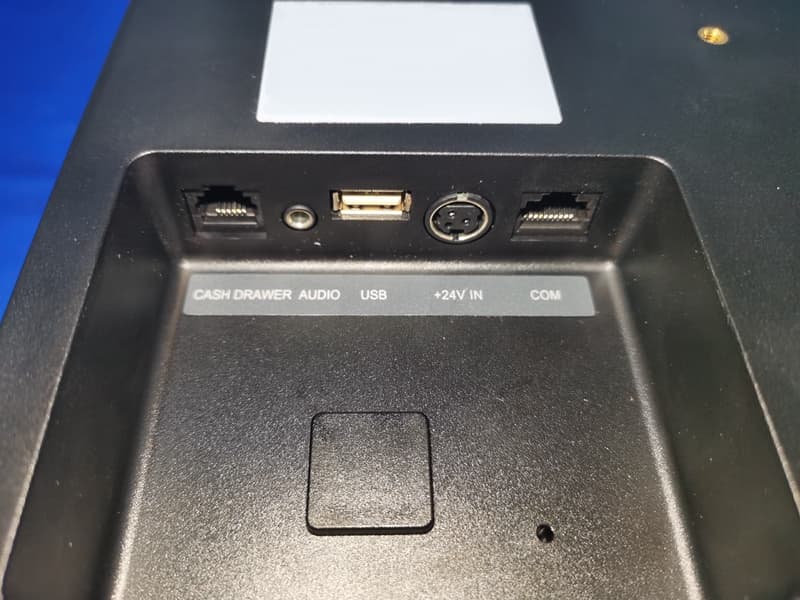
Click to zoom
Application Details
- Equipment Class
- DXX - Part 15 Low Power Communication Device Transmitter
- Date of Grant
- Jul 26, 2021
- Application Purpose
- Original Equipment
- Date of Application
- Jul 25, 2021
- Equipment Note
- POS COMPUTER
- Frequency Range
- 13.56000000 - 13.56000000
- Company
- Shiji (US) Inc.
- Country
- United States
Documents & Files
Document Text
Text extracted from the exhibit documents filed with the FCC. Open a document above to read the original.
Users Manual
1 HK560M User’s Manual Document version 1.0 QingDao Hisense Intelligent Commercial System Co.,Ltd. 2 Safety Notices Before Installation or Use ☆ It is required grounded well and the supply voltage shall be stable, and you must confirm that the voltage of the outlet provides shall be in line with the voltage marked on the label of the unit. ☆ Be sure not to sprinkle any liquid or fall any object into the unit. ☆ Be sure not to keep heavy, strenuous movement, shake & heavy strike away from the POS. ☆ Do not switch on or off the host frequently, because it is easy to result in damage on the machine. ☆ Be sure not to unplug or plug in any live part or external device when they are in energized state, and the connecting cables of the POS between parts shall be connected securely. ☆ Be sure neither to lengthen cable nor to replace parts at your will, if you have any demand, please contact with the reseller. ☆ The unit shall be used under dry, ventilated & clean environment away from sunlight. Avoid to making the air vent of the host machine blocked or covered ☆ If any liquid sprinkles or any sundry falls into the unit, please shut it down immediately & switch off power supply, take batteries down, dry the liquid or remove the sundry. If you take the batteries down, you shall reset CMOS. ☆ In case of safety fault, such as peculiar smell, abnormal sound, leakage and other faults, you must switch off the power supply at once and then contact with reseller. ☆ When inserting USB flash or disk, you shall kill virus to prevent the host machine from virus. ☆ The RJ11 port at the back of the host is connected with the cash drawer, as it is not a communication port, users shall not use the port for dial-up networking. ☆ The product is a Level A one, it may cause radio interference in living environment. In such case, users may need to take practical & feasible measures against the interference. ☆ When the POS is not in use, you shall switch off power supply. 3 The manufacturer has the right to modify the contents of the manual without prior notice! Product standard NO:Q/0202 RSR527 Product standard Name: POS device 1. Applied range The HK560M terminal adopt open operating system, flexible component structure and standard peripherals. The products are suitable for the commercial enterprises, such as restaurants, supermarkets, and convenience stores to Internet –connected use or stand-alone use. The main components are standard parts, so the quality of the products is reliable, the system is easy to upgrade and the components are conveniently and easily maintained. Reasonable price ratio makes it more competitive than similar products. Specification : Item Description Model HK560M System CPU Intel Celeron 3965U, Dual core CPU, clock speed 2.2GHz Intel Skylake Core I3-6100U, Dual core CPU, clock speed 2.3GHz Intel Skylake Core I5-6200U, Dual core CPU, clock speed 2.3GHz Memory DDR4 2133Mhz ,4G, up to 16GB Storage Flash Memory 3D NAND SSD,64GB up to 256GB LCD Touch Panel LCD Size 15.6 inch Resolution 1920×1080 Touch Screen capacitive true flat touch Serial Ports 3* RJ48 COM(COM1-3); COM2 COM3 voltage is adjustable USB 4* USB 2.0(3* on IO panel, 1*under side cover ) 1*USB3.0 (on IO panel) Powered USB 1* USB 2.0 ,24V, on IO panel Warning: 1. Absolute Ratings of Environment: Operating Temperature:0~40°C Operating Humidity:10%~85%RH Storage Temperature:-10~50°C Storage Humidity:10%~90%RH 2. Main plug on the power supply was used as disconnected device. The socket -outlet shall be installed near the equipment and shall be easily accessible 3. If any damage to the power supply or the equipment, please contact local service person for help. 4. Static may damage to the integrated circuit in the host machine. 5. If a replaced battery is not right, this may cause explosion or serious damage. Must replace the same type of batteries or similar ones recommended by the manufacturer 6. Used only with attached AC/DC power supply. 4 I/O Ports LAN 1 * RJ-45 (100M/1000Mbps Gigabit LAN) HDMI 1*HDMI Port Audio 1 * Line-out Cash Drawer 1 * RJ-11 for cash drawer Power Power Adapter Adapter (DC 24V, 2.5A)(Standard) Adapter (DC 24V, 5A) (optional) Peripheral VFD 2*20 characters Second Display 15.6 inch (touch/non-touch) 12.5 inch(touch/non-touch) 10.1inch(touch/non-touch) Printer Separate 80MM thermal printer Fingerprint reader HID fingerprint reader MSR card reader 3 Tracks RFID card reader RFID (Supports MIFARE one and MIFARE CPU card) Operating system Windows7/posready7/windows8.1/windows10/linux 4. Device Assembly and disassembly 1). Unscrew the two screw shown to remove the back shell of the base. 2).After removing the screw, pull at the back shell of the base according to the picture shows, and remove the back shell of the base. 5 3).Remove the two connectors shown in the picture and protect them with the tape according to the picture shows (to prevent the connector from being pulled out in the process of dismantling and threading); 4).Rotate the main screen and the secondary screen : to the vertical angle, remove the three screws of the main screen hinge and the second screen hinge respectively, and carefully pass the screen line through the line hole. Separate the main and auxiliary screen from the base respectively. 6 5).Remove the hinges of the host: Remove four screws according to the picture shows. Remove the hinges of the host and the hinges cover of the host separately. 6).Remove the extended interface cover: pull the expanded interface cover outward at the notch according to the picture shows, and remove it. 7. remove the hard drive, unscrew the hard drive fixing screw, then remove the hard drive as arrow direction show in the picture below. 8.remove the host back cover, remove the screws of hinge cover(4 pcs, show as ① ) and screws of back cover(4 pcs, show as ② ), then remove the back cover ,and then you may replace or maintenance the mainboard. 7 5. Environmental requirements Type State Environmental Voltage AC 10…
Text truncated - open the document above for the full version.
Cover Letter(s)
July 13, 2021 Federal Communications Commission Authorization & Evaluation Division 7345 Oakland Mills Road Columbia, Maryland 21046 Authority to Act as Agent On our behalf, I appoint Shenzhen Timeway Testing Laboratories/ Zone C, 1st Floor, Zone C, 1st Floor, Block B, Jun Xiang Da Building, Zhongshan Park Road West, Tong Le Village, Nanshan District, Shenzhen, China (Name of Agent company name and address) to act as our agent in the preparation of this application for equipment certification. I certify that submitted documents properly describe the device or system for which equipment certification is sought. I also certify that each unit manufactured, imported or marketed, as defined in the Federal Communications Commission’s regulations will have affixed to it a label identical to that submitted for approval with this application. For instances where our authorized agent signs the application for certification on our behalf, I acknowledge that all responsibility for complying with the terms and conditions for certification, still resides with Shiji (US) Inc. / 730 Peachtree Street NE, Suite 375, Atlanta, Georgia, 30319, USA <Signature>: Name:Greg Berman Title:COD Applicant Company:Shiji (US) Inc.
Cover Letter(s)
July 13, 2021 Equipment Autorisation Division Federal Communications Commission 7435 Oakland Mills Road Columbia, MD 21046 FCC ID: 2ATYP-HK560M Product Name: POS COMPUTER Request for Confidentiality Pursuant to Sections 0.457 and 0.459 of the commissions rules, we hereby request that the following documents be held confidential: • Schematics • Block diagram • Operation description These materials contain trade secrets and proprietary information and are not customarily released to the public. The public disclosure of this information might be harmful to the company and provide unjustified benefits to our competitors. <Signature>: Name:Greg Berman Title:COD Applicant Company:Shiji (US) Inc.
ID Label/Location Info
Made in China Model:HK560M POS COMPUTER Rated voltage: 24V Rated current: 2.5A S/N:******************* Shiji (US) Inc. HK560M Shiji (US) Inc.,730 Peachtree Street NE Suite 375, Atlanta Georgia ,30319,USA FCC ID:2ATYP-HK560M Made in China Model:HK560M POS COMPUTER Rated voltage: Rated current: 5A S/N:******************* Shiji (US) Inc. HK560M Shiji (US) Inc.,730 Peachtree Street NE Suite 375, Atlanta Georgia ,30319,USA FCC ID:2ATYP-HK560M 24V 24V24V Caution: This device complies with Part 15 of the FCC Rules. Operation is subject to the following two conditions: (1) this devicemay not cause harmful interference, and(2) this device must accept any interference received, including interference that may cause undesired operation. Caution: This device complies with Part 15 of the FCC Rules. Operation is subject to the following two conditions: (1) this devicemay not cause harmful interference, and(2) this device must accept any interference received, including interference that may cause undesired operation.
ID Label/Location Info
Label Location
Test Report
0 @3m SWT 15 ms A 1MA UnitdBV Ref Lvl 100 dBV Ref Lvl 100 dBV RF Att 30 dB 1MAX Start 13.11 MHzStop 13.41 MHz30 kHz/ RBW 10 kHz VBW 30 kHz 10 20 30 40 50 60 70 80 90 0 100 1 Marker 1 [T1] 31.73 dBV 13.26330661 MHz 1 [T1] 31.73 dBV 13.26330661 MHz Date: 27.JUL.2021 10:24:18 RBW 10 kHz VBW 30 kHz SWT 15 ms A 1MA UnitdBV Start 13.41 MHzStop 13.553 MHz14.3 kHz/ Ref Lvl 100 dBV Ref Lvl 100 dBV RF Att 30 dB 1MAX 10 20 30 40 50 60 70 80 90 0 100 1 Marker 1 [T1] 59.43 dBV 13.55300000 MHz 1 [T1] 59.43 dBV 13.55300000 MHz Date: 27.JUL.2021 10:22:56 A 1MA UnitdBV Ref Lvl 100 dBV Ref Lvl 100 dBV RF Att 30 dB Start 13.567 MHzStop 13.71 MHz14.3 kHz/ RBW 10 kHz VBW 30 kHz SWT 15 ms 1MAX 10 20 30 40 50 60 70 80 90 0 100 1 Marker 1 [T1] 63.40 dBV 13.56728657 MHz 1 [T1] 63.40 dBV 13.56728657 MHz Date: 27.JUL.2021 10:25:45 1MAX Ref Lvl 100 dBV Ref Lvl 100 dBV RBW 10 kHz VBW 30 kHz SWT 15 ms RF Att 30 dB A 1MA UnitdBV Start 13.71 MHzStop 14.01 MHz30 kHz/ 10 20 30 40 50 60 70 80 90 0 100 1 Marker 1 [T1] 32.71 dBV 13.76410822 MHz 1 [T1] 32.71 dBV 13.76410822 MHz Date: 27.JUL.2021 10:26:27 A 1MA UnitdBm Ref Lvl 0 dBm Ref Lvl 0 dBm RF Att 20 dB 1MAX Center 13.56 MHzSpan 5 kHz500 Hz/ RBW 100 Hz VBW 300 Hz SWT 3 s -90 -80 -70 -60 -50 -40 -30 -20 -10 -100 0 1 T1 T2 Marker 1 [T1 ndB] ndB 20.00 dB BW 370.74148297 Hz 1 [T1] -15.04 dBm 13.56003507 MHz ndB 20.00 dB BW 370.74148297 Hz T1 [T1] -34.35 dBm 13.55984469 MHz T2 [T1] -35.69 dBm 13.56021543 MHz Date: 2.JUL.2021 17:19:12
Test Setup Photos
Conducted Emission Test Setup: Radiated Emission Test Setup:
Contact Information
Applicant
Greg Berman(COO)
Test Firm
Shenzhen Timeway Testing LaboratoriesTerry Tang
[email protected]+86-755-83448688
Technical Specifications
| # | Rule Parts | Frequency Range | Power Output |
|---|---|---|---|
| 1 | 15C | 13.56 MHz - 13.56 MHz | - |