2AUJX-R1Neova MIDI controller (Ring)
ENHANCIA SAS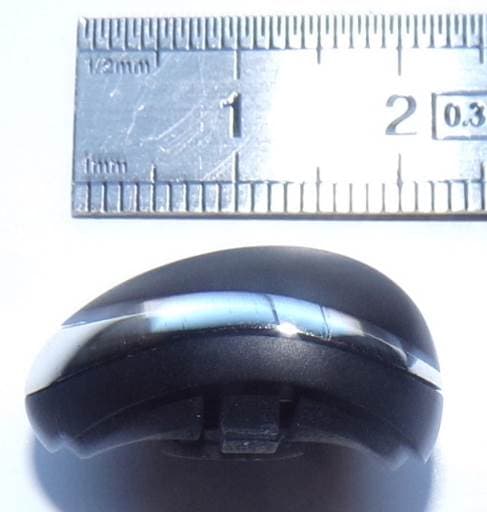
Click to zoom
Application Details
- Equipment Class
- DXX - Part 15 Low Power Communication Device Transmitter
- Date of Grant
- Mar 18, 2020
- Application Purpose
- Original Equipment
- Date of Application
- Mar 17, 2020
- Equipment Note
- Neova MIDI controller (Ring)
- Frequency Range
- 2402.00000000 - 2479.00000000
- Company
- ENHANCIA SAS
- Country
- France
Documents & Files
Document Text
Text extracted from the exhibit documents filed with the FCC. Open a document above to read the original.
Users Manual
Neova Before using this unit, carefully read the section entitled: “Safety Regulation”. This section provide important informa- tion regarding the appropriate usage of the unit. Additionally, in order to feel assured that you understand flawlessly each feature provided by the unit, User’s manual should be read entirely. User Manual November 2019 Version 1.0 ENHANCIA p. 2 ENHANCIA The information in this document is subject to change without notice and does not represent a commitment on the part of Enhancia SAS. “Enhancia”, “Neova” and associated logos are registered trademarks of Enhancia SAS. Mac, MacOS, OS X, GarageBand, Logic, are registered trademarks of Apple Inc. All other trademarks are the property of their respective owners and use of them does not imply any affiliation with or endorsement by them. Document authored by Enhancia Team. Enhancia Team 3 Parvis Louis Néel, 38000 Grenoble, FRANCE [email protected] www.enhancia.co p. 3 ENHANCIA Safety Regulation The following instructions shall be read, understood and respected to prevent of fire, electric shock or injury to persons. • Before using this unit, make sure to read the instructions below, and the User’s Manual. • Do not open (or modify in any way) the unit. • Do not attempt to repair the unit, or replace parts within it. In case of any any encoun- tered issue, please contact the Enhancia Support Team at: [email protected]. Our team will pleased to help you out. • Never use or store the unit in places that are: • Subject to temperature extremes (e.g., direct sunlight in an enclosed vehicle, near a heating duel, on top of heat-generating equipmenmt); or are • Damp (e.g., baths, washrooms, on wet floors); or are • Humid; or are • Exposed to rain; or are • Dusty; or are • Subject to high levels of vibration. • Make sure you always have the unit placed so it is level and sure to remain stable. Never place it on o stands that could wobble, or on inclined surfaces. • Be sure to use only the USB cable supplied or equivalent standard USB Type A to USB Type C cable. The Hub require 500 mA to power correctly. • Do not excessively twist or bend the cables, nor place heavy objects on it. Doing so can damage the cord, producing severed elements and short circuits. Damaged cords are fire and shock hazards! • Enhancia are not responsible about any damage caused by universal USB - AC adapter used to power supply the Hub. You are responsible of any issue caused by this third party adapter. We recommend to power supply the Hub with a computer. • Do not allow any objects (e.g., flammable material, coins, pins); or liquids of any kind (water, soft drinks, etc.) to penetrate the unit. • ln households with small children, an adult should provide supervision until the child is capable of following all the rules essential for the safe operation of the unit. • Protect the unit from strong impact. (Do not drop it!) p. 4 ENHANCIA Introduction Thank you for purchasing Neova. At Enhancia, we firmly believe that expressivity should be the very basis of music creation. Your instrument should always let you play in a controlled and subtle way. You should be allowed to express every single musical idea that crosses your mind, and the instrument should be a medium—not an obstacle!—to your music. Neova was designed with this idea in mind, as a way to enhance the spontaneity of your mu- sical creation. This comprehensive manual will provide you all information on the product, either as a way to get you started, or as a guide you can later refer to if you want to explore all of Neova’s possi- bilities. p. 5 ENHANCIA TABLE OF CONTENTS 1. Getting Started 6 1.1. System Requirements 6 1.2. Register your product 6 1.3. Download & Update 6 1.4. Software Installation 6 2. Introducing Neova 7 2.1. Concept 7 2.2. Product Overview 7 2.3. Using Neova as a native MIDI Controller 11 2.4. Gestures 12 3. The Dashboard 16 3.1. Interface Overview 16 3.2. Configuring a Gesture 20 4. Support 21 4.1. TroubleShooting 21 4.2. Contact 21 p. 6 ENHANCIA 01. Getting Started02. Introducing Neova03. The Dashboard04. Support 1. Getting Started 1.1. System Requirements Operating System: MacOS 10 (or higher) Windows 10 (or higher) Disk space: 4 GB free hard disk space (full installation) 1.2. Register your product 1.3. Download & Update To unlock the full usage of Neova, you must download the Neova Dashboard Software using the Neova installer. You can find the Neova installer on Enhancia’s website under the “down- load” section: https://sites.google.com/enhancia.co/dev/download Download the latest version of the Neova installer for your operating system. When a new ver- sion comes out, the website will be updated. To update your software, launch the latest installer to override your outdated version of the software. 1.4. Software Installation After downloading the installer, find it in your downloaded files and launch it. You may need to authorize the application before you can launch it. Do not worry, our installer will only install the Dashboard and a driver for Neova. Installing the software on MacOS: The installer is split into 2 separate steps. First, drag the Dashboard application to your Appli- cation folder to install it. Then, click on the package and follow the wizard instructions to install the Neova Driver. Please do not skip this step, as the driver is mandatory for the dashboard to function properly. You will need to restart your computer when the driver is installed. Installing the software on Windows: The installer will let you choose the location for the Dashboard app. Once you’ve chosen one, go through the next steps to install the app. Once the installation is done, you’re all set to start using Neova! p. 7 ENHANCIA 01. Getting Started02. Introducing Neova03. The Dashboard04. Support 2. Introducing Neova 2.1. Concept Neova is a ring-shaped device that adds expressivity to your other MIDI instruments or Digital Audio Workstations. By catching the subtlest movements of y…
Text truncated - open the document above for the full version.
Cover Letter(s)
Authority to Act as Agent Date: February 26 th , 2020 American Certification Body, Inc. 6731 Whittier Avenue Suite C110 McLean, VA 22101 To Whom It May Concern: SMEE (Mr. Laurent Chapus, ZI des Blanchisseries, F-38500 Voiron, France) is authorized to act on our behalf, until otherwise notified, for applications to American Certification Body, Inc. (ACB). We certify that we are not subject to denial of federal benefits, that includes FCC benefits, pursuant to Section 5301 of the Anti-Drug Abuse Act of 1988, 21 U.S.C. 862. Further, no party, as defined in 47 CFR 1.2002 (b), to the application is subject to denial of federal benefits, that includes FCC benefits. Thank you. Agency Agreement Expiration Date: December 31 st , 2020 By: Mr. Mario Viola (Signature) (Print name) Title: General Director On behalf of: ENHANCIA SAS 3 Parvis Louis Néel 38 000 GRENOBLE FRANCE [email protected] +336 24 01 40 85
Cover Letter(s)
Request for Confidentiality Date: November 7th, 2019 Subject: Confidentiality Request for FCC ID: 2AUJX-R1 IC: 25446-R1 Pursuant to FCC 47 CFR 0.457(d) and 0.459 and IC RSP-100, Section 9.4, the applicant requests that a part of the subject FCC application be held confidential. Type of Confidentiality Requested Exhibit Short Term Permanent Block Diagrams Short Term External Photos Short Term Permanent* 1 Internal Photos Short Term Permanent Operation Description/Theory of Operation Short Term Permanent Parts List & Placement/BOM Short Term Permanent Tune-Up Procedure Short Term Permanent Schematics Short Term Test Setup Photos Short Term Permanent* 3 User’s Manual ENHANCIA has spent substantial effort in developing this product and it is one of the first of its kind in industry. Having the subject information easily available to "competition" would negate the advantage they have achieved by developing this product. Not protecting the details of the design will result in financial hardship. Permanent Confidentiality: The applicant requests the exhibits listed above as permanently confidential be permanently withheld from public review due to materials that contain trade secrets and proprietary information not customarily released to the public. Short-Term Confidentiality: The applicant requests the exhibits selected above as short term confidential be withheld from public view for a period of ___(specify number of days not to exceed 180) 2 ___ days from the date of the Grant of Equipment Authorization and prior to marketing. This is to avoid premature release of sensitive information prior to marketing or release of the product to the public. Applicant is also aware that they are responsible to notify ACB in the event information regarding the product or the product is made available to the public before the requested period has expired. ACB will then release the documents listed above for public disclosure pursuant to FCC Public Notice DA 04-1705. NOTE for Industry Canada Applications: IC currently only distinguishes Permanent Confidentiality exhibits as shown above. Short Term confidentiality is not considered applicable to IC applications. Sincerely, 1 - The asterisked items (*) require further information to be provided to ACB before permanent confidentiality will be extended to these exhibits. Please refer to FCC KDB 726920 and the specific Document link for D01 found at: https://apps.fcc.gov/oetcf/kdb/forms/FTSSearchResultPage.cfm?switch=P&id=41731 and review section II, 3) regarding specific information that must accompany these requests. 2 - Please refer to http://acbcert.com/documents/misc-docs/Memo-Short-Term-Vs-Standard-Confidentiality.pdf for complete details. By: __________________________ __________ Mario Viola______________ (Signature/Title 3 ) (Print name) General Detector ENHANCIA SAS Parvis Louis Néel 38 000 GRENOBLE FRANCE
External Photos
FCC ID: 2AUJX-R1 IC: 25446-R1 Page 1/1 EXTERNAL PHOTOS OF TESTED EUT Tested sample with removable plastic ring Stone without ring
ID Label/Location Info
FCC ID: 2AUJX-R1 IC: 25446-R1 Page 1/3 PRODUCT LABELING E-labelling of the device: No marking can be put on the ring because of the small size of the transmitter (Plastic ring part is detachable from transmitter to get different sizes of ring) E-labeling is used to communicate FCC ID, IC ID, and HVIN to users. All this information is displayed on the software. The user can retrieve all these regulation numbers under the settings menu. (Dashboard menu after starting the program) Note: In all cases, the hub associated with the ring needs to be first connected to a PC through USB connection in order to configure the device. FCC ID: 2AUJX-R1 IC: 25446-R1 Page 2/3 User’s manual information: The FCC and IC ID’s are placed in the user’s manual. FCC ID: 2AUJX-R1 IC: 25446-R1 Page 3/3 Packaging information: Regulatory information is also included in the device’s packaging.
Internal Photos
FCC ID: 2AUJX-R1 IC: 25446-R1 Page 1/1 EXTERNAL PHOTOS OF TESTED EUT Inside stone without PCBs PCBs
Test Setup Photos
FCC ID: 2AUJX-R1 IC: 25446-R1 Page 1/2 MEASUREMENT PHOTO Conducted emissions Note: Battery charging on the hub Radiated emissions Open Area Test site (30M-1GHz) – Ring on the hub for battery charging FCC ID: 2AUJX-R1 IC: 25446-R1 Page 2/2 FAC setup (1GHz-25GHz / 3m)
Contact Information
Applicant
Mario Viola(General Director)
Technical Contact
Test Firm
SMEELaurent Chapus
[email protected]+33 4 76 65 76 50
Technical Specifications
| # | Rule Parts | Frequency Range | Power Output |
|---|---|---|---|
| 1 | 15C | 2.40 GHz - 2.48 GHz | - |
Other Applications from ENHANCIA SAS
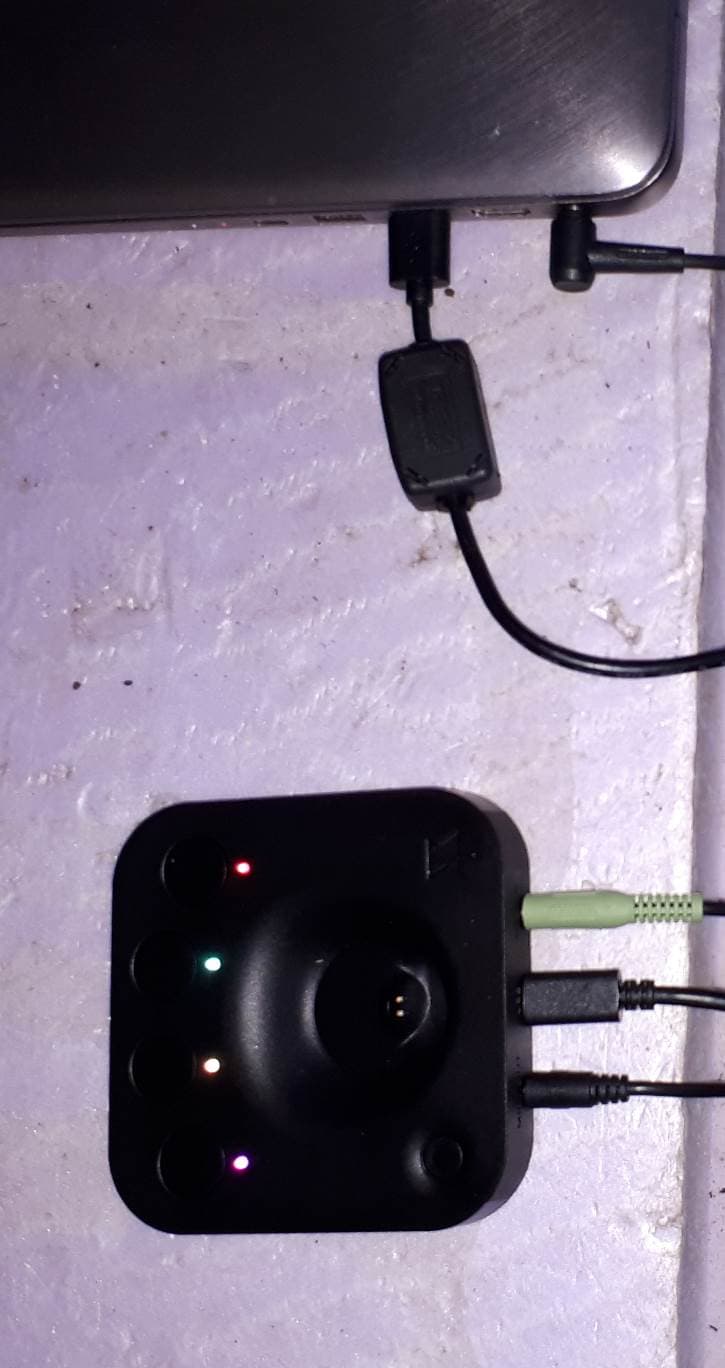
2AUJX-H1
Mar 18, 2020Neova MIDI controller (HUB)
Equipment Class
DXX - Part 15 Low Power Communication Device Transmitter