2AUUD-TRKCF001Smart bracelet
Shenzhen Mingzhe Technology Co.,Ltd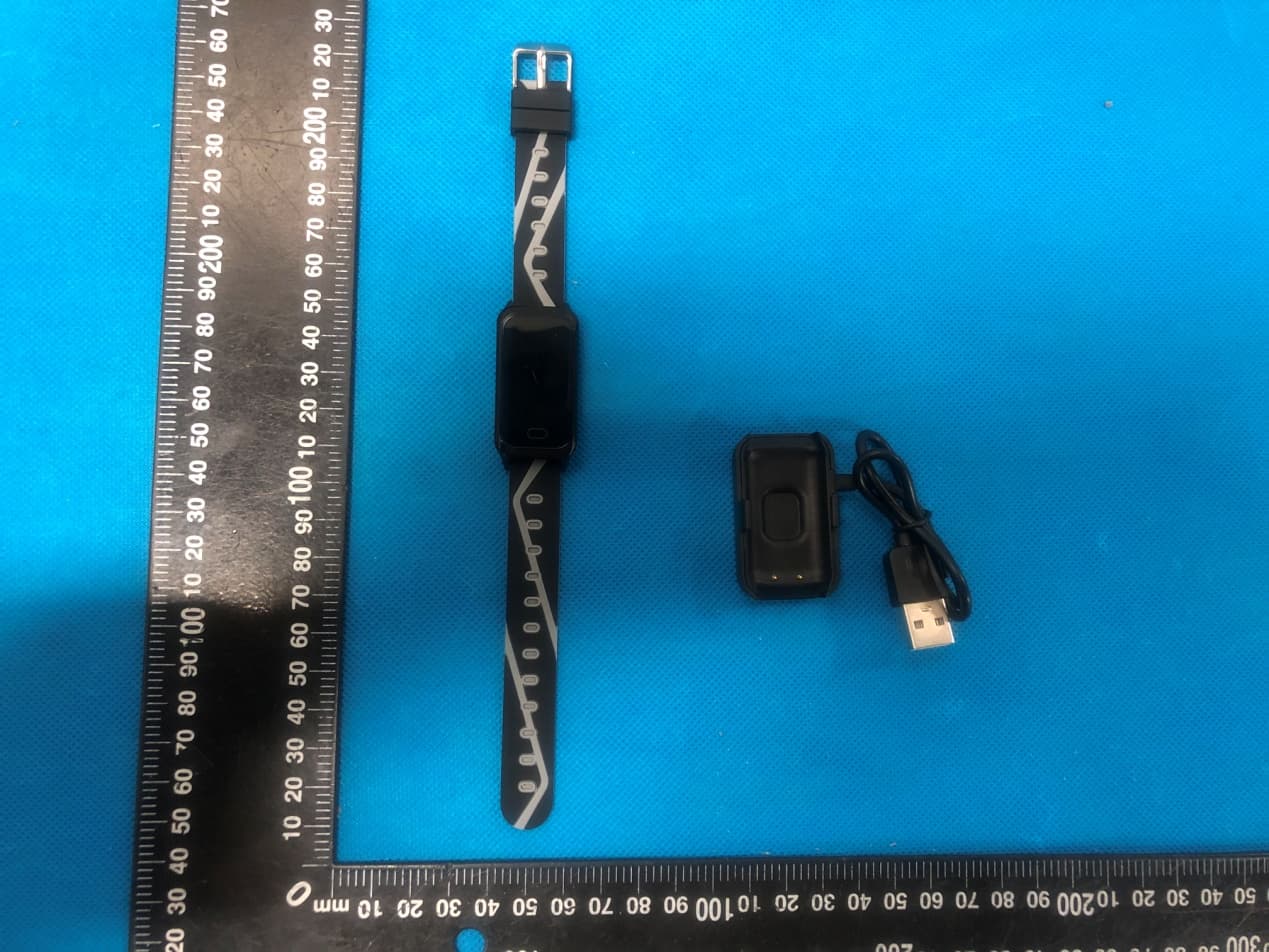
Click to zoom
Application Details
- Equipment Class
- DXX - Part 15 Low Power Communication Device Transmitter
- Date of Grant
- Mar 24, 2020
- Application Purpose
- Original Equipment
- Date of Application
- Mar 24, 2020
- Equipment Note
- Smart bracelet
- Frequency Range
- 2402.00000000 - 2480.00000000
- Country
- China
Documents & Files
Document Text
Text extracted from the exhibit documents filed with the FCC. Open a document above to read the original.
Users Manual
USER MANUAL Maintenance Regularly clean your wrist and the fitness tracker, especially after sweating in the exercise or being exposed to substances such as soap or detergent which may attach on the internal side of the tracker. Do NOT wash the fitness tracker with household cleanser. Please use soapless detergent, rinse thoroughly and wipe with a piece of soft towel or napkin. While the fitness tracker is water resistant, it’s not good for your skin to wear a wet band. If your bands get wet - like after sweating or showering - clean and dry them thoroughly before putting them back on your wrist. Be sure your skin is dry before you put your bands back on. 24 IMPORTANT WARRANTY INFORMATION We are happy to offer a Lifetime Warranty to all of our devices. Please simply SCAN THE CODE to below with your phone to join our VIP LIST and activate your warranty as well as receive a 30% COUPON CODE for any of our products in our entire selection. NEED HELP?? Contact us at [email protected] We reply to all inquiries within 24 hours. 2 Getting to Know Your Device Color Display ScreenTouch KeyFastening StrapsCharging PinsHeart Rate and Blood Pressure Sensor User Manual 3 Assembly Tracker Body Side Front Tracker Bands 123 4 Charging and First Use Compatibility with Smart Phone Please charge your new device for at least 10 minutes to have it activated before initial use.How to Charge Align the pins of the charging clamp with the 2 metal charging pieces on the back of the device body.You will see the green charging display on the screen. The device is successfully charging! 12 IOS 8.0 & above Android 5.1 & above Bluetooth 4.0 & above 5 Insert pin into tracker body slot Push down on the metal sliding tab and hold Align the 2nd pin and release the metal sliding tab to fasten Download App Pair the Device to Phone Power on fitness tracker device by pressing and holding the Touch Key for 5 seconds 2 Options for Download Options 1: Scan the QR code with mobile phone camera to download and install Tip: In case of problems when opening the link, copy the link and open it in a browser Option 2: Search for “JYouPro” in App Store for IOS or in Google Play Store for Android Enable Bluetooth on your phone before connecting the device.Open “JYouPro” on your smartphone and tap on “ Device” -> “ Scan for Device ” 1. 2. 6 Connection Status You can verify the connection of the device in the upper left corner When the icon shows as shown below, this indicates that the phone is NOT connected to the bracelet Select on the ID in the form of “ TRK-XXXX’ ” to connect device to smartphoneNote: For IOS system, there will be Bluetooth Pairing Request and you can click Bluetooth "Pairing" to confirm. For Android, you can connect directly. 3. 1. 7 Disconnect the Device from Phone For Android, we can disconnect the device from the phone by clicking on the “ Unbind Device .” For some Android models, after it is unbound it may be necessary to click Settings -> Connections -> Bluetooth -> Find the Device ID -> ‘ Forget’ or ‘ Unpair ’ When the icon flashes as shown below, this indicates the mobile phone APP has been disconnected from the wristband, and the APP connection bracelet needs to be opened.Note: Do not be alarmed if you see this status, the fitness tracker device is still able to function properly and track results. You will simply need to open the APP to push the results to the APP. 2. When the icon is shown as below and not flashing, this indicates that the mobile phone APP is successfully connected to the bracelet. 3. 1. 8 Touch Key For IOS, we can disconnect the device from the phone by clicking on the “ Unbind Device .” After it is disconnected, you may need to click Settings -> Bluetooth -> Find the Device ID -> Forget the Device After the first successful connection, the main screen will be shown. To navigate through the various functions, please use the touch key. Note: You can customize the main screen as described in the Functions Introduction section later in the manual. Note: The display panel is a non-touch screen, please use the touch key to choose different functions. 2. 9 Main Functions Overview Click the touch key to toggle between each function 10 Functions Introduction Main ScreenTime, date, battery status and Bluetooth connection status are shown and are synchronized when bracelet and APP are connected. Press and hold the touch key for 3 seconds on Main Screen to switch between the 5 available display styles. Activity and Step ModeThe step-counting interface shows the number of steps, walking distance and consumed calories automatically when the user is walking with arms swinging. 11 Note: If needing to change between KM and MILES, go to the APP -> ME -> Unit -> Choose your Preference (Metric = KM, Imperial = Miles) Sleep monitoringThe bracelet can automatically determine when a user is sleeping and shows a summary of sleep time for the previous night. Further information to monitor sleep quality such as Deep Sleep, Light Sleep and Awake times can be viewed in the APP. 3. Heart Rate MonitoringClick the touch area to switch to the heart rate monitoring interface, supporting real-time dynamic heart rate. Wait around 10 seconds for the real-time heart rate to display.. 4. Tips for Accurate Heart Rate Measurement The heart rate sensor should be in direct contact with the skin and placed approximately 2 cm away from the wrist joint. If the bracelet is worn too loosely, it can result in inaccurate measurements. Although the real-time heart rate can be obtained during activity such as walking or running, for the most accurate results the user should not move the wrist during measurement.Be sure that there is no dirt at the bottom of the heart rate sensor when conduct measurement. Hair, tattoo and scars may affect the accuracy of the measuring results. 12 Blood oxygenClick the touch area to switch to the Blood Oxygen interface. Wait around 25 seconds for the Blood Oxygen level to display. Blood oxygen saturation …
Text truncated - open the document above for the full version.
Cover Letter(s)
Shenzhen Mingzhe Technology Co., Ltd Agent Authorization Company : Shenzhen Mingzhe Technology Co., Ltd Address: F5, 4RD, 4#, Fuyong, FengHuang, BaoAn, ShenZhen, China Product Name: Smart bracelet Model Number(s): TRK CF001 Product Description: Smart bracelet We authorize MiCOM Labs Inc., 575 Boulder Court, Pleasanton, California 94566, USA, to act on our behalf on all matters concerning the certification of above named equipment. We declare that MiCOM Labs Inc. is allowed to forward all information related to the approval and certification of equipment to the regulatory agencies as required and to discuss any issues concerning the approval application. Any and all acts carried out by MiCOM Labs on our behalf shall have the same effect as acts of our own. Signature: D ate: Mar. 23, 2020 Name: Tony Han Title: Manager Company: Shenzhen Mingzhe Technology Co., Ltd
Cover Letter(s)
Shenzhen Mingzhe Technology Co., Ltd Office of Engineering Technology Federal Communications Commission 7435 Oakland Mills Road Columbia, MD 21046 USA Date: Mar. 23, 2020 Subject; Request for Confidentiality FCC ID: 2AUUD-TRKCF001 To Whom It May Concern, Pursuant to the provisions of the Commission’s rules Title 47 Sections §0.457 and §0.459, we are requesting the Commission to withhold the following attachment(s) as confidential documents from public disclosure indefinitely. These documents contain detailed system and equipment descriptions and are considered as proprietary information in operation of the equipment. The public disclosure of these documents might be harmful to our company and would give competitors an unfair advantage in the market. Schematic Diagram Block Diagram Parts List Operational Description Tune-up Procedure It is our understanding that all measurement test reports, FCC ID label format and correspondence during the certification review process cannot be granted as confidential documents and this information will be available for public review once the grant of equipment authorization is issued. Sincerely, Signature: Name: Tony Han Title: Manager
External Photos
Annex A External Photos Report No.:HK2003170351-E Page 1 of 4 Report No.:HK2003170351-E Page 2 of 4 Report No.:HK2003170351-E Page 3 of 4 Report No.:HK2003170351-E Page 4 of 4
ID Label/Location Info
FCC ID LABEL: Ca. 5mm x 10mm Label Location FCC ID: 2AUUD-TRKCF001
Internal Photos
Annex B Internal Photo Report No.:HK2003170351-E Page 1 of 3 Antenna Report No.HK2003170351-E Page 2 of 3 Report No.HK2003170351-E Page 3 of 3
Test Report
Page 1 of 26 Report No.: HK2003170351-E FCC TEST REPORT Test report On Behalf of Shenzhen Mingzhe Technology Co., Ltd For Smart bracelet Model No.: TRK CF001 FCC ID: 2AUUD-TRKCF001 Prepared for : Shenzhen Mingzhe Technology Co., Ltd F5, 4RD, 4#, Fuyong, FengHuang, BaoAn, ShenZhen, China Prepared By : Shenzhen HUAK Testing Technology Co., Ltd. 1F, B2 Building, Junfeng Zhongcheng Zhizao Innovation Park, Fuhai Street, Bao'an District, Shenzhen City, China Date of Test: Mar. 18, 2020 ~ Mar. 25, 2020 Date of Report: Mar. 25, 2020 Report Number: HK2003170351-E Page 2 of 26 Report No.: HK2003170351-E TEST RESULT CERTIFICATION Applicant’s name ................. : Shenzhen Mingzhe Technology Co., Ltd Address ................................. : F5, 4RD, 4#, Fuyong, FengHuang, BaoAn, ShenZhen, China Manufacture's Name ............ : Shenzhen Mingzhe Technology Co., Ltd Address ................................. : F5, 4RD, 4#, Fuyong, FengHuang, BaoAn, ShenZhen, China Product description Trade Mark: M-TECH Product name ........................... : Smart bracelet Model and/or type reference : TRK CF001 Standards ............................. : FCC Rules and Regulations Part 15 Subpart C Section 15.249 ANSI C63.10: 2013 This publication may be reproduced in whole or in part for non-commercial purposes as long as the Shenzhen HUAK Testing Technology Co., Ltd. is acknowledged as copyright owner and source of the material. Shenzhen HUAK Testing Technology Co., Ltd. takes no responsibility for and will not assume liability for damages resulting from the reader's interpretation of the reproduced material due to its placement and context. Date of Test ............................................ : Date (s) of performance of tests ............. : Mar. 18, 2020 ~ Mar. 25, 2020 Date of Issue ........................................... : Mar. 25, 2020 Test Result .............................................. : Pass Testing Engineer : (Gary Qian) Technical Manager : (Eden Hu) Authorized Signatory : (Jason Zhou) Page 3 of 26 Report No.: HK2003170351-E Table of Contents Page 1 . TEST SUMMARY 4 2 . GENERAL INFORMATION 5 2.1 GENERAL DESCRIPTION OF EUT 5 2.2 Carrier Frequency of Channels 6 2.3 Operation of EUT during testing 6 2.4 DESCRIPTION OF TEST SETUP 6 2.5 MEASUREMENT INSTRUMENTS LIST 7 3 . CONDUCTED EMISSIONS TEST 8 3.1 Conducted Power Line Emission Limit 8 3.2 Test Setup 8 3.3 Test Procedure 8 3.4 Test Result 8 4 RADIATED EMISSION TEST 11 4.1 Radiation Limit 11 4.2 Test Setup 11 4.3 Test Procedure 12 4.4 Test Result 12 5 BAND EDGE 18 5.1 Limits 18 5.2 Test Procedure 18 5.3 Test Result 19 6 OCCUPIED BANDWIDTH MEASUREMENT 21 6.1 Test Setup 21 6.2 Test Procedure 21 6.3 Measurement Equipment Used 21 6.4 Test Result 21 7 ANTENNA REQUIREMENT 23 8 PHOTOGRAPH OF TEST 24 8.1 Radiated Emission 24 8.2 Conducted Emission 25 9 PHOTOS OF THE EUT 26 Page 4 of 26 Report No.: HK2003170351-E 1. TEST SUMMARY 1.1 TEST PROCEDURES AND RESULTS DESCRIPTION OF TEST RESULT CONDUCTED EMISSIONS TEST 15.207 COMPLIANT RADIATED EMISSION TEST 15.249(a) /15.209 COMPLIANT BAND EDGE 15.249(d)/15.205COMPLIANT OCCUPIED BANDWIDTH MEASUREMENT 15.215(c) COMPLIANT ANTENNA REQUIREMENT 15.203 COMPLIANT 1.2 TEST FACILITY Te s t F i r m : Shenzhen HUAK Testing Technology Co., Ltd. Address : 1F, B2 Building, Junfeng Zhongcheng Zhizao Innovation Park, Fuhai Street, Bao'an District, Shenzhen City, China 1.3 MEASUREMENT UNCERTAINTY Measurement Uncertainty Conducted Emission Expanded Uncertainty =2.23dB, k=2 Radiated emission expanded uncertainty(9kHz-30MHz) = 3.08dB, k=2 Radiated emission expanded uncertainty(30MHz-1000MHz)= 4.42dB, k=2 Radiated emission expanded uncertainty(Above 1GHz) = 4.06dB, k=2 Page 5 of 26 Report No.: HK2003170351-E 2. GENERAL INFORMATION 2.1 GENERAL DESCRIPTION OF EUT Equipment Smart bracelet Model Name TRK CF001 Serial Model N/A Model Difference N/A FCC ID 2AUUD-TRKCF001 Antenna Type Internal Antenna Antenna Gain 0dBi Equipment Smart bracelet Operation frequency 2402-2480MHz Number of Channels 40CH Modulation Type GFSK Power Source DC 3.7V from battery or DC5V From DC Cable Power Rating DC 3.7V from battery or DC5V From DC Cable Page 6 of 26 Report No.: HK2003170351-E 2.2 Carrier Frequency of Channels Channel List Channel Frequency (MHz) Channel Frequency (MHz) Channel Frequency (MHz) Channel Frequency (MHz) 01 2402 11 2422 21 2442 31 2462 02 2404 12 2424 22 2444 32 2464 03 2406 13 2426 23 2446 33 2466 04 2408 14 2428 24 2448 34 2468 05 2410 15 2430 25 2450 35 2470 06 2412 16 2432 26 2452 36 2472 07 2414 17 2434 27 2454 37 2474 08 2416 18 2436 28 2456 38 2476 09 2418 19 2438 29 2458 39 2478 10 2420 20 2440 30 2460 40 2480 2.3 Operation of EUT during testing Operating Mode The mode is used: Transmitting mode Low Channel: 2402MHz Middle Channel: 2440MHz High Channel: 2480MHz 2.4 DESCRIPTION OF TEST SETUP Operation of EUT during conducted testing and Radiation testing: AC Main Operation of EUT Above1GHz Radiation testing: ● Adapter information Model: HW-059200CHQ Input: 100-240V, 50/60Hz, 0.5A Output: 5VDC, 2A The sample was placed (0.8m below 1GHz, 1.5m above 1GHz) above the ground plane of 3m chamber. Measurements in both horizontal and vertical polarities were performed. During the test, each emission was maximized by: having the EUT continuously working, investigated all operating modes, rotated about all 3 axis (X, Y & Z) and considered typical configuration to obtain worst position, manipulating interconnecting cables, rotating the turntable, varying antenna height from 1m to 4m in both horizontal and vertical polarizations.The emissions worst-case are shown in Test Results of the following pages. The worst case is X position. Adapter EUT EUT Page 7 of 26 Report No.: HK2003170351-E 2.5 MEASUREMENT INSTRUMENTS LIST Item Equipment Manufacturer Model No.Serial No. Last Cal. Cal. Interval 1. L.I.S.N. Artificial Mains Network R&S ENV216 HKE-002 Dec. 26, 2019 1 Year 2. Receiver R&S ESCI 7 HKE-010 Dec. 26, 2019 1 Year 3. RF automatic …
Text truncated - open the document above for the full version.
Test Setup Photos
Test Model:TRK CF001 Radiated Emission Conducted Emission
Contact Information
Applicant
Tony Han(Manager)
Technical Contact
Test Firm
Shenzhen HUAK Testing Technology Co., Ltd.Jason Zhou
[email protected]+86-755-23029901
Technical Specifications
| # | Rule Parts | Frequency Range | Power Output |
|---|---|---|---|
| 1 | 15C | 2.40 GHz - 2.48 GHz | - |