2AV6G-YDE031Youdao Translator 3
NetEase Youdao Information Technology (Beijing) Co., Ltd.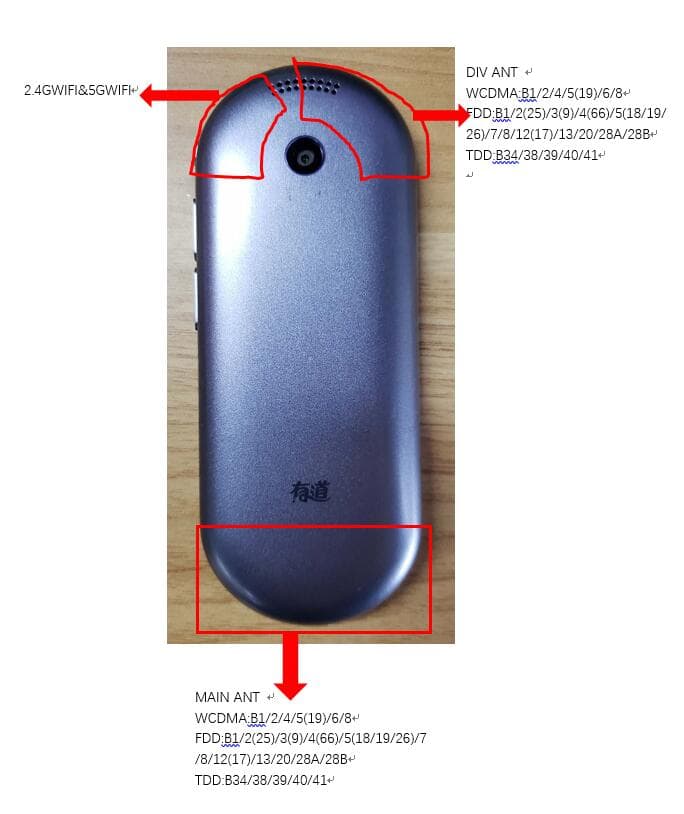
Click to zoom
Application Details
- Equipment Class
- DSS - Part 15 Spread Spectrum Transmitter
- Date of Grant
- Jul 27, 2020
- Application Purpose
- Original Equipment
- Date of Application
- Jul 27, 2020
- Equipment Note
- Youdao Translator 3
- Frequency Range
- 2402.00000000 - 2480.00000000
- Country
- China
Documents & Files
Document Text
Text extracted from the exhibit documents filed with the FCC. Open a document above to read the original.
Users Manual
Knowyourphone TableofContents Foreword.......................................................................3 1.SIMcardinstallation ............................................... 5 2.Menufunctions........................................................6 3.FCCRegulations......................................................8 4.SAR ........................................................................... 10 5.Technicalparameter.............................................11 Foreword Youdao Translation 3 supports two-way offline voice translation between Chinese and English, Japanese, Korean, Spanish or Russian; and two-way offline camera translation between Chinese and English, Japanese, Korean, French, Spanish or Portuguese. Translation between other language pairs can also be fulfilled in a network environment. To ensure speech collection, please do not block the microdevice. Please keep the touch screen dry and clean. When using the device for the first time, you need to activate your device by connecting it to the Internet either via a WLAN or using your nano-SIM or eSIM data plan. Specifically, the nano-SIM or eSIM data connection is operated in a 4G network, which may a network searching process for the first time of use. Please wait patiently until you are connected to the network The online translation process is real-time recording after the user presses the translation button. During the recording process, the product does not transmit, and then uploads the data to the server to transmit the data. After the user lets go, the voice recognition result is received and the data is uploaded to the translation server to transmit the data, and then go Online translation services, after getting the results, display the page to receive data, and use the online pronunciation interface text to speech pronunciation to receive data. Safety Never attempt to disassemble your device. You alone are responsible for how you use your device and any consequences of its use. Use of your device is subject to safety measures designed to protect users and their environment. Do not use your device in damp areas (bathroom, swimming pool...). Protect it from liquids and other moisture. Do not expose your device to extreme temperatures lower than - -10°C and higher than + 55°C. Please note that the ambient temperature range for normal charging of mobile devices is 0 °C ~ 45°C. Do not charge at an ambient temperature below 0 °C or above 45 °C, as this will result in reduced battery performance and reduced life. Charging for too long at too high or too low ambient temperatures can damage unfilled or swelled batteries, and there is a risk of battery explosion. The physicochemical processes created by chargers impose temperature limits when charging the battery. Your device automatically protects the batteries in extreme temperatures. Donotleaveyourdevicewithinthereachofsmallchildren (certainremovablepartsmaybeaccidentallyingested). Electronicequipment Toavoidtheriskofdemagnetization,donotletelectronic devicesclosetoyourdeviceforalongtime. Electronicmedicalequipment Yourdeviceisaradiotransmitterwhichmayinterferewith electronicmedicalequipmentorimplants,suchashearingaids, pacemakers,insulinpumps,etc.Itisrecommendedthata minimumseparationof5mmbemaintainedbetweenthedevice andanimplant.Yourdoctororthemanufacturersofsuch equipmentwillbeabletogiveyouanyadviceyoumayneedin thisarea. Hospitals Alwaysmakesurethatyourdeviceisswitchedoffinhospitals whensoinstructedbywarningsignsorbymedicalstaff. Roadsafety Donotuseyourdevicewhendriving.Inordertogiveyourfull attentiontodriving,stopandparksafelybeforemakingacall. Youmustcomplywithanycurrentlegislation. 1.SIMcardinstallation 2.Menufunctions VoiceTranslation Thevoicebuttons,placedattherightsideofthedevice,correspondto thetwolanguagesrespectivelydisplayedonthefrontpage.Pressand holdabuttoncorrespondingtothesourcelanguageinwhichyouare speaking;afteryouaredonespeaking,releasethebuttontoallowthe devicetoautomaticallycollectyourspeechandtranslateit.Toenter LanguageListOptions,taptheLanguagebuttononthefrontpage, whereyoucansetthedesiredlanguagepair. CameraTranslation Withcameratranslation,youcantranslateavarietyofcontentby takingpicturesofmenus,roadsignsorhandwrittentextseitherina verticalorhorizontalmode.Whentakingphotos,pleaseplacethe objectinparalleltothereferencelinedisplayedinthesoftware interface. Aftertakingaphoto,youcantaptheReaderModetoenablethe translationofthesourcelanguagetobeautomaticallydisplayedin separateparagraphsthatmakereadingorviewingeasier. MobileNetwork Thedevicesupportsmainstream4Gfrequencybandsintheworld. Networkscanbeconnectedviaeitheranano-SIMoreSIMcard, inter-switchablefromSettings-MobileNetwork. Tousenano-SIMdata,youneedtoinsertaphysicalSIMcardto thedevice.Forinformationaboutthespecificdatapackageand pricingpolicy,pleaseconsultwithanoutletofyouroperator. AneSIMisadigitalSIMthatallowsyoutousedatanetworkwithout havingtoinsertaphysicalcard.YoucanpurchaseanduseaneSIM datapackagedirectlyfromthedevice. GlobalData Withthedevice,youcanviewandpurchaseadigital-SIMdataplan fromFrontPage-Data.Packagessupportedbythedevicecanbe viewedafterselectingthetargetcountry/region.Adatapackagewill bedeliveredwithin10minutesuponpayment.Youcanviewdata packagescurrentlyavailableforthedeviceatthefrontpageofData Application. VoiceNotes VoiceNotesisafeaturethatconvertsspeechintotextsinrealtime. Notescanbeexportedafterconnectingthedeviceviaadatacable. VoiceAssistant VoiceAssistantofferslearningmaterials,encyclopedicknowledge, translation,systemsettings,weatherforecasting,foreignexchange calculationandotherfeatures. ShortcutSettings SlidedownthescreenfromanyinterfacetoaccesstotheShortcut Settingsoption,whereyoucansetshortcutsforvolume,brightness, Wi-Fi,Bluetooth,mobilenetworkandhotspot. Reboot&Reset ForcedReboot Torebootthedevice,pressandholdthePowerbuttonformorethan 10seconds. ResettoFactorySettings TapResettoFactorySettingsinSettingstocleardataondevice. 3.FCCRegulations Thisdevicec…
Text truncated - open the document above for the full version.
External Photos
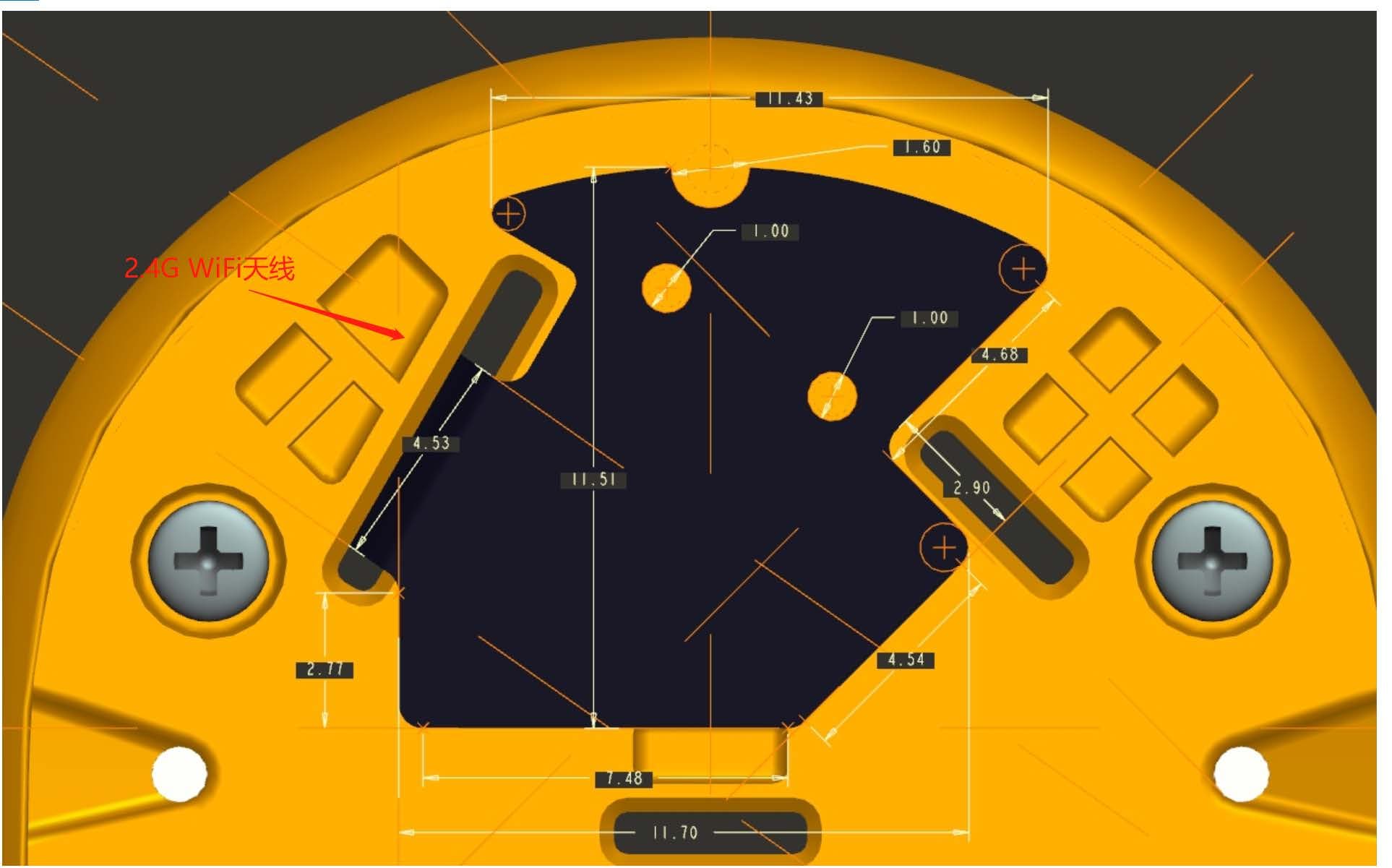
1. 天线位置图 2. WIFI天线(左边)和DIV天线( 右边) 3. 主天线
External Photos
EUT Appearance Report No.: R2005A0272 TA Technology (Shanghai) Co., Ltd. Page 1 of 1 This report shall not be reproduced except in full, without the written approval of TA Technology (Shanghai) Co., Ltd. EUT Appearance a: EUT Picture 1: Constituents of EUT
ID Label/Location Info
SN: IMEI2: IMEI1: MODEL:YDE032 CMIIT IDMade in China 31.3mm 17.7mm INPUT RATING:5.0V 2A Product NameYoudao Translator 3 FCC ID2AV6G-YDE031 MFRSNetEase Youdao Information Technology (Beijing) Co., Ltd.
Internal Photos
Main supply with eSIM Secondary supply with eSIM
Internal Photos
Main supply without eSIM Secondary supply without eSIM
Test Report
TEST REPORT No. I20D000056-SRD21 For Client: NetEase Youdao Information Technology (Beijing) Co., Ltd. Production: Youdao Translator 3 Model Name: Brand Name: YDE031, YDE032 youdao FCC ID: 2AV6G-YDE031 Hardware Version: V00A Software Version: YDE031.0.0.2 Issued date: 2020-07-03 Report No. I20D00056-SRD21 East China Institute of Telecommunications Page Number: 2 of 44 Report Issued Date: July.03, 2020 NOTE 1. The test results in this test report relate only to the devices specified in this report. 2. This report shall not be reproduced except in full without the written approval of East China Institute of Telecommunications. 3. For the test results, the uncertainty of measurement is not taken into account when judging the compliance with specification, and the results of measurement or the average value of measurement results are taken as the criterion of the compliance with specification directly. Test Laboratory: East China Institute of Telecommunications Add: Block No.4, No.766, Jingang Road, Pudong District, Shanghai, P. R. China Tel: +86 21 63843300 E-Mail: [email protected] Report No. I20D00056-SRD21 East China Institute of Telecommunications Page Number: 3 of 44 Report Issued Date: July.03, 2020 Revision Version Report Number Revision Date Memo I20D00056-SRD21 00 2020-07-03 Initial creation of test report Report No. I20D00056-SRD21 East China Institute of Telecommunications Page Number: 4 of 44 Report Issued Date: July.03, 2020 CONTENTS 1. TEST LABORATORY ............................................................................................................................... 6 1.1. TESTING LOCATION ................................................................................................................ 6 1.2. TESTING ENVIRONMENT ........................................................................................................ 6 1.3. PROJECT DATA ........................................................................................................................ 6 1.4. SIGNATURE .............................................................................................................................. 6 2. CLIENT INFORMATION........................................................................................................................... 7 2.1. APPLICANT INFORMATION .................................................................................................... 7 2.2. MANUFACTURER INFORMATION .......................................................................................... 7 3. EQUIPMENT UNDER TEST (EUT) AND ANCILLARY EQUIPMENT (AE) ............................................ 8 3.1. ABOUT EUT .............................................................................................................................. 8 3.2. INTERNAL IDENTIFICATION OF EUT USED DURING THE TEST ........................................ 8 3.3. INTERNAL IDENTIFICATION OF AE USED DURING THE TEST .......................................... 8 4. REFERENCE DOCUMENTS ................................................................................................................... 9 4.1. DOCUMENTS SUPPLIED BY APPLICANT ............................................................................. 9 4.2. REFERENCE DOCUMENTS FOR TESTING ........................................................................... 9 5. TEST RESULTS ..................................................................................................................................... 10 5.1. SUMMARY OF TEST RESULTS ............................................................................................. 10 5.2. STATEMENTS ......................................................................................................................... 11 6. TEST EQUIPMENTS UTILIZED ............................................................................................................ 12 6.1. CONDUCTED TEST SYSTEM ................................................................................................ 12 6.2. RADIATED EMISSION TEST SYSTEM .................................................................................. 12 7. MEASUREMENT UNCERTAINTY ......................................................................................................... 13 8. TEST ENVIRONMENT ........................................................................................................................... 14 ANNEX A. DETAILED TEST RESULTS ................................................................................................ 15 ANNEX A.1. PEAK OUTPUT POWER-CONDUCTED ......................................................................... 15 Report No. I20D00056-SRD21 East China Institute of Telecommunications Page Number: 5 of 44 Report Issued Date: July.03, 2020 ANNEX A.2. FREQUENCY BAND EDGES-CONDUCTED .................................................................. 18 ANNEX A.3. CONDUCTED EMISSION ................................................................................................ 21 ANNEX A.4. RADIATED EMISSION ..................................................................................................... 23 ANNEX A.5. TIME OF OCCUPANCY (DWELL TIME) ......................................................................... 32 ANNEX A.6. 20DB BANDWIDTH ......................................................................................................... 36 ANNEX A.7. CARRIER FREQUENCY SEPARATION ......................................................................... 38 ANNEX A.8. NUMBER OF HOPPING CHANNELS ............................................................................. 40 ANNEX A.9. AC POWERLINE CONDUCTED EMISSION ................................................................... 42 ANNEX B. ACCREDITATION CERTIFICATE ....................................................................................... 44 Report No. I20D00056-SRD21 East Ch…
Text truncated - open the document above for the full version.
Test Setup Photos
Test positions for body: According to the antenna position, the Body SAR is tested at the following 6 test positions all with the distance =10mm between the EUT and the phantom bottom : Phantom in body position Ground in body position EUT Setup Configuration 1 EUT Setup Configuration 2 left Side in body position right Side in body position EUT Setup Configuration 3 EUT Setup Configuration 4 Top Side in body position Bottom Side in body position EUT Setup Configuration 5 EUT Setup Configuration 6
Contact Information
Applicant
Hao Huang(Project Manager)
Test Firm
Industrial Internet Innovation Center (Shanghai)Zheng Zhongbin
[email protected]86-21-63843300
Technical Specifications
| # | Rule Parts | Frequency Range | Power Output |
|---|---|---|---|
| 1 | 15C | 2.40 GHz - 2.48 GHz | 8.00 mW |
Other Applications from NetEase Youdao Information Technology (Beijing) Co., Ltd.
2AV6G-YDP031
Feb 25, 2021Youdao Dictionary Pen 3
Equipment Class
DTS - Digital Transmission System
2AV6G-YDP021
Sep 22, 2020Youdao Dictionary Pen 2
Equipment Class
DTS - Digital Transmission System