2AV7H-WKM33Mouse
Shenzhen Aerji Communication Co., Ltd.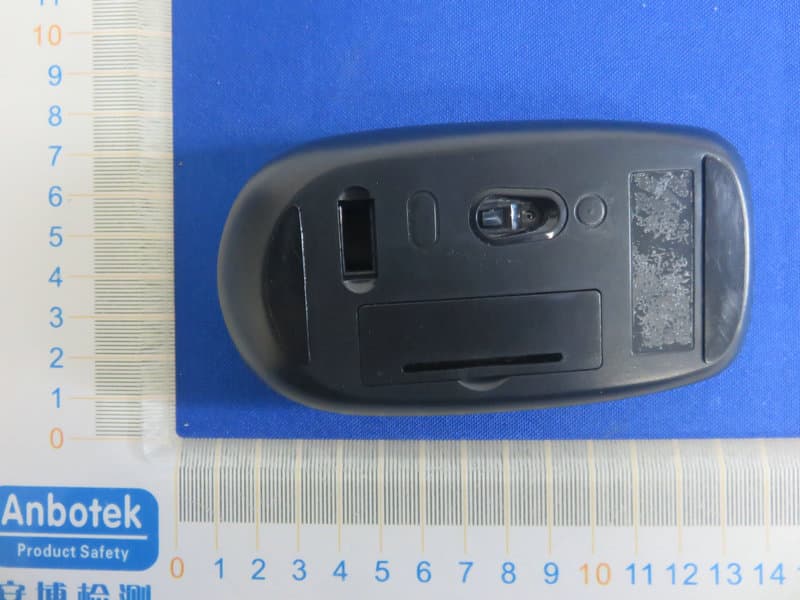
Click to zoom
Application Details
- Equipment Class
- DXX - Part 15 Low Power Communication Device Transmitter
- Date of Grant
- Jun 08, 2020
- Application Purpose
- Original Equipment
- Date of Application
- Jun 08, 2020
- Equipment Note
- Mouse
- Frequency Range
- 2408.00000000 - 2474.00000000
- Country
- China
Documents & Files
Document Text
Text extracted from the exhibit documents filed with the FCC. Open a document above to read the original.
Users Manual
Model:WKM-33 The rec eiver is insert to USB port imm ediate, or by a ex tra USB cable. M ou se: Whe n the end use r find s th e wireless mo usedoes n’t work , ple ase check: 1 . Wh ethe r the ba ttery is use d o ut, if ye s, plea se rep lace with n ewbattery; 2 . If the led on mou se b otto m is off, pl ea se do th e follo win g step s to re covery th e d efault se tting (a utom atic pa iring): Ste p on e: un plu g and plug ag ain th e na no rece iver o nto an available USB po rt of co mpu ter, Ste p two : ma ke the wireless m ouse clo se to the n an o rece ive r (within 1 0 cm), ta ke o ut the ba ttery an d in stall thebattery a gain inside th e Ba ttery compa rtme nt, if we find the Led o n th e m ouse botto m on, we ca n sta rt u sing the wire le ss mo use ag ain . RF2.4GHz Auto-Link Keyboard & Optical Mouse USB port Nano r eceiver The RF2 .4 GHz Optica l m ou se u se o ne AA a lkali ne b atte ries. The RF2 .4 GHz Optica l ke yb oa rd us e on e AAA alk alin e b atte ries. 1.Without using the mouse for 1 minute, the mousewill go into sl eep mode level 1.You can move i t to wake up the m ouse. The R ed LED i s stil l on. 2. W ithout usi ng the mouse for 1-8 minutes, the mouse wi ll go into sleep mode level 2. You can move it to wake up the mouse. The Red LED keep fl ashing. 3.Without using the mouse for mor e than 8 minutes, the mousewill go intodeep sleep mode. The LED turn off automatically. Without any clicks or scroll movement for 8 minutes, the mouse will go into standby mode . Click any buttonscroll the wheel to wake up the mouse. Under this economize mode, the optical Red LED will turn of automatically and the mouse won’t respond by moving it. . or State of standby and wake up the mouse Obtain the receiver on the mouse 1.If you w ant to u se the m ouse ,pls take out the receiver (shown in pi ctur e) and connect it to computer; 2.If you w ant to stop using the mouse, pls store the recei ver onto the mouse Multimedia Hotkeys functions: Co nn ec t th e USB p lug to USB p ort o f yo ur com p uter Ins talling Ba tte ries in the Mouse Step 1. Ope n th e b atte ry co mpa rtm ent Step 2.In sert the ba tterie s a s sho wn in side the ba ttery co mp artme nt Step 3.Re pl ace the cover Ins tall the batte ries in the ke yboar d Step 1: Rem ove the ba ttery co mp artme nt cov er on the bo ttom o f the k eyb oa rd by sq ue ez ing the cove r i n fro m th e ta b to rele ase it Step 2:In se rt th e ba tterie s as sh own in sid e th e b atte ry co mpa rtm ent Step 3:Rep lac e th e co ver FN+ES C= Me dia Pla yer FN+F1= Pla y/P au se FN+F2= Pre viou s Tra ck FN+F4= Volu me Up FN+F3= Ne xt Track FN+F6= Mu te FN+F7= Web ho me FN+F5= Volu me Do wn FN+F8= Se arch FN+F9= M y Favo rite FN+F10 =E ma il FN+F11= ScreenockL FN+F12 =M y com pu ter PDF !"# "pdfFactory" $#%&'(www.fineprint.cn (shown in picture ) FCCSTATEMENT: ThisdevicecomplieswithPart15oftheFCCRules.Operationissubjecttothefollowing twoconditions: (1)Thisdevicemaynotcauseharmfulinterference,and (2)Thisdevicemustacceptanyinterferencereceived,includinginterferencethatmay causeundesiredoperation. Warning:Changesormodificationsnotexpresslyapprovedbythepartyresponsiblefor compliancecouldvoidtheuser'sauthoritytooperatetheequipment. NOTE:ThisequipmenthasbeentestedandfoundtocomplywiththelimitsforaClassB digitaldevice,pursuanttoPart15oftheFCCRules.Theselimitsaredesignedtoprovide reasonableprotectionagainstharmfulinterferenceinaresidentialinstallation.This equipmentgeneratesusesandcanradiateradiofrequencyenergyand,ifnotinstalled andusedinaccordancewiththeinstructions,maycauseharmfulinterferencetoradio communications.However,thereisnoguaranteethatinterferencewillnotoccurina particularinstallation.Ifthisequipmentdoescauseharmfulinterferencetoradioor televisionreception,whichcanbedeterminedbyturningtheequipmentoffandon,the userisencouragedtotrytocorrecttheinterferencebyoneormoreofthefollowing measures: Reorientorrelocatethereceivingantenna. Increasetheseparationbetweentheequipmentandreceiver. Connecttheequipmentintoanoutletonacircuitdifferentfromthattowhichthe receiverisconnected. Consultthedealeroranexperiencedradio/TVtechnicianforhelp.
External Photos
FCC ID: 2AV7H-WKM33
ID Label/Location Info
Label Location On EUT Label Product Name: Mouse Model No.: WKM-33 FCC ID: 2AV7H-WKM33 This device complies with Part 15 of the FCC Rules. Operation is subject to the following two conditions: (1) This device may not cause harmful interference, and (2)This device must accept any interference received, including interference that may cause undesired operation.
Internal Photos
FCC ID: 2AV7H-WKM33 ANT
Operational Description
version01 Shenzhen Aerji Communication Co., Ltd. Declaration concerning Antenna Specification It is hereby declared that the product Model No.: WKM-33 FCCID:2AV7H-WKM33 fulfills the requirement in FCC test relating to the antenna type. The device specified above confirms to the FCC recommendations for internal antenna type(s) described below: 2.4GHz Model No. of antenna: N/A Type of antenna:PCB Antenna Gain of the antenna: -0.61 dBi Frequency range:2408~2474MHz The mounting of the antenna is fixed to the radio module and no other antenna should be used. Company name: Shenzhen Aerji Communication Co., Ltd. Address: Room 4B-01, Building 45, Dayun Software Town, 8288 Longgang Avenue, Henggang Street, Longgang District, Shenzhen, China City: Shenzhen ZIP / Postal code: Country:China Place:ChinaDate:2020-06-04 Signature:
RF Exposure Info
RF EXPOSURE EVALUATION FCC ID: 2AV7H-WKM33 According to FCC 1.1310: The criteria listed in the following table shall be used to evaluate the environment impact of human exposure to radio frequency(RF) Radiation as specified in §1.1307(b): Routine SAR evaluation refers to that specifically required by §2.1093, using measurements or computer simulation. When routine SAR evaluation is not required, portable transmitters with output power greater than the applicable low threshold require SAR evaluation to qualify for TCB approval. E=EIRP-20Log D+104.8 Where: E= electric field strength in dBuV/m EIRP= equivalent isotropic radiated power in dBm D= specified measurement distance in meters EIRP= E-104.8+20logD= 94.57 -104.8+20log3= -0.687 dbm Note 1: Calculation Value =[(max. power of channel, mW)/(min.test separation distance, mm)] ·[√f(GHz)]. Fox example:1.08/5*√2.408=0.334≤3.0 Test Results: PASS. Channel (MHz) Max power (dBuV/m) Max output power (dBm) Tune up tolerance (dBm) Max Tune Up Power (dBm) Max Tune Up Power (mW) Distance (mm) Calculation results Limit 2408.0 94.57 -0.6870 ±1 0.3130 1.08 5 0.334 3 2440.0 94.31 -0.9470 ±1 0.0530 1.02 5 0.316 3 2474.0 94.40 -0.8570 ±1 0.1430 1.04 5 0.325 3
Test Report
Report No.: 18220WC00029401FCC ID: 2AV7H-WKM33Page 1 of 37 Code:AB-RF-05-a FCC TEST REPORT Client Name: Shenzhen Aerji Communication Co., Ltd. Address: Room 4B-01, Building 45, Dayun Software Town, 8288 Longgang Avenue, Henggang Street, Longgang District, Shenzhen, China Product Name: Mouse Date: Jun. 03, 2020 Shenzhen Anbotek Compliance Laboratory Limited Report No.: 18220WC00029401FCC ID: 2AV7H-WKM33Page 2 of 37 Code:AB-RF-05-a Contents 1. General Information ............................................................................................................................................... 4 1.1. Client Information ....................................................................................................................................... 4 1.2. Description of Device (EUT) ..................................................................................................................... 4 1.3. Auxiliary Equipment Used During Test ................................................................................................... 5 1.4. Description of Test Modes ........................................................................................................................ 5 1.5. List of Channels .......................................................................................................................................... 6 1.6. Description of Test Setup .......................................................................................................................... 7 1.7. Test Equipment List .................................................................................................................................... 8 1.8. Measurement Uncertainty ......................................................................................................................... 9 1.9. Description of Test Facility ........................................................................................................................ 9 2. Summary of Test Results ................................................................................................................................... 10 3. Conducted Emission Test ................................................................................................................................... 11 3.1. Test Standard and Limit .......................................................................................................................... 11 3.2. Test Setup .................................................................................................................................................. 11 3.3. Test Procedure .......................................................................................................................................... 11 3.4. Test Data .................................................................................................................................................... 12 4. Radiated Emission and Band Edge .................................................................................................................. 13 4.1. Test Standard and Limit .......................................................................................................................... 13 4.2. Test Setup .................................................................................................................................................. 14 4.3. Test Procedure .......................................................................................................................................... 15 4.4. Test Data .................................................................................................................................................... 16 5. 20dB Bandwidth Test .......................................................................................................................................... 26 5.1. Test Standard and Limit .......................................................................................................................... 26 5.2. Test Setup .................................................................................................................................................. 26 5.3. Test Procedure .......................................................................................................................................... 26 5.4. Test Data .................................................................................................................................................... 26 6. Antenna Requirement ......................................................................................................................................... 29 6.1. Test Standard and Requirement ............................................................................................................ 29 6.2. Antenna Connected Construction .......................................................................................................... 29 APPENDIX I -- TEST SETUP PHOTOGRAPH ................................................................................................... 30 APPENDIX II -- EXTERNAL PHOTOGRAPH ..................................................................................................... 31 APPENDIX III -- INTERNAL PHOTOGRAPH ..................................................................................................... 34 Report No.: 18220WC00029401FCC ID: 2AV7H-WKM33Page 3 of 37 Code:AB-RF-05-a TEST REPORT Applicant: Shenzhen Aerji Communication Co., Ltd. Manufacturer: SHENZHEN DING CHUANG SMART MANUFACTURING CO., LTD. Product Name: Mouse Model No.: WKM-33 Trade Mark: Uhuru Rating(s): Input: DC 1.5V, 15mA by "AA"*1 battery inside Test Standard(s) : FCC Part15 Subpart C, Paragraph 15.249 Test Method(s): ANSI C63.10: 2013 The device described above is tested by Shenzhen Anbotek Compliance Laboratory Limited to determine the maximu…
Text truncated - open the document above for the full version.
Test Setup Photos
FCC ID: 2AV7H-WKM33 Photo of Radiation Emission Test
Contact Information
Applicant
Peter Zou(Manager)
Test Firm
Shenzhen Anbotek Compliance Laboratory LimitedJeff Zhu
Technical Specifications
| # | Rule Parts | Frequency Range | Power Output |
|---|---|---|---|
| 1 | 15C | 2.41 GHz - 2.47 GHz | 900.00 µW |
Other Applications from Shenzhen Aerji Communication Co., Ltd.

2AV7H-WKM43
Jun 08, 2020Keyboard
Equipment Class
DXT - Part 15 Low Power Transceiver, Rx Verified