2AVI7-91DA3CSmartee G3
Webee Corporation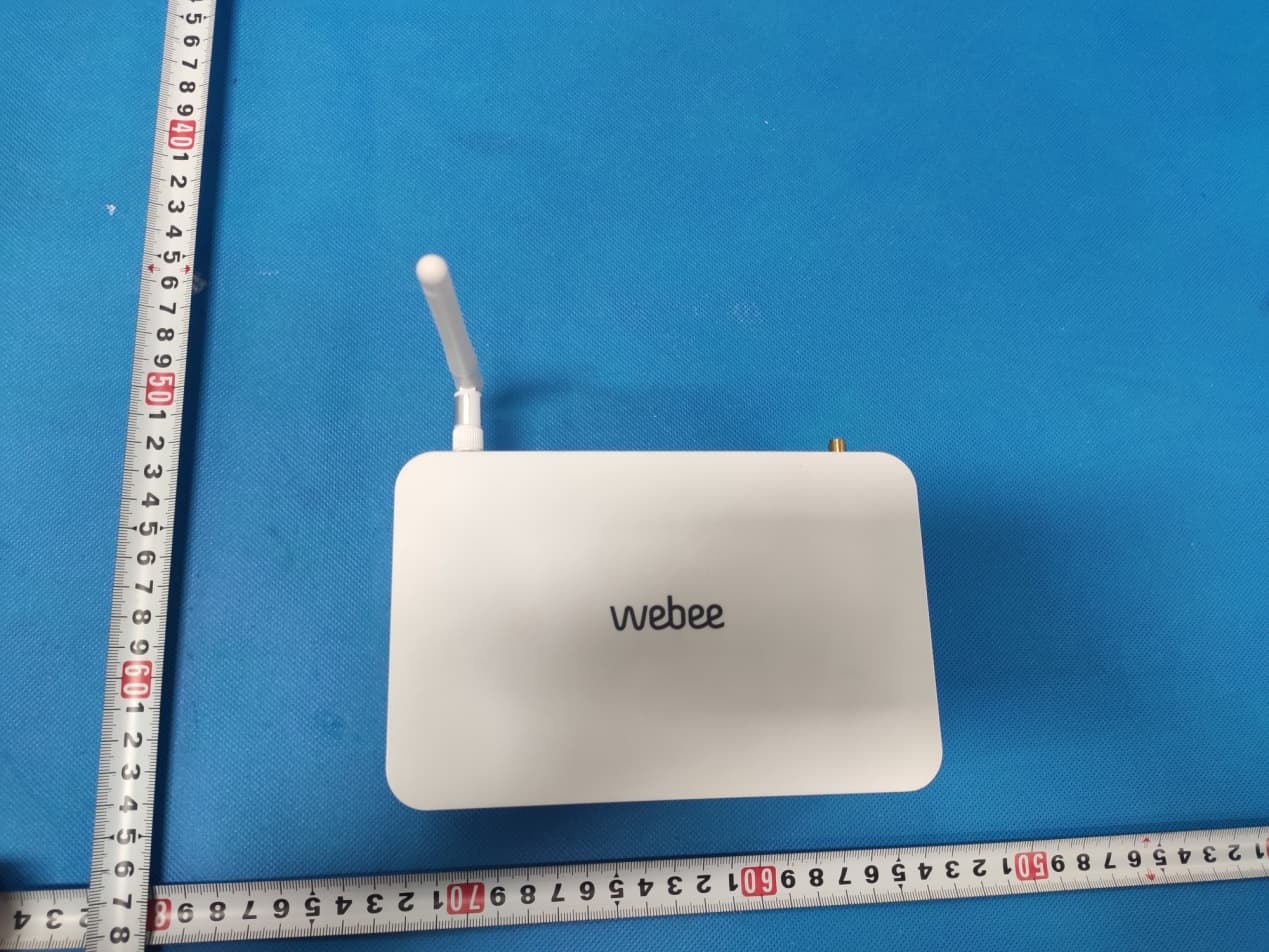
Click to zoom
Application Details
- Equipment Class
- DXX - Part 15 Low Power Communication Device Transmitter
- Date of Grant
- Mar 30, 2020
- Application Purpose
- Original Equipment
- Date of Application
- Mar 30, 2020
- Equipment Note
- Smartee G3
- Frequency Range
- 908.40000000 - 916.00000000
- Company
- Webee Corporation
- Country
- United States
Documents & Files
Document Text
Text extracted from the exhibit documents filed with the FCC. Open a document above to read the original.
Users Manual
1 Android Box User’s Guide 2 Contents 1. Safety Information, P3-4 1.1 Warning, P3 1.2 Precautions, P3-4 1.3 Handling Cautions, P4 2. Introduction, P5-7 2.1 Package Contents, P5 2.2 Product Features, P5 2.3 Panel Introduction, P6 2.4 Remote Controller, P6 2.5 Setup Connection, P7 2.6 Display when Power Up, P7-8 3. Settings, P8-21 3.1 WiFi, P9 3.2 Bluetooth, P10 3.3 Ethernet, P10 3.4 More..., P11 3.5 Sound and notification, P12 3.6 Display, P13-15 3.7 Storage&USB, P16 3.8 Apps, P17 3.9 Memory, P17 3.10 Location, P18 3.11 Security, P18 3.12 Language & input, P19 3.13 Reset, P19 3.14 Accounts, P20 3.15 Google, P21 3.16 Date time, P21 3.17 About MediaBox, P22 4. Apps Install & Uninstall, P23 5. Firmware Update , P24 6. Trouble Shooting/FAQ , P25 7. Repairs , P26 8. Specification , P27 9. Trademark Notice , P28 3 1. Safety Information Read and understand all instructions before using this product. If damage is caused by failure to follow the instructions, the warranty does not apply. 1.1 Warning To reduce the risk of electric shock, DO NOT remove the cover (or back). DO NOT attempt to repair the product, this could lead to the risk of injury, damage to the product . To reduce the risk of fire or electric shock, keep this product away from exposed direct sunlight, naked flames or heat, large amounts of moisture, dust, and sand. FCC Note (for U.S.A) This equipment has been tested and found to comply with the limits for a Class B digital device, pursuant to Part 15 of the FCC rules. These limits are designed to provide reasonable protection against harmful interference in a residential installation. This equipment generates, uses and can radiate radio frequency energy and, if not installed and used in accordance with the instructions, may cause harmful interference to radio or television reception, which can be determined by turning the equipment off and on. The user is encouraged to try to correct the interference by one or more of the following measures. - Reorient or relocate the receiving antenna. - Increase the separation between the equipment and receiver. - Consult the dealer or an experienced radio/TV technician for help. - This class B digital product meets all requirements of the Canadian Interference - Causing Equipment Regulations. 1.2 Precautions Important Safety Instructions Read these operating instructions carefully before using the unit. Follow all the safety instructions listed below. Keep these operating instructions handy for future reference. 1.2.1 Read these instructions. 1.2.2 Keep these instructions. 1.2.3 Heed all warnings. 1.2.4 Follow all instructions. 1.2.5 DO NOT use this apparatus near water. 1.2.6 DO NOT clean with any chemical detergent. Clean only with a dry cloth. 1.2.7 DO NOT block any ventilation openings. Install in accordance with the manufacturer’s instructions. 1.2.8 DO NOT install near any heat sources such as radiators, heat registers, stoves, or other apparatus that produce heat. 1.2.9 Protect the power cord from being walked on or pinched particularly at plugs, 4 convenience receptacles, and the point where it exits the apparatus. 1.2.10 Only use attachments/accessories specified by the manufacturer. 1.2.11 Use only with the cart, stand, tripod, bracket, or table specified by the manufacturer, or sold with the apparatus. When a cart is used , use caution when moving the cart/apparatus combination to avoid injury from tip-over. 1.2.12 Unplug this apparatus during lightning storms or when unused for long period of time. 1.2.13 Refer all servicing to qualified service personnel. Servicing is required when the apparatus has been damaged in any way, such as when the power-supply cord or plug is damaged, liquid has been spilled or objects have fallen into the apparatus, the apparatus has been exposed to rain or moisture, does not operate normally, or has been dropped. 1.3 Handling Cautions 1.3.1 DO NOT expose this apparatus to dripping or splashing. Do not put objects filled with liquids, such as vases on the apparatus. 1.3.2 To turn this apparatus off completely, you must pull the power plug out of the wall socket. Consequently, the power plug must be easily and readily accessible at all times. 1.3.3 DO NOT plug multiple electric devices into the same wall socket. Overloading a socket can cause it to overheat, resulting in a fire. 1.3.4 Before connecting other components to this player, be sure to turn them off. 1.3.5 If the product makes an abnormal noise or produces a burning smell or smoke, turn off the power switch immediately and disconnect the power plug from the wall outlet. Then, contact the nearest customer service center for technical assistance. Do not use the product. Using the product as it is may cause a fire or an electric shock. 5 2. Introduction 2.1 Package Contents Enjoy TV Quad Core Box User’s Guide HDMI Cable IR Remote Controller (IR RC) Power Adapter, Input: AC100 ~ 240V, 50/60Hz, Output: 5V, 2A 2.2 Product Features Quad Core CPU,Penta GPU, frequency is 2.0GHz, RAM is 2G(1G optional), built in 8G EMMC. Powered by Android 6.0 OS Built in browser and support virtual private network access RJ45 10/100M Ethernet interface Support 4k2k video local media playback from SD card or USB HDD Built in 802.11b/g/n AC WIFI module with antenna inside, WiFi frequency range is 2.4G/5.8G Rj45:Wired internet connection HDMI video output, connect to HDTV for HD video playback 2 external USB interface , support mobile HDD, support mouse and keyboard operating Support weather, calendar, and desktop clock gadgets Support USB mouse and keyboard operation Support simple IR remote control with mouse function Support music player, picture player and more family entertainment Support Micro SD card Support Google Chrome browser App Installer for application installation from USB/SD card 6 2.3 Panel Introduction 2.4 Remote Controller Note: Button Battery 2025 3V insert with correct polarity (+/-). ① Power ② Mode ③ Mute ④ Upwards ⑤ Toward…
Text truncated - open the document above for the full version.
Cover Letter(s)
Webee Corporation Agent Authorization Company: Webee Corporation Address: SUITE# W014. 440 N. Wolfe Road, Sunnyvale, CA 94085 Product Name: Smartee G3 Model Number(s): SM3001, SM3001+, SM3001x, PCHQ1 Product Description: Smartee G3 We authorize MiCOM Labs Inc., 575 Boulder Court, Pleasanton, California 94566, USA, to act on our behalf on all matters concerning the certification of above named equipment. We declare that MiCOM Labs Inc. is allowed to forward all information related to the approval and certification of equipment to the regulatory agencies as required and to discuss any issues concerning the approval application. Any and all acts carried out by MiCOM Labs on our behalf shall have the same effect as acts of our own. Signature: Date: Mar. 26, 2020 Name: Leonardo G Giordano Title: Private Sector Company: Webee Corporation
Cover Letter(s)
EMBUX Technology Co. Ltd. Office of Engineering Technology Federal Communications Commission 7435 Oakland Mills Road Columbia, MD 21046 USA Date: Mar. 23, 2020 Subject; Request for Confidentiality FCC ID: 2AVW3-MWF220HDB To Whom It May Concern, Pursuant to the provisions of the Commission’s rules Title 47 Sections §0.457 and §0.459, we are requesting the Commission to withhold the following attachment(s) as confidential documents from public disclosure indefinitely. These documents contain detailed system and equipment descriptions and are considered as proprietary information in operation of the equipment. The public disclosure of these documents might be harmful to our company and would give competitors an unfair advantage in the market. Schematic Diagram Block Diagram Parts List Operational Description Tune-up Procedure software security requirement It is our understanding that all measurement test reports, FCC ID label format and correspondence during the certification review process cannot be granted as confidential documents and this information will be available for public review once the grant of equipment authorization is issued. Sincerely, Signature: Name: Steve Chen Title: Director
Cover Letter(s)
Model Difference Declaration To Whom It May Concern, We, Webee Corporation(Smartee G3) Trademark:N/A; Model Number: SM3001, SM3001+, SM3001x, PCHQ1; All model’s the function, software and electric circuit are the same, only with a product color and model named different for commercial purpose. Test sample model: SM3001. Please contact me if you have any question. Name: Leonardo G Giordano Date:Mar. 26, 2020 Title: Private Sector Signature of applicant:
External Photos
Annex A External Photos SM3001 915MHz ANT
ID Label/Location Info
FCC ID LABEL: Ca. 5mm x 10mm Label Location FCC ID: 2AVI7-91DA3C Model Name: SM3001
Internal Photos
Annex B Internal Photo SM3001 GPS ANT. 2.4G/5GWiFi/ BT ANT GSM/WCDMA/LTE ANT Z‐WAVE ANT. ZigBee ANT.
Test Report
Page 1 of 22 Report No.: HK1910082514-11E FCC RADIO TEST REPORT FCC ID: 2AVI7-91DA3C Product: Smartee G3 Trade Name: N/A Model Name: SM3001 Serial Model:SM3001+, SM3001x, PCHQ1 Report No.:HK1910082514-11E Prepared for Webee Corporation SUITE# W014. 440 N. Wolfe Road, Sunnyvale, CA 94085 Prepared by Shenzhen HUAK Testing Technology Co., Ltd. 1F, B2 Building, Junfeng Zhongcheng Zhizao Innovation Park, Heping Community, Fuhai Street, Bao'an District, Shenzhen, China Page 2 of 22 Report No.: HK1910082514-11E TEST RESULT CERTIFICATION Applicant’s name ................. : Webee Corporation Address .................................. : SUITE# W014. 440 N. Wolfe Road, Sunnyvale, CA 94085 Manufacture's Name ............ : Webee Corporation Address .................................. : SUITE# W014. 440 N. Wolfe Road, Sunnyvale, CA 94085 Product description Product name ........................... : Smartee G3 Trade Mark ............................. : N/A Model and/or type reference : SM3001, SM3001+, SM3001x, PCHQ1 Standards .............................. : FCC Rules and Regulations Part 15 Subpart C Section 15.249 ANSI C63.10: 2013 This device described above has been tested by Shenzhen HUAK Testing Technology Co., Ltd., and the test results show that the equipment under test (EUT) is in compliance with the FCC requirements. And it is applicable only to the tested sample identified in the report. This report shall not be reproduced except in full, without the written approval of UNI, this document may be altered or revised by Shenzhen HUAK Testing Technology Co., Ltd., personnel only, and shall be noted in the revision of the document. Date of Test ............................................ : Date (s) of performance of tests.............. : Oct. 06, 2019 ~Dec. 25, 2019 Date of Issue ........................................... : Dec. 25, 2019 Test Result ............................................... : Pass Testing Engineer : (Gary Qian) Technical Manager : (Eden Hu) Authorized Signatory : (Jason Zhou) Page 3 of 22 Report No.: HK1910082514-11E Table of Contents Page 1 TEST SUMMARY 4 2 GENERAL INFORMATION 5 2.1 GENERAL DESCRIPTION OF EUT 5 2.2 Carrier Frequency of Channels 6 2.3 Operation of EUT during testing 6 2.4 DESCRIPTION OF TEST SETUP 6 Operation of EUT during Conducted, Radiation testing: 6 AC Main 6 Operation of EUT during Above1GHz Radiation testing: 6 Adapter 6 2.5 MEASUREMENT INSTRUMENTS LIST 7 3 CONDUCTED EMISSION TEST 8 3.1 Test Limit 8 3.2 Test Setup 8 3.3 Test Procedure 8 3.4 Test Result 8 4 RADIATED EMISSION TEST 11 4.1 Test Limit 11 4.2 Test Setup 12 4.3 Test Procedure 14 4.4 Test Result 14 5 OCCUPIED BANDWIDTH TEST 18 5.1 Test Setup 18 5.2 Rules and specifications 18 5.3 Test Procedure 18 5.4 Test Result 19 6 ANTENNA REQUIREMENT 20 7 PHOTOGRAPH OF TEST 21 8 PHOTOS OF THE EUT 22 Page 4 of 22 Report No.: HK1910082514-11E 1 TEST SUMMARY 1.1 TEST PROCEDURES AND RESULTS DESCRIPTION OF TEST RESULT AC Power Line Conducted Emission §15.207 COMPLIANT Field Strength of Fundamental §15.249 (a) (d)/ §15.209 COMPLIANT Spurious Emissions §15.249 (a) (d)/ §15.209 COMPLIANT Band Edge §15.249 (a) (d)/ §15.209 COMPLIANT 20dB Occupied Bandwidth §15.215 (c) COMPLIANT Antenna requirement §15.203 COMPLIANT 1.2 TEST FACILITY Test Firm : Shenzhen HUAK Testing Technology Co., Ltd. Address : 1/F., Building B2, Junfeng Zhongcheng Zhizao Innovation Park, Heping Community, Fuhai Street, Bao'an District, Shenzhen, Guangdong, China The testing quality ability of our laboratory meet with "Quality Law of People's Republic of China" Clause 19.The testing quality system of our laboratory meets with ISO/IEC-17025 requirements, which is approved by CNAS. This approval result is accepted by MRA of APLAC. The EMC Laboratory has been assessed and in compliance with CNAS-CL01 accreditation criteria for testing Laboratories (identical to ISO/IEC 17025:2017 General Requirements) for the Competence of testing Laboratories. Designation Number: CN1229 Test Firm Registration Number: 616276 The EMC Laboratory has been registered and fully described in a report filed with the (FCC) Federal Communications commission. The acceptance letter from the FCC is maintained in our files. 1.3 MEASUREMENT UNCERTAINTY Measurement Uncertainty Conducted Emission Expanded Uncertainty =2.23dB, k=2 Radiated emission expanded uncertainty(9kHz-30MHz) = 3.08dB, k=2 Radiated emission expanded uncertainty(30MHz-1000MHz)= 4.42dB, k=2 Radiated emission expanded uncertainty(Above 1GHz) = 4.06dB, k=2 Page 5 of 22 Report No.: HK1910082514-11E 2 GENERAL INFORMATION 2.1 GENERAL DESCRIPTION OF EUT Equipment Smartee G3 Trade Mark N/A Model Name SM3001 Serial No. SM3001+, SM3001x, PCHQ1 Model Difference All model’s the function, software and electric circuit are the same, only with a product color and model named different. Test sample model: SM3001. FCC ID 2AVI7-91DA3C Antenna Type internal Antenna Antenna Gain 1dBi Operation frequency 908.40 MHz, 916.00 MHz Number of Channels 2CH Modulation Type ASK Battery N/A Power Source DC5V/3A From Adapter Page 6 of 22 Report No.: HK1910082514-11E 2.2 Carrier Frequency of Channels Operation Frequency each of channel Channel Frequency 01 908.40 MHz 02 916.00 MHz 2.3 Operation of EUT during testing Operating Mode The mode is used: Transmitting mode 2.4 DESCRIPTION OF TEST SETUP Operation of EUT during Conducted, Radiation testing: AC Main Operation of EUT during Above1GHz Radiation testing: ● Adapter information Model: TEKA018-0503000UK Input: 100-240V~ 50/60Hz, 0.5Amax Output: 5V, 3000mA ● Display information Model: 24PFF3661/T3 Input: AC 120V/60Hz Adapter EUT EUT Display Page 7 of 22 Report No.: HK1910082514-11E 2.5 MEASUREMENT INSTRUMENTS LIST Item Equipment Manufacturer Model No. Serial No. Calibrated until CONDUCTED EMISSIONS TEST 1 LISN R&S ENV216 HKE-002 2018.12.27 2 LISN R&S ENV216 HKE-029 2018.12.27 3 EMI Test Receiver R&S ESCI-7 HKE-010 2018.12.27 RADIATED EMISSION TEST 1 Broadband antenna Schwarzbeck VULB 916…
Text truncated - open the document above for the full version.
Test Setup Photos
Test model: SM3001
Contact Information
Applicant
Leonardo Gabriel Giordano(General Manager)
Technical Contact
Test Firm
Shenzhen HUAK Testing Technology Co., Ltd.Jason Zhou
[email protected]+86-755-23029901
Technical Specifications
| # | Rule Parts | Frequency Range | Power Output |
|---|---|---|---|
| 1 | 15C | 908.4 MHz - 916 MHz | - |