2AVJT-80-000Wattbike Performance Touchscreen
Wattbike Ltd.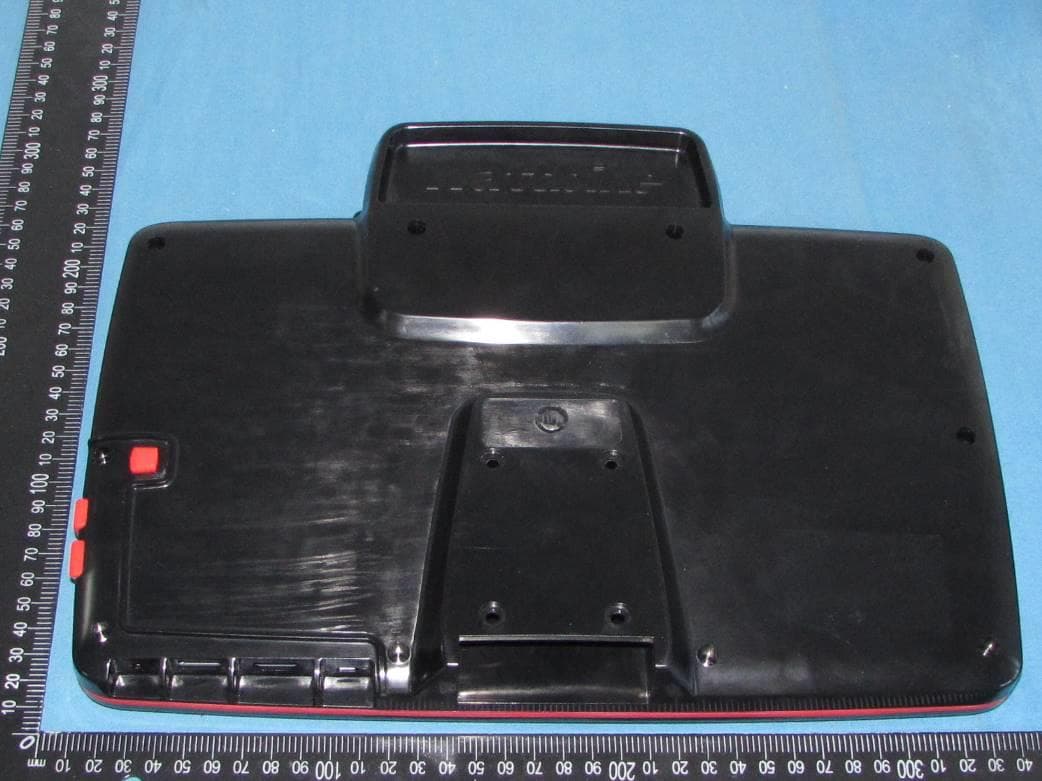
Click to zoom
Application Details
- Equipment Class
- NII - Unlicensed National Information Infrastructure TX
- Date of Grant
- Mar 05, 2020
- Application Purpose
- Original Equipment
- Date of Application
- Feb 27, 2020
- Equipment Note
- Wattbike Performance Touchscreen
- Frequency Range
- 5755.00000000 - 5795.00000000
- Company
- Wattbike Ltd.
- Country
- United Kingdom
Documents & Files
Document Text
Text extracted from the exhibit documents filed with the FCC. Open a document above to read the original.
Users Manual
1 User Guide Model: 80-000 2 ) 1 Quick Start Guide 1.1 Keys Function Keys Funcction Description: Power button Short press to sleep/wake up, long press to startup and shutdown. Volume +(up) increase the volume Volume -(down) decrease the volume HOME button(home Click it in any interface will return to main interface. Back button(back) click it in any interface will return to previous menu Menu button This button will display in menu interface. Setting button display recently browsed history 1.2 Startup and Shutdown Startup Long press POWER key for three seconds, you can enter into startup picture. The system enters into screen lock status, please unlock it. Shutdown 1. Long press POWER, it will popoup shutdown window. 2. Shutdowm window contains mute mode, airplane mode,reboot mode and shutdown four options. 3. Click Shutdown is the last step. 1.3 Open and Close of the Screen Screen will be closed on its own when no operation happens. 1. Screen will be closed on its own if no operation happens for some time to save battery power 2. When screen is open, press POWER key, the screen will be closed immediately. Open the screen when it is closed. If the screen is closed, short press POWER to open the screen. The screen will be locked open it, it will show the picture as below picture, left slide to unlock and enter into camera, right slide the unlock icon to unlock the screen. 3 Picture 1.1 1.4 Usage of Touch Screen MID operating methods There are below methods to view the main screen, menu and application procedure in your MID. Click When you want to use the screen keyboard typing or choose application in the main interface, you only need to touch it by your finger. Press on If you want to open some item( textbox or the link in the webpage), or shortcut and main procedure move, you can press on this item. Quickly slide or slide Quickly slide or slide indicates make quick vertical or horizoncial movement by finger. Pull Before you pull, you need to hold the it with strenghth until you pull it into the position you want. Rotate For most pictures, you only need to retate the MID sidewise to change the screen direction from horizoncial to vertical. For instance, when you are typing wods, and watching movies. 1.5 Home Page Main interface as below picture 3.2, long press the blank and it will popup windows to set wallpaper, folder, widgets, and shortcut. 4 history Notice column Batty volume time Picture 1.2 return Home display recently browsed The extended home page The home page can be extended beyond the wideness of screen to provide more space, which you can put new-added shortcuts and widgets. Click the blank space in home page then slide right or left to extend to the right or left of the screen. In the home page, there are two extended pictures, as Picture 1.3. Picture 1.3 The shortcut icons management in desktop application. Create folder icon in desktop 1. Drag the icons need to be put together on one icon(can also overlay several icons)as Picture 1.4. 2. Then click the overlayed icons, the applications can be folded, as Picture 1.5. Click the unnamed folder in the black box, it will popup the hidden keyboard, the folder name can be renamed (this is similiar with Apple IOS system), the icons position can be changed through long press. 5 Picture 1.4 Picture 1.5 Remove the icons in desktop 1. Long press the icons need to be remove, then on the right above of the screen, it will appear icons. 2. Drag the icon to the above of the remove icon, till the icon become red, then move your finger to delete the icon. Change the wallpaper of desktop 1. In home page, long press any blank space in main screen, it will popup a window to change the wallpaper. 2. Click the gallery or wallpaper gallery to select the wallpaper. 1.6 Visit Application Procedures Click in right top of Picture 1.2, enter into main interface as Picture 1.6, choose the application procedure you want to visit. Picture 1.6 Return to home page 6 1.7 USB Connection MID storage configuration Before transmitting documents, you have to conduct storage configuration for your MID: 1. Connect the MID and computer by USB cable, the reminder column will show the remind information. 2. Open the reminder board; please view the MID status and reminder to learn how to open the board. 3. In the reminder board, click the “USB Connected”, it will as below Picture 3.4, then click “open USB storage configuration”. 4. Now the USB is connected successfully. Picture 1.7 Copy the document into memory card 1. Connect the MID to computer with USB cable. 2. As MID storage configuration, it is connected with computer successfully. 3. Open the “My computer” in your computer, check the items in “removable disc”. 4. Copy the documents you need into “removable disc”. 5. After copying finishes, click “shutdown the USB storage configuration” to uninstall. Notice: When the MID is connected with USB cable, and you open the USB storage configuration, you can’t view the memory card through the MID. Only after you detach the USB cable, you can view the memory card in the MID. 2 Basic Setting 2.1 Wireless and Internet 1. Connect Wi-Fi 1) In the main menu or interface, choose setting application procedure. 2) Click WLAN, open wifi, MID will automatically search the available Wifi wireless internet. As Picture 2.3 3) Choose the Wi-Fi internet you want to connect, if it has password, it will popup the password window, enter password, click connect. 7 Picture 2.1 2. Add Network 1) Click icon in right top, as Picture 2.4 Picture 2.2 2) Input network SSID, the wireless network name, click save. 3) Click user name already saved, click connect to use network, as Picture 2.5 8 Picture 2.3 3. Network Notice If you open Network Notice, when WIFI signal appears, the right bottom will remind you available WLAN network, as Picture 2.3 4. Keep WI-FI on during sleep.. 1. Click icon in right top of Picture 2.6, select advanced. 2. Click Keep WI-FI on during sleep, as Picture 2.7 Picture 2.…
Text truncated - open the document above for the full version.
Cover Letter(s)
CONFIDENTIALITY REQUEST for Certification Service in USA Federal Communication Commission Equipment Authorization Division, Application Processing Branch 7435 Oakland Mills Road Columbia, MD 21046 Date: January 14, 2020 TO WHOM IT MAY CONCERN Pursuant to Paragraphs §0.457 and 0.459 of the Commission’s Rules (47 C.F.R.) and Section §552(b)(4) of the Freedom of Information Act, we requests confidentiality for the following products: FCC ID Model name 2AVJT-80-000 80-000 For the product stated above, we request that the following information be held confidential; Exhibits Long-Term Confidentiality Short-Term Confidentiality Short-Term Confidentiality Days External Photos Internal Photos Block Diagram Schematics Test Setup Photos User’s Manual Parts List Tune Up Operational Descriptions The long-term confidentiality exhibits contain our trade secrets and proprietary information that could be of benefit to our competitors. The short-term confidentiality on the basis of ensuring that business sensitive information remains confidential until the actual marketing of our new device. If you have any questions, please feel free to contact me at the address shown below. Sincerely, Name: Dusan Adamovic Company: Wattbike Ltd. Address: Unit 13, Nottingham South & Wilford Industrial Estate West Bridgford, Nottingham NG11 7EP, UK Phone: 0044 115 945 5450 Fax: 0044 115 945 5450 E-Mail: [email protected]
Cover Letter(s)
Wattbike Ltd. Unit 13, Nottingham South & Wilford Industrial Estate West Bridgford, Nottingham NG11 7EP, UK Federal Communications Commission Authorization and Evaluation Division Equipment Authorization Branch 7435 Oakland Mills Road Columbia, MD 21046 1/14/2020 To whom it may concern: We, Wattbike Ltd., the undersigned, hereby authorize Eurofins Product Service GmbH to act on our behalf in all matters relating to applications for equipment authorization FCC ID: 2AVJT-80-000 including the signing of all documents related to these matters. Any and all acts carried out by Eurofins Product Service GmbH on our behalf shall have the same effect as acts of our own. We also hereby certify that no party to this application is subject to a denial of benefits, including FCC benefits, pursuant to Section 5301 of the Anti-Drug Abuse Act of 1988, 21 U.S.C. 862. Sincerely, Signature Dusan Adamovic Manager Wattbike Ltd.
Cover Letter(s)
Federal Communication Commission Equipment Authorization Division, Application Processing Branch 7435 Oakland Mills Road Columbia, MD 21046 UNII Device Declaration Letter To whom it may concern: We have declared below featured for FCC equipment authorization, Device FCC ID:2AVJT-80-000 (1) DFS Device: Master Client with Radar detection capability N/A Client without radar detection capability, (2) Active / Passive Scanning , adhoc mode access point capability Frequency Band (MHz) Active Scanning (the device can transmit a probe (beacon)) passive scanning (where the device is can listen only with no probes) Ad Hoc Mode Capability Access point Capability 5745-5825 Yes No Yes No Yes No Yes No 5755-5795 Yes No Yes No Yes No Yes No 5180-5240 Yes No Yes No Yes No Yes No 5190-5230 Yes No Yes No Yes No Yes No (3) Country code selection ability Yes No If yes, pls explain how it was implemented: (4) Meet 15.202 requirement Yes No pls check below : A master device is defined as a device operating in a mode in which it has the capability to transmit without receiving an enabling signal. In this mode it is able to select a channel and initiate a network by sending enabling signals to other devices A client device is defined as a device operating in a mode in which the transmissions of the device are under control of the master. A device in client mode is not able to initiate a network. (5) For client devices that have software configuration control to operate in different modes (active scanning in some and passive scanning in others) in different bands (devices with multiple equipment classes or those that operate on non- DFS frequencies) or modular devices which configure the modes of operations through software, the application must provide software and operations description on how the software and / or hardware is implemented to ensure that proper operations modes cannot be modified by end user or an installer. Apply Does not apply (If apply, pls help to provide explanation on it was implement, and how software was controlled) Sincerely, Name: Dusan Adamovic Company: Wattbike Ltd. Address: Unit 13, Nottingham South & Wilford Industrial Estate West Bridgford, Nottingham NG11 7EP, UK Phone: 0044 115 945 5450 Fax: 0044 115 945 5450 E-Mail: [email protected]
External Photos
Shenzhen HUAK Testing Technology Co., Ltd. FCC ID: 2AVJT-80-000 This reportshall not be reproduced except in full, without the written approval of Shenzhen HUAK Testing Technology Co., Ltd. Page 1 of 3 EXTERIOR PHOTOGRAPHS OF EUT Fig.1 Fig.2 Shenzhen HUAK Testing Technology Co., Ltd. FCC ID: 2AVJT-80-000 This reportshall not be reproduced except in full, without the written approval of Shenzhen HUAK Testing Technology Co., Ltd. Page 2 of 3 Fig.3 Fig.4 Shenzhen HUAK Testing Technology Co., Ltd. FCC ID: 2AVJT-80-000 This reportshall not be reproduced except in full, without the written approval of Shenzhen HUAK Testing Technology Co., Ltd. Page 3 of 3 Fig.5 Fig.6
ID Label/Location Info
Label & Label Location Size: 45mm(L)*30mm(W) FCC ID: 2AVJT-80-000 This device complies with Part 15 of the FCC Rules. Operation is subject to the following two conditions: (1) this device may not cause harmful interference, and (2) this device must accept any interference received, including interference that may cause undesired operation.
Internal Photos
Shenzhen HUAK Testing Technology Co., Ltd. FCC ID: 2AVJT-80-000 This report shall not be reproduced except in full, without the written approval of Shenzhen HUAK Testing Technology Co., Ltd. Page 1 of 7 INTERIOR PHOTOGRAPHS OF EUT Fig.1 Fig.2 Bluetooth & WIFI Antenna1 Shenzhen HUAK Testing Technology Co., Ltd. FCC ID: 2AVJT-80-000 This report shall not be reproduced except in full, without the written approval of Shenzhen HUAK Testing Technology Co., Ltd. Page 2 of 7 Fig.3 Fig.4 Bluetooth Antenna 2 Shenzhen HUAK Testing Technology Co., Ltd. FCC ID: 2AVJT-80-000 This report shall not be reproduced except in full, without the written approval of Shenzhen HUAK Testing Technology Co., Ltd. Page 3 of 7 Fig.5 Fig.6 Shenzhen HUAK Testing Technology Co., Ltd. FCC ID: 2AVJT-80-000 This report shall not be reproduced except in full, without the written approval of Shenzhen HUAK Testing Technology Co., Ltd. Page 4 of 7 Fig.7 Fig.8 Shenzhen HUAK Testing Technology Co., Ltd. FCC ID: 2AVJT-80-000 This report shall not be reproduced except in full, without the written approval of Shenzhen HUAK Testing Technology Co., Ltd. Page 5 of 7 Fig.7 Fig.8 Shenzhen HUAK Testing Technology Co., Ltd. FCC ID: 2AVJT-80-000 This report shall not be reproduced except in full, without the written approval of Shenzhen HUAK Testing Technology Co., Ltd. Page 6 of 7 Fig.9 Fig.10 Shenzhen HUAK Testing Technology Co., Ltd. FCC ID: 2AVJT-80-000 This report shall not be reproduced except in full, without the written approval of Shenzhen HUAK Testing Technology Co., Ltd. Page 7 of 7 Fig.11 Fig.12
RF Exposure Info
Shenzhen HUAK Testing Technology Co., Ltd. FCC ID: 2AVJT-80-000 This report shall not be reproduced except in full, without the written approval of Shenzhen HUAK Testing Technology Co., Ltd. Page 1 of 9 RF Exposure Report Product Information EUT : Wattbike Performance Touchscreen Model Number : 80-000 Model Declaration : / Test Model : 80-000 Power Supply : DC 3.7V by battery Hardware version : BND-MT8163-MT116-BSF-V1.0 Software version : V1.0 Chipset/Module 1 : MT6625L Bluetooth Version : V5.0+EDR Channel Number : 79 Channels for Bluetooth V5.0(DSS) 40 Channels for Bluetooth V5.0(DTS) Modulation Technology : GFSK, π/4-DQPSK, 8-DPSK for Bluetooth V5.0(DSS) GFSK for Bluetooth V5.0(DTS) Data Rates : Bluetooth V5.0(DSS): 1~3Mbps Bluetooth V5.0(DTS): 1Mbps WLAN : Supported IEEE 802.11a/b/g/n WLAN FCC Operation Frequency : IEEE 802.11b:2412-2462MHz IEEE 802.11g:2412-2462MHz IEEE 802.11n HT20:2412-2462MHz / 5180-5240MHz / 5745-5825MHz IEEE 802.11n HT40:2422-2452MHz / 5190-5230MHz / 5755-5795MHz IEEE 802.11a: 5180-5240MHz / 5745-5825MHz WLAN Channel Number : 11 Channels for 2412-2462MHz(IEEE 802.11b/g/n HT20) 7 Channels for 2422-2452MHz(IEEE 802.11n HT40) 4 Channels for 5180-5240MHz (IEEE 802.11a/n HT20) 2 Channels for 5190-5230MHz (IEEE 802.11n HT40) 5 Channels for 5745-5825MHz(IEEE 802.11a/n HT20) 2 Channels for 5755-5795MHz(IEEE 802.11n HT40) WLAN Modulation Technology : IEEE 802.11b: DSSS(CCK,DQPSK,DBPSK) IEEE 802.11g: OFDM (64QAM, 16QAM, QPSK, BPSK) IEEE 802.11n: OFDM (64QAM, 16QAM, QPSK, BPSK) IEEE 802.11a: OFDM (64QAM, 16QAM, QPSK, BPSK) Antenna Type And Gain : Antenna 1 1.56 dBi(Max.), for TX/RX (Bluetooth), 1.56dBi(Max.), for TX/RX (WLAN 2.4G Band), 0.67 dBi(Max.), for TX/RX (WLAN 5.2G Band) 0.53 dBi(Max.), for TX/RX (WLAN 5.8G Band) Chipset/Module 2 : nRF52840 Bluetooth Version : V4.2 BLE Frequency Range : 2402-2480MHz Channel Number : 40 Channels Modulation Technology : GFSK Shenzhen HUAK Testing Technology Co., Ltd. FCC ID: 2AVJT-80-000 This report shall not be reproduced except in full, without the written approval of Shenzhen HUAK Testing Technology Co., Ltd. Page 2 of 9 Data Rates : 1Mbps Antenna Type And Gain : Antenna 2 0.5 dBi(Max.), for TX/RX (Bluetooth only support BLE mode), Note: Antenna position refer to EUT Photos. 2. Evaluation Method and Limit According to KDB447498 D01 General RF Exposure Guidance v06 Section 4.3.1 Standalone SAR test exclusion considerations: “Unless specifically required by the published RF exposure KDB procedures, standalone 1-g head or body and 10-g extremity SAR evaluation for general population exposure conditions, by measurement or numerical simulation, is not required when the corresponding SAR Test Exclusion Threshold condition, listed below, is satisfied. These test exclusion conditions are based on source-based time-averaged maximum conducted output power of the RF channel requiring evaluation, adjusted for tune-up tolerance, and the minimum test separation distance required for the exposure conditions. The minimum test separation distance is determined by the smallest distance from the antenna and radiating structures or outer surface of the device, according to the host form factor, exposure conditions and platform requirements, to any part of the body or extremity of a user or bystander (see 5) of section 4.1). To qualify for SAR test exclusion, the test separation distances applied must be fully explained and justified by the operating configurations and exposure conditions of the transmitter and applicable host platform requirements, typically in the SAR measurement or SAR analysis report, according to the required published RF exposure KDB procedures. When no other RF exposure testing or reporting is required, a statement of justification and compliance must be included in the equipment approval, in lieu of the SAR report, to qualify for the SAR test exclusion. When required, the device specific conditions described in the other published RF exposure KDB procedures must be satisfied before applying these SAR test exclusion provisions; for example, handheld PTT two-way radios, handsets, laptops & tablets etc. “ [(max. power of channel, including tune-up tolerance, mW)/ (min. test separation distance, mm)] · [√f (GHz)] ≤ 3.0 for 1-g SAR and ≤ 7.5 for 10-g extremity SAR, where: • f (GHz) is the RF channel transmit frequency in GHz • Power and distance are rounded to the nearest mW and mm before calculation • The result is rounded to one decimal place for comparison • 3.0 and 7.5 are referred to as the numeric thresholds in the step 2 below The test exclusions are applicable only when the minimum test separation distance is ≤ 50 mm and for transmission frequencies between 100 MHz and 6 GHz. When the minimum test separation distance is < 5 mm, a distance of 5 mm according to f) in section 4.1 is applied to determine SAR test exclusion. When an antenna qualifies for the standalone SAR test exclusion of 4.3.1 and also transmits simultaneously with other antennas, the standalone SAR value must be estimated according to the following to determine the simultaneous transmission SAR test exclusion criteria: 1) [(max. power of channel, including tune-up tolerance, mW) / (min. test separation distance, mm)]·[√ f(GHz)/x] W/kg, for test separation distances ≤ 50 mm; where x = 7.5 for 1-g SAR and x = 18.75 for 10-g SAR. 2) 0.4 W/kg for 1-g SAR and 1.0 W/kg for 10-g SAR, when the test separation distance is > 50 mm. Shenzhen HUAK Testing Technology Co., Ltd. FCC ID: 2AVJT-80-000 This report shall not be reproduced except in full, without the written approval of Shenzhen HUAK Testing Technology Co., Ltd. Page 3 of 9 3. Antenna Information This Product can only use antennas certificated as follows provided by manufacturer; Internal Identification Antenna Description Antenna type and antenna number Operate frequency band Maximum antenna gain Antenna 1 WiFi Antenna Internal Antenna 24 00 MHz – 2500 MHz 1.56 dBi 5150 MHz – 5250 MHz 0.67 dBi 5720 MHz – 5900 …
Text truncated - open the document above for the full version.
Test Report
Report No.: HK1912113153-E5 Page 1 of 49 FCC TEST REPORT Test report On Behalf of Wattbike Ltd. For Wattbike Performance Touchscreen Model No.: 80-000 FCC ID: 2AVJT-80-000 Prepared for : Wattbike Ltd. Unit 13, Nottingham South & Wilford Industrial Estate West Bridgford, Nottingham NG11 7EP, UK Prepared By : Shenzhen HUAK Testing Technology Co., Ltd. 1F, B2 Building, Junfeng Zhongcheng Zhizao Innovation Park, Fuhai Street, Bao'an District, Shenzhen City, China Date of Test: Dec 2, 2019~Dec 25, 2019 Date of Report: Dec 27, 2019 Report Number: HK1912113153-E5 Report No.: HK1912113153-E5 Page 2 of 49 TEST RESULT CERTIFICATION Applicant’s name ................. : Wattbike Ltd. Address .................................. : Unit 13, Nottingham South & Wilford Industrial Estate West Bridgford, Nottingham NG11 7EP, UK Manufacture's Name ............ : Shenzhen NewMagic Technology Co., Ltd. Address .................................. : 2602A, Block A, World Trade Plaza, Fuhong Road, Futian Dist., Shenzhen, Guangdong, China Product description Trade Mark ................................ : WattbikePT1 Product name ............................ : Wattbike Performance Touchscreen Model and/or type reference : 80-000 Standards.............................. : FCC Rules and Regulations Part 15 Subpart E Section 15.407 ANSI C63.10: 2013 This publication may be reproduced in whole or in part for non-commercial purposes as long as the Shenzhen HUAK Testing Technology Co., Ltd. is acknowledged as copyright owner and source of the material. Shenzhen HUAK Testing Technology Co., Ltd. takes no responsibility for and will not assume liability for damages resulting from the reader's interpretation of the reproduced material due to its placement and context. Date of Test ........................................... : Date (s) of performance of tests ............. : Dec 2, 2019~Dec 25, 2019 Date of Issue .......................................... : Dec 27, 2019 Test Result .............................................. : Pass Testing Engineer : (Gary Qian) Technical Manager : (Eden Hu) Authorized Signatory : (Jason Zhou) Report No.: HK1912113153-E5 Page 3 of 49 Revision History Revision Issue Date Revisions Revised By 000 Dec 27, 2019 Initial Issue Jason Zhou Report No.: HK1912113153-E5 Page 4 of 49 TABLE OF CONTENTS 1. GENERAL INFORMATION ................................................................................................................................... 5 1.1. DESCRIPTION OF DEVICE (EUT) ........................................................................................................................ 5 1.2 EUT CONFIGURATION .......................................................................................................................................... 6 1.3. EXTERNAL I/O CABLE ......................................................................................................................................... 6 1.4. DESCRIPTION OF TEST FACILITY ........................................................................................................................ 6 1.5. STATEMENT OF THE MEASUREMENT UNCERTAINTY .......................................................................................... 6 1.6. MEASUREMENT UNCERTAINTY ........................................................................................................................... 7 1.7. DESCRIPTION OF TEST MODES .......................................................................................................................... 7 2. TEST METHODOLOGY ......................................................................................................................................... 8 2.1. EUT CONFIGURATION......................................................................................................................................... 8 2.2. EUT EXERCISE ................................................................................................................................................... 8 2.3. GENERAL TEST PROCEDURES ........................................................................................................................... 8 3. SYSTEM TEST CONFIGURATION ...................................................................................................................... 9 3.1. JUSTIFICATION..................................................................................................................................................... 9 3.2. EUT EXERCISE SOFTWARE ................................................................................................................................ 9 3.3. SPECIAL ACCESSORIES ...................................................................................................................................... 9 3.4. BLOCK DIAGRAM/SCHEMATICS........................................................................................................................... 9 3.5. EQUIPMENT MODIFICATIONS .............................................................................................................................. 9 3.6. TEST SETUP ........................................................................................................................................................ 9 4. SUMMARY OF TEST RESULTS ........................................................................................................................ 10 5. TEST RESULT ....................................................................................................................................................... 11 5.1. ON TIME AND DUTY CYCLE .............................................................................................................................. 11 5.2. MAXIMUM CONDUCTED OUTPUT POWER MEASUREMENT ............................................................................... 13 5.3. POWER SPECTRAL DENSITY MEASUREMENT .......…
Text truncated - open the document above for the full version.
Test Report
Report No.: HK1912113153-E6 Page 1 of 44 FCC TEST REPORT Test report On Behalf of Wattbike Ltd. For Wattbike Performance Touchscreen Model No.: 80-000 FCC ID: 2AVJT-80-000 Prepared for : Wattbike Ltd. Unit 13, Nottingham South & Wilford Industrial Estate West Bridgford, Nottingham NG11 7EP, UK Prepared By : Shenzhen HUAK Testing Technology Co., Ltd. 1F, B2 Building, Junfeng Zhongcheng Zhizao Innovation Park, Fuhai Street, Bao'an District, Shenzhen City, China Date of Test: Dec 2, 2019~Dec 25, 2019 Date of Report: Dec 27, 2019 Report Number: HK1912113153-E6 Report No.: HK1912113153-E6 Page 2 of 44 TEST RESULT CERTIFICATION Applicant’s name ................. : Wattbike Ltd. Address .................................. : Unit 13, Nottingham South & Wilford Industrial Estate West Bridgford, Nottingham NG11 7EP, UK Manufacture's Name ............ : Shenzhen NewMagic Technology Co., Ltd. Address .................................. : 2602A, Block A, World Trade Plaza, Fuhong Road, Futian Dist., Shenzhen, Guangdong, China Product description Trade Mark ................................ : WattbikePT1 Product name ............................ : Wattbike Performance Touchscreen Model and/or type reference : 80-000 Standards.............................. : FCC Rules and Regulations Part 15 Subpart E Section 15.407 ANSI C63.10: 2013 This publication may be reproduced in whole or in part for non-commercial purposes as long as the Shenzhen HUAK Testing Technology Co., Ltd. is acknowledged as copyright owner and source of the material. Shenzhen HUAK Testing Technology Co., Ltd. takes no responsibility for and will not assume liability for damages resulting from the reader's interpretation of the reproduced material due to its placement and context. Date of Test ........................................... : Date (s) of performance of tests ............. : Dec 2, 2019~Dec 25, 2019 Date of Issue .......................................... : Dec 27, 2019 Test Result .............................................. : Pass Testing Engineer : (Gary Qian) Technical Manager : (Eden Hu) Authorized Signatory : (Jason Zhou) Report No.: HK1912113153-E6 Page 3 of 44 Revision History Revision Issue Date Revisions Revised By 000 Dec 27, 2019 Initial Issue Jason Zhou Report No.: HK1912113153-E6 Page 4 of 44 TABLE OF CONTENTS 1. GENERAL INFORMATION ................................................................................................................................... 5 1.1. DESCRIPTION OF DEVICE (EUT) ........................................................................................................................ 5 1.2 EUT CONFIGURATION .......................................................................................................................................... 6 1.3. EXTERNAL I/O CABLE ......................................................................................................................................... 6 1.4. DESCRIPTION OF TEST FACILITY ........................................................................................................................ 6 1.5. STATEMENT OF THE MEASUREMENT UNCERTAINTY .......................................................................................... 6 1.6. MEASUREMENT UNCERTAINTY ........................................................................................................................... 7 1.7. DESCRIPTION OF TEST MODES .......................................................................................................................... 7 2. TEST METHODOLOGY ......................................................................................................................................... 8 2.1. EUT CONFIGURATION......................................................................................................................................... 8 2.2. EUT EXERCISE ................................................................................................................................................... 8 2.3. GENERAL TEST PROCEDURES ........................................................................................................................... 8 3. SYSTEM TEST CONFIGURATION ...................................................................................................................... 9 3.1. JUSTIFICATION..................................................................................................................................................... 9 3.2. EUT EXERCISE SOFTWARE ................................................................................................................................ 9 3.3. SPECIA…
Text truncated - open the document above for the full version.
Contact Information
Applicant
Dusan Adamovic
Test Firm
Shenzhen HUAK Testing Technology Co., Ltd.Jason Zhou
[email protected]+86-755-23029901
Technical Specifications
| # | Rule Parts | Frequency Range | Power Output |
|---|---|---|---|
| 4 | 15E | 5.75 GHz - 5.79 GHz | 8.10 mW |