2AW3A-1NAC21ACUCMEV Charger
Rivian Automotive, LLC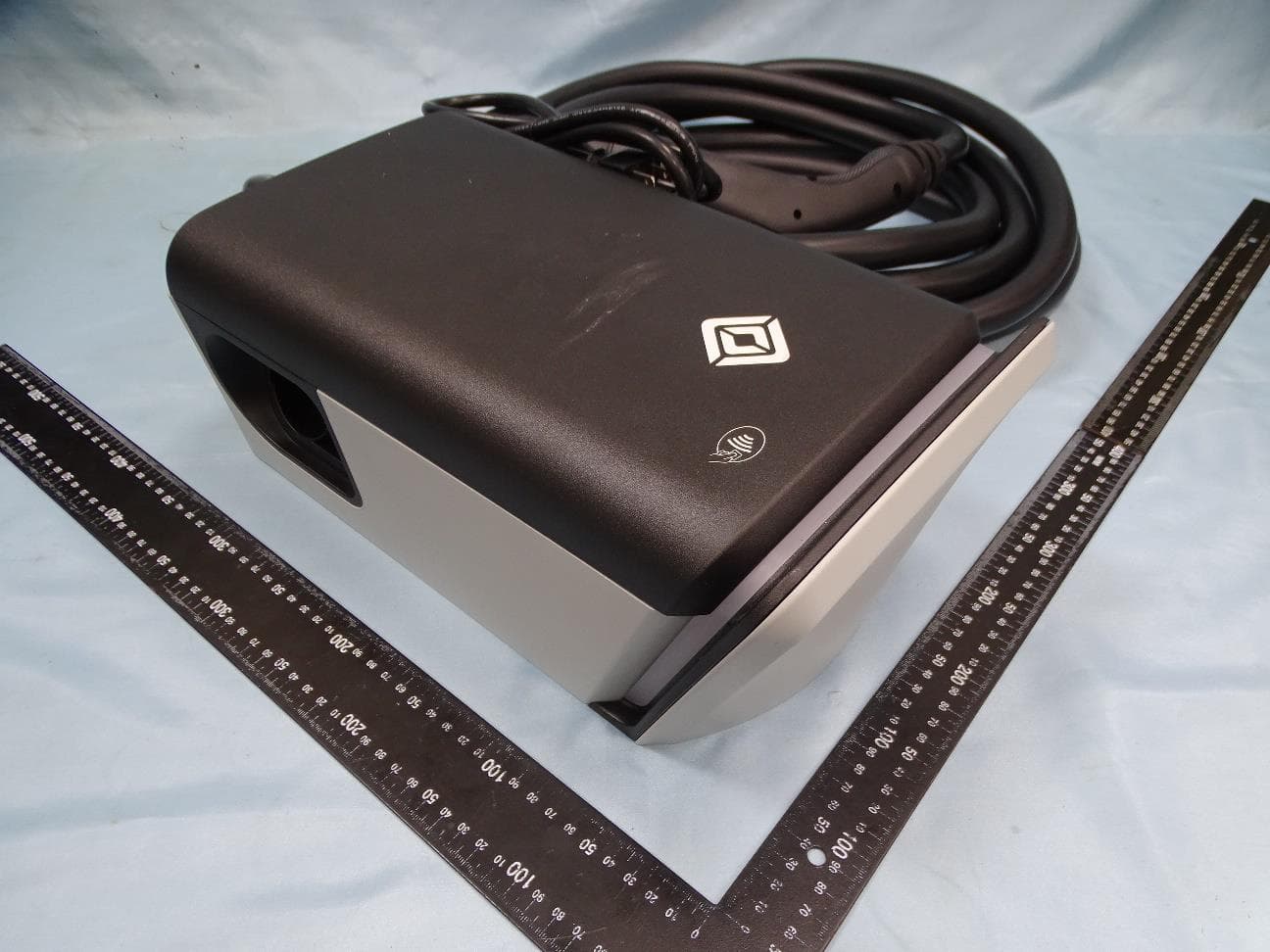
Click to zoom
Application Details
- Equipment Class
- PCB - PCS Licensed Transmitter
- Date of Grant
- Oct 03, 2022
- Application Purpose
- Original Equipment
- Date of Application
- Sep 27, 2022
- Equipment Note
- EV Charger
- Frequency Range
- 1850.10000000 - 1914.90000000
- Company
- Rivian Automotive, LLC
- Country
- United States
Documents & Files
Document Text
Text extracted from the exhibit documents filed with the FCC. Open a document above to read the original.
Users Manual
JUNE2022 FLEETACDISPENSERWITH32FTCABLE InstallationGuide PRODUCTNUMBERPT00261633 © 2021-2022 Rivian Automotive, LLC. All rights reserved. All information in this document and all Rivian software is subject to copyright and other intellectual property rights of Rivian Automotive, LLC, its affiliates, or its licensors. This material may not be modified, reproduced, or copied, in whole or in part, without the prior written permission of Rivian Automotive, LLC, its affiliates, or its licensors. Unless indicated otherwise, all trademarks are owned and registered by Rivian Automotive, LLC, its affiliates, or its licensors in the United States and/or other countries. Please visit https://www.rivian.com/legal/brand for Rivian's trademarks and service marks. Software embedded or accessed by the vehicle may utilize open source software. Please visit https://www.rivian.com/legal/open-source for more information. 2 Contents Important Safety Instructions4 SAVE THESE INSTRUCTIONS4 Precautions4 Risk of Electrical Shock4 Risk of Personal Injury5 Risk of Damage to Equipment5 Safety Symbols on Hardware Labels6 Introduction7 Identify Parts7 Tools and Equipment8 Remove the Faceplate8 Install the SIM Card9 Attach the Dispenser to the Pedestal10 Mount the Dispenser on the Pedestal12 Set the Operating Current15 Connect Conductors16 Install the Faceplate17 Complete the Installation18 Light Bar States19 Troubleshooting20 Specifications21 Supplemental Information for Electrical Service Wiring23 240V Split-Phase System23 208V Three-Phase Wye-Connected23 240V Three-Phase Delta-Connected24 FCC Interference Statement25 RF Exposure Information25 Industry Canada Statement26 Radiation Exposure Statement26 Déclaration d'exposition aux radiations26 Customer Service27 3 4 Important Safety Instructions SAVE THESE INSTRUCTIONS DANGER Read all the instructions before installing the Rivian Fleet AC Dispenser. Follow the safety instructions and warnings in this guide when installing the Fleet AC Dispenser. Failure to do so may result in fire, electrical shock, serious injury, or death. PRECAUTIONS The following safety symbols are used in this document. DANGER Risk of electric shock DANGER Risk of personal injury CAUTION Risk of damage to equipment Risk of Electrical Shock DANGER l Improper connection of the equipment grounding conductor can result in a risk of electric shock. Check with a qualified electrician or service person if you are in doubt as to whether the product is properly grounded. l Do not touch live electrical parts. Incorrect connections may cause electric shock. l No user serviceable parts inside. Refer servicing to qualified service personnel. l Do not put fingers into the coupler. l Do not use this equipment if the flexible power cord or cable is frayed, has broken insulation, or any other signs of damage. l Do not use this equipment if the enclosure or the coupler is broken, cracked, open, or shows any other indication of damage. l Do not allow unsupervised children in the area during installation of the Fleet AC Dispenser. l Before connecting the Fleet AC Dispenser to a power supply, check that the power supply voltage and current rating corresponds with the power supply details shown on the product rating label. IMPORTANTSAFETYINSTRUCTIONS 5 l Use appropriate protection when connecting to a main switchboard. l Ground the Fleet AC Dispenser through a permanent wiring system using the equipment grounding conductor. l To reduce the risk of fire, connect only to a circuit provided with no more than 60 amperes maximum branch circuit over-current protection in accordance with the National Electrical Code, ANSI/NFPA 70, and the Canadian Electrical Code, Part I, C22.2. l When a breaker smaller than 60 amperes is used, ensure that the conductor sizes used comply with the minimum sizes prescribed by national and local electrical codes and standards. Risk of Personal Injury DANGER l Disconnect the power supply before installing or repairing the Fleet AC Dispenser. Failure to do so may result in physical injury or damage to the power supply system and the Fleet AC Dispenser. l Keep any packing materials away from children. These materials are a potential source of danger, and can cause suffocation. l Only a licensed electrician should perform this installation in accordance with the provisions of national electrical codes and standards. Risk of Damage to Equipment CAUTION l Use anti-static gloves, wrist bands connected to ground, and insulated tools for installation and removal of the faceplate. l Do not operate this equipment in temperatures outside its operating range of -30°C to +50°C (-22°F to +122°F). l Store this equipment in a clean dry location between -40°C and +80°C (-40°F to +176°F). l Do not use extender cables to increase the length of the charging cable. l If this unit is installed outdoors, the components and fittings must be rated for outdoor installation. The outlet must be installed properly to maintain the proper NEMA rating of the enclosure. l Avoid direct hand contact with components on the network board. l For storage/shipping of the front panel or network board, use a bubble wrap bag with ESD (electrostatic discharge) protection. l Rivian does not recommend using a GFCI breaker since the Fleet AC Dispenser has charging circuit interrupting device (CCID20) protection. Using a GFCI breaker in the panel can cause nuisance tripping. If local codes require a GFCI breaker for plug-in installation, Rivian recommends a hardwire installation. IMPORTANTSAFETYINSTRUCTIONS 6 SAFETY SYMBOLS ON HARDWARE LABELS The following safety symbols may appear on labels located on hardware used in this installation. Risk of Electric Shock Danger Phase Equipment Ground Instruction Manual UL Logo IMPORTANTSAFETYINSTRUCTIONS 7 Introduction This document provides installation instructions for the Fleet AC Dispenser with 32 ft cable on a tall (15 ft) pedestal. Identify Parts 1. Fleet AC Dispenser 2. Mounting plate (wall inst…
Text truncated - open the document above for the full version.
Users Manual
JUNE2022 FLEETACDISPENSERWITH25FTCABLE InstallationGuide PRODUCTNUMBERPT00340197 © 2021-2022 Rivian Automotive, LLC. All rights reserved. All information in this document and all Rivian software is subject to copyright and other intellectual property rights of Rivian Automotive, LLC, its affiliates, or its licensors. This material may not be modified, reproduced, or copied, in whole or in part, without the prior written permission of Rivian Automotive, LLC, its affiliates, or its licensors. Unless indicated otherwise, all trademarks are owned and registered by Rivian Automotive, LLC, its affiliates, or its licensors in the United States and/or other countries. Please visit https://www.rivian.com/legal/brand for Rivian's trademarks and service marks. Software embedded or accessed by the vehicle may utilize open source software. Please visit https://www.rivian.com/legal/open-source for more information. Contents Important Safety Instructions4 SAVE THESE INSTRUCTIONS4 Precautions4 Safety Symbols on Hardware Labels8 Introduction9 Identify Parts9 Tools and Equipment10 Remove the Faceplate10 Install the SIM Card12 Install the Dispenser12 On a Rivian Pedestal12 On a Wall15 Set the Operating Current23 Connect Conductors24 Install the Faceplate25 Wall Installation Only - Wrap and Dock the Cable26 Complete the Installation26 Light Bar States27 Troubleshooting28 Specifications29 Supplemental Information for Electrical Service Wiring31 240V Split-Phase System31 208V Three-Phase Wye-Connected32 240V Three-Phase Delta-Connected33 FCC Interference Statement34 RF Exposure Information34 Industry Canada Statement35 Radiation Exposure Statement35 Déclaration d'exposition aux radiations35 Customer Service37 Important Safety Instructions SAVE THESE INSTRUCTIONS DANGER Read all the instructions before installing the Rivian Fleet AC Dispenser. Follow the safety instructions and warnings in this guide when installing the Fleet AC Dispenser. Failure to do so may result in fire, electrical shock, serious injury, or death. PRECAUTIONS The following safety symbols are used in this document. DANGER Risk of electric shock DANGER Risk of personal injury CAUTION Risk of damage to equipment Risk of Electrical Shock DANGER l Improper connection of the equipment grounding conductor can result in a risk of electric shock. Check with a qualified electrician or service person if you are in doubt as to whether the product is properly grounded. l Do not touch live electrical parts. Incorrect connections may cause electric shock. 4 l No user serviceable parts inside. Refer servicing to qualified service personnel. l Do not put fingers into the coupler. l Do not use this equipment if the flexible power cord or cable is frayed, has broken insulation, or any other signs of damage. l Do not use this equipment if the enclosure or the coupler is broken, cracked, open, or shows any other indication of damage. l Do not allow unsupervised children in the area during installation of the Fleet AC Dispenser. l Before connecting the Fleet AC Dispenser to a power supply, check that the power supply voltage and current rating corresponds with the power supply details shown on the product rating label. l Use appropriate protection when connecting to a main switchboard. l Ground the Fleet AC Dispenser through a permanent wiring system using the equipment grounding conductor. l To reduce the risk of fire, connect only to a circuit provided with no more than 60 amperes maximum branch circuit over-current protection in accordance with the National Electrical Code, ANSI/NFPA 70, and the Canadian Electrical Code, Part I, C22.2. l When a breaker smaller than 60 amperes is used, ensure that the conductor sizes used comply with the minimum sizes prescribed by national and local electrical codes and standards. 5 Risk of Personal Injury DANGER l Disconnect the power supply before installing or repairing the Fleet AC Dispenser. Failure to do so may result in physical injury or damage to the power supply system and the Fleet AC Dispenser. l Keep any packing materials away from children. These materials are a potential source of danger, and can cause suffocation. l Only a licensed electrician should perform this installation in accordance with the provisions of national electrical codes and standards. 6 Risk of Damage to Equipment CAUTION l Use anti-static gloves, wrist bands connected to ground, and insulated tools for installation and removal of the faceplate. l Do not operate this equipment in temperatures outside its operating range of -30°C to +50°C (-22°F to +122°F). l Store this equipment in a clean dry location between -40°C and +80°C (-40°F to +176°F). l Do not use extender cables to increase the length of the charging cable. l If this unit is installed outdoors, the components and fittings must be rated for outdoor installation. The outlet must be installed properly to maintain the proper NEMA rating of the enclosure. l Avoid direct hand contact with components on the network board. l For storage/shipping of the front panel or network board, use a bubble wrap bag with ESD (electrostatic discharge) protection. l Rivian does not recommend using a GFCI breaker since the Fleet AC Dispenser has charging circuit interrupting device (CCID20) protection. Using a GFCI breaker in the panel can cause nuisance tripping. If local codes require a GFCI breaker for plug-in installation, Rivian recommends a hardwire installation. 7 SAFETY SYMBOLS ON HARDWARE LABELS The following safety symbols may appear on labels located on hardware used in this installation. Risk of Electric Shock Danger Phase Equipment Ground Instruction Manual UL Logo 8 Introduction This document provides installation instructions for the Fleet AC Dispenser with 25 ft cable on a pedestal or wall. Identify Parts 1. Fleet AC Dispenser 2. Mounting plate (wall installation only) 3. Four T20 anchor screws (wall installation only) 4. Two 13 mm M4 Phillips screws 5. Micro SIM (3FF) card 6. T20 Securi…
Text truncated - open the document above for the full version.
Users Manual
JUNE2022 FLEETACDISPENSERWITH18FTCABLE InstallationGuide PRODUCTNUMBERPT00401761 © 2021-2022 Rivian Automotive, LLC. All rights reserved. All information in this document and all Rivian software is subject to copyright and other intellectual property rights of Rivian Automotive, LLC, its affiliates, or its licensors. This material may not be modified, reproduced, or copied, in whole or in part, without the prior written permission of Rivian Automotive, LLC, its affiliates, or its licensors. Unless indicated otherwise, all trademarks are owned and registered by Rivian Automotive, LLC, its affiliates, or its licensors in the United States and/or other countries. Please visit https://www.rivian.com/legal/brand for Rivian's trademarks and service marks. Software embedded or accessed by the vehicle may utilize open source software. Please visit https://www.rivian.com/legal/open-source for more information. Contents Important Safety Instructions4 SAVE THESE INSTRUCTIONS4 Precautions4 Safety Symbols on Hardware Labels8 Introduction9 Identify Parts9 Tools and Equipment10 Remove the Faceplate11 Install the SIM Card12 Install the Dispenser12 On a Rivian Gantry12 On a Rivian Pedestal12 On a Wall15 Set the Operating Current23 Connect Conductors24 Install the Faceplate25 Wall Installation Only - Wrap and Dock the Cable26 Complete the Installation26 Light Bar States27 Troubleshooting28 Specifications29 Supplemental Information for Electrical Service Wiring31 240V Split-Phase System31 208V Three-Phase Wye-Connected32 240V Three-Phase Delta-Connected33 FCC Interference Statement34 RF Exposure Information34 Industry Canada Statement35 Radiation Exposure Statement35 Déclaration d'exposition aux radiations35 Customer Service37 Important Safety Instructions SAVE THESE INSTRUCTIONS DANGER Read all the instructions before installing the Rivian Fleet AC Dispenser. Follow the safety instructions and warnings in this guide when installing the Fleet AC Dispenser. Failure to do so may result in fire, electrical shock, serious injury, or death. PRECAUTIONS The following safety symbols are used in this document. DANGER Risk of electric shock DANGER Risk of personal injury CAUTION Risk of damage to equipment Risk of Electrical Shock DANGER l Improper connection of the equipment grounding conductor can result in a risk of electric shock. Check with a qualified electrician or service person if you are in doubt as to whether the product is properly grounded. l Do not touch live electrical parts. Incorrect connections may cause electric shock. 4 l No user serviceable parts inside. Refer servicing to qualified service personnel. l Do not put fingers into the coupler. l Do not use this equipment if the flexible power cord or cable is frayed, has broken insulation, or any other signs of damage. l Do not use this equipment if the enclosure or the coupler is broken, cracked, open, or shows any other indication of damage. l Do not allow unsupervised children in the area during installation of the Fleet AC Dispenser. l Before connecting the Fleet AC Dispenser to a power supply, check that the power supply voltage and current rating corresponds with the power supply details shown on the product rating label. l Use appropriate protection when connecting to a main switchboard. l Ground the Fleet AC Dispenser through a permanent wiring system using the equipment grounding conductor. l To reduce the risk of fire, connect only to a circuit provided with no more than 60 amperes maximum branch circuit over-current protection in accordance with the National Electrical Code, ANSI/NFPA 70, and the Canadian Electrical Code, Part I, C22.2. l When a breaker smaller than 60 amperes is used, ensure that the conductor sizes used comply with the minimum sizes prescribed by national and local electrical codes and standards. 5 Risk of Personal Injury DANGER l Disconnect the power supply before installing or repairing the Fleet AC Dispenser. Failure to do so may result in physical injury or damage to the power supply system and the Fleet AC Dispenser. l Keep any packing materials away from children. These materials are a potential source of danger, and can cause suffocation. l Only a licensed electrician should perform this installation in accordance with the provisions of national electrical codes and standards. 6 Risk of Damage to Equipment CAUTION l Use anti-static gloves, wrist bands connected to ground, and insulated tools for installation and removal of the faceplate. l Do not operate this equipment in temperatures outside its operating range of -30°C to +50°C (-22°F to +122°F). l Store this equipment in a clean dry location between -40°C and +80°C (-40°F to +176°F). l Do not use extender cables to increase the length of the charging cable. l If this unit is installed outdoors, the components and fittings must be rated for outdoor installation. The outlet must be installed properly to maintain the proper NEMA rating of the enclosure. l Avoid direct hand contact with components on the network board. l For storage/shipping of the front panel or network board, use a bubble wrap bag with ESD (electrostatic discharge) protection. l Rivian does not recommend using a GFCI breaker since the Fleet AC Dispenser has charging circuit interrupting device (CCID20) protection. Using a GFCI breaker in the panel can cause nuisance tripping. If local codes require a GFCI breaker for plug-in installation, Rivian recommends a hardwire installation. 7 SAFETY SYMBOLS ON HARDWARE LABELS The following safety symbols may appear on labels located on hardware used in this installation. Risk of Electric Shock Danger Phase Equipment Ground Instruction Manual UL Logo 8 Introduction This document provides installation instructions for the Fleet AC Dispenser with 18 ft cable on a Rivian pedestal, gantry, or wall. Identify Parts 1. Fleet AC Dispenser 2. Mounting plate (wall installation only) 3. Four T20 anchor screws (wall installation only) 4. Two 13 mm M4 Phillips screws …
Text truncated - open the document above for the full version.
Cover Letter(s)
14600 Myford Rd Irvine CA, 92606 FCC Laboratory 7435 Oakland Mills Rd. Columbia, MD 21046 To whom it may concern: This device with FCC ID: 2AW3A-1NAC21ACUCM integrates a WWAN module: Brand Name FCC ID Grant date WWAN module Quectel XMR201707BG96 07/20/2017 03/28/2019 09/04/2020 No hardware design changes are made on the modules, and the software has not been changed to increase the RF output power of the modules. Pursuant to KDB 996369 D02v01, the original modular report are submitted to represent the compliance of Part 22/24/27 conducted RF testing items of this device. Modular Test Report Number RXA1706-0199RF01R1 RXA1706-0199RF02R1 RXA1706-0199RF03R1 RXA1706-0199RF04R1 R1811A0536-R1 R1811A0536-R2 R1811A0536-R3 R1811A0536-R4 R1811A0536-R5 R1811A0536-R6 R2007A0435-R1 R2007A0435-R2 R2007A0435-R3 R2007A0435-R4 R2007A0435-R5 R2007A0435-R6 The radiated RF testing items are tested on this host device, and the test report is submitted additionally. Your early review will be greatly appreciated. Should you have any comments or questions, please feel free to contact me at [email protected]. Sep Zaker Sr. Manager - Range, Wireless, and Material Compliance Legal, Homologation and Certification Rivian Automotive LLC
Cover Letter(s)
14600 Myford Rd Irvine CA, 92606 FCC Laboratory 7435 Oakland Mills Rd. Columbia, MD 21046 Subject: Request for Confidentiality FCC ID: 2AW3A-1NAC21ACUCM To Whom It May Concern, Pursuant to the provisions of Sections 0.457 and 0.459 of Commission’s rules (47CFR§§0.457, 0.459), we are requesting the Commission to withhold the following documents from public disclosure indefinitely. • Schematic Diagram • Block Diagram • Part List • Operational Description • Tune-up Procedure Above mentioned documents which contain detailed system and equipment description are considered as proprietary information in operation of the equipment. The public disclosure of above documents might be harmful to our company and would give competitor an unfair advantage in the market. In additional to above mentioned documents, pursuant to Public Notice DA 04-1705 of the Commission’ s policy, in order to comply with the marketing regulations in 47 CFR §2.803 and the importation rules in 47 CFR §2.1204, while ensuring that business sensitive information remains confidential until the actual marketing of newly authorized devices, we are requesting the Commission to withhold the following documents for 180 days after the grant of equipment authorization is issued: • External Photos • Internal Photos • Test Setup Photos • User Manual It is our understanding that all measurement test reports, FCC ID label format cannot be granted as confidential documents and those information will be available for public review once the grant of equipment authorization is issued. Your early review will be greatly appreciated. Should you have any comments or questions, please feel free to contact me at [email protected]. Sep Zaker Sr. Manager - Range, Wireless, and Material Compliance Legal, Homologation and Certification Rivian Automotive LLC
Cover Letter(s)
14600 Myford Rd Irvine CA, 92606 FCC Agent Authorization To whom it may concern, Rivian Automotive, LLC hereby authorize Sporton International Inc. to act on our behalf in all matters relating to applications for FCC equipment authorization, including the signing of all documents relating to these matters. Any and all acts carried out by Sporton International Inc. on our behalf shall have the same effect as acts of our own. We also hereby certify that neither the applicant nor any party to the application is subject to a denial of Federal benefits that includes FCC benefits pursuant to section 5301 of the Anti-Drug Abuse Act of 1988. 21 U.S.C. 862. This authorization is limited to the product of as following: FCC ID: 2AW3A-1NAC21ACUCM This authorization is valid until further written notice from the Rivian Automotive, LLC Your early review will be greatly appreciated. Should you have any comments or questions, please feel free to contact me at [email protected]. Sep Zaker Sr. Manager - Range, Wireless, and Material Compliance Legal, Homologation and Certification Rivian Automotive LLC
External Photos
PHOTOGRAPHS OF EUT Report No.: EP230116 TEL : 886-3-327-3456 Page Number : 1 of 135 FAX : 886-3-328-4978 Issued Date : Jun. 24, 2022 Report Version : 01 1. External Photograph of EUT Brand Name: RIVIAN Model Name: PT00057322 PT00261633, PT00401761, PT00340197 Marketing Name: RIVIAN WAYPOINTS CHARGER RIVIAN FLEET AC DISPENSER Sample 1 PHOTOGRAPHS OF EUT Report No.: EP230116 TEL : 886-3-327-3456 Page Number : 2 of 135 FAX : 886-3-328-4978 Issued Date : Jun. 24, 2022 Report Version : 01 720510 PHOTOGRAPHS OF EUT Report No.: EP230116 TEL : 886-3-327-3456 Page Number : 3 of 135 FAX : 886-3-328-4978 Issued Date : Jun. 24, 2022 Report Version : 01 Sample 2 PHOTOGRAPHS OF EUT Report No.: EP230116 TEL : 886-3-327-3456 Page Number : 4 of 135 FAX : 886-3-328-4978 Issued Date : Jun. 24, 2022 Report Version : 01
Internal Photos
PHOTOGRAPHS OF EUT Report No.: EP230116 TEL : 886-3-327-3456 Page Number : 5 of 135 FAX : 886-3-328-4978 Issued Date : Jun. 24, 2022 Report Version : 01 2. Internal Photograph of EUT Brand Name: RIVIAN Model Name: PT00057322 PT00261633, PT00401761, PT00340197 Marketing Name: RIVIAN WAYPOINTS CHARGER RIVIAN FLEET AC DISPENSER 720510 Sample 1 PHOTOGRAPHS OF EUT Report No.: EP230116 TEL : 886-3-327-3456 Page Number : 6 of 135 FAX : 886-3-328-4978 Issued Date : Jun. 24, 2022 Report Version : 01 PHOTOGRAPHS OF EUT Report No.: EP230116 TEL : 886-3-327-3456 Page Number : 7 of 135 FAX : 886-3-328-4978 Issued Date : Jun. 24, 2022 Report Version : 01 PHOTOGRAPHS OF EUT Report No.: EP230116 TEL : 886-3-327-3456 Page Number : 8 of 135 FAX : 886-3-328-4978 Issued Date : Jun. 24, 2022 Report Version : 01 PHOTOGRAPHS OF EUT Report No.: EP230116 TEL : 886-3-327-3456 Page Number : 9 of 135 FAX : 886-3-328-4978 Issued Date : Jun. 24, 2022 Report Version : 01 PHOTOGRAPHS OF EUT Report No.: EP230116 TEL : 886-3-327-3456 Page Number : 10 of 135 FAX : 886-3-328-4978 Issued Date : Jun. 24, 2022 Report Version : 01 PHOTOGRAPHS OF EUT Report No.: EP230116 TEL : 886-3-327-3456 Page Number : 11 of 135 FAX : 886-3-328-4978 Issued Date : Jun. 24, 2022 Report Version : 01 PHOTOGRAPHS OF EUT Report No.: EP230116 TEL : 886-3-327-3456 Page Number : 12 of 135 FAX : 886-3-328-4978 Issued Date : Jun. 24, 2022 Report Version : 01 PHOTOGRAPHS OF EUT Report No.: EP230116 TEL : 886-3-327-3456 Page Number : 13 of 135 FAX : 886-3-328-4978 Issued Date : Jun. 24, 2022 Report Version : 01 PHOTOGRAPHS OF EUT Report No.: EP230116 TEL : 886-3-327-3456 Page Number : 14 of 135 FAX : 886-3-328-4978 Issued Date : Jun. 24, 2022 Report Version : 01 PHOTOGRAPHS OF EUT Report No.: EP230116 TEL : 886-3-327-3456 Page Number : 15 of 135 FAX : 886-3-328-4978 Issued Date : Jun. 24, 2022 Report Version : 01 PHOTOGRAPHS OF EUT Report No.: EP230116 TEL : 886-3-327-3456 Page Number : 16 of 135 FAX : 886-3-328-4978 Issued Date : Jun. 24, 2022 Report Version : 01 PHOTOGRAPHS OF EUT Report No.: EP230116 TEL : 886-3-327-3456 Page Number : 17 of 135 FAX : 886-3-328-4978 Issued Date : Jun. 24, 2022 Report Version : 01 PHOTOGRAPHS OF EUT Report No.: EP230116 TEL : 886-3-327-3456 Page Number : 18 of 135 FAX : 886-3-328-4978 Issued Date : Jun. 24, 2022 Report Version : 01 PHOTOGRAPHS OF EUT Report No.: EP230116 TEL : 886-3-327-3456 Page Number : 19 of 135 FAX : 886-3-328-4978 Issued Date : Jun. 24, 2022 Report Version : 01 PHOTOGRAPHS OF EUT Report No.: EP230116 TEL : 886-3-327-3456 Page Number : 20 of 135 FAX : 886-3-328-4978 Issued Date : Jun. 24, 2022 Report Version : 01 PHOTOGRAPHS OF EUT Report No.: EP230116 TEL : 886-3-327-3456 Page Number : 21 of 135 FAX : 886-3-328-4978 Issued Date : Jun. 24, 2022 Report Version : 01 PHOTOGRAPHS OF EUT Report No.: EP230116 TEL : 886-3-327-3456 Page Number : 22 of 135 FAX : 886-3-328-4978 Issued Date : Jun. 24, 2022 Report Version : 01 PHOTOGRAPHS OF EUT Report No.: EP230116 TEL : 886-3-327-3456 Page Number : 23 of 135 FAX : 886-3-328-4978 Issued Date : Jun. 24, 2022 Report Version : 01 PHOTOGRAPHS OF EUT Report No.: EP230116 TEL : 886-3-327-3456 Page Number : 24 of 135 FAX : 886-3-328-4978 Issued Date : Jun. 24, 2022 Report Version : 01 PHOTOGRAPHS OF EUT Report No.: EP230116 TEL : 886-3-327-3456 Page Number : 25 of 135 FAX : 886-3-328-4978 Issued Date : Jun. 24, 2022 Report Version : 01 PHOTOGRAPHS OF EUT Report No.: EP230116 TEL : 886-3-327-3456 Page Number : 26 of 135 FAX : 886-3-328-4978 Issued Date : Jun. 24, 2022 Report Version : 01 PHOTOGRAPHS OF EUT Report No.: EP230116 TEL : 886-3-327-3456 Page Number : 27 of 135 FAX : 886-3-328-4978 Issued Date : Jun. 24, 2022 Report Version : 01 PHOTOGRAPHS OF EUT Report No.: EP230116 TEL : 886-3-327-3456 Page Number : 28 of 135 FAX : 886-3-328-4978 Issued Date : Jun. 24, 2022 Report Version : 01 PHOTOGRAPHS OF EUT Report No.: EP230116 TEL : 886-3-327-3456 Page Number : 29 of 135 FAX : 886-3-328-4978 Issued Date : Jun. 24, 2022 Report Version : 01 PHOTOGRAPHS OF EUT Report No.: EP230116 TEL : 886-3-327-3456 Page Number : 30 of 135 FAX : 886-3-328-4978 Issued Date : Jun. 24, 2022 Report Version : 01
Internal Photos
PHOTOGRAPHS OF EUT Report No.: EP230116 TEL : 886-3-327-3456 Page Number : 31 of 135 FAX : 886-3-328-4978 Issued Date : Jun. 24, 2022 Report Version : 01 PHOTOGRAPHS OF EUT Report No.: EP230116 TEL : 886-3-327-3456 Page Number : 32 of 135 FAX : 886-3-328-4978 Issued Date : Jun. 24, 2022 Report Version : 01 PHOTOGRAPHS OF EUT Report No.: EP230116 TEL : 886-3-327-3456 Page Number : 33 of 135 FAX : 886-3-328-4978 Issued Date : Jun. 24, 2022 Report Version : 01 PHOTOGRAPHS OF EUT Report No.: EP230116 TEL : 886-3-327-3456 Page Number : 34 of 135 FAX : 886-3-328-4978 Issued Date : Jun. 24, 2022 Report Version : 01 PHOTOGRAPHS OF EUT Report No.: EP230116 TEL : 886-3-327-3456 Page Number : 35 of 135 FAX : 886-3-328-4978 Issued Date : Jun. 24, 2022 Report Version : 01 PHOTOGRAPHS OF EUT Report No.: EP230116 TEL : 886-3-327-3456 Page Number : 36 of 135 FAX : 886-3-328-4978 Issued Date : Jun. 24, 2022 Report Version : 01 PHOTOGRAPHS OF EUT Report No.: EP230116 TEL : 886-3-327-3456 Page Number : 37 of 135 FAX : 886-3-328-4978 Issued Date : Jun. 24, 2022 Report Version : 01 PHOTOGRAPHS OF EUT Report No.: EP230116 TEL : 886-3-327-3456 Page Number : 38 of 135 FAX : 886-3-328-4978 Issued Date : Jun. 24, 2022 Report Version : 01 PHOTOGRAPHS OF EUT Report No.: EP230116 TEL : 886-3-327-3456 Page Number : 39 of 135 FAX : 886-3-328-4978 Issued Date : Jun. 24, 2022 Report Version : 01 PHOTOGRAPHS OF EUT Report No.: EP230116 TEL : 886-3-327-3456 Page Number : 40 of 135 FAX : 886-3-328-4978 Issued Date : Jun. 24, 2022 Report Version : 01 PHOTOGRAPHS OF EUT Report No.: EP230116 TEL : 886-3-327-3456 Page Number : 41 of 135 FAX : 886-3-328-4978 Issued Date : Jun. 24, 2022 Report Version : 01 PHOTOGRAPHS OF EUT Report No.: EP230116 TEL : 886-3-327-3456 Page Number : 42 of 135 FAX : 886-3-328-4978 Issued Date : Jun. 24, 2022 Report Version : 01 PHOTOGRAPHS OF EUT Report No.: EP230116 TEL : 886-3-327-3456 Page Number : 43 of 135 FAX : 886-3-328-4978 Issued Date : Jun. 24, 2022 Report Version : 01 PHOTOGRAPHS OF EUT Report No.: EP230116 TEL : 886-3-327-3456 Page Number : 44 of 135 FAX : 886-3-328-4978 Issued Date : Jun. 24, 2022 Report Version : 01 PHOTOGRAPHS OF EUT Report No.: EP230116 TEL : 886-3-327-3456 Page Number : 45 of 135 FAX : 886-3-328-4978 Issued Date : Jun. 24, 2022 Report Version : 01 PHOTOGRAPHS OF EUT Report No.: EP230116 TEL : 886-3-327-3456 Page Number : 46 of 135 FAX : 886-3-328-4978 Issued Date : Jun. 24, 2022 Report Version : 01 PHOTOGRAPHS OF EUT Report No.: EP230116 TEL : 886-3-327-3456 Page Number : 47 of 135 FAX : 886-3-328-4978 Issued Date : Jun. 24, 2022 Report Version : 01 PHOTOGRAPHS OF EUT Report No.: EP230116 TEL : 886-3-327-3456 Page Number : 48 of 135 FAX : 886-3-328-4978 Issued Date : Jun. 24, 2022 Report Version : 01 PHOTOGRAPHS OF EUT Report No.: EP230116 TEL : 886-3-327-3456 Page Number : …
Text truncated - open the document above for the full version.
Contact Information
Applicant
Sep Zaker(Sr. Manager-Range, Wireless, Material Compliance)
Technical Contact
Sporton International Inc.Eric Huang
[email protected]886-3-327-3456
No.52, Huaya 1st Rd., Guishan Dist., · Taoyuan · Taiwan
Non-Technical Contact
Sporton International Inc.Ida Chen
[email protected]886-3-327-3456
Test Firm
SPORTON International Inc.Alex Chen
Technical Specifications
| # | Rule Parts | Frequency Range | Power Output | Emission | Tolerance |
|---|---|---|---|---|---|
| 32 | 24E | 1.85 GHz - 1.91 GHz | 516.40 mW | 186KG7D | 2.5 ppm |
Other Applications from Rivian Automotive, LLC
2AW3A-2NAC24ACUCM
Aug 25, 2024EV Charger
Equipment Class
DXX - Part 15 Low Power Communication Device Transmitter2AW3A-2NAT23AXM
Apr 07, 2024Autonomy Experience Module (AXM 2.0)
Equipment Class
PCB - PCS Licensed Transmitter2AW3A-2WWG23CC
Mar 27, 2024Wireless Charger
Equipment Class
DXX - Part 15 Low Power Communication Device Transmitter2AW3A-2WWG23VAS
Mar 24, 2024Vehicle Access System (VAS 2.0)
Equipment Class
UWB - Ultra Wideband Transmitter
2AW3A-1NAC21ACUCMR
Oct 03, 2022EV Charger
Equipment Class
DTS - Digital Transmission System