2AW8U-WNIP-2LTAWBSUCCTV Camera
Qualvision Technology Co., Ltd.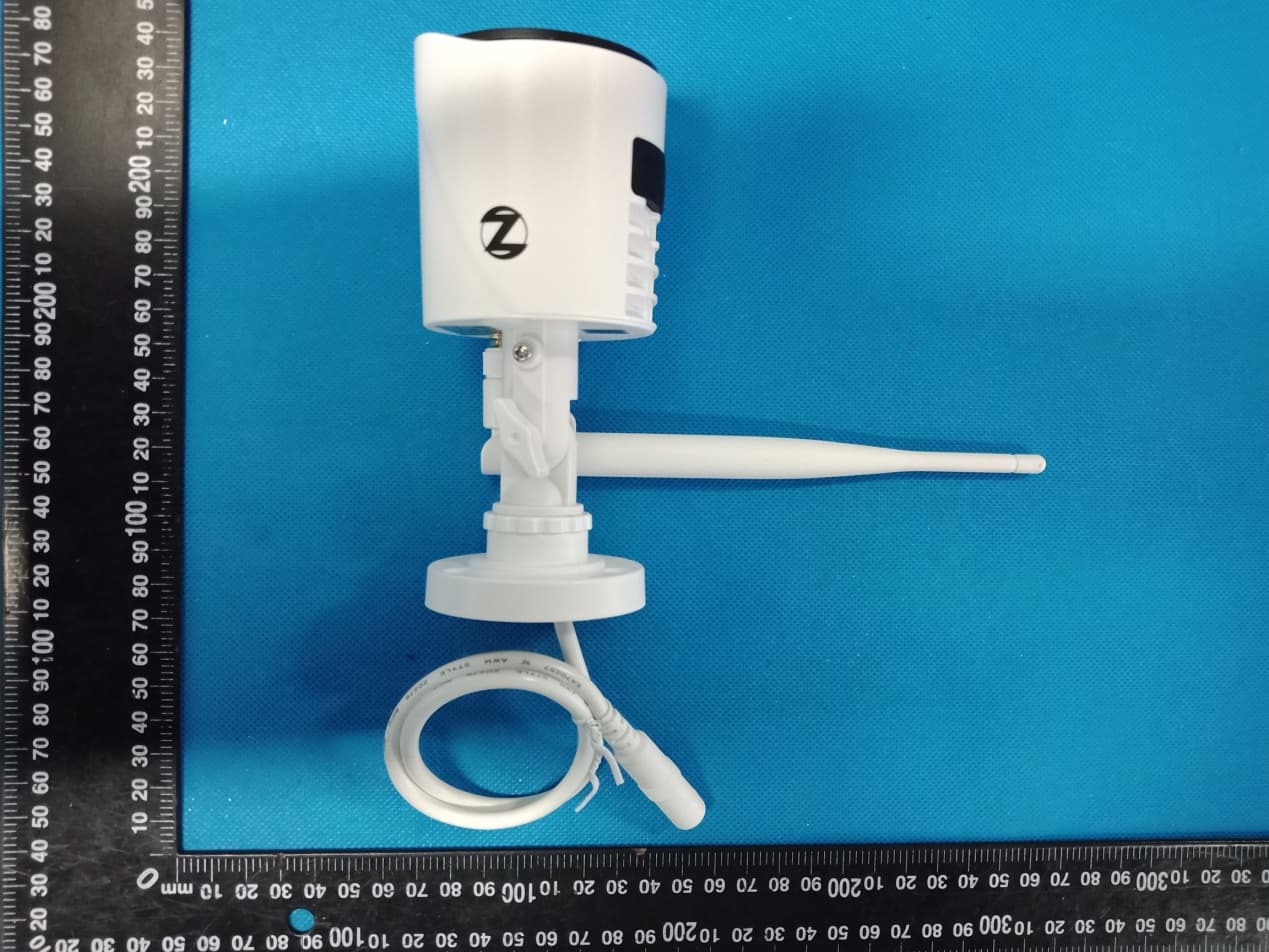
Click to zoom
Application Details
- Equipment Class
- DTS - Digital Transmission System
- Date of Grant
- Sep 22, 2020
- Application Purpose
- Original Equipment
- Date of Application
- Sep 22, 2020
- Equipment Note
- CCTV Camera
- Frequency Range
- 2412.00000000 - 2462.00000000
- Country
- China
Documents & Files
Document Text
Text extracted from the exhibit documents filed with the FCC. Open a document above to read the original.
Users Manual
QUICK SETUP GUIDE SECURITY SYSTEMS Home & Business QSG-WCM-SD2POUV2.indd 16/13/19 9:44 AM 1 What’s in the Box Quickly Flashing–Pairing Mode (default). Slowly Flashing–Camera is not connected to your WNVR or Wi-Fi network. Solid Light–Camera is connected to a network and functional. NOTE: The Status Light is found on the base of the camera’s cord. Testing with a Smart DeviceCamera Status Light Key NOTE: Night Owl recommends using your cell phone to test the location for your Wi-Fi signal strength before installing the camera. Camera (x1) Bracket Mounting Hardware Camera Antenna (x1) CCTV Camera Model # WNIP-2LTAW-BS-U Package Contents DISCLAIMER: The exact components of your product, images and quantities may vary depending on your model number. QSG-WCM-SD2POUV2.indd 26/13/19 9:44 AM 2 Add-On or Stand-Alone Night Owl gives you options! Your camera can be used as an add-on to an existing Night Owl Wireless NVR kit or as a stand-alone camera that records to a microSD card. Option 1: Pairing to your existing Wireless NVR System When used as an add-on to your existing Wireless NVR System, you can view the camera in the same Night Owl App as the systems other cameras. Please follow OPTION #1 setup instructions to add your camera. NOTE: You must complete add-on camera setup in the same room as the NVR. To use as a stand-alone camera, please follow the Option #2 setup instructions found on page 6. You will need to download and install the Night Owl Connect App to view and control the camera. A microSD card (not included) will be required to use the recording function. NOTE: Camera will be in pairing mode when first powered on. If the camera is not in pairing mode please follow pairing instructions found on page 9. Option 2: Stand-alone Camera Pairing to your Router RESET LAN1LAN2LAN3LAN4WAN QSG-WCM-SD2POUV2.indd 36/13/19 9:44 AM 3 1 Power on the add-on camera using the camera power adapter. You will hear the camera say, “Camera is in pairing mode” and the status light will flash quickly. If the camera is not in pairing mode, please refer to page 9 for pairing instructions. 2 With the NVR connected to a TV/Monitor, login, then right click on your mouse and navigate to the Main Menu using the options bar. By default, the camera will be in pairing mode when it’s first powered on. Pairing allows for the wireless transmission coming from the camera to be detected by the Wireless NVR. To pair an add-on camera to your Night Owl Wireless NVR, please use the following steps: NOTE: When pairing the camera to your NVR make sure you are in the same room as the NVR. ALWAYS test the camera locally before installing. 3 A B C A B C Option #1: Pairing to existing Wireless NVR System Go to the Camera Menu and Select the Add Camera tab on the left side of the menu. The top portion of the screen will list cameras that have been found but not yet paired. The bottom portion of the screen will show all cameras that are currently paired to the NVR. QSG-WCM-SD2POUV2.indd 46/13/19 9:44 AM 4 NOTE: Please be patient as NVR locates the add-on camera. May take up to 3 minutes. Within the Wireless Add screen, the “Number of Cameras Connected” signifies those cameras that are already paired to the Wireless NVR and will not immediately reflect this new camera. 5 4 With camera in pairing mode click on Wireless Add located on the Add Camera screen. Your NVR will now search for new cameras. NOTE: The add-on camera will not appear in the bottom screen with the other paired cameras until the NVR finds and pairs the new camera. NOTE: You cannot exceed the number of Wireless NVR channels you have. If you have a 4 channel system, the maximum number of cameras you can have paired is 4. A A B B QSG-WCM-SD2POUV2.indd 56/13/19 9:44 AM 5 7 WooHoo! Your add-on camera has now been paired to the Wireless NVR using the Wireless NVR’s built in Wi-Fi. 6 Pairing to exisiting Wireless NVR System If you have not exceeded the channel limitation, the new camera will appear in a vacant video field once paired. QSG-WCM-SD2POUV2.indd 66/13/19 9:44 AM 6 Don’t have a Wireless NVR or want to use the camera on its own? No problem! To use as a Stand-Alone camera the following technical requirements must be met. Wi-Fi 2.4 GHz Router compatible with 802.11 b/g/n. High Speed Internet Connection with a minimum of 2 Mbps upload speed. Optional microSD Card needed to record (not included). 1 2 3 To use as a Stand-alone camera: Be in same room as the router during setup, if possible. Power on camera using the camera power adapter. Camera will be in pairing mode: Status light will flash quickly. Camera will say “Camera is in pairing mode”. NOTE: If the camera is not in pairing mode please refer to page 9 for pairing instructions. Know the name and password of Wi-Fi network being used. NOTE: If you don’t know your Wi-Fi password, please contact your Internet Service Provider (ISP). Night Owl will not be able to provide this information. 1 2 3 4 A B Option #2 Stand-Alone Camera Setup QSG-WCM-SD2POUV2.indd 76/13/19 9:44 AM 7 Create an account using an email address for the username and a password between 8–20 characters. 2 To confirm your email address, enter the verification code found in the confirmation email from: [email protected]. 3 NOTE: Check your spam/junk inbox. NOTE: Night Owl Connect will lead you through a step by step process for adding your camera to the app. Using Night Owl Connect Download the app from the App Store or Google Play Store and install the application on your device. NOTE: Setup is the same for Smartphone and Tablet. Download and Install Application 1 QSG-WCM-SD2POUV2.indd 86/13/19 9:44 AM To download the CMS Software: Night Owl Connect CMS Software The Night Owl Connect CMS Software allows you to view your Night Owl Security system remotely from a PC or Mac ® . Additionally, you can playback recorded video, save video and images directly to your PC or Mac ® , configure numerous settings such as channel names, and set record preferenc…
Text truncated - open the document above for the full version.
Cover Letter(s)
Co m Ad d Gon Pr o Mo d Pr o We act We an d issu our Sig Na m Title Com mpany: Qu dress: 4F-5 ngMing, Sh oduct Name del Numbe oduct Desc authorize M on our beha declare tha d certificatio ues concern behalf shal nature: me: e: mpany: ualvision Te 5F, Bldg B, henZhen, 5 e: CCTV Ca er(s): WNIP ription: C C MiCOM Lab alf on all ma at MiCOM L n of equipm ning the app ll have the s Ying Liu Sales Doc Qualvision Qualvi Agen echnology No.37, Zh e 518107, Chi amera -2LTAW-B S CTV Camer bs Inc., 575 atters conce Labs Inc. is ment to the r proval applic same effect cumentary n Technolog sion Techn nt Auth Co., Ltd. enXing Roa ina S-U, WM-C ra Boulder C o erning the c allowed to f regulatory a cation. Any t as acts of gy Co., Ltd. nology Co., horizat ad, LiYuHe CAM-WAWN ourt, Pleasa certification forward all i agencies as and all acts our own. , Ltd. tion e Industrial NP2L anton, Califo of above na information s required a s carried ou Date: l Park, Lou ornia 94566 amed equip related to t nd to discu ut by MiCOM Sep. 21, 20 Cun, 6, USA, to pment. the approva ss any M Labs on 020 al
Cover Letter(s)
Office o Federa 7435 O Columb USA Subjec t FCC ID To Wh o Pursua are req u docume These d propriet might b It is ou r corresp docume authoriz Sincer e Signat u Name: Y Title: Sa of Engineeri l Communic Oakland Mills bia, MD 210 t; Request f D: 2AW8U-W om It May C nt to the pro uesting the ents from pu documents tary informa be harmful to Schema Block D Parts Lis Operatio r understand pondence du ents and thi zation is iss ely, ure: Ying Liu ales Docum ing Techno cations Com s Road 046 for Confiden WNIP-2LT Concern, ovisions of t Commissio ublic disclos contain det ation in ope o our comp atic Diagram iagram st onal Descri ding that all uring the ce s informatio sued. mentary Qualvisio logy mmission ntiality TAWBSU the Commis on to withho sure indefin tailed syste ration of th e any and wo m ption l measurem ertification re on will be av on Technolo ssion’s rule old the follow nitely. m and equi e equipmen ould give co ment test rep eview proce vailable for ogy Co., Ltd s Title 47 S wing attach pment desc nt. The publ ompetitors a ports, FCC ess cannot public revi e d. Sections §0. hment(s) as criptions an ic disclosu r an unfair ad ID label for be granted ew once the Date: Sep. 457 and §0 confidentia d are consi re of these d vantage in mat and as confide n e grant of eq 21, 2020 0.459, we al dered as documents the market . ntial quipment .
Cover Letter(s)
Model Difference Declaration To Whom It May Concern, We, Qualvision Technology Co., Ltd.(CCTV Camera) Trademark:Night Owl; Model Number: WNIP-2LTAW-BS-U, WM-CAM-WAWNP2L;All model’s the function, software and electric circuit are the same, only with a product model named different for commercial purpose. Test sample model: WNIP-2LTAW-BS-U. Please contact me if you have any question. Name: Ying Liu Date: Sep. 21, 2020 Title: Sales Documentary Signature of applicant:
External Photos
Annex A External Photos Report No.: HK2008072502‐E Page 1 of 4 Report No.: HK2008072502‐E Page 2 of 4 Report No.: HK2008072502‐E Page 3 of 4 Report No.: HK2008072502‐E Page 4 of 4 Antenna
ID Label/Location Info
FCC ID LABEL: Label Location
Internal Photos
Annex B Internal Photo Report No.:HK2008072502-E Page 1 of 4 Report No.:HK2008072502-E Page 2 of 4 Report No.:HK2008072502-E Page 3 of 4 Report No.:HK2008072502-E Page 4 of 4
RF Exposure Info
MPE ESTIMATION FCC ID: 2AW8U-WNIP-2LTAWBSU 1, Limit for General Population/ Uncontrolled Exposures Frequency Power density (mW/ cm 2 ) Averaging time(minutes) 300MHz----1.5GHz F/1500 30 1.5GHz---100GHz 1.0 30 Note: F= Frequency in MHz 2, Estimation Result WIFI Mode Max PK Output power(dBm) Tune Up Power(dBm) Max Tune Up power(mW) Antenna Gain(dBi) Antenna Gain (numerical) MPE ( mW/cm²) 2.4G WIFI 15 14.5±1(15.5)35.481 2 1.5849 0.01119 Note: Note: The estimation distance is 20cm Note: PK Output power= conducted power. Conducted power see the test report HK2008072502-E, antenna gain=2dBi when the minimum test separation distance is >20 cm, a distance of 20 cm is applied to determine RF Exposure test exclusion. The test exclusion threshold is 0.01119 mW/cm² which is< 1.0mW/cm², RF Exposure testing is not required. -------The End-------
Test Report
Report No.: HK2008072502-E FCC TEST REPORT Test report On Behalf of Qualvision Technology Co., Ltd. For CCTV Camera Model No.: WNIP-2LTAW-BS-U, WM-CAM-WAWNP2L FCC ID: 2AW8U-WNIP-2LTAWBSU Prepared for : Qualvision Technology Co., Ltd. 4F-5F, Bldg B, No.37, ZhenXing Road, LiYuHe Industrial Park, LouCun, GongMing, ShenZhen, 518107, China Prepared By : Shenzhen HUAK Testing Technology Co., Ltd. 1F, B2 Building, Junfeng Zhongcheng Zhizao Innovation Park, Fuhai Street, Bao'an District, Shenzhen City, China Date of Test: Sep. 02, 2020 ~Sep. 09, 2020 Date of Report: Sep. 09, 2020 Report Number: HK2008072502-E Report No.: HK2008072502-E Page 2 of 67 TEST RESULT CERTIFICATION Applicant’s name .................. : Qualvision Technology Co., Ltd. Address .................................. : 4F-5F, Bldg B, No.37, ZhenXing Road, LiYuHe Industrial Park, LouCun, GongMing, ShenZhen, 518107, China Manufacture's Name ............. : PT. ADI PRATAMA INDONESIA Address .................................. : JL. STPI CURUG KM 0.5 KP. POS BITUNG RT. 003/003 DESA KADUJAY A KEC. CURUG KABUPATEN TANGERANG 15810, Indonesia Product description Trade Mark: Night Owl Product name ............................ : CCTV Camera Model and/or type reference . : WNIP-2LTAW-BS-U, WM-CAM-WAWNP2L Standards .............................. : FCC Rules and Regulations Part 15 Subpart C Section 15.247 ANSI C63.10: 2013 This publication may be reproduced in whole or in part for non-commercial purposes as long as the Shenzhen HUAK Testing Technology Co., Ltd. is acknowledged as copyright owner and source of the material. Shenzhen HUAK Testing Technology Co., Ltd. takes no responsibility for and will not assume liability for damages resulting from the reader's interpretation of the reproduced material due to its placement and context. Date of Test ............................................ : Date (s) of performance of tests ............. : Sep. 02, 2020 ~Sep. 09, 2020 Date of Issue ........................................... : Sep. 09, 2020 Test Result ............................................... : Pass Testing Engineer : (Gary Qian) Technical Manager : (Eden Hu) Authorized Signatory : (Jason Zhou) Report No.: HK2008072502-E Page 3 of 67 TABLE OF CONTENTS 1. Test Result Summary ............................................................................... 5 1.1. TEST PROCEDURES AND RESULTS ............................................................................................... 5 1.2. TEST FACILITY .................................................................................................................................. 5 1.3. MEASUREMENT UNCERTAINTY ............................................................................................................... 6 2. EUT Description ........................................................................................ 7 2.1. GENERAL DESCRIPTION OF EUT ................................................................................................... 7 2.2. OPERATION OF EUT DURING TESTING .................................................................................................... 8 2.3. DESCRIPTION OF TEST SETUP ....................................................................................................... 9 3. General Information ................................................................................ 10 3.1. TEST ENVIRONMENT AND MODE ............................................................................................................ 10 3.2. DESCRIPTION OF SUPPORT UNITS ........................................................................................................ 11 4. Test Results and Measurement Data .................................................... 12 4.1. CONDUCTED EMISSION ........................................................................................................................ 12 4.2. MAXIMUM CONDUCTED OUTPUT POWER .............................................................................................. 15 4.3. EMISSION BANDWIDTH ......................................................................................................................... 17 4.4. POWER SPECTRAL DENSITY ................................................................................................................ 23 4.5. CONDUCTED BAND EDGE AND SPURIOUS EMISSION MEASUREMENT ..................................................... 29 4.6. RADIATED SPURIOUS EMISSION MEASUREMENT ................................................................................... 39 4.7. ANTENNA REQUIREMENT ............................................................................................................. 65 4.8. PHOTOGRAPH OF TEST ................................................................................................................. 66 4.9. PHOTOS OF THE EUT ..................................................................................................................... 67 Report No.: HK2008072502-E Page 4 of 67 ** Modifited History ** Revison Description Issued Data Remark Revsion 1.0 Initial Test Report Release Sep. 09, 2020 Jason Zhou Report No.: HK2008072502-E Page 5 of 67 1. Test Result Summary 1.1. TEST PROCEDURES AND RESULTS Requirement CFR 47 Section Result Antenna requirement §15.203/§15.247 (c) PASS AC Power Line Conducted Emission §15.207 N/A Conducted Peak Output Power §15.247 (b)(3) PASS 6dB Emission Bandwidth §15.247 (a)(2) PASS Power Spectral Density §15.247 (e) PASS Band Edge 1§5.247(d) PASS Spurious Emission §15.205/§15.209 PASS Note: 1. PASS: Test item meets the requirement. 2. Fail: Test item does not meet the requirement. 3. N/A: Test case does not apply to the test object. 4. The test result judgment is decided by the limit of test standard. 1.2. TEST FACILITY Test Firm : Shenzhen HUAK Testing Technology Co., Ltd. Address 1F, B2 Building, Junfeng Zhongcheng Zhizao Innovation Park, Fuhai Street, Bao'an Di…
Text truncated - open the document above for the full version.
Contact Information
Applicant
Ying Liu(Sales Documentary)
Technical Contact
Test Firm
Shenzhen HUAK Testing Technology Co., Ltd.Jason Zhou
[email protected]+86-755-23029901
Technical Specifications
| # | Rule Parts | Frequency Range | Power Output |
|---|---|---|---|
| 1 | 15C | 2.41 GHz - 2.46 GHz | 31.62 mW |
Other Applications from Qualvision Technology Co., Ltd.
2AW8U-QV-ODS946SX
Jun 10, 2026QV-ODS946SX
Equipment Class
DXX - Part 15 Low Power Communication Device Transmitter2AW8U-97A6FW
Jun 08, 2026QV-IDS97A6FW-WW0000D
Equipment Class
DTS - Digital Transmission System