2AWI8-CF19Smart Bracelet /watch
Shenzhen poplar Intelligent Technology Co., Ltd.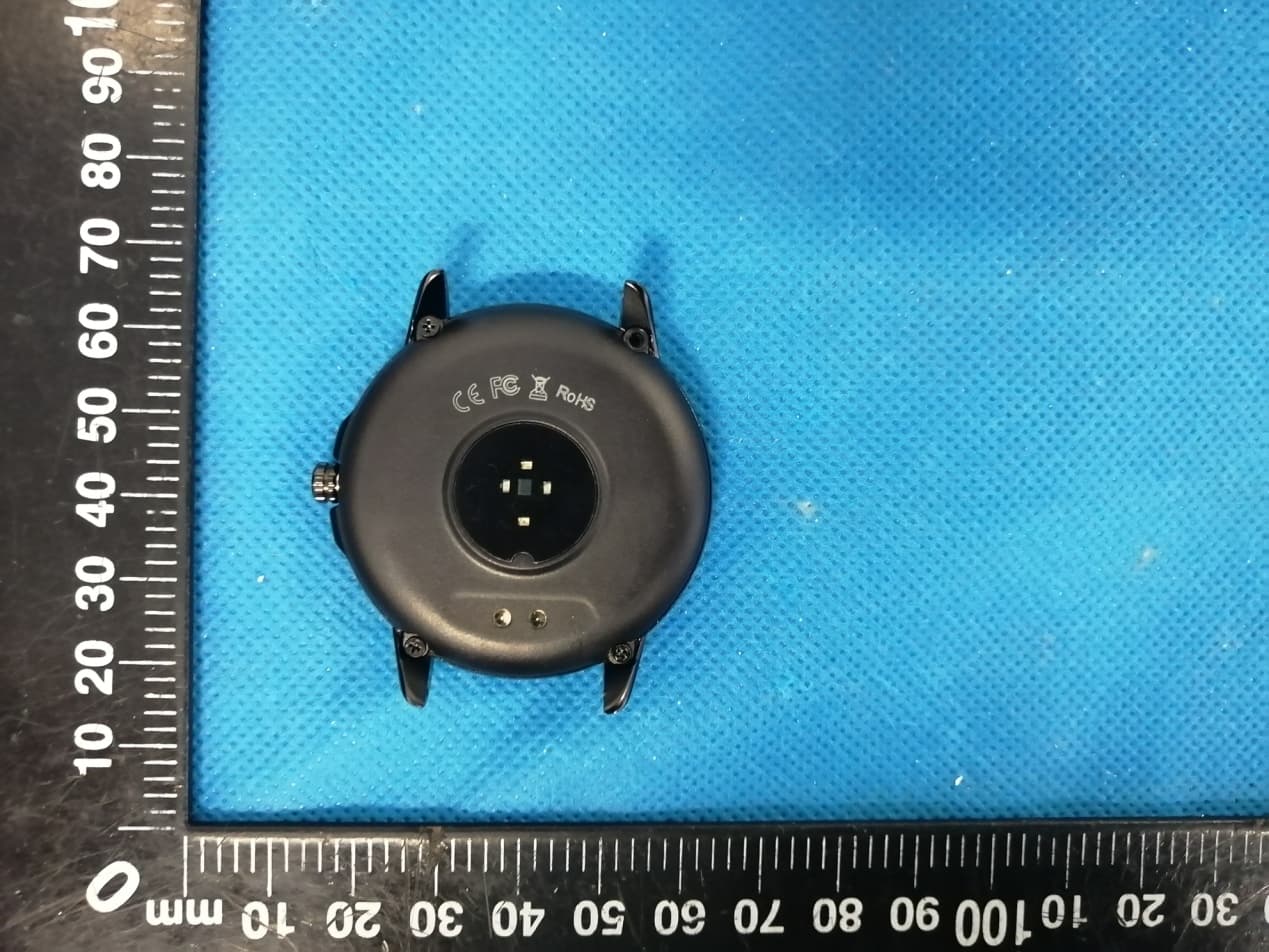
Click to zoom
Application Details
- Equipment Class
- DTS - Digital Transmission System
- Date of Grant
- May 31, 2020
- Application Purpose
- Original Equipment
- Date of Application
- May 31, 2020
- Equipment Note
- Smart Bracelet /watch
- Frequency Range
- 2402.00000000 - 2480.00000000
- Country
- China
Documents & Files
Document Text
Text extracted from the exhibit documents filed with the FCC. Open a document above to read the original.
Users Manual
Instruction Manual Equipment requirements IOS9.0 or later Android4.4 or later Bluetooth 5.0 APP ---- Two-dimensional code: Main function description Chip: Realtek8762c + full touch chip Bluetooth: 5.0 Screen size: 1.3 inches full circle Screen pixels: 240 * 240 Compatible system: Android4.4 or higher, iso9.0 or higher Standby time: 20 days for normal standby, 5-7 days in use Main function interface A. Main dial interface APP side --- docking dial application market, you can download with ease The bracelet has three main interfaces, and the interface can be switched after long pressing on the main interface for three seconds. After the APP is paired and connected for the first time, the bracelet will synchronize the time, date and day of the week. B.Main menu interface Status interface Switch to this interface to view the current steps, distance, and calorie status. The distance and calories are calculated and displayed based on the current number of walking steps, the height and weight set by the APP personally. 2. Heart rate interface, blood pressure interface, blood oxygen interface Switch to the heart rate interface / blood pressure interface / blood oxygen interface and enter the detection automatically; you can also connect to the mobile app to test on the heart rate interface / blood pressure interface. If the bracelet is not worn properly or the test fails, the failure interface will be displayed. In the heart rate detection / blood pressure detection / blood oxygen detection mode, the battery life will be reduced. The heart rate model is: VC31, which is a real-time dynamic heart rate and adapts to various skin tones. Heart rate, blood pressure, blood oxygen monitoring precautions: • During the test, the heart rate LED on the back of the bracelet will light up; • The sensor should be close to the skin to avoid external light from affecting the accuracy of the test; • Keep the test area clean. Sweat or stains can affect test results. 3. Sports interface Switch to this interface, click the screen to enter the specific sports interface, including running, riding, skipping, badminton, table tennis, tennis, climbing, hiking, basketball, football, baseball, softball, volleyball, cricket, rugby, American football, hockey, dancing, cycling, yoga, sit-ups, treadmills, gymnastics, rowing, closing, jumping 23 sports, sliding screen can switch specific sports interface. Press the side key to return to exit the specific exercise interface. 4. Information interface In the message interface, you can view the message on the single screen. Slide the screen to turn the page. After viewing the information, press the side button to return or exit. 5. Search interface When the watch and phone are connected, long press search to find the phone. 6. Setting interface Tap the screen function interface to enter the lower menu interface for more function operations. Brightness adjustment: Tap the screen to select different brightness. There are four levels of brightness. Version information: Click the interface on the screen to view the firmware version number and Bluetooth address of the bracelet. Restore settings: Press and hold the screen for three seconds on this interface, all the bracelet data will be cleared, and the APP's data will be cleared on the day (the rest of the historical data will be retained). Shutdown: On this interface, press and hold the bracelet for three seconds on the screen to shut down, and the bracelet will vibrate at the same time. Startup: key status, long press the side button to start up. 7. Music Control When the watch and mobile phone are connected, open the music control, press the play button to play the music, you can pause, the previous song, the next song. Charging method For the first time, please remove the bracelet and charge the device with the corresponding charger. When charging, the bracelet will automatically turn on. (The charging method is as follows: Align the two contacts of the charger with the charging position on the back of the bracelet. The magnetic charging base will automatically close, and the other end is connected to the standard USB interface to charge. Install the bracelet app Scan the following QR code or enter the major application markets to download and install "GloryFit" Device requirements: iOS 9. 0 and above; Android 4.4 and above, support Bluetooth 5.0. Device connection The first time you use the watch, you need to connect to the APP for calibration. If the APP is successfully logged in, you need to set personal information. After the connection is successful, the bracelet will automatically synchronize the time, otherwise the step counting and sleep data will be inaccurate. After the mobile APP is successfully set, click the device icon ↓ Add Device (iOS) / Add Device (Android) ↓ Click the search icon in the upper right ↓ Click device connection Bluetooth connection: After the pairing is successful, the APP automatically saves the Bluetooth address of the bracelet. When the APP is opened or running in the background, it will automatically search and connect to the bracelet. Data synchronization: Manually pull down the synchronization data on the APP homepage; the bracelet can store offline data for 7 days. The more data, the longer the synchronization time, the longest is about 2 minutes. After the synchronization is completed, there will be a "sync completed" prompt. Reminder function The reminder function needs to turn on the reminder switch on the "Device" function page on the APP side, and keep the Bluetooth connection status between the mobile phone and the bracelet, and shake the reminder when a message comes. Call reminder: When a call comes in, the bracelet will vibrate and the name or number of the call will be displayed. If the app turns on the “call rejection” function, long press the screen to reject the call. Reminder categories: call reminder, message reminder, sedentary reminder, smart alarm reminder, do not disturb mode…
Text truncated - open the document above for the full version.
Cover Letter(s)
Shenzhen poplar Intelligent Technology Co., Ltd. Agent Authorization Company: Shenzhen poplar Intelligent Technology Co., Ltd. Address: Room 613 Building No.113 Guanlan Fuben Road Longhua District Shenzhen City China Product Name: Smart Bracelet /watch Model Number(s ): CF19, S02, CF68, S01, CF20, CF22, CF80, CF18, CF60 Product Description: Smart Bracelet /watch We authorize MiCOM Labs Inc., 575 Boulder Court, Pleasanton, California 94566, USA, to act on our behalf on all matters concerning the certification of above named equipment. We declare that MiCOM Labs Inc. is allowed to forward all information related to the approval and certification of equipment to the regulatory agencies as required and to discuss any issues concerning the approval application. Any and all acts carried out by MiCOM Labs on our behalf shall have the same effect as acts of our own. Signature: Date: May. 29, 2020 Name: Jibo Li Title: Product owner Company: Shenzhen poplar Intelligent Technology Co., Ltd.
Cover Letter(s)
Shenzhen poplar Intelligent Technology Co., Ltd. Office of Engineering Technology Federal Communications Commission 7435 Oakland Mills Road Columbia, MD 21046 USA Date: May. 29, 2020 Subject; Request for Confidentiality FCC ID: 2AWI8-CF19 To Whom It May Concern, Pursuant to the provisions of the Commission’s rules Title 47 Sections §0.457 and §0.459, we are requesting the Commission to withhold the following attachment(s) as confidential documents from public disclosure indefinitely. These documents contain detailed system and equipment descriptions and are considered as proprietary information in operation of the equipment. The public disclosure of these documents might be harmful to our company and would give competitors an unfair advantage in the market. Schematic Diagram Block Diagram Parts List Operational Description Tune-up Procedure It is our understanding that all measurement test reports, FCC ID label format and correspondence during the certification review process cannot be granted as confidential documents and this information will be available for public review once the grant of equipment authorization is issued. Sincerely, Signature: Name: Jibo Li Title: Product owner
Cover Letter(s)
Model Difference Declaration To Whom It May Concern, We, Shenzhen poplar Intelligent Technology Co., Ltd.(Smart Bracelet /watch) Trademark:N/A; Model Number: CF19, S02, CF68, S01, CF20, CF22, CF80, CF18, CF60; All model’s the function, software and electric circuit are the same, only with a product color and model named different for commercial purpose. Test sample model: CF19 . Please contact me if you have any question. Name: Jibo Li Date: May. 29, 2020 Title: Product owner Signature of applicant:
External Photos
Annex A External Photos Report No.: HK2005211167‐E Page 1 of 4 Report No.: HK2005211167‐E Page 2 of 4 Report No.: HK2005211167‐E Page 3 of 4 Report No.: HK2005211167‐E Page 4 of 4
ID Label/Location Info
FCC ID LABEL: Ca. 5mm x 10mm Include in manual: This device complies with part 15 of the FCC Rules. Operation is subject to the following two conditions: (1) This device may not cause harmful interference, and (2) this device must accept any interference received, including interference that may cause undesired operation. Label Location FCC ID: 2AWI8-CF19
Internal Photos
Annex B Internal Photos Report No.: HK2005211167‐E Page 1 of 3 Report No.: HK2005211167‐E Page 2 of 3 BT Antenna Report No.: HK2005211167‐E Page 3 of 3
Parts List/Tune Up Info
FCC RF Exposure EUT Description: Smart Bracelet /watch Model No.: CF19 FCC ID: 2AWI8-CF19 1. Limits According to KDB 447498 D01 General RF Exposure Guidance v06 The 1‐g and 10‐g SAR test exclusion thresholds for 100 MHz to 6 GHz at test separation distances ≤50 mm are determined by: [(max power of channel, including tune‐up tolerance, mW)/(min. test separation distance, mm)]·[√ f(GHz)]≤3.0 for 1‐g SAR and ≤ 7.5 for 10‐g extremity SAR, Where: Result=P/D*√F F= the RF channel transmit frequency in GHz P=Maximum turn‐up power in mw D=Min. test separation distance in mm 2. Test Result of RF Exposure Evaluation BT Frequency (MHz) Output power (dBm) Tune Up Power (dBm) Max Tune Up power dBm/mW Min test separati on distance mm Result Limit (mW/cm 2 ) S A R Te s t Exclusion 2480 -2.112 -2±1 -1 /0.79 5 0.249 3.0 Pass Note: PK Output power= conducted power. Conducted power see the test report HK2005211167-E, antenna gain=0dBi Per KDB 447498 D01, when the minimum test separation distance is < 5 mm, a distance of 5 mm is applied to determine RF Exposure test exclusion. The test exclusion threshold is 0.249 which is<= 3, RF Exposure testing is not required. Note: Exclusion Thresholds Results=[(max. power of channel, including tune-up tolerance, mW)/(min. test separation distance, mm)] ·[√f (GHz)] f(GHz) is the RF channel transmit frequency in GHz Distance=5mm
Test Report
Page 1 of 44 Report No.: HK2005211167-E TEST REPORT FCC PART 15 SUBPART C 15.247 Test report On Behalf of Shenzhen poplar Intelligent Technology Co., Ltd. For Smart Bracelet /watch Model No.: CF19, S02, CF68, S01, CF20, CF22, CF80, CF18, CF60 FCC ID: 2AWI8-CF19 Prepared for : Shenzhen poplar Intelligent Technology Co., Ltd. Room 613 Building No.113 Guanlan Fuben Road Longhua District Shenzhen City China Prepared By : Shenzhen HUAK Testing Technology Co., Ltd. 1F, B2 Building, Junfeng Zhongcheng Zhizao Innovation Park, Fuhai Street, Bao'an District, Shenzhen City, China Date of Test: May. 21, 2020 ~ May. 28, 2020 Date of Report: May. 28, 2020 Report Number: HK2005211167-E Page 2 of 44 Report No.: HK2005211167-E TEST RESULT CERTIFICATION Applicant’s name ................... : Shenzhen poplar Intelligent Technology Co., Ltd. Address .................................... : Room 613 Building No.113 Guanlan Fuben Road Longhua District Shenzhen City China Manufacture's Name .............. : Shenzhen poplar Intelligent Technology Co., Ltd. Address .................................... : Room 613 Building No.113 Guanlan Fuben Road Longhua District Shenzhen City China Product description Trade Mark: N/A Product name ............................. : Smart Bracelet /watch Model and/or type reference .. : CF19, S02, CF68, S01, CF20, CF22, CF80, CF18, CF60 Standards ................................ : 47 CFR FCC Part 15 Subpart C 15.247 This publication may be reproduced in whole or in part for non-commercial purposes as long as the Shenzhen HUAK Testing Technology Co., Ltd. is acknowledged as copyright owner and source of the material. Shenzhen HUAK Testing Technology Co., Ltd. takes no responsibility for and will not assume liability for damages resulting from the reader's interpretation of the reproduced material due to its placement and context. Date of Test .............................................. : Date (s) of performance of tests ................ : May. 21, 2020 ~ May. 28, 2020 Date of Issue ............................................. : May. 28, 2020 Test Result ................................................. : Pass Prepared by: Project Engineer Reviewed by: Project Supervisor Approved by: Technical Director Page 3 of 44 Report No.: HK2005211167-E Contents Page CONTENTS .............................................................................................................................................................. 3 1 TEST SUMMARY ............................................................................................................................................ 6 1.1 TEST DESCRIPTION ...................................................................................................................................... 6 1.2 MEASUREMENT UNCERTAINTY ...................................................................................................................... 7 2 TEST FACILITY ............................................................................................................................................... 8 3 GENERAL INFORMATION ............................................................................................................................. 8 3.1 GENERAL DESCRIPTION OF EUT .................................................................................................................. 8 3.2 DESCRIPTION OF TEST CONDITIONS ............................................................................................................ 10 3.3 DESCRIPTION OF TEST SETUP ........................................................................................................... 10 4 EQUIPMENTS LIST FOR ALL TEST ITEMS ............................................................................................... 11 5 TEST RESULT .............................................................................................................................................. 12 5.1 ANTENNA REQUIREMENT ............................................................................................................................ 12 5.1.1 Standard requirement ...................................................................................................................... 12 5.1.2 EUT Antenna ................................................................................................................................... 12 5.2 CONDUCTION EMISSIONS MEASUREMENT ................................................................................................... 13 5.2.1 Applied procedures / Limit ............................................................................................................... 13 5.2.2 Test procedure ................................................................................................................................. 13 5.2.3 Test setup ........................................................................................................................................ 14 5.2.4 Test results ...................................................................................................................................... 15 5.3 RADIATED EMISSIONS MEASUREMENT ........................................................................................................ 17 5.3.1 Applied procedures / Limit ............................................................................................................... 17 5.3.2 Test setup ........................................................................................................................................ 17 5.3.3 Test Result ....................................................................................................................................... 19 5.4 MAXIMUM OUTPUT POWER MEASUREMENT ................................................................................................. 26 5.4.1 Limit .......................................................…
Text truncated - open the document above for the full version.
Test Setup Photos
Test Model:CF19 Radiated Emission Conducted Emission
Contact Information
Applicant
Jibo Li
Technical Contact
Test Firm
Shenzhen HUAK Testing Technology Co., Ltd.Jason Zhou
[email protected]+86-755-23029901
Technical Specifications
| # | Rule Parts | Frequency Range | Power Output |
|---|---|---|---|
| 1 | 15C | 2.40 GHz - 2.48 GHz | 610.00 µW |
Other Applications from Shenzhen poplar Intelligent Technology Co., Ltd.
2AWI8-L18
Jan 21, 2026SMART BRACELET
Equipment Class
DTS - Digital Transmission System