FCCID.CO- FCC ID Database
HomeCompaniesEquipment ClassesSearch

© 2026 FCC ID Database. All rights reserved.

AboutContactData sourced from FCC public records
  1. Home/
  2. Beijing Puppy Robotics Co., Ltd./
  3. 2AWMI-PP23TQA

2AWMI-PP23TQAArtificial Intelligence Terminal Computer

Beijing Puppy Robotics Co., Ltd.
Artificial Intelligence Terminal Computer - FCC ID 2AWMI-PP23TQA - Beijing Puppy Robotics Co., Ltd.
Click to zoom

Application Details

Equipment Class
DSS - Part 15 Spread Spectrum Transmitter
Date of Grant
Sep 14, 2020
Application Purpose
Original Equipment
Date of Application
Sep 14, 2020
Equipment Note
Artificial Intelligence Terminal Computer
Frequency Range
2402.00000000 - 2480.00000000
Company
Beijing Puppy Robotics Co., Ltd.
Country
China

Documents & Files

Select a file to view
Users Manual

↗

Cover Letter(s)

↗
↗

External Photos

↗

ID Label/Location Info

↗

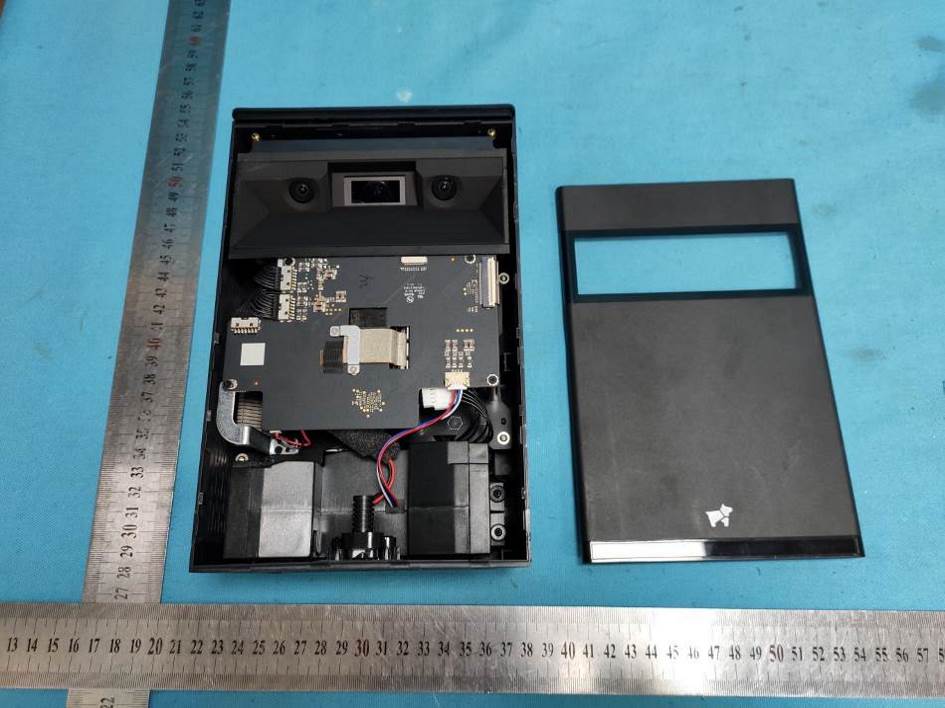
Internal Photos

↗

RF Exposure Info

↗

Test Report

↗

Test Setup Photos

↗

Document Text

Text extracted from the exhibit documents filed with the FCC. Open a document above to read the original.

Users Manual

Welcome Projector Overview Getting Started • Power-On:When the device is off, press and hold the power button for 3 seconds to turn it on. • Power-Off :When the device is on, press and hold the power button for 3 seconds and select Power Off in the shutdown menu that appears. • Restart:When the device is on, press and hold the power button for 3 seconds and select Reboot in the shutdown menu that appears. • Sleep and Wake Up:When the device is on, press the power button to put the device to sleep. The device will also enter sleep mode if you do not perform any operations for a period of time. After the device goes to sleep, press the power button on the projector or the remote control to wake it up. Basic Knowledge Vertical *Please do not place any objects in the projection area or 5cm around and avoid strong light sources that shine on the projection area. Vertical Touch Control Projection:Stand the device upright on a flat surface. After turning it on, you can perform touch control operations in the projection area. The touch control interface supports 10-point touch control and can distinguish between taps, long-presses, two -finger zoom, and other common touch control gestures. Horizontal Cinema Projecti *Do not place objects in the projection path or projection area and avoid strong external light sources that shine on it. When the device is in the horizontal mode, it is better to operate it using the remote control. Horizontal Cinema Projection:Lay the device horizontally on a flat surface. After turning it on, you can project a large cinema-style screen on a wall or projection screen (place the device as shown in the figure). To enlarge or reduce the projection area, adjust the distance between the wall or projection screen and the device. The farther away, the larger the projection area will become. Auto Focus * The image above is the device’s auto-focusing page. After the device turns on, it will autofocus for about 4 seconds. To repeat the autofocus procedure, tilt the device forward about 30°and stand it up straight again. Pressing the “Focus Button”on the remote control will also cause the device to autofocus. Restore Factory Settings If the system encounters a problem, or you need to delete the data and settings on the device, you can use the "Restore Factory Settings" function. Go to "Settings"->"About the Device" and tap "Restore Factory Settings" to restore the factory settings. Remote Control Remote Control Overview *Please download the Hachi Remote Control App in the following app stores. Remote Control Pairing • Move the remote control near the device and long-press the back button and the menu button until the red and blue indicators flash. • Open the device "Settings"-"Connect"-"Bluetooth" page, find "Hachi remote control" in the device list, click connect to complete the pairing. Remote Control Charging The remote uses a standard Micro-USB port for charging. The port is located on the bottom of the remote. To charge the remote, use a USB data cable to connect it to a USB socket or power outlet with a USB power brick. With a full charge, the remote control’s battery life is about one month of normal use. Remote control indicator System Homepage 1、App Store: Built-in application store 2、App list portal: Tap to go to the "App List" 3、System settings portal: Tap to go to "System Settings" 4、Back button: Tap to go to the previous page 5、Home button: Tap to go to the homepage 6、Overview button: Tap to go to the “Overview" 7、Hide button: Tap to hide the current task Custom Application Press and hold the app card’s app for 3 seconds to remove or replace the app. Theme and Wallpaper Swipe down from the top to open the “Notification Center”, and click the theme button to choose a different theme or wallpaper. Cast screen HDMI Input Projection Insert one end of an HDMI cable in the HDMI port on the back of the projector and connect the other end to an input device. This will cause the projector to enter HDMI mode automatically. If the screen did not cast automatically with the HDMI cable inserted, please go to the "App List" and select the "Hachi HDMI" App in the "App List" manually. Wireless Screen Casting IOS :Find the casting image in the iPhone / iPad’s control center, click and select the device name (Hachi Infinite-XXXX) and you can connect. Android:Please ensure that the Android phone and Hachi Infinite are on the same network Find the cast button in the drop-down shortcut bar, click and select the device name (Hachi Infinite-XXXX) and you can connect. If you still cannot connect, please download the app "Hachi Cast" in Google Play. Then select the device name (Hachi Infinite-XXXX) in the App, and the screen can be casted after the connection. *For related support, please check "Settings" - "Connect" - “Screencast”. *The device names displayed may be different based on different brands of Android phones. Product Specifications Common Troubleshooting Projector Crashes If the device crashes or does not work normally, press and hold the power button for 15 seconds to force restart the device. Touch Control Failure 1.Make sure the projector is placed on a clean and flat surface. 2.Do not place any objects in the projection area. 3.The projection area must not be near strong light sources. 4.Make sure that the projection window and the bottom of the projector (indicated in red in the figure below) are clean and unobstructed. 5.The above conditions affect the accuracy of touch control. Remote Control Pairing Failed Cannot find the remote control in the Bluetooth list: Make sure the remote control has been sufficiently charged. The remote is in the "Paired Devices" list, but it is still in the "Not Connected" status: Tap the "Puppy Remote" option in the list, select "Disconnect" in the dialog box that appears, and then follow the pairing steps to pair the remote again. Precautions Do not point the projector at eyes, as it may cause injury. Do not obstruct the air inlet/outlet.…

Text truncated - open the document above for the full version.

External Photos

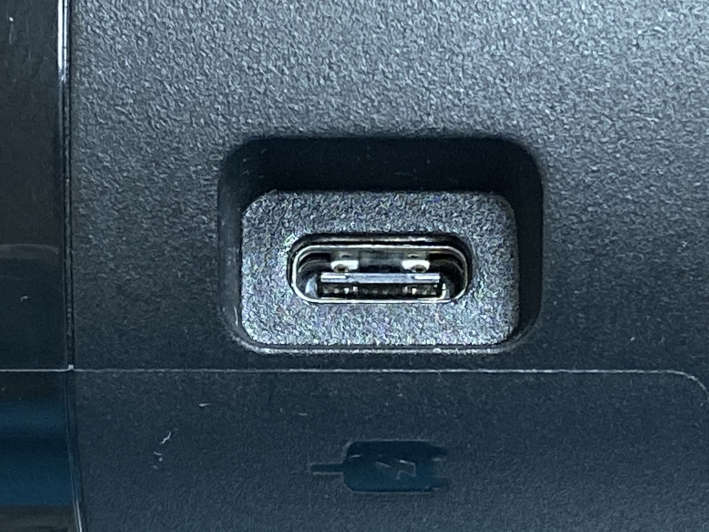
Report No. : EED32M00211501Page 89 of 111 PHOTOGRAPHS OF EUT Constructional Details Test mode No:PP23TQA View of Product-1 View of Product-2 Report No. : EED32M00211501Page 90 of 111 View of Product-3 View of Product-4 Report No. : EED32M00211501Page 91 of 111 View of Product-5 View of Product-6 Report No. : EED32M00211501Page 92 of 111 View of Product-7 View of Product-8 Report No. : EED32M00211501Page 93 of 111 View of Product-9 View of Product-10

ID Label/Location Info

Labe Loc a el: ation:

Internal Photos

Report No. : EED32M00211501Page 94 of 111 View of Product-11 View of Product-12 Report No. : EED32M00211501Page 95 of 111 View of Product-13 View of Product-14 Report No. : EED32M00211501Page 96 of 111 View of Product-15 View of Product-16 Report No. : EED32M00211501Page 97 of 111 View of Product-17 View of Product-18 Report No. : EED32M00211501Page 98 of 111 View of Product-19 View of Product-20 Report No. : EED32M00211501Page 99 of 111 View of Product-21 View of Product-22 Report No. : EED32M00211501Page 100 of 111 View of Product-23 View of Product-24 Report No. : EED32M00211501Page 101 of 111 View of Product-25 View of Product-26 Report No. : EED32M00211501Page 102 of 111 View of Product-27 View of Product-28 Report No. : EED32M00211501Page 103 of 111 View of Product-29 View of Product-30 Report No. : EED32M00211501Page 104 of 111 View of Product-31 View of Product-32 Report No. : EED32M00211501Page 105 of 111 View of Product-33 View of Product-34 Report No. : EED32M00211501Page 106 of 111 View of Product-35 View of Product-36 Report No. : EED32M00211501Page 107 of 111 View of Product-37 View of Product-38 Report No. : EED32M00211501Page 108 of 111 View of Product-39 View of Product-40 Report No. : EED32M00211501Page 109 of 111 View of Product-41 View of Product-42 Report No. : EED32M00211501Page 110 of 111 View of Product-43 View of Product-44 Report No. : EED32M00211501Page 111 of 111 View of Product-45 The test report is effective only with both signature and specialized stamp, The result(s) shown in this report refer only to the sample(s) tested. Without written approval of CTI, this report can’t be reproduced except in full. *** End of Report ***

RF Exposure Info

Report No. : EED32M00211505Page 1 of 8 1 COVER PAGE RF Exposure Evaluation Report Product:Artificial Intelligence Terminal Computer Trade mark:N/A Model/Type reference :PP23TQA Serial Number:N/A Report Number:EED32M00211505 FCC ID:2AWMI-PP23TQA Date of Issue:Sep. 14, 2020 Test Standards: 47 CFR Part 1.1307 47 CFR Part 2.1091 KDB447498D01v06 Test result:PASS Prepared for: Beijing Puppy Robotics Co., Ltd. Room 103, building 1, Yard 33, Yanqi Road, Huairou District, Beijing, China Prepared by : Centre Testing International Group Co., Ltd. Hongwei Industrial Zone, Bao’an 70 District, Shenzhen, Guangdong, China TEL: +86-755-3368 3668 FAX: +86-755-3368 3385 Compiled by:Reviewed by: Sunlight SunJok Yang Approved by:Date:Sep. 14, 2020 Sam Chuang CheckNo.:3915617794 Report No. : EE32M00211505Page 2 of 8 2Version Version No.DateDescription 00Sep. 14, 2020Original Report No. : EE32M00211505Page 3 of 8 3 Contents Page 1 COVER PAGE.................................................................................................................................................................... 1 2 VERSION.............................................................................................................................................................................2 3CONTENTS.........................................................................................................................................................................3 4 GENERAL INFORMATION..............................................................................................................................................4 4.1 C LIENT I NFORMATION ................................................................................................................................................... 4 4.2 G ENERAL D ESCRIPTION OF EUT ................................................................................................................................ 4 4.3 T EST L OCATION ............................................................................................................................................................ 5 4.4 D EVIATION FROM S TANDARDS ..................................................................................................................................... 5 4.5 A BNORMALITIES FROM S TANDARD C ONDITIONS ......................................................................................................... 5 4.6 O THER I NFORMATION R EQUESTED BY THE C USTOMER ............................................................................................. 5 5 RF EXPOSURE EVALUATION....................................................................................................................................... 6 5.1 RF E XPOSURE C OMPLIANCE R EQUIREMENT .............................................................................................................. 6 5.2 M AXIMUM P ERMISSIBLE E XPOSURE ............................................................................................................................ 7 PHOTOGRAPHS OF EUT CONSTRUCTIONAL DETAILS.......................................................................................... 8 Report No. : EE32M00211505Page 4 of 8 4 General Information 4.1 Client Information Applicant: Beijing Puppy Robotics Co., Ltd. Address of Applicant: Room 103, building 1, Yard 33, Yanqi Road, Huairou District, Beijing, China Manufacturer: Beijing Puppy Robotics Co., Ltd. Address ofManufacturer: Room 103, building 1, Yard 33, Yanqi Road, Huairou District, Beijing, China Factory: Zhangzhou Wanlida Technology Co., Ltd. Address of Factory: Wanlida Industrial Zone, Jingcheng Town, Nanjing, Zhangzhou, Fujian, China 4.2 General Description of EUT Product Name:Artificial Intelligence Terminal Computer Model No.(EUT): PP23TQA Trade Mark: N/A EUT Supports Radios application BT: 2402MHz to 2480MHz 2.4GHz Wi-Fi: 2412MHz ~2462 MHz 5GHz Wi-Fi: 5.15-5.25GHz; 5.25-5.35GHz; 5.47-5.725GHz 5.725-5.850GHz Test Power Grade:Default Test Software of EUT: QRCT Antenna Type: PIFA antenna Antenna Gain 4.1dBi Power Supply: AC Adapter MODEL:AP065G-19300 INPUT:100-240V~50/60Hz 1.5A Max OUTPUT:19V  3A Sample Received Date: Jul. 16, 2020 Sample tested Date:Jul. 16, 2020 to Sep. 04, 2020 The tested sample(s) and the sample information are provided by the client. Report No. : EE32M00211505Page 5 of 8 4.3 Test Location All tests were performed at: Centre Testing International Group Co., Ltd Building C, Hongwei Industrial Park Block 70, Bao'an District, Shenzhen, China Telephone: +86 (0) 755 33683668 Fax:+86 (0) 755 33683385 No tests were sub-contracted. FCC Designation No.: CN1164 4.4 Deviation from Standards None. 4.5 Abnormalities from Standard Conditions None. 4.6 Other Information Requested by the Customer None. Report No. : EE32M00211505Page 6 of 8 5 RF Exposure Evaluation 5.1 RF Exposure Compliance Requirement Given d GP E   30 & 377 2 E S Where E = Field strength in Volts / meter P = Power in Watts G = Numeric antenna gain d = Distance in meters S = Power density in milliwatts / square centimeter Combining equations and re-arranging the terms to express the distance as a function of the remaining variables yields: 2 377 30 d GP S   Changing to units of mW and cm, using: P (mW) = P (W) / 1000 and d (cm) = d(m) / 100 Yields   22 0796.0 100/377 1000/30 d GP d GP S      Equation 1 Where d = Distance in cm P=PowerinmW G = Numeric antenna gain S = Power density in mW / cm 2 Report No. : EE32M00211505Page 7 of 8 5.2 Maximum Permissible Exposure Substituting the MPE safe distance using d = 20 cm into Equation 1: GPS000199.0 Where P = Power in mW G = Numeric antenna gain S = Power density in mW / cm 2 The worst case are recorded: Mode Antenna Gain(dBi) Antenna numeric gain Power (dBm) Power (mW) Distance (cm) S (mW/cm2) S Limit (mW/cm2) BT Classic4.1002.5706.4324.39720.0000.0021.000 BLE4.1002.5706.3904.35520.0000.0021.000 2.4G WIFI4.…

Text truncated - open the document above for the full version.

Test Report

Report No. : EED32M00211501Page 1 of 111 1 COVER PAGE TEST REPORT Product:Artificial Intelligence Terminal Computer Trade mark:N/A Model/Type reference :PP23TQA Serial Number:N/A Report Number:EED32M00211501 FCC ID : 2AWMI-PP23TQA Date of Issue::Sep. 14, 2020 Test Standards : 47 CFR Part 15 Subpart C Test result : PASS Prepared for: Beijing Puppy Robotics Co., Ltd. Room 103, building 1, Yard 33, Yanqi Road, Huairou District, Beijing, China Prepared by : Centre Testing International Group Co., Ltd. Hongwei Industrial Zone, Bao’an 70 District, Shenzhen, Guangdong, China TEL: +86-755-3368 3668 FAX: +86-755-3368 3385 Compiled by:Reviewed by: Sunlight SunJok Yang Approved by:Date:Sep. 14, 2020 Sam Chuang CheckNo.:3915617794 Report No. : EED32M00211501Page 2 of 111 2Version Version No.Date Description 00Sep. 14, 2020Original Report No. : EED32M00211501Page 3 of 111 3TestSummary Test ItemTest RequirementTest methodResult Antenna Requirement 47 CFR Part 15, Subpart C Section 15.203/15.247 (c) ANSI C63.10-2013PASS AC Power Line Conducted Emission 47 CFR Part 15, Subpart C Section 15.207 ANSI C63.10-2013PASS Conducted Peak Output Power 47 CFR Part 15, Subpart C Section 15.247 (b)(1) ANSI C63.10-2013PASS 20dB Occupied Bandwidth 47 CFR Part 15, Subpart C Section 15.247 (a)(1) ANSI C63.10-2013PASS Carrier Frequencies Separation 47 CFR Part 15, Subpart C Section 15.247 (a)(1) ANSI C63.10-2013PASS Hopping Channel Number 47 CFR Part 15, Subpart C Section 15.247 (b) ANSI C63.10-2013PASS Dwell Time 47 CFR Part 15, Subpart C Section 15.247 (a)(1) ANSI C63.10-2013PASS Pseudorandom Frequency Hopping Sequence 47 CFR Part 15, Subpart C Section 15.247(b)(4)&TCB Exclusion List (7 July 2002) ANSI C63.10-2013PASS RF Conducted Spurious Emissions 47 CFR Part 15, Subpart C Section 15.247(d) ANSI C63.10-2013PASS Radiated Spurious emissions 47 CFR Part 15, Subpart C Section 15.205/15.209 ANSI C63.10-2013PASS Restricted bands around fundamental frequency (Radiated Emission) 47 CFR Part 15 Subpart C Section 15.205/15.209 ANSI C63.10-2013PASS Remark: Test according to ANSI C63.4-2014 & ANSI C63.10-2013. The tested samples and the sample information are provided by the client. Report No. : EED32M00211501Page 4 of 111 4 Content 1 COVER PAGE..................................................................................................................................................................... 1 2 VERSION..............................................................................................................................................................................2 3 TEST SUMMARY................................................................................................................................................................3 4CONTENT.............................................................................................................................................................................4 5 TEST REQUIREMENT.......................................................................................................................................................5 5.1 T EST SETUP ................................................................................................................................................................... 5 5.1.1 For Conducted test setup ................................................................................................................................... 5 5.1.2 For Radiated Emissions test setup ................................................................................................................... 5 5.1.3 For Conducted Emissions test setup ............................................................................................................... 6 5.2 T EST E NVIRONMENT ...................................................................................................................................................... 6 5.3 T EST C ONDITION ........................................................................................................................................................... 6 6 GENERAL INFORMATION...............................................................................................................................................7 6.1 C LIENT I NFORMATION ....................................................................................................................................................7 6.2 G ENERAL D ESCRIPTION OF EUT..................................................................................................................................7 6.3 P RODUCT S PECIFICATION SUBJECTIVE TO THIS STANDARD ........................................................................................7 6.4 D ESCRIPTION OF S UPPORT U NITS ...............................................................................................................................9 6.5 T EST L OCATION .............................................................................................................................................................9 6.6 D EVIATION FROM S TANDARDS ......................................................................................................................................9 6.7 A BNORMALITIES FROM S TANDARD C ONDITIONS ..........................................................................................................9 6.8 O THER I NFORMATION R EQUESTED BY THE C USTOMER ..............................................................................................9 6.9 M EASUREMENT U NCERTAINTY (95% CONFIDENCE LEVELS , K =2)...............................................................................9 7EQUIPMENTLIST............................................................................................................................................................ 10 8 RADIO TECHNICAL REQUIREMENTS SPECIFICATION....................................…

Text truncated - open the document above for the full version.

Test Setup Photos

Report No. : EED32M00211501Page 86 of 111 PHOTOGRAPHS OF TEST SETUP Test model No.:PP23TQA Radiated spurious emission Test Setup-1 (Below 30MHz) Radiated spurious emission Test Setup-2 (Below 1GHz) Report No. : EED32M00211501Page 87 of 111 Radiated spurious emission Test Setup-3( Above 1GHz) Radiated spurious emission Test Setup-4( Above 1GHz) There are absorbing materials under the ground. Report No. : EED32M00211501Page 88 of 111 Conducted Emissions Test Setup

Contact Information

Applicant

Xina Wang(Project Manager)
[email protected]010-59037583Fax: N/A

Test Firm

Centre Testing International Group Co., LtdVicky Zhou
[email protected]N/A

Technical Specifications

#Rule PartsFrequency RangePower Output
115C2.40 GHz - 2.48 GHz4.40 mW
Confidentiality
Long Term
Grant Notes
Power listed is conducted. The antennas use for this device must be installed to provide a separation distance of at least 20cm from all persons and must not transmit simultaneously with any other antenna or transmitter, except in accordance with FCC multi-transmitter product procedures. Users must be provided with installation instructions and transmitter operating conditions for satisfying RF exposure compliance.

Other Applications from Beijing Puppy Robotics Co., Ltd.

Artificial Intelligence Terminal Computer - FCC ID 2AWMI-PP23TQB - Beijing Puppy Robotics Co., Ltd.
2AWMI-PP23TQB

Artificial Intelligence Terminal Computer

Jul 15, 2020

Equipment Class

NII - Unlicensed National Information Infrastructure TX