2AWZ7-WHIMLaptop
CRYPTODATA TECH SRL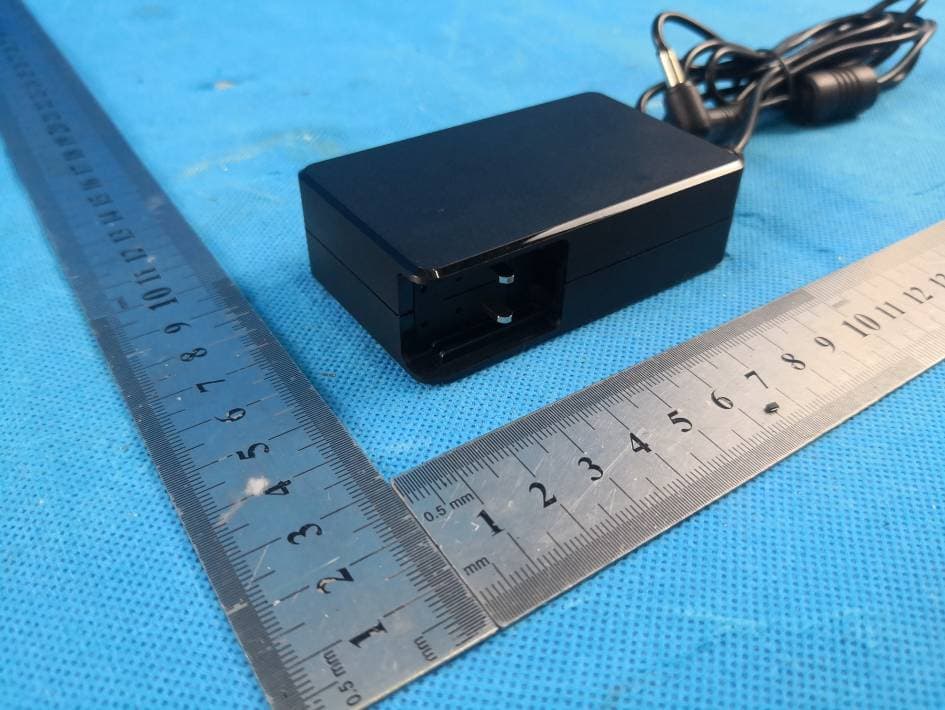
Click to zoom
Application Details
- Equipment Class
- NII - Unlicensed National Information Infrastructure TX
- Date of Grant
- Aug 10, 2020
- Application Purpose
- Original Equipment
- Date of Application
- Aug 10, 2020
- Equipment Note
- Laptop
- Frequency Range
- 5180.00000000 - 5240.00000000
- Company
- CRYPTODATA TECH SRL
- Country
- Romania
Documents & Files
Document Text
Text extracted from the exhibit documents filed with the FCC. Open a document above to read the original.
Users Manual
WHIM Business Whim Pro, Whim Book, N141 User Manual V1.0 Note • This manual is mainly for Windows 10. There might be some slight differences if you use other windows systems. • This manual contains the common functions of most models. Maybe it does not fit very well with your model for some functions, or maybe some of your model functions are not contained in this manual. • The illustrations in this manual may differ from the actual products. Please prevail in kind. ■ Before using the computer, please read the safety precautions and important tips carefully and patiently first! Content Chapter 1 Know your computer ............................................................................................ 1 Front View ............................................................................................................... 1 Left View.................................................................................................................. 6 Right View ............................................................................................................... 7 Bottom View ............................................................................................................ 8 Chapter 2 Operating Windows 10.......................................................................................... 9 Configuring the operating system in initial use. ....................................................... 9 Operating System Interface..................................................................................... 9 Keep the computer in sleep mode or shut down ................................................... 11 Connect to the wireless network............................................................................ 12 Chapter 3 Troubleshooting ................................................................................................... 13 Common problems ................................................................................................ 14 1 Chapter 1 Know your computer Front View Attention: 2 • When you close the display, please be careful not to leave pens or any other objects in between the display and the keyboard. Otherwise, the display may be damaged. Tab1-1 3 Chapter 1 Know your computer ■Using the keyboard Keyboard function keys Pressing certain function key to enter the corresponding system settings immediately. Keyboard Function Through the use of the function keys, you can change operational feature instantly. To use this function, press and hold ; then press one of the function keys. 4 Chapter 1 Know your computer ■Positioning the display panel.The display panel can be opened to any angle up to 180 degrees. Note: • Do not open the display with too much force, otherwise the panel or hinges may be damaged. • Do not rotate the camera with too much force, otherwise the camera may be damaged. Chapter 1 Know your computer Left View 5 USB 2.0Port You can connect a USB device to your computer by inserting its USB plug (Type A) into the USB port on your computer. Combo Audio Jack 1. The combo audio jack does not support a conventional microphone connection. 2. Due to differences in industry-standard, when third-party connects headphones or headset microphone, recording functions may not be supported well. Chapter 1 Know your computer Right View 6 UDisk Port You can connect a Type C device to your computer by inserting its USB plug (Type C) into the Type C port on your computer. Switch Control camera, mic on and off. Micro SD Card Slot The computer supports the following types of memory cards: • Micro Secure Digital (SD) card • Micro Secure Digital High Capacity (SDHC) card • Micro Secure Digital Extended Capacity (SDXC) card Type C Port You can connect a Type C device to your computer by inserting its USB plug (Type C) into the Type C port on your computer. HDMI Port You can plug the HDMI display device into the computer connected to the HDMI port USB 3.0Port You can connect a USB device to your computer by inserting its USB plug (Type A) into the USB port on your computer. Note: 1. You can only insert one memory card in the slot each time. 2. Please insert memory card until into the bottom of the slot. 3. Remove the memory card from the memory card slot and gently pull the memory card out of the slot. 4. Before removing the memory card, safely remove hardware and eject media utility to disable the card to avoid data corruption. 7 Chapter 1 Know your computer Bottom View Chapter 2 Operating Windows10 Configuring the operating system in initial use. The first time you use, you need to configure the operating system. The configuration process may include the following steps: 1. Accepting the End User License Agreement 2. Configuring the Internet connection 3. Registering the operating system 8 4. Creating a user account Operating System Interface Windows 10 comes with a powerful and useful start menu. To open the start menu, do one of the following: • Press the Windows key on the keyboard • Select Start on the lower-left corner of the desktop Chapter 2 Operating Windows10 Settings Button Settings let you perform basic tasks. You can also search for more settings with the settings search box in the upper-right corner. To open the settings, do the following: Open the Start menu and select Settings 9 Power Button The power button is on the Start menu, click it you can choose to shut down or restart the computer, or put the computer into sleep mode. Start Button Select the Start button on the taskbar, open the start menu Search Box Search for anything, anywhere Start menu You can personalize the start menu with your favorite apps. To personalize the Start menu, do the following: Right-click the application which you want to add to the Start menu, then select Pin to Start menu. Note: You can also drag apps from the most used or All apps columns to add them to the start menu. Chapter 2 Operating Windows10 Keep the computer in sleep mode or shut down W…
Text truncated - open the document above for the full version.
Cover Letter(s)
CRYPTODATA TECH SRL DATE : 07-28-2020 Equipment Autorisation Division Federal Communications Commission 7435 Oakland Mills Road Columbia, MD 21046 FCC ID: 2AWZ7-WHIM Product Name: Laptop Request for Confidentiality Pursuant to Sections 0.457 and 0.459 of the commission’s rules, we hereby request that the following documents be held confidential: (List here the documents for which you are seeking confidentiality – for example ...) • Schematics • Block diagram • Operation description These materials contain trade secrets and proprietary information and are not customarily released to the public. The public disclosure of this information might be harmful to the company and provide unjustified benefits to our competitors. <Signature> Name: Anisia-Georgiana David Title: Manager Company: CRYPTODATA TECH SRL
Cover Letter(s)
DATE : 07-28-2020 Federal Communications Commission Authorization & Evaluation Division 7345 Oakland Mills Road Columbia, Maryland 21046 Authority to Act asAgent Onourbehalf,Iappoint(Flux Compliance Service Laboratory/ Room 105 Floor Bao hao Technology Building 1 NO.15 Gong yeWest Road Hi-Tech Industrial, Song shan lake Dongguan,China)toactasouragentinthepreparationofthisapplicationforequipmentcertificati on.Icertifythatsubmitteddocumentsproperlydescribethedeviceorsystemforwhichequipmentc ertificationissought.Ialsocertifythateachunitmanufactured,importedormarketed,asdefinedint heFederalCommunicationsCommission’sregulationswillhaveaffixedtoit a label identical to that submitted for approval with thisapplication. Forinstanceswhereourauthorizedagentsignstheapplicationforcertificationonourbehalf,Iack nowledgethatallresponsibilityforcomplyingwiththetermsandconditionsforcertification,stillres ideswith(Applicant Nameandaddress) <Signature> Name: Anisia-Georgiana David Title: Manager Company: CRYPTODATA TECH SRL
Cover Letter(s)
DATE : 07-28-2020 Federal Communications Commission Authorization & Evaluation Division 7345 Oakland Mills Road Columbia, Maryland 21046 RE: LETTER OF AGENT AUTHORIZATION To Whom It May Concern: We, the undersigned, hereby authorize Compliance Testing, LLC to act on our behalf in all matters relating to application for equipment authorization, including the signing of all documents relating to these matters. We also hereby certify that no party to the application authorized hereunder is subject to the denial of benefits, including FCC benefits, pursuant to Section 5301 of the Anti-Drug Abuse Act of 1988, 21 U.S.C.853(a). Sincerely, <Signature> Name: Anisia-Georgiana David Title: Manager Company: CRYPTODATA TECH SRL
External Photos
Page 1 of 25 FCC ID: 2AWZ7-WHIM IC: 26331-WHIM APPENDIX-PHOTOGRAPHS OF EUT CONSTRUCTIONAL DETAILS Model No.: WHIM Business Photo 1 Photo 2 Page 2 of 25 FCC ID: 2AWZ7-WHIM IC: 26331-WHIM Photo 3 Photo 4 Page 3 of 25 FCC ID: 2AWZ7-WHIM IC: 26331-WHIM Photo 5 Photo 6 Page 4 of 25 FCC ID: 2AWZ7-WHIM IC: 26331-WHIM Photo 7 Photo 8 Page 5 of 25 FCC ID: 2AWZ7-WHIM IC: 26331-WHIM Photo 9 Photo 10 Page 6 of 25 FCC ID: 2AWZ7-WHIM IC: 26331-WHIM Photo 11 Photo 12
ID Label/Location Info
Label Product Name : Laptop Model No. : WHIM Business Rating : Shenzhen KEP Technology Co., Ltd A/S No. : FCC ID: 2AWZ7-WHIM IC: 26331-WHIM Production date : 08.08 Made in China
Internal Photos
Page 7 of 25 FCC ID: 2AWZ7-WHIM IC: 26331-WHIM Photo 13 Photo 14 Page 8 of 25 FCC ID: 2AWZ7-WHIM IC: 26331-WHIM Photo 15 Photo 16 BT&WIFI AntennaB WIFI AntennaA Page 9 of 25 FCC ID: 2AWZ7-WHIM IC: 26331-WHIM Photo 17 Photo 18 Page 10 of 25 FCC ID: 2AWZ7-WHIM IC: 26331-WHIM Photo 19 Photo 20 Page 11 of 25 FCC ID: 2AWZ7-WHIM IC: 26331-WHIM Photo 21 Photo 22 Page 12 of 25 FCC ID: 2AWZ7-WHIM IC: 26331-WHIM Photo 23 Photo 24 Page 13 of 25 FCC ID: 2AWZ7-WHIM IC: 26331-WHIM Photo 25 Photo 26 Page 14 of 25 FCC ID: 2AWZ7-WHIM IC: 26331-WHIM Photo 27 Photo 28 Page 15 of 25 FCC ID: 2AWZ7-WHIM IC: 26331-WHIM Photo 29 Photo 30 Page 16 of 25 FCC ID: 2AWZ7-WHIM IC: 26331-WHIM Photo 31 Photo 32 Page 17 of 25 FCC ID: 2AWZ7-WHIM IC: 26331-WHIM Photo 33 Photo 34 Page 18 of 25 FCC ID: 2AWZ7-WHIM IC: 26331-WHIM Photo 35 Photo 36 Page 19 of 25 FCC ID: 2AWZ7-WHIM IC: 26331-WHIM Photo 37 Photo 38 Page 20 of 25 FCC ID: 2AWZ7-WHIM IC: 26331-WHIM Photo 39 Photo 40 Page 21 of 25 FCC ID: 2AWZ7-WHIM IC: 26331-WHIM Photo 41 Photo 42 Page 22 of 25 FCC ID: 2AWZ7-WHIM IC: 26331-WHIM Photo 43 Photo 44 Page 23 of 25 FCC ID: 2AWZ7-WHIM IC: 26331-WHIM Photo 45 Photo 46 Page 24 of 25 FCC ID: 2AWZ7-WHIM IC: 26331-WHIM Photo 47 Photo 48 Page 25 of 25 FCC ID: 2AWZ7-WHIM IC: 26331-WHIM Photo 49
RF Exposure Info
Freqency GHz5.15 Max power of channel, mW0.53 minimuin test seperation, mm5 0.240552< 3 SAR evalaution is exempted according KDB 447498 0
Test Report
FCC IC Test Report Report No: FCS202007069 Issued for Applicant: CRYPTODATA TECH SRL Address: Bucuresti,Sectorul 1,Soldat Gheorghe Buciumat,nr.1 4 Mansarda,Romania Product Name: Laptop Brand Name: CryptoData Model Name: WHIM Business Series Model: Whim Pro, Whim Book, N141 FCC ID: 2AWZ7-WHIM IC: 26331-WHIM Issued By: Flux Compliance Service Laboratory Add: Room 105 Floor Bao hao Technology Building 1 NO.15 Gong yeWest Road Hi-Tech Industrial, Song shan lake Dongguan Tel: 769-27280901 Fax:769-27280901 http://www.FCS-lab.com Page 1 of 162 Test Report No.: FCS202007069 Flux Compliance Service Laboratory Room 105 Floor Bao hao Technology Building 1 NO.15 Gong yeWest Road Hi-Tech Industrial, Song shan lake Dongguan Tel: 769-27280901 Fax:769-27280901 http://www.FCS-lab.com TABLE OF CONTENTS Effect Page.............................................................................................................................................................3 1. Summary of test results...................................................................................................................5 1.1 Test Laboratory.................................................................................................................................6 1.2 Measurement Uncertainty................................................................................................................6 1.3 Test Environment Conditions..........................................................................................................6 2. General test information...................................................................................................................7 2.1. Description of EUT............................................................................................................................7 2.2. Accessories of EUT..........................................................................................................................8 2.3. Assistant equipment used for test..................................................................................................8 2.4. Block diagram of EUT configuration for test.................................................................................9 2.5. Test environment conditions...........................................................................................................9 2.1 Equipments List...............................................................................................................................10 3. POWER SPECTRAL DENSITY TEST........................................................................................11 3.1. Block diagram of test setup...........................................................................................................11 3.2. Applied procedures / limit...............................................................................................................11 3.3. Test Procedure................................................................................................................................11 3.4. Test Result.......................................................................................................................................13 4. 26 dB & 99% Emission Bandwidth...............................................................................................24 4.1. Block diagram of test setup...........................................................................................................24 4.2. Applied procedures / limit...............................................................................................................24 4.3. Test Procedure................................................................................................................................24 4.4. Test Result.......................................................................................................................................25 5. MAXIMUM CONDUCTED OUTPUT POWER............................................................................44 5.1. Test Result............................................................................................................................... ........45 6. Band Edges Measurement............................................................................................................47 6.1. Test Result.......................................................................................................................................49 7. RADIATED EMISSION MEASUREMENT..................................................................................51 7.1. Block diagram of test setup...........................................................................................................51 7.2. Limit...................................................................................................................................................53 7.3. Test Procedure................................................................................................................................54 7.4. Test result(Below 30MHz).............................................................................................................56 8. FREQUENCY STABILITY.............................................................................................................62 9. Power Line Conducted Emission..................................................................................................65 9.1 Block diagram of test setup......................................................................................................................65 9.2 Power Line Conducted Emission Limits(Class B)...................................................................................65 9.4 Test Result....................................................................................................................................................66 Page 2 of 162 Test Report No.: FCS2020070…
Text truncated - open the document above for the full version.
Test Setup Photos
Page 1 of 2 FCC ID: 2AWZ7-WHIM IC:26331-WHIM Radiated Emission Test Setup Below 1G Above 1G Page 2 of 2 FCC ID: 2AWZ7-WHIM IC:26331-WHIM Power Line Conducted Emission Test Setup
Contact Information
Applicant
Anisia-Georgiana David(manager)
Test Firm
Flux Compliance Service LaboratoryAndy Yue
[email protected]13510297284
Technical Specifications
| # | Rule Parts | Frequency Range | Power Output |
|---|---|---|---|
| 1 | 15E | 5.18 GHz - 5.24 GHz | 535.00 µW |