2AX9O-T01Dog Training Collar
SHENZHEN HONGKE GELIN TECHNOLOGY CO.,LTD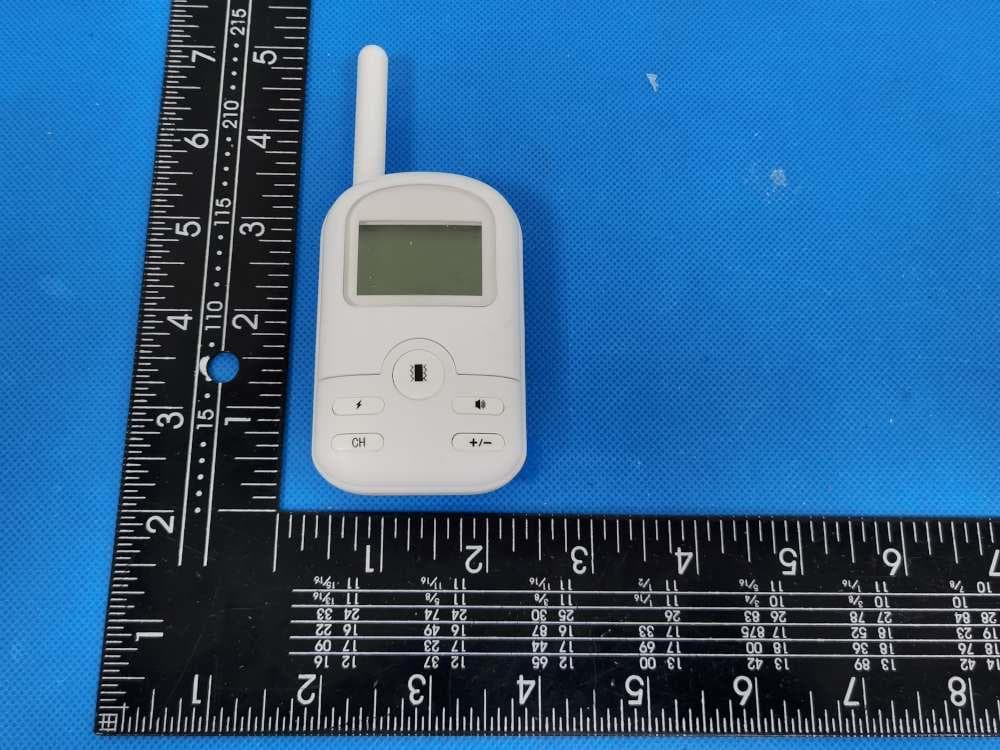
Click to zoom
Application Details
- Equipment Class
- DSC - Part 15 Security/Remote Control Transmitter
- Date of Grant
- Nov 23, 2020
- Application Purpose
- Original Equipment
- Date of Application
- Nov 23, 2020
- Equipment Note
- Dog Training Collar
- Frequency Range
- 433.92000000 - 433.92000000
- Country
- China
Documents & Files
Document Text
Text extracted from the exhibit documents filed with the FCC. Open a document above to read the original.
Users Manual
Dog Training Collar Manual Please Read the Manual before Use The pictures maybe different from the actual product please in kind prevail! Features 1. Rechargeable: Rechargeable Remote Control and Receiver 2. It works well, even in rainy day. 3. Adjustable Levels: The adjustable level of Vibration mode and Shock mode are 01-06. 4. Three training mode: Shock/Vibration /Sound. 5. Three channels: Select the channel, up to 3 Receivers and1 Remote Control. 6. Automatic power saving: If no operations within 5 minutes, the Remote Control and Receiver will go into standby mode. Tips 1. Please charge it before using it for the first time, and continue until the charging indicator is on. 2. Eliminate one bad behavior or disobedience to appropriate orders at a time, if you train too quickly, your pet maybe confused or even repelled. 3. Before using the Shock mode, try vibrating your pet first. 4. Observing the dog's reaction to ensure the training intensity is not too much. 5. Check your dog's skin, make sure it don’t get hurt by shocking. Key Definition ① Antenna: Transmit the signal strongly. ② LCD screen : Display modes, levels and channels. ③Shock button: Turn on the screen, press the Shock button, press the + or - button to adjust the level from 01-06,press the Shock button to make the receiver shock again. ④ Vibration button: On the screen, press the Vibration mode, press+/-button to adjust the levels from 01-06, press Shock button to make the receiver vibrate again. ⑤Sound button: press to choose Sound mode, don't need to adjust the levels. Just press to make the receiver sound Bee~~ ⑥button+/-: press +/- to adjust the levels. ⑦Channel button: choose your training channel among Chl/CH2 /Ch3 by press this button. ⑧Charging port: Type-c Charging Port. ⑨Power button: press to turn on the receiver, press again to turn it off. ⑩Charging :The hole of the Charging port Type-c. (11)Contact points: When installing the metal cap, be sure to contact to pet's skin. Perform safety corrections. (12)Indicator light: The light will flash when we press the Shock/Vibration/Sound button. When it’s charged, the indicator will be light up like breathing. Please charge the Remote Control and the Receiver before use it at the first time. 1. Charge the remote control: 1.1. Plug the cable into the charging hole. 1.2. Connect the USB charging adapter and plug it into outlet. 1.3. When it’s charged, the battery icon in the screen will be flashing; after charged fully, it will stop flashing. 2. Charge the receiver: 2. l. Open the rubber cover of the receiver's charging hole. 2.2. Plug the cable to the charging hole 2.3. Connect the USB charging adapter and plug it into outlet. 2.4. The indicator green LED light up like breathing; After being charged fully, the green LED light will stop breathing and always on. NOTE: 1. Please charge the remote control and receiver for more than 5 hours at the first charging. 2. When the receiver is charged , it's in sleep mode, and can't receive the signal from the remote control. 3. There will be showing empty battery icon on the screen of the remote control if it's low power. 4. If the receiver running out of power, the indicator light will be on per second. 5. Please charge them fully before you keep them idle for a long time, it's necessary to charge them every month. Auto Power Saving Function: 1. If there is no operations on the remote control within 10 seconds, the back lit of screen will be off. If there is no operations within 30 seconds, the remote control will be in sleep mode, and the screen display will be shut off. Pressing any buttons can activate the Remote. 2. If there is no signal in the receiver within 5 minutes, it will go into standby mode; you could press Shock or Vibration or Sound button to activate it. 3. You could turn the receiver OFF by pressing the power button of the Receiver. Pair the Remote Control with Receiver 1. Press the shock button or vibration button to turn on the Remote 2. Choose a channel CH1 or CH2 or CH3 by pressing the CH button 3. Adjust the level by pressing + or — button, make sure the level above 01 4. Press the Power button of the receiver for 3 seconds, you will hear a sound like Bee~, and the indicator light is flashing; Then quickly, Press the Vibration button or Shock button within 10 seconds after the sound Bee~, you can hear a sound Bee~ again , which means the pairing is successfully. 5. If you have 2 or 3 receivers just choose the different channels, and pair as the above steps. Note: Please remember the channel you have chosen to pair, if you use another channel without pairing, you can't control the receiver. Test the training collar set (After paired successfully) 1. Test the Shock function Take out the test bulb and put it on the Receiver's contact point Press the Shock button (make sure the level above 01). The test bulb will be on 2. Test the Vibration function Press the Vibration button (make sure the level above 01) The receiver will vibrate 3. Test the Sound function Press the Sound button (don’t need to adjust the level) The Receiver will sound bi~bi~ How to wear the Receiver to your pet 1. Put the Receiver on dog's neck 2. Make sure the contact point reaches to the skin of dog, and choose the suitable metal cap. 3. Adjust the belt collar, make sure your dog feels comfortable. F.A.Q Q: What’s the length of this training collar? A: 23.6 IN (60 CM) Q: How much weight of dogs does this training collar suits for? A: above 20 lb. Q: Is the Receiver waterproof? A: Yes, it's totally waterproof. Q: How long does my dog get training every time? A: 10-15 min. Q: What should I do if the training collar set doesn’t work? A: 1. Check the battery power of the Remote and Receiver, if it’s low power, charge them. 2. Check the level, if you choose Vibration mode or Shock mode, adjust to above 01. 3. Check the Receiver, if you don't turn it on, press the Power button of the Receiver. 4. Check the channel, if you choose the different chan…
Text truncated - open the document above for the full version.
Attestation Statements
SHENZHEN HONGKE GELIN TECHNOLOGY CO.,LTD Model Difference Product Name: Dog Training Collar Model Number: T01-TX/RX T02-TX/RX, T03-TX/RX, T05-TX/RX, T06-TX/RX, T07-TX/RX, T08-TX/RX, T09-TX/RX, T01BS-H, T02BS-H FCC Identifier: 2AX9O-T01 All the models are the same circuit and RF module, except the mode names and outlook color. Regards Sincerely Client’s signature Client’s name / title: Tian Zheng / Manager Contact information: A, 2nd Floor, Building 26, District C, Liantang Industrial Zone, Shangcun Community, Gongming Office, Guangming New District, Shenzhen
Cover Letter(s)
SHENZHEN HONGKE GELIN TECHNOLOGY CO.,LTD 1/1 Letter of Authorization Company: SHENZHEN HONGKE GELIN TECHNOLOGY CO.,LTD Address: A, 2nd Floor, Building 26, District C, Liantang Industrial Zone, Shangcun Community, Gongming Office, Guangming New District, Shenzhen Product Name: Dog Training Collar Model Number: T01-TX/RX T02-TX/RX, T03-TX/RX, T05-TX/RX, T06-TX/RX, T07-TX/RX, T08-TX/RX, T09-TX/RX, T01BS-H, T02BS-H FCC Identifier: 2AX9O-T01 We authorize LGAI Technological Center S.A., Ronda de la Font del Carme, s/n, 08193 Bellaterra, Spain, to act on our behalf on all matters concerning the above named equipment. Any individual within LGAI Technological Center S.A. is authorized to act on our behalf and take action on the application. We declare that authorize LGAI Technological Center S.A., Ronda de la Font del Carme, s/n, 08193 Bellaterra, Spain, is allowed to forward all information related to the approval project to the Federal Communication Commission and to discuss any issues concerning the approval application. Any and all acts carried out by LGAI Technological Center S.A. on our behalf shall have the same effect as acts of our own. Name: Tian Zheng Date: 2020-11-20 Title: Manager Signature of applicant:
Cover Letter(s)
SHENZHEN HONGKE GELIN TECHNOLOGY CO.,LTD 1/1 Office of Engineering Technology Federal Communications Commission 7435 Oakland Mills Road Columbia, MD 21046 Date: 2020-11-20 Subject: Request for Confidentiality FCC ID: 2AX9O-T01 To Whom It May Concern, Pursuant to the provisions of Sections 0.457 and 0.459 of Commission's rules (47CFR0.457, 0.459), we are requesting the Commission to withhold the following attachment(s) as confidential document from public disclosure. Exhibits Long-Term Confidentiality Short-Term Confidentiality NOTE 2 ID Label/Location No No Attestation Statement No No External Photos No ☐ Block Diagram ☒ ☐ Schematics ☒ ☐ Test Report No No Test Setup Photos No ☐ User’s Manual No ☐ Internal Photos No ☐ Parts List / Tune Up ☐ ☐ RF Exposure Info No No Operational Description ☒ ☐ Cover Letter(s) No No SDR Software / Security Info ☐ No NOTE 1: Long-Term Confidentiality may be permitted under special conditions (See II. LONG-TERM CONFIDENTIALITY, Section 3 of KDB 726920, use last in force) NOTE 2: Short-Term Confidentiality can be requested for a maximum of 180 days from the date of the grant. Above mentioned document contains detailed system and equipment description are considered as proprietary information in operation of the equipment. The public disclosure of above documents might be harmful to our company and would give competitor an unfair advantage in the market. It is our understanding that all measurement test reports, FCC ID label format and correspondent during certification review process cannot be granted as confidential documents and those information will be available for public review once the grant of equipment authorization is issued. Sincerely, Signature: Name: Tian Zheng Title: Manager
External Photos
Model: T01-TX/RX
ID Label/Location Info
Size:17*10.5mm M/N: T01-TX/RX FCC ID: 2AX9O-T01 This device complies with part 15 of the FCC Rules. Operation is subject to the following two conditions:(1) This device may not cause harmful interference, and (2) this device must accept any interference received, including interference that may cause undesired operation. Label location
Internal Photos
Model: T01-TX/RX Antenna location
Test Report
Global United Technology Services Co., Ltd. Report No.: GTSL202011000107F01 Authorized Signature: Robinson Lo Laboratory Manager This results shown in this test report refer only to the sample(s) tested, this test report cannot be reproduced, except in full, without prior written permission of the company. The report would be invalid without specific stamp of test institute and the signatures of compiler and approver. Page 1 of 34 + TEST REPORT Applicant: SHENZHEN HONGKE GELIN TECHNOLOGY CO.,LTD Address of Applicant: A, 2nd Floor, Building 26, District C, Liantang Industrial Zone, Shangcun Community, Gongming Office, Guangming New District, Shenzhen Manufacturer: SHENZHEN HONGKE GELIN TECHNOLOGY CO.,LTD Address of Manufacturer: A, 2nd Floor, Building 26, District C, Liantang Industrial Zone, Shangcun Community, Gongming Office, Guangming New District, Shenzhen Equipment Under Test (EUT) Product Name: Dog Training Collar Model No.: T01-TX/RX T02-TX/RX, T03-TX/RX, T05-TX/RX, T06-TX/RX, T07-TX/RX, T08-TX/RX, T09-TX/RX, T01BS-H, T02BS-H Trade Mark: N/A FCC ID: 2AX9O-T01 Applicable standards: FCC CFR Title 47 Part 15 Subpart C Section 15.231 Date of sample receipt: Nov. 12, 2020 Date of Test: Nov. 12, 2020 - Nov. 19, 2020 Date of report issued: Nov. 19, 2020 Test Result : PASS * * In the configuration tested, the EUT complied with the standards specified above. Report No.: GTSL202011000107F01 Global United Technology Services Co., Ltd. No. 123-128, Tower A, Jinyuan Business Building, No.2, Laodong Industrial Zone, Xixiang Road, Baoan District, Shenzhen, Guangdong, China 518102 Telephone: +86 (0) 755 2779 8480 Fax: +86 (0) 755 2779 8960 Page 2 of 34 2 Version Version No. Date Description 00 Nov. 19, 2020 Original Prepared By: Date: Nov. 19, 2020 Project Engineer Check By: Date: Nov. 19, 2020 Reviewer Report No.: GTSL202011000107F01 Global United Technology Services Co., Ltd. No. 123-128, Tower A, Jinyuan Business Building, No.2, Laodong Industrial Zone, Xixiang Road, Baoan District, Shenzhen, Guangdong, China 518102 Telephone: +86 (0) 755 2779 8480 Fax: +86 (0) 755 2779 8960 Page 3 of 34 3 Contents Page 1 COVER PAGE .............................................................................................................................................1 2 VERSION ...................................................................................................................................................2 3 CONTENTS ...............................................................................................................................................3 4 TEST SUMMARY ......................................................................................................................................4 4.1 MEASUREMENT UNCERTAINTY .............................................................................................................4 5 GENERAL INFORMATION .......................................................................................................................5 5.1 GENERAL DESCRIPTION OF EUT ..........................................................................................................5 5.2 TEST MODE .........................................................................................................................................5 5.3 DESCRIPTION OF SUPPORT UNITS ........................................................................................................5 5.4 DEVIATION FROM STANDARDS ..............................................................................................................5 5.5 ABNORMALITIES FROM STANDARD CONDITIONS ....................................................................................6 5.6 TEST FACILITY ....................................................................................................................................6 5.7 TEST LOCATION ..................................................................................................................................6 5.8 ADDITIONAL INSTRUCTIONS ..................................................................................................................6 6 TEST INSTRUMENTS LIST ......................................................................................................................7 7 TEST RESULTS AND MEASUREMENT DATA .......................................................................................9 7.1 ANTENNA REQUIREMENT ......................................................................................................................9 7.2 CONDUCTED EMISSIONS ....................................................................................................................10 7.3 RADIATED EMISSION METHOD ............................................................................................................13 7.3.1 Spurious emissions .....................................................................................................................15 7.4 20DB OCCUPY BANDWIDTH ...............................................................................................................19 7.5 CALCULATION OF AVERAGE FACTOR .......................................................................................21 7.6 DWELL TIME ..................................................................................................................................24 8 TEST SETUP PHOTO .............................................................................................................................26 9 EUT CONSTRUCTIONAL DETAILS .......................................................................................................28 Report No.: GTSL202011000107F01 Global United Technology Services Co., Ltd. No. 123-128, Tower A, Jinyuan Business Building, No.2, Laodong Industrial Zone, Xixiang Road, Baoan District, Shenzhen, Guangdong, China 518102 Telephone: +86 (0) 755 2779 8480 Fax: +86 (0) 755 2779 8960…
Text truncated - open the document above for the full version.
Test Setup Photos
Measurement Photos Model: T01-TX/RX
Contact Information
Applicant
Tina Zheng(Manager)
Technical Contact
Global United Technology Services Co. Ltd.robinson lo
[email protected]86-0-755-2779-8480
Shenzhen · China
Test Firm
Global United Technology Services Co. Ltd.Robinson Lo
Technical Specifications
| # | Rule Parts | Frequency Range | Power Output |
|---|---|---|---|
| 1 | 15.231 | 433.92 MHz - 433.92 MHz | - |