2AXKV-APAIApai Genie
Wuhu qidirobot Co. Ltd.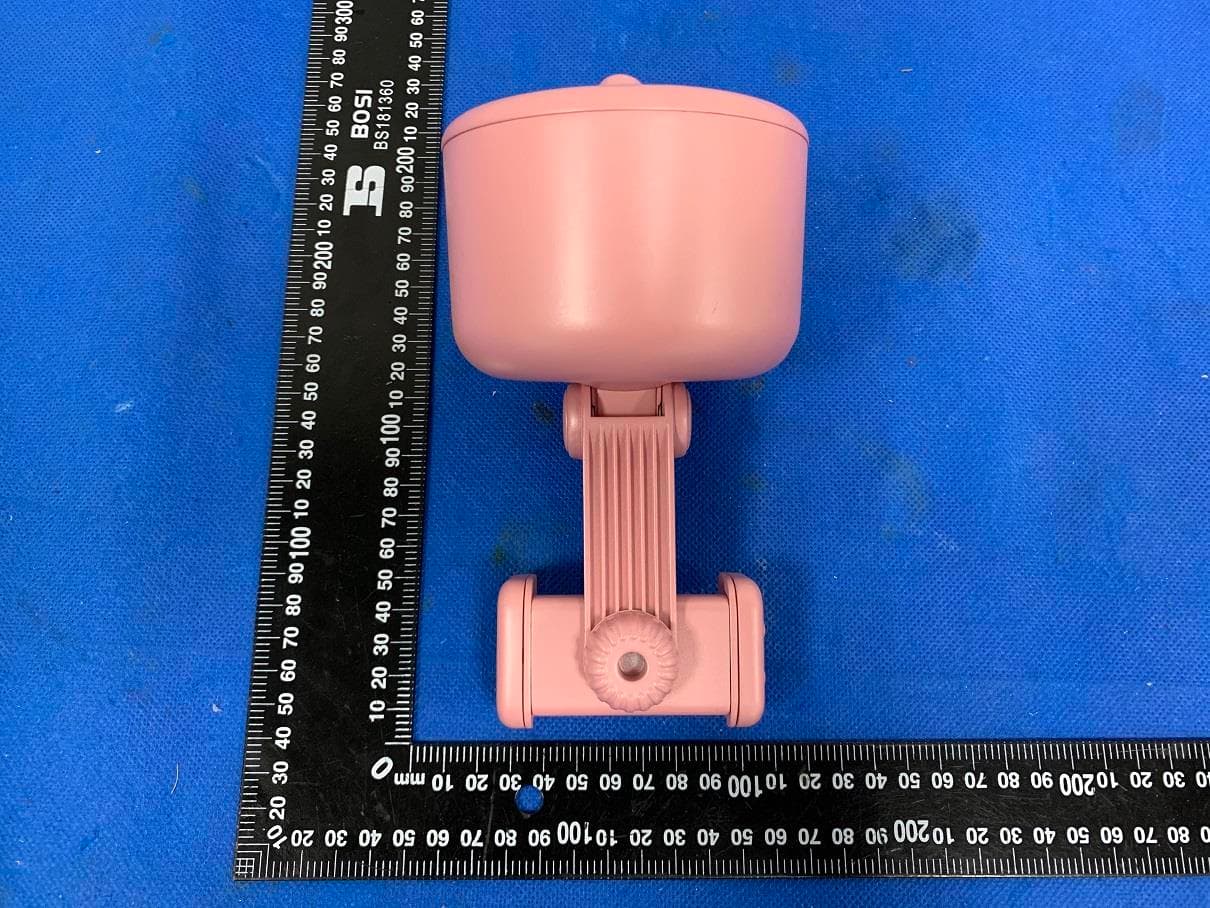
Click to zoom
Application Details
- Equipment Class
- DXX - Part 15 Low Power Communication Device Transmitter
- Date of Grant
- Sep 23, 2020
- Application Purpose
- Original Equipment
- Date of Application
- Sep 23, 2020
- Equipment Note
- Apai Genie
- Frequency Range
- 2402.00000000 - 2480.00000000
- Company
- Wuhu qidirobot Co. Ltd.
- Country
- China
Documents & Files
Document Text
Text extracted from the exhibit documents filed with the FCC. Open a document above to read the original.
Users Manual
MARS HERD Apai Genie 2 THE SMART PERSONAL • :111:It} 11:l.,!1.!.I :t:1!1.!.F!1 � • ⑨ MA阳Hl!RCI USER MANUAL 啕罔司创束l 啕罔i!.I到时·回::i!.1111时i!.I崎企”军,111 土,!tlf.2!; 3)1到5量 由lti!.ll!f!XI.W@响咽团回到叫•&tQLIQ. 事咱吾剑文l 事吗墨西:11•四2鼻CH!到咱哥,1雷击’畸呈蜀,事咱噩啬 画凋!:W@啊’咱NV赌e钊量·旦呈雹’LI卧. ,.呈k’呈笛’ 唱叫•=e刨沓毒t唱’f>.i事咱哥刮凋,.,.里’H�Al!i!旦旦墨 画司2唱叫·圣割草鼻qi!.创lt l at园”LIQ. 早",.』§ fl组副墨·刮,......卧�倒刮目incιLED司’..,.雷畸 到刮目,n卧 APPQe.ms. 锢’Ai到QR.21.E.企哩斟码,AppStore!iEe Google Play St。””klApalG四Id萄晶’曲创叫l!!!.5.斟.:il5&呈.1!::J. 回量创刻画LI卧. 剑HIg司 1.3唱。, ... E.l:ILI卧. 2屠唱岳.早早企S哥啊刻萄且·到:i!.!!1.叫到到咱哥APP9回叫叶. ·呈旦i伞号ii唱也·早早企咽flltOl,6孟I.IOI刻•包甜甜LI日. 晴旦:•阜阜企.,拥牟噩.211雹刻•w矗由2,11tQLIQ. Install Battery Unscrew the battery c。verand insert 3 x气'AA•batteries ace 。rdingto the directi。n marked on the battery case. Put back the battery E。ver. Install Mobile Phone Op en the ph。ne holder and slide the phone into the phone holder by making ph。nelens face you, and adjust the ph。ne to make it suitable. Horiz。ntaland Vertical Switching L。osenthe lcnob, release the phone holder and r。tateit to horizontal or vertica I m。de.Tighten the lcnob to install the ph。ne. Power 。n fa『Use L。ngPress Power Button: p。wer。n/off,the LED light flashing/。ut Downloading APP Sean the QR code l。catedin the instruction b。。kor sea阿h 气l\paiGenie" in the App St。”。『Go。glePlay St。同t。 d。wnload and i nsta II the app. Connecting Device 1. Make SU『e the 360 ° 0bjectTraclcing Holder is ON, the red light flashing, and the Holder is waiting f。r bluetooth connection 2. Make sure the Bluet。。th。”yourdevice is ON 3. Launch the Holder Apai Genie c。mpanionapp and within 6 sec。nds,the Holde『willant。maticallyconnect t。yourdevice. .,.. 锢量里岳q甜辛哥哥旦旦但剖 ’回响帽’101!!但回量丰司’LIQ.0101!! ..叫哥时回画 牟剖’l吟唱tt•刽明ett:11.12. 包自窜皇字会旦旦 1.>,阳•11•墨♀会:墨至·剩斟2主墨画町-回Xis旦E J.1f!•t1011.1�11叫曰. 2思甜•m窗里平会:皇军.铜制:ill盘l!町·四XI雹旦 旦 t1tt•t1011.1司副L[C』. 3.2园里三:平J.f髓。l回量.,.凋叫树::i!.3墨西叫-回碍e .2••11011.1哥Ill.I口. W?IW呈平安旦旦 1.1.阳..量呈字安:到咱畸型国咽’I企Of>.i蜀.罩·量时··叫 主主哥叫量回碍岳旦旦•t11011.1司由LICι 2.w 笛‘白”·旦♀:,.咱哥也罔圃’l企峭Ai甸墨••c-t••副 3盘西叫·四碍墨皇E11tt•1101 I.I畸型叫卧. 罕2,1弩企’E ’」’咱否!Ht•tSt1!!• 2.•a画里♀会 3.�回..早会 NOTE: There is n。needto manually pair the device via Blueto。th Shooting • Selecting Facial m。bjectT1『ackingMode The Tracking Selecti。n k。n is located at the top of the screen. Tap the icon to select Face Tracking or ObjectTraclcing. • Facial Tracking Mode l.Ph。t。graphF。II。w:pose and wait for 3 seconds, it can aut。maticallystart taking photos. 2. Video F。llow:pose and wait for 3 seconds, it can automatically start the rec。rding. 3. Pair M。de:two faces draw close and wait f。『3 sec。nds, it can automatically sta rt ta Icing ph。”s .。bjectTrackingMode 1. Photograph Follow. Double cliclc the selected target on the camera interface and wait for 3 seconds, it can automatically start ta Icing photos. 2.Vide。F。llow:D。ublecliclc the selected target。n the camera interface and click the video button, it can start vide。foll。w. Main Function Introduction l.Rec。rdingcon rt。1 2 . ObjectTraclci ng 3. Facial Tracking I《 ‘ Y予υ - 老取υ付时� ,可,予叨-力/{ - 唱E四时司r.t、,t·y子” - 力,t-0)丰民襄示吉h .I,士方向1.:J;;-:,τ、三 ’ ::>OJ5号7'11,'IJυ越哩池毫捕入L、1(γ7υ -'!Jlt-毫鳝9τ出来上fl')宏1", 携带雹自富有E取υf寸吵� 由’幡J飞吵王奄帽”τ、攥稽。!)l;;l;;(C1)前<I)方向ltJ:-:,τ、剑”司Ut 郁,飞管三1.:滑υ丛�营、遭罔1.:阑堕营机It也、L"�"t. 罐横@切υ替;t ’:>II:孙奄锺岭、翻带J飞吵三唱E锺占6τ擅自圃叉怯.画面O).ti毛 - l"li:回L、9苯a,.�鲸at,付附τ棚’毫取”付时Ill.、b、t''f". 才二’比 . .,. ,?, 口二,告fγL,又@喧嚣求,:,:电力。n/。何,LED7,(←@点即消虹 APP笋’7:,,口 - tt 又串鸣,:tQR::J-!tO)摘自示’:th:怯惋索 ’ ApaiGenie•o, l\p p St。『�G。ogle句再生又←7忆苦f?)I曰 - i: Lτ,,νλ ← - Wt�77'υ毫·C,又← - /1,l,.司E"t• 般惜民接貌"j",g 1J(::.-'fJl,←奄7才口 - ,<γl-τ,t;.-1.:l.ll:T 2.携带O>;;fJL, - ←., _ 又.!::flt置惰’E警起勤L、AT'Y-f:/ 丑 ’ y ←密”时、孚勘'1/l,-t,.7 - 叉’电j'fJI, ' 、St.I:<、8渺t'i商量血?啻絮’ Installation der Batterien Nehmen Sie die Batterieabdeclcung ab und leg en Sie drei AA Alkali· Trockenbatterien entsprechend der angegebenen 土Richtungin das Batteriefach ein, und dann machen Sie die Batterieabdeckung zu. Installation von Handy Breiten Sie den Klemm halter aus und stecken Sie lhr Handy fest in der Halterung auf gewllnschte p。siti。n, dabei bleibt d as Telefono bjektiv v。me. Wechsel der horizontale。dervertikale Halterung Lllsen Sie den Drehlcnopf, um den Klemm halter loszulassen und die Halterung im H。chformatoder Querformat zu drehen, dann ziehen Sie den Drehkn。pf fest und lh『Handy d ara uf unterzubri ngen. Anschalten zur Verwendung Lange Taste drOclcen: Strom ein/aus,das LED-Licht blinkt/aus. A pp-H eru nterladen Sie k晶nnendirekt den QR-C。de scannen, um "Apai Genie' (A ndroid 8.1 oder hOher, !OS 10.0 oder h晶her ) herunterzuladen, oder suchen Sie direkt "Apai Genie" im App Store herunte『zuladen.(QR-Code fiir D。wnloadv。n App siehe unten) Verbindung von Ge『昌t l. Schalten Sie den Gimbal ein 2.Aktivieren Sie das Bluet。。th von Ihrem Handy und die Stand。rtinf,。rmati。nen,un dann晶ffnenSie die App "Apai Genie", werden sie in 6 Sekunden aut。matisch koppeln, und die manuelle Verbindung ist nicht notwending. 注意: Bluet。。th手勘守•y子Y击’苦苦,H又毫使用"t-1>必要lj:�υ苯位九. 撮影串串画 颠事tt�,,体造麟毛-i:奄趣织 遍’远织j',(:::J:,怯画面@←'Y:11<:i5-ii,7-1'::::i:,毫舍’'ll::1L τ、’因@副啻争4’4事@’国啻毫迫麟古.i.. 颜面追麟毛 - tt 1.7,t口 - ,t:/:,J(-,:毫3秒自由持L、自勤的民撮’!ft•啻窑-r 2.7,t口 - ·画:水-:;;(警3秒’在揭L、自勘的,.::.画"t.'l!事亨 3二λ毛 - ft:工人0)·蚀3秒近害?τ、自剧的1.::摄影"?'啻宰亨 物体追麟毛 - t:' 1.7才曰 - ,t:,:'国)C7画菌苦目摞奄2固?υ'Y�T-1、 3秒停止Lτ自勤的比撞’睡't"�'f'f" 2.7才口 - •iii:tJ�7画面夺目摞毫2圄少υ'l'�'t苞、 .画4号,ν毫少υ•y夕Lτ、"t寺li:7才口 - ·画可?曹营营 主t.t•能比?I,、τ 1锦幡@饵’曾.画毫制”亨司5 2.4’体造跻 3.翩田遍麟 Hl时WEIS: Es ist nicht erforderlich. das Gerl!t manuell !lber Bluetooth zu paaren Foto-I Videoaufnahme • Auswahl des Modus der Gesichts-oder。bjelctve『folgung Das Symbol fOr die Auswahl des Trackings befindet sich oben auf dem Bildschirm.Tippen Sie auf das Symbol, um Face Tracking oder Ob ject Tracking auszuwihlen. • Gesichtsverfolgungsmodus 1.Folgen zu r F。toaufnahme:Halten Sie die p。se for 3 Sekunden, wird die aut。matischeFot。aufnahmeaktiviert 2.Folgen zurVideoaufnahme: Halten Sie die Pose fQr 3 Sekunden, wird die aut。matischeVideoaufnahme aktiviert 3.C。uple-Modus:Zwei Gesichter n画hernsich zueinander und halten fur 3 Sekunden, wird die aut。matische F…
Text truncated - open the document above for the full version.
Attestation Statements
Wuhu qidirobot Co. Ltd. Model Difference Product Name: Apai Genie Model Number: Apai Genie 2, MARS HERO, MARS, HREO, QD008, QD007, Apai Plus, Apai 2, Apai Genie Plus, Hero 2, Mars 2, QM360, QD360, QDONE, H5, M8, Q8, D5. FCC Identifier: 2AXKV- APAI All the models are the same circuit and RF module, except the model names and outlook color. Regards Sincerely Client’s signature Client’s name / title : Pual Li / Manager Contact information / address: Room 1003, Block B, National Advertising Industrial Park, Jiu Jiang District, Wuhu City, Anhui Province
Cover Letter(s)
Wuhu qidirobot Co. Ltd. 1/1 Letter of Authorization Company: Wuhu qidirobot Co. Ltd. Address: Room 1003, Block B, National Advertising Industrial Park, Jiu Jiang District, Wuhu City, Anhui Province Product Name: Apai Genie Model Number: Apai Genie 2, MARS HERO, MARS, HREO, QD008, QD007, Apai Plus, Apai 2, Apai Genie Plus, Hero 2, Mars 2, QM360, QD360, QDONE, H5, M8, Q8, D5. FCC Identifier: 2AXKV-APAI We authorize LGAI Technological Center S.A., Ronda de la Font del Carme, s/n, 08193 Bellaterra, Spain, to act on our behalf on all matters concerning the above named equipment. Any individual within LGAI Technological Center S.A. is authorized to act on our behalf and take action on the application. We declare that authorize LGAI Technological Center S.A., Ronda de la Font del Carme, s/n, 08193 Bellaterra, Spain, is allowed to forward all information related to the approval project to the Federal Communication Commission and to discuss any issues concerning the approval application. Any and all acts carried out by LGAI Technological Center S.A. on our behalf shall have the same effect as acts of our own. Name: Pual Li Date: 2020-09-15 Title: Manager Signature of applicant:
Cover Letter(s)
Wuhu qidirobot Co. Ltd. 1/1 Office of Engineering Technology Federal Communications Commission 7435 Oakland Mills Road Columbia, MD 21046 Date: 2020-09-15 Subject: Request for Confidentiality FCC ID: 2AXKV-APAI To Whom It May Concern, Pursuant to the provisions of Sections 0.457 and 0.459 of Commission's rules (47CFR0.457, 0.459), we are requesting the Commission to withhold the following attachment(s) as confidential document from public disclosure. Exhibits Long-Term Confidentiality Short-Term Confidentiality NOTE 2 ID Label/Location No No Attestation Statement No No External Photos No ☐ Block Diagram ☒ ☐ Schematics ☒ ☐ Test Report No No Test Setup Photos No ☐ User’s Manual No ☐ Internal Photos No ☐ Parts List / Tune Up ☐ ☐ RF Exposure Info No No Operational Description ☒ ☐ Cover Letter(s) No No SDR Software / Security Info ☐ No NOTE 1: Long-Term Confidentiality may be permitted under special conditions (See II. LONG-TERM CONFIDENTIALITY, Section 3 of KDB 726920, use last in force) NOTE 2: Short-Term Confidentiality can be requested for a maximum of 180 days from the date of the grant. Above mentioned document contains detailed system and equipment description are considered as proprietary information in operation of the equipment. The public disclosure of above documents might be harmful to our company and would give competitor an unfair advantage in the market. It is our understanding that all measurement test reports, FCC ID label format and correspondent during certification review process cannot be granted as confidential documents and those information will be available for public review once the grant of equipment authorization is issued. Sincerely, Signature: Name: Pual Li Title: Manager
External Photos
FCC ID: 2AXKV-APAI
ID Label/Location Info
Size:5*10mm M/N: Apai Genie 2 FCC ID: 2AXKV- APAI This device complies with part 15 of the FCC Rules. Operation is subject to the following two conditions:(1) This device may not cause harmful interference, and (2) this device must accept any interference received, including interference that may cause undesired operation. Label location
Internal Photos
FCC ID: 2AXKV-APAI Antenna location AB5322B
Test Report
Global United Technology Services Co., Ltd. Report No.: GTS202009000140F01 Authorized Signature: Robinson Lo Laboratory Manager This results shown in this test report refer only to the sample(s) tested, this test report cannot be reproduced, except in full, without prior written permission of the company. The report would be invalid without specific stamp of test institute and the signatures of compiler and approver. Page 1 of 30 + TEST REPORT Applicant: Wuhu qidirobot Co. Ltd. Address of Applicant: Room 1003, Block B, National Advertising Industrial Park, Jiu Jiang District, Wuhu City, Anhui Province Manufacturer: Wuhu qidirobot Co. Ltd. Address of Manufacturer: Room 1003, Block B, National Advertising Industrial Park, Jiu Jiang District, Wuhu City, Anhui Province Equipment Under Test (EUT) Product Name: Apai Genie Model No.: Apai Genie 2, MARS HERO, MARS, HREO, QD008, QD007, Apai Plus, Apai 2, Apai Genie Plus, Hero 2, Mars 2, QM360, QD360, QDONE, H5, M8, Q8, D5. Trade Mark: N/A FCC ID: 2AXKV-APAI Applicable standards: FCC CFR Title 47 Part 15 Subpart C Section 15.249 Date of sample receipt: Sep. 07, 2020 Date of Test: Sep. 07, 2020 - Sep. 16, 2020 Date of report issued: Sep. 16, 2020 Test Result : PASS * * In the configuration tested, the EUT complied with the standards specified above. Report No.: GTS202009000140F01 Global United Technology Services Co., Ltd. No. 123-128, Tower A, Jinyuan Business Building, No.2, Laodong Industrial Zone, Xixiang Road, Baoan District, Shenzhen, Guangdong, China 518102 Telephone: +86 (0) 755 2779 8480 Fax: +86 (0) 755 2779 8960 Page 2 of 30 2 Version Version No. Date Description 00 Sep. 16, 2020 Original Prepared By: Date: Sep. 16, 2020 Project Engineer Check By: Date: Sep. 16, 2020 Reviewer Report No.: GTS202009000140F01 Global United Technology Services Co., Ltd. No. 123-128, Tower A, Jinyuan Business Building, No.2, Laodong Industrial Zone, Xixiang Road, Baoan District, Shenzhen, Guangdong, China 518102 Telephone: +86 (0) 755 2779 8480 Fax: +86 (0) 755 2779 8960 Page 3 of 30 3 Contents Page 1 COVER PAGE ............................................................................................................................................ 1 2 VERSION .................................................................................................................................................. 2 3 CONTENTS .............................................................................................................................................. 3 4 TEST SUMMARY ..................................................................................................................................... 4 4.1 MEASUREMENT UNCERTAINTY ............................................................................................................ 4 5 GENERAL INFORMATION ...................................................................................................................... 5 5.1 GENERAL DESCRIPTION OF EUT ......................................................................................................... 5 5.2 TEST MODE ........................................................................................................................................ 7 5.3 DESCRIPTION OF SUPPORT UNITS ....................................................................................................... 7 5.4 DEVIATION FROM STANDARDS ............................................................................................................ 7 5.5 ABNORMALITIES FROM STANDARD CONDITIONS .................................................................................. 7 5.6 TEST FACILITY ................................................................................................................................... 8 5.7 TEST LOCATION ................................................................................................................................. 8 5.8 ADDITIONAL INSTRUCTIONS ................................................................................................................ 8 6 TEST INSTRUMENTS LIST ..................................................................................................................... 9 7 TEST RESULTS AND MEASUREMENT DATA .................................................................................... 11 7.1 ANTENNA REQUIREMENT ................................................................................................................... 11 7.2 CONDUCTED EMISSIONS ................................................................................................................... 12 7.3 RADIATED EMISSION METHOD ........................................................................................................... 13 7.3.1 Field Strength of The Fundamental Signal ................................................................................ 15 7.3.2 Spurious emissions .................................................................................................................... 16 7.3.3 Bandedge emissions .................................................................................................................. 21 7.4 20DB OCCUPY BANDWIDTH .............................................................................................................. 22 8 TEST SETUP PHOTO ............................................................................................................................ 24 9 EUT CONSTRUCTIONAL DETAILS ..................................................................................................... 25 Report No.: GTS202009000140F01 Global United Technology Services Co., Ltd. No. 123-128, Tower A, Jinyuan Business Building, No.2, Laodong Industrial Zone, Xixiang Road, Baoan District, Shenzhen, Guangdong, China 518102 Telephone: +86 (0) 755 2779 8480 Fax: +86 (0) 755 2779 8960 Page 4 of 30 4 Test Summary Test Item Section in CFR 47 Result Antenna requ…
Text truncated - open the document above for the full version.
Test Setup Photos
Measurement Photos FCC ID: 2AXKV-APAI
Contact Information
Applicant
Pual Li(Manager)
Technical Contact
Global United Technology Services Co. Ltd.robinson lo
[email protected]86-0-755-2779-8480
Shenzhen · China
Test Firm
Global United Technology Services Co. Ltd.Robinson Lo
Technical Specifications
| # | Rule Parts | Frequency Range | Power Output |
|---|---|---|---|
| 1 | 15C | 2.40 GHz - 2.48 GHz | - |