2AYLT-KR2201WRWireless intelligent switch
Zhongshan Qihang Electronic Technology Co., Ltd.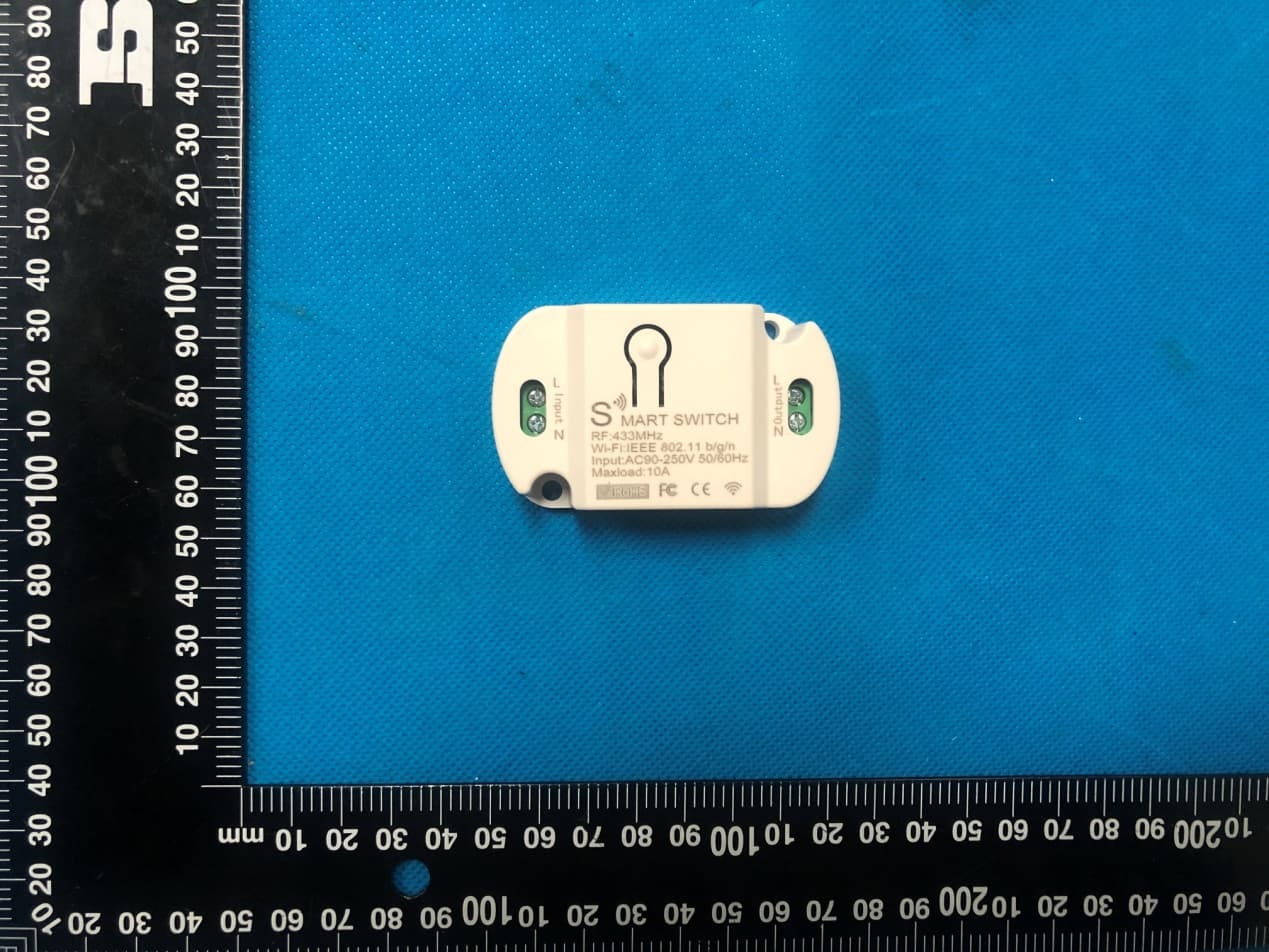
Click to zoom
Application Details
- Equipment Class
- DTS - Digital Transmission System
- Date of Grant
- Jan 05, 2021
- Application Purpose
- Original Equipment
- Date of Application
- Jan 05, 2021
- Equipment Note
- Wireless intelligent switch
- Frequency Range
- 2412.00000000 - 2462.00000000
- Country
- China
Documents & Files
Document Text
Text extracted from the exhibit documents filed with the FCC. Open a document above to read the original.
Users Manual
———————————————————————————————————————————— KR2201WR智能通断器说明书 注意事项 请仔细阅读本说明书。 本产品只能在室内使用。 本产品不防水,请勿将本产品暴露于滴水或溅水等任何危险的环境。 本产品只能由成人安装。 请勿安装在任何热源附近。 请勿将本产品与调光器一起使用。 请勿在完全封闭的灯具中使用本产品。只能在开放式灯具中使用本产品。 如果本产品重量比需要更换设备的重量重,则有可能会降低照明设备和灯座的机械稳定 性,并可能损害触点与灯的固定位。 电击危险:请在干燥环境中使用。 请勿湿手安装本产品! 接线示意图 * 请勿带电接线 ———————————————————————————————————————————— 一、无线遥控功能操作说明(RF功能) *红色指示灯表示“智能通断器”进入配对遥控器的状态。 手动开关模式说明 无需遥控器,按一下对码按键“智能通断器”打开,再按一下对码按键“智能通断器”关闭。 自锁模式对码说明 (遥控器一个按键,按一下打开,再按一下关闭。该模式适用于1个遥控器按键控制1个“智能通断器”) 设置方法:按下“智能通断器”上的对码按键2次,红色指示灯闪烁后点亮;按下遥控器上需要配对的 按键,当红色指示灯闪烁后熄灭,自锁模式设置成功。 互锁模式对码说明 (设置一个按键只能打开,另外一个按键只能关闭。需要至少两个按键以上的遥控器。该模式适用于一个 遥控器控制多个“智能通断器”。) 设置方法:按下“智能通断器”上对码按键3次,红色指示灯闪烁后点亮;按下遥控器需要设置为打开功 能的按键(例如按键A)红色指示灯闪烁后,继续按遥控器上需要设置为关闭功能的按键(例如按键B)红 色指示灯闪烁,互锁模式设置成功。 点动模式对码说明 (同一个按键,按住打开,松开关闭。) 设置方法:按下“智能通断器”上的对码按键4次,红色指示灯闪烁后点亮;按下遥控器上需要配对的按 键,当红色指示灯闪烁后熄灭,自锁模式设置成功。 复位设置 按下“智能通断器”的学习按钮8次后,“智能通断器”清除其存储器中的所有遥控器数据。当“智能通 断器”的LED连续闪烁8次后,表示复位已完成。如已设置成上电通电状态也会被复位成上电断电状态。 二、设备与WiFi连接的操作方法 *绿色指示灯表示“智能通断器”正在进入WiFi配对的状态。 1.使用准备 1)将“智能通断器”通电,同时确保手机已连接到2.4GHz频段的Wi-Fi网络;开启手机蓝牙和 手机定位。 2)确保设备、手机、路由器三者靠近 3)下载并打开App: 在应用商店搜索“智能生活”或扫描以下的二维码下载安装App; 如第一次下载使用,请点击“创建新帐户”按钮进行注册; 如已有账号,则点击“使用已有帐户登陆”按钮。 ———————————————————————————————————————————— 2.重置“智能通断器”: 长按“智能通断器”上的对码按键6秒以上直到绿色指示灯快速的闪烁 3.打开“智能生活”APP,点击右上角的“+”进入设备添加页面,然后选择“自动发现” (进行此操作之前请打开手机的蓝牙功能)开始搜索附近待添加的设备,发现待添加设备后, 设备的图标与名称会出现在APP页面中或者弹出提示页面,然后请按APP提示操作添加设 备) ———————————————————————————————————————————— 配网成功后可以在APP首页界面看到新添加的设备,此时“智能通断器”绿色指示灯常亮 ———————————————————————————————————————————— 过天猫精灵智能语音设备控制“智能通断器” 在这之前你需要做好以下准备工作: “智能生活”app可以正常的控制“智能通断器”。 拥有一个正常可以使用的天猫精灵智能音箱。 手机安装“天猫精灵”app并已经绑定天猫精灵智能音箱。 ———————————————————————————————————————————— 三、产品参数 输入电压:交流AC90V-250V50/60Hz 最大负载电流:10A 最大负载功率:阻性负载2200W(AC220V) 感性负载500W(AC220V) 容性负载200W(AC220V) 白炽灯2200W 节能灯300W LED灯300W 遥控( RF )工作频率: 433MHz 遥控( RF )距离:空旷地区大于 25 米 ———————————————————————————————————————————— UserManual SafetyWarning Thisdeviceisforindooruseonly. Thisdeviceshouldnotbeexposedtodrippingorsplashingwaterorany dangerSources. Thisdeviceshouldonlybeinstalledbyadults. Donotinstallnearanyheatsources. Donotusethisdevicewithdimmers. Donotusethisdeviceintotallyenclosedluminaires.Usethisdevicein openluminairesonly. Ifthisdeviceismuchheavierthantheonetobereplaced,theincreased weightmayreducethemechanicalstabilityofcertainluminairesand lampholdersandmayimpaircontactmakingandlampretention. RISKOFELECTRICSHOCK:USEINDRY LOCATIONSONLY.Donotinstallthisdevicewithwethands. WiringDiagram *Pleasedon’tinstallwithelectricity *Note:RFworkingmodesneedtobeimplementedwithQIACHIPbrandremotecontrol (transmitter)andcontroller(receiver/wirelessremotecontrolswitch).Thereisno guaranteethatremotecontrolsfromotherbrandswillworkproperly. ———————————————————————————————————————————— Operation Note:Theredindicatorlightindicatesthatthe"smartswitch"hasenteredthestateof pairingtheremotecontrol. Manualswitchmodedescription Withouttheremotecontrol,pressingthesettingbutton"smartswitch"willturniton,and pressingthesettingbutton"smartswitch"willturnitoff. LatchModeSettingDescription(Presstheremotecontroltoturniton,thenpressit toturnitoff.Thismodeissuitablefor1remotecontrolbuttontocontrol1"smart switch") Settingmethod:Pressthesettingbuttononthe"smartswitch"twice,theredindicatorlight flashesandthenlightsup;pressthebuttonthatneedstobepairedontheremotecontrol,when theredindicatorlightflashes,itgoesout,andthelatchmodesettingissuccessful. TogglemodesettingDescription(Thesamebutton,pressandholdtoopen,releaseto close.) ClicktheSettingsbuttononthereceiveronce,waitfortheLEDtolightup,andenterthesetting state;thenclickthebutton(suchasbuttonA)ontheremotecontrolonce,whentheindicator lightonthereceiverflashesandgoesout,thetogglemodesettingissuccessful. JogmodesettingDescription(Thesamekey,pressandholdtoopen,releasetoclose.) Settingmethod:Pressthecodematchingbuttononthe"smartswitch"4times,theredindicator lightflashesandlightsup;pressthebuttonthatneedstobepairedontheremotecontrol,when theredindicatorlightflashes,itgoesout,andtheself-lockingmodeissetsuccessfully. Reset: Afterpressingthereceiver'slearningbutton8times,thereceiverclearsallremotecontrol datainitsmemory.Whenthereceiver'sLEDflashes,theresetfunctioniscomplete. NOTE 1)Donotwirewithpoweron,turnoffthepowertowire,andpoweronaftercheckingandconfirming thatitiscorrect. 2)Whentheremotecontrolvoltageislow,pleasereplacethebatteryintime(whentheremote controlbatteryvoltageislow,theremotecontroldistancewillgenerallybecomeshorter). 3)Whenusingwirelesselectronicproducts,payattentiontoavoidingmetalmasks,large electronicdevices,electromagneticfieldsandotherstrongsourcesofinterference,soasto avoidtheshortdistancebetweentheremotecontrolandthereceiverorthefailureofnormal operation. 4)Donotusethiselectronicproductabnormally.Abnormalusewillreducetheperformanceand lifeoftheproduct.Inseverecases,itwilldamagetheproductandbringhiddendangerstoyour safety. 一、HowtoconnectthedevicetoWi-Fi? ———————————————————————————————————————————— *Theindicatorlight(Led)showsgreenthatthedeviceismatchingtheWIFIfunction Firstofall: 1.PoweronthesmartswitchandmakesurethatthephoneisconnectedtotheWi-Finetworkin the2.4GHzfrequencyband;turnonthephone’sBluetooth. 2.Makesurethatthedevice,mobilephone,androuterareclosetoeachother. 3.DownloadandopentheApp: Searchfor"SmartLife"intheAppStoreorscantheQRcodebelowtodownloadandinstallthe App; Forthefirstdownloadanduse,pleaseclickthe"CreateNewAccount"buttontoregister; Ifyoualreadyhaveanaccount,clickthe"Loginwithanexistingaccount"button. 4.Resetthesmartswitch:Pressandholdthebuttononthesmartswitchformorethan6 secondsuntiltheLEDindicatoronitflashesquickly. 5.Openthe"SmartLife"APP,clickthe"+"intheupperrightcornertoenterthedeviceaddition page,andthenselect"AutoScan"(pleaseturnontheBluetoothfunctionofthephonebefore performingthisoperation)tostartsearchingfornearbydevicestobeadded.Afterdiscovering thedevicetobeadded,TheiconandnameofthedevicewillappearontheAPPpageora promptpagewillpopup,thenpleasefollowtheAPPpromp…
Text truncated - open the document above for the full version.
Cover Letter(s)
Co m Ad d Prov Pr o Mo d Pr o We act We an d issu our Sig Na m Title Com mpany: Zho dress: 3/F, N vince, China oduct Name del Numbe oduct Desc authorize M on our beha declare tha d certificatio ues concern behalf shal nature: me: e: mpany: Zhong ongshan Qih No. 4, Hongd e: Wireless i er(s): KR220 ription: Wir MiCOM Lab alf on all ma at MiCOM L n of equipm ning the app ll have the s Tommy Xi Manager Zhongshan gshan Qiha Agen ang Electron da Road, Ca ntelligent sw 01WR, KR22 reless intellig bs Inc., 575 atters conce Labs Inc. is ment to the r proval applic same effect n Qihang El ang Electro nt Auth nic Technolo aoer Village, witch 201WB, KR22 gent switch Boulder Co erning the c allowed to f regulatory a cation. Any t as acts of lectronic Te onic Techno horizat gy Co., Ltd. Guzhen To w 201W ourt, Pleasa certification forward all i agencies as and all acts our own. echnology C ology Co., tion wn, Zhongsha anton, Califo of above na information s required a s carried ou Date: Co., Ltd. Ltd. an City, Gua ornia 94566 amed equip related to t nd to discu ut by MiCOM Jan. 04, 202 angdong 6, USA, to pment. the approva ss any M Labs on 20 al
Cover Letter(s)
Office o Federa 7435 O Columb USA Subjec t FCC ID To Wh o Pursua are req u docume These d propriet might b It is ou r corresp docume authoriz Sincer e Signat u Name: Title: M of Engineeri l Communic Oakland Mills bia, MD 210 t; Request f D: 2AYLT-K om It May C nt to the pro uesting the ents from pu documents tary informa be harmful to Schema Block D Parts Lis Operatio Tune-up r understand pondence du ents and thi zation is iss ely, ure: Tommy Xi Manager Zhongsh ing Techno cations Com s Road 046 for Confiden KR2201WR Concern, ovisions of t Commissio ublic disclos contain det ation in ope o our comp atic Diagram iagram st onal Descri p Procedure ding that all uring the ce s informatio sued. han Qihang logy mmission ntiality R the Commis on to withho sure indefin tailed syste ration of th e any and wo m ption e l measurem ertification re on will be av g Electronic ssion’s rule old the follow nitely. m and equi e equipmen ould give co ment test rep eview proce vailable for c Technolo s Title 47 S wing attach pment desc nt. The publ ompetitors a ports, FCC ess cannot public revi e ogy Co., Lt Sections §0. hment(s) as criptions an ic disclosu r an unfair ad ID label for be granted ew once the d. Date: Jan. 457 and § 0 confidentia d are consi re of these d vantage in mat and as confide n e grant of eq 04, 2020 0.459, we al dered as documents the market . ntial quipment .
Cover Letter(s)
Model Difference Declaration To Whom It May Concern, We, Zhongshan Qihang Electronic Technology Co., Ltd.(Wireless intelligent switch) Trademark: N/A; Model Number: KR2201WR, KR2201WB, KR2201W All model’s the function, software and electric circuit are the same, only model named, customers, shapes and software v ersions different. Test sample model: KR2201WR Please contact me if you have any question. Name: Tommy Xi Date: Jan. 04, 2020 Title: Manager Signature of applicant:
External Photos
Annex A External Photos Model: KR2201WR Page 1 of 3 Model: KR2201WR Page 2 of 3 Model: KR2201WR Page 3 of 3
Internal Photos
Annex B Internal Photo Model: KR2201WR Page 1 of4 Model: KR2201WR Page 2 of4 Model: KR2201WR Page 3 of4 Antenna Model: KR2201WR Page 4 of4
RF Exposure Info
MPE ESTIMATION FCC ID: 2AYLT-KR2201WR 1, Limit for General Population/ Uncontrolled Exposures Frequency Power density (mW/ cm 2 ) Averaging time(minutes) 300MHz----1.5GHz F/1500 30 1.5GHz---100GHz 1.0 30 2, Estimation Result For 2.4G WIFI: Mode Max PK Output power(dBm) Tune Up Power(dBm) Max Tune Up power(mW) Antenna Gain(dBi) Antenna Gain (linear) MPE (mW/cm²) 2.4GWIFI 18.85 18±1(19) 79.43 1 1.26 0.01992 Note: Note: The estimation distance is 20cm Note: PK Output power= conducted power. Conducted power see the test report HK2012183879-E. Gantenna gain=1dBi when the minimum test separation distance is >20 cm, a distance of 20 cm is applied to determine RF Exposure test exclusion. The test exclusion threshold is 0.01992mW/cm² which is< 1.0mW/cm², RF Exposure testing is not required. -------The End-------
Test Report
Report No.: HK2012183879-E FCC TEST REPORT Test report On Behalf of Zhongshan Qihang Electronic Technology Co., Ltd. For Wireless intelligent switch Model No.: KR2201WR, KR2201WB, KR2201W FCC ID: 2AYLT-KR2201WR Prepared for : Zhongshan Qihang Electronic Technology Co., Ltd. 3/F, No. 4, Hongda Road, Caoer Village, Guzhen Town, Zhongshan City, Guangdong Province, China Prepared By : Shenzhen HUAK Testing Technology Co., Ltd. 1F, B2 Building, JunfengZhongchengZhizao Innovation Park, Fuhai Street, Bao'an District, Shenzhen City, China Date of Test: Dec. 24, 2020 ~ Dec. 30, 2020 Date of Report: Dec. 30, 2020 Report Number: HK2012183879-E Report No.: HK2012183879-E Page 2 of 69 TEST RESULT CERTIFICATION Applicant’s name .................. : Zhongshan Qihang Electronic Technology Co., Ltd. Address .................................. : 3/F, No. 4, Hongda Road, Caoer Village, Guzhen Town, Zhongshan City, Guangdong Province, China Manufacture's Name ............. : Zhongshan Qihang Electronic Technology Co., Ltd. Address .................................. : 3/F, No. 4, Hongda Road, Caoer Village, Guzhen Town, Zhongshan City, Guangdong Province, China Product description Trade Mark: N/A Product name ............................ : Wireless intelligent switch Model and/or type reference . : KR2201WR, KR2201WB, KR2201W Standards .............................. : FCC Rules and Regulations Part 15 Subpart C Section 15.247 ANSI C63.10: 2013 This publication may be reproduced in whole or in part for non-commercial purposes as long as the Shenzhen HUAK Testing Technology Co., Ltd. is acknowledged as copyright owner and source of the material. Shenzhen HUAK Testing Technology Co., Ltd. takes no responsibility for and will not assume liability for damages resulting from the reader's interpretation of the reproduced material due to its placement and context. Date of Test ............................................ : Date (s) of performance of tests ............. : Dec. 24, 2020 ~ Dec. 30, 2020 Date of Issue ........................................... : Dec. 30, 2020 Test Result ............................................... : Pass Testing Engineer : (Gary Qian) Technical Manager : (Eden Hu) Authorized Signatory : (Jason Zhou) Report No.: HK2012183879-E Page 3 of 69 TABLE OF CONTENTS 1. Test Result Summary ............................................................................... 5 1.1. TEST PROCEDURES AND RESULTS ............................................................................................... 5 1.2. TEST FACILITY .................................................................................................................................. 5 1.3. MEASUREMENT UNCERTAINTY ............................................................................................................... 6 2. EUT Description ........................................................................................ 7 2.1. GENERAL DESCRIPTION OF EUT ................................................................................................... 7 2.2. CARRIER FREQUENCY OF CHANNELS ..................................................................................................... 8 2.3. OPERATION OF EUT DURING TESTING .................................................................................................... 8 2.4. DESCRIPTION OF TEST SETUP ....................................................................................................... 9 3. Genera Information ................................................................................. 10 3.1. TEST ENVIRONMENT AND MODE ............................................................................................................ 10 3.2. DESCRIPTION OF SUPPORT UNITS ........................................................................................................ 11 4. Test Results and Measurement Data .................................................... 12 4.1. CONDUCTED EMISSION ........................................................................................................................ 12 4.2. TEST RESULT ...................................................................................................................................... 14 4.3. MAXIMUM CONDUCTED OUTPUT POWER .............................................................................................. 14 4.4. EMISSION BANDWIDTH ......................................................................................................................... 18 4.5. POWER SPECTRAL DENSITY ................................................................................................................ 24 4.6. CONDUCTED BAND EDGE AND SPURIOUS EMISSION MEASUREMENT ..................................................... 30 4.7. RADIATED SPURIOUS EMISSION MEASUREMENT ................................................................................... 40 4.8. ANTENNA REQUIREMENT ............................................................................................................. 66 4.9. PHOTOGRAPH OF TEST ................................................................................................................. 67 4.10. PHOTOS OF THE EUT ..................................................................................................................... 69 Report No.: HK2012183879-E Page 4 of 69 ** Modifited History ** Revison Description Issued Data Remark Revsion 1.0 Initial Test Report Release Dec. 30, 2020 Jason Zhou Report No.: HK2012183879-E Page 5 of 69 1. Test Result Summary 1.1. TEST PROCEDURES AND RESULTS Requirement CFR 47 Section Result Antenna requirement §15.203/§15.247 (c) PASS AC Power Line Conducted Emission §15.207 PASS Conducted Peak Output Power §15.247 (b)(3) PASS 6dB Emission Bandwidth §15.247 (a)(2) PASS Power Spectral Density §15.247 (e) PASS Band Edge 1§5.247(d) PASS Spurious Emission §15.205/§15.209 PASS Note: 1. PASS: Test item meets the r…
Text truncated - open the document above for the full version.
Test Setup Photos
Test Model:KR2201WR Radiated Emission Conduction Emission
Contact Information
Applicant
Tommy Xi
Technical Contact
Test Firm
Shenzhen HUAK Testing Technology Co., Ltd.Jason Zhou
[email protected]+86-755-23029901
Technical Specifications
| # | Rule Parts | Frequency Range | Power Output |
|---|---|---|---|
| 1 | 15C | 2.41 GHz - 2.46 GHz | 76.74 mW |