2AZ4C2021Tablet PC
Shenzhen Hui Bao Xiang Technology Co., Ltd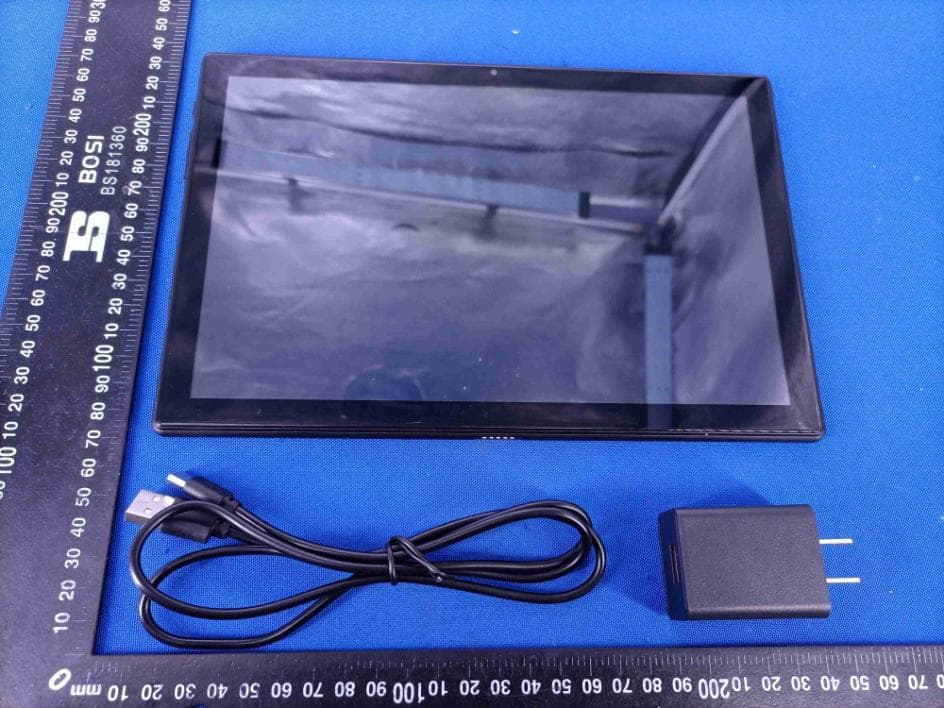
Click to zoom
Application Details
- Equipment Class
- NII - Unlicensed National Information Infrastructure TX
- Date of Grant
- Jul 29, 2021
- Application Purpose
- Original Equipment
- Date of Application
- Jul 29, 2021
- Equipment Note
- Tablet PC
- Frequency Range
- 5745.00000000 - 5825.00000000
- Country
- China
Documents & Files
Document Text
Text extracted from the exhibit documents filed with the FCC. Open a document above to read the original.
Users Manual
USER MANUAL H30 Tablet PC V1.0 Browse the web Visit your favorite websites. Check your E-mail Keep in touch with friends and families. Make watching your favorite videos easier with the YouTube app Explore brand new content, music, news and more with the official YouTube app. Download your favorite apps on Google Play Discover thousands of apps such as music, movies, TV, books, magazines, apps and games all on Google Play (Customers need to download these apps on Google Play). Connect to the Internet wirelessly With high-speed Wi fi802.11 ac/b/g/n (2.4GHz/5GHz) networking, you can enjoy your media library anytime and anywhere. Battery(6000mAh) makes you feel free to listen popular music, watch videos, and search photos. MicroSD memory card reader Increase your storage capacity (up to 128GB supported). Built-in camera Convenient front-facing camera 2MP/rear camera 5MP (support flash). Automatic orientation detection Read any way you want, the display adjusts automatically! FEATURES 2 UNIT AT A GLAN TF/SIM card slots Headphone Jack Rear Camera Power Button Flash VOL +/VOL - Reset USB-C Port Docking Connector Speaker 1 2 3 4 5 6 7 8 9 10 11 1 2 4 5 8 9 3 11 10 7 6 Front Camera 3 GETTING STARTED To turn on the tablet: Press and hold the power button until the LCD screen turns on. Wait until the Home screen appears, the tablet is now ready for use. To turn off the tablet: 1. Press and hold the power button until the Device Options menu appears. 2. Tap “Power off ’’ to turn o ffthe tablet. Turning on/off the screen (Sleep mode) When the tablet is on, you can turn o ffthe screen to save battery power. Simply press the power button once to turn the screen off. Press the power button again to turn the screen back on. To save battery power, the screen can be set to turn o ffautomatically when the tablet is not in use (between 15 seconds and 30 minutes). To change the screen time out, tap Settings →Display → Screen timeout. Changing the language You can change the display language to your preferred language at any time. 1. Tap Settings → System → Languages & input → Languages → Add a language. 2. Select your preferred language from the list by tapping on it. If prompted, select the region for your chosen language. 10:00 Turning on/o ffthe tablet 3. Touch and hold your preferred language and drag it to the top of the list. To remove a language from the list, tap " "→ Remove, mark the language you would like to remove, and tap " ". Home Screen ① Back: Press to check the previous operating display. ② Home Screen: Press to go to the home screen. ③ Background: Press to check applications running in the background. Closing idle apps may help improve performance. ④ Application Panel: Swipe up to check all available applications. Wallpaper 1. On your tablet's home screen, touch and hold an empty space. 2. Tap Wallpapers. 3. Pick your wallpaper. 4. Tap Set wallpaper. 5. If available, pick which screen(s) show the wallpaper. Widgets 1. On your tablet's home screen, touch and hold an empty space. 2. Tap "Widgets". Tip: 1. To make a folder on the home screen, drag an app or a shortcut on top of another. To rename the folder, tap the folder, tap "Unnamed Folder", and then enter the new name. 2. To access the quick notification settings, swipe down from the top of your screen. Screen Lock Set a screen lock to secure your tablet. Go to Settings, tap "Security" → "Screen lock", and select a mode from None, Swipe, Pattern, PIN and Password. You can create a Backup PIN as a safety measure in case you forget your code. 4 Unlocking the Screen When the screen turns off, you will have to unlock the screen when you turn it back on. To unlock the screen, swipe up the lock icon. Taking a Screenshot Press and hold the power button and volume down button at the same time to take a screenshot. The screenshots will be saved in the photos file. 5 6 ABOUT APPLICATIONS To open an application, tap the application icon on the home screen or swipe up to check all available applications. The screen shown above is for illustrative purposes only. We reserve the right to modify and improve the final list of applications available on the tablet. Pre-installed Applications Some applications have been installed on your tablet for your convenience. These applications include: Browse the web. Perform simple mathematical operations. Take pictures or videos with the camera. Check your e-mail. Play music. Access the Settings menu to adjust the tablet’s options. INSTALLING APPLICATIONS You can also download and install additional applications from Google Play, the web browser, or other sources. To download apps from sources other than Google Play, your tablet must be set to allow app installations from unknown sources. Go to Settings, tap "Apps & notifications" → "Advanced" → "Special app access" → "Install unknown apps". Select the app then tap the Allow from this source switch to turn on or off. Note: 1. Users are responsible for all charges from specific apps if it is necessary. 2. Manufacturers/sellers are not responsible for apps that are incompatible with the device. 3. In some cases, there may be no icon in the App Panel after an app is installed. Possible reasons may be that this app is not compatible with your OS or the downloaded file is a broken one so you may need to download a full version. If you install and use an OS other than the one provided by the manufacturer, it may cause your device to malfunction, therefore, your device will no longer be covered by the warranty in this condition CONNECTING TO A Wi fiNETWORK The Notification bar displays icons that indicate your tablet’s Wi fistatus. Notification that an open Wi finetwork is in range. Connected to a Wi finetwork (waves indicate connection strength). [no icon] There are no Wi finetworks in range, or the Wi firadio is off. 1. Turning on Wifi a. Swipe up on the screen and tap Settings. b. Tap Network & internet and then Wifi. c. Turn on Use Wifi. 7 Your device will automatical…
Text truncated - open the document above for the full version.
Cover Letter(s)
Shenzhen Hui Bao Xiang Technology Co., Ltd FCC Software Configuration Control Declaration Date: Jul. 12, 2021 Federal Communications Commission 7435 Oakland Mills Road Columbia, MD 21046 USA A ttn: OET Dept. Product/ Model Number: Tablet PC / H30, H10, H10 S, H10 Plus, H10 Pro, H10 Power, H10 Air, H20, H20 S, H20 Plus, H20 Pro, H20 Power, H20 Air, H30 S, H30 Plus, H30 Pro, H30 Power, H30 Air, H40, H40 S, H40 Plus, H40 Pro, H40 Power, H40 Air, H50, H50 S, H50 Plus, H50 Pro, H50 Power, H50 Air, H10E, H20E, H30E, H40E, H50E, T10, T10 S, T10 E, T10 Plus, T10 Pro, T10 Air, T10 E, T11, T11 S, T11 E, T11 Plus, T11 Pro, T11 Air, T11 E, H7, H7 S, H7 Plus, H7 Plus, H7 Pro, H7 Air, H7 E, H8, H8 S, H8 Plus, H8 Plus, H8 Pro, H8 Air, H8 E, M7, M7 S, M 7 Plus, M7Plus, M7 Pro, M7 Air, M7 E, M8, M8 S, M8 Plus, M8 Plus, M8 Pro, M8 Air, M8 E, M9, M9 S, M9 Plus, M9 Plus, M9 Pro, M9 Air, M9 E, M10, M10 S, M10 Plus, M10 Plus, M10 Pro, M10 Air, M10 E, M11, M11 S, M11 Plus, M11 Plus, M11 Pro, M11 Air, M11 E, M12, M12 S, M12 Plus, M12 Plus, M12 Pro, M12 Air, M12 E Regarding FCC Country Code S election guidelines identified in KDB 594280 D02 U-NII Device Security v01r03. “All applications for equipment authorization for transmitters that can have radio parameters, or other technical parameters, reported to the Commission set by software must have an attestation indicating that no third party will have software, or configuration control, to program the device out of compliance of the technical rules under which it has been certified.” We declare that no third party will have software, or configuration control, to program the device out of compliance of the technical rules under which it has been certified. Signature: Name: Mao Wei Company Name: Shenzhen Hui Bao Xiang Technology Co., Ltd Address: 5001, West Block, Veteran Building, 3012 Xingye Road, Xixiang Street, Baoan District, Shenzhen, China Tel / Fax: +86-0755-85271822/N/A E-Mail: [email protected]
Cover Letter(s)
Shenzhen Hui Bao Xiang Technology Co., Ltd Office of Engineering Technology Federal Communications Commission 7435 Oakland Mills Road Columbia, MD 21046 USA Date: 2021-07-12 Subject; Request for Long Term Confidentiality FCC ID: 2AZ4C2021 To Whom It May Concern, Pursuant to the provisions of the Commission’s rules Title 47 Sections §0.457 and §0.459, we are requesting the Commission to withhold the following attachment(s) as confidential documents from public disclosure indefinitely. These documents contain detailed system and equipment descriptions and are considered as proprietary information in operation of the equipment. The public disclosure of these documents might be harmful to our company and would give competitors an unfair advantage in the market. Schematic Diagram Block Diagram Parts List Operational Description Tune-up Procedure Software security operational description It is our understanding that all measurement test reports, FCC ID label format and correspondence during the certification review process cannot be granted as confidential documents and this information will be available for public review once the grant of equipment authorization is issued. Sincerely, Signature: Name: Mao Wei Title: General Manager
Cover Letter(s)
Shenzhen Hui Bao Xiang Technology Co., Ltd 5001, West Block, Veteran Building, 3012 Xingye Road, Xixiang Street, Baoan District, Shenzhen, China Statement Product: Tablet PC Model: H30 Additional Model: H10, H10 S, H10 Plus, H10 Pro, H10 Power, H10 Air, H20, H20 S, H20 Plus, H20 Pro, H20 Power, H20 Air, H30 S, H30 Plus, H30 Pro, H30 Power, H30 Air, H40, H40 S, H40 Plus, H40 Pro, H40 Power, H40 Air, H50, H50 S, H50 Plus, H50 Pro, H50 Power, H50 Air, H10E, H20E, H30E, H40E, H50E, T10, T10 S, T10 E, T10 Plus, T10 Pro, T10 Air, T10 E, T11, T11 S, T11 E, T11 Plus, T11 Pro, T11 Air, T11 E, H7, H7 S, H7 Plus, H7 Plus, H7 Pro, H7 Air, H7 E, H8, H8 S, H8 Plus, H8 Plus, H8 Pro, H8 Air, H8 E, M7, M7 S, M7 Plus, M7Plus, M7 Pro, M7 Air, M7 E, M8, M8 S, M8 Plus, M8 Plus, M8 Pro, M8 Air, M8 E, M9, M9 S, M9 Plus, M9 Plus, M9 Pro, M9 Air, M9 E, M10, M10 S, M10 Plus, M10 Plus, M10 Pro, M10 Air, M10 E, M11, M11 S, M11 Plus, M11 Plus, M11 Pro, M11 Air, M11 E, M12, M12 S, M12 Plus, M12 Plus, M12 Pro, M12 Air, M12 E Trademark : VGKE We hereby state that All models above are identical in interior structure, electrical circuits and components, and just model names are different for the marketing requirement. Your assistance on this matter is highly appreciated. Yours sincerely, Signature: Date: 202107/12 Name: Mao Wei Company Name: Shenzhen Hui Bao Xiang Technology Co., Ltd Address: 5001, West Block, Veteran Building, 3012 Xingye Road, Xixiang Street, Baoan District, Shenzhen, China Tel / Fax: +86-0755-85271822/N/A E-Mail: [email protected]
Cover Letter(s)
Shenzhen Hui Bao Xiang Technology Co., Ltd Agent Authorization Company: Shenzhen Hui Bao Xiang Technology Co., Ltd Address: 5001, West Block, Veteran Building, 3012 Xingye Road, Xixiang Street, Baoan District, Shenzhen, China Product Name: Tablet PC Model Number(s): H30, H10, H10 S, H10 Plus, H10 Pro, H10 Power, H10 Air, H20, H20 S, H20 Plus, H20 Pro, H20 Power, H20 Air, H30 S, H30 Plus, H30 Pro, H30 Power, H30 Air, H40, H40 S, H40 Plus, H40 Pro, H40 Power, H40 Air, H50, H50 S, H50 Plus, H50 Pro, H50 Power, H50 Air, H10E, H20E, H30E, H40E, H50E, T10, T10 S, T10 E, T10 Plus, T10 Pro, T10 Air, T10 E, T11, T11 S, T11 E, T11 Plus, T11 Pro, T11 Air, T11 E, H7, H7 S, H7 Plus, H7 Plus, H7 Pro, H7 Air, H7 E, H8, H8 S, H8 Plus, H8 Plus, H8 Pro, H8 Air, H8 E, M7, M7 S, M7 Plus, M7Plus, M7 Pro, M7 Air, M7 E, M8, M8 S, M8 Plus, M8 Plus, M8 Pro, M8 Air, M8 E, M9, M9 S, M9 Plus, M9 Plus, M9 Pro, M9 Air, M9 E, M10, M10 S, M10 Plus, M10 Plus, M10 Pro, M10 Air, M10 E, M11, M11 S, M11 Plus, M11 Plus, M11 Pro, M11 Air, M11 E, M12, M12 S, M12 Plus, M12 Plus, M12 Pro, M12 Air, M12 E Product Description: Tablet PC We authorize MiCOM Labs Inc., 575 Boulder Court, Pleasanton, California 94566, USA, to act on our behalf on all matters concerning the certification of above named equipment. We declare that MiCOM Labs Inc. is allowed to forward all information related to the approval and certification of equipment to the regulatory agencies as required and to discuss any issues concerning the approval application. Any and all acts carried out by MiCOM Labs on our behalf shall have the same effect as acts of our own. Signature: Date: 2021-07-12 Name: Mao Wei Title: General Manager Company: Shenzhen Hui Bao Xiang Technology Co., Ltd
External Photos
Page 1 of 4 Appendix C: Photographs of EUT Product: Tablet PC Model: H30 External Photos Page 2 of 4 Page 3 of 4 Page 4 of 4
ID Label/Location Info
Label Artwork and Location Model: H30 Label: Size: L*W=52*30mm Tablet PC Model: H30 FCC ID: 2AZ4C2021 This device complies with part 15 of the FCC rules. Operation is subject to the following two conditions (1)this device may not cause harmful interference, and (2) this device must accept any interference received, including interference that may cause undesired operation. Location
Internal Photos
Page 1 of 4 Appendix C: Photographs of EUT Product: Tablet PC Model: H30 Internal Photos BT/WIFI ANT GSM/WCDMA/ LTE Main ANT Page 2 of 4 GSM/WCDMA/ LTE DEV ANT Page 3 of 4 Page 4 of 4
RF Exposure Info
Hotline: 400-6611-140 Tel: 86-755-27673339 Fax: 86-755-27673332 http://www.tct-lab.com SAR TEST REPORT FCC ID. ............................ : 2AZ4C2021 Test Report No. ............... : TCT210519E006 Date of issue ................... : Jul. 02, 2021 Testing laboratory .......... : SHENZHEN TONGCE TESTING LAB Testing location/ address: TCT Testing Industrial Park Fuqiao 5th Industrial Zone, Fuhai Street, Bao'an District Shenzhen, Guangdong, 518103, People's Republic of China Applicant's name ............ : Shenzhen Hui Bao Xiang Technology Co., Ltd Address ........................... : 5001, West Block, Veteran Building, 3012 Xingye Road, Xixiang Street, Baoan Distict, Shenzhen, China Manufacturer's name ... : Shenzhen Hui Bao Xiang Technology Co., Ltd Address ........................... : 5001, West Block, Veteran Building, 3012 Xingye Road, Xixiang Street, Baoan Distict, Shenzhen, China Test item description ..... : Tablet PC Trade Mark ...................... : VGKE Model/Type reference..... : Refer to model list of page 4 SAR Max. Values..............: 0.74 W/Kg (1g) for Body-worn Date of receipt of test item ......................................... : Jun. 10, 2021 Date (s) of performance of test ................................... : See dates for each test case Tested by (+signature) ... : karl Check by (+signature) .... : Beryl Zhao Approved by (+signature): Tomsin General disclaimer: This report shall not be reproduced except in full, without the written approval of SHENZHEN TONGCE TESTING LAB. This document may be altered or revised by SHENZHEN TONGCE TESTING LAB personnel only, and shall be noted in the revision section of the document. The test results in the report only apply to the tested sample. Report No.: TCT210519E006 Page 2 of 191 Hotline: 400-6611-140 Tel: 86-755-27673339 Fax: 86-755-27673332 http://www.tct-lab.com TABLE OF CONTENTS 1. General Product Information ..................................................................................................................................... 3 1.1. EUT description ................................................................................................................................................. 3 1.2. Model(s) list ....................................................................................................................................................... 4 2. Test standard .............................................................................................................................................................. 5 3. Facilities and Accreditations ..................................................................................................................................... 5 3.1. Facilities ............................................................................................................................................................. 5 3.2. Location ............................................................................................................................................................. 5 3.3. Environment Condition: ................................................................................................................................... 5 4. Test Result Summary ................................................................................................................................................. 6 5. RF Exposure Limit ...................................................................................................................................................... 7 6. SAR Measurement System Configuration ................................................................................................................ 8 6.1. SAR Measurement Set-up ................................................................................................................................ 8 6.2. E-field Probe ...................................................................................................................................................... 9 6.3. Phantom ............................................................................................................................................................. 9 6.4. Device Holder .................................................................................................................................................. 10 6.5. Data Storage and Evaluation .......................................................................................................................... 11 6.6. Position of the wireless device in relation to the phantom ......................................................................... 12 6.7. Tissue Dielectric Parameters ......................................................................................................................... 15 6.8. Tissue-equivalent Liquid Properties ............................................................................................................. 16 6.9. System Check .................................................................................................................................................. 17 7. Measurement Procedure .......................................................................................................................................... 18 8. Conducted Output Power ........................................................................................................................................ 21 9. Exposure Position Consideration ........................................................................................................................... 35 9.1. EUT Antenna Location .................................................................................................................................... 35 9.2. Test Position Consideration ..........................................................................................................…
Text truncated - open the document above for the full version.
RF Exposure Info
Report No.: TCT210519E006 Page 103 of 191 Hotline: 400-6611-140 Tel: 86-755-27673339 Fax: 86-755-27673332 http://www.tct-lab.com Dielectric Probe Calibration Report No.: TCT210519E006 Page 104 of 191 Hotline: 400-6611-140 Tel: 86-755-27673339 Fax: 86-755-27673332 http://www.tct-lab.com Report No.: TCT210519E006 Page 105 of 191 Hotline: 400-6611-140 Tel: 86-755-27673339 Fax: 86-755-27673332 http://www.tct-lab.com Report No.: TCT210519E006 Page 106 of 191 Hotline: 400-6611-140 Tel: 86-755-27673339 Fax: 86-755-27673332 http://www.tct-lab.com Report No.: TCT210519E006 Page 107 of 191 Hotline: 400-6611-140 Tel: 86-755-27673339 Fax: 86-755-27673332 http://www.tct-lab.com Report No.: TCT210519E006 Page 108 of 191 Hotline: 400-6611-140 Tel: 86-755-27673339 Fax: 86-755-27673332 http://www.tct-lab.com Report No.: TCT210519E006 Page 109 of 191 Hotline: 400-6611-140 Tel: 86-755-27673339 Fax: 86-755-27673332 http://www.tct-lab.com Report No.: TCT210519E006 Page 110 of 191 Hotline: 400-6611-140 Tel: 86-755-27673339 Fax: 86-755-27673332 http://www.tct-lab.com 15. Appendix D: Dipole Calibration Report SID 750 Report No.: TCT210519E006 Page 111 of 191 Hotline: 400-6611-140 Tel: 86-755-27673339 Fax: 86-755-27673332 http://www.tct-lab.com Report No.: TCT210519E006 Page 112 of 191 Hotline: 400-6611-140 Tel: 86-755-27673339 Fax: 86-755-27673332 http://www.tct-lab.com Report No.: TCT210519E006 Page 113 of 191 Hotline: 400-6611-140 Tel: 86-755-27673339 Fax: 86-755-27673332 http://www.tct-lab.com Report No.: TCT210519E006 Page 114 of 191 Hotline: 400-6611-140 Tel: 86-755-27673339 Fax: 86-755-27673332 http://www.tct-lab.com Report No.: TCT210519E006 Page 115 of 191 Hotline: 400-6611-140 Tel: 86-755-27673339 Fax: 86-755-27673332 http://www.tct-lab.com Report No.: TCT210519E006 Page 116 of 191 Hotline: 400-6611-140 Tel: 86-755-27673339 Fax: 86-755-27673332 http://www.tct-lab.com Report No.: TCT210519E006 Page 117 of 191 Hotline: 400-6611-140 Tel: 86-755-27673339 Fax: 86-755-27673332 http://www.tct-lab.com Report No.: TCT210519E006 Page 118 of 191 Hotline: 400-6611-140 Tel: 86-755-27673339 Fax: 86-755-27673332 http://www.tct-lab.com Report No.: TCT210519E006 Page 119 of 191 Hotline: 400-6611-140 Tel: 86-755-27673339 Fax: 86-755-27673332 http://www.tct-lab.com Report No.: TCT210519E006 Page 120 of 191 Hotline: 400-6611-140 Tel: 86-755-27673339 Fax: 86-755-27673332 http://www.tct-lab.com Report No.: TCT210519E006 Page 121 of 191 Hotline: 400-6611-140 Tel: 86-755-27673339 Fax: 86-755-27673332 http://www.tct-lab.com SID 835 Report No.: TCT210519E006 Page 122 of 191 Hotline: 400-6611-140 Tel: 86-755-27673339 Fax: 86-755-27673332 http://www.tct-lab.com Report No.: TCT210519E006 Page 123 of 191 Hotline: 400-6611-140 Tel: 86-755-27673339 Fax: 86-755-27673332 http://www.tct-lab.com Report No.: TCT210519E006 Page 124 of 191 Hotline: 400-6611-140 Tel: 86-755-27673339 Fax: 86-755-27673332 http://www.tct-lab.com Report No.: TCT210519E006 Page 125 of 191 Hotline: 400-6611-140 Tel: 86-755-27673339 Fax: 86-755-27673332 http://www.tct-lab.com Report No.: TCT210519E006 Page 126 of 191 Hotline: 400-6611-140 Tel: 86-755-27673339 Fax: 86-755-27673332 http://www.tct-lab.com Report No.: TCT210519E006 Page 127 of 191 Hotline: 400-6611-140 Tel: 86-755-27673339 Fax: 86-755-27673332 http://www.tct-lab.com Report No.: TCT210519E006 Page 128 of 191 Hotline: 400-6611-140 Tel: 86-755-27673339 Fax: 86-755-27673332 http://www.tct-lab.com Report No.: TCT210519E006 Page 129 of 191 Hotline: 400-6611-140 Tel: 86-755-27673339 Fax: 86-755-27673332 http://www.tct-lab.com Report No.: TCT210519E006 Page 130 of 191 Hotline: 400-6611-140 Tel: 86-755-27673339 Fax: 86-755-27673332 http://www.tct-lab.com Report No.: TCT210519E006 Page 131 of 191 Hotline: 400-6611-140 Tel: 86-755-27673339 Fax: 86-755-27673332 http://www.tct-lab.com Report No.: TCT210519E006 Page 132 of 191 Hotline: 400-6611-140 Tel: 86-755-27673339 Fax: 86-755-27673332 http://www.tct-lab.com SID1800 Report No.: TCT210519E006 Page 133 of 191 Hotline: 400-6611-140 Tel: 86-755-27673339 Fax: 86-755-27673332 http://www.tct-lab.com Report No.: TCT210519E006 Page 134 of 191 Hotline: 400-6611-140 Tel: 86-755-27673339 Fax: 86-755-27673332 http://www.tct-lab.com Report No.: TCT210519E006 Page 135 of 191 Hotline: 400-6611-140 Tel: 86-755-27673339 Fax: 86-755-27673332 http://www.tct-lab.com Report No.: TCT210519E006 Page 136 of 191 Hotline: 400-6611-140 Tel: 86-755-27673339 Fax: 86-755-27673332 http://www.tct-lab.com Report No.: TCT210519E006 Page 137 of 191 Hotline: 400-6611-140 Tel: 86-755-27673339 Fax: 86-755-27673332 http://www.tct-lab.com Report No.: TCT210519E006 Page 138 of 191 Hotline: 400-6611-140 Tel: 86-755-27673339 Fax: 86-755-27673332 http://www.tct-lab.com Report No.: TCT210519E006 Page 139 of 191 Hotline: 400-6611-140 Tel: 86-755-27673339 Fax: 86-755-27673332 http://www.tct-lab.com Report No.: TCT210519E006 Page 140 of 191 Hotline: 400-6611-140 Tel: 86-755-27673339 Fax: 86-755-27673332 http://www.tct-lab.com Report No.: TCT210519E006 Page 141 of 191 Hotline: 400-6611-140 Tel: 86-755-27673339 Fax: 86-755-27673332 http://www.tct-lab.com Report No.: TCT210519E006 Page 142 of 191 Hotline: 400-6611-140 Tel: 86-755-27673339 Fax: 86-755-27673332 http://www.tct-lab.com Report No.: TCT210519E006 Page 143 of 191 Hotline: 400-6611-140 Tel: 86-755-27673339 Fax: 86-755-27673332 http://www.tct-lab.com SID1900 Report No.: TCT210519E006 Page 144 of 191 Hotline: 400-6611-140 Tel: 86-755-27673339 Fax: 86-755-27673332 http://www.tct-lab.com Report No.: TCT210519E006 Page 145 of 191 Hotline: 400-6611-140 Tel: 86-755-27673339 Fax: 86-755-27673332 http://www.tct-lab.com Report No.: TCT210519E006 Page 146 of 191 Hotline: 400-6611-140 Tel: 86-755-27673339 Fax: 86-755-27673332 http://www.tct-lab.com Report No.: TCT210519E006 Page 147 of 191 Hotline: 400-6611-140 Tel: 86-755-27673339 Fax: 86-755-27673332 http://www.tct-lab.com Report No.: TCT210519E006 Page 148 of 191 Hotline: 400-6611-140 Tel: 86-755-27673339 Fax: 86…
Text truncated - open the document above for the full version.
RF Exposure Info
Report No.: TCT210519E006 Page 162 of 191 Hotline: 400-6611-140 Tel: 86-755-27673339 Fax: 86-755-27673332 http://www.tct-lab.com Report No.: TCT210519E006 Page 163 of 191 Hotline: 400-6611-140 Tel: 86-755-27673339 Fax: 86-755-27673332 http://www.tct-lab.com Report No.: TCT210519E006 Page 164 of 191 Hotline: 400-6611-140 Tel: 86-755-27673339 Fax: 86-755-27673332 http://www.tct-lab.com Report No.: TCT210519E006 Page 165 of 191 Hotline: 400-6611-140 Tel: 86-755-27673339 Fax: 86-755-27673332 http://www.tct-lab.com SID2600 Report No.: TCT210519E006 Page 166 of 191 Hotline: 400-6611-140 Tel: 86-755-27673339 Fax: 86-755-27673332 http://www.tct-lab.com Report No.: TCT210519E006 Page 167 of 191 Hotline: 400-6611-140 Tel: 86-755-27673339 Fax: 86-755-27673332 http://www.tct-lab.com Report No.: TCT210519E006 Page 168 of 191 Hotline: 400-6611-140 Tel: 86-755-27673339 Fax: 86-755-27673332 http://www.tct-lab.com Report No.: TCT210519E006 Page 169 of 191 Hotline: 400-6611-140 Tel: 86-755-27673339 Fax: 86-755-27673332 http://www.tct-lab.com Report No.: TCT210519E006 Page 170 of 191 Hotline: 400-6611-140 Tel: 86-755-27673339 Fax: 86-755-27673332 http://www.tct-lab.com Report No.: TCT210519E006 Page 171 of 191 Hotline: 400-6611-140 Tel: 86-755-27673339 Fax: 86-755-27673332 http://www.tct-lab.com Report No.: TCT210519E006 Page 172 of 191 Hotline: 400-6611-140 Tel: 86-755-27673339 Fax: 86-755-27673332 http://www.tct-lab.com Report No.: TCT210519E006 Page 173 of 191 Hotline: 400-6611-140 Tel: 86-755-27673339 Fax: 86-755-27673332 http://www.tct-lab.com Report No.: TCT210519E006 Page 174 of 191 Hotline: 400-6611-140 Tel: 86-755-27673339 Fax: 86-755-27673332 http://www.tct-lab.com Report No.: TCT210519E006 Page 175 of 191 Hotline: 400-6611-140 Tel: 86-755-27673339 Fax: 86-755-27673332 http://www.tct-lab.com Report No.: TCT210519E006 Page 176 of 191 Hotline: 400-6611-140 Tel: 86-755-27673339 Fax: 86-755-27673332 http://www.tct-lab.com SID 5G Report No.: TCT210519E006 Page 177 of 191 Hotline: 400-6611-140 Tel: 86-755-27673339 Fax: 86-755-27673332 http://www.tct-lab.com Report No.: TCT210519E006 Page 178 of 191 Hotline: 400-6611-140 Tel: 86-755-27673339 Fax: 86-755-27673332 http://www.tct-lab.com Report No.: TCT210519E006 Page 179 of 191 Hotline: 400-6611-140 Tel: 86-755-27673339 Fax: 86-755-27673332 http://www.tct-lab.com Report No.: TCT210519E006 Page 180 of 191 Hotline: 400-6611-140 Tel: 86-755-27673339 Fax: 86-755-27673332 http://www.tct-lab.com Report No.: TCT210519E006 Page 181 of 191 Hotline: 400-6611-140 Tel: 86-755-27673339 Fax: 86-755-27673332 http://www.tct-lab.com Report No.: TCT210519E006 Page 182 of 191 Hotline: 400-6611-140 Tel: 86-755-27673339 Fax: 86-755-27673332 http://www.tct-lab.com Report No.: TCT210519E006 Page 183 of 191 Hotline: 400-6611-140 Tel: 86-755-27673339 Fax: 86-755-27673332 http://www.tct-lab.com Report No.: TCT210519E006 Page 184 of 191 Hotline: 400-6611-140 Tel: 86-755-27673339 Fax: 86-755-27673332 http://www.tct-lab.com Report No.: TCT210519E006 Page 185 of 191 Hotline: 400-6611-140 Tel: 86-755-27673339 Fax: 86-755-27673332 http://www.tct-lab.com Report No.: TCT210519E006 Page 186 of 191 Hotline: 400-6611-140 Tel: 86-755-27673339 Fax: 86-755-27673332 http://www.tct-lab.com Report No.: TCT210519E006 Page 187 of 191 Hotline: 400-6611-140 Tel: 86-755-27673339 Fax: 86-755-27673332 http://www.tct-lab.com Report No.: TCT210519E006 Page 188 of 191 Hotline: 400-6611-140 Tel: 86-755-27673339 Fax: 86-755-27673332 http://www.tct-lab.com Report No.: TCT210519E006 Page 189 of 191 Hotline: 400-6611-140 Tel: 86-755-27673339 Fax: 86-755-27673332 http://www.tct-lab.com 16. Appendix E: SAR SYSTEM VALIDATION Per FCC KDB 865664 D02v01, SAR system validation status should be documented to confirm measurement accuracy. The SAR systems (including SAR probes, system components and software versions) used for this device were validated against its performance specifications prior to the SAR measurements. Reference dipoles were used with the required tissue- equivalent media for system validation, according to the procedures outlined in FCC KDB 865664 D01 v01 and IEEE 1528-2013. Since SAR probe calibrations are frequency dependent, each probe calibration point was validated at a frequency within the valid frequency range of the probe calibration point, using the system that normally operates with the probe for routine SAR measurements and according to the required tissue-equivalent media. A tabulated summary of the system validation status including the validation date(s), measurement frequencies, SAR probes and tissue dielectric parameters has been included. SAR System Validation Summary Date Freq. [MHz] Probe S/N Tissu e type COND. PERM. COND. PERM. CW Validation Mod. Validation (σ) (εr) sensitivity Probe linearity Probe isotropy Mod. t…
Text truncated - open the document above for the full version.
Contact Information
Applicant
Mao Wei(General Manager)
Technical Contact
Test Firm
SHENZHEN TONGCE TESTING LABBeryl Zhao
[email protected]+8675527208735
Technical Specifications
| # | Rule Parts | Frequency Range | Power Output |
|---|---|---|---|
| 2 | 15E | 5.75 GHz - 5.83 GHz | 17.80 mW |
Other Applications from Shenzhen Hui Bao Xiang Technology Co., Ltd
2AZ4C2021M
Jul 20, 2021Laptop
Equipment Class
DSS - Part 15 Spread Spectrum Transmitter