2AZ76IF-SR-D01Jump Rope
Shenzhen AG Sports Equipment Co.,Ltd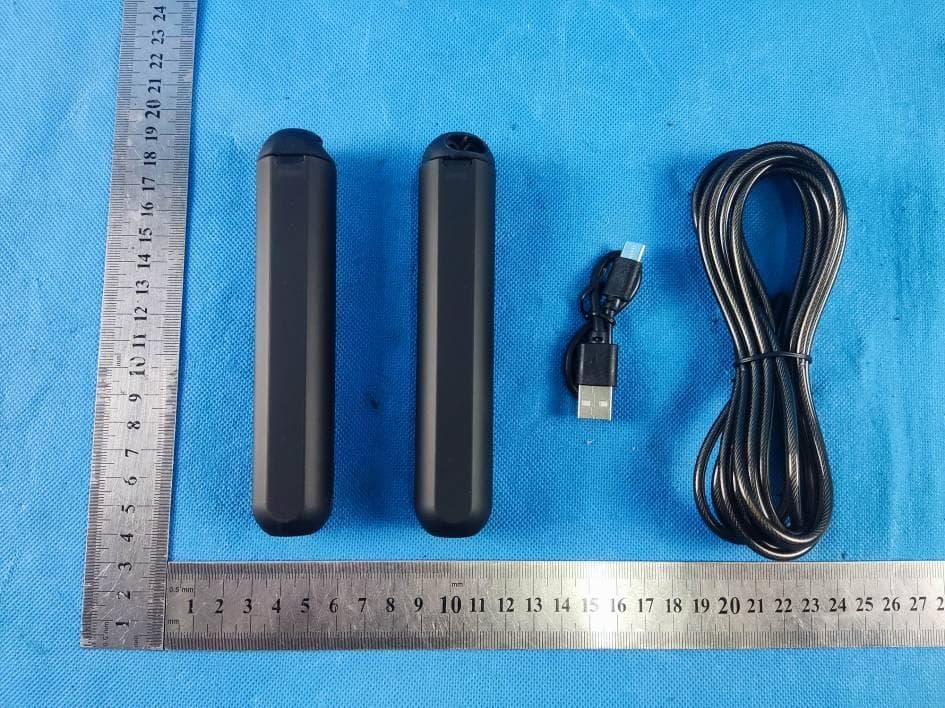
Click to zoom
Application Details
- Equipment Class
- DTS - Digital Transmission System
- Date of Grant
- Aug 10, 2021
- Application Purpose
- Original Equipment
- Date of Application
- Aug 10, 2021
- Equipment Note
- Jump Rope
- Frequency Range
- 2402.00000000 - 2480.00000000
- Country
- China
Documents & Files
Document Text
Text extracted from the exhibit documents filed with the FCC. Open a document above to read the original.
Users Manual
Version 1.0 Start Guide SMART JUMP ROPE IF-SR-D01/02 1 Model No.:IF-SR-D01 Model No.:IF-SR-D02 ITEMS 1 x Functional Handle 1 x Rope 1 x Charging Cable 1 x Normal Handle 2 x Rope Lock 1 x Manual IF-SR-D01/02 (v1.0) Start Guide Move It Smart Skipping Rope 2 Product List When using the product for the first time, ensure you charge for the product at least 20 minutes and there is at least 20% remaining power left in the product.(Please see the chapter 10 about battery status checking.) Connect one the end of the providing charge cable to the handle charging port and the other to a 5V adapter to safely charge the device. When Charging, the LED Light will light red continuously. When fully charged, the LED light will turn blue. To prolong the battery lifespan of your device, kindly avoid overcharging the battery. 1.How to activate product 3 Follow the steps below to assemble the skipping rope. 2. Assembling 4 5 5. Initiating Bluetooth Turn on Bluetooth on your mobile, ensure that your mobile is made discoverable. With Googles’s updated system requirements, Android users may be prompted to turn their Location Service on in order to ensure a stable connection on Bluetooth. *Move It app is only compatible for Android 4.4 or iOS 9.0 higher. 4.Registered Account For new members Follow the instructions in the app to complete the setup. For existing members Login to your account accordingly. 5 To download the “Move It” app, you can either scan the QR code below or search “Move It” in your mobile app store. 3. Download Move it APP 6 1 2 Login to your account and pair the device to your mobile by clicking: Me > Device Management > Move It Smart Rope (AG). 6. Pairing the device 7 3 Choose the device “Move It Smart Rope (AG)”. 8 4 Click“Pair”to bond the device smart jump rope(AG). 9 5 6 Scan for the skipping rope and select your skipping rope to pair to your mobile. 10 6 11 It will show “Device Has Bound”when it is paired successfully, and then click “MOVE IT”to return homepage. 2 1 At the main menu, click by Workouts > Jump Rope V2, and select any the mode of “Free Account”,“Rep Countdown”or“Time Attack”to start your workout. 7. Start Workout 12 2 1 3a Mode 1: Free Count Select the mode “Free Count”, the device will be connected automatically to start workout. 13 2 1 3b Mode 2: Rep Countdown Select the mode “Rep Countdown”, the device will be connected automatically to start workout. 14 Regarding custom setting of “Rep Countdown”, please follow step below, and input numbers of reps as you want, confirm and start to workout. 15 2 1 3c 16 Mode 3: Time Attack Select the mode “Track Attack” , input duration number of 00:30(sec), 01:00(min), 05:00(mins), 10:00(mins) or Custom to start workout. 17 Regarding custom setting of ”Time Track”, please follow step below, and input time target as you want, confirm and start to workout. 2 1 3 18 At the main menu, please select the mode“ Challenge ”to Join a challenge. 7a. Join a Challenge 4 19 For new challenge participants, select the icon “M1” or tap the challenge box to begin the challenge! If your jump rope has not been paired successfully, it will prompt you to initiate Bluetooth pairing with your mobile phone. Otherwise, you will begin the challenge! 2 1 3 At the main menu, please select the mode“ All programs ”to learn to jumping. 8. Learn to jumping 20 Learn to jump following programs guidance. You need to pay for it to unlock the training course. 21 *The smart skipping rope does not support offline data saving, it needs to connect with mobile phone APP to save motion data. Bluetooth Indicator: When the skipping rope and mobile are connected, the LED light will be light up and handle will be vibrated. Stand By The device will enter standby mode after 30 seconds of inactivity.. PS: *The LED display is only compatible for Model No. IF-SR-D01. For the model IF- SR-D02, it is no LED display. On the handle LED screen, the “Rep”and “Time” will display alternately when you are jumping. 9.Instruction 22 COUNT TIME 1 2 You can check battery status in the APP. It shows the remaining power left in the product. When the handle LED light turn red, the product is in need of a charge. 10. Battery 23 1.Connect the Type C cable to the bottom of the handle to charge with 5V adapter. 2.A full charge takes approximately 1 hour. 3. The LED light will light red continually, and it will be turn blue when it is full charging. 4. To prolong the battery liftspan, it is recommended to charge the device at least once a month. 11. Charging 24 Product Name Model No.: Build-in Sensor: Battery: Charging Port: Input : Connect: Operation System: Evolving Contents: Model No.: Handle Size: Rope Length: Rope Material: Color: Smart Jump Rope IF-SR-D01/02 L144*D28mm 2.8 Adjustable PVC+ Steel Black Double Hall Sensor 60mAh(3.7v) Li-Ion Type C 5V 1A Bluetooth 4.0 Apple iOS 9.0 or Android 5.0 Yes 12. Specification 25 When you can't use the device properly, try the following: 1. Charge the device to make sure there is sufficient power. 2. Ensure Bluetooth is turned on. 3. Turn off and re-open Bluetooth. 4. Restart your phone. 5. Unpair and re-connect the product to your mobile. *Attention: For Android users, turn on your mobile‘s GPS to boost connectivity with the product. 13. FAQ 26 Warranty 27 Thankyouverymuchforchoosing ourproducts. Accordingtotheprescription,the periodforprotectingtofixour company’sproductisoneyear. (Fromthedaywhenyouhavethe invoice)Duringthisperiod,any belongs toundernormalusage circumstancecausebecauseofthe productquality'sproblemof breakdown,ourcompanywillbe responsibleforgivingfreereplacing. Free replacewon't be given under the following circumstance, * Without a warranty card. (It is Included in the manual.) * The breakdown caused by the manipulation that has not follow the requests of the manual. *The damage caused by the dismantle movement of a non-our company authorized maintainer. * The breakdown, row harm or damaged because of the move or drop * The damage caused by custo…
Text truncated - open the document above for the full version.
Cover Letter(s)
Shenzhen AG Sports Equipment Co.,Ltd Add: No.301 Building 5 Yuantou Lane, Shenzhen, China Date: 2021-8-7 FCC ID: 2AZ76IF-SR-D01 Dear Sir/Madam, We, Shenzhen AG Sports Equipment Co.,Ltd Hereby declares the following statement for Federal Communications Commission, PCB board, circuit, structure and internal of these model(s) are the same, Only model number is different for these model: Product name: Jump Rope Model no.: IF-SR-D01, IF-SR-D02 Sincerely, Name/Title: Linda Bai Company: Shenzhen AG Sports Equipment Co.,Ltd Address: No.301 Building 5 Yuantou Lane, Shenzhen, China Phone: 8618124064220 Fax: 8618124064220 E-Mail: [email protected]
Cover Letter(s)
CONFIDENTIALITY REQUEST for Certification Service in USA Federal Communication Commission Equipment Authorization Division, Application Processing Branch 7435 Oakland Mills Road Columbia, MD 21046 Date:<2021-8-7> Pursuant to Paragraphs §0.457 and 0.459 of the Commission’s Rules (47 C.F.R.) and Section §552(b)(4) of the Freedom of Information Act, we requests confidentiality for the following products: FCC ID Model name 2AZ76IF-SR-D01 IF-SR-D01 For the product stated above, we request that the following information be held confidential; Exhibits Long-Term Confidentiality Short-Term Confidentiality Short-Term Confidentiality Days External Photos Internal Photos Block Diagram Schematics Test Setup Photos User’s Manual Parts List Tune Up Operational Descriptions The long-term confidentiality exhibits contain our trade secrets and proprietary information that could be of benefit to our competitors. The short-term confidentiality on the basis of ensuring that business sensitive information remains confidential until the actual marketing of our new device. If you have any questions, please feel free to contact me at the address shown below. Sincerely, Name/Title: Linda Bai Company: Shenzhen AG Sports Equipment Co.,Ltd Address: No.301 Building 5 Yuantou Lane, Shenzhen, China Phone: 8618124064220 Fax: 8618124064220 E-Mail: [email protected]
External Photos
GTSL202107000126 Global United Technology Services Co., Ltd. No. 123-128, Tower A, Jinyuan Business Building, No.2, Laodong Industrial Zone, Xixiang Road, Baoan District, Shenzhen, Guangdong, China 518102 Telephone: +86 (0) 755 2779 8480 Fax: +86 (0) 755 2779 8960 Page 1 of 4 FCC ID: 2AZ76IF-SR-D01 Product Name: Jump Rope Test Model No.: IF-SR-D01 EUT Constructional Details External EUT Photo Photo 1 Photo 2 GTSL202107000126 Global United Technology Services Co., Ltd. No. 123-128, Tower A, Jinyuan Business Building, No.2, Laodong Industrial Zone, Xixiang Road, Baoan District, Shenzhen, Guangdong, China 518102 Telephone: +86 (0) 755 2779 8480 Fax: +86 (0) 755 2779 8960 Page 2 of 4 Photo 3 Photo 4 GTSL202107000126 Global United Technology Services Co., Ltd. No. 123-128, Tower A, Jinyuan Business Building, No.2, Laodong Industrial Zone, Xixiang Road, Baoan District, Shenzhen, Guangdong, China 518102 Telephone: +86 (0) 755 2779 8480 Fax: +86 (0) 755 2779 8960 Page 3 of 4 Photo 5 Photo 6 GTSL202107000126 Global United Technology Services Co., Ltd. No. 123-128, Tower A, Jinyuan Business Building, No.2, Laodong Industrial Zone, Xixiang Road, Baoan District, Shenzhen, Guangdong, China 518102 Telephone: +86 (0) 755 2779 8480 Fax: +86 (0) 755 2779 8960 Page 4 of 4 Photo 7 ------End------
ID Label/Location Info
FCC ID Label Jump Rope Model: IF-SR-D01 FCC ID: 2AZ76IF-SR-D01 MADE IN CHINA
Internal Photos
GTSL202107000126 Global United Technology Services Co., Ltd. No. 123-128, Tower A, Jinyuan Business Building, No.2, Laodong Industrial Zone, Xixiang Road, Baoan District, Shenzhen, Guangdong, China 518102 Telephone: +86 (0) 755 2779 8480 Fax: +86 (0) 755 2779 8960 Page 1 of 3 FCC ID: 2AZ76IF-SR-D01 Product Name: Jump Rope Test Model No.: IF-SR-D01 EUT Constructional Details Internal EUT Photo Photo 1 Photo 2 Antenna GTSL202107000126 Global United Technology Services Co., Ltd. No. 123-128, Tower A, Jinyuan Business Building, No.2, Laodong Industrial Zone, Xixiang Road, Baoan District, Shenzhen, Guangdong, China 518102 Telephone: +86 (0) 755 2779 8480 Fax: +86 (0) 755 2779 8960 Page 2 of 3 Photo 3 Photo 4 GTSL202107000126 Global United Technology Services Co., Ltd. No. 123-128, Tower A, Jinyuan Business Building, No.2, Laodong Industrial Zone, Xixiang Road, Baoan District, Shenzhen, Guangdong, China 518102 Telephone: +86 (0) 755 2779 8480 Fax: +86 (0) 755 2779 8960 Page 3 of 3 Photo 5 Photo 6 ------End------
RF Exposure Info
RF Exposure evaluation FCC ID: 2AZ76IF-SR-D01 1.1. Applicable Standard According to §1.1307(b)(1), systems operating under the provisions of this section shall be operated in a manner that ensures that the public is not exposed to radio frequency energy level in excess of the Commission’s guidelines. According to §1.1310 and §2.1093 RF exposure requirement KDB447498 v06: Mobile and Portable Devices RF Exposure Procedures and Equipment Authorization Policies 1.2. Requirement According to KDB447498 D01 General RF Exposure Guidance v06 Section 4.3.1 Standalone SAR test exclusion considerations: “Unless specifically required by the published RF exposure KDB procedures, standalone 1-g head or body and 10-g extremity SAR evaluation for general population exposure conditions, by measurement or numerical simulation, is not required when the corresponding SAR Test Exclusion Threshold condition, listed below, is satisfied. These test exclusion conditions are based on source-based time-averaged maximum conducted output power of the RF channel requiring evaluation, adjusted for tune-up tolerance, and the minimum test separation distance required for the exposure conditions.22 The minimum test separation distance is determined by the smallest distance from the antenna and radiating structures or outer surface of the device, according to the host form factor, exposure conditions and platform requirements, to any part of the body or extremity of a user or bystander (see 5) of section 4.1). To qualify for SAR test exclusion, the test separation distances applied must be fully explained and justified by the operating configurations and exposure conditions of the transmitter and applicable host platform requirements, typically in the SAR measurement or SAR analysis report, according to the required published RF exposure KDB procedures. When no other RF exposure testing or reporting is required, a statement of justification and compliance must be included in the equipment approval, in lieu of the SAR report, to qualify for the SAR test exclusion. When required, the device specific conditions described in the other published RF exposure KDB procedures must be satisfied before applying these SAR test exclusion provisions; for example, handheld PTT two-way radios, handsets, laptops & tablets etc.23 “ [(max. power of channel, including tune-up tolerance, mW)/ (min. test separation distance, mm)] · [√f (GHz)] ≤ 3.0 for 1-g SAR and ≤ 7.5 for 10-g extremity SAR, where: • f (GHz) is the RF channel transmit frequency in GHz • Power and distance are rounded to the nearest mW and mm before calculation • The result is rounded to one decimal place for comparison • 3.0 and 7.5 are referred to as the numeric thresholds in the step 2 below The test exclusions are applicable only when the minimum test separation distance is ≤ 50 mm and for transmission frequencies between 100 MHz and 6 GHz. When the minimum test separation distance is < 5 mm, a distance of 5 mm according to 5) in section 4.1 is applied to determine SAR test exclusion. Manufacturing tolerance Bluetooth BLE GFSK (Peak) Channel Channel 1 Channel 20 Channel 40 Target (dBm) 0 0 -1 Tolerance ±(dB) 1.0 1.0 1.0 2. Evaluation Result Standalone Antenna 1 RF output power including tune up Band/Mode f (GHz) Antenna Distance (mm) dBm mW SAR Test Exclusion Threshold SAR Test Exclusion Estimated SAR BT BLE 2.5 5 1 1.26 0.398< 3.0 Yes 0.106 Remark: 1. Output power including tune up tolerance; 2. When the minimum test separation distance is < 5 mm, a distance of 5 mm according to f) in section 4.1 is applied to determine SAR test exclusion. 3. Conclusion The measurement results comply with the FCC Limit per 47 CFR 2.1093 for the uncontrolled RF Exposure and SAR Exclusion Threshold per KDB 447498 v06, No SAR is required. .....................End.........................
Test Report
Global United Technology Services Co., Ltd. Report No.: GTSL202107000126F01 Authorized Signature: Robinson Luo Laboratory Manager This results shown in this test report refer only to the sample(s) tested, this test report cannot be reproduced, except in full, without prior written permission of the company. The report would be invalid without specific stamp of test institute and the signatures of compiler and approver. Page 1 of 34 TEST REPORT Applicant: Shenzhen AG Sports Equipment Co., Ltd Address of Applicant: No.301 Building 5 Yuantou Lane, Shenzhen City, Guangdong Province, China Manufacturer/Factory: Shenzhen AG Sports Equipment Co., Ltd, Address of Manufacturer/Factory: No.301 Building 5 Yuantou Lane, Shenzhen City, Guangdong Province, China Equipment Under Test (EUT) Product Name: Jump Rope Model No.: IF-SR-D01,IF-SR-D02 Trade Mark: AG.sport FCC ID: 2AZ76IF-SR-D01 Applicable standards: FCC CFR Title 47 Part 15 Subpart C Section 15.247 Date of sample receipt: Jun. 03, 2021 Date of Test: Jun. 03, 2021~Jun. 09, 2021 Date of report issued: Jun. 10, 2021 Test Result : PASS * * In the configuration tested, the EUT complied with the standards specified above. Report No.: GTSL202107000126F01 Global United Technology Services Co., Ltd. No. 123-128, Tower A, Jinyuan Business Building, No.2, Laodong Industrial Zone, Xixiang Road, Baoan District, Shenzhen, Guangdong, China 518102 Telephone: +86 (0) 755 2779 8480 Fax: +86 (0) 755 2779 8960 Page 2 of 34 2 Version Version No. Date Description 00 Jun. 10, 2021 Original Prepared By: Date: Jun. 10, 2021 Tested/Project Engineer Check By: Date: Jun. 10, 2021 Reviewer Report No.: GTSL202107000126F01 Global United Technology Services Co., Ltd. No. 123-128, Tower A, Jinyuan Business Building, No.2, Laodong Industrial Zone, Xixiang Road, Baoan District, Shenzhen, Guangdong, China 518102 Telephone: +86 (0) 755 2779 8480 Fax: +86 (0) 755 2779 8960 Page 3 of 34 3 Contents Page 1 COVER PAGE ........................................................................................................................................... 1 2 VERSION ...................................................................................................................................................2 3 CONTENTS ...............................................................................................................................................3 4 TEST SUMMARY ......................................................................................................................................4 5 GENERAL INFORMATION .......................................................................................................................5 5.1 GENERAL DESCRIPTION OF EUT ..........................................................................................................5 5.2 TEST MODE .........................................................................................................................................7 5.3 DESCRIPTION OF SUPPORT UNITS ........................................................................................................7 5.4 DEVIATION FROM STANDARDS ..............................................................................................................7 5.5 ABNORMALITIES FROM STANDARD CONDITIONS ....................................................................................7 5.6 TEST FACILITY ....................................................................................................................................7 5.7 TEST LOCATION ..................................................................................................................................7 5.8 ADDITIONAL INSTRUCTIONS ..................................................................................................................7 6 TEST INSTRUMENTS LIST ......................................................................................................................8 7 TEST RESULTS AND MEASUREMENT DATA .....................................................................................10 7.1 ANTENNA REQUIREMENT ....................................................................................................................10 7.2 CONDUCTED EMISSIONS ....................................................................................................................11 7.3 CONDUCTED OUTPUT POWER ............................................................................................................14 7.4 CHANNEL BANDWIDTH .......................................................................................................................16 7.5 POWER SPECTRAL DENSITY ..............................................................................................................18 7.6 BAND EDGES .....................................................................................................................................20 7.6.1 Conducted Emission Method ......................................................................................................20 7.6.2 Radiated Emission Method .........................................................................................................22 7.7 SPURIOUS EMISSION .........................................................................................................................24 7.7.1 Conducted Emission Method ......................................................................................................24 7.7.2 Radiated Emission Method .........................................................................................................26 8 TEST SETUP PHOTO .............................................................................................................................34 9 EUT CONSTRUCTIONAL DETAILS .......................................................................................................34 Report No.: GTSL202107000126F01 Global U…
Text truncated - open the document above for the full version.
Test Setup Photos
GTSL202107000126 Global United Technology Services Co., Ltd. No. 123-128, Tower A, Jinyuan Business Building, No.2, Laodong Industrial Zone, Xixiang Road, Baoan District, Shenzhen, Guangdong, China 518102 Telephone: +86 (0) 755 2779 8480 Fax: +86 (0) 755 2779 8960 Page 1 of 2 FCC ID: 2AZ76IF-SR-D01 Product Name: Jump Rope Test Model No.: IF-SR-D01 Test Setup Photo Radiated Emission GTSL202107000126 Global United Technology Services Co., Ltd. No. 123-128, Tower A, Jinyuan Business Building, No.2, Laodong Industrial Zone, Xixiang Road, Baoan District, Shenzhen, Guangdong, China 518102 Telephone: +86 (0) 755 2779 8480 Fax: +86 (0) 755 2779 8960 Page 2 of 2 Conducted Emission ------End------
Contact Information
Applicant
Linda Bai
Test Firm
Global United Technology Services Co. Ltd.Robinson Lo
Technical Specifications
| # | Rule Parts | Frequency Range | Power Output |
|---|---|---|---|
| 1 | 15C | 2.40 GHz - 2.48 GHz | 900.00 µW |