2AZLG-AHD01RairKAVE Room
KAVE Industries LLC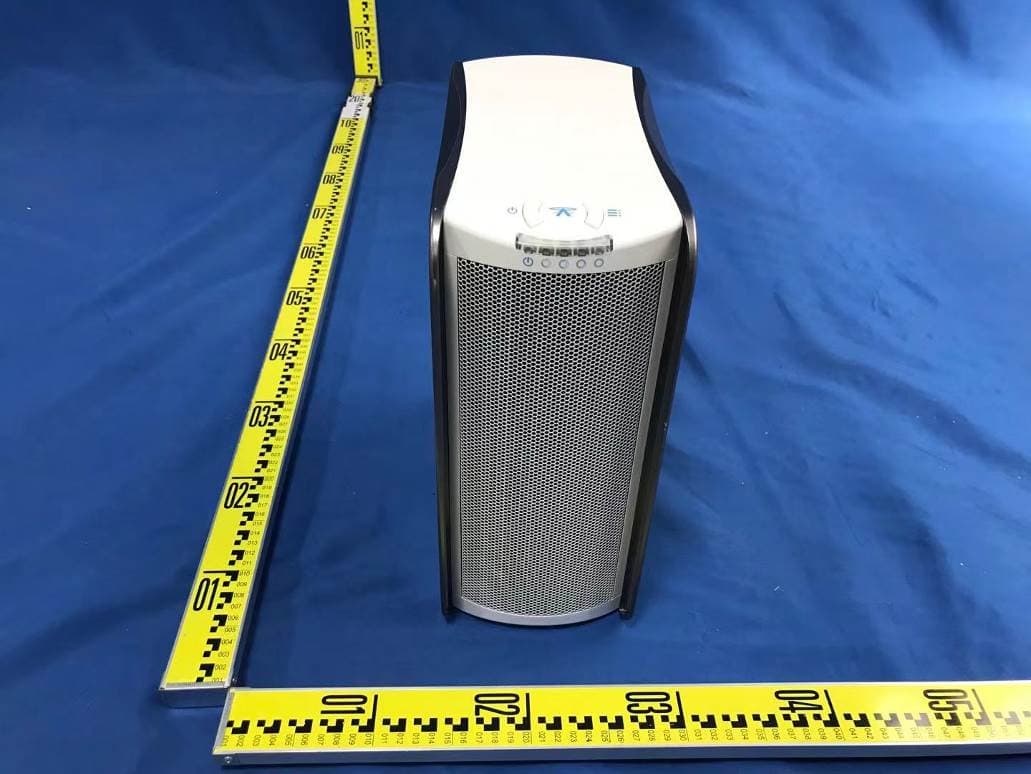
Click to zoom
Application Details
- Equipment Class
- DTS - Digital Transmission System
- Date of Grant
- May 29, 2021
- Application Purpose
- Original Equipment
- Date of Application
- May 29, 2021
- Equipment Note
- airKAVE Room
- Frequency Range
- 2412.00000000 - 2462.00000000
- Company
- KAVE Industries LLC
- Country
- United States
Documents & Files
Document Text
Text extracted from the exhibit documents filed with the FCC. Open a document above to read the original.
Users Manual
1OVERVIEW Turn ON / Hold to turn OFF | Tap to cycle modes Turn ON | Tap for function options Mode & Power Level displays Clean air exits here Contaminated air enters here Barrel type socket 1. Function Button 2. Selection Button 3. Top LED Indicator 4. Front Out Air-vent 5. Back In Air-vent 6. Back Power Port 2KEY FEATURES 5SAFETY PRECAUTIONS6OPERATION GUIDE 7WIFI CONTROLS ACTIVE sanitization NO EXOTIC FILTERS RAPID EFFECTIVENESS WIFI CONTROL Plascide Micro-lightning process Anti-germ & VOCs technology No expensive, special or exotic filters required A simple fine dust filter for ease of mind Where every breath counts, Sanitise within seconds Control and monitor your ROOM wherever you are 3PACKAGE CONTENT 4QUICK START 1.airKAVEROOM 2.Fine Dust PM 2.5 filter (Type: E12 or H13) 3.Air-vent Large Dust filter (Washable) 4.Power supply adapter 5.Manual & Warranty Card 6.Magnetic Feet (x4) 1.Handle with care when transporting or moving 2.ROOM can be damaged if dropped, burned, punctured or crushed 3.Do not operate if damaged and / or when any parts are broken to avoid potential injury 4.Power with the included power supply adapter only 5.Do not operate with damaged connectors, cables or power supply adapter 6.During operation or storage keep indoors and dry 7.Do not operate if wet and / or immersed in any liquid to avoid potential injuries and/or damages to properties 8.Do not allow infants and young children to operate unsupervised 9.Keep magnetic feet away from infants, young children and animals as they can be choking hazards 10.Do not insert any objects into the In or Out air-vents 11.Do not operate without any parts attached or any panels left open 12.Close left side panel and ensure all filters are seated correctly before operating 13.Do not block the In or Out air-vents during operation 6.1Function Button 6.2Mode Selection Immediately after turning on, default mode is set to Manual. LED MODEDESCRIPTION REDOFF Fan & sanitization Off, WIFI in Standby WHITEMANUAL Direct control by user BLUEPROGRAM Time & Day schedule set by user YELLOWTIMER Turn off after a set duration GREENECON Pre-programmed optimized performance In Manual, Timer and Program mode, sanitization power levels can be adjusted manually from the ROOM interface. In Econ mode, sanitization power level is automatically set and cannot be manually adjusted. D.On the list display select the ROOM you wish to control, this will load the login page: See Step 3 Below 7.1Quick Connect Guide Remotely control and customisesettings for Timer & Program mode from a web browser on a PC, Mobile or Android app from google Play Store. Step-by-Step Control Guide, please see: 11.4 Support 7.2Control Panel •On/Off –Turn the ROOM to Standby mode •Mode/Power Status –Display current status here •Modes –Switch to Manual/Timer/Program/Econ •Power Level –User can take manual control •Advance Panel –Access by “Gear” icon (Top Right) •Logout –Return to login page “Cross” icon (Top Left) 6.4sanitization Power Levels POWERDESCRIPTION 1SILENT Quiet comfort & Sleep 2LOW Low power for relaxing study 3NORMAL Everyday optimized power 4BOOST Max coverage for demanding situation 5OFF Turn OFF (Program Mode Only) In Manual, Program and Timer modes, press to cycle throughthe power levels. In Program mode, you can configure each schedule to a specific sanitization power level, for any time and day. For more details, see: 7.6 Configure: Program In Econ mode, sanitization power level is automatic and cannot be manually changed during operations. 6.5sanitization Power Indicator sanitization power LEDs are shown in GREEN. Mode LED will be shown in different colours. See: 6.3 Mode Indicator 3.After connecting by android app or web browser, The ROOM login page requires Username & Password Default Username: admin Default Password: admin 4.Only one user can control remotely (App/Browser) “Log out” (Top left) to allow another user to connect Plug Power Supply into the ROOM & the Wall Socket WIFI Hotspot (WIFI4 / 2.4GHz) will turn on automatically when connected to power supply. Ensure the Indicator LED is lit RED. Switch modes to Manual, Timer, Program or ECON: Click Manual, Timer, Program or ECON button to activate. You can change to manual mode by: 1.Click “manual” button or Select a sanitization power level 2.Press button to apply manual mode 7.3Advance Panel •Device Name –Display name of the ROOM •Login Password –Set custom password •Configure –Configure options for specific modes •System –Configure device settings •Bright –Set the brightness of the LEDs indicator •Reset –Apply factory default Set new Device Name and/or Login Password: 1.Select the ROOM name/Login Password field 2.Enter a new alphanumeric entry 3.Click “Apply” to set new name/password 4.Click “Back” to return to Control Panel Set specific options from the Configure and System group. Clicking on the button will take you to the specific panel options. LED Brightness can be set for all indicator LEDs Ranging from “Off”, “Dim”, “Normal” or “Bright” Set Brightness: 1.Select brightness option from drop down menu 2.Selection will be applied immediately 6.3Mode Indicator Reset -!Warning! Selecting this option will restore all software to factory default. Please see for more details: 11.1 Troubleshooting Tapor to turn ON the ROOM. To turn OFF, press and hold for a few seconds. Tap to cycle the modes, LED will flash to different colours when cycled. CONNECT BY ANDROID APP A.Download on Google Play Store (QR Link): https://play.google.com/store/apps/details?id=com.aonetech.airhalo B.At the home screen, press “Refresh” button to search for your ROOM. A list of available WIFI HOTSPOT will be displayed Preparation before use: 1.Plug power supply adapter into wall socket 2.Plug barrel type connector into ROOM’s back power port 3.Press or Button until LED indicator turns green 4.Tap button to change sanitization power level x4 Power LED MODE LEDLEVELSPOWER LED INDICATOR See: 6.3 Mode Indicator SILENT LOW NORMAL BO…
Text truncated - open the document above for the full version.
Attestation Statements
KAVE Industries LLC Date: 2021-05-25 Federal Communications Commission Authorization and Evaluation Division 7435 Oakland Mills Road Columbia, MD 21046 FCC ID: 2AZLG-AHD01R To Whom It May Concern: This letter is to statement that AHD01, AHD02, AHD03 / airKAVE Room. has been tested according to FCC Part 15B by Waltek Testing Group Co., Ltd. (Test Report No.: WTD21D04030059E). And the SDOC file, meetting the requirements of the FCC regulations, would been provided when the device is sold by the responsible party in US. The service will not be sold until the SDOC is provided. If the sale does not have an SDOC, all responsibility is the responsibility of the applicant. Sincerely, Signature [Brett Lieberman] [CEO] [KAVE Industries LLC]
Cover Letter(s)
KAVE Industries LLC Date: May 25, 2021 Federal Communications Commission Authorization and Evaluation Division Confidentiality Request regarding application for certification of FCC ID: 2AZLG-AHD01R Pursuant to Sections 0.457 and 0.459 of the Commission’s Rules, we hereby request confidential treatment of information accompanying this application as outlined below: Exhibit Type File Name Schematics Block Diagram Operational Description Schematics.pdf Block Diagram.pdf Operational Description.pdf The above materials contain trade secrets and proprietary information not customarily released to the public. The public disclosure of these materials may be harmful to the applicant and provide unjustified benefits to its competitors. The applicant understands that pursuant to Section 0.457 of the Rules, disclosure of this application and all accompanying documentation will not be made before the date of the Grant for this application. Sincerely, KAVE Industries LLC Signature Brett Lieberman / CEO Typed name and Title
Cover Letter(s)
KAVE Industries LLC FCC ID: 2AZLG-AHD01R POWER OF ATTORNEY Date: May 25, 2021 Federal Communications Commission Authorization and Evaluation Division 7435 Oakland Mills Road Columbia, MD 21046 To Whom It May Concern: We, the undersigned, hereby authorize Waltek Testing Group Co., Ltd. (Philo Zhong) on our behalf, to apply to the Federal Communications Commission on our equipment. Any and all acts carried out by Waltek Testing Group Co., Ltd. (Philo Zhong) on our behalf shall have the same effect as acts of our own. This authorization expires on May 24, 2022. This is to advise that we are in full compliance with the Anti-Drug Abuse Act. We, KAVE Industries LLC are not subject to a denial of federal benefits pursuant to Section 5301 of the Anti-Drug Act of 1988, 21 USC853a, and no party to the application is subject to a denial of federal benefits pursuant to that section. Sincerely, KAVE Industries LLC Signature Brett Lieberman / CEO Typed name and Title
Cover Letter(s)
KAVE Industries LLC FCC ID: 2AZLG-AHD01R Date: 5/25/2021 Subject: authorization for adding family models To whom it May concern, Statement We would like to confirm the product airKAVE Room with models AHD01, AHD02, AHD03 are same in all respects. Only the model names are different for different market requirement. Yours sincerely, [signature] [Brett Lieberman] [CEO] [KAVE Industries LLC]
External Photos
Appendix- AHD01-Photos Page 3 of 16 2. Photographs –Constructional Details 2.1. EUT – External View Model AHD01 FCC ID: 2AZLG-AHD01R Appendix- AHD01-Photos Page 4 of 16 Appendix- AHD01-Photos Page 5 of 16 Appendix- AHD01-Photos Page 6 of 16
ID Label/Location Info
AHD01_Label and Label Location Label sample Location
Internal Photos
Appendix- AHD01-Photos Page 7 of 16 2.2. EUT – Internal View Model AHD01 FCC ID: 2AZLG-AHD01R Appendix- AHD01-Photos Page 8 of 16 Appendix- AHD01-Photos Page 9 of 16 Appendix- AHD01-Photos Page 10 of 16 Appendix- AHD01-Photos Page 11 of 16 Ant. Appendix- AHD01-Photos Page 12 of 16 Ant. port Appendix- AHD01-Photos Page 13 of 16 Appendix- AHD01-Photos Page 14 of 16 Appendix- AHD01-Photos Page 15 of 16 Appendix- AHD01-Photos Page 16 of 16 ======End======
RF Exposure Info
Waltek Testing Group Co., Ltd. http://www.waltek.com.cn Page 1 of 7 TEST REPORT Referen ce No. .................... : WTD21D04030232W002 FCC ID ................................ : 2AZLG-AHD01R Applicant ............................ : KAVE Industries LLC Address .............................. : 8605 Santa Monica.Blvd #53476, Los Angeles, CA 90069 Manufacturer .................... : A-oneTech Limited Address .............................. : Unit B, 6/F, Valiant Industrial Center, 2-12 Au Pui Wan Street, Fo Tan, N.T., Hong Kong Product ............................... : airKAVE Room Model(s). ............................ : AHD01, AHD02, AHD03 Brand name ....................... : N/A Standards........................... : FCC Part 2.1091 Date of Receipt sample .... : 2021-04-08 Date of Test ....................... : 2021-04-08 to 2021-04-26 Date of Issue ...................... : 2021-04-26 Test Result ......................... : Pass Remarks: The re sults shown in this test report refer only to the sample(s) tested, this test report cannot be reproduced, except in full, without prior written permission of the company. The report would be invalid without specific stamp of test institute and the signatures of compiler and approver. Prepared By: Waltek Testing Group Co., Ltd. Address: No. 77, Houjie Section, Guantai Road, Houjie Town, Dongguan City, Guangdong, China Tel: +86-769-2267 6998 Fax: +86-769-2267 6828 Compiled by: Approved by: Estel Qian / Project Engineer Daniel Liu / Designated Reviewer Reference No.: WTD21D04030232W002 Page 2 of 7 Waltek Testing Group Co., Ltd. http://www.waltek.com.cn 2 Contents Page 1 COVER PAGE ........................................................................................................................................... 1 2 CONTENTS ............................................................................................................................................................ 2 3 REVISION HISTORY ............................................................................................................................................ 3 4 GENERAL INFORMATION .................................................................................................................................. 4 4.1 GENERAL DESCRIPTION OF E.U.T. ................................................................................................................ 4 4.2 DETAILS OF E.U.T. ......................................................................................................................................... 4 4.3 TEST FACILITY ................................................................................................................................................. 4 5 TEST SUMMARY .................................................................................................................................................. 5 6 RF EXPOSURE ...................................................................................................................................................... 6 6.1 PROCEDURES AND REQUIREMENTS ............................................................................................................... 6 6.2 TEST RESULT .................................................................................................................................................. 7 Reference No.: WTD21D04030232W002 Page 3 of 7 Waltek Testing Group Co., Ltd. http://www.waltek.com.cn 3 Revision History Test report No. Date of Receipt sample Date of Test Date of Issue Purpose CommentApproved WTD21D04030232 W002 2021-04-08 2021-04-08 to 2021-04-26 2021-04-26Original - Valid Reference No.: WTD21D04030232W002 Page 4 of 7 Waltek Testing Group Co., Ltd. http://www.waltek.com.cn 4 General Information 4.1 General Description of E.U.T. Product: airKAVE Room Model(s): AHD01, AHD02, AHD03 Model Description: Only the model name are difference. Wi-Fi Specification: 802.11b/g/n HT20/n HT40 Hardware Version: 2.1 Software Version: 6.85 Note: N/A 4.2 Details of E.U.T. Operation Frequency: 802.11b/g/n HT20: 2412~2462MHz 802.11n HT40: 2422~2452MHz Max. RF output power: 16.97dBm Type of Modulation: BPSK, DQPSK, CCK, OFDM Antenna installation: internal permanent antenna Antenna Gain: 2.0dBi Ratings: 12.0V 5.0A Adapter: Model: DSS65-1205000 Input: 100-240V ~2.0A 50/60Hz Output: 12.0V 5.0A 4.3 Test Facility The test facility has a test site registered with the following organizations: ISED CAB identifier: CN0013. Test Firm Registration No.: 7760A. Waltek Testing Group Co., Ltd. Has been registered and fully described in a report filed with the Industry Canada. The acceptance letter from the Industry Canada is maintained in our files. Registration number 7760A, October 15, 2016. FCC Designation No.: CN1201. Test Firm Registration No.: 523476. Waltek Testing Group Co., Ltd. EMC Laboratory `has been registered and fully described in a report filed with the (FCC) Federal Communications Commission. The acceptance letter from the FCC is maintained in our files. Registration number 523476, September 10, 2019. Reference No.: WTD21D04030232W002 Page 5 of 7 Waltek Testing Group Co., Ltd. http://www.waltek.com.cn 5 Test Summary Test Items Test Requirement Result Maximum Permissible Exposure (Exposure of Humans to RF Fields) 2.1091 PASS Reference No.: WTD21D04030232W002 Page 6 of 7 Waltek Testing Group Co., Ltd. http://www.waltek.com.cn 6 RF Exposure Test Requirement: FCC Part 2.1091 Test Mode: The EUT work in test mode(Tx). 6.1 Procedures and Requirements Systems operating under the provisions of this section shall be operated in a manner that ensures that the public is not exposed to radio frequency energy levels in excess limit for maximum permissible exposure. In accordance with 47 CFR FCC Part 2 Subpart J, section 2.1091 this device has been defined as a mobile device whereby a distance of 0.2m normally can be maintained between the user and the device. FCC Part 1.1301…
Text truncated - open the document above for the full version.
Test Report
Waltek Testing Group Co., Ltd. http://www.waltek.com.cn Page 1 of 77 TEST REPORT Referen ce No. .................... : WTD21D04030232W001 FCC ID ................................ : 2AZLG-AHD01R Applicant ............................ : KAVE Industries LLC Address .............................. : 8605 Santa Monica.Blvd #53476, Los Angeles, CA 90069 Manufacturer .................... : A-oneTech Limited Address .............................. : Unit B, 6/F, Valiant Industrial Center, 2-12 Au Pui Wan Street, Fo Tan, N.T., Hong Kong Product ............................... : airKAVE Room Model(s). ............................ : AHD01, AHD02, AHD03 Standards........................... : FCC CFR47 Part 15.247 Date of Receipt sample .... : 2021-04-08 Date of Test ....................... : 2021-04-08 to 2021-04-26 Date of Issue ...................... : 2021-04-26 Test Result ......................... : Pass Remarks: The re sults shown in this test report refer only to the sample(s) tested, this test report cannot be reproduced, except in full, without prior written permission of the company. The report would be invalid without specific stamp of test institute and the signatures of compiler and approver. Prepared By: Waltek Testing Group Co., Ltd. Address: No. 77, Houjie Section, Guantai Road, Houjie Town, Dongguan City, Guangdong, China Tel: +86-769-2267 6998 Fax: +86-769-2267 6828 Compiled by: Approved by: Estel Qian / Project Engineer Daniel Liu / Designated Reviewer Reference No.: WTD21D04030232W001 Page 2 of 77 Waltek Testing Group Co., Ltd. http://www.waltek.com.cn 2 Contents Page 1 COVER PAGE ........................................................................................................................................... 1 2 CONTENTS ............................................................................................................................................................ 2 3 REVISION HISTORY ............................................................................................................................................ 4 4 GENERAL INFORMATION .................................................................................................................................. 5 4.1 GENERAL DESCRIPTION OF E.U.T. ................................................................................................................ 5 4.2 DETAILS OF E.U.T. ......................................................................................................................................... 5 4.3 CHANNEL LIST ................................................................................................................................................. 6 4.4 TEST FACILITY ................................................................................................................................................. 6 4.5 TEST MODE ..................................................................................................................................................... 7 5 TEST SUMMARY .................................................................................................................................................. 8 6 EQUIPMENT USED DURING TEST .................................................................................................................. 9 6.1 EQUIPMENTS LIST ........................................................................................................................................... 9 6.2 DESCRIPTION OF SUPPORT UNITS ............................................................................................................... 10 6.3 MEASUREMENT UNCERTAINTY ..................................................................................................................... 10 6.4 TEST EQUIPMENT CALIBRATION ................................................................................................................... 10 7 CONDUCTED EMISSION .................................................................................................................................. 11 7.1 E.U.T. OPERATION ....................................................................................................................................... 11 7.2 EUT SETUP ................................................................................................................................................... 11 7.3 MEASUREMENT DESCRIPTION ...................................................................................................................... 11 7.4 CONDUCTED EMISSION TEST RESULT ......................................................................................................... 12 8 RADIATED EMISSIONS..................................................................................................................................... 14 8.1 EUT OPERATION ........................................................................................................................................... 14 8.2 TEST SETUP .................................................................................................................................................. 15 8.3 SPECTRUM ANALYZER SETUP ...................................................................................................................... 16 8.4 TEST PROCEDURE ........................................................................................................................................ 17 8.5 CORRECTED AMPLITUDE & MARGIN CALCULATION ..................................................................................... 17 8.6 SUMMARY OF TEST RESULTS ....................................................................................................................... 18 9 DUTY CYCLE ....................................................................................................................................................... 30 10 CONDUCTED…
Text truncated - open the document above for the full version.
Test Setup Photos
Appendix- AHD01-Photos Page 1 of 16 1. Test Setup photos Model AHD01 FCC ID: 2AZLG-AHD01R 1.1 Photograph – Conducted Emission Test Setup Test Site 1# 1.2 Photograph – Radiated Emissions Test Setup For 9kHz-30MHz Test Site 1# Appendix- AHD01-Photos Page 2 of 16 For 30MHz-1000MHz Test Site 1# For Above 1GHz Test Site 2#
Contact Information
Applicant
Brett Lieberman(CEO)
Test Firm
WALTEK TESTING GROUP CO., LTD.Joy Zhou
[email protected]0769-22676998
Technical Specifications
| # | Rule Parts | Frequency Range | Power Output |
|---|---|---|---|
| 1 | 15C | 2.41 GHz - 2.46 GHz | 50.00 mW |