2BA3S-JT75JT75 Tir-Mode Bluetooth Keyboard
Shen Zhen Shi ZhiYang Electronic Technology Co., Ltd.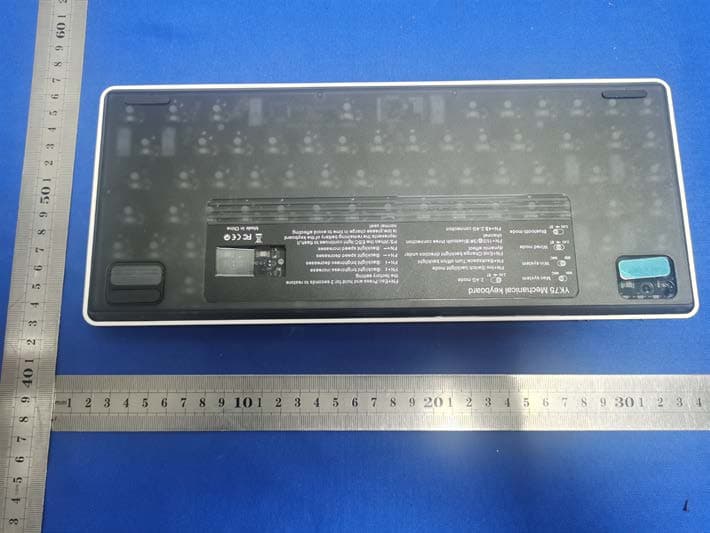
Click to zoom
Application Details
- Equipment Class
- DTS - Digital Transmission System
- Date of Grant
- May 08, 2023
- Application Purpose
- Original Equipment
- Date of Application
- May 08, 2023
- Equipment Note
- JT75 Tir-Mode Bluetooth Keyboard
- Frequency Range
- 2402.00000000 - 2480.00000000
- Country
- China
Documents & Files
Document Text
Text extracted from the exhibit documents filed with the FCC. Open a document above to read the original.
Users Manual
JT75 Tri-Mode Bluetooth Keyboard User Manual Product specification: JT75 adopts three connection modes of 2.4G, Bluetooth 5.0, and Type C, The 2.4G receiving range is 8 meters, Bluetooth receiving range is 5M, built-in 1850mA 3.7V lithium battery is rechargeable. USB Full Speed 2.0 supports up to 1000HZ true report rate. Support N-key rollover (which is all keys are pressed at the same time and are recognized). All lighting effects support global control: brightness increase and decrease (5 levels in total, 3rd level by default), speed (5 levels in total, 3rd level by default), and the overall backlight flashes when it is adjusted to the limit. The relevant MCU parameters are as follows: Flash ROM: 64KB Operating voltage: VDD = 3.3V - 5.5V Working environment temperature: - 40°C - + 85°C Package form: LQFP64 Bluetooth/2.4G/USB wired settings: (1) Mode switching: Switch between wired and wireless mode (Including 2.4G/Bluetooth mode) through the switch in the device’s upper right corner. After switching to wireless mode, the mode indicator light in the upper right corner: BT1 blue light/BT2 green light/BT3 yellow light/2.4G white light. (2) Bluetooth mode connection: FN+1! Short press: switch devices (blue light flashes three times) Long press for 3 seconds: enter code pairing (blue light flashes quickly) computer/mobile phone searches and connects the device, after the connection is successful, the indicator light stops flashing and stays on, connection succeeded. FN+2@ Short press: switch devices (green light flashes three times) Long press for 3 seconds: enter code pairing (green light flashes quickly) computer/mobile phone searches and connects the device, after the connection is successful, the indicator light stops flashing and stays on, connection succeeded. FN+3# Short press: switch devices (yellow light flashes three times) Long press for 3 seconds: enter code pairing (yellow light flashes quickly) computer/mobile phone searches and connect the device, after the connection is successful, the indicator light stops flashing and stays on, connection succeeded. Switch to the Bluetooth corresponding mode, the light flashes 3 times, and the light is always on after the connection is successful. (3) 2.4G connection method: 1. FN+4 switches to 2.4G mode; when the device is not connected, the corresponding white light in the upper right corner flashes slowly for 3 seconds, and it is always on after the connection is successful; 2. Press and hold the combination key FN+4 for 3 seconds. At this time, the white light in the upper right corner continues to flash, indicating that it has entered the 2.4G pairing mode; 3. Insert the 2.4G receiver into the computer; 4. After the connection is successful, the indicator light in the upper right corner stops flashing and it is completed. PS: If you have already matched Bluetooth or 2.4G, switch to the corresponding mode and it will automatically reconnect. You do not need to enter the pairing mode again. If there is no operation within three minutes in the wireless mode, the backlight of the keyboard will be automatically turned off to save power. Pressing any key can directly wake up. Refers to special indicators: With a single click the “Caps” button light is always on, which means that the capitalization function is turned on. At this time, it does not change synchronously with other lights. Click it again to turn off the constant light and restore the backlight change. The FN+WIN win light is always on, which means the win function is locked. At this time, the win button light does not change synchronously with other lights. Press FN+WIN again to return to normal (only for WIN systems) The default normal function. The ESC button light is a low-battery reminder When the battery voltage is lower than 3.3V, the ESC light flashes, and charging in time can restore normal use. FCC Statement: This device complies with part 15 of the FCC Rules. Operation is subject to the following two conditions: (1) this device may not cause harmful interference, and (2) this device must accept any interference received, including interference that may cause undesired operation. Any changes or modifications not expressly approved by the party responsible for compliance could void the user's authority to operate the equipment. NOTE: This equipment has been tested and found to comply with the limits for a Class B digital device, pursuant to Part 15 of the FCC Rules. These limits are designed to provide reasonable protection against harmful interference in a residential installation. This equipment generates, uses and can radiate radio frequency energy and, if not installed and used in accordance with the instructions, may cause harmful interference to radio communications. However, there is no guarantee that interference will not occur in a particular installation. If this equipment does cause harmful interference to radio or television reception, which can be determined by turning the equipment off and on, the user is encouraged to try to correct the interference by one or more of the following measures: -- Reorient or relocate the receiving antenna. -- Increase the separation between the equipment and receiver. -- Connect the equipment into an outlet on a circuit different from that to which the receiver is connected. -- Consult the dealer or an experienced radio/TV technician for help. The device has been evaluated to meet general RF exposure requirement. The device can be used in portable exposure condition without restriction System switching, multimedia, and combined key functions: The keyboard can switch the WIN and MAC systems through two sections in the upper right corner. After switching to the Mac system, the indicator in the upper right corner will flash for 5 seconds to a prompt. FN combination button function FN+ESC restores factory settings FN+F1 screen brightness- FN+ F2 screen brightness+ FN+F3 task switching (WIN+TAB) FN+F4 Quick Access (Win+E) FN+F5 ke…
Text truncated - open the document above for the full version.
Attestation Statements
Attestation Statements (May. 05, 2023) TO: Federal Communications Commission Authorization and Evaluation Division 7435 Oakland Mills Road Columbia, MD 21046, USA RE: Attestation Statements Part 2.911(d)(7) request for (2BA3S-JT75) (Shen Zhen Shi ZhiYang Electronic Technology Co., Ltd. ), the undersigned, hereby authorize (Bitrow LLC) to act as our designated U.S. agent for service of process, (Shen Zhen Shi ZhiYang Electronic Technology Co., Ltd.) accepts to maintain an agent for no less than one year after the grantee has terminated all marketing and importation or the conclusion of any Commission-related proceeding involving the equipment. (Bitrow LLC) accepts the responsibility to act as designated U.S. agent for service of process, provides an agent for no less than one year after the grantee has terminated all marketing and importation or the conclusion of any Commission-related proceeding involving the equipment. Applicant Information: Company name: Shen Zhen Shi ZhiYang Electronic Technology Co., Ltd. Contact Name: LinZhi Chen Address: FuYongJieDao, Bao An Qu 609, Jude Building,15 Zhengfeng South Road, Huaide Community ShenZhenShi GuangDongShen Telephone No: 13538214502 Email: [email protected] U.S. Agent Information: Company Name: Bitrow LLC Address: 13395 Voyager Pkwy Ste 130 PMB Colorado Springs, CO 80921 Contact Name: LinZhi Chen Telephone No: +7192946270 Email: [email protected] FRN: 0033678053 Applicant Signature: Agent Signature: Applicant printed name: LinZhi Chen Agent printed name: LinZhi Chen
Cover Letter(s)
Shen Zhen Shi ZhiYang Electronic Technology Co., Ltd. Model Difference Data:2023.05.05 Product description: JT75 Tir-Mode Bluetooth Keyboard Model name: JT75, JT68, GAS67 Trade Name: JSJT FCC ID: 2BA3S-JT75 All the model are the same circuit and RF module, except model names . Regards Sincerely Client’s signature : Client’s name / title : LinZhi Chen(General manager) Contact information / address:FuYongJieDao, Bao An Qu 609, Jude Building,15 Zhengfeng South Road, Huaide Community ShenZhenShi GuangDongShen
Cover Letter(s)
Shen Zhen Shi ZhiYang Electronic Technology Co., Ltd. (2023.05.05) Eurofins Electrical and Electronic Testing NA, Inc. 914 West Patapsco Avenue Baltimore, MD 21230 RE: CONFIDENTIALITY REQUEST FOR (JT75 Tir-Mode Bluetooth Keyboard / JT75 , JT68, GAS67/ FCC ID: 2BA3S-JT75) To Whom It May Concern: This letter serves as an official request for confidentiality under sections 0.457 and 0.459 of CFR 47. We have requested that the Exhibits Long-Term Confidentiality Short-Term Confidentiality NOTE 2 ID Label/Location No No Attestation Statement No No External Photos No ☒ Block Diagram ☒ ☐ Schematics ☒ ☐ Test Report No No Test Setup Photos No ☒ User’s Manual ☐ NOTE 1 ☒ Internal Photos ☐ NOTE 1 ☒ Parts List / Tune Up ☐ ☐ RF Exposure Info No No Operational Description ☒ ☐ Cover Letter(s) No No SDR Software / Security Info ☐ No required to be submitted with this application be permanently withheld from public review. Above mentioned document contains detailed system and equipment description are considered as proprietary information in operation of the equipment. The public disclosure of above documents might be harmful to our company and would give competitor an unfair advantage in the market. Please contact me if there is any information you may need. Sincerely, Signature: Name: LinZhi Chen Title: General manager
Cover Letter(s)
Shen Zhen Shi ZhiYang Electronic Technology Co., Ltd. (2023.05.05) Eurofins Electrical and Electronic Testing NA, Inc. 914 West Patapsco Avenue Baltimore, MD 21230 RE: LETTER OF AGENT AUTHORIZATION To Whom It May Concern: We, the undersigned, hereby authorize (Shenzhen CTB Testing Technology Co., Ltd.) to act on our behalf in all matters relating to application for equipment authorization, including the signing of all documents relating to these matters. We also hereby certify that no party to the application authorized hereunder is subject to the denial of benefits, including FCC benefits, pursuant to Section 5301 of the Anti-Drug Abuse Act of 1988, 21 U.S.C.853(a). This agreement expires one year from the current date. Sincerely, Signature: Name: LinZhi Chen Title: General manager
External Photos
External Photos
ID Label/Location Info
FCC ID LABEL: Label Location: FCC ID: 2BA3S-JT75 Model No.: JT75 This device complies with Part 15 of the FCC Rules. Operation is subject to the following two conditions: (1) This device may not cause harmful interference, and (2) This device must accept any interference received, including interference that may cause undesired operation.
Internal Photos
Internal Photos ANT
RF Exposure Info
Shenzhen CTB Testing Co., Ltd. FCC ID: 2BA3S-JT75 Portable device According to §15.247(e)(i) and §1.1307(b)(1), systems operating under the provisions of this section shall be operated in a manner that ensures that the public is not exposed to radio frequency energy level in excess of the Commission’s guidelines. According to KDB447498 D01 General RF Exposure Guidance V06 The 1-g SAR and 10-g SAR test exclusion thresholds for 100 MHz to 6 GHz at test separation distances ≤ 50 mm are determined by: [(max. power of channel, including tune-up tolerance, mW)/(min. test separation distance, mm)]·[√f(GHZ)] ≤ 3.0 for 1-g SAR and ≤ 7.5 for 10-g extremity SAR, where: • f(GHZ) is the RF channel transmit frequency in GHz • Power and distance are rounded to the nearest mW and mm before calculation • The result is rounded to one decimal place for comparison When the minimum test separation distance is < 5 mm, a distance of 5 mm is applied to determine SAR test exclusion. BLE: Modulation Channel Freq. (GHz) Conduct ed power (dBm) Conducte d power (mW) Tune-up power (dBm) Max tune-up power (dBm) Max tune-up power (mW) Distance (mm) Result calculatio n SAR Exclusion threshold SAR test exclusion 2.402 1.019 1.26 1±1 2.00 1.58 <5 0.49127 3.00 YES 2.44 0.962 1.25 0±1 1.00 1.26 <5 0.39330 3.00 YES 2.480 -0.043 0.99 0±1 1.00 1.26 <5 0.39651 3.00 YES GFSK 2.4G: Modulation Channel Freq. (GHz) Conduct ed power (dBm) Conducte d power (mW) Tune-up power (dBm) Max tune-up power (dBm) Max tune-up power (mW) Distance (mm) Result calculatio n SAR Exclusion threshold SAR test exclusion GFSK 2.402 4.51 2.82 4±1 5.00 3.16 <5 0.98020 3.00 YES Note:dbm=dbuv/m-95.2=103.56-95.2=8.36dBm(ERP), so the conduct peak power=8.36- 3.85=4.51dBm Conclusion: For the max result : 0.9802≤ FCC Limit 3.0 for 1g SAR.
Test Report
ÓÉFoxitPDFEditor±à¼• °æÈ ̈ËùÓÐ (c) by Foxit Software Company, 2004 ½öÓÃÓÚÆÀ¹À¡£ ÓÉFoxitPDFEditor±à¼• °æÈ ̈ËùÓÐ (c) by Foxit Software Company, 2004 ½öÓÃÓÚÆÀ¹À¡£ ÓÉFoxitPDFEditor±à¼• °æÈ ̈ËùÓÐ (c) by Foxit Software Company, 2004 ½öÓÃÓÚÆÀ¹À¡£ Antenna Specification Specifications Summary Antenna Photo & Length ITEMSPEC. ModelNameISM2.4GHz Center Frequency 2402.65 MHz 2441.65 MHz 2480.65 MHz 3.85 dBi 3.18 dBi 2.80 dBi MAX.GAIN3.85dBi PolarizationHorizontal Azimuth Beam Pattern Omni-directional Impedance50Ω Antenna Length41 mm ÓÉFoxitPDFEditor±à¼• °æÈ ̈ËùÓÐ (c) by Foxit Software Company, 2004 ½öÓÃÓÚÆÀ¹À¡£ 1. Main antenna:2441.65 MHz 1.1 Horizontal 2015/11/16 2402.65 ÓÉFoxitPDFEditor±à¼• °æÈ ̈ËùÓÐ (c) by Foxit Software Company, 2004 ½öÓÃÓÚÆÀ¹À¡£ 1.2 Vertical 2015/11/16 2402.65 2. Main antenna : 2441.65 MHz 2.1 Horizontal 2015/11/16 2441.65 2.2 Vertical 2015/11/16 2441.65 2480.65 2480.65
Test Report
Shenzhen CTB Testing Technology Co., Ltd. Report No.: CTB230428022RFX Report Tel: 4008-707-283 Web: http://www.ctb-lab.net Page 1 of 35 TEST REPORT Compiled by: Reviewed by: Approved by: Chen Zheng Arron Liu Bin Mei / Director Note: If there is any objection to the inspection results in this report, please submit a written report to the company within 15 days from the date of receiving the report. The test report is effective only with both signature and specialized stamp. This result(s) shown in this report refer only to the sample(s) tested. Without written approval of Shenzhen CTB Testing Technology Co., Ltd. this report can’t be reproduced except in full. The tested sample(s) and the sample information are provided by the client. “*” indicates the testing items were fulfilled by subcontracted lab. “#” indicates the items are not in CNAS accreditation scope. Product Name: JT75 Tir-Mode Bluetooth Keyboard FCC ID: 2BA3S-JT75 Trademark: JSJT Model Number: JT75, JT68, GAS67 Prepared For: Shen Zhen Shi ZhiYang Electronic Technology Co., Ltd. Address: FuYongJieDao, Bao An Qu 609, Jude Building,15 Zhengfeng South Road, Huaide Community ShenZhenShi GuangDongShen Manufacturer: Shen Zhen Shi ZhiYang Electronic Technology Co., Ltd. Address: FuYongJieDao, Bao An Qu 609, Jude Building,15 Zhengfeng South Road, Huaide Community ShenZhenShi GuangDongShen Prepared By: Shenzhen CTB Testing Technology Co., Ltd. Address: 1&2/F., Building A, No.26, Xinhe Road, Xinqiao, Xinqiao Street, Bao'an District, Shenzhen, Guangdong, China Sample Received Date: Apr. 14, 2023 Sample tested Date: Apr. 14, 2023 to Apr. 28, 2023 Issue Date: Apr. 28, 2023 Report No.: CTB230428022RFX Test Standards FCC Part15.247 ANSI C63.10:2013 Test Results PASS Remark: This is Bluetooth radio test report. Shenzhen CTB Testing Technology Co., Ltd. Report No.: CTB230428022RFX Report Tel: 4008-707-283 Web: http://www.ctb-lab.net Page 2 of 35 TABLE OF CONTENT Test Report Declaration Page 1. VERSION ........................................................................................................................................ 3 2. TEST SUMMARY ........................................................................................................................... 4 3. MEASUREMENT UNCERTAINTY ................................................................................................. 5 4. PRODUCT INFORMATION AND TEST SETUP ............................................................................ 6 4.1 Product Information .......................................................................................................................... 6 4.2 Test Setup Configuration .................................................................................................................. 6 4.3 Support Equipment........................................................................................................................... 6 4.4 Channel List ..................................................................................................................................... 7 4.5 Test Mode ........................................................................................................................................ 7 4.6 Test Environment ............................................................................................................................. 7 5. TEST FACILITY AND TEST INSTRUMENT USED ....................................................................... 8 5.1 Test Facility ...................................................................................................................................... 8 5.2 Test Instrument Used ....................................................................................................................... 8 6. AC POWER LINE CONDUCTED EMISSION ................................................................................ 10 6.1 Block Diagram Of Test Setup ......................................................................................................... 10 6.2 Limit ................................................................................................................................................ 10 6.3 Test procedure ............................................................................................................................... 10 6.4 Test Result ..................................................................................................................................... 12 7. RADIATED SPURIOUS EMISSION ............................................................................................. 14 7.1 Block Diagram Of Test Setup ......................................................................................................... 14 7.2 Limit ................................................................................................................................................ 14 7.3 Test procedure ............................................................................................................................... 15 7.4 Test Result ..................................................................................................................................... 16 8. BAND EDGE AND RF COUNDUCTED SPURIOUS EMISSIONS ............................................... 23 8.1 Block Diagram Of Test Setup ......................................................................................................... 23 8.2 Limit ................................................................................................................................................ 23 8.3 Test procedure ............................................................................................................................... 23 8.4 Test Result ..................................................................................................................................... 24 9. COUDUCTED OUTPUT POWER …
Text truncated - open the document above for the full version.
Test Setup Photos
Radiated Emission Below 1G Above 1G Conducted emissions
Contact Information
Applicant
LinZhi Chen
Technical Contact
Shen Zhen Shi ZhiYang Electronic Technology Co., LLinZhi Chen
[email protected]13538214502
FuYongJieDao, Bao An Qu 609, Jude Building, · ShenZhenShi GuangDongShen · China
Test Firm
Shenzhen CTB Testing Technology Co., Ltd.Rita Xiao
[email protected]86-13538218145
Technical Specifications
| # | Rule Parts | Frequency Range | Power Output |
|---|---|---|---|
| 1 | 15C | 2.40 GHz - 2.48 GHz | 1.26 mW |