2BATF-N3Digital voice recorder
Shenzhen Gongchengshi Technology Co., Ltd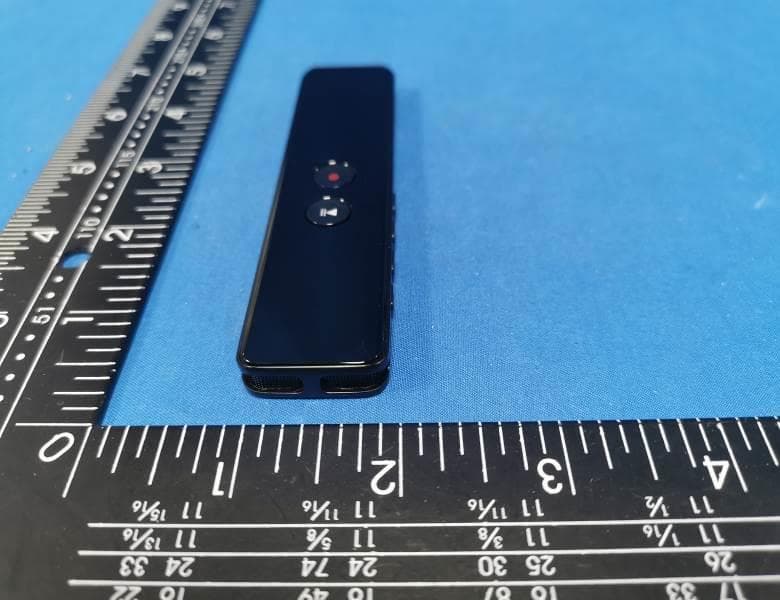
Click to zoom
Application Details
- Equipment Class
- DTS - Digital Transmission System
- Date of Grant
- Apr 22, 2023
- Application Purpose
- Original Equipment
- Date of Application
- Apr 22, 2023
- Equipment Note
- Digital voice recorder
- Frequency Range
- 2402.00000000 - 2480.00000000
- Country
- China
Documents & Files
Document Text
Text extracted from the exhibit documents filed with the FCC. Open a document above to read the original.
Users Manual
1 preface Thank you for purchasing this product, please read this manual carefully before you start using this product. In order to continuously improve the quality of the product, the product specifications and accessories are subject to change without notice, so the product and accessories may not be consistent with the contents of the manual, please refer to the actual product. Thank you for your understanding! Disclaimer: Please be sure to back up the data during the use of the user, the company is not responsible for the loss and damage of personal data caused by the misoperation of software and hardware, product maintenance, replacement or other unexpected circumstances, nor is it responsible for other indirect losses caused thereby, let alone any legal and compensation disputes arising from the use of this product. 2 Outline and button function operation instructions 1. Play/pause keys: (1) Press this key in standby to play music/recording or pause music/recording (2) When the power switch is turned on, press this key to turn the machine on or off 2. Record/Save key: Long press 2 seconds to start recording, and then long press again for 2 seconds to save the recording 3. display screen 4. Headphone jack: Plugs into the headphones to listen to the contents of 3 the machine 5. Power on key: Dial up to turn on, down to turn off 6. M key: Press back with a short press, and press and hold at the specified position to bring up the secondary menu or delete a file 7. USB port: can be connected to the computer and charging 8. Previous/rewind: Press short press to toggle music/record to the previous track, and press and hold to rewind 9. Next song/fast forward key: short press to switch music/record to the next song, long press fast forward 10. Volume + key: Press this key to increase the volume 11. Volume — Key: Press this key to decrease the volume 12. horn 13. Lanyard holes 14. Microphone Key action definition action Basic operation Short press The key time is less than 1 second Long press Key pressing time is greater than 1. 5 seconds Hold Hold down the key and save this state all the time Note: Nothing in this manual refers to short presses unless otherwise specified. Switch on and off 1. Flip the power switch up to power on and down to turn off the power supply 2. When the power switch is on, press and hold the play/pause key to turn the system on or off Note: This feature does not work when the player is connected to or charging the PC. 4 Main interface Record Bluetooth folder Settings Music After booting the system automatically enter the main interface, if not in the main interface, you can continuously press the M key to return to the main interface. The main interface contains five major items: "Recording", "Bluetooth", "Folder", "Settings", and "Music", press Previous Song or Next song key toggles each function, press the Play/Pause key to confirm access to each function recording 1. Select Record on the main interface, press the Play /Pause key to enter the menu item, as shown below: 5 Operation instructions: Press the Previous or Next Songs key to switch up and down, press the Play/Pause key to select, press the M key to return to the previous level. 1. Recording Library: A list of recording files that can be browsed and selected for playback by selecting the recorded files, and prompting "No recordings found" if the voice files have not been recorded. 2. Recording bitrate: Select "512kbps", "1536kbps", "3072" kbps”。 The recording bitrate is displayed on the top of the screen while recording. 3. Recording scene: You can select "Close", "Interview", "Meeting", "Station", "Teaching". 4. Recording segments: You can set "Off", "30 minutes", "60 minutes", "1 20 minutes". When recording for a long time, when the set time is reached, a file will be saved and a new file will be automatically generated to continue recording. If you choose to turn off, a new file is still saved and automatically generated when a single recording file reaches 2 hours to continue recording. 5. Noise reduction switch: turn noise reduction on and off, when noise reduction is turned on, there will be a noise reduction flag on the screen when recording 6. Voice Recording: Turn voice recording on and off, turn on the status, and display on the screen while recording. Off status and displayed on the screen while recording 7. Recording monitoring: When the monitoring is turned on, plug in the headphones to hear the recording content in real time. 6 8. Timed recording: Select "Timed recording" to set on/off, "Start Time", "End Time", "Fixed" Time Period". Start Time: Set the time to start recording, use the upper and lower key to tune the number, the volume key to switch the time minute, press the play key to confirm and save, press the M key to return to the settings without saving. End time: Set the time to end recording, use the upper and lower tune keys to tune the number, the volume key to switch the minutes, press the play key to confirm and save, press the M key to return to the setting without saving. Timing period: You can set "Single", "Daily", "Working Day". Single: The setting only takes effect once, and the timed recording is turned off after execution. Daily: Recording starts automatically every day at the set time. Weekdays: Recording starts automatically from Monday to Friday to the set time, and does not record on Saturdays and Sundays. Note: (1) Before enabling timed recording, please go to the settings to adjust the machine time and date accurately. See the Settings section below. (2) After enabling timed recording, ensure that the machine power switch cannot be turned off and the power is sufficient, otherwise the recording will not be automatically turned on or the set time cannot be recorded. Start Recording: In the power on state, any interface long press the Record/Save key 7 for 2 seconds will start recording. The interface and description in the recording are as follows: Pause recording:…
Text truncated - open the document above for the full version.
Attestation Statements
Shenzhen Gongchengshi Technology Co., Ltd 201, second floor, building 2, No. 28, Dawangshan Industrial 1st Road, Dawangshan Community, Shajing Street, Bao'an District,Shenzhen The information provided in this letter is based on the referenced rule parts of Title 47 of the CFR as well as KDB 986446 D01. An expiration date for this letter does not exist. In case the U.S. agent changes, the grantee is obligated to notify the FCC within 30 days via the granting TCB. Federal Communications Commission Authorization and Evaluation Division Equipment Authorization Branch 7435 Oakland Mills Road Columbia, MD 21046 04/23/2023 U.S. Agent Designation Shenzhen Gongchengshi Technology Co., Ltd acknowledges their consent for the following contact located in the United States to act as their agent for service of process for the equipment for which authorization is sought (FCC ID: 2BATF-N3): Name and company of U.S. agent: GSS SERVICE INC Physical U.S. address of agent: 6547 N Academy Blvd #2266 Colorado Springs Co 80918 USA FRN of U.S. agent: 0033402082 Email address of U.S. agent: [email protected] GSS SERVICE INC acknowledges their obligation to accept service of process on behalf of Shenzhen Gongchengshi Technology Co., Ltd Shenzhen Gongchengshi Technology Co., Ltd with the FRN 0033641044 accepts its obligation to maintain an agent for service of process in the United States for no less than one year after either the grantee has permanently terminated all marketing and importation of the applicable equipment within the U.S., or the conclusion of any Commission-related administrative or judicial proceeding involving the equipment, whichever is later. By signing this form, we confirm the above and that we are aware of the application requirements listed under § 2.911(d)(7). Sincerely, Signature Signature [Name]: YongFeng Wang [Name of U.S. agent]:Michoux Logan [Title]: Manager [Title of U.S. agent]:PM [Company]: Shenzhen Gongchengshi Technology Co., Ltd [Company of U.S. agent]: GSS SERVICE INC 48_[mo del] US_Agent_2.911(d)(7) - U, V04
Cover Letter(s)
Sincerely, Name/Title: Yongfeng Wang /Manager Company: Shenzhen Gongchengshi Technology Co., Ltd Address: 201, second floor, building 2, No. 28, Dawangshan Industrial 1st Road, Dawangshan Community, Shajing Street, Bao'an District, Shenzhen China Phone: 13424388340 Fax: N/A E-Mail: [email protected]
External Photos
FCC ID: 2BATF-N3 External Photos of the EUT Photo 1 Photo 2 Photo 3 FCC ID: 2BATF-N3 Photo 4 Photo 5 Photo 6
ID Label/Location Info
Label and Location Size: L: 1.0cm*W: 0.5cm Label and Location FCC ID : 2BATF-N3
Internal Photos
FCC ID: 2BATF-N3 Internal Photos of the EUT Photo 1 Photo 2 Photo 3 FCC ID: 2BATF-N3 Photo 4 Photo 5 Photo 6 BLE Internal Antenna FCC ID: 2BATF-N3 Photo 7
RF Exposure Info
RF Exposure evaluation FCC ID: 2BATF-N3 1.1. Applicable Standard According to §1.1307(b)(1), systems operating under the provisions of this section shall be operated in a manner that ensures that the public is not exposed to radio frequency energy level in excess of the Commission’s guidelines. According to §1.1310 and §2.1093 RF exposure requirement KDB447498 v06: Mobile and Portable Devices RF Exposure Procedures and Equipment Authorization Policies 1.2. Requirement According to KDB447498 D01 General RF Exposure Guidance v06 Section 4.3.1 Standalone SAR test exclusion considerations: “Unless specifically required by the published RF exposure KDB procedures, standalone 1-g head or body and 10-g extremity SAR evaluation for general population exposure conditions, by measurement or numerical simulation, is not required when the corresponding SAR Test Exclusion Threshold condition, listed below, is satisfied. These test exclusion conditions are based on source-based time-averaged maximum conducted output power of the RF channel requiring evaluation, adjusted for tune-up tolerance, and the minimum test separation distance required for the exposure conditions.22 The minimum test separation distance is determined by the smallest distance from the antenna and radiating structures or outer surface of the device, according to the host form factor, exposure conditions and platform requirements, to any part of the body or extremity of a user or bystander (see 5) of section 4.1). To qualify for SAR test exclusion, the test separation distances applied must be fully explained and justified by the operating configurations and exposure conditions of the transmitter and applicable host platform requirements, typically in the SAR measurement or SAR analysis report, according to the required published RF exposure KDB procedures. When no other RF exposure testing or reporting is required, a statement of justification and compliance must be included in the equipment approval, in lieu of the SAR report, to qualify for the SAR test exclusion. When required, the device specific conditions described in the other published RF exposure KDB procedures must be satisfied before applying these SAR test exclusion provisions; for example, handheld PTT two-way radios, handsets, laptops & tablets etc.23 “ [(max. power of channel, including tune-up tolerance, mW)/ (min. test separation distance, mm)] · [√f (GHz)] ≤ 3.0 for 1-g SAR and ≤ 7.5 for 10-g extremity SAR, where: • f (GHz) is the RF channel transmit frequency in GHz • Power and distance are rounded to the nearest mW and mm before calculation • The result is rounded to one decimal place for comparison • 3.0 and 7.5 are referred to as the numeric thresholds in the step 2 below The test exclusions are applicable only when the minimum test separation distance is ≤ 50 mm and for transmission frequencies between 100 MHz and 6 GHz. When the minimum test separation distance is < 5 mm, a distance of 5 mm according to 5) in section 4.1 is applied to determine SAR test exclusion. 1.3. Manufacturing tolerance GFSK (Peak) Channel Channel 00 Channel 19 Channel 39 Target (dBm) 2.0 2.0 3.0 Tolerance ±(dB) 1.0 1.0 1.0 Page 2 of 2 2. E v a l u a t i o n R e s u l t Evaluation Results Band/Mode f (GHz) Antenna Distance (mm) RF output power (including tune-up tolerance) SAR Test Exclusion Threshold SAR Test Exclusion dBm mW BT 2.450 5 4.0 2.5119 0.7863<3.0 Yes 3. C o n c l u s i o n The measurement results comply with the FCC Limit per 47 CFR 2.1093 for the uncontrolled RF Exposure and SAR Exclusion Threshold per KDB 447498 v06 .....................End of Report.........................
Test Report
1. Antenna Description: Antenna type Internal antenna Model N3 Frequency range 2400-2500MHz Manufacturer Shenzhen Gongchengshi Technology Co., Ltd ANT Peak Gain 1.79 dBi 2. Antenna Photo: Length :7.83mm Width:0.85mm 3. Test Equipment & Conditions 3.1 Test instrument VSWR is tested using Agilent E5071B connected to a hand mechanism, and the status is free space. 3.2 Test environment and methods 4.Antenna Radiation Pattern 2400MHz 2450MHz 2500MHz
Test Report
Shenzhen CTA Testing Technology Co., Ltd. Room 106, Building 1, Yibaolai Industrial Park, Qiaotou Community, Fuhai Street, Bao‘an District, Shenzhen, China Shenzhen CTA Testing Technology Co., Ltd. Room 106, Building 1, Yibaolai Industrial Park, Qiaotou Community, Fuhai Street, Bao’an District, Shenzhen, China Tel:+86-755 2322 5875 E-mail:[email protected] Web:http://www.cta-test.cn FCC PART 15 SUBPART C TEST REPORT FCC PART 15.247 Report Reference No. ..................... : FCC ID. ........................................... : CTA23040600301 2BATF-N3 Compiled by ( position+printed name+signature) .. : File administrators Zoey Cao Supervised by ( position+printed name+signature) .. : Project Engineer Amy Wen Approved by ( position+printed name+signature) .. : RF Manager Eric Wang Date of issue ..................................... : Apr. 08, 2023 Testing Laboratory Name .............. : Shenzhen CTA Testing Technology Co., Ltd. Address ............................................ : Room 106, Building 1, Yibaolai Industrial Park, Qiaotou Community, Fuhai Street, Bao‘an District, Shenzhen, China Applicant’s name ............................ : Shenzhen Gongchengshi Technology Co., Ltd Address ............................................ : 201, second floor, building 2, No. 28, Dawangshan Industrial 1st Road, Dawangshan Community, Shajing Street, Bao'an District, Shenzhen Test specification ...........................: Standard ........................................... : FCC Part 15.247 Shenzhen CTA Testing Technology Co., Ltd. All rights reserved. This publication may be reproduced in whole or in part for non-commercial purposes as long as the Shenzhen CTA Testing Technology Co., Ltd. is acknowledged as copyright owner and source of the material. Shenzhen CTA Testing Technology Co., Ltd. takes no responsibility for and will not assume liability for damages resulting from the reader's interpretation of the reproduced material due to its placement and context. Test item description ..................... : Digital voice recorder Trade Mark ....................................... : 一果 Manufacturer .................................... : Shenzhen Gongchengshi Technology Co., Ltd Model/Type reference....................... : N3 Listed Models .................................. : N/A Modulation ....................................... : GFSK Frequency .......................................... From 2402MHz to 2480MHz Ratings ............................................. : DC 3.7V From Battery and DC 5.0V From external circuit Result................................................ : PASS Report No.: CTA23040600301 Page 2 of 35 Shenzhen CTA Testing Technology Co., Ltd. Room 106, Building 1, Yibaolai Industrial Park, Qiaotou Community, Fuhai Street, Bao’an District, Shenzhen, China Tel:+86-755 2322 5875 E-mail:[email protected] Web:http://www.cta-test.cn T E S T R E P O R T Equipment under Test : Digital voice recorder Model /Type : N3 Listed Models : N/A Applicant : Shenzhen Gongchengshi Technology Co., Ltd Address : 201, second floor, building 2, No. 28, Dawangshan Industrial 1st Road, Dawangshan Community, Shajing Street, Bao'an District, Shenzhen Manufacturer : Shenzhen Gongchengshi Technology Co., Ltd Address : 201, second floor, building 2, No. 28, Dawangshan Industrial 1st Road, Dawangshan Community, Shajing Street, Bao'an District, Shenzhen Test Result: PASS The test report merely corresponds to the test sample. It is not permitted to copy extracts of these test result without the written permission of the test laboratory. Report No.: CTA23040600301 Page 3 of 35 Shenzhen CTA Testing Technology Co., Ltd. Room 106, Building 1, Yibaolai Industrial Park, Qiaotou Community, Fuhai Street, Bao’an District, Shenzhen, China Tel:+86-755 2322 5875 E-mail:[email protected] Web:http://www.cta-test.cn Contents 1 T E S T S T A N D A R D S .................................................................. 4 2 S U M M A R Y ............................................................................. 5 2.1 General Remarks 5 2.2 Product Description 5 2.3 Equipment Under Test 5 2.4 Short description of the Equipment under Test (EUT) 5 2.5 EUT operation mode 6 2.6 Block Diagram of Test Setup 6 2.7 Related Submittal(s) / Grant (s) 6 2.8 Modifications 6 3 T E S T E N V I R O N M E N T ............................................................... 7 3.1 Address of the test laboratory 7 3.2 Test Facility 7 3.3 Environmental conditions 7 3.4 Summary of measurement results 8 3.5 Statement of the measurement uncertainty 8 3.6 Equipments Used during the Test 9 4 T E S T C O N D I T I O N S A N D R E S U L T S ............................................ 10 4.1 AC Power Conducted Emission 10 4.2 Radiated Emissions and Band Edge 13 4.3 Maximum Peak Output Power 20 4.4 Power Spectral Density 21 4.5 6dB Bandwidth 23 4.6 Out-of-band Emissions 25 4.7 Antenna Requirement 29 5 T E S T S E T U P P H O T O S O F T H E E U T .......................................... 30 6 P H O T O S O F T H E E U T ............................................................. 31 Report No.: CTA23040600301 Page 4 of 35 Shenzhen CTA Testing Technology Co., Ltd. Room 106, Building 1, Yibaolai Industrial Park, Qiaotou Community, Fuhai Street, Bao’an District, Shenzhen, China Tel:+86-755 2322 5875 E-mail:[email protected] Web:http://www.cta-test.cn 1 T E S T S T A N D A R D S The tests were performed according to following standards: FCC Rules Part 15.247: Frequency Hopping, Direct Spread Spectrum and Hybrid Systems that are in operation within the bands of 902-928 MHz, 2400-2483.5 MHz, and 5725-5850 MHz. ANSI C63.10-2013: American National Standard for Testing Unlicensed Wireless Devices KDB558074 D01 V05r02: Guidance for Performing Compliance Measurements on Digital Transmission Systems (DTS) Operating Under §15.247 Report No.: CTA23040600301 Page 5 of 35 Shenzhen CTA Testing Technology Co., Ltd. Room 106, Building 1, Yibaolai Industrial Park, Qiaotou Comm…
Text truncated - open the document above for the full version.
Test Setup Photos
FCC ID: 2BATF-N3 Test Setup Photos of the EUT
Contact Information
Applicant
Yongfeng Wang
Test Firm
SHENZHEN CTA TESTING TECHNOLOGY CO., LTD.Eric Wang
[email protected]+86 755 2322 5875
Technical Specifications
| # | Rule Parts | Frequency Range | Power Output |
|---|---|---|---|
| 1 | 15C | 2.40 GHz - 2.48 GHz | 2.40 mW |