2BAYU-V93Dash Cam
Shenzhen Jackson Technology Co., Ltd.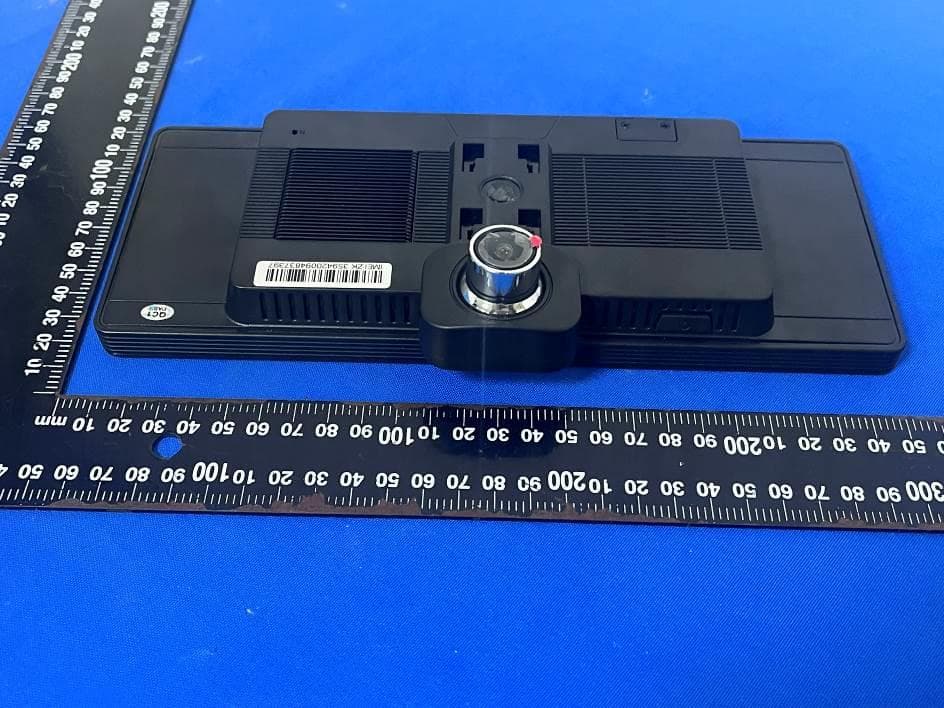
Click to zoom
Application Details
- Equipment Class
- DTS - Digital Transmission System
- Date of Grant
- May 09, 2023
- Application Purpose
- Original Equipment
- Date of Application
- May 09, 2023
- Equipment Note
- Dash Cam
- Frequency Range
- 2412.00000000 - 2462.00000000
- Country
- China
Documents & Files
Document Text
Text extracted from the exhibit documents filed with the FCC. Open a document above to read the original.
Users Manual
10.26" High-performance Center Console DVR 8-Core│ Android 10.0 │4+64G 1 一、Product Specification High-performance Center Console DVR System Hardware Configuration CPU Unisoc UIS8581A,8-Core,4*a55 1.6GHz+4*A55 1.2GHz GPU Power VR Fentale GE8322 up to 550MHz RAM LPDDR4:4GB ROM eMMC:32GB/64GB Display Screen 10.26 inch;Resolution:1600*600P Touch Screen Capacitive screen Front Camera C2395K 6P 1080P Rear Camera AHD 1080P Microphone Built in single microphone, supports two independent ADC channels, supports echo and noise cancellation;-40db±2db Loudspeaker Built-in(8ohm/2W) G-Sensor Support collision auto save video System Parameters Work Temperature -20 °C ~ +70 °C Wireless Connection WiFi 2.4G:WiFi 802.11b/g/n Bluetooth Bluetooth 5.1,Support BT Call,BT Music(A2dp) Interface Configuration USB Jack Mini USB 5pin right bend 90° (power supply mode:buck line/ car charger DC5V/4A) TF Jack Used to store driving recorder video, TF card capacity up to 128GB LCD Jack 40Pin mini display screen,support 0.5mm pitch 40PIN lower contact FFC socket Touch Screen Jack Support 0.5mm pitch 6PIN upper contact FFC socket (universal 6PIN FPC line capacitive touch screen) OBD communication interface UART Jack,support 1-Way TTL jack,4PIN 1.25MM pitch(VCC,TX(3.3V),RX(3.3V),GND) Button Power-on key/reset key/download key/two function keys Software Configuration OS Android 10.0 Video Format TS(Power-off protection,Or the TF card is suddenly pulled out, etc., and the video file is not damaged. 2 WiFi real-time preview After the mobile phone is connected to the WiFi hotline of the driving recorder, you can preview the front and rear cameras of the recorder in real time on the mobile phone Cloud Service Playback and share online at any time without affecting the recorder’s recording of the driving video to the local TF card. Intelligent collision detection algorithm: Support intelligent collision detection algorithm, and actively uploads the collision video to the background System updation Support local upgrade and OTA upgrade 二、Product Renderings 三、Function Introduction Of Car Dvr 1. Power Key (1)Power on/off function In the off state, press and hold the power button for 3 seconds to turn on the power of the device.In the power-on state, press and hold the power button for 3 seconds, the machine automatically saves the video file and shuts down; (2)Turn off the display backlight 3 In any state, short press the power button to enter the screen saver HUD mode, short press the power button again to sleep and turn off the backlight, and short press the power button again to light up. Reset Key, on the back of the fuselage.If the recorder crashes, short press the reset hole and reconnect the power to return to normal. 2. Screensaver and hibernation You can operate the screen saver under Settings - Display - Screen Saver or in the shortcut settings.Our default is that the machine will automatically enter the screen saver mode if there is no operation for one minute. If you need to modify the screen saver time, you can modify the screen saver time here.Our default hibernation mode is off.If the sleep screensaver is opened at the same time, the screensaver will work. Closing the screensaver will make sleep work. 3. Main Interface First Page 4 A、Navigation Click the "" icon to enter the default map navigation. Long press the "" icon to enter the navigation application interface. B、Cloud service Click the "" icon to enter the background cloud service, which can be bound to remote monitoring and traffic management, etc. C、Bluetooth Click the "" icon to enter the Bluetooth interface, you can connect the car Bluetooth or mobile phone Bluetooth. D、Playback 5 Click the "" icon to enter the video playlist, where you can play video and view pictures. a、When the recorder is recording and then entering the video to view the file, you need to stop recording first, and then click“” b、Video playback is divided into three parts: Normal video, Locking video and Pictures. Long press the video file to perform relevant operations. c、ClickAll video playback files can be selected d、ClickThe video can be locked after playing back the file, and the file can be unlocked in the locked video after locking e、ClickVideo playback files can be deleted f、ClickThe selected video can be cancelled. 6 E、DVR Click”DVR”,Then open DVR,show as below picture: Click the preview interface to switch between the front and back video previews, and click back to exit. 1. Click enter the video playback related functions 2. Click In the case of inserting the TF card, when recording, the video that is being recorded will be locked, and the locked video will not be covered by the looped video. 3. Click When the TF card is inserted, click this icon to take a photo. 4. Click Recording sound: When recording, you can turn on or off the recording. 5. Click to enter the recording setting function interface, as follows: 7 a.Format SD card:Through this item, you can format the TF card. b.Record trime:Set the video segment duration:1min 2min 3min 4min 5min optional. c.Collision-lock sensitivity:According to the sensitivity of gravity sensing, you can set three modes: low, medium, high, and different sensitivities correspond to corresponding file locking sensitivities. c.Speed unit:There are two optional speed units: km/n and mph. F、click enter music interface H、Click enter the APP,and more APP displayed here. Shortcut key: 8 a、Click icon to use the voice-related functions. b、Click return to the main interface. c、Click continue to return. d、Click enter the shortcut setting interface.Set the volume, brightness, WiFi and other switches.As follows: K、Click enter the system setting interface to perform system related operations. 9 a.Open/close WiFi,When you click“”in the WLAN column, you can quickly open the WiFi function. The system automatically scans the nearby WIFI signals, lists the searched wireless routers, click the searched wireless router name, a setting window will pop up, please…
Text truncated - open the document above for the full version.
Attestation Statements
Shenzhen Jackson Technology Co., Ltd. 2.911 (d)(7)USA Agent v1.3 Section 2.911(d)(7) USA Agent for Service of Process Company name: Shenzhen Jackson Technology Co., Ltd. Address: Floor 8th-2, Building C, East Zone 1, Snow Science Park, Xinxue she qu, Bantian Street, Shenzhen, Guangdong Product Name: Dash Cam FCC ID: 2BAYU-V93 Model(s): V93, V93A11, H33, Z60, Z70, T93, T95, V8, V9, M11, M12, Z68, S18, Z80, Z90, V8, V9, K18, T88, T94 2.911(d)(7) USA Designated Agent for Service of Process We, [Shenzhen Jackson Technology Co., Ltd.] (“the applicant”) designate [Electronic Mac, Inc.] NOTE1 for the purpose of accepting service of process on behalf of the applicant. Applicant consent: We Acknowledge our consent to accept service of process in the United States for matters related to the applicable equipment, and at the physical U.S. address and email address of the designated agent and acknowledge our acceptance of our obligation to maintain an agent for service of process in the United States for no less than one year after either the grantee has permanently terminated all marketing and importation of the applicable equipment within the U.S., or the conclusion of any Commission-related administrative or judicial proceeding involving the equipment, whichever is later. Agent obligation: We Acknowledge our obligation to accept service of process in the United States for matters related to the applicable equipment at our physical U.S. address and email address for no less than one year after either the grantee has permanently terminated all marketing and importation of the applicable equipment within the U.S., or the conclusion of any Commission-related administrative or judicial proceeding involving the equipment, whichever is later. USA Agent Company name: Electronic Mac, Inc. Address: 6525 Crown Blvd, # 20805, San Jose, CA 95120 FRN: 0033414541 Contact Name: Ray Sia Telephone No: 408-332-2399 Email: [email protected] Applicant Company name: Shenzhen Jackson Technology Co., Ltd. Address: Floor 8th-2, Building C, East Zone 1, Snow Science Park, Xinxue she qu, Bantian Street, Shenzhen, Guangdong FCC Grantee Code: 2BAYU Contact Name: CONG CHENG Telephone No: 13925201089 Email: [email protected] Signature: Title: Manager Signature: Title: General Manager Shenzhen Jackson Technology Co., Ltd. 2.911 (d)(7)USA Agent v1.3 Date: Apri.24,2023 Date: Apri.24,2023 NOTE 1: An applicant located in the United States may designate itself as the agent for service of process. Reference; Federal Register document 2022-28263 published on 02/06/23 https://www.federalregister.gov/documents/2023/02/06/2022-28263/protecting-against-nation al-security-threats-to-the-communications-supply-chain-through-the
External Photos
- Page 1 of 4 - ET-23040358 Product Name: Dash Cam Test Model No.: V93 Ext Photos - Page 2 of 4 - ET-23040358 - Page 3 of 4 - ET-23040358 - Page 4 of 4 - ET-23040358 -----END-----
ID Label/Location Info
Product Name : Dash Cam Model No. : V93 Manufacturer : Shenzhen Jackson Technology Co., Ltd. FCC ID : 2BAYU-V93 Made in China Label size:50mm*30mm
Internal Photos
- Page 1 of 4 - ET-23040358 Product Name: Dash Cam Test Model No.: V93 Internal photos - Page 2 of 4 - ET-23040358 - Page 3 of 4 - ET-23040358 - Page 4 of 4 - ET-23040358 ------END----- RF ANT
RF Exposure Info
FCC ID: 2BAYU-V93 RF Exposure Evaluation Limits The criteria listed in the following table shall be used to evaluate the environment impact of human exposure to radio frequency (RF) radiation as specified in 1.1307(b) Limits for Maximum Permissible Exposure (MPE) Frequency range (MHz) Electric field strength (V/m) Magnetic field strength (A/m) Power density (mW/cm 2 ) Averaging time (minutes) (A) Limits for Occupational/Controlled Exposures 0.3–3.0 614 1.63 *(100) 6 3.0–30 1842/f 4.89/f *(900/f 2 ) 6 30–300 61.4 0.163 1.0 6 300–1500 f/300 6 1500–100,000 5 6 (B) Limits for General Population/Uncontrolled Exposure 0.3–1.34 614 1.63 *(100) 30 1.34–30 824/f 2.19/f *(180/f 2 ) 30 30–300 27.5 0.073 0.2 30 300–1500 f/1500 30 1500–100,000 1.0 30 f = frequency in MHz Friis transmission formula: Pd = (Pout*G)/(4*pi*r 2 ) Where Pd = power density in mW/cm 2 , Pout = output power to antenna in mW; G = gain of antenna in linear scale, Pi = 3.1416; R = distance between observation point and center of the radiator in cm Pd id the limit of MPE, 1 mW/cm 2 . If we know the maximum gain of the antenna and the total power input to the antenna, through the calculation, we will know the distance r where the MPE limit is reached. Test Procedure Software provided by client enabled the EUT to transmit and receive data at lowest, middle and highest channel individually. FCC ID: 2BAYU-V93 Test Result of RF Exposure Evaluation The source of the evaluation data results is based on the test report ET-23040358E01/02 BT Antenna gain=2.67dBi, 2.4G WIFI Antenna gain=2.67dBi, FOR BLE Mode Output power (dBm) Output power (mW) Numeric antenna gain Power Density at R=20cm (mW/cm 2 ) Limit (mW/cm 2 ) Result GFSK 1.60 1.45 1.85 0.0005 1.0 PASS FOR 2.4GWIFI Mode Output power (dBm) Output power (mW) Numeric antenna gain Power Density at R=20cm (mW/cm 2 ) Limit (mW/cm 2 ) Result 802.11b 13.92 24.66 1.85 0.0091 1.0 PASS 802.11g 14.65 29.17 1.85 0.0107 1.0 PASS 802.11n20 14.59 28.77 1.85 0.0106 1.0 PASS 802.11n40 12.18 16.52 1.85 0.0061 1.0 PASS If BLE and 2.4G WIFI operate simultaneously, Total power density=0.0005/1+0.0107/1=0.0112<1. Then SAR evaluation is not require .
Test Report
Report No.: ET-23040358E02 Tel: +86 755 85259392 Email: [email protected] No.103, No.10, Phase I, Zone 3, Xinxing Industrial Park, Xinhe, Fuhai Street, Bao'an District, Shenzhen, Guangdong, China TEST REPORT Applicant: Shenzhen Jackson Technology Co., Ltd. Address of Applicant: Floor 8th-2, Building C, East Zone 1, Snow Science Park, Xinxue she qu, Bantian Street, Shenzhen, Guangdong Manufacturer/Factory: Shenzhen Jackson Technology Co., Ltd. Address of Manufacturer Floor 8th-2, Building C, East Zone 1, Snow Science Park, Xinxue she qu, Bantian Street, Shenzhen, Guangdong Product Name: Dash Cam Model No.: V93, V93A11, H33, Z60, Z70, T93, T95, V8, V9, M11, M12, Z68, S18, Z80, Z90, K18, T88, V80 Trade Mark: N/A FCC ID: 2BAYU-V93 Applicable standards: FCC CFR Title 47 Part 15 Subpart C Section 15.247 Date of Test: Apri.17, 2023- Apri.24, 2023 Date of report issued: May.08, 2023 Test Result : PASS * * In the configuration tested, the EUT complied with the standards specified above. Remark: The results shown in this test report refer only to the sample(s) tested , this test report cannot be reproduced, except in full without prior written permission of the company. The report would be invalid without specific stamp of test institute and the signatures of compiler and approver Prepared By Shenzhen ETR Standard Technology Co., Ltd. Address: No.103, No.10, Phase I, Zone 3, Xinxing Industrial Park, Xinhe, Fuhai Street, Bao'an District, Shenzhen, Guangdong, China Compiled by: Reviewed by: Approved by: Project Engineer Project Manager Authorized Signature - Page 2 of 48 - Report No.: ET-23040358E02 Report Revision History Report No. Description Issue Date ET-23040358E02 Original May.08, 2023 - Page 3 of 48 - Report No.: ET-23040358E02 Tel: +86 755 85259392 Email: [email protected] Web: www.etrlab.cn No.103, No.10, Phase I, Zone 3, Xinxing Industrial Park, Xinhe, Fuhai Street, Bao'an District, Shenzhen, Guangdong, China Contents Page 1. TEST SUMMARY ......................................................................................................................................4 2. GENERAL INFORMATION .......................................................................................................................5 2.1 GENERAL DESCRIPTION OF EUT .................................................................................................................5 2.2 TEST MODE ................................................................................................................................................7 2.3 DESCRIPTION OF SUPPORT UNITS ...............................................................................................................7 2.4 DEVIATION FROM STANDARDS .....................................................................................................................7 2.5 ABNORMALITIES FROM STANDARD CONDITIONS ....................................................................................7 2.6 TEST FACILITY ............................................................................................................................................7 2.7 TEST LOCATION ..........................................................................................................................................7 2.8 ADDITIONAL INSTRUCTIONS .........................................................................................................................7 3. TEST INSTRUMENTS LIST ......................................................................................................................8 4. TEST RESULTS AND MEASUREMENT DATA .......................................................................................9 4.1 ANTENNA REQUIREMENT .............................................................................................................................9 4.2 CONDUCTED EMISSIONS ...........................................................................................................................10 4.3 CONDUCTED PEAK OUTPUT POWER ..........................................................................................................11 4.4 6DB BANDWIDTH ......................................................................................................................................12 4.5 POWER SPECTRAL DENSITY ......................................................................................................................15 4.6 BAND EDGES ............................................................................................................................................18 Conducted Emission Method ...................................................................................................................18 Radiated Emission Method ......................................................................................................................21 4.7 SPURIOUS EMISSION .................................................................................................................................26 Conducted Emission Method ...................................................................................................................26 Radiated Emission Method ......................................................................................................................31 5. TEST SETUP PHOTO .............................................................................................................................48 6. EUT CONSTRUCTIONAL DETAILS .......................................................................................................48 - Page 4 of 48 - Report No.: ET-23040358E02 Tel: +86 755 85259392 Email: [email protected] Web: www.etrlab.cn No.103, No.10, Phase I, Zone 3, Xinxing Industrial Park, Xinhe, Fuhai Street, Bao'an District, Shenzhen, Guangdong, China 1. Test Summary Test Item Section Result Test by Antenna requirement FCC part 15.203/15.247 (c) Pass / AC Power Line Conduc…
Text truncated - open the document above for the full version.
Test Report
ShenzhenFreeWalkCommunicationTechnologyCo.LTD FreeWalkProprietary&Confidential©2022FreeWalkCorporation.Allrightsreserved. TEL:86-0755-2995598 3rdFloor,Building2,HezhouWestIndustrialPark, Xixiang,Baoan,Shenzhen Email:[email protected] ADD: t 3FAX:86-0755-29955983 APPROVALSHEET ( Customer ) : (Product): ( Model ) 2.4GWIFI antenna (Dual antenna) : Part Number: Main antenna(Z01-6084-R01)Grey Line L=360mm Written By:Mr Hu 2022-12-0IssuedDate ) :5 CUSTOMER ENGINEER R&D DEPTQUALITY DEPTAPPROVED FreeWalk R&D DEPT ENGINEER R&D DEPTAPPROVED D215W Shenzhen Jackson Technology Co., Ltd.son Technology Co., Ltd. Auxiliary antenna(Z08-10088-R01)Black Line L=330mm ShenzhenFreeWalkCommunicationTechnologyCo.LTD FreeWalkProprietary&Confidential©2022FreeWalkCorporation.Allrightsreserved. Document change history QR-ZYX-084 :A0 Form number: QR-ZYX-084 Version: A0 Product number Serial Document change history number Change typeFile NumberChange date Description of changes Production/R evision versionRemarks ShenzhenFreeWalkCommunicationTechnologyCo.LTD FreeWalkProprietary&Confidential©2022FreeWalkCorporation.Allrightsreserved. Index (Cover)········································································1 (Document Change Resume)·································2 ( The basic parameters ) ·············································4 (Product Drawing)···················································5 (Test Equipment & Conditions)···································6 (Test Data)·························································7-23 (Antenna Picture)···················································24 (Tee PackingWay) (Index)······································································3 ···················································25 Shenzhen Free Walk Technology Co. LTD The basic parameters A. Electrical Characteristics Frequency VSWR Efficiency Impedance Polarization Gain B. Material & Mechanical Characteristics C. Environmental Operation Temperature - 20 ̊C ~ + 60 ̊C Storage Temperature - 40 ̊C ~ + 80 ̊C Free Walk Proprietary & Confidential © 2022 Free Walk Corporation. All rights reserved. Material of Radiator Cable Type Connector Type Dimension >50% 50 Ohm Linear 2410 MHz ~2480MHz ≤3 2dBi Φ1.13 Main antenna Gray Φ1.13 Auxiliary antenna Black Fourth generation IPEX ( 3 M 3 0 0 L SE) 3M back glu e(3M300LSE) A v u l s i o n p o s i t i on 3M 背 胶 ( 3 M 3 0 0 L SE) 3M back glu e(3M300LSE) A v u l s i o n p o s i t i on Shenzhen Free Walk Technology Co. LTD Test Equipment & Conditions 1. Network Analyzers : Agilent 8753D 5071B 2. Communications Test Set: Agilent 8960 3. 3D Chamber Test System Free Walk Proprietary & Confidential © 2022 Free Walk Corporation. All rights reserved. Shenzhen Free Walk Technology Co. LTD 2.4GHz Freq Effi Gain (MHz) (%) (dBi) 2400 64.25 2.16 2410 63.96 2.02 2420 60.83 2.01 2430 61.45 2.1 2440 60.65 2.41 2450 59.63 2.26 2460 61.67 2.55 2470 64.23 2.67 2480 64.5 2.65 2490 63.23 2.32 2500 62.72 2.28 Main antenna Efficency&Gain Shenzhen Free Walk Technology Co. LTD Free Walk Proprietary & Confidential © 2022 Free Walk Corporation. All rights reserved. 2400MHZ(Main antenna) Shenzhen Free Walk Technology Co. LTD 2450MHz(Main antenna) FreeWalkProprietary&Confidential©2022FreeWalkCorporation.Allrightsreserved. Shenzhen Free Walk Technology Co. LTD 2500MHz(Main antenna) Free Walk Proprietary & Confidential © 2022 Free Walk Corporation. All rights reserved. Shenzhen Free Walk Technology Co. LTD Freq Effi Gain (MHz) (%) (dBi) 2400 64.11 2.56 2410 60.24 2.14 2420 61.67 2.18 2430 58.25 2.01 2440 2450 58.82 2.01 2460 65.89 2.54 2470 64.3 2.52 2480 65.83 2.65 2490 61.96 2.37 2500 59.07 2.16 62.2 2.12 na Efficency&Gain:Auxiliary anten 2.4GHz Shenzhen Free Walk Technology Co. LTD Free Walk Proprietary & Confidential © 2022 Free Walk Corporation. All rights reserved. 2400MHZ(Auxiliary antenna) 2400MHz 2400.000MHz 2400.000MHz H hgng 2400.000MHz E1 0.0n 6Q 2400.000MHz E2 6Q Shenzhen Free Walk Technology Co. LTD Free Walk Proprietary & Confidential © 2022 Free Walk Corporation. All rights reserved. 2450MHzAuxiliary antenna 2450.000MHz H 2450MHz 2450.000MHz 1.6 19.an 2450.000MHz E1 isn Shenzhen Free Walk Technology Co. LTD Free Walk Proprietary & Confidential © 2022 Free Walk Corporation. All rights reserved. 2500MHZ (Auxiliary antenna) 2500MHz 2500.000MHz H 2500.000MHz 50m 0 ao L11.4 2500.000MHz E1 2500.000MHz E2 5a0 10.n0 smm am
Test Setup Photos
ET-23040358 Page 1 of 1 Product Name: Dash Cam Test Model No.: V93 Test Setup Photo Radiated emissions 30MHz to1GHz Above 1GHz ------End------
Contact Information
Applicant
CONG CHENG
Technical Contact
Test Firm
Shenzhen ETR Standard Technology Co., Ltd.Smith Chen
[email protected]+86 755-85259392
Technical Specifications
| # | Rule Parts | Frequency Range | Power Output |
|---|---|---|---|
| 1 | 15C | 2.41 GHz - 2.46 GHz | 29.20 mW |