2BB62-HK5HK5 HERO
Shenzhen Yunteng Investment Co., LTD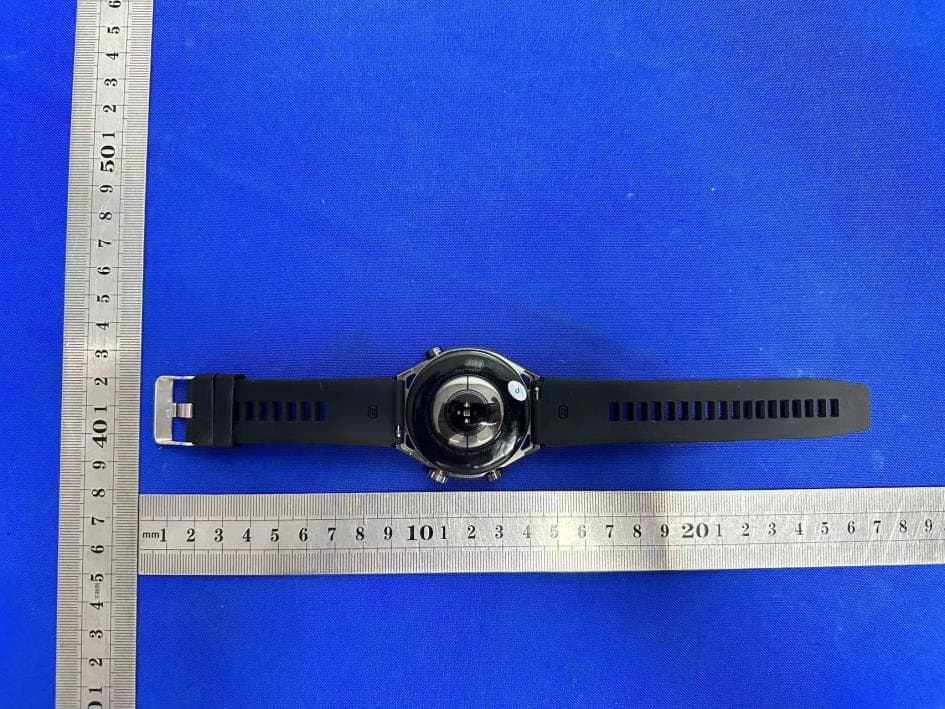
Click to zoom
Application Details
- Equipment Class
- DTS - Digital Transmission System
- Date of Grant
- Jul 24, 2023
- Application Purpose
- Original Equipment
- Date of Application
- Jul 24, 2023
- Equipment Note
- HK5 HERO
- Frequency Range
- 2402.00000000 - 2480.00000000
- Country
- China
Documents & Files
Document Text
Text extracted from the exhibit documents filed with the FCC. Open a document above to read the original.
Users Manual
HK5HERO Smartwatch instructions 1. Connect the watch to the mobile phone 1.1 Download "Wearfit Pro" APP to and install on the phone, you can directly search "Wearfit Pro" in the APP mall to download, you can also scan the following QR code to download (browser, wechat can be scanned) 1.2 Connect the watch Scan code connection: Power on connection during the first boot / restore factory Settings: after the boot language, the download APP QR code + paired QR code will pop up. Use the APP to scan the paired QR code to add the device Conventional connection: open the Settings- -universal- -connect to the mobile phone, you can view and download the APP QR code + matching QR code. Use the APP to scan the paired QR code to add the device Manual connection: When the connection is restored at the factory for the first time: after the language is selected, the download APP QR code + the matching QR code will pop up. Below the QR code of the match, the device name will be displayed. Click Add the device on the APP, scan the corresponding device and click directly to connect Conventional connection: open the Settings- -universal- -connect to the mobile phone, you can view and download the APP QR code + matching QR code. At the bottom of the paired QR code, the name of the device will be displayed. Click Add device on the APP, scan the corresponding device and click to connect 2.1 Connect to the call to Bluetooth Bluetooth is off in the initial state of the watch, when the call function, music function and voice assistant can not be used. According to the instructions in the app, enter the Bluetooth search interface and search for the Bluetooth name with the "CALL" suffix. Click Connect call Bluetooth. After the successful connection, you can use both the call function and the music function. 3. Main functions 3.1 Dial 3.1.1 Built-in dial: built-in multiple dial, can be replaced freely; 3.1.2 Watch dial market: APP built-in dial mall, can be downloaded dial, free replacement; 3.1.3 Custom dial: Users can upload patterns in the APP and customize the dial; 3.2 Basic functions 3.2.1 Menu mode: Double click the menu interface to switch the menu style; 3.2.2 Application market: my TA (positioning and health), blood sugar, short video control and other functions; 3.2.3 Component management: dial shortcut function, support: heart rate, sleep, short video and other functions; 3.2.4 Message reminder: the message content can be pushed on the mobile terminal; 3.2.5 Settings: wrist lifting bright screen, constant bright setting, brightness adjustment, screen time, health reminder, language, button definition, sound and vibration, don't disturb mode, connect mobile phone, shutdown, restart, watch, time setting, restore factory recovery, etc.; 3.2.6 Shortcut function: lock screen, do not disturb, always bright, find mobile phone, Alipay, lift wrist bright screen, setting, positioning, short video, etc.; 3.3 Sports 3.3.1 Including a variety of sports modes, including indoor running, indoor cycling, outdoor cycling, brisk walking, football, badminton, basketball, hiking, mountain climbing, free sports, etc.; 3.4 Health 3.4.1 Sleep monitoring: Your sleep duration and quality will be recorded every night to the next morning to help you better adjust your rest time and improve your sleep quality. In the sleep function interface, query the options about the sleep function; 3.4.2 Heart rate: close the watch to the wrist, the best wearing position is in the wrist bone above the arm, the real-time heart rate value can be measured, the average normal value is 60-90 times / minute; 3.4.3 Blood oxygen: close the watch to the wrist, the best wearing position is in the wrist bone above the arm, and the blood oxygen value can be measured; 3.4.4 Breathing training: Be able to quickly relax yourself, relieve pressure, and quickly supplement oxygen to the body; 3.4.5 Blood pressure: close the watch to the wrist, and the best wearing position is in the wrist bone above the arm, which can measure the blood pressure; 3.4.6 Pressure: The watch supports continuous pressure monitoring, monitoring the user's pressure changes for 24 hours, and using a scientific health algorithm to image the pressure with the ICONS, so that users can adjust their state at any time. Pressure range shows: 1-29 relaxed; 30-59 normal; 60-79 medium; 80-99 high. 3.4.7 Plum: The watch realizes the function of plum, converts all the daily amount of exercise into plum value on the watch and APP, records the energy metabolism equivalent of exercise for a week, forms a visual icon, so that users can clearly understand their amount of exercise; 3.5 Daily Tools 3.5.1 Weather: Connect APP can synchronize the weather; 3.5.2 Music player: Connect the APP to control the music playback. 3.5.3: Remote control photography: open the camera in the APP, and can control the watch to take photos; 3.5.4: Find the mobile phone: when the mobile phone is not silent, operate the watch and make the mobile phone ring. 3.5.5: Alipay: Watch Alipay, can be bound to mobile phone Alipay, two-dimensional code payment function; 31.5.6: Stopwatch: The watch supports stopwatch timing; 3.5.7: Telephone: connected to the mobile phone call Bluetooth, which can be realized on the mobile phone terminal; 3.5.8: Voice assistant: watch fast call mobile phone voice assistant; 3.5.9: Alarm clock: support the watch to set the alarm clock, and the app to set the alarm bell 3.5.10: Calculator: can be simple calculation. 3.5.11: Timer: Watch support timer. 3.5.12: Wallet / business card: upload the collection code and social QR code in the APP in advance. Down the shortcut menu to open the wallet function, support wechat, Alipay, PayPal, etc. Down the shortcut menu to open the business card function, support wechat, QQ, Facebook, WhatsApp, Twitter, etc.; 3.5.13: Compass: to provide an accurate and reliable direction. 4. Alipay (payment code) 4.1 Bind to Alipay Select Alipay in the list of watch apps, and…
Text truncated - open the document above for the full version.
Attestation Statements
(Shenzhen Yunteng Investment Co., LTD) (July 21, 2023) Eurofins Electrical and Electronic Testing NA, Inc. 914 West Patapsco Avenue Baltimore, MD 21230 RE: Attestation Statements Part 2.911(d)(5)(i) request for (FCC ID: 2BB62-HK5) [Shenzhen Yunteng Investment Co., LTD] (“the applicant”) certifies that the equipment for which authorization is sought is not “covered” equipment prohibited from receiving an equipment authorization pursuant to section 2.903 of the FCC rules. Sincerely, (Applicant signature) (Applicant printed name) zefeng chen (Shenzhen Yunteng Investment Co., LTD) (July 21, 2023) Eurofins Electrical and Electronic Testing NA, Inc. 914 West Patapsco Avenue Baltimore, MD 21230 RE: Attestation Statements Part 2.911(d)(5)(ii) request for (FCC ID: 2BB62-HK5) [Shenzhen Yunteng Investment Co., LTD] (“the applicant”) certifies that, as of the date of the filing of the application, the applicant is not identified on the Covered List as an entity producing “covered” equipment. Sincerely, (Applicant signature) (Applicant printed name) zefeng chen
Cover Letter(s)
Shenzhen Yunteng Investment Co., LTD Model Difference Data:July 21, 2023 Product description: HK5 HERO Model name: HK5 HERO(Black), HK5 HERO(Gold), HK5 HERO(Green), HK5 HERO(Blue), HK5 HERO Trade Name: N/A FCC ID: 2BB62-HK5 All the model are the same circuit and RF module, except model names . Regards Sincerely Client’s signature : Client’s name / title : zefeng chen(CEO) Contact information / address:3F, Wenkang Building, Kangsheng Electronic Industry Park, Longhua New District, Shenzhen
Cover Letter(s)
Shenzhen Yunteng Investment Co., LTD (July 21, 2023) Eurofins Electrical and Electronic Testing NA, Inc. 914 West Patapsco Avenue Baltimore, MD 21230 RE: CONFIDENTIALITY REQUEST FOR (HK5 HERO / HK5 HERO(Black) , HK5 HERO(Gold), HK5 HERO(Green), HK5 HERO(Blue), HK5 HERO / FCC ID: 2BB62-HK5 ) To Whom It May Concern: This letter serves as an official request for confidentiality under sections 0.457 and 0.459 of CFR 47. We have requested that the Exhibits Long-Term Confidentiality Short-Term Confidentiality NOTE 2 ID Label/Location No No Attestation Statement No No External Photos No ☐ Block Diagram ☒ ☐ Schematics ☒ ☐ Test Report No No Test Setup Photos No ☐ User’s Manual ☐ NOTE 1 ☒ Internal Photos ☐ NOTE 1 ☒ Parts List / Tune Up ☐ ☐ RF Exposure Info No No Operational Description ☒ ☐ Cover Letter(s) No No SDR Software / Security Info ☐ No required to be submitted with this application be permanently withheld from public review. Above mentioned document contains detailed system and equipment description are considered as proprietary information in operation of the equipment. The public disclosure of above documents might be harmful to our company and would give competitor an unfair advantage in the market. Please contact me if there is any information you may need. Sincerely, Signature: Name: zefeng chen Title: CEO
Cover Letter(s)
Shenzhen Yunteng Investment Co., LTD (July 21, 2023) Eurofins Electrical and Electronic Testing NA, Inc. 914 West Patapsco Avenue Baltimore, MD 21230 RE: LETTER OF AGENT AUTHORIZATION To Whom It May Concern: We, the undersigned, hereby authorize (Shenzhen CTB Testing Technology Co., Ltd.) to act on our behalf in all matters relating to application for equipment authorization, including the signing of all documents relating to these matters. We also hereby certify that no party to the application authorized hereunder is subject to the denial of benefits, including FCC benefits, pursuant to Section 5301 of the Anti-Drug Abuse Act of 1988, 21 U.S.C.853(a). This agreement expires one year from the current date. Sincerely, Signature: Name: zefeng chen Title: CEO
External Photos
External Photos
ID Label/Location Info
FCC ID LABEL: Label Location: FCC ID: 2BB62-HK5
Internal Photos
Internal Photos ANT
RF Exposure Info
Shenzhen CTB Testing Co., Ltd. FCC ID:2BB62-HK5 Portable device According to §15.247(e)(i) and §1.1307(b)(1), systems operating under the provisions of this section shall be operated in a manner that ensures that the public is not exposed to radio frequency energy level in excess of the Commission’s guidelines. According to KDB447498 D01 General RF Exposure Guidance V06 The 1-g SAR and 10-g SAR test exclusion thresholds for 100 MHz to 6 GHz at test separation distances ≤ 50 mm are determined by: [(max. power of channel, including tune-up tolerance, mW)/(min. test separation distance, mm)]·[√f(GHZ)] ≤ 3.0 for 1-g SAR and ≤ 7.5 for 10-g extremity SAR, where: • f(GHZ) is the RF channel transmit frequency in GHz • Power and distance are rounded to the nearest mW and mm before calculation • The result is rounded to one decimal place for comparison When the minimum test separation distance is < 5 mm, a distance of 5 mm is applied to determine SAR test exclusion. BLE: Modulation Channel Freq. (GHz) Conduct ed power (dBm) Conducte d power (mW) Tune-up power (dBm) Max tune-up power (dBm) Max tune-up power (mW) Distance (mm) Result calculatio n SAR Exclusion threshold SAR test exclusion 2.402 -1.79 0.66 -1±1 0.00 1.00 <5 0.30997 3.00 YES 2.44 -1.215 0.76 -1±1 0.00 1.00 <5 0.31241 3.00 YES 2.480 -0.781 0.84 0±1 1.00 1.26 <5 0.39651 3.00 YES GFSK Conclusion: For the max result : 0.39651≤ FCC Limit 3.0 for 1g SAR.
Test Report
Shenzhen Yunteng Investment Co., LTD 天线测试报告 Antenna test report 项目型号 天线型号 测 试许 涛 审 核康锦煌 日 期2022-03-26 Shenzhen Yunteng Investment Co., LTD Shenzhen Yunteng Investment Co., LTD 测试设备 Test equipment 探头微波暗室 频率:0.4GHz至 6GHz 主要测试指标 无源指标 增益 功率 3D方向图 Shenzhen Yunteng Investment Co., LTD 测试设备 Test equipment AgilentE5071C矢量网络分析仪 频率:300kHz至 8.5GHz R&SCMW500宽带无线通信测试仪 GSM/3G/4G WIFI/Bluetooth NB-IoT Shenzhen Yunteng Investment Co., LTD 天线驻波比 AntennaSWR 天线回波损耗 AntennaReturnloss Shenzhen Yunteng Investment Co., LTD 天线 Freq(MHz) Efficiency (%) Gian(dBi) 2400 MHz25.59-0.36 2450 MHz25.82-0.08 2500 MHz25.93-0.84 Shenzhen Yunteng Investment Co., LTD
Test Report
Shenzhen CTB Testing Technology Co., Ltd. Report No.: CTB230717030RFX Report Tel: 4008-707-283Web: http://www.ctb-lab.net Page 1 of 35 TEST REPORT Compiled by: Reviewed by: Approved by: Zhou Kui Arron Liu Bin Mei / Director Note: If there is any objection to the inspection results in this report, please submit a written report to the company within 15 days from the date of receiving the report. The test report is effective only with both signature and specialized stamp. This result(s) shown in this report refer only to the sample(s) tested. Without written approval of Shenzhen CTB Testing Technology Co., Ltd. this report can’t be reproduced except in full. The tested sample(s) and the sample information are provided by the client. “*” indicates the testing items were fulfilled by subcontracted lab. “#” indicates the items are not in CNAS accreditation scope. Product Name: HK5 HERO FCC ID: 2BB62-HK5 Trademark: N/A Model Number: HK5 HERO(Black), HK5 HERO(Gold), HK5 HERO(Green), HK5 HERO(Blue), HK5 HERO Prepared For: Shenzhen Yunteng Investment Co., LTD Address: 3F, Wenkang Building, Kangsheng Electronic Industry Park, Longhua New District, Shenzhen Manufacturer: Shenzhen Yunteng Investment Co., LTD Address: 3F, Wenkang Building, Kangsheng Electronic Industry Park, Longhua New District, Shenzhen Prepared By: Shenzhen CTB Testing Technology Co., Ltd. Address: 1&2/F., Building A, No.26, Xinhe Road, Xinqiao, Xinqiao Street, Bao'an District, Shenzhen, Guangdong, China Sample Received Date: Jul. 10, 2023 Sample tested Date: Jul. 10, 2023 t Jul. 17, 2023 Issue Date: Jul. 17, 2023 Report No.: CTB230717030RFX Test Standards FCC Part15.247 ANSI C63.10:2013 Test Results PASS Remark: This is Bluetooth radio test report. Shenzhen CTB Testing Technology Co., Ltd. Report No.: CTB230717030RFX Report Tel: 4008-707-283 Web: http://www.ctb-lab.net Page 2 of 35 TABLE OF CONTENT Test Report Declaration Page 1. VERSION ........................................................................................................................................ 3 2. TEST SUMMARY ........................................................................................................................... 4 3. MEASUREMENT UNCERTAINTY ................................................................................................. 5 4. PRODUCT INFORMATION AND TEST SETUP ............................................................................ 6 4.1 Product Information .......................................................................................................................... 6 4.2 Test Setup Configuration .................................................................................................................. 6 4.3 Support Equipment........................................................................................................................... 6 4.4 Channel List ..................................................................................................................................... 7 4.5 Test Mode ........................................................................................................................................ 7 4.6 Test Environment ............................................................................................................................. 7 5. TEST FACILITY AND TEST INSTRUMENT USED ....................................................................... 8 5.1 Test Facility ...................................................................................................................................... 8 5.2 Test Instrument Used ....................................................................................................................... 8 6. AC POWER LINE CONDUCTED EMISSION ................................................................................ 10 6.1 Block Diagram Of Test Setup ......................................................................................................... 10 6.2 Limit ................................................................................................................................................ 10 6.3 Test procedure ............................................................................................................................... 10 6.4 Test Result ..................................................................................................................................... 12 7. RADIATED SPURIOUS EMISSION ............................................................................................. 14 7.1 Block Diagram Of Test Setup ......................................................................................................... 14 7.2 Limit ................................................................................................................................................ 14 7.3 Test procedure ............................................................................................................................... 15 7.4 Test Result ..................................................................................................................................... 16 8. BAND EDGE AND RF COUNDUCTED SPURIOUS EMISSIONS ............................................... 23 8.1 Block Diagram Of Test Setup ......................................................................................................... 23 8.2 Limit ................................................................................................................................................ 23 8.3 Test procedure ............................................................................................................................... 23 8.4 Test Result ..................................................................................................................................... 24 9. COUDUCTED OUTPUT POWER ...................................................…
Text truncated - open the document above for the full version.
Test Setup Photos
Radiated Emission Below 1G Above 1G Conducted emissions
Contact Information
Applicant
zefeng chen
Technical Contact
Shenzhen Yunteng Investment Co., LTDzefeng chen
[email protected]13538214502
3F, Wenkang Building, Kangsheng · Shenzhen · China
Test Firm
Shenzhen CTB Testing Technology Co., Ltd.Rita Xiao
[email protected]86-13538218145
Technical Specifications
| # | Rule Parts | Frequency Range | Power Output |
|---|---|---|---|
| 1 | 15C | 2.40 GHz - 2.48 GHz | 840.00 µW |