2BBC3-D01Battery Camera
Shenzhen Suyu Vision Technology Co., Ltd.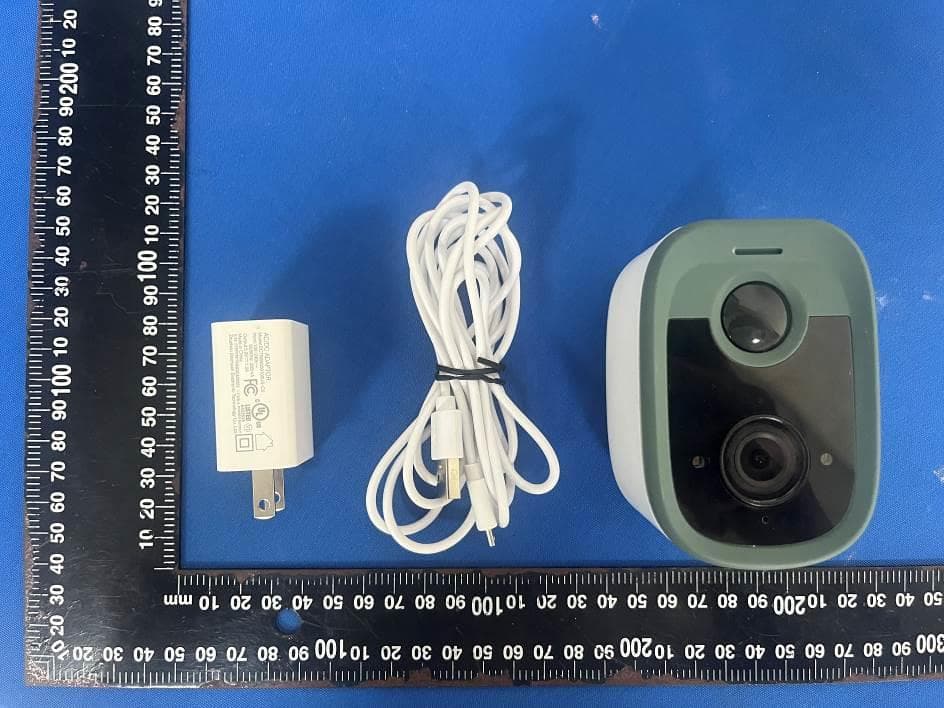
Click to zoom
Application Details
- Equipment Class
- DTS - Digital Transmission System
- Date of Grant
- Jun 05, 2023
- Application Purpose
- Original Equipment
- Date of Application
- Jun 05, 2023
- Equipment Note
- Battery Camera
- Frequency Range
- 2412.00000000 - 2462.00000000
- Country
- China
Documents & Files
Document Text
Text extracted from the exhibit documents filed with the FCC. Open a document above to read the original.
Users Manual
First of all, thank you for purchasing our products. Please rea d this user manual carefully before using the product and keep it prop erly. This manual is applicable to various models of cameras.The appearances may vary depending on different batches, and th e actual device received shall prevail. The information in this manual is subject to change without not ice. Directory ........................................... 2Product Appearance ......................... 3Packing List ...................................... 3User Guide ....................................... 4Notes ................................................ 9FAQ ................................................ 10After-sales Service ......................... 11FCC Statement............................... 12 Packing List After unpacking, please check whether the main unit is in good condition and that all accessories are included. 1 Power up the device 2 APP Download and Registration Complete the network configuration of the camera following the tips of the Facea APP. 1.Plug the power cord into the power connector of the device to power up the device, it indicates that the camera is powered on when the indicator light on the front turns on, or the LEDs flash, or the speaker beeps. 1.You can search for ‘Facea’ in the App Store, Google Play Store and other available application markets, or simply scan the QR code below to download the APP.2.Open the ‘Facea’ APP, tap the "Free Registration" icon, and select an account type to register, as shown in the figure, 2. Make sure your phone is connected to 2.4GHz Wi-Fi network.3.Please ensure that the camera is successfully added to the App before installing it on the wall. 3 Device Adding Process Log in with an account, click the ‘Add device’ or ‘ icon’, scan the QR code on the device (4G devices can be added after scanning the code), as shown in the figure, Due to upgrades and updates of the APP, the actual operation steps may be slightly different from the guide described in the manual. Please follow the instructions in the APP for registration. Main Unit x1Bracket x1Power Cable x1Installation Kit x1User Manual x1 Directory Product Appearance User Guide USER MANUAL BATTERY CAMERA 4 Device Network Configuration 1.Enter the password of the WiFi that the phone is connected to.2.Scan the QR code generated by the APP using camera lens, tap ‘Next’ when ‘ding-dong’ was heard, and wait for the configuration to complete. *The above descriptions are for some specific models, please refer to the actual product for details. 5 Camera Installation Method 6 Schematic Diagram of Ceiling Mounted and Installation FAQ 1.Q: Where are the video clips stored?2.Q: What is the maximum capacity of TF (Micro SD) card supported by the camera? For 32G/64G/128G TF (Micro SD) card with 24/7 video recording,how long can the video clips be stored respectively without overwriting?4.Q: The camera has no internet access or in offline state.3.Q: How to upgrade the firmware of the camera? Note: The installation wall shall withstand at least 3 times the total weight of the camera and the bracket. 1.Surface mounted2.Ceiling mounted3.Wall mounted 5.Q: What are the things to pay attention to when using the camera? A:It supports max. 128G TF (Micro SD) card. A: If the Cloud storage is activated, the video clips are stored both in the Cloud and on the TF (Micro SD) card; If the Cloud storage is not activated, the video clips are stored on the TF (Micro SD) card only. A: The camera supports OTA upgrades. When new firmware is available, click --> ‘Settings’ --> ‘Firmware Upgrade’ for upgrading. A:1. Check whether the power supply is working properly. 2. Power off and restart the device (press the reset button for no less than 5 seconds) to reconnect to the router. 3.Sites with weak signal coverage. Signal interference shielding in special sites A: For better imaging, please avoid obstructions near the front or side of the lens when positioning the camera, or close to reflective objects such as glass and white walls which would cause the phenomenon that the near part of the picture is bright, and the far part is dark or whitish. NoticeTo avoid risk of electric shock or fire, do not use power sources beyond the range listed in this manual. To protect your rights and interests, please read this manual carefully before installing and using this product.For installation and maintenance of this product, please contact qualified personnel.The operating temperature range of this equipment is -20 ~+60 , and the relative humidity is lower than 85%. When operating this product, do not exceed the temperature, humidity, or power ranges stated in this manual. After-sales Service 1) Product failures caused by the following conditions are not covered by the warranty: a. Product failure due to accident, negligence, disaster, improper operation or mishandling; b. Product failure due to improper environment or conditions of use, such as incompatible power supply, ambient temperature, lightning strikes, etc. c. Products that have been repaired by non-manufacturer authorized repair units; d. Products sold for more than 12 months.2) When users encounter product failure, please contact the dealer or local service agency for technical support with the user registration card.3) When the user has any objection to the technical service provided by the dealer, he can initiate a complaint with the customer support service center of the manufacturer. To prevent fire or electric shock accidents, please do not place this product in a humid or rainy place, and please follow the instructions for operation or maintenance. Users should be careful when seeing accessories with Dangerous Voltage, because this accessory may cause serious voltage accidents. WarningTo reduce the risk of electric shock, non-professionals should not open the front or back cover of the machine. Notes Memory Card Capacity 24/7 Recording (days) Alarm Recording Depends on the actual number …
Text truncated - open the document above for the full version.
Attestation Statements
Shenzhen Suyu Vision Technology Co., Ltd. 2.911 (d)(5)(i) Equipment Type Attestation v1.2 Section 2.911(d)(5)(i) Certification – Equipment Type Company name: Shenzhen Suyu Vision Technology Co., Ltd. Address: Area B, Floor 9, building 1, no. 25, Mudun Road, No. 1 Industrial Area, Loucun community, Shenzhen, China Product Name: Battery Camera FCC ID: 2BBC3-D01 Model(s): D01,D01 Note,D01 Pro 2.911(d)(5)(i) Equipment Type We, [Shenzhen Suyu Vision Technology Co., Ltd.] certify that the equipment for which authorization is sought through certification is not: Prohibited from receiving an equipment authorization pursuant to § 2.903; of the FCC rules. Identified as an equipment type in the “Covered List” NOTE 1 Yours sincerely, Name: MEIFANG HUANG Date: May.29, 2023 Title and Company name: General manager / Shenzhen Suyu Vision Technology Co., Ltd. NOTE 1 “Covered List”; is the List of Equipment and Services Covered By Section 2 of The Secure Networks Act, available at https://www.fcc.gov/supplychain/coveredlist References; 1) 986446 D01 Covered Equipment v01 https://apps.fcc.gov/oetcf/kdb/forms/FTSSearchResultPage.cfm?switch=P&id=325672 2) Federal Register document 2022-28263 published on 02/06/23 https://www.federalregister.gov/documents/2023/02/06/2022-28263/protecting-against-national-security-threats-to-the-com munications-supply-chain-through-the
Attestation Statements
Shenzhen Suyu Vision Technology Co., Ltd. 2.911 (d)(5)(ii) Applicant Attestation v1.2 Section 2.911(d)(5)(ii) Certification – Applicant (Covered List ) Company name: Shenzhen Suyu Vision Technology Co., Ltd. Address: Area B, Floor 9, building 1, no. 25, Mudun Road, No. 1 Industrial Area, Loucun community, Shenzhen, China Product Name: Battery Camera FCC ID: 2BBC3-D01 Model(s): D01,D01 Note,D01 Pro 2.911(d)(5)(ii) Applicant filing We, [Shenzhen Suyu Vision Technology Co., Ltd.] certify that, as of the date of the filing of the application, the applicant is not identified NOTE 1 on the “Covered List” NOTE 2 , established pursuant to § 1.50002 of this chapter, as an entity producing covered communications equipment. Yours sincerely, Name: MEIFANG HUANG Date: May.29, 2023 Title and Company name: General manager / Shenzhen Suyu Vision Technology Co., Ltd. NOTE 1 Delete option not applicable to this application. NOTE 2 “Covered List”; is the List of Equipment and Services Covered By Section 2 of The Secure Networks Act, available at https://www.fcc.gov/supplychain/coveredlist References; 1) 986446 D01 Covered Equipment v01 https://apps.fcc.gov/oetcf/kdb/forms/FTSSearchResultPage.cfm?switch=P&id=325672 2) Federal Register document 2022-28263 published on 02/06/23 https://www.federalregister.gov/documents/2023/02/06/2022-28263/protecting-against-national-security-threats-to-the-com munications-supply-chain-through-the
Attestation Statements
Shenzhen Suyu Vision Technology Co., Ltd. 2.911 (d)(7)USA Agent v1.3 Section 2.911(d)(7) USA Agent for Service of Process Company name: Shenzhen Suyu Vision Technology Co., Ltd. Address: Area B, Floor 9, building 1, no. 25, Mudun Road, No. 1 Industrial Area, Loucun community, Shenzhen, China Product Battery Camera FCC ID: 2BBC3-D01 Model(s): D01,D01 Note,D01 Pro 2.911(d)(7) USA Designated Agent for Service of Process We, [Shenzhen Suyu Vision Technology Co., Ltd.] (“the applicant”) designate [JIAXUAN TRADING LLC] NOTE1 for the purpose of accepting service of process on behalf of the applicant. Applicant consent: We Acknowledge our consent to accept service of process in the United States for matters related to the applicable equipment, and at the physical U.S. address and email address of the designated agent and acknowledge our acceptance of our obligation to maintain an agent for service of process in the United States for no less than one year after either the grantee has permanently terminated all marketing and importation of the applicable equipment within the U.S., or the conclusion of any Commission-related administrative or judicial proceeding involving the equipment, whichever is later. Agent obligation: We Acknowledge our obligation to accept service of process in the United States for matters related to the applicable equipment at our physical U.S. address and email address for no less than one year after either the grantee has permanently terminated all marketing and importation of the applicable equipment within the U.S., or the conclusion of any Commission-related administrative or judicial proceeding involving the equipment, whichever is later. USA Agent Company name: JIAXUAN TRADING LLC Address: 536 Bayview Ave. Osprey.FL 34229 FRN: 0033817446 Contact Name:Robin Telephone No:4078650588 Email: [email protected] Applicant Company name: Shenzhen Suyu Vision Technology Co., Ltd. Address: Area B, Floor 9, building 1, no. 25, Mudun Road, No. 1 Industrial Area, Loucun community, Shenzhen, China FCC Grantee Code: 2BBC3 Contact Name: MEIFANG HUANG Telephone No: 13430555873 Email: [email protected] Signature: Title: General Manager Signature: Title: General manager Date: May.29, 2023 Date: May.29, 2023 Shenzhen Suyu Vision Technology Co., Ltd. 2.911 (d)(7)USA Agent v1.3 NOTE 1: An applicant located in the United States may designate itself as the agent for service of process. Reference; Federal Register document 2022-28263 published on 02/06/23 https://www.federalregister.gov/documents/2023/02/06/2022-28263/protecting-against-nation al-security-threats-to-the-communications-supply-chain-through-the
Cover Letter(s)
Shenzhen Suyu Vision Technology Co., Ltd. Agent Authorization Company: Shenzhen Suyu Vision Technology Co., Ltd. Address: Area B, Floor 9, building 1, no. 25, Mudun Road, No. 1 Industrial Area, Loucun community, Shenzhen, China Product Name: Battery Camera Model Number(s): D01,D01 Note,D01 Pro Product Description: Battery Camera We authorize MiCOM Labs Inc., 575 Boulder Court, Pleasanton, California 94566, USA, to act on our behalf on all matters concerning the certification of above named equipment. We declare that MiCOM Labs Inc. is allowed to forward all information related to the approval and certification of equipment to the regulatory agencies as required and to discuss any issues concerning the approval application. Any and all acts carried out by MiCOM Labs on our behalf shall have the same effect as acts of our own. Signature: Date: May.29, 2023 Name: MEIFANG HUANG Title: General manager Company: Shenzhen Suyu Vision Technology Co., Ltd.
Cover Letter(s)
Shenzhen Suyu Vision Technology Co., Ltd. Family models declaration letter. Date: June 2, 2023 We Shenzhen Suyu Vision Technology Co., Ltd. Of Area B, Floor 9, building 1, no. 25, Mudun Road, No. 1 Industrial Area, Loucun community, Shenzhen, China Product: Battery Camera Model Name: D01 Serial Model: D01,D01 Note,D01 Pro Difference description of series models: All the model are the same circuit and RF module, except the model names and colors Thanks Sincerely Signature Name: MEIFANG HUANG Date: May.29, 2023 Title: General manager
Cover Letter(s)
Shenzhen Suyu Vision Technology Co., Ltd. Office of Engineering Technology Federal Communications Commission 7435 Oakland Mills Road Columbia, MD 21046 USA Date: June 2, 2023 Subject; Request for Confidentiality FCC ID: 2BBC3-D01 To Whom It May Concern, Pursuant to the provisions of the Commission’s rules Title 47 Sections §0.457 and §0.459, we are requesting the Commission to withhold the following attachment(s) as confidential documents from public disclosure indefinitely. These documents contain detailed system and equipment descriptions and are considered as proprietary information in operation of the equipment. The public disclosure of these documents might be harmful to our company and would give competitors an unfair advantage in the market. Schematic Diagram Block Diagram Parts List Operational Description Software Security Requirements for UNII devices In additional to above mentioned documents, in order to comply with the marketing regulations in Title 47 CFR §2.803 and the importation rules in Title 47 CFR §2.1204, while ensuring that business sensitive information remains confidential until the actual marketing of newly authorized devices, we request Short Term Confidentiality of the following attachment(s); External Photos Test Setup Photos Internal Photos User Manual For 45 days, pursuant to Public Notice DA 04-1705. OR For 180 days pursuant to KDB 726920 D01. It is our understanding that all measurement test reports, FCC ID label format and correspondence during the certification review process cannot be granted as confidential documents and this information will be available for public review once the grant of equipment authorization is issued. Sincerely, Signature: Name: MEIFANG HUANG Title: General manager May 29, 2023
External Photos
- Page 1 of 4 - ET-23050476 Product Name: Battery Camera Test Model No.: D01 Ext Photos - Page 2 of 4 - ET-23050476 - Page 3 of 4 - ET-23050476 - Page 4 of 4 - ET-23050476 -----END-----
ID Label/Location Info
Label size: 40*20mm
Internal Photos
- Page 1 of 5 - ET-23050476 Product Name: Battery Camera Test Model No.: D01 Internal photos - Page 2 of 5 - ET-23050476 - Page 3 of 5 - ET-23050476 - Page 4 of 5 - ET-23050476 RF ANT - Page 5 of 5 - ET-23050476 ------END-----
RF Exposure Info
FCC ID: 2BBC3-D01 RF Exposure Evaluation Limits The criteria listed in the following table shall be used to evaluate the environment impact of human exposure to radio frequency (RF) radiation as specified in 1.1307(b) Limits for Maximum Permissible Exposure (MPE) Frequency range (MHz) Electric field strength (V/m) Magnetic field strength (A/m) Power density (mW/cm 2 ) Averaging time (minutes) (A) Limits for Occupational/Controlled Exposures 0.3–3.0 614 1.63 *(100) 6 3.0–30 1842/f 4.89/f *(900/f 2 ) 6 30–300 61.4 0.163 1.0 6 300–1500 f/300 6 1500–100,000 5 6 (B) Limits for General Population/Uncontrolled Exposure 0.3–1.34 614 1.63 *(100) 30 1.34–30 824/f 2.19/f *(180/f 2 ) 30 30–300 27.5 0.073 0.2 30 300–1500 f/1500 30 1500–100,000 1.0 30 f = frequency in MHz Friis transmission formula: Pd = (Pout*G)/(4*pi*r 2 ) Where Pd = power density in mW/cm 2 , Pout = output power to antenna in mW; G = gain of antenna in linear scale, Pi = 3.1416; R = distance between observation point and center of the radiator in cm Pd id the limit of MPE, 1 mW/cm 2 . If we know the maximum gain of the antenna and the total power input to the antenna, through the calculation, we will know the distance r where the MPE limit is reached. Test Procedure Software provided by client enabled the EUT to transmit and receive data at lowest, middle and highest channel individually. FCC ID: 2BBC3-D01 Test Result of RF Exposure Evaluation The source of the evaluation data results is based on the test report ET-23050476E. Antenna gain= -2.48dBi Mode Output power (dBm) Output power (mW) Numeric antenna gain Power Density at R=20cm (mW/cm 2 ) Limit (mW/cm 2 ) Result 802.11b 12.68 18.54 0.56 0.002 1.0 PASS 802.11g 14.36 27.29 0.56 0.003 1.0 PASS 802.11n20 15.24 33.42 0.56 0.004 1.0 PASS 802.11n40 11.68 14.72 0.56 0.002 1.0 PASS Then SAR evaluation is not require .
Test Report
AFT tech Electronic Co., Ltd. (Shenzhen) 0755-27888203 0755-27888450 2.4G AFT tech Electronic Co., Ltd. (Shenzhen) 0755-27888203 0755-27888450 2.4G 0755-27888203 0755-27888450 2.4G AFT tech Electronic Co., Ltd. (Shenzhen)
Test Report
Report No.: ET-23050476E Tel:+86 755 85259392Email: [email protected] No.103, No.10, Phase I, Zone 3, Xinxing Industrial Park, Xinhe, Fuhai Street, Bao'an District, Shenzhen, Guangdong, China TEST REPORT Applicant: Shenzhen Suyu Vision Technology Co., Ltd. Address of Applicant: Area B, Floor 9, building 1, no. 25, Mudun Road, No. 1 Industrial Area, Loucun community, Shenzhen, China Manufacturer/Factory: Shenzhen Suyu Vision Technology Co.,Ltd. Address of Manufacturer Area B, Floor 9, building 1, no. 25, Mudun Road, No. 1 Industrial Area, Loucun community, Shenzhen, China Product Name: Battery Camera Model No.: D01,D01 Note,D01 Pro Trade Mark: facealink FCC ID: 2BBC3-D01 Applicable standards: FCC CFR Title 47 Part 15 Subpart C Section 15.247 Date of Test: May.17, 2023-May.28, 2023 Date of report issued: Jun.02, 2023 Test Result : PASS * * In the configuration tested, the EUT complied with the standards specified above. Remark: The results shown in this test report refer only to the sample(s) tested , this test report cannot be reproduced, except in full without prior written permission of the company. The report would be invalid without specific stamp of test institute and the signatures of compiler and approver Prepared By Shenzhen ETR Standard Technology Co., Ltd. Address: No.103, No.10, Phase I, Zone 3, Xinxing Industrial Park, Xinhe, Fuhai Street, Bao'an District, Shenzhen, Guangdong, China Compiledby:Reviewed by:Approved by: Project EngineerProject ManagerAuthorized Signature -Page 2of 52-Report No.: ET-23050476E Report Revision History Report No.DescriptionIssue Date ET-23050476E Original Jun.02, 2023 -Page 3of 52-Report No.: ET-23050476E Tel:+86 755 85259392Email:[email protected]:www.etrlab.cn No.103, No.10, Phase I, Zone 3, Xinxing Industrial Park, Xinhe, Fuhai Street, Bao'an District, Shenzhen, Guangdong, China Contents Page 1. TEST SUMMARY ......................................................................................................................................4 2. GENERAL INFORMATION .......................................................................................................................5 2.1GENERAL DESCRIPTION OF EUT .................................................................................................................5 2.2TEST MODE................................................................................................................................................7 2.3DESCRIPTION OF SUPPORT UNITS...............................................................................................................7 2.4DEVIATION FROM STANDARDS.....................................................................................................................7 2.5 ABNORMALITIES FROM STANDARD CONDITIONS....................................................................................7 2.6TEST FACILITY............................................................................................................................................7 2.7TEST LOCATION..........................................................................................................................................7 2.8ADDITIONAL INSTRUCTIONS.........................................................................................................................7 3. TEST INSTRUMENTS LIST ......................................................................................................................8 4. TEST RESULTS AND MEASUREMENT DATA .......................................................................................9 4.1ANTENNA REQUIREMENT.............................................................................................................................9 4.2CONDUCTED EMISSIONS.............................................................................................................................9 4.3CONDUCTED PEAK OUTPUT POWER..........................................................................................................13 4.4CHANNEL BANDWIDTH...............................................................................................................................14 4.5POWER SPECTRAL DENSITY......................................................................................................................19 4.6BAND EDGES............................................................................................................................................22 Conducted Emission Method ...................................................................................................................22 Radiated Emission Method ......................................................................................................................25 4.7SPURIOUS EMISSION.................................................................................................................................30 Conducted Emission Method ...................................................................................................................30 Radiated Emission Method ......................................................................................................................35 5. TEST SETUP PHOTO .............................................................................................................................52 6. EUT CONSTRUCTIONAL DETAILS .......................................................................................................52 -Page 4of 52-Report No.: ET-23050476E Tel:+86 755 85259392Email:[email protected]:www.etrlab.cn No.103, No.10, Phase I, Zone 3, Xinxing Industrial Park, Xinhe, Fuhai Street, Bao'an District, Shenzhen, Guangdong, China 1. Test Summary Test ItemSectionResultTest by Antenna requirementFCC part 15.203/15.247 (c)Pass / AC Power Line Conducted EmissionFCC part 15.207Pass Qiao Li Conducted Peak Output PowerFCC part 15.247 (b)(3)Pass Yvan Fan 6dB BandwidthFCC part 15.247 (…
Text truncated - open the document above for the full version.
Test Setup Photos
ET-23050476 Page 1 of 2 Product Name: Battery Camera Test Model No.: D01 Test Setup Photo Radiated emissions 30MHz to1GHz Above 1GHz ET-23050476 Page 2 of 2 Conducted Emission ------End------
Contact Information
Applicant
MEIFANG HUANG
Technical Contact
Test Firm
Shenzhen ETR Standard Technology Co., Ltd.Smith Chen
[email protected]+86 755-85259392
Technical Specifications
| # | Rule Parts | Frequency Range | Power Output |
|---|---|---|---|
| 1 | 15C | 2.41 GHz - 2.46 GHz | 33.40 mW |