2BBOY-SE-1Dual-Ribbon Driver Wireless Headphones
Shenzhen Linearup Technologies Ltd.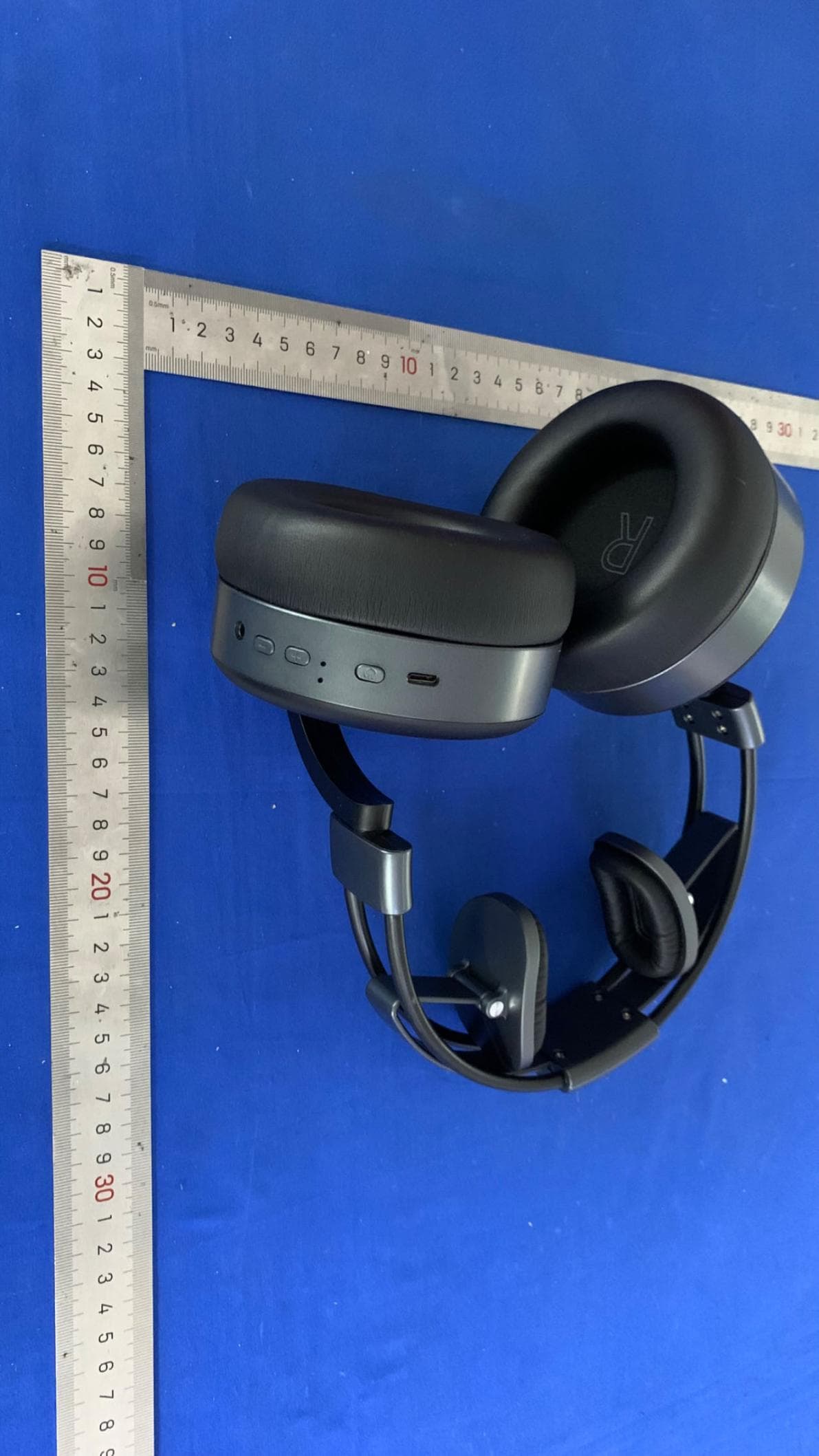
Click to zoom
Application Details
- Equipment Class
- DSS - Part 15 Spread Spectrum Transmitter
- Date of Grant
- Jul 09, 2023
- Application Purpose
- Original Equipment
- Date of Application
- Jul 09, 2023
- Equipment Note
- Dual-Ribbon Driver Wireless Headphones
- Frequency Range
- 2402.00000000 - 2480.00000000
- Country
- China
Documents & Files
Document Text
Text extracted from the exhibit documents filed with the FCC. Open a document above to read the original.
Users Manual
User Manual USE INSTRUCTION —————————— WHAT’S IN THE BOX Confirm that the following parts are included: SE-1 Wireless Headphones Type-C USB cable 3.5mm audio cable Note: If any part of the product is damaged, do not use it. Contact your authorized Sineaptic™ dealer or Sineaptic customer service. HEADPHONES CONTROLS AUX Mode — Plug in the Audio cable Wireless Mode On/Off — Press and hold POWER button for two seconds. EQ Mode On/Off — In wireless mode, press and hold POWER button for one second. Play/Pause — Press POWER button. Forward — Press and hold + for two seconds. Previous — Press and hold - for two seconds. Volume Up — Press +. Volume Down — Press CALL FUNCTIONS The microphone can only be used in wireless mode. Answer a call — Press POWER button. End a call — Press POWER button. Volume Up — Press +. Volume Down — Press -. Decline an incoming call — Press and hold POWER button for two seconds. Answer a second incoming call and put the current call on hold — While on a call, press POWER button once. Decline a second incoming call and stay on current call — While on a call, press and hold POWER button for two seconds. Answer a second incoming call and decline the current call — While on a call, double- click POWER button. Switch between two calls — With two active calls,press and hold + for two seconds. Mute/unmute a call — While on a call, press and hold - for two seconds. Call back — Double-click POWER button. Activate Siri or other voice assistants — Triple-click POWER button. Deactivate Siri or other voice assistants — Triple-click POWER button. LIGHT INDICATOR Indicator activity System state Green and White lights flash alternately Connecting Blinking green Connected Blinking white Need to charge Solid White Charging White light flashes every 5 seconds At 90% charge Indicator light turns off Full charge CHARGING THE HEADPHONES 1. Plug one end of the USB cable into the Type-C USB port. 2. Plug the other end into a USB wall charger and/or a powered-on computer. Notes: • The battery indicator will turn white when charging. When the battery is fully charged, the battery indicator will be off. CHARGING TIME Allow up to two hours to fully charge the headphones. Notes: • When connected wirelessly, a full charge powers the headphones for up to 8 hours. • When connected using the audio cable, a full charge powers the headphones for up to 10 hours. CONNECTION ———————— WIRELESS MODE CONNECT Wireless technology lets you stream music from mobile devices such as smartphones, tablets and laptop computers. Before you can stream music from a device, you must connect the device with your headphones. 1. Turn on the wireless mode (see page 2) 2. Make sure the wireless function of the mobile device is turned on. 3. Choose “SE-1 Wireless” to connect. DISCONNECT You can also disconnect using the Bluetooth menu on your mobile device. Notes: When pairing with a second or subsequent device, if “SE-1 Wireless” cannot be found, try disconnecting it from the mobile device that was originally connected to the headphones and then pair again. ____ AUX MODE CONNECT Use the 3.5 mm cable (provided) to connect a device. 1. Insert the cable into the connector on the right earcup. 2. Insert the other end of the cable into the connector on your device. MAINTENANCE ———————— STORING YOUR HEADPHONES Please store the earphones in a dry and normal temperature environment. Extreme conditions may affect the functionality of the headphones. Notes: • Make sure to turn off wireless mode and unplug the audio cable when not in use. • Before storing the headphones for more than a few months, make sure the battery is fully charged. ____ CLEAN YOUR HEADPHONES Your headphones may require periodic cleaning. • Wipe the outside surfaces with a soft, dry cloth. • Do not allow moisture to get inside the earcups or the audio input connector. ____ REPLACEMENT ACCESSORIES Replacement parts and accessories can be ordered through Sineaptic customer service. ____ SPECIFICATIONS ———————— Model: SE-1 Type: Over-ear, closed-back Driver Diameter: 50mm Frequency Response: 20Hz - 20kHz Wireless Version: 5.2 Wireless Range: Up to 10 meters Battery Life: Up to 25 hours Charging Time: 3 hours Charging Type: Type-C USB Cable Length: 3 meters (3.5mm audio cable) Connectivity Technology: Wireless, 3.5mm stereo mini-plug Product Dimensions: 250x140x115mm Weight: 412g Package Contents: SE-1 Wireless Headphones、3 meter 3.5mm audio cable、Type-C USB charging cable、QuickStart Guide、User manual TROUBLESHOOTING ———————— COMMON SOLUTIONS If you experience problems with your headphones: • Check the state of the status indicators (see page 4). • Charge the battery (see page 4). • Increase the volume on your headphones, mobile device and music app. • Try connecting another mobile device. If you can not resolve your issue, see the table below to identify symptoms and solutions to common problems. If you are unable to resolve your issue, contact Sineaptic customer service. Symptom Solution Headphones don’t connect with your mobile device • Check the state of the status indicators (see page 4). • Disconnect the back-up audio cable. • Disconnect the USB charging cable. • On your mobile device: - Disable the wireless feature and then re-enable. - Delete your SE-1 Wireless Headphones from the bluetooth list on your device. Connect again. • Move your mobile device closer to the headphones and away from any interference or obstructions. • Connect another mobile device. • Clear the headphone pairing list and connect again. No sound • Turn on the wireless mode and charge the battery. • Increase the volume on your headphones, your mobile device and music source. • Make sure you are using the correct device. • Move your mobile device closer to the headphones and away from any interference or obstructions. • Use a different music source. • Connect another mobile device. • If two mobile devices are connected, pause your other device first. • If two mobile devices are connected, mov…
Text truncated - open the document above for the full version.
Attestation Statements
V02072023 Manufacturers Letterhead Federal Communications Commission Authorization and Evaluation Division 7435 Oakland Mills Road Columbia, MD 21046 USA Date: 07/05/2023 Ref: Attestation Statement Part 2.911(d)(7) Filing Validity Period: Permanent FCC ID: 2BBOY-SE-1 Shenzhen Linearup Technologies Ltd. Room 205, Basitai, Building 22, Tangxi Yongli Industrial Zone, Guxing Community, Xixiang Street, Baoan District, Shenzhen, China certifies that, as of the dates of this application, Americas Compliance Consulting LLC dba iCertifi “iCertifi” is our designated U.S. agent for service of process for the above referenced FCC ID. We accept to maintain an agent for no less than one year after the grantee has terminated all marketing and importation or the conclusion of any commission-related proceeding involving the equipment. The US Agent for Service of Process is aware of and agrees to comply with the requirements outlined in the FCC Equipment Authorization Program, Report and Order FCC 22-84, and clause § 2.911. iCertifi accepts, as of the date of the filing of the application, the obligation of the designated U.S. agent for service process for the above: Designated U.S. Agent Information: Name Americas Compliance Consulting, LLC dba iCertifi FCC FRN 0033399411 Address 1001 SW Disk Drive, Suite 250 Bend, Oregon 97702 USA Contact Person Paul Preston Telephone (866) 885-4575 Email [email protected] Sincerely, Shenzhen Linearup Technologies Ltd. Americas Compliance Consulting LLC dba iCertifi Chenxi Zhu Paul Preston
Cover Letter(s)
Local Representative Letter For Certification Service in the USA Federal Communications Commission Equipment Authorization Division, Application Processing Branch 7435 Oakland Mills Road Columbia, MD 21048 To whom it may concern Pursuant to Section 2.911(d)(7), of the Commission’s Rules (47 C.F.R.) we attest as follows for the product listed below: FCC ID Model name 2BBOY-SE-1 SE-1 We hereby acknowledge as follows: i. both signees confirm that the point of contact accepts responsibility to act as a US- American Representative on behalf of the applicant ii. the point of contact provides the physical U.S. address and email as listed below iii. both parties maintain the requirements of this agreement for no less than one year after the grantee has terminated all marketing and importation or the conclusion of any Commission-related proceeding involving the equipment. US-American Point of Contact Applicant/Approval Holder Company Name: Americas Compliance Consulting, LLC dba iCertifi Shenzhen Linearup Technologies Ltd. FRN: 0033399411 0033896796 Contact Name: Paul Preston Chenxi Zhu Address: 1001 SW Disk Drive, Suite 250 Bend, Oregon 97702 USA Room 205, Basitai, Building 22, Tangxi Yongli Industrial Zone, Guxing Community, Xixiang Street, Baoan District, Shenzhen City, China Phone: (866) 885-4575 18166895819 Email: [email protected] [email protected]
External Photos
ExternalPhotographs FCCID:2BBOY-SE-1
ID Label/Location Info
LabelSampleforFCCID:2BBOY-SE-1 FCCID:2BBOY-SE-1 ThisdevicecomplieswithPart15oftheFCCRules. Operationissubjecttothefollowingtwoconditions: (1)Thisdevicemaynotcauseharmfulinterference,and (2)Thisdevicemustacceptanyinterferencereceived, includinginterferencethatmaycauseundesiredoperation. Sizeforthelabel:8mmX16mm ProductName:Dual-RibbonDriverWirelessHeadphones Model:SE-1 FCCID:2BBOY-SE-1
Internal Photos
Internal photographs FCC ID: 2BBOY-SE-1 Chip Antenna
RF Exposure Info
Radiofrequencyradiationexposureevaluation: portabledevices 1.1 RadioFrequency ExposureCo mpliance 1.1.1 ElectromagneticFi eld s RESULT:Pass Test Specification Test ite m: Dual-RibbonDriverWirelessHeadphones Ide ntification/ TypeNo .: SE-1 FCC ID: 2BB OY -SE-1 Test sta ndard: CF R47 FCC Part 2: Sect ion 2.1 093 FCC KDBPu blication4474 98 v06 MeasurementRe cor d: EIRP[dBm] = maximum peak output + antenna Gain = 6.43dBm + 2.5dBi =8.93dBm Since maximum peak output power of the transmitter is 8.93dBm ≈7.82mW < 10mW. Hence the EUT is excluded from SAR evaluation ac cordingto FCCKDB Publication447498 D01 Ge neral RF Exp osure Gui dance v06.
Test Report
BSL Testing Co.,LTD. Report No.: BSL230606020001RF Report No.: BSL230606020001RF Page 1 of 47 FCC Part 15.247 FCC Part 15C Measurement and Test Report For Shenzhen Linearup Technologies Ltd. FCC ID:2BBOY-SE-1 FCC Rule(s): FCC Part 15.247 Product Description: Dual-Ribbon Driver Wireless Headphones Tested Model: SE-1 Report No.: BSL230606020001RF Tested Date: Jun. 16~Jul.4, 2023 Issued Date: Jul. 4, 2023 Tested By: Cindy Zheng / Engineer Reviewed By: Haley Wen / EMC Manager Approved & Authorized By: Mike Mo / PSQ Manager Prepared By: BSL Testing Co.,LTD. 1/F, Building B, Xinshidai GR Park, Shiyan Street, Bao'an District, Shenzhen, ShiyanStreet, Bao'an District, Shenzhen,Guangdong,518052,People’s Republic of China Tel: 400-882-9628 Fax: 86- 755-26508703 BSL Testing Co.,LTD. Report No.: BSL230606020001RF Report No.: BSL230606020001RF Page 2 of 47 FCC Part 15.247 TABLE OF CONTENTS 1. GENERAL INFORMATION ................................................................................................................................... 3 1.1 PRODUCT DESCRIPTION FOR EQUIPMENT UNDER TEST (EUT) ............................................................................... 3 1.2 EUT SETUP AND TEST MODE ................................................................................................................................. 5 1.3 TEST STANDARDS ................................................................................................................................................... 5 1.4 TEST METHODOLOGY ............................................................................................................................................. 5 1.5 TEST FACILITY ....................................................................................................................................................... 5 1.6 MEASUREMENT UNCERTAINTY .............................................................................................................................. 6 1.7 TEST EQUIPMENT LIST AND DETAILS ..................................................................................................................... 6 3. RF EXPOSURE ......................................................................................................................................................... 7 3.1 STANDARD APPLICABLE ......................................................................................................................................... 7 3.2 TEST RESULT.......................................................................................................................................................... 7 4. ANTENNA REQUIREMENT .................................................................................................................................. 8 4.1 STANDARD APPLICABLE ......................................................................................................................................... 8 4.2 EVALUATION INFORMATION .................................................................................................................................. 8 5. CONDUCTED EMISSIONS .................................................................................................................................... 9 6. 20DB EMISSION BANDWIDTH .......................................................................................................................... 11 7. CARRIER FREQUENCIES SEPARATION ........................................................................................................ 18 8. HOPPING CHANNEL NUMBER ......................................................................................................................... 21 9. DWELL TIME ........................................................................................................................................................ 24 10. PSEUDORANDOM FREQUENCY HOPPING SEQUENCE .......................................................................... 27 11. BAND EDGE .......................................................................................................................................................... 28 12. SPURIOUS EMISSION ........................................................................................................................................ 37 BSL Testing Co.,LTD. Report No.: BSL230606020001RF Report No.: BSL230606020001RF Page 3 of 47 FCC Part 15.247 1. GENERAL INFORMATION 1.1 Product Description for Equipment Under Test (EUT) Applicant: Shenzhen Linearup Technologies Ltd. Address of applicant: Room 205, Basitai, Building 22, Tangxi Yongli Industrial Zone, Guxing Community, Xixiang Street, Baoan District, Shenzhen Manufacturer: Shenzhen Linearup Technologies Ltd. Address of manufacturer: Room 205, Basitai, Building 22, Tangxi Yongli Industrial Zone, Guxing Community, Xixiang Street, Baoan District, Shenzhen Product Name: Dual-Ribbon Driver Wireless Headphones Model No.: SE-1 Test Model No: N/A Quantity of tested samples 1 Serial No.: SE-1 Operation Frequency: 2402MHz~2480MHz Channel numbers: 79 Channel separation: 1MHz Modulation type: GFSK,Pi/4 QPSK,8DPSK Antenna Type: Chip Antenna Antenna gain: 2.5dBi Power supply: DC 3.7V by battery BSL Testing Co.,LTD. Report No.: BSL230606020001RF Report No.: BSL230606020001RF Page 4 of 47 FCC Part 15.247 Operation Frequency each of channel Channel Frequency Channel Frequency Channel Frequency Channel Frequency 1 2402MHz 21 2422MHz 41 2442MHz 61 2462MHz 2 2403MHz 22 2423MHz 42 2443MHz 62 2463MHz 3 2404MHz 23 2424MHz 43 2444MHz 63 2464MHz 4 2405MHz 24 2425MHz 44 2445MHz 64 2465MHz 5 2406MHz 25 2426MHz 45 2446MHz 65 2466MHz 6 2407MHz 26 2427MHz 46 2447MHz 66 2467MHz 7 2408MHz 27 2428MHz 47 2448MHz 67 2468MHz 8 2409MHz 28 2429MHz 48 2449MHz 68 2469MHz 9 2410MHz 29 2430MHz 49 2450MHz 69 2470MHz 10 2411MHz 30 2431MHz 50 2451MHz 70 2471MHz 11 2412MHz 31 2432MHz 51 2452MHz 71 2472MHz 12 2413MHz 32 243…
Text truncated - open the document above for the full version.
Test Setup Photos
TestSetupPhotos FCCID:2BBOY-SE-1
Contact Information
Applicant
Chenxi Zhu
Technical Contact
BSL Testing Co.,LTD.bill
[email protected]400-962-6168
1/F, Building B, Xinshidai GR Park, Shiyan Street, · Shenzhen · China
Test Firm
BSL Testing Co., Ltd.Bill Zhao
[email protected]+86 755 26649703
Technical Specifications
| # | Rule Parts | Frequency Range | Power Output |
|---|---|---|---|
| 1 | 15C | 2.40 GHz - 2.48 GHz | 5.00 mW |