2BCY6-M19Magnetic Suspension Keyboard Case
Dongguan Mingyuxin Intelligent Technology Co., Ltd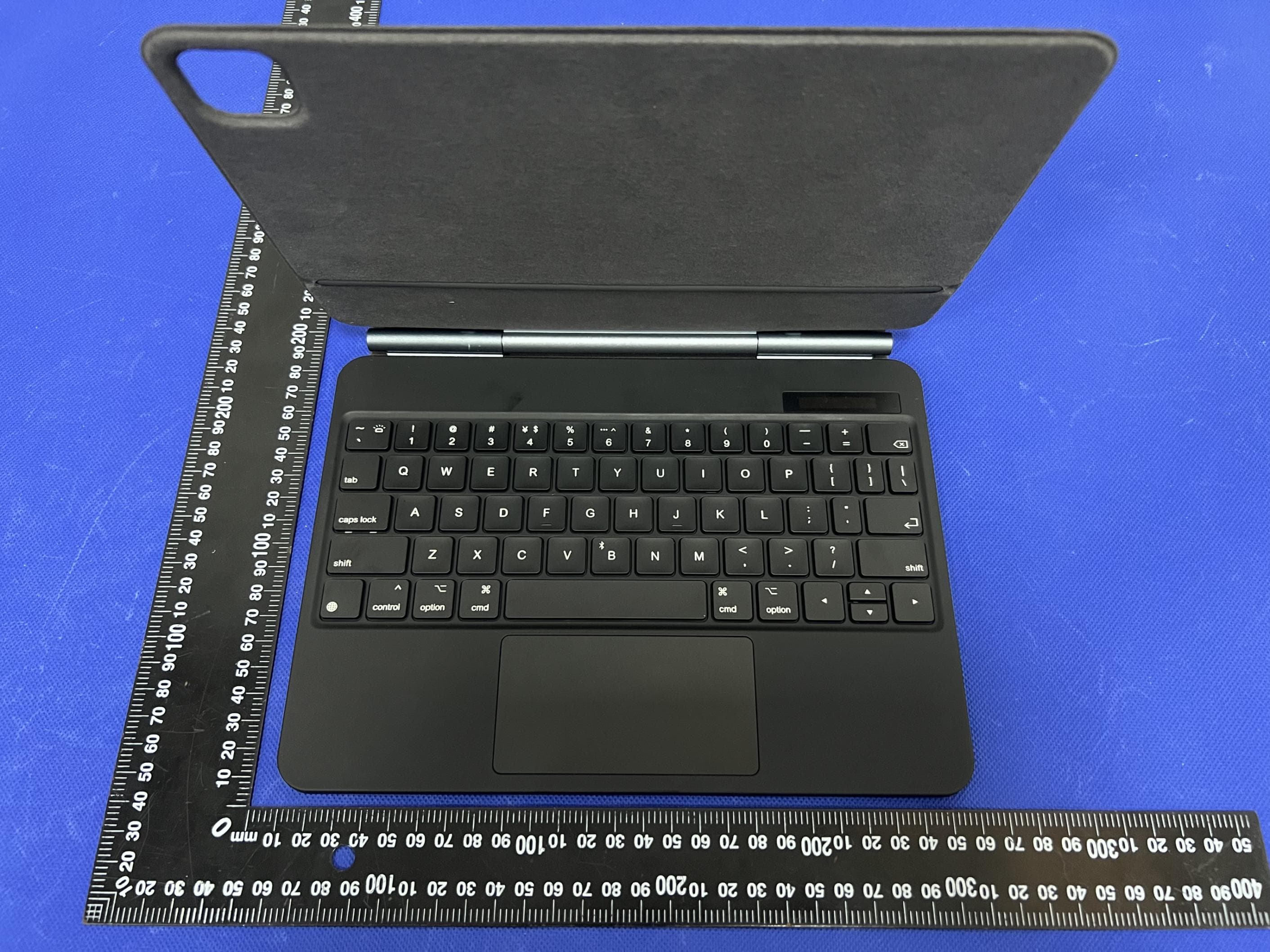
Click to zoom
Application Details
- Equipment Class
- DTS - Digital Transmission System
- Date of Grant
- Oct 06, 2023
- Application Purpose
- Original Equipment
- Date of Application
- Oct 06, 2023
- Equipment Note
- Magnetic Suspension Keyboard Case
- Frequency Range
- 2402.00000000 - 2480.00000000
- Country
- China
Documents & Files
Document Text
Text extracted from the exhibit documents filed with the FCC. Open a document above to read the original.
Users Manual
磁吸悬浮键盘套 使用说明书 产品介绍 •磁吸安装,操作便捷 •超薄设计,携带方便 •灵敏触控,一触即发 •无线连接,免密配对 •智能休眠,一键唤醒 •实时电量,无忧使用 充电指示灯:充电时白色指示灯亮 电量指示灯:当电量小于30%时,建议进行充电 大小写状态指示灯:当键盘处于大写输入状态时灯亮 电源键:双击电源键可开启键盘电源,显示电量百分 比后进入“开机”状态。双击电源键可关闭键盘电源。 蓝牙指示灯:同时点击右键“option”和“B”键, 蓝牙符号会闪烁,配对后蓝牙符号会消失。 指示灯 1、双击电源键可开启键盘电源,显示电 量百分比后进入“开机”状态,然后同 时点击右键“option”和“B”键,蓝 牙图标会闪烁,进入配对模式。 2、打开并解锁iPad,点击“设置"图标。 蓝牙连接 4、打开“蓝牙”开关,iPad自动搜索蓝 牙键盘设备,发现蓝牙键盘设备: QM002 , 并点击它,蓝牙键盘会自动连 接。 3、在“设置”菜单中,点击“蓝牙”菜单。 5、蓝牙连接成功后,配对指示灯 熄灭,在蓝牙设备列表中会显示此 设备“已连接”。 键盘布局 新增功能组合键 右 option + 右 option + 背光字符键 B键 = 背光调节 = 蓝牙开关 请注意: 1、操作系统:IOS 15.0及以上(设备必须支持触控) 2、轻触设置(无线配对成功后):设置-通用-触控板-轻点以点按/双指辅助 点(打开) 3、灵敏度设置:设置-通用-触控板-跟踪速度(调节至合适的速度) 4、触控板(无物理按键款):无“拖动”手势功能选项 iOS触摸手势 点按 用单指按下直至有点按感 拖移 点按住项目,然后用手 指在触控板上滑动以移动它 打开程序坞 用单指将指针轻 扫过屏幕底部 打开“通知中心” 用单指移 动指针以选择左上方的状态图 标,然后点按,或者用单指将 指针移动过屏幕顶部中间附近 向左或向右移动 双指向左或 向右轻扫 前往主屏幕 用单指将指针轻 扫过屏幕底部,程序坞出现 后,再次将指针轻扫过屏幕 底部 在打开的 APP 之间切换 三 指向左或向右轻扫 从主屏打开搜索 双指向下轻 扫 点按住 用单指按住 前往主屏幕 三指向上轻扫 打开“控制中心” 用单指移动 指针以选择右上方的状态图标, 然后点按,或者选择右上方的 状态图标,然后单指向上轻扫 向上或向下移动 双指向上或 向下轻扫 缩放 双指靠近放置,张开以 放大,或者捏合以缩小 打开APP切换器 三指向上轻 扫,停顿一下后抬起手指 打开“今天”视图 在主屏幕 或锁定屏幕可见时,用双指 向右轻扫 辅助点按 单指将光标移动到 APP图标上,然后双指轻点 或点按以打开APP菜单 唤醒 请点击触控板或按下任 意键盘上的按键 Magnetic Suspension Keyboard Case Operation Instructions Product Description •Magnetic installation, convenient operation •Slim design, easy to carry •Sensitive touch and instant action •Wireless connection, no password pairing •Smart dormancy, one button to wake up •Actual power, worry free for use Charging Indicator:While charging, the indicator flashes, and only the lower light stays on after full charge. Battery Indicator:Charging is recommended when the energy percentage is less than 30%. Caps Lock Indicator: The indicator flashes when the keyboard is on Capital input status. Power Button:Double click power button to turn on the power of keyboard, After the battery percentage is displayed, it will enter the "on" state. Double click power button to turn off the power of keyboard. Bluetooth Indicator:Click right "option and B "button together, the bluetooth symbol will flash, and then the bluetooth symbol will be disappeared after device are paired. Indicator 1. Double click power button to turn on power of the keyboard. After the battery percentage is displayed, it will enter the "Power On" state, and then click the right "option" and "B" buttons at the same time, the Bluetooth icon will flash, and enter the pairing mode. 2. Open and unlock the iPad and click the "Settings" icon. Bluetooth Connection 4. Turn on the "Bluetooth" switch, and the iPad will automatically search for Bluetooth keyboard devices. Discover the Bluetooth keyboard device: QM002 and click it. The Bluetooth keyboard will be automatically connected. 3. In the "Settings" menu, click the menu,"Bluetooth". 5. After the Bluetooth connection is successful, the pairing indicator is off, and the device "connected" will be displayed in the Bluetooth device list. Keyboard Layout New Added Function Combination Key Right Option + Right Option + Backlight Character Key B Key Backlight Adjustment = Buletooth Switch = Please Note: 1. Operating System: IOS 15.0 and above (device must support touch). 2. Tap Settings (after successful wireless pairing): Settings - General - Trackpad - Tap to tap / Two-finger assist point (on). 3. Sensitivity Settings: Settings - General - Trackpad - Tracking Speed (adjust to a suitable speed). 4. Touchpad (without physical buttons): no "drag" gesture function option. iOS Touch Gestures Go To Main Screen Swipe up with three fingers. Open ”Control Center” Move the pointer with single finger to select the upper right status icon and use dot- pressing click on it, or select the upper right status icon and gently swipe upper with single finger. Move Up Or Down Swipe up or down with two fingers. Zoom Place two fingers close together, open to enlarge, or pinch to zoom out. Open APP Switcher Swipe up with three fingers, pause and lift your finger. Open“Today” View When the Home or Lock screen is visible, swipe right with two fingers. Auxiliary Tap Move the cursor over the app icon with one finger, then tap or tap with two fingers to open the app menu. Awake Click the touchpad or press any key on the keyboard. Open Notification Center Move the pointer with single finger to select the status icon at the top left, and then click, or move the pointer with single finger near the middle of the upper screen. Move Left Or Right Swipe left or right with two fingers. Go To Home Screen Swipe the pointer across the bottom of the screen with one finger, and when the Dock appears, swipe the pointer across the bottom of the screen again. Shift Between The Open APP Swipe left or right with three fingers. Open Searching From Home Screen Swipe down with two fingers. Tap Press with single finger until it feels a little touch feeling. Drag Tap and hold an item, then swipe your finger across the trackpad to move it. Open Program Expansion Dock Swipe the pointer across the bottom of the screen with one finger. Tap and Hold Press and hold with single finger. FCC warnings are on the next page: FCCWarningStatement:Changesormodificationstothisunitnotexpressly approvedbythepartyresponsibleforcompliancecouldvoidtheuser’s authoritytooperatetheequipment.Thisequipmenthasbeentestedandfound tocomplywiththelimitsforaClassBdigitaldevice,pursuanttoPart15ofthe FCCRules.Theselimitsaredesignedtoprovidereasonableprotectionagainst harmfulinterferenceinaresidentialinstallation.Thisequipmentgenerates, usesandcanradiateradiofrequencyenergyand,ifnotinstalledandusedin accordancewiththeinstructions,maycauseharmfulinterferencetoradio communications. However,thereisnoguaranteethatinterferencewillnotoccurinaparticular installation.Ifthisequipmentdoescauseharmfulinterferencetoradioor televisionreception,whichcanbedeterminedbyturningtheequipmentoffand on,theuserisencouragedtotrytocorrecttheinterferencebyoneormoreof thefollowingmeasures: -Reorientorrelocatethereceivingantenna. -Increasetheseparationbetweentheequipmentandreceiver. - Connec…
Text truncated - open the document above for the full version.
Attestation Statements
DongguanMingyuxinIntelligentTechnologyCo.,Ltd 2.911(d)(5)(i)EquipmentTypeAttestationv1.2 Section2.911(d)(5)(i)Certification–EquipmentType Companyname:DongguanMingyuxinIntelligentTechnologyCo.,Ltd Address:Room401,4thFloor,Building9,No.1HuiliSecondRoad,TangxiaTown,DongguanChina ProductName:MagneticSuspensionKeyboardCase FCCID:2BCY6-M19 Model(s):M19,M16,M16A-Z,M19A-Z,M27A-Z,M27 2.911(d)(5)(i)EquipmentType We,DongguanMingyuxinIntelligentTechnologyCo.,Ltd(“theapplicant”)certifythattheequipment forwhichauthorizationissoughtthroughcertificationisnot: Prohibitedfromreceivinganequipmentauthorizationpursuantto§2.903;oftheFCCrules. Identifiedasanequipmenttypeinthe“CoveredList” NOTE1 Yourssincerely, Name:CaihualiDate:2023.09.22 TitleandCompanyname:N/A/DongguanMingyuxinIntelligentTechnologyCo.,Ltd NOTE1 “CoveredList”;istheListofEquipmentandServicesCoveredBySection2ofTheSecureNetworksAct,availableat https://www.fcc.gov/supplychain/coveredlist References; 1)986446D01CoveredEquipmentv01 https://apps.fcc.gov/oetcf/kdb/forms/FTSSearchResultPage.cfm?switch=P&id=325672 2)FederalRegisterdocument2022-28263publishedon02/06/23 https://www.federalregister.gov/documents/2023/02/06/2022-28263/protecting-against-national-security-threats-to-the-com munications-supply-chain-through-the
Attestation Statements
DongguanMingyuxinIntelligentTechnologyCo.,Ltd 2.911(d)(5)(ii)ApplicantAttestationv1.3 Section2.911(d)(5)(ii)Certification–Applicant(CoveredList) Companyname:DongguanMingyuxinIntelligentTechnologyCo.,Ltd Address:Room401,4thFloor,Building9,No.1HuiliSecondRoad,TangxiaTown,DongguanChina ProductName:MagneticSuspensionKeyboardCase FCCID:2BCY6-M19 Model(s):M19,M16,M16A-Z,M19A-Z,M27A-Z,M27 2.911(d)(5)(ii)Applicantfiling We,DongguanMingyuxinIntelligentTechnologyCo.,Ltd(“theapplicant”)certifythat,asofthedate ofthefilingoftheapplication,theapplicantisnotidentified NOTE1 onthe“CoveredList” NOTE2 , establishedpursuantto§1.50002ofthischapter,asanentityproducingcoveredcommunications equipment. Yourssincerely, Name:CaihualiDate:2023.09.22 TitleandCompanyname:N/A/DongguanMingyuxinIntelligentTechnologyCo.,Ltd NOTE1 Deleteoptionnotapplicabletothisapplication. NOTE2 “CoveredList”;istheListofEquipmentandServicesCoveredBySection2ofTheSecureNetworksAct,availableat https://www.fcc.gov/supplychain/coveredlist References; 1)986446D01CoveredEquipmentv01 https://apps.fcc.gov/oetcf/kdb/forms/FTSSearchResultPage.cfm?switch=P&id=325672 2)FederalRegisterdocument2022-28263publishedon02/06/23 https://www.federalregister.gov/documents/2023/02/06/2022-28263/protecting-against-national-security-threats-to-the-com munications-supply-chain-through-the
Cover Letter(s)
DongguanMingyuxinIntelligentTechnologyCo.,Ltd AgentAuthorization Company:DongguanMingyuxinIntelligentTechnologyCo.,Ltd Address:Room401,4thFloor,Building9,No.1HuiliSecondRoad,TangxiaTown, DongguanChina ProductName:MagneticSuspensionKeyboardCase ModelNumber(s):M19,M16,M16A-Z,M19A-Z,M27A-Z,M27 ProductDescription:MagneticSuspensionKeyboardCase WeauthorizeMiCOMLabsInc.,575BoulderCourt,Pleasanton,California94566,USA, toactonourbehalfonallmattersconcerningthecertificationofabovenamed equipment. WedeclarethatMiCOMLabsInc.isallowedtoforwardallinformationrelatedtothe approvalandcertificationofequipmenttotheregulatoryagenciesasrequiredandto discussanyissuesconcerningtheapprovalapplication.Anyandallactscarriedoutby MiCOMLabsonourbehalfshallhavethesameeffectasactsofourown. Signature:Date:2023.09.22 Name:Caihuali Title:N/A Company:DongguanMingyuxinIntelligentTechnologyCo.,Ltd
Cover Letter(s)
DongguanMingyuxinIntelligentTechnologyCo.,Ltd OfficeofEngineeringTechnology FederalCommunicationsCommission 7435OaklandMillsRoad Columbia,MD21046 USA Date:2023.09.22 Subject;RequestforConfidentiality FCCID:2BCY6-M19 ToWhomItMayConcern, PursuanttotheprovisionsoftheCommission’srulesTitle47Sections§0.457and§0.459,we arerequestingtheCommissiontowithholdthefollowingattachment(s)asconfidential documentsfrompublicdisclosureindefinitely. Thesedocumentscontaindetailedsystemandequipmentdescriptionsandareconsideredas proprietaryinformationinoperationoftheequipment.Thepublicdisclosureofthesedocuments mightbeharmfultoourcompanyandwouldgivecompetitorsanunfairadvantageinthemarket. SchematicDiagram BlockDiagram PartsList OperationalDescription Tune-upProcedure Inadditionaltoabovementioneddocuments,inordertocomplywiththemarketingregulations inTitle47CFR§2.803andtheimportationrulesinTitle47CFR§2.1204,whileensuringthat businesssensitiveinformationremainsconfidentialuntiltheactualmarketingofnewly authorizeddevices,werequestShortTermConfidentialityofthefollowingattachment(s); ExternalPhotos TestSetupPhotos InternalPhotos UserManual For45days,pursuanttoPublicNoticeDA04-1705. OR For180dayspursuanttoKDB726920D01. Itisourunderstandingthatallmeasurementtestreports,FCCIDlabelformatand correspondenceduringthecertificationreviewprocesscannotbegrantedasconfidential documentsandthisinformationwillbeavailableforpublicreviewoncethegrantofequipment authorizationisissued. Sincerely, Signature: Name:Caihuali Title:N/A
Cover Letter(s)
DongguanMingyuxinIntelligentTechnologyCo.,Ltd ModelDifference Productdescription:MagneticSuspensionKeyboardCase Modelname:M19 M16,M16A-Z,M19A-Z,M27A-Z,M27 TradeName:N/A AllthemodelarethesamecircuitandRFmodule,onlythemodelnameisdifferent. Regards Sincerely Client’ssignature: Client’sname/title:Caihuali/N/A Contactinformation/address:18979625754/Room401,4thFloor,Building9,No.1 HuiliSecondRoad,TangxiaTown,DongguanChina
External Photos
EUTPHOTO(ExternalPhotos) TestMode:M19 ※※※※※ENDOFREPORT※※※※※
ID Label/Location Info
Labelandlabellocation High:1cm Wide:3cm MagneticSuspensionKeyboardCase FCCID:2BCY6-M19
Internal Photos
EUTPHOTO(InternalPhotos) TestMode:M19 ※※※※※ENDOFREPORT※※※※※ ANT
RF Exposure Info
FCCID:2BCY6-M19 RFExposureEvaluation AccordingtoKDB447498D01GeneralRFExposureGuidancev06andpart2.1093 , UnlessspecificallyrequiredbythepublishedRFexposureKDBprocedures,standalone 1-gheadorbodyand10-gextremitySARevaluationforgeneralpopulationexposure conditions,bymeasurementornumericalsimulation,isnotrequiredwhenthe correspondingSARTestExclusionThresholdcondition(s),listedbelow,is(are)satisfied. For100MHzto6GHzandtestseparationdistances≤50mm,the1-gand10-gSARtest exclusionthresholdsaredeterminedbythefollowing: [(max.powerofchannel,includingtune-uptolerance,mW)/(min.testseparationdistance, mm)]·[√f (GHz) ]≤3.0for1-gSAR,and≤7.5for10-gextremitySAR,where f (GHz) istheRFchanneltransmitfrequencyinGHz PoweranddistanceareroundedtothenearestmWandmmbeforecalculation Theresultisroundedtoonedecimalplaceforcomparison Here, ForBLE MaxPower (dBm) MaxPower (mW) Frequency (MHz) Min.Distance (mm) Calc. thresholds limit -0.3570.9224025 0.29011 3.0 SoaSARtestisnotrequired
Test Report
ReportNo.:RFI-LAB-RF-202209-II18 QP030-E11 Page1of10 TestingReport CustomerName:ShenZhenAPP-lifeTechnologyCo.,Ltd ProductName:BluetoothKeyboard SampleModel:QM002 ReferenceStandard:GB/T9410-2008;ANSI/IEEEStd149-1979 IssueDate:2022.9.15 Engineer:Date: Auditor:Date: Approver:Date: ReportNo.:RFI-LAB-RF-202209-II18 QP030-E11 Page2of10 Version VersionNo.DateDescriptionFormulateApproval A02022.9.15Forthefirsttime,formulateJacksonEason Contents 1.GeneralInformation.........................................................................................................................3 1.1Generalinformationoftestinginstitutions...........................................................................3 1.2Testingprinciple...................................................................................................................3 1.3Testequipment......................................................................................................................4 1.4Testenvironment...................................................................................................................4 1.5Statement..............................................................................................................................4 2.SampleInformation.........................................................................................................................5 2.1Clientinformation.................................................................................................................5 2.2DescriptionofEUT(S)..........................................................................................................5 2.3EUTappearance....................................................................................................................6 2.4DUTsetupphotooffreespaceOTAtesting........................................................................6 3.TestResults......................................................................................................................................7 3.1Teststandard.........................................................................................................................7 3.2Testuncertainty.....................................................................................................................7 3.3Testdata................................................................................................................................8 3.3.1S11parameters...........................................................................................................8 3.3.2VSWRdata................................................................................................................8 3.3.3Typicalfreespaceefficiencyandgain......................................................................8 3.3.4Typicalfreespaceradiationpattern...........................................................................9 (Thefollowingisblank)..............................................................................................................10 ReportNo.:RFI-LAB-RF-202209-II18 QP030-E11 Page3of10 1.GeneralInformation 1.1Generalinformationoftestinginstitutions Name ShenzhenRFI-LABCommunicationTechnologyCo.,Ltd. Address 10/FA,LingyunBld,LiufangRd,BaoanDistrict,SZ Tel 13631623357 E-mail [email protected] Equipment Alltheequipmentusedinthereportisfixedin 10/FA,LingyunBld,LiufangRd,BaoanDistrict,SZ 1.2Testingprinciple ReportNo.:RFI-LAB-RF-202209-II18 QP030-E11 Page4of10 1.3Testequipment EquipmentModelNo.SerialNo.Manufacturer Calibration date Next calibration date 16probe microwave chamber 3*3*2.5 RFI-LAB-RF -A00 SUNYIELD2021.3.152023.3.14 Network Analyzer E5071C RFI-LAB-RF -A02 Agilent 2022.5.132023.5.12 Network Analyzer E5071C RFI-LAB-RF -C02 KEYSIGHT2022.5.132023.5.12 1.4Testenvironment Temperature 24.5°C Humidity 59%RH Pressure 100.08kPa 1.5Statement (1)Thetestresultsinthereportareonlyapplicabletothetestedsamplesandthetestedsamples workundertheenvironmentdescribedinthereport. (2)OnlyShenzhenRFI-LABCommunicationTechnologyCo.,Ltd.havetherighttomodifythe report,andthemodificationinformationshallbeannotatedintherevisionform. (3)Anyobjectiontothisreportshallberaisedwithin30daysafterformalconfirmationofthe report. (4)Thisreportisinvalidifthereisanyevidencethatthesampleinformationprovidedisfalsified. (5)Thereportisinvalidwithoutthesignatureoftheauditorandapprover. ReportNo.:RFI-LAB-RF-202209-II18 QP030-E11 Page5of10 2.SampleInformation 2.1Clientinformation Name ShenZhenAPP-lifeTechnologyCo.,Ltd Address ShenZhenAPP-lifeTechnologyCo.,Ltd,Room1005,HuameiBuilding, SonggangStreet,BaoanDistrict,Shenzhen,Guangdong. Contacts Tommy Tel 15986801728 E-mail [email protected] Manufacturer ShenZhenAPP-lifeTechnologyCo.,Ltd 2.2DescriptionofEUT(S) ProductName BluetoothKeyboard SampleModel QM002 Size / SerialNo. / TestItem VSWR;Antennagain;Efficiency;Radiationpattern FrequencyRange 2400-2500MHz ReceivedDate 2022.9.15 TestDate 2022.9.15 Remark ThelengthoftheRFcableis30mm ReportNo.:RFI-LAB-RF-202209-II18 QP030-E11 Page6of10 2.3 EUTappearance 2.4DUTsetupphotooffreespaceOTAtesting Planform Frontview ReportNo.:RFI-LAB-RF-202209-II18 QP030-E11 Page7of10 3.TestResults 3.1Teststandard NameParameterMethodStandardno. Mobile communication antenna Antennagain Genericspecification forantennasusedinthe mobilecommunications GB/T 9410-2008 Radiationpattern VSWR Antenna Radiationefficiency IEEEStandardTest ProceduresforAntennas ANSI/IEEEStd 149-1979 Gainanddirectivity 3.2Testuncertainty TheuncertaintywascalculatedonthebasisoftheGUMpublishedbyISO,usingthe inclusionfactorofK=2andthe95%confidenceleveltoexpresstheextended uncertainty. ItemUncertainty VSWR±0.3 Antennagain ± 1dB Radiationefficiency±10% ReportNo.:RFI-LAB-RF-202209-II18 QP030-E11 Page8of10 3.3 Testdata 3.3.1S11parameters 3.3.2VSWRdata 3.3.3Typicalfreespaceefficiencyandgain Frequency/MHz 240024502500 VSWR 3.09651.69511.2812 Frequency/MHz 24002410242024302440245024602470248024902500 PeakGain/dBi …
Text truncated - open the document above for the full version.
Test Report
ProjectNo.:ZKT-2309127105E Page 1 of 39 FCCTESTREPORT FCCID:2BCY6-M19 ReportNumber. .................................. :ZKT-2309127105E DateofTest ....................................................... : Sep.13,2023toSep.20,2023 Dateofissue ......................................... : Sep.20,2023 Totalnumberofpages..........................39 TestResult .......................................... : PASS TestingLaboratory............................: ShenzhenZKTTechnologyCo.,Ltd. Address...............................................: 1/F,No.101,BuildingB,No.6,TangweiCommunityIndustrial Avenue,FuhaiStreet,Bao'anDistrict,Shenzhen,China Applicant'sname.............................:DongguanMingyuxinIntelligentTechnologyCo.,Ltd Address ............................................... : Room401,4thFloor,Building9,No.1HuiliSecondRoad,Tangxia Town,DongguanCity Manufacturer'sname......................:DongguanMingyuxinIntelligentTechnologyCo.,Ltd Address...............................................: Room401,4thFloor,Building9,No.1HuiliSecondRoad,Tangxia Town,DongguanCity Testspecification: Standard................................................: FCCCFRTitle47Part15SubpartCSection15.247 ANSIC63.10:2013 Testprocedure.....................................: / Non-standardtestmethod................:N/A TestReportFormNo. ....................... : / TestReportForm(s)Originator ..... : ZKTTesting MasterTRF ........................................ : Dated:2020-01-06 ThisdevicedescribedabovehasbeentestedbyZKT,andthetestresultsshowthattheequipmentunder test(EUT)isincompliancewiththeFCCrequirements.Anditisapplicableonlytothetestedsample identifiedinthereport. Thisreportshallnotbereproducedexceptinfull,withoutthewrittenapprovalofZKT,thisdocumentmay bealteredorrevisedbyZKT,personalonly,andshallbenotedintherevisionofthedocument. Productname.....................................:MagneticSuspensionKeyboardCase Trademark...........................................:N/A Model/Typereference......................:M19 M16,M16A-Z,M19A-Z,M27A-Z,M27 Ratings..................................................: Input:5V1A Batterycapacity:DC3.7V,500mAh,1.85Wh ProjectNo.:ZKT-2309127105E Page 2 of 39 Testingprocedureandtestinglocation: TestingLaboratory.......................................: ShenzhenZKTTechnologyCo.,Ltd. Address............................................................:1/F,No.101,BuildingB,No.6,TangweiCommunity IndustrialAvenue,FuhaiStreet,Bao'anDistrict, Shenzhen,China JimLiu Testedby(name+signature).......................: JacksonFang Reviewer(name+signature) ....................... : LakeXie Approved(name+signature).......................: ProjectNo.:ZKT-2309127105E Page 3 of 39 TableofContents Page 1.VERSION....................................................................................................................5 2.SUMMARYOFTESTRESULTS...............................................................................6 2.1TESTFACILITY.................................................................................................................7 2.2MEASUREMENTUNCERTAINTY....................................................................................7 3.GENERALINFORMATION........................................................................................8 3.1GENERALDESCRIPTIONOFEUT.................................................................................8 3.2DESCRIPTIONOFTESTMODES....................................................................................9 3.3BLOCKDIGRAMSHOWINGTHECONFIGURATIONOFSYSTEMTESTED..............9 3.4DESCRIPTIONOFSUPPORTUNITS(CONDUCTEDMODE)........................................9 3.5EQUIPMENTSLISTFORALLTESTITEMS.................................................................10 4.EMCEMISSIONTEST.............................................................................................12 4.1CONDUCTEDEMISSIONMEASUREMENT..................................................................12 4.1.1POWERLINECONDUCTEDEMISSIONLimits...................................................12 4.1.2TESTPROCEDURE...............................................................................................12 4.1.3DEVIATIONFROMTESTSTANDARD..................................................................12 4.1.4TESTSETUP...........................................................................................................13 4.1.5EUTOPERATINGCONDITIONS...........................................................................13 4.2.1RADIATEDEMISSIONLIMITS...............................................................................16 4.2.2TESTPROCEDURE...............................................................................................17 4.2.3DEVIATIONFROMTESTSTANDARD..................................................................17 4.2.4TESTSETUP...........................................................................................................17 4.2.5EUTOPERATINGCONDITIONS...........................................................................18 5.RADIATEDBANDEMISSIONMEASUREMENT.....................................................23 5.1TESTREQUIREMENT:..............................................................................................23 5.2TESTPROCEDURE..................................................................................................23 5.3DEVIATIONFROMTESTSTANDARD.....................................................................23 5.4TESTSETUP..............................................................................................................24 5.5EUTOPERATINGCONDITIONS..............................................................................24 5.6TESTRESULT...........................................................................................................25 6.POWERSPECTRALDENSITYTEST......................................................................26 6.1APPLIEDPROCEDURES/LIMIT.................…
Text truncated - open the document above for the full version.
Test Setup Photos
EUTTESTPHOTO TestMode:M19
Contact Information
Applicant
Cai huali
Technical Contact
Test Firm
Shenzhen ZKT Technology Co., Ltd.Lake Xie
[email protected]0086-13620010775
Technical Specifications
| # | Rule Parts | Frequency Range | Power Output |
|---|---|---|---|
| 1 | 15C | 2.40 GHz - 2.48 GHz | 920.00 µW |