FCCID.CO- FCC ID Database
HomeCompaniesEquipment ClassesSearch

© 2026 FCC ID Database. All rights reserved.

AboutContactData sourced from FCC public records
  1. Home/
  2. Shenzhen YYD Digital Co., Ltd./
  3. 2BDMKDPF-1002Y

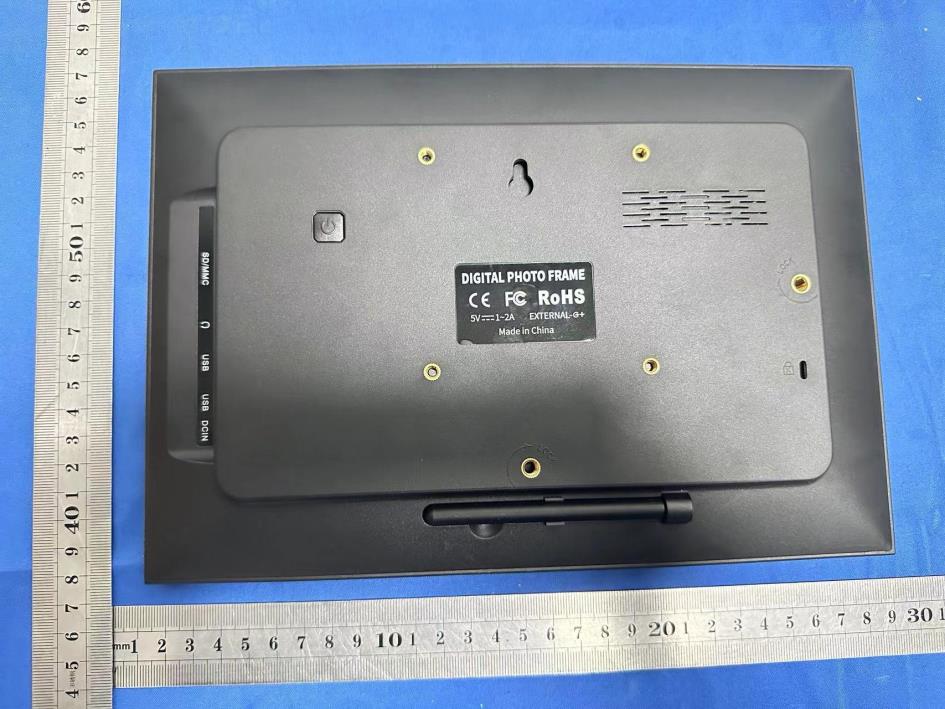
2BDMKDPF-1002YWifi Digital Photo Frame

Shenzhen YYD Digital Co., Ltd.
Wifi Digital Photo Frame - FCC ID 2BDMKDPF-1002Y - Shenzhen YYD Digital Co., Ltd.
Click to zoom

Application Details

Equipment Class
DTS - Digital Transmission System
Date of Grant
Nov 19, 2023
Application Purpose
Original Equipment
Date of Application
Nov 19, 2023
Equipment Note
Wifi Digital Photo Frame
Frequency Range
2412.00000000 - 2462.00000000
Company
Shenzhen YYD Digital Co., Ltd.
Country
China

Documents & Files

Select a file to view

Users Manual

↗

Attestation Statements

↗
↗

Cover Letter(s)

↗
↗
↗

External Photos

↗

ID Label/Location Info

↗

Internal Photos

RF Exposure Info

↗

Test Report

↗
↗

Test Setup Photos

↗

Document Text

Text extracted from the exhibit documents filed with the FCC. Open a document above to read the original.

Users Manual

CLOUD DIGITAL PHOTO FRAME User Manual 1 Contents Contents 1 Getting started 4 Frameo app 4 Frameo quick setup 4 Start using Frameo 5 Connecting a new friend 5 Navigating your Frameo 6 Add friend 6 Settings 6 Power menu 6 Hide photo 6 Gallery 6 Fit to frame/Fill frame 6 Adjust photo 7 Interacting with videos 7 Power menu 8 Settings 8 My frame 8 Frame name 8 Frame location 8 Set language 8 Set time zone 8 Enable/Disable 24-hour format 9 Manage photos 9 Show/hide photos 9 Delete photos 9 Import photos 9 2 Export photos 10 My Friends 10 Change options for a friend 10 Add person 10 Display 10 Brightness level 10 Sleep mode 10 Slideshow 11 Timer 11 Show caption 11 Fill frame 11 Photo display order 11 Autoplay 11 Video playback 11 Video volume 11 Wi-Fi 12 Wi-Fi details 12 Reset Wi-Fi 12 Notifications 12 Show notifications 12 Notification volume 12 Storage space 12 Backup 12 Network connection 12 New photos 12 New friends 13 Software update 13 Feature news 13 Backup and Restore 13 Backup frame to external storage (e.g. SD card) 13 3 Automatic backup 13 Restore from backup 13 Reset frame 14 Help 14 Open source libraries 14 Share anonymous analytics data 14 Guide 14 About 14 Android version 14 Peer ID 14 MAC 14 Frameo version 15 Up time 15 Check for update 15 Beta program 15 Privacy 15 Support 15 Warranty, Compliance, Support and Safety information 15 4 Ge�ng started Congratula�ons with your brand new Frameo photo frame! If you are new to using Frameo then start by following the Frameo quick setup or follow the on-screen guide when powering it on for the first �me. Once you have set up your Frameo frame, you can start connec�ng it to your friends and family. Frameo app To send photos to your frame, use the Frameo app for iOS or Android. Find the Frameo app by scanning this code: For Android: Search for “Frameo” on Google Play. For iOS: Search for “Frameo” on App Store. Frameo quick setup When star�ng your frame for the first �me, you will need to setup the frame. ● Select a language. This will be the language used on the Frameo. ● Connect your frame to the internet by connec�ng it to a Wi-Fi. ● Frameo may ask you to update to the latest version. It is recommended to update your frame before continuing if asked to. ● Enter your name, and the loca�on where you have placed your frame e.g. “John Doe” and “Living room”, “Kitchen” or “Office”. Finally set the �mezone if not already correct. 5 Start using Frameo Next step is to connect Frameo with your friends and family by providing them with a code from your frame. If you want to be able to send photos to the frame yourself, start by downloading the app for iOS or Android on App Store or Google Play. Then use the code to connect your frame and app as described below. Connecting a new friend Make sure that your friend has downloaded and installed the Frameo app. Click the add friend icon on your frame . A dialog will appear showing a connec�on code, which is valid for 12 hours. Now share this code in whatever fashion you prefer e.g. SMS, E-Mail, IM, phone call, to your friend. Once your friends have added the code in their Frameo app, they will automa�cally appear on your frame and be able to send you photos. Read chapter Change op�ons for a friend to allow connected friends, to retrieve and share the connec�on code via the smartphone app. 6 Naviga�ng your Frameo Swipe le� or right to go through your photos. To access the menu, simply tap once on the screen. In the menu you will find the most used features. Add friend This will generate a code that you can share with your friends and family so they can connect and send photos to your frame. Se�ngs Opens the Se�ngs. Power menu Opens the Power menu Hide photo Hides the current photo. This means that the photo will no longer be shown in the slideshow. If needed the photo can be shown again through the se�ngs menu. Gallery Opens a gallery which allows for easy and fast naviga�on through your photos. Fit to frame/Fill frame This toggles how the photo is shown. The Fill frame op�on is the default. The photo is scaled so that it fills the whole screen. It will be centered around what is selected as the most important part. See the first picture below. 7 Fit to frame will make sure that the en�re photo is shown on the screen. See the second picture below. Adjust photo Allows you to adjust the posi�on of the photo in the frame for an even be�er fit. Here you can also use to rotate your photo. Interac�ng with videos When a video is shown two addi�onal controls are shown. One for play/pause of the video and one to control the volume level for video sounds. Press to start the video playback. Pressing will pause the video playback. Press to open the volume slider. Use the slider to adjust the volume level for video sounds. Pressing will mute the video while pressing will unmute the video. 8 Power menu Tap the power icon to access the power menu. Here you can power off using , restart your frame using or enter sleep mode using . NB. Make sure to always use the power off bu�on on the device or in the power menu to turn Frameo off. Never disconnect power when Frameo is running. Se�ngs Through the se�ngs, you can personalize your frame to your needs. My frame Frame name Changes the name of your frame. This is also the name that connected friends and family will see in their list of connected frames in the smartphone app. Frame loca�on Changes the loca�on of your frame. This is the loca�on displayed on your friends' and family's list of connected frames which can help to dis�nguish frames from each other. Set language Sets the language used on the frame. Set �me zone Sets the �me zone used on the frame. 9 Enable/Disable 24-hour format Enables, and disables, 24-hour �me format. Manage photos In the manage photos menu you can see how many photos are on your frame and the storage they use. You can also see the amount of storage le� available on your device for storing new photos. Show/hide photos Select which photos to hide…

Text truncated - open the document above for the full version.

Attestation Statements

(Shenzhen YYD Digital Co., Ltd.) (November 16, 2023) Eurofins Electrical and Electronic Testing NA, Inc. 914 West Patapsco Avenue Baltimore, MD 21230 RE: Attestation Statements Part 2.911(d)(5)(i) request for (FCC ID: 2BDMKDPF-1002Y) [Shenzhen YYD Digital Co., Ltd.] (“the applicant”) certifies that the equipment for which authorization is sought is not “covered” equipment prohibited from receiving an equipment authorization pursuant to section 2.903 of the FCC rules. Sincerely, (Applicant signature) (Applicant printed name) Zini Jiang (Shenzhen YYD Digital Co., Ltd.) (November 16, 2023) Eurofins Electrical and Electronic Testing NA, Inc. 914 West Patapsco Avenue Baltimore, MD 21230 RE: Attestation Statements Part 2.911(d)(5)(ii) request for (FCC ID: 2BDMKDPF-1002Y) [Shenzhen YYD Digital Co., Ltd.] (“the applicant”) certifies that, as of the date of the filing of the application, the applicant is not identified on the Covered List as an entity producing “covered” equipment. Sincerely, (Applicant signature) (Applicant printed name) Zini Jiang

Cover Letter(s)

Shenzhen YYD Digital Co., Ltd. Model Difference Data:November 16, 2023 Product description: Wifi Digital Photo Frame Model name: DPF-1002Y, DPF-1001Y, DPF-1003Y, DPF-1004Y, DPF-1005Y, DPF-1006Y, DPF-1007Y, DPF-1008Y, DPF-1009Y, DPF-1010Y, DPF-1011Y, DPF-1012Y, DPF-1013Y, DPF-1014Y, DPF-1015Y, DPF-1016Y, DPF- 1017Y, DPF-1018Y, DPF-1019Y Trade Name: YYD FCC ID: 2BDMKDPF-1002Y All the model are the same circuit and RF module, except model names . Regards Sincerely Client’s signature : Client’s name / title : Zini Jiang(General Manager) Contact information / address:4th Floor, Building G, Bailian Smart City, No. 28 Xingnong Road, Longxin Community, Baolong Street, Longgang District, Shenzhen, China

Cover Letter(s)

Shenzhen YYD Digital Co., Ltd. (November 16, 2023) Eurofins Electrical and Electronic Testing NA, Inc. 914 West Patapsco Avenue Baltimore, MD 21230 RE: CONFIDENTIALITY REQUEST FOR (Wifi Digital Photo Frame / DPF-1002Y, DPF-1001Y, DPF-1003Y, DPF-1004Y, DPF-1005Y, DPF-1006Y, DPF-1007Y, DPF-1008Y, DPF-1009Y, DPF-1010Y, DPF-1011Y, DPF-1012Y, DPF- 1013Y, DPF-1014Y, DPF-1015Y, DPF-1016Y, DPF-1017Y, DPF-1018Y, DPF- 1019Y / FCC ID: 2BDMKDPF-1002Y ) To Whom It May Concern: This letter serves as an official request for confidentiality under sections 0.457 and 0.459 of CFR 47. We have requested that the Exhibits Long-Term Confidentiality Short-Term Confidentiality NOTE 2 ID Label/Location No No Attestation Statement No No External Photos No ☐ Block Diagram ☒ ☐ Schematics ☒ ☐ Test Report No No Test Setup Photos No ☐ User’s Manual ☐ NOTE 1 ☒ Internal Photos ☐ NOTE 1 ☒ Parts List / Tune Up ☐ ☐ RF Exposure Info No No Operational Description ☒ ☐ Cover Letter(s) No No SDR Software / Security Info ☐ No required to be submitted with this application be permanently withheld from public review. Above mentioned document contains detailed system and equipment description are considered as proprietary information in operation of the equipment. The public disclosure of above documents might be harmful to our company and would give competitor an unfair advantage in the market. Please contact me if there is any information you may need. Sincerely, Signature: Name: Zini Jiang Title: General Manager

Cover Letter(s)

Shenzhen YYD Digital Co., Ltd. (November 16, 2023) Eurofins Electrical and Electronic Testing NA, Inc. 914 West Patapsco Avenue Baltimore, MD 21230 RE: LETTER OF AGENT AUTHORIZATION To Whom It May Concern: We, the undersigned, hereby authorize (Shenzhen CTB Testing Technology Co., Ltd.) to act on our behalf in all matters relating to application for equipment authorization, including the signing of all documents relating to these matters. We also hereby certify that no party to the application authorized hereunder is subject to the denial of benefits, including FCC benefits, pursuant to Section 5301 of the Anti-Drug Abuse Act of 1988, 21 U.S.C.853(a). This agreement expires one year from the current date. Sincerely, Signature: Name: Zini Jiang Title: General Manager

External Photos

Shenzhen CTB Testing Technology Co., Ltd. Report Tel: 4008-707-283 Web: http://www.ctb-lab.net Page 1 of 4 Model: DPF-1002Y External Photos Shenzhen CTB Testing Technology Co., Ltd. Report Tel: 4008-707-283 Web: http://www.ctb-lab.net Page 2 of 4 Shenzhen CTB Testing Technology Co., Ltd. Report Tel: 4008-707-283 Web: http://www.ctb-lab.net Page 3 of 4 Shenzhen CTB Testing Technology Co., Ltd. Report Tel: 4008-707-283 Web: http://www.ctb-lab.net Page 4 of 4

ID Label/Location Info

FCC ID LABEL: Label Location: FCC ID: 2BDMKDPF-1002Y Model No.: DPF-1002Y This device complies with Part 15 of the FCC Rules. Operation is subject to the following two conditions: (1) This device may not cause harmful interference, and (2) This device must accept any interference received, including interference that may cause undesired operation.

RF Exposure Info

FCC §15.247 (i), §2.1091 – RF Exposure FCC ID: 2BDMKDPF-1002Y Applied procedures / limit According to FCC §15.247(i) and §1.1307(b)(1), systems operating under the provisions of this section shall be operated in a manner that ensures that the public is not exposed to radio frequency energy level in excess of the Commission’s guidelines. Limits for Occupational / Controlled Exposure Frequency Range (MHz) Electric Field Strength (E) (V/m) Magnetic Field Strength (H) (A/m) Power Density (S) (mW/ cm 2 ) Averaging Time |E| 2 ,|H| 2 or S (minutes) 0.3-3.0 614 1.63 (100)* 6 3.0-30 1842 / f 4.89 / f (900 / f)* 6 30-300 61.4 0.163 1.0 6 300-1500 F/300 6 1500-100,000 5 6 Note: ƒ is frequency in MHz * = Power density limit is applicable at frequencies greater than 100 MHz Limits for General Population / Uncontrolled Exposure Frequency Range (MHz) Electric Field Strength (E) (V/m) Magnetic Field Strength (H) (A/m) Power Density (S) (mW/ cm 2 ) Averaging Time |E| 2 ,|H| 2 or S (minutes) 0.3-1.34 614 1.63 (100)* 30 1.34-30 824/f 2.19/f (180/f)* 30 30-300 27.5 0.073 0.2 30 300-1500 F/1500 30 1500-100,000 1.0 30 Note: f = frequency in MHz * = Plane-wave equivalent power density MPE PREDICTION Predication of MPE limit at a given distance, Equation from OET Bulletin 65, Edition 97-01 Where: S = power density P = power input to antenna G = power gain of the antenna in the direction of interest relative to an isotropic radiator R = distance to the center of radiation of the antenna,R=20cm Test Result of RF Exposure Evaluation Modes& Channel Freq. (MHz) Tune up Produce power Maximu m peak output power (dBm) Output power to antenna (mW) Antenna Gain (numeric) Power Density (S) (mW/ cm2) Limit (mW / cm2 ) Result 2.4G WIFI 802.11b&2 412 14±1 15 31.6228 1.2078 (0.82dBi) 0.0076 1 Pass

Test Report

深 深 圳 圳 市 市 雨 雨 盛 盛 通 通 讯 讯 电 电 子 子 有 有 限 限 公 公 司 司 Shenzhen Yu Sheng Communications Electronics co., LTD TEL:+86 0755-28640107 FAX:+86 755 28694967 客 户 : 品 名 规 格 DESCRIPTION: 料 号 PART NO.: 客 户 料 号 CUS PART NO.: 承认书 APPROVAL 2.4/5.8G 内置 FPC 天线 120mm YS030-0063 2023-10-24 呈样签章: 版本:A1 工 程 ENGINEERING DEPARTMENT 品 保 Q C DEPARTMENT 业 务 SALES DEPARTMENT 客户承认签章 : 工 程 ENGINEERING DEPARTMENT 品 保 Q C DEPARTMENT 采 购 PURCHASING DEPARTMENT ж客户确认样品附意栏: 日 期 D A T E: 深 深 圳 圳 市 市 雨 雨 盛 盛 通 通 讯 讯 电 电 子 子 有 有 限 限 公 公 司 司 Shenzhen Yu Sheng Communications Electronics co., LTD TEL:+86 0755-28640107 FAX:+86 755 28694967 Electrical technical parameters Electrical Specifications Frequency Range 2400-5800MHZ VSWR ≤2.0 GAIN 2DBI Input Impedance 50 Ω Mechanical Specifications Antenna Color BLACK Input connector ipex Working Temperature -40°C~+85°C Working Humidity 20~80% Product image: 深 深 圳 圳 市 市 雨 雨 盛 盛 通 通 讯 讯 电 电 子 子 有 有 限 限 公 公 司 司 Shenzhen Yu Sheng Communications Electronics co., LTD TEL:+86 0755-28640107 FAX:+86 755 28694967 规格图: 120mm 深 深 圳 圳 市 市 雨 雨 盛 盛 通 通 讯 讯 电 电 子 子 有 有 限 限 公 公 司 司 Shenzhen Yu Sheng Communications Electronics co., LTD TEL:+86 0755-28640107 FAX:+86 755 28694967 Sample Testing: Network Analysis Testing (2.4G): Network Analysis Testing (5.8G)): 深 深 圳 圳 市 市 雨 雨 盛 盛 通 通 讯 讯 电 电 子 子 有 有 限 限 公 公 司 司 Shenzhen Yu Sheng Communications Electronics co., LTD TEL:+86 0755-28640107 FAX:+86 755 28694967 深 深 圳 圳 市 市 雨 雨 盛 盛 通 通 讯 讯 电 电 子 子 有 有 限 限 公 公 司 司 Shenzhen Yu Sheng Communications Electronics co., LTD TEL:+86 0755-28640107 FAX:+86 755 28694967 深 深 圳 圳 市 市 雨 雨 盛 盛 通 通 讯 讯 电 电 子 子 有 有 限 限 公 公 司 司 Shenzhen Yu Sheng Communications Electronics co., LTD TEL:+86 0755-28640107 FAX:+86 755 28694967

Test Report

TEST REPORT Compiled by: Reviewed by: Approved by: Zhou Kui Arron Liu Bin Mei / Director Note: If there is any objection to the inspection results in this report, please submit a written report to the company within 15 days from the date of receiving the report. The test report is effective only with both signature and specialized stamp. This result(s) shown in this report refer only to the sample(s) tested. Without written approval of Shenzhen CTB Testing Technology Co., Ltd. this report can’t be reproduced except in full. The tested sample(s) and the sample information are provided by the client. “*” indicates the testing items were fulfilled by subcontracted lab. “#” indicates the items are not in CNAS accreditation scope. Product Name: Wifi Digital Photo Frame FCC ID: 2BDMKDPF-1002Y Trademark: YYD Model Number: DPF-1002Y, DPF-1001Y, DPF-1003Y, DPF-1004Y, DPF-1005Y, DPF-1006Y, DPF-1007Y, DPF-1008Y, DPF-1009Y, DPF-1010Y, DPF-1011Y, DPF-1012Y, DPF-1013Y, DPF-1014Y, DPF-1015Y, DPF-1016Y, DPF-1017Y, DPF-1018Y, DPF-1019Y Prepared For: Shenzhen YYD Digital Co., Ltd. Address: 4th Floor, Building G, Bailian Smart City, No. 28 Xingnong Road, Longxin Community, Baolong Street, Longgang District, Shenzhen, China Manufacturer: Shenzhen YYD Digital Co., Ltd. Address: 4th Floor, Building G, Bailian Smart City, No. 28 Xingnong Road, Longxin Community, Baolong Street, Longgang District, Shenzhen, China Prepared By: Shenzhen CTB Testing Technology Co., Ltd. Address: 1&2/F., Building A, No.26, Xinhe Road, Xinqiao, Xinqiao Street, Bao'an District, Shenzhen, Guangdong, China Sample Received Date: Oct. 31, 2023 Sample tested Date: Oct. 31, 2023 to Nov. 14, 2023 Issue Date: Nov. 14, 2023 Report No.: CTB231114034RFX Test Standards FCC Part15.247 ANSI C63.10:2013 Test Results PASS Remark: This is WIFI-2.4GHz band radio test report. Shenzhen CTB Testing Technology Co., Ltd. Report No.: CTB231114034RFX Report Tel: 4008-707-283 Web: http://www.ctb-lab.net Page 2 of 54 TABLE OF CONTENT Test Report Declaration Page 1. VERSION .......................................................................... 3 2. TEST SUMMARY ................................................................... 4 3. MEASUREMENT UNCERTAINTY ..................................................... 5 4. PRODUCT INFORMATION AND TEST SETUP .......................................... 6 4.1 Product Information .................................................................... 6 4.2 Test Setup Configuration ............................................................... 6 4.3 Support Equipment .................................................................... 6 4.4 Channel List .......................................................................... 7 4.5 Test Mode ............................................................................ 7 4.6 Test Environment ...................................................................... 7 5. TEST FACILITY AND TEST INSTRUMENT USED ....................................... 8 5.1 Test Facility ........................................................................... 8 5.2 Test Instrument Used .................................................................. 8 6. AC POWER LINE CONDUCTED EMISSION ............................................ 10 6.1 Block Diagram Of Test Setup .......................................................... 10 6.2 Limit ................................................................................ 10 6.3 Test procedure ....................................................................... 10 6.4 Test Result .......................................................................... 12 7. RADIATED SPURIOUS EMISSION ................................................... 14 7.1 Block Diagram Of Test Setup .......................................................... 14 7.2 Limit ................................................................................ 14 7.3 Test procedure ....................................................................... 15 7.4 Test Result .......................................................................... 16 8. BAND EDGE AND RF COUNDUCTED SPURIOUS EMISSIONS .......................... 33 8.1 Block Diagram Of Test Setup .......................................................... 33 8.2 Limit ................................................................................ 33 8.3 Test procedure ....................................................................... 33 8.4 Test Result .......................................................................... 34 9. COUDUCTED OUTPUT POWER ..................................................... 40 9.1 Block Diagram Of Test Setup .......................................................... 40 9.2 Limit ................................................................................ 40 9.3 Test procedure ....................................................................... 40 9.4 Test Result .......................................................................... 41 10. 6DB OCCUPIED BANDWIDTH ....................................................... 42 10.1 Block Diagram Of Test Setup ......................................................... 42 10.2 Limit ............................................................................... 42 10.3 Test procedure ...................................................................... 42 10.4 Test Result ......................................................................... 43 11. POWER SPECTRAL DENSITY ...................................................... 47 11.1 Block Diagram Of Test Setup ......................................................... 47 11.2 Limit ............................................................................... 47 11.3 Test procedure ...................................................................... 47 11.4 Test Result ......................................................................... 48 12. ANTENNA REQUIREMENT ..............…

Text truncated - open the document above for the full version.

Test Setup Photos

Shenzhen CTB Testing Technology Co., Ltd. Report Tel: 4008-707-283 Web: http://www.ctb-lab.net Page 1 of 2 Model: DPF-1002Y Radiated Emission Below 1G Above 1G Shenzhen CTB Testing Technology Co., Ltd. Report Tel: 4008-707-283 Web: http://www.ctb-lab.net Page 2 of 2 Conducted emissions

Contact Information

Applicant

Zini Jiang
[email protected]13538214502Fax: 13538214502

Test Firm

Shenzhen CTB Testing Technology Co., Ltd.Rita Xiao
[email protected]86-13538218145

Technical Specifications

#Rule PartsFrequency RangePower Output
115C2.41 GHz - 2.46 GHz29.30 mW
Confidentiality
Long Term
Grant Notes
Output power listed is conducted. The device supports 20MHz bandwidth. The antenna(s) used for this transmitter must be installed to provide a separation distance of at least 20 cm from all persons and must not be co-located or operating in conjunction with any other antenna or transmitter device.