2BDUMTHEBOXConnected foldable box
Living Packets SA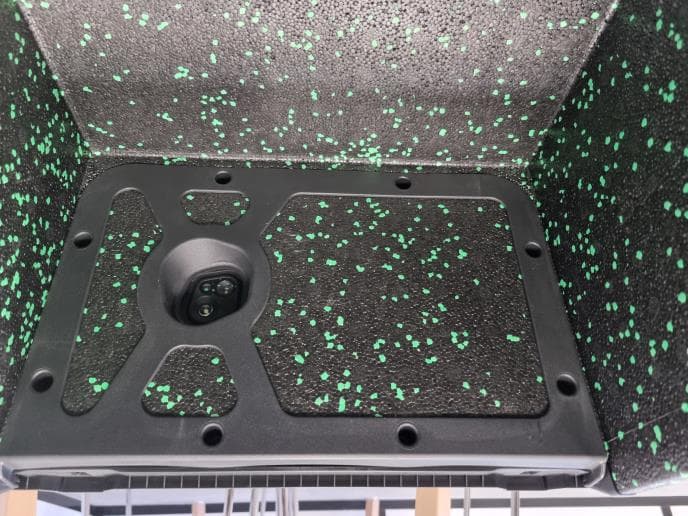
Click to zoom
Application Details
- Equipment Class
- DTS - Digital Transmission System
- Date of Grant
- Aug 12, 2024
- Application Purpose
- Original Equipment
- Date of Application
- Aug 12, 2024
- Equipment Note
- Connected foldable box
- Frequency Range
- 2402.00000000 - 2480.00000000
- Company
- Living Packets SA
- Country
- Switzerland
Documents & Files
Document Text
Text extracted from the exhibit documents filed with the FCC. Open a document above to read the original.
Users Manual
LP-TD-1008_EN_User's Guide with certificat_05152024 This document is the property of LivingPackets and may not be reproduced or transmitted without prior permission User’s Guide 1 LP-TD-1008_EN_User's Guide with certificat_05152024 This document is the property of LivingPackets and may not be reproduced or transmitted without prior permission General Content STARTER GUIDE TECHNICAL DOCUMENTATION CERTIFICATE OF CONFORMITY 3 39 59 2 LP-TD-1008_EN_User's Guide with certificat_05152024 This document is the property of LivingPackets and may not be reproduced or transmitted without prior permission Starter Guide 3 LP-TD-1008_EN_User's Guide with certificat_05152024 This document is the property of LivingPackets and may not be reproduced or transmitted without prior permission Content PARTNER SPACE SHIPPING RECEIVING 6 13 26 REMOTE CONTROL 33 4 LP-TD-1008_EN_User's Guide with certificat_05152024 This document is the property of LivingPackets and may not be reproduced or transmitted without prior permission User account - Personal space This view contains the information of the personal account, the Contributions and the Purchases & Rentals and gives the possibility to modify the user's identifiers. The detailed description of the sections of a personal account is not detailed in this guide. 1. Home page The user account allows you to view your personal dashboard as well as that of your associated Partner. Personal Account: 5 LP-TD-1008_EN_User's Guide with certificat_05152024 This document is the property of LivingPackets and may not be reproduced or transmitted without prior permission User guide Partner Space 6 LP-TD-1008_EN_User's Guide with certificat_05152024 This document is the property of LivingPackets and may not be reproduced or transmitted without prior permission User account - Partnership Space To integrate a partner space, you must receive an invitation from that partnership administrator. This view contains the information of the business account and gives the possibility to modify, create and follow up shipments as well as to access the Partner. Business Account: 7 LP-TD-1008_EN_User's Guide with certificat_05152024 This document is the property of LivingPackets and may not be reproduced or transmitted without prior permission User account - Partnership Space This section allows you to track or create a shipment. (1) ●Shipments overview: 1 To initiate a new shipment, click on "Create a shipment". (2) See page 15 for the shipment creation steps 2 ●Create a shipment: Log in to your business account to view the following sections. 2. Shipping 8 LP-TD-1008_EN_User's Guide with certificat_05152024 This document is the property of LivingPackets and may not be reproduced or transmitted without prior permission In the "Shipments" section, all your imported labels will be displayed. You will find the label(s) you have created. (1) The 3 tabs define the status of your shipment (Labels available, In transit, Delivered). User account - Partnership Space ●Manage Shipments: 1 9 LP-TD-1008_EN_User's Guide with certificat_05152024 This document is the property of LivingPackets and may not be reproduced or transmitted without prior permission User account - Partnership Space In the "In Transit" tab, select the trip (1) you wish to track from the list of shipments. Access the tracking by clicking on the desired trip. 1 10 LP-TD-1008_EN_User's Guide with certificat_05152024 This document is the property of LivingPackets and may not be reproduced or transmitted without prior permission User account - Partnership Space In this section, you will find all the shipping addresses that have been added. You will be able to add new addresses or modify existing ones. Adding addresses in this section will allow you to select them for pre-filling when creating labels. 3. Addresses 11 LP-TD-1008_EN_User's Guide with certificat_05152024 This document is the property of LivingPackets and may not be reproduced or transmitted without prior permission User account - Partnership Space The Product overview allows you to track BOXes, BOXes Pro and TABLETS, associated with your partnership space. You can simply view their last known position or select the list display (1). In this mode, you will find more information for each product (BOX, BOX Pro or THE TABLET). 4. Products 1 12 LP-TD-1008_EN_User's Guide with certificat_05152024 This document is the property of LivingPackets and may not be reproduced or transmitted without prior permission User’s guide Shipping 13 LP-TD-1008_EN_User's Guide with certificat_05152024 This document is the property of LivingPackets and may not be reproduced or transmitted without prior permission 01 Get THE BOX 02 Open THE BOX using the left and right latches 03 Place the object on the mat on the bottom of THE BOX 04 Close THE BOX by pulling the lid down and toward you 05 Create the label on the Partner Space (see pages 8-16) 06 Follow the instructions on the Mobile App to send the label to THE BOX (see next page) 07 Connect to THE BOX via the Mobile App and transfer the label Shipping: General Directions 08 Lock THE BOX. It is ready to be sent via your usual carrier 14 LP-TD-1008_EN_User's Guide with certificat_05152024 This document is the property of LivingPackets and may not be reproduced or transmitted without prior permission Create a shipment STEP 1 : In the left menu, click on “Shipments” (1) 1 STEP 2: To initiate a new shipment, click on "Create a shipment". (2) 2 Log in to your business account to view the following sections. 15 LP-TD-1008_EN_User's Guide with certificat_05152024 This document is the property of LivingPackets and may not be reproduced or transmitted without prior permission Create a shipment STEP 3: Select your shipping company. 16 LP-TD-1008_EN_User's Guide with certificat_05152024 This document is the property of LivingPackets and may not be reproduced or transmitted without prior permission Create a shipment STEP 4: Select "Entire PDF shipping label" (right …
Text truncated - open the document above for the full version.
Cover Letter(s)
July 22, 2024
External Photos
Page 1/5 EXTERNAL PHOTOS OF TESTED EUT Applicant: LivingPackets SA Model / HVIN THE BOX / THE BOX PRO / THE TABLET FCC ID: 2BDUMTHEBOX IC: 31698-THEBOX THE BOX Page 2/5 Internal view of (side of the tablet) Page 3/5 THE BOX PRO Page 4/5 Internal view ( side of the tablet) Page 5/5 THE TABLET Rear side without cover
ID Label/Location Info
Page 1/3 PRODUCT LABELING Applicant: LivingPackets SA Model / HVIN THE BOX / THE BOX PRO / THE TABLET FCC ID: 2BDUMTHEBOX IC: 31698-THEBOX THE BOX Front side marking Rear side label placement Detail view of label Page 2/3 THE BOX PRO Front side marking Rear side label placement Detail view of label Page 3/3 THE TABLET Front side marking Rear side label placement Detail view of label
Internal Photos
Page 1/3 INTERNAL PHOTOS OF TESTED EUT Applicant: LivingPackets SA Model / HVIN THE BOX / THE BOX PRO / THE TABLET FCC ID: 2BDUMTHEBOX IC: 31698-THEBOX THE BOX / THE BOX PRO / THE BOX TABLET Page 2/3 NFC antenna NFC antenna GNSS / LTE / WIFI antennas BLE antenna GNSS 4G/WIFI Page 3/3
RF Exposure Info
COORDONNEES SMEE TEL : 04 76 65 76 50 385, Rue Renè Rambaud, ZA le Parvis 2 FAX : 04 76 66 18 30 38500 VOIRON - France SAS au capital de 50 000 € / RC Grenoble B534 796 453 / SIRET 534 796 453 00023 / code APE 7490B / n° TVA : FR 59 534 796 453 RF Exposure Considerations for FCC ID: FCC ID: 2BDUMTHEBOX The calculation of the MPE is as following: Prediction of MPE limit at a prediction distance: S= ²..4 . R GP ∏ = ²..4 ... R PRIE ∏ S: Power density (mW/cm²) P: Peak output power at antenna terminal (mW) G: Numerical Antenna gain R: Distance of radiation to antenna (cm) MPE calculation (1): Power value is taken from EIRP (Conducted power + antenna gain) (2): Worts case MPE for GSM / NB-IOT. See calculation below: Note: Only BLE and GSM / NB-IOT can transmit simultaneously. Max conducted powerAntenna GainMax EIRPMax EIRPS MPE% of limit dBmdBidBmmW(mW/cm² @20cm) ( mW /cm² ) GSM850263.129.1812.80.16170.56628.571 GSM1900233.126.1407.40.08101.0008.105 NB-IOT / Band 2223.125.1323.60.06441.0006.438 NB-IOT / Band 4223.125.1323.60.06441.0006.438 NB-IOT / Band 5223.125.1323.60.06440.56611.374 NB-IOT / Band 12223.125.1323.60.06440.47713.497 NB-IOT / Band 13223.125.1323.60.06440.52512.263 NB-IOT / Band 25223.125.1323.60.06441.0006.438 NB-IOT / Band 26223.125.1323.60.06440.56611.374 NB-IOT / Band 66223.125.1323.60.06441.0006.438 NB-IOT / Band 71223.125.1323.60.06440.46513.845 Conclusion: Therefore, the device complies with FCC’s RF radiation exposure limits for general population for a mobile device. Frequency (MHz) Maximum E.I.R.P. (mW) (1) R (cm) Power Density S (mW/cm²) MPE limit (mW/cm²) % of limit Limit (%) Verdict 824.2-848.8 (GSM850) (2) 812.8 20 0.1617 0.566 28.57 100% Below MPE limit for uncontrolle d exposure 2402-2480 (BLE) 1.78 20 0.00035 1 0.035 100% Simultaneous transmissions SUM = 28.60 100% Certified By Laurent CHAPUS (Agent for this device) SMEE 385, Rue René Rambaud ZA Le Parvis 2 38500 Voiron - France [email protected] FCC Registration Number: 0020356952 (FRN)
Test Report
Rapport d’essais / Test Report N° : 10035-FCC-ISED-1 Page 1 / 31 COORDONNEES SMEE TEL : 04 76 65 76 50 385, Rue René Rambaud, ZA Le Parvis 2 FAX : 04 76 66 18 30 38500 VOIRON - France SAS au capital de 50 000 € / RC Grenoble B534 796 453 / SIRET 534 796 453 00015 / code APE 7490B / n° TVA : FR 59 534 796 453 FCC Test Firm Designation Number: FR0014 ISED Wireless Device Testing Laboratory CAB Number: FR0004 Matériel testé : Equipment under test: LIVING PACKETS / THE BOX-THE BOX PRO-THE TABLET (Trademark / Marketing name or product reference) Demandeur de certification : Applicant for certification: LivingPackets SA Avenue C-F. Ramuz 80 - 1009 Pully – Switzerland Client : Customer: SGS FRANCE 135. rue René Descartes – 13857 Aix en Provence – France Numéro d’affaire : Work number : 15417 Référence de la proposition : Proposal number: 062022-25510-1 Date de l’essai : Date of test: Du 15 au 17 janvier 2024 January 15th to 17th, 2024 Objectif des essais : Test purpose: EMC qualification accordingly to following standards: - CFR 47, FCC Part 15, Subpart C (Chapter 15.247 - Operation within the bands 902–928 MHz, 2400–2483.5 MHz, and 5725–5850 MHz)s - Industry Canada RSS-247, Issue 3 (Digital Transmission Systems Operating in the Bands 902–928 MHz) Measurement standards: ANSI C63.10 (2013) Lieu du test: Test location: SMEE, 385 Rue René Rambaud 38500 VOIRON - France Test réalisé par : Test realized by: Laurent CHAPUS Conclusion : Conclusion: L’équipement satisfait aux prescriptions et essais des normes citées en référence. The appliance complies with requirements and tests of above mentioned standards. Ed. Date Modifications / Pages Written by: Visa Approved by: Visa 1 May 21 st , 2024 Initial Edition Laurent CHAPUS Test operator Géraldine Guyennot Technical reviewer La copie de ce document n'est permise que sous sa forme intégrale. Ce document est le résultat d’essais effectués sur un échantillon. Il ne préjuge pas de la conformité de l’ensemble des produits fabriqués à l’objet essayé. Pour la déclaration de conformité de l'équipement, il n'est pas tenu compte de l'incertitude de mesure. Cette nouvelle édition de ce rapport annule et remplace l’édition précédente. Les modifications apportées à une nouvelle édition de ce rapport sont signalées par un trait vertical à gauche de la page. L’utilisation de la marque d’accréditation COFRAC est interdite. This document shall not be reproduced, except in full. This document contains results related only to the item tested. It does not imply the conformity of the whole production to the item tested. For the declaration of conformity of the equipment, the measurement uncertainty is not taken into account. This new edition of this report cancels and replaces the previous edition. Changes made to a new edition of this report are indicated by a vertical line to the left of the page. The use of the COFRAC accreditation mark is prohibited. Page 2 / 31 Rapport d’essai / Test Report N° : 15417-FCC-ISED-1 Page 2 / 31 Contents 1. NORMATIVES REFERENCES ......................................................................................................... 3 2. TEST SYNTHESIS ........................................................................................................................... 4 3. EQUIPMENT UNDER TEST (EUT) .................................................................................................. 5 4. TEST CONDITIONS ......................................................................................................................... 6 5. MODIFICATIONS OF THE EUT ....................................................................................................... 6 6. SPECIAL ACCESSORY ................................................................................................................... 6 7. MEASUREMENT UNCERTAINTY .................................................................................................... 6 8. FIELD STRENGTH CALCULATION ................................................................................................. 6 9. TEST SETUP DIAGRAM .................................................................................................................. 7 10. CONDUCTED EMISSION MEASUREMENT (150 KHZ-30MHZ) .................................................. 9 11. DTS BANDWIDTH ...................................................................................................................... 12 12. MAXIMUM PEAK OUTPUT POWER .......................................................................................... 14 13. MAXIMUM POWER SPECTRAL DENSITY LEVEL IN THE FUNDAMENTAL EMISSION .......... 17 14. UNWANTED EMISSIONS IN NON-RESTRICTED FREQUENCY BANDS (RADIATED EMISSIONS) .......................................................................................................................................... 20 15. UNWANTED EMISSIONS IN RESTRICTED FREQUENCY BANDS .......................................... 22 16. OCCUPIED BANDWIDTH (99%) ................................................................................................ 28 17. TEST EQUIPMENT LIST ............................................................................................................ 30 Page 3 / 31 Rapport d’essai / Test Report N° : 15417-FCC-ISED-1 Page 3 / 31 1. Normatives References FCC qualification according to: Standards Applied Title ANSI C63.10 (2013) X American National Standard for Testing Unlicensed Wireless Devices CFR47, Part 15 (January 2024) X Telecommunication – Federal Communication Commission – Radio frequency devices, Sections 15.207 / 15.209 / 15.247 ISED qualification according to: Standards Applied Title RSS-Gen (Issue 5/2018, amendments 2019 and 2021) X General Requirements and Information for the Certification of Radio Apparatus RSS-247 (Issue 3/2023) X Digital Transmission Systems (DTSs), Frequency Hopping Systems (FHSs) and Licence-Exempt Local Area Network (LE-LAN) Devices Note: Fol…
Text truncated - open the document above for the full version.
Test Setup Photos
Page 1/3 TEST SETUP PHOTOS Applicant: LivingPackets SA Model / HVIN THE BOX / THE BOX PRO / THE TABLET FCC ID: 2BDUMTHEBOX IC: 31698-THEBOX CONDUCTED EMISSIONS Page 2/3 RADIATED EMISSIONS (FREQ < 1GHz) Page 3/3 RADIATED EMISSIONS (FREQ > 1GHz)
Contact Information
Applicant
Denis Mourrain(CEO)
Technical Contact
LivingPackets FranceAurelien JOTTREAU
[email protected]330970551479
2 rue Adrienne Bolland · Sainte-Luce-sur-Loire · France
Non-Technical Contact
LivingPackets FranceAurelien JOTTREAU
[email protected]330970551479
Test Firm
SMEELaurent Chapus
[email protected]+33 4 76 65 76 50
Technical Specifications
| # | Rule Parts | Frequency Range | Power Output |
|---|---|---|---|
| 1 | 15C | 2.40 GHz - 2.48 GHz | 810.00 µW |