2BFJX-HNS-T100TABLET PC
HANASIS Co., Ltd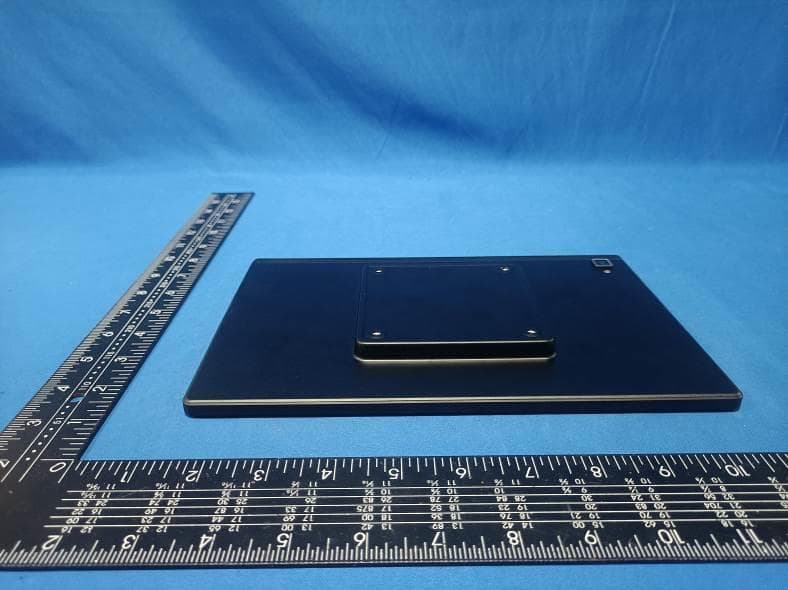
Click to zoom
Application Details
- Equipment Class
- NII - Unlicensed National Information Infrastructure TX
- Date of Grant
- Apr 01, 2024
- Application Purpose
- Original Equipment
- Date of Application
- Apr 01, 2024
- Equipment Note
- TABLET PC
- Frequency Range
- 5745.00000000 - 5825.00000000
- Company
- HANASIS Co., Ltd
- Country
- South Korea
Documents & Files
Document Text
Text extracted from the exhibit documents filed with the FCC. Open a document above to read the original.
Users Manual
HNS-T100 User Guide Please read this instruction throughly before using this product and keep it for future reference. 1 FUCTION OVERVIEW GETTING STARTED Power ON/OFF Plug in the charger,Press and hold the power button for 3-5s to turn on your tablet.Select your language and set up your tablet following the start guide. Press and hold the power button for 2s, then release it. It will show Power off, Restart on the screen. Tap Power off to turn 2 off the tablet. Press and hold the power button for 7-8s to do a forced reboot when it’s frozen. BATTERY A rechargeable Li-ion battery is installed in the tablet. We suggest you drain the battery completely once a month if only use your tablet occasionally. DO NOT dispose of tablet in a fire. SLEEP MODE Simply press the power button once to switch the tablet to the Sleep Mode when the tablet is ON: Press again to wake it up. Tip: Go to Settings>Display>Advanced>Sleep to set the time of entering the sleep Mode. 3 HOME SCREEN ICONS ON THE BOTTOM MENU ① ② ③ 1. Back 2. Home Screen 3. Recent Activities 4 Home Settings, wallpapers Tap and hold the empty section of a Home screen, Home settings, Wallpapers will be displayed. Tap Home settings to enable/disable Add icon to home screen. This is applicable to the new Apps installed from Play Store. It 5 also provides the shortcut to enable/disable the notification dots. In addition, you can set the option for Pull down action on the screen and change Home screen style, and more. Tap Wallpapers to change the current wallpaper of the tablet from the default wallpapers, liver Wallpapers or your photos. SETTING BASICS QUICK SETTINGS Swipe down from the top of the screen to access Quick settings. WIFI.Tap to connect/disconnect to a wireless network 6 Bluetooth.Enable/disable the Bluetooth of the tablet Auto-rotate.Turn on/ off of the screen. Tap the ✎ icon the change the options in the Quick Settings.long press each icon to enter the interface of its detailed settings. MORE SETTINGS Swipe down from the top of the screen, the tap the icon to enter the detailed setting interface.Or, Tap the Setting App on the Home screen to enter. 7 Network& internet. Connect to any working WiFi. Enable/disable the Airplane Mode. Monitor the data usage And more. Connected devices Turn on/ off Bluetooth. Pair with Bluetooth devices and check the paired devices. Check the received files from other devices via Bluetooth connection. 8 Add and check printers and more Apps¬ifications. Check the Apps recently opened. Check all the Apps on the tablet. Set the App permissions. Uninstall the third-party Apps. Adjust App notification settings. Clear the cache of the Apps. Check the screen time and more. Display Adjust the screen brightness. Adjust the font size and display size. Set a screen saver. Change the wallpaper. Adjust the time of entering the Sleep Mode. Adjust Color and Contrast of display. Set to check the notifications and other info. When you lift the tablet with screen locked and more. 9 Sound Select audio profiles from General and Silent Set the volumes for notifications, media and alarm. Storage View and manage your storage space. Privacy View App permissions, account activity and personal data. Location Location may use sources like GPS, WiFi, and sensors to help estimate your devices locations. Google may collect locations data periodically and use this data in an anonymous way to improve location accuracy and location-based services. 10 Security Set screen lock pattern, e.g.Password.PIN,Swipe etc. Enable/disable all the notifications while the screen is locked. Turn on/off the location services for specific Apps Set to show/hide the password when input a password and more. Accounts Add and manage the user accounts on you tablet. Accessibility For vision and hearing impaired users, manage settings for Screen readers, Display, Interation Controls and more. 11 Digital Well being & parental controls Check your app usage based on Screen time, Notifications received, or Times opened from Dashboard Set a schedule for Wind Down and turn on the setting you prefer. Manage the related notifications settings to reduce interruptions. Set up parental controls to help your kids balance their screen time and more. Google Set the preferences for Google related services System Set language Tap Language & Input>Languages>+Add a language to add your language. After adding, Hold and slide the ≡ to the top to 12 change the language Restore factory setting. Tap Advanced> Reset options>Erase all data (factory rest) to restore the factory setting. Set the data and time. Set the data and time. Turn on/off the Back up to Google Drive. Check and update the tablet’s system. Check the detailed information about the tablet. Enable/Disable Gestures to quickly launch camera or lift tablet to check notifications and more. About tablet To edit you device name to whatever you like. NETWORK CONNECTION Go to network settings from the Settings App or by long pressing the WiFi/Bluetooth icon in Quick Settings. WIFI CONNECTION 13 1. Tap Network&internet and turn on the WiFi. All the Wifi connections available will be listed. 2. Select your Wifi and input the correct password. BLUETOOTH PAIRING Please turn on the Bluetooth on you tablet and your Bluetooth 14 device. 1. Tap Connected devices. 2. Tap+pair new device to enter the scanning interface. Devices available will be displayed after a few seconds. 3. Tap the desired device to get a paring code and click PARI on both devices. The automatic connection is applied to some devices. APP MANAGEMENT APP DOWNLOAD AND INSTALLATION 1. Tap and open Play Store on the Home screen. 2. Log into your google account, search and download the App you need. APP MANAGEMENT 15 Move the App Tap and hold the App, then slide it to a desired screen. Remove the App from the Home Screen Touch and hold the App, them slide to X Remove to remove it from you Home Screen. Uninstall the App Touch and hold the App, then slide to the Uninstal…
Text truncated - open the document above for the full version.
Attestation Statements
HANASIS Co., Ltd Gosaek-dong, 17, Saneop-ro155beon-gil, Gwonseon-gu, Suwon-si,Gyeonggi-do South Korea Federal Communications Commission Authorization and Evaluation Division Equipment Authorization Branch 7435 Oakland Mills Road Columbia, MD 21046 2024-3-28 To whom it may concern: We, HANASIS Co., Ltd, hereby certify that the equipment for which authorization is sought (FCC ID: 2BFJX-HNS-T100) is not “covered” equipment prohibited from receiving an equipment authorization pursuant to § 2.903 of the FCC rules. We also certify that, as of the date of the filing of the application, we are not identified on the Covered List (https://www.fcc.gov/supplychain/coveredlist) as an entity producing “covered” equipment. By signing this form, we confirm the above and that we are aware of the application requirements listed under § 2.911(b) and (d)(5) and (6). The information provided in this letter is based on the referenced rule parts of Title 47 of the CFR as well as KDB 986446 D01. Sincerely, Signature Xiaojie Xie Manager HANASIS Co., Ltd 62_[model] CoveredEqu_2.911(d)(5)(i) and (ii) - U, V03
Attestation Statements
HANASIS Co., Ltd Gosaek-dong, 17, Saneop-ro155beon-gil, Gwonseon-gu, Suwon-si, Gyeonggi-do, Republic of Korea Federal Communications Commission Authorization and Evaluation Division Equipment Authorization Branch 7435 Oakland Mills Road Columbia, MD 21046 2024/03/25 U.S. Agent Designation HANASIS Co., Ltd acknowledges their consent for the following contact located in the United States to act as their agent for service of process for the equipment for which authorization is sought (FCC ID: 2BFJX-HNS-T100): Name and company of U.S. agent: GSS SERVICE INC Physical U.S. address of agent: 6547 N Academy Blvd #2266 Colorado Springs COLORADO 80918 United States FRN of U.S. agent: 0033402082 Email address of U.S. agent: [email protected] GSS SERVICE INC acknowledges their obligation to accept service of process on behalf of HANASIS Co., Ltd HANASIS Co., Ltd with the FRN [0035173285] accepts its obligation to maintain an agent for service of process in the United States for no less than one year after either the grantee has permanently terminated all marketing and importation of the applicable equipment within the U.S., or the conclusion of any Commission-related administrative or judicial proceeding involving the equipment, whichever is later. By signing this form, we confirm the above and that we are aware of the application requirements listed under § 2.911(d)(7). The information provided in this letter is based on the referenced rule parts of Title 47 of the CFR as well as KDB 986446 D01. An expiration date for this letter does not exist. In case the U.S. agent changes, the grantee is obligated to notify the FCC within 30 days via the granting TCB. Sincerely, Signature Xiaojie Xie Manager HANASIS Co., Ltd Signature Michoux Logan PM GSS SERVICE INC 48_[mo del] US_Agent_2.911(d)(7) - U, V0 5
Cover Letter(s)
CONFIDENTIALITY REQUEST for Certification Service in USA Federal Communication Commission Equipment Authorization Division, Application Processing Branch 7435 Oakland Mills Road Columbia, MD 21046 Date:<2024-3-28> Pursuant to Paragraphs §0.457 and 0.459 of the Commission’s Rules (47 C.F.R.) and Section §552(b)(4) of the Freedom of Information Act, we requests confidentiality for the following products: FCC ID Model name 2BFJX-HNS-T100 HNS-T100 For the product stated above, we request that the following information be held confidential; Exhibits Long-Term Confidentiality Short-Term Confidentiality Short-Term Confidentiality Days External Photos Internal Photos Block Diagram Schematics Test Setup Photos User’s Manual Parts List Tune Up Operational Descriptions The long-term confidentiality exhibits contain our trade secrets and proprietary information that could be of benefit to our competitors. The short-term confidentiality on the basis of ensuring that business sensitive information remains confidential until the actual marketing of our new device. If you have any questions, please feel free to contact me at the address shown below. Sincerely, Name/Title: Xiaojie Xie/Manager Company: HANASIS Co., Ltd Address: Gosaek-dong, 17, Saneop-ro155beon-gil, Gwonseon-gu, Suwon- si,Gyeonggi-do South Korea Phone: 13724489209 Fax: N/A E-Mail: [email protected]
Cover Letter(s)
HANASIS Co., Ltd Gosaek-dong, 17, Saneop-ro155beon-gil, Gwonseon-gu, Suwon-si,Gyeonggi-do South Korea Federal Communications Commission Authorization and Evaluation Division Equipment Authorization Branch 7435 Oakland Mills Road Columbia, MD 21046 2024-3-28 To whom it may concern: We, the undersigned, hereby authorize Eurofins Product Service GmbH to act on our behalf in all matters relating to applications for equipment authorization FCC ID: 2BFJX-HNS-T100 including the signing of all documents related to these matters. Any and all acts carried out by Eurofins Product Service GmbH on our behalf shall have the same effect as acts of our own. By signing this application form, we agree to Eurofins’ current valid General Terms and Conditions (AGB),Testing and Certification Regulations (PZO) which can be viewed on following website www.eurofins.de/ee or retrieved on request. We also hereby certify that no party to this application is subject to a denial of benefits, including FCC benefits, pursuant to Section 5301 of the Anti-Drug Abuse Act of 1988, 21 U.S.C. 862. Sincerely, Name/Title: Xiaojie Xie/Manager Company: HANASIS Co., Ltd Address: Gosaek-dong, 17, Saneop-ro155beon-gil, Gwonseon-gu, Suwon- si,Gyeonggi-do South Korea Phone: 13724489209 Fax: N/A E-Mail: [email protected]
Cover Letter(s)
HANASIS Co., Ltd Gosaek-dong, 17, Saneop-ro155beon-gil, Gwonseon-gu, Suwon-si,Gyeonggi-do South Korea UNII Device Declaration Letter To whom it may concern: We have declared below featured for FCC equipment authorization, Device FCC ID: 2BFJX-HNS-T100 (1) DFS Device: Master Client with Radar detection capability N/A Client without radar detection capability, (2) Active / Passive Scanning , adhoc mode access point capability Frequency Band (MHz) Active Scanning (the device can transmit a probe (beacon)) passive scanning (where the device is can listen only with no probes) Ad Hoc Mode capability Access point capability 5180-5240 Yes No Yes No Yes No Yes No 5190-5230 Yes No Yes No Yes No Yes No 5210-5210 Yes No Yes No Yes No Yes No 5745-5825 Yes No Yes No Yes No Yes No 5755-5795 Yes No Yes No Yes No Yes No 5775-5775 Yes No Yes No Yes No Yes No (3) Country code selection ability Yes No If yes, pls explain how it was implemented: (4) Meet 15.202 requirement Yes No pls check below : A master device is defined as a device operating in a mode in which it has the capability to transmit without receiving an enabling signal. In this mode it is able to select a channel and initiate a network by sending enabling signals to other devices A client device is defined as a device operating in a mode in which the transmissions of the device are under control of the master. A device in client mode is not able to initiate a network. (5) For client devices that have software configuration control to operate in different modes (active scanning in some and passive scanning in others) in different bands (devices with multiple equipment classes or those that operate on non-DFS frequencies) or modular devices which configure the modes of operations through software, the application must provide software and operations description on how the software and / or hardware is implemented to ensure that proper operations modes cannot be modified by end user or an installer. Apply Does not apply (If apply, pls help to provide explanation on it was implement, and how software was controlled) Should you have any questions or comments regarding this matter, please have my best attention. Sincerely, (Signed) Name/Title: Xiaojie Xie/Manager Company: HANASIS Co., Ltd Address: Gosaek-dong, 17, Saneop-ro155beon-gil, Gwonseon-gu, Suwon- si,Gyeonggi-do South Korea Phone: 13724489209 Fax: N/A E-Mail: [email protected]
External Photos
FCC ID: 2BFJX-HNS-T100 External Photos of the EUT FCC ID: 2BFJX-HNS-T100 FCC ID: 2BFJX-HNS-T100
ID Label/Location Info
Label and Location Size: L: 3.0cm*W: 2.0cm Label and Location W Model: HNS-T100 FCC ID : 2BFJX-HNS-T100 L
Internal Photos
FCC ID: 2BFJX-HNS-T100 Internal Photos of the EUT FCC ID: 2BFJX-HNS-T100 FCC ID: 2BFJX-HNS-T100 FCC ID: 2BFJX-HNS-T100 FCC ID: 2BFJX-HNS-T100
RF Exposure Info
RF Exposure evaluation FCC ID: 2BFJX-HNS-T100 1.1. Applicable Standard According to §1.1307(b)(1), systems operating under the provisions of this section shall be operated in a manner that ensures that the public is not exposed to radio frequency energy level in excess of the Commission’s guidelines. According to §1.1310 and §2.1093 RF exposure requirement KDB447498 v06: Mobile and Portable Devices RF Exposure Procedures and Equipment Authorization Policies 1.2. Requirement According to KDB447498 D01 General RF Exposure Guidance v06 Section 4.3.1 Standalone SAR test exclusion considerations: “Unless specifically required by the published RF exposure KDB procedures, standalone 1-g head or body and 10-g extremity SAR evaluation for general population exposure conditions, by measurement or numerical simulation, is not required when the corresponding SAR Test Exclusion Threshold condition, listed below, is satisfied. These test exclusion conditions are based on source-based time-averaged maximum conducted output power of the RF channel requiring evaluation, adjusted for tune-up tolerance, and the minimum test separation distance required for the exposure conditions.22 The minimum test separation distance is determined by the smallest distance from the antenna and radiating structures or outer surface of the device, according to the host form factor, exposure conditions and platform requirements, to any part of the body or extremity of a user or bystander (see 5) of section 4.1). To qualify for SAR test exclusion, the test separation distances applied must be fully explained and justified by the operating configurations and exposure conditions of the transmitter and applicable host platform requirements, typically in the SAR measurement or SAR analysis report, according to the required published RF exposure KDB procedures. When no other RF exposure testing or reporting is required, a statement of justification and compliance must be included in the equipment approval, in lieu of the SAR report, to qualify for the SAR test exclusion. When required, the device specific conditions described in the other published RF exposure KDB procedures must be satisfied before applying these SAR test exclusion provisions; for example, handheld PTT two-way radios, handsets, laptops & tablets etc.23 “ [(max. power of channel, including tune-up tolerance, mW)/ (min. test separation distance, mm)] · [√f (GHz)] ≤ 3.0 for 1-g SAR and ≤ 7.5 for 10-g extremity SAR, where: • f (GHz) is the RF channel transmit frequency in GHz • Power and distance are rounded to the nearest mW and mm before calculation • The result is rounded to one decimal place for comparison • 3.0 and 7.5 are referred to as the numeric thresholds in the step 2 below The test exclusions are applicable only when the minimum test separation distance is ≤ 50 mm and for transmission frequencies between 100 MHz and 6 GHz. When the minimum test separation distance is < 5 mm, a distance of 5 mm according to 5) in section 4.1 is applied to determine SAR test exclusion. 1.3. Manufacturing tolerance Mode Max. Peak Conducted Output Power (dBm) Max. tune-up BT 0.91 1.0±1 2.4GWIFI 15.97 15.0±1 Mode Max. Average Conducted Output Power (dBm) Max. tune-up 5.2GWIFI 14.54 14.0±1 5.8GWIFI 13.32 13.0±1 Page 2 of 2 2. E v a l u a t i o n R e s u l t Evaluation Results Band/Mode f (GHz) Antenna Distance (mm) RF output power (including tune-up tolerance) SAR Test Exclusion Threshold SAR Test Exclusion dBm mW BT 2.450 25 2.0 1.5849 0.0992<3.0 Yes 2.4GWIFI 2.450 25 16.0 39.8107 2.4925<3.0 Yes 5.2GWIFI 5.150 25 15.0 31.6228 2.8705<3.0 Yes 5.8GWIFI 5.850 25 14.0 25.1189 2.4302<3.0 Yes 3. C o n c l u s i o n The measurement results comply with the FCC Limit per 47 CFR 2.1093 for the uncontrolled RF Exposure and SAR Exclusion Threshold per KDB 447498 v06 .....................End of Report.........................
Test Report
1. Antenna Description: Antenna type PIFA antenna Model HNS-T100 Frequency range 5180-5240MHz, 5745-5825MHz Manufacturer Dongguan Mingzhi precision manufacturing Co., LTD ANT Peak Gain 0.42 dBi 2. Antenna Photo: Length: 21.84mm Width: 18.05mm 3. Test Equipment & Conditions 3.1 Test instrument VSWR is tested using Agilent E5071B connected to a hand mechanism, and the status is free space. 3.2 Test environment and methods 4.Antenna Radiation Pattern 5180MHz 5220MHz 5240MHz 5745MHz 5785MHz 5825MHz
Test Report
Shenzhen CTA Testing Technology Co., Ltd. Room 106, Building 1, Yibaolai Industrial Park, Qiaotou Community, Fuhai Street, Bao‘an District, Shenzhen, China Shenzhen CTA Testing Technology Co., Ltd. Room 106, Building 1, Yibaolai Industrial Park, Qiaotou Community, Fuhai Street, Bao’an District, Shenzhen, China Tel:+86-755 2322 5875 E-mail:[email protected] Web:http://www.cta-test.cn FCC PART 15 SUBPART C TEST REPORT FCC PART 15 SUBPART E 15.407 Report Reference No. .................... : FCC ID. ........................................... : CTA24030100403 2BFJX-HNS-T100 Compiled by ( position+printed name+signature) . : File administrators Zoey Cao Supervised by ( position+printed name+signature) . : Project Engineer Amy Wen Approved by ( position+printed name+signature) . : RF Manager Eric Wang Date of issue .................................... : Mar. 15, 2024 Testing Laboratory Name .............. : Shenzhen CTA Testing Technology Co., Ltd. Address ........................................... : Room 106, Building 1, Yibaolai Industrial Park, Qiaotou Community, Fuhai Street, Bao’an District, Shenzhen, China Applicant’s name ........................... : HANASIS Co., Ltd Address ............................................ : Gosaek-dong, 17, Saneop-ro155beon-gil, Gwonseon-gu, Suwon-si, Gyeonggi-do, Republic of Korea Test specification ........................... : Standard ........................................... : FCC Part 15 Subpart E 15.407 TRF Originator ................................. : Shenzhen CTA Testing Technology Co., Ltd. Shenzhen CTA Testing Technology Co., Ltd. All rights reserved. This publication may be reproduced in whole or in part for non-commercial purposes as long as the Shenzhen CTA Testing Technology Co., Ltd. is acknowledged as copyright owner and source of the material. Shenzhen CTA Testing Technology Co., Ltd. takes no responsibility for and will not assume liability for damages resulting from the reader's interpretation of the reproduced material due to its placement and context. Test item description ..................... : TABLET PC Trade Mark ....................................... : N/A Manufacturer .................................... : Dongguan Mingzhi precision manufacturing Co., LTD Model/Type reference ...................... : HNS-T100 Listed Models .................................. : N/A Modulation ....................................... : OFDM Frequency ......................................... From 5180MHz-5240MHz, 5745MHz-5825MHz Ratings ............................................. : DC 5.0V From external circuit Result ............................................... : PASS Report No.: CTA24030100403 Page 2 of 41 Shenzhen CTA Testing Technology Co., Ltd. Room 106, Building 1, Yibaolai Industrial Park, Qiaotou Community, Fuhai Street, Bao’an District, Shenzhen, China Tel:+86-755 2322 5875 E-mail:[email protected] Web:http://www.cta-test.cn T E S T R E P O R T Equipment under Test : TABLET PC Model /Type : HNS-T100 Serial Models : N/A Applicant : HANASIS Co., Ltd Address : Gosaek-dong, 17, Saneop-ro155beon-gil, Gwonseon-gu, Suwon-si, Gyeonggi-do, Republic of Korea Manufacturer : Dongguan Mingzhi precision manufacturing Co., LTD Address : Room 301, Building 1, No.4 Jizhi North Road, Humen Town, Dongguan City, China Test Result: PASS The test report merely corresponds to the test sample. It is not permitted to copy extracts of these test result without the written permission of the test laboratory. Report No.: CTA24030100403 Page 3 of 41 Shenzhen CTA Testing Technology Co., Ltd. Room 106, Building 1, Yibaolai Industrial Park, Qiaotou Community, Fuhai Street, Bao’an District, Shenzhen, China Tel:+86-755 2322 5875 E-mail:[email protected] Web:http://www.cta-test.cn Contents 1 T E S T S T A N D A R D S ................................................................. 4 2 S U M M A R Y ............................................................................ 5 2.1 General Remarks 5 2.2 Product Description 5 2.3 Equipment Under Test 5 2.4 Short description of the Equipment under Test (EUT) 5 2.5 EUT operation mode 6 2.6 Block Diagram of Test Setup 6 2.7 Related Submittal(s) / Grant (s) 6 2.8 Modifications 6 3 T E S T E N V I R O N M E N T .............................................................. 7 3.1 Address of the test laboratory 7 3.2 Test Facility 7 3.3 Environmental conditions 7 3.4 Test Description 8 3.5 Statement of the measurement uncertainty 8 3.6 Equipments Used during the Test 9 4 T E S T C O N D I T I O N S A N D R E S U L T S ........................................... 11 4.1 AC Power Conducted Emission 11 4.2 Radiated Emissions 14 4.3 Maximum Conducted Average Output Power 21 4.4 Power Spectral Density 23 4.5 Emission Bandwidth (26dB Bandwidth) 30 4.6 Minimum Emission Bandwidth (6dB Bandwidth) 34 4.7 Frequency Stability 38 5 T E S T S E T U P P H O T O S O F T H E E U T ......................................... 40 6 P H O T O S O F T H E E U T ........................................................... 41 Report No.: CTA24030100403 Page 4 of 41 Shenzhen CTA Testing Technology Co., Ltd. Room 106, Building 1, Yibaolai Industrial Park, Qiaotou Community, Fuhai Street, Bao’an District, Shenzhen, China Tel:+86-755 2322 5875 E-mail:[email protected] Web:http://www.cta-test.cn 1 T E S T S T A N D A R D S The tests were performed according to following standards: FCC Rules Part 15 Subpart E—Unlicensed National Information Infrastructure Devices ANSI C63.10-2013: American National Standard for Testing Unlicensed Wireless Devices KDB789033 D02: General UNII Test Procedures New Rules v01r02 Report No.: CTA24030100403 Page 5 of 41 Shenzhen CTA Testing Technology Co., Ltd. Room 106, Building 1, Yibaolai Industrial Park, Qiaotou Community, Fuhai Street, Bao’an District, Shenzhen, China Tel:+86-755 2322 5875 E-mail:[email protected] Web:http://www.cta-test.cn 2 S U M M A R Y 2.1 General Remarks Date of receipt of test sample : Mar. 04, 2024 Testing commen…
Text truncated - open the document above for the full version.
Test Report
Report No.: CTA24030100403 Page 33 of 41 Shenzhen CTA Testing Technology Co., Ltd. Room 106, Building 1, Yibaolai Industrial Park, Qiaotou Community, Fuhai Street, Bao’an District, Shenzhen, China Tel:+86-755 2322 5875 E-mail:[email protected] Web:http://www.cta-test.cn 802.11ac(HT40) 802.11ac(HT80) CH38 CH42 CH46 Report No.: CTA24030100403 Page 34 of 41 Shenzhen CTA Testing Technology Co., Ltd. Room 106, Building 1, Yibaolai Industrial Park, Qiaotou Community, Fuhai Street, Bao’an District, Shenzhen, China Tel:+86-755 2322 5875 E-mail:[email protected] Web:http://www.cta-test.cn 4.6 Minimum Emission Bandwidth (6dB Bandwidth) Limit Within the 5.725-5.85 GHz band, the minimum 6 dB bandwidth of U-NII devices shall be at least 500 kHz. Test Procedure 1. Set resolution bandwidth (RBW) = 100 kHz 2. Set the video bandwidth 3 x RBW. 3. Detector = Peak. 4. Trace mode = Max hold. 5. Measure the maximum width of the emission that is constrained by the frequencies associated with the two outermost amplitude points (upper and lower frequencies) that are attenuated by 6 dB relative to the maximum level measured in the fundamental emission. Test Configuration EUT SPECTRUM ANALYZER Test Results Type Bands Channel 6dB Bandwidth (MHz) Limit (KHz) Result 802.11a U-NII 3 149 15.120 ≥500KHz Pass 157 15.120 165 15.120 802.11n(HT20) U-NII 3 149 13.160 157 15.080 165 14.760 802.11n(HT40) U-NII 3 151 35.040 159 35.120 802.11ac(HT20) U-NII 3 149 14.680 157 13.800 165 15.000 802.11ac(HT40) U-NII 3 151 33.920 159 35.120 802.11ac(HT80) U-NII 3 155 75.040 Test plot as follows: Report No.: CTA24030100403 Page 35 of 41 Shenzhen CTA Testing Technology Co., Ltd. Room 106, Building 1, Yibaolai Industrial Park, Qiaotou Community, Fuhai Street, Bao’an District, Shenzhen, China Tel:+86-755 2322 5875 E-mail:[email protected] Web:http://www.cta-test.cn 802.11a 802.11n(HT20) CH149 CH149 CH157 CH157 CH165 CH165 Report No.: CTA24030100403 Page 36 of 41 Shenzhen CTA Testing Technology Co., Ltd. Room 106, Building 1, Yibaolai Industrial Park, Qiaotou Community, Fuhai Street, Bao’an District, Shenzhen, China Tel:+86-755 2322 5875 E-mail:[email protected] Web:http://www.cta-test.cn 802.11n(HT40) 802.11ac(HT20) CH151 CH149 CH159 CH157 CH165 Report No.: CTA24030100403 Page 37 of 41 Shenzhen CTA Testing Technology Co., Ltd. Room 106, Building 1, Yibaolai Industrial Park, Qiaotou Community, Fuhai Street, Bao’an District, Shenzhen, China Tel:+86-755 2322 5875 E-mail:[email protected] Web:http://www.cta-test.cn 802.11ac(HT40) 802.11ac(HT80) CH151 CH155 CH159 Report No.: CTA24030100403 Page 38 of 41 Shenzhen CTA Testing Technology Co., Ltd. Room 106, Building 1, Yibaolai Industrial Park, Qiaotou Community, Fuhai Street, Bao’an District, Shenzhen, China Tel:+86-755 2322 5875 E-mail:[email protected] Web:http://www.cta-test.cn 4.7 Frequency Stability LIMIT Manufacturers of U-NII devices are responsible for ensuring frequency stability such that an emission is maintained within the band of operation under all conditions of normal operation as specified in the users manual. TEST CONFIGURATION TEST PROCEDURE Frequency Stability under Temperature Variations: The equipment under test was connected to an external AC or DC power supply and input rated voltage. RF output was connected to a frequency counter or spectrum analyzer via feed through attenuators. The EUT was placed inside the temperature chamber. Set the spectrum analyzer RBW low enough to obtain the desired frequency resolution and measure EUT 20°C operating frequency as reference frequency. Turn EUT off and set the chamber temperature to -30°C. After the temperature stabilized for approximately 30 minutes recorded the frequency. Repeat step measure with 10°C increased per stage until the highest temperature of +50°C reached. Frequency Stability under Voltage Variations: Set chamber temperature to 20°C. Use a variable AC power supply / DC power source to power the EUT and set the voltage to rated voltage. Set the spectrum analyzer RBW low enough to obtain the desired frequency resolution and recorded the frequency. Reduce the input voltage to specify extreme voltage variation (±15%) and endpoint, record the maximum frequency change. TEST RESULTS Record worst case as below: Report No.: CTA24030100403 Page 39 of 41 Shenzhen CTA Testing Technology Co., Ltd. Room 106, Building 1, Yibaolai Industrial Park, Qiaotou Community, Fuhai Street, Bao’an District, Shenzhen, China Tel:+86-755 2322 5875 E-mail:[email protected] Web:http://www.cta-test.cn Reference Frequency: 802.11ac channel=36 frequency=5180MHz Voltage ( V ) Temperature (°C) Frequency error Limit (ppm) Result Hz ppm AC 120 -30 110.56 0.021344 Within the band of operation Pass -20 174.79 0.033743 -10 145.18 0.028027 0 146.66 0.028313 10 145.75 0.028137 20 99.39 0.019187 30 167.43 0.032322 40 129.39 0.024979 50 128.58 0.024822 AC 132 25 195.77 0.037793 AC 108 25 118.47 0.022871 Reference Frequency: 802.11ac channel=149 frequency=5745MHz Voltage ( V ) Temperature (°C) Frequency error Limit (ppm) Result Hz ppm AC 120 -30 135.72 0.023624 Within the band of operation Pass -20 129.56 0.022552 -10 167.43 0.029144 0 169.89 0.029572 10 136.44 0.023749 20 144.94 0.025229 30 116.81 0.020332 40 168.61 0.029349 50 160.87 0.028002 AC 132 25 150…
Text truncated - open the document above for the full version.
Contact Information
Applicant
Xiaojie Xie
Test Firm
SHENZHEN CTA TESTING TECHNOLOGY CO., LTD.Eric Wang
[email protected]+86 755 2322 5875
Technical Specifications
| # | Rule Parts | Frequency Range | Power Output |
|---|---|---|---|
| 2 | 15E | 5.75 GHz - 5.83 GHz | 21.50 mW |