2BGW2-RC01Biboting Cloud Remote Control
Biboting Trading (Shanghai) Co., Ltd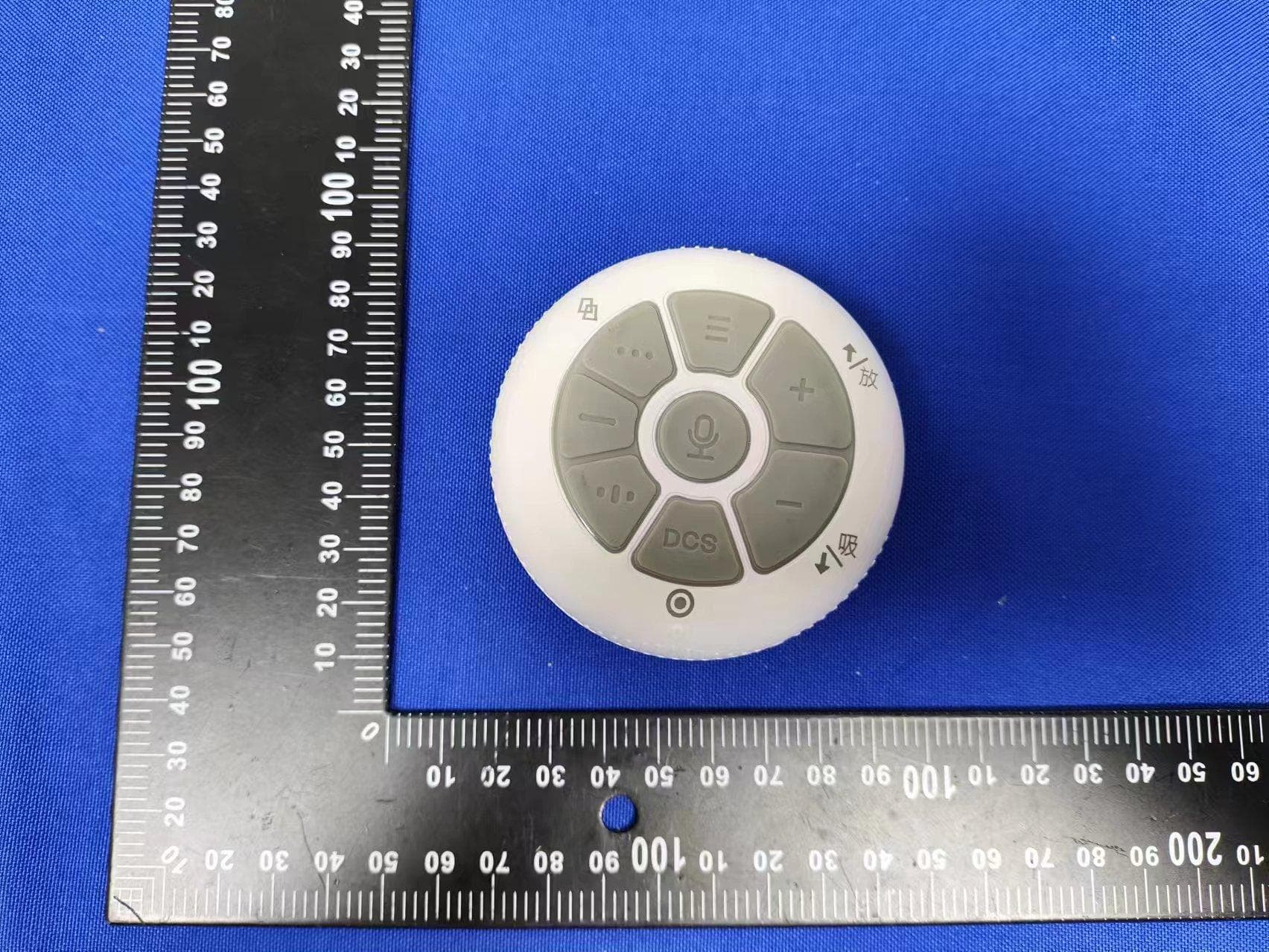
Click to zoom
Application Details
- Equipment Class
- DTS - Digital Transmission System
- Date of Grant
- Jun 26, 2024
- Application Purpose
- Original Equipment
- Date of Application
- Jun 25, 2024
- Equipment Note
- Biboting Cloud Remote Control
- Frequency Range
- 2402.00000000 - 2480.00000000
- Country
- China
Documents & Files
Document Text
Text extracted from the exhibit documents filed with the FCC. Open a document above to read the original.
Users Manual
Remote Control Connection Instructions Step 1: Open the Back Cover of the Remote Control Open the back cover of the remote control in the direction shown in the illustration. Connect Function Indicator Explanation (1) Adjusting Suction and Release Time (2) In the Main Screen, Adjusting Time by +/- 5 Minutes (3) Navigating the Menu Use the "+" button to scroll up. Use the "-" button to scroll down. Press the DCS button to confirm the selection. If there is no action within 12 seconds, it will automatically return to the main screen. Step 2: Insert the Batteries Insert two 1.5V AA batteries into the battery compartment and secure them according to the indicated directions. After securing the batteries, press any button on the front of the remote control to activate it, and the green light at the top front of the remote control should turn on (indicating that the remote control is not yet connected). Step 3: Connect the Remote Control to the Device Press and hold the knob on the left side of the device for two seconds until the screen displays the connection symbol. Press and hold the rhythm button on the remote control until the green light starts flashing. Then, bring the remote control within 15 cm of the device to establish the connection. A successful connection is indicated by two beeps and the green light turning blue. The connection symbol will also appear on the device's screen, confirming that the connection has been successfully established. Blue Light Mode on the Device (1)Rhythm Button: (2)Long Press: Connect/Disconnect the device. Red Light Mode on the Device Strengthen Suction Button Yellow Light Mode on the Device Wave Suction Button DCS Button: (1)A-B-C-III-II-I: Switch vibration frequencies. (2)Confirm Button: Used to confirm during the operation paging function. (3)Confirm Button: Used to confirm during the adjustment of suction function. The device will display the connection symbol. Insert two 1.5V AA dry batteries. Function Explanation of the +/- Buttons Adjusting Release Time: Press and hold the "+" button for 1 second until the device's release time starts flashing yellow. Then use the +/- buttons to increase or decrease the release time by 0.1 seconds. Adjusting Suction Time: Press and hold the "-" button for 1 second until the device's suction time starts flashing yellow. Then use the +/- buttons to increase or decrease the suction time by 0.1 seconds. Press the DCS button to confirm or it will automatically return to the main screen after 5 seconds. Page Button Function Explanation (01) Press once to change the page (cyclic pages) Page Screen: (1) Part Mode (First Page) (2) Settings (Second Page) Contents of the Part Mode Selection Menu: Breast Abdomen M Private1 M Private2 Hip F Private1 F Private2 Shoulder Face Contents of the Settings Menu: Disconnect Sound/Mute Language (1)简体中文 (2)繁体中文 (3)English A A All selections are made using the "+" and "-" buttons to navigate up and down. (02) Press the Page Button Twice Quickly to Return to the Main Screen Voice Button Function Explanation (3) Press the third time to return to the main screen A short press pauses/resumes the operation of the device. Press the DCS button to select "Language" and navigate up and down to choose the desired language. Once the language is confirmed, press the DCS button. Language changed successfully. Return to the main screen. 1/2 After confirmation, it will jump to the mode selection screen. Precautions for Operating the Voice Button: 1. When long-pressing the voice button, only one command can be recognized at a time. Please do not speak consecutive phrases for recognition. 2. Speak the phrases clearly during recognition to avoid recognition errors or failures. Voice Button: (01) Upon successfully recognizing discernible content, a correct sound will be emitted. The device will then synchronize with this command. Below are the recognizable voice commands: 1. Connect/Pair/Link: This command establishes a connection with the device. 2. Release: This command disconnects from the device. 3. Add 5/10 minutes: Increases the operation time of the device (maximum increase up to 60 minutes). 4. Subtract 5/10 minutes: Decreases the operation time of the device (minimum decrease down to 1 minute). 5. Stop/End: Completely stops the operation of the device. 6. Pause: Pauses the operation of the device. 7. Continue/Start: Resumes the operation from the paused state. 8. Chest/Abdomen/Hip/Shoulder & Neck/Facial: Specific body part selection. (02) To use the voice function, long-press the voice button and speak the designated phrase. When receiving the phrase, the indicator light will be red. Upon successful recognition, a correct sound will be emitted, and the device will synchronize with the command. If the phrase cannot be recognized, there will be no response, and the phrase needs to be re-recognized. The voice function can only recognize the following phrases 0.8 2.2 (3) If you wish to exit the mode, what steps should be taken? A: Using the chest mode as an example: You need to press the button corresponding to the mode that is currently operating to exit the mode. Explanation of Other Functions: (1)If there are 45 minutes remaining on the device originally, upon selecting the page mode, it will revert back to 30 minutes and commence operation. If the original time exceeds 30 minutes, upon selecting the mode, it will start counting down from 30 minutes. (2)If the original time on the device is less than 30 minutes, upon selecting the mode, it will start counting down from that time. 0.5 2.0 When in chest mode, adjusting the suction and release will return to the mode without any specific setting. 0.8 2.0 And it will continue operating with the adjusted suction and release settings. (4) The DCS buttons A, B, C, III, II, and I can be operated in any mode. *However, in page mode or when changing suction and release time, the DCS button functions as the "Confirm" button. This indicates the illuminated in…
Text truncated - open the document above for the full version.
Attestation Statements
BibotingTrading(Shanghai)Co.,Ltd FederalCommunicationsCommission AuthorizationandEvaluationDivision 7435OaklandMillsRoad Columbia,MD21046 USA Date:06-25-2024 FCCID:2BGW2-RC01 Ref.#1:AttestationStatementsPart2.911(d)(5)(i)Filing BibotingTrading(Shanghai)Co.,Ltdcertifiesthattheequipmentforwhichauthorizationis soughtisnot“covered”equipmentprohibitedfromreceivinganequipmentauthorization pursuanttosection2.903oftheFCCrules. Ref.#2:AttestationStatementsPart2.911(d)(5)(ii)Filing BibotingTrading(Shanghai)Co.,Ltd certifiesthat,asofthedateofthefilingofthe application,theapplicantisnotidentifiedontheCoveredListasanentityproducing “covered”equipment. Applicant:BibotingTrading(Shanghai)Co.,Ltd Address:No.15,GroundFloor,No.111XingshanRoad,PutuoDistrict,Shanghai ContactPerson:JaydenLiu Tel.:Manager Email:[email protected] Sincerely, Signature:
Attestation Statements
BibotingTrading(Shanghai)Co.,Ltd Address : No.15,GroundFloor,No.111XingshanRoad,PutuoDistrict,Shanghai Date:2024-06-25 FederalCommunicationsCommission AuthorizationandEvaluationDivision 1435OaklandMillsRoad Columbia,MD21046 Ref:AttestationStatementsPart2.911(d)(7)Filing SUBJECT:FCCApplicationforFCCID:2BGW2-RC01,FRN:0035547322 BibotingTrading(Shanghai)Co.,Ltdcertifiesthat,asofthedateofthefilingoftheapplication, WilsonTechServiceLLCisourdesignatedU.S.agentforserviceofprocessfortheabove referencedFCCID.BibotingTrading(Shanghai)Co.,Ltdacceptstomaintainanagentforno lessthanoneyearafterthegranteehasterminatedallmarketingandimportationorthe conclusionofanyCommission-relatedproceedinginvolvingtheequipment. WilsonTechServiceLLCaccepts,asofthedateofthefilingoftheapplication,theobligation ofthedesignatedU.S.agentforserviceofprocessfortheabovereferencedFCCID. DesignatedU.S.AgentInformation: Name:WilsonTechServiceLLC Address: 131217thStreetSuite692,Denver,CO,80202,US FRN:0033402033 ContactPerson:WilsonCheung Tel.:+1-716-965-5112 Email: [email protected] Sincerely, SignedonbehalfofSignedonbehalfof BibotingTrading(Shanghai)Co.,Ltd WilsonTechServiceLLC Name:JaydenLiu Name: WilsonCheung Title: Manager Title:Manager Signature:Signature: Date:2024-06-25Date:2024-06-25
Cover Letter(s)
BibotingTrading(Shanghai)Co.,Ltd Date: 2024/06/25 ProductModelNumber:RC01 FCCID: 2BGW2-RC01 Towhomitmayconcern, Re:ProductCertificationRepresentativeAuthorizationLetter WeauthorizeQAILaboratoriesLtd.3980NorthFraserWay,BurnabyB.C.CanadaV5J5K5to actonourbehalfonallmattersconcerningtheabovenamedequipment. Thisshallincludethefollowing: Testing Approvalapplicationsandprocedures WedeclarethatORGANIZATIONisallowedtoforwardallinformationrelatedtotheapproval projecttotheappliedcertificationbodyandtothenotificationentitiesandtodiscussanyissues concerningtheapprovalapplication.AnyandallactscarriedoutbyORGANIZATIONonour behalfshallhavethesameeffectasactsofourown. By: Title: Manager Email: 13431311839 Telephone:[email protected] Onbehalfof: JaydenLiu
Cover Letter(s)
BibotingTrading(Shanghai)Co.,Ltd OfficeofEngineeringTechnology FederalCommunicationsCommission 7435OaklandMillsRoad Columbia,MD21046 USA Date:June25,2024 Subject;RequestforConfidentiality FCCID:2BGW2-RC01 ToWhomItMayConcern, PursuanttotheprovisionsoftheCommission’srulesTitle47Sections§0.457and§0.459,we arerequestingtheCommissiontowithholdthefollowingattachment(s)asconfidential documentsfrompublicdisclosureindefinitely. Thesedocumentscontaindetailedsystemandequipmentdescriptionsandareconsideredas proprietaryinformationinoperationoftheequipment.Thepublicdisclosureofthese documentsmightbeharmfultoourcompanyandwouldgivecompetitorsanunfairadvantage inthemarket. SchematicDiagram BlockDiagram PartsList OperationalDescription Tune-upProcedure Inadditionaltoabovementioneddocuments,inordertocomplywiththemarketingregulations inTitle47CFR§2.803andtheimportationrulesinTitle47CFR§2.1204,whileensuringthat businesssensitiveinformationremainsconfidentialuntiltheactualmarketingofnewly authorizeddevices,werequestShortTermConfidentialityofthefollowingattachment(s); ExternalPhotos TestSetupPhotos InternalPhotos UserManual For45days,pursuanttoPublicNoticeDA04-1705. OR For180dayspursuanttoKDB726920D01. Itisourunderstandingthatallmeasurementtestreports,FCCIDlabelformatand correspondenceduringthecertificationreviewprocesscannotbegrantedasconfidential documentsandthisinformationwillbeavailableforpublicreviewoncethegrantofequipment authorizationisissued. Sincerely, Signature: Name: JaydenLiu Title: Manager
Cover Letter(s)
AntennaSpecification Specifications Summary ITEMSPEC. ModelNamePCBAntenna Frequency2400-2500MHz MAX.GAIN1.06dBi PolarizationHorizontal AzimuthBeamPatternOmni-directional Impedance50Ω ManufacturerBibotingTrading(Shanghai)Co.,Ltd AddressNo.15,GroundFloor,No.111XingshanRoad,PutuoDistrict,Shanghai TestcompanyADVANCEDCERAMICXCORP. TestAddress16TzuChiangRoad,HsinchuIndustrialDistrictHsinchuHsien303, Taiwan TestDate2023-08-10 TestInstrumentvectornetworkanalyzer-R&SZVB20 1.Mainantenna:2400MHz 1.1Horizontal Frequency(MHZ):2441AntennaPolarity:Horizontal MaximumValue(dBi):1.06 AverageGain(dBi):-3.32 MinimumGain(dBi):-53.04 1.2Vertical Frequency(MHZ):2441AntennaPolarity:Vertical MaximumValue(dBi):-4.01 AverageGain(dBi):-6.64 MinimumGain(dBi):-48.4 2.Mainantenna:2450MHz 2.1Horizontal Frequency(MHZ):2441AntennaPolarity:Horizontal MaximumValue(dBi):0.19 AverageGain(dBi):-4.46 MinimumGain(dBi):-55.84 2.2Vertical Frequency(MHZ):2441AntennaPolarity:Vertical MaximumValue(dBi):-5.14 AverageGain(dBi):-7.64 MinimumGain(dBi):-46.8 3.Mainantenna:2500MHz 3.1Horizontal Frequency(MHZ):2441AntennaPolarity:Horizontal MaximumValue(dBi):0.26 AverageGain(dBi):-3.44 MinimumGain(dBi):-54.71 3.2Vertical Frequency(MHZ):2441AntennaPolarity:Vertical MaximumValue(dBi):-4.38 AverageGain(dBi):-6.85 MinimumGain(dBi):-45.82
External Photos
ExternalPhotos
ID Label/Location Info
Label:
RF Exposure Info
FCCID:2BGW2-RC01 RFExposureEvaluation AccordingtoKDB447498andpart2.1093,Unlessspecificallyrequiredbythepublished RFexposureKDBprocedures,standalone1-gheadorbodyand10-gextremitySAR evaluationforgeneralpopulationexposureconditions,bymeasurementornumerical simulation,isnotrequiredwhenthecorrespondingSARTestExclusionThreshold condition(s),listedbelow,is(are)satisfied. For100MHzto6GHzandtestseparationdistances≤50mm,the1-gand10-gSARtest exclusionthresholdsaredeterminedbythefollowing: [(max.powerofchannel,includingtune-uptolerance,mW)/(min.testseparationdistance, mm)]·[√f (GHz) ]≤3.0for1-gSAR,and≤7.5for10-gextremitySAR,where f (GHz) istheRFchanneltransmitfrequencyinGHz PoweranddistanceareroundedtothenearestmWandmmbeforecalculation Theresultisroundedtoonedecimalplaceforcomparison Here, SoaSARtestisnotrequired ModeFreque ncy (MHz) Max Power (dBm) Target power W/tolerance (dBm) Maxtune uppower tolerance (dBm) Max Power (mW) Min. Distanc e (mm) Calc. threshol ds limit BLEGFSK2402 0.25 0±1 1 1.25895.000.3902 3.0 2440 0.86 0 ± 1 1 1.25895.000.3933 3.0 2480 0.66 0±1 1 1.25895.000.3965 3.0
Test Report
FCCTESTREPORT FCCID:2BGW2-RC01 Product: BibotingCloudRemoteControl ModelName: RC01 Brand: N/A ReportNo.: NCT24023217E1-1 Preparedfor BibotingTrading(Shanghai)Co.,Ltd No.15,GroundFloor,No.111XingshanRoad,PutuoDistrict,Shanghai Preparedby ShenzhenNCTTestingTechnologyCo.,Ltd. A101&2FB2,Fuqiao6thArea,XintianCommunity,FuhaiStreet,BaoanDistrict, Shenzhen,People’sRepublicofChina TEL:400-8868-419 FAX:86-755-27790922 ReportNo.:NCT24023217E1-1 Page2of41 Hotline:400-8868-419Fax:86-755-27790922http://www.ncttesting.cn 1TESTRESULTCERTIFICATION Applicant’sname: BibotingTrading(Shanghai)Co.,Ltd Address: No.15,GroundFloor,No.111XingshanRoad,PutuoDistrict,Shanghai Manufacture'sname: DongguanrunmeiyaTradingCo.,Ltd Address: Room201,building2,No.17,JinfuRoad,Jinxia,Chang'anTown, Dongguan Productname: BibotingCloudRemoteControl Modelname: RC01 Standards:FCCCFR47Part15Section15.247 Testprocedure:ANSIC63.10:2013 Dateoftest:Jan.04,2024-Jan.13,2024 DateofIssue:Jun.13,2024 ThisdevicedescribedabovehasbeentestedbyNCT,andthetestresultsshowthatthe equipmentundertest(EUT)isincompliancewiththeFCCrequirements.Anditisapplicableonly tothetestedsampleidentifiedinthereport. Thisreportshallnotbereproducedexceptinfull,withoutthewrittenapprovalofNCT,this documentmaybealteredorrevisedbyNCT,personalonly,andshallbenotedintherevisionof thedocument. TestEngineer: KevenWu/Engineer TechnicalManager: HenryWang/Manager ReportNo.:NCT24023217E1-1 Page3of41 Hotline:400-8868-419Fax:86-755-27790922http://www.ncttesting.cn Contents Page 1TESTRESULTCERTIFICATION...............................................................................................................................2 2TESTSUMMARY..........................................................................................................................................................5 2.1TESTSITE............................................................................................................................................................6 3GENERALINFORMATION..........................................................................................................................................7 3.1GENERALDESCRIPTIONOFE.U.T.....................................................................................................................7 3.2CHANNELLIST.....................................................................................................................................................8 3.3TESTSETUPCONFIGURATION............................................................................................................................9 3.4TESTMODE.........................................................................................................................................................9 4EQUIPMENTDURINGTEST....................................................................................................................................10 4.1EQUIPMENTSLIST.............................................................................................................................................10 4.2MEASUREMENTUNCERTAINTY.........................................................................................................................12 4.3DESCRIPTIONOFSUPPORTUNITS...................................................................................................................12 5CONDUCTEDEMISSION..........................................................................................................................................13 5.1E.U.T.OPERATION............................................................................................................................................13 5.2EUTSETUP.......................................................................................................................................................13 5.3TESTSET-UP(BLOCKDIAGRAMOFCONFIGURATION).................................................................................14 5.4MEASUREMENTPROCEDURE............................................................................................................................14 5.5CONDUCTEDEMISSIONLIMIT...........................................................................................................................14 5.6MEASUREMENTDESCRIPTION..........................................................................................................................14 5.7CONDUCTEDEMISSIONTESTRESULT.............................................................................................................14 6RADIATEDSPURIOUSEMISSIONS......................................................................................................................15 6.1EUTOPERATION...............................................................................................................................................15 6.2TESTSETUP......................................................................................................................................................16 6.3SPECTRUMANALYZERSETUP..........................................................................................................................17 6.4TESTPROCEDURE.............................................................................................................................................18 6.5SUMMARYOFTESTRESULTS...........................................................................................................................20 7CONDUCTBANDEDGEANDSPURIOUSEMISSIONSMEASUREMENT....................................................27 7.1TESTPROCEDURE.............................................................................................................................................27 ReportNo.:NCT24023217E1-1 Page4of41 Hotline:400-8868-419Fax:86-755-27790922http://www.ncttesting.cn 7.2TESTRESULT.............................................................................................…
Text truncated - open the document above for the full version.
Contact Information
Applicant
Jayden Liu(Manager)
Technical Contact
Test Firm
SHENZHEN NCT TESTING TECHNOLOGY CO., LTD.Henry Wang
[email protected]0755-27790922
Technical Specifications
| # | Rule Parts | Frequency Range | Power Output |
|---|---|---|---|
| 1 | 15C | 2.40 GHz - 2.48 GHz | 1.22 mW |