2BH7FFUSPROM2Fusion Pro 2.5G Gateway with SSD Tray
TP-Link Systems Inc.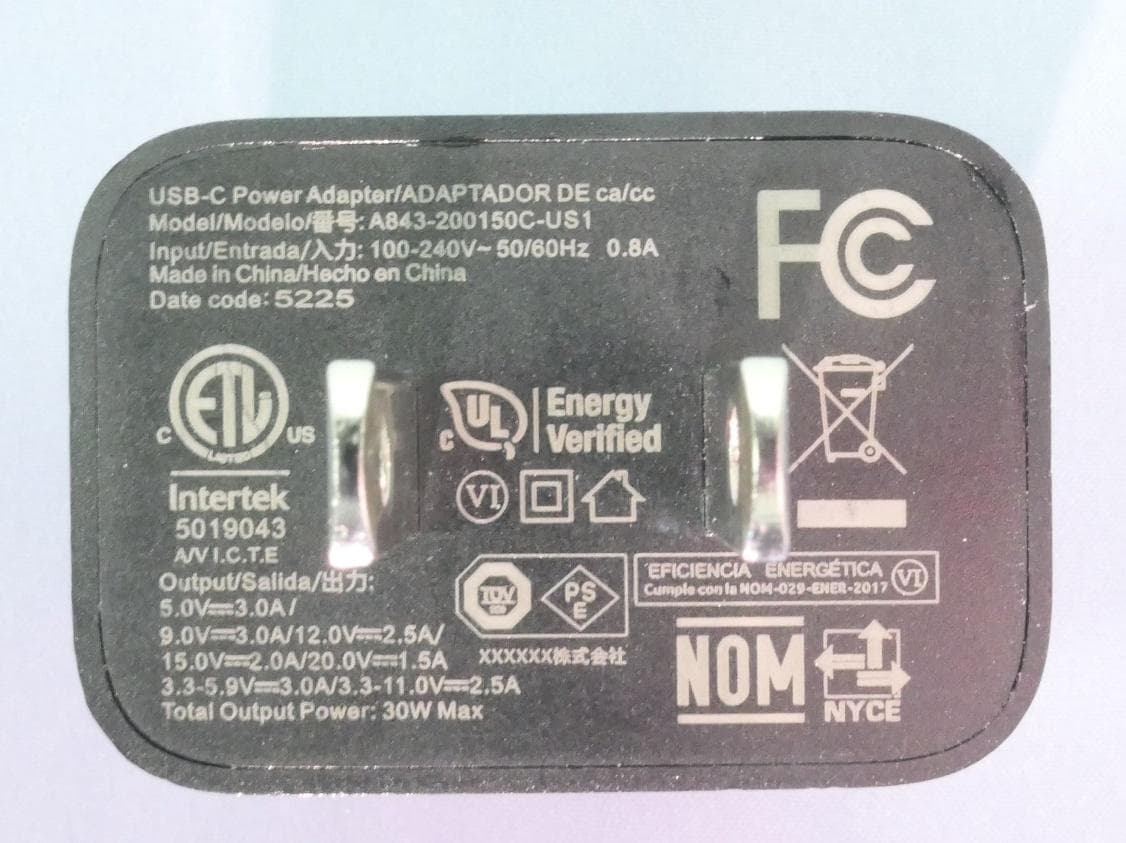
Click to zoom
Application Details
- Equipment Class
- DTS - Digital Transmission System
- Date of Grant
- Apr 28, 2026
- Application Purpose
- Original Equipment
- Equipment Note
- Fusion Pro 2.5G Gateway with SSD Tray
- Frequency Range
- 2402.00000000 - 2480.00000000
- Company
- TP-Link Systems Inc.
- Country
- United States
Documents & Files
Document Text
Text extracted from the exhibit documents filed with the FCC. Open a document above to read the original.
Users Manual
Fusion Pro Gateway Quick Installation Guide Note: Fusion gateways are for enterprise installation and use. Fusion Pro 2.5G is used as an example throughout the guide. Images may differ from your actual product. Fusion Pro Gateway 2.5G PoE SwitchPoE NVR Wall Plate AP Celling Mount AP Management PC Managed Switch Non-PoE Gigabit Switch Office Area, Meeting RoomSurveillance Area PC PC PC PC Department A Department B Open a web browser and type the default management address https://omada.local or https://192.168.188.1 in the address field of the browser, then press the Enter ke y. 4. Make sure the management PC is configured to Obtain an IP address automatically. 3. Follow the setup wizard to configure the internet settings, bind the gateway to your TP-Link ID, set up the controller, and add devices. 5. After the setup wizard is complete, you will be directed to the management page. And you can configure more settings and manage your network. 6. For detailed information and configuration, refer to the gateway's user guide. The guide can be found on the Documents page of our official website: https://support.omadanetworks.com/document/. Initial Setup The Fusion gateway delivers an all-in-one solution for networking and centralized management on a single device, featuring a built-in controller for the entire Omada ecosystem. It is ideal for small businesses across single or multiple sites. This Quick Installation Guide is for qualified IT staff and professional installers. It covers typical network topology, basic software configuration, and descriptions of enterprise-dedicated features. For detailed instructions, refer to the user guide. Enterprise Solution Connect the Internet port (Port 1) of the gateway to the internet using the provided Ethernet cable. 1. Connect the gateway to a grounded power outlet using the provided power adapter. The touchscreen on the front panel will light up. 2. Via Omada Cloud Portal a. Enable Cloud Access on the Settings page on the gateway and bind a TP-Link ID to your gateway. If you have configured this in the setup wizard, skip the step. b. Launch a web browser and enter https://omada.tplinkcloud.com in the address bar. c. Enter your TP-Link ID and password to log in. A list of Fusion gateways that have been bound with your TP-Link ID will appear in the Fusion Systems page. Then you can launch your device to further configure the gateway. With the TP-Link Omada app, you can access and manage your Omada devices at a local site or remotely. More Management Methods Via Omada App Typical Network Topology Software Configuration Safety Precautions Preface ©2026 TP-Link 7100003112 REV1.0.0 Internet • Do not attempt to disassemble, repair, or modify the device. If you need service, please contact us. • Do not use damaged charger or USB cable to charge the device. • Do not use any other chargers than those recommended. • Adapter shall be installed near the equipment and shall be easily accessible. • Keep the device away from water, fire, humidity or hot environments. • Do not use the device where wireless devices are not allowed. • For enterprise installation and use only. Flip Over to Explore More Cameras Outdoor AP Camera More Resources Main Sitehttps://www.omadanetworks.com/ https://support.omadanetworks.com/video/ https://support.omadanetworks.com/document/ https://support.omadanetworks.com/product/ https://support.omadanetworks.com/contact-support/ Video Center Product Support Documents Technical Support EU Declaration of Conformity TP-Link hereby declares that the gateway is in compliance with the essential requirements and other relevant provisions of directives (EU)2015/863, 2014/53/EU and 2011/65/EU. The original EU declaration of conformity may be found at https://www.tp-link.com/en/support/ce/ UK Declaration of Conformity TP-Link hereby declares that the gateway is in compliance with the essential requirements and other relevant provisions of the Radio Equipment Regulations 2017. The original UK declaration of conformity may be found at https://www.tp-link.com/support/ukca/ Frequently Asked Questions (FAQ) Q1. Why were no APs or switches found during the initial setup? A: During initial setup, only devices in factory mode can be detected. Otherwise, they can only be detected and adopted after setup using their original account and password. Q2. How do I reset the Fusion gateway? A: • Via the physical Reset button With the device powered on, use a pin to press and hold the Reset button on the front panel for about 5 seconds until a reset prompt appears, then release. The device will restore to its factory default settings. • Via the web management page Go to Settings > System Settings > OS Settings. In the Action drop-down list, click Reset to reset the device to its factory default settings. Q3. How do I adopt APs and switches? A: 1. Connect the APs/switches to the same network as the gateway. 2. Access the gateway's management page at https://omada.local or https://192.168.188.1. 3. Go to Devices, you will find the devices displayed in the Device List. 4. Click Adopt and wait until the device’s S TAT U S changes to CONNECTED. Appendix Enterprise-Dedicated Features Fusion gateways are FCC Class A certified products with various advanced software capabilities, primarily used in business, industrial, or office environments. ■ Multi-Site Networking and Management: Features an enterprise-grade SD-WAN for multi-site networking in business scenarios (e.g., chain supermarkets and chain restaurants) and Cloud Portal for managing multiple sites. • Sites are interconnected via encrypted tunnels, forming a unified enterprise WAN and ensuring secure and reliable communication across geographically distributed locations. All network configuration, site onboarding, and policy management are performed exclusively through a cloud management portal. Local or on-premises controllers are not supported. Branch devices support multiple WAN connections. Link availability is de…
Text truncated - open the document above for the full version.
Users Manual
Regulatory Compliance Omada Fusion Pro 2.5G Gateway © 2026 TP-Link 1900002450 REV1.0.0 FCC compliance information statement Product Name: Omada Fusion Pro 2.5G Gateway Model Number: Fusion Pro 2.5G Component NameModel I.T.E. PowerA843-200150C-US1 Responsible party: TP-Link Systems Inc. Address: 10 Mauchly, Irvine, CA 92618 Website: https://www.tp-link.com/us/ Tel: +1 626 333 0234 Fax: +1 909 527 6804 E-mail: [email protected] This equipment has been tested and found to comply with the limits for a Class A digital device, pursuant to part 15 of the FCC Rules. These limits are designed to provide reasonable protection against harmful interference when the equipment is operated in a commercial environment. This equipment generates, uses, and can radiate radio frequency energy and, if not installed and used in accordance with the instruction manual, may cause harmful interference to radio communications. Operation of this equipment in a residential area is likely to cause harmful interference in which case the user will be required to correct the interference at his own expense. This device complies with part 15 of the FCC Rules. Operation is subject to the following two conditions: 1. This device may not cause harmful interference. 2. This device must accept any interference received, including interference that may cause undesired operation. Any changes or modifications not expressly approved by the party responsible for compliance could void the user’s authority to operate the equipment. Note: The manufacturer is not responsible for any radio or TV interference caused by unauthorized modifications to this equipment. Such modifications could void the user’s authority to operate the equipment. FCC RF Radiation Exposure Statement This equipment complies with FCC RF radiation exposure limits set forth for an uncontrolled environment. This device and its antenna must not be co-located or operating in conjunction with any other antenna or transmitter. “To comply with FCC RF exposure compliance requirements, this grant is applicable to only Mobile Configurations. The antennas used for this transmitter must be installed to provide a separation distance of at least 20 cm from all persons and must not be co-located or operating in conjunction with any other antenna or transmitter.” We,TP-Link Systems Inc., has determined that the equipment shown as above has been shown to comply with the applicable technical standards, FCC part 15. There is no unauthorized change is made in the equipment and the equipment is properly maintained and operated. Issue Date: 2026.04.15 FCC compliance information statement Product Name: I.T.E. Power Supply Model Number: A843-200150C-US1 Responsible party: TP-Link Systems Inc. Address: 10 Mauchly, Irvine, CA 92618 Website: https://www.tp-link.com/us/ Tel: +1 626 333 0234 Fax: +1 909 527 6804 E-mail: [email protected] This equipment has been tested and found to comply with the limits for a Class B digital device, pursuant to part 15 of the FCC Rules. These limits are designed to provide reasonable protection against harmful interference in a residential installation. This equipment generates, uses and can radiate radio frequency energy and, if not installed and used in accordance with the instructions, may cause harmful interference to radio communications. However, there is no guarantee that interference will not occur in a particular installation. If this equipment does cause harmful interference to radio or television reception, which can be determined by turning the equipment off and on, the user is encouraged to try to correct the interference by one or more of the following measures: • Reorient or relocate the receiving antenna. • Increase the separation between the equipment and receiver. • Connect the equipment into an outlet on a circuit different from that to which the receiver is connected. • Consult the dealer or an experienced radio/ TV technician for help. This device complies with part 15 of the FCC Rules. Operation is subject to the following two conditions: 1. This device may not cause harmful interference. 2. This device must accept any interference received, including interference that may cause undesired operation. Any changes or modifications not expressly approved by the party responsible for compliance could void the user’s authority to operate the equipment. We, TP-Link Systems Inc., has determined that the equipment shown as above has been shown to comply with the applicable technical standards, FCC part 15. There is no unauthorized change is made in the equipment and the equipment is properly maintained and operated. Issue Date: 2026.04.15 CE Mark Warning This is a class A product. In a domestic environment, this product may cause radio interference, in which case the user may be required to take adequate measures. OPERATING FREQUENCY (the maximum transmitted power) 2400 MHz -2483.5 MHz(20dBm) EU declaration of conformity TP-Link hereby declares that the gateway is in compliance with the essential requirements and other relevant provisions of directives (EU)2015/863, 2014/53/EU, and 2011/65/EU. The original EU declaration of conformity may be found at https://www.tp-link.com/en/ce RF Exposure Information The device complies with RF specifications when the device used at 20 cm from your body. UKCA Mark UK Declaration of Conformity TP-Link hereby declares that the device is in compliance with the essential requirements and other relevant provisions of the Radio Equipment Regulations 2017. The original UK Declaration of Conformity may be found at https://www.tp-link.com/support/ukca Canadian Compliance Statement This device contains licence-exempt transmitter(s)/receiver(s) that comply with Innovation, Science and Economic Development Canada’s licence-exempt RSS(s). Operation is subject to the following two conditions: 1. This device may not cause interference. 2. This device must accept any interference, including interference that may cause…
Text truncated - open the document above for the full version.
Attestation Statements
TP-Link Systems Inc. 092723-17 rev 10 Certification Application Attestation Statements Date: April 23, 2026 American Certification Body, Inc. 313 Park Avenue Suite 300 Falls Church, VA 22046 To Whom It May Concern: Statement for 47 CFR section 2.911(d)(5)(i) ____ TP-Link Systems Inc. _____ certifies that as of the date of the application the equipment for which authorization is sought is not “covered” equipment 1 prohibited from receiving an equipment authorization pursuant to section 2.903 of the FCC rules. If the equipment for which the applicant seeks authorization is produced by any of the entities identified on the current Covered List, including affiliates or subsidiaries of the named companies, the applicant must include an explanation on why the equipment is not “covered” equipment. Additional Explanation: <N/A> Statement for 47 CFR section 2.911(d)(5)(ii) _____ TP-Link Systems Inc.____ (“the applicant”) certifies that, as of the date of the filing of this application, the applicant ☐ - is / ☑ - is not identified on the Covered List (as a specifically named entity or any of its subsidiaries or affiliates – see KDB 986446 Question 5) as an entity producing “covered” equipment. The applicant also certifies that the device does not have cybersecurity and/or anti-virus software produced by Kaspersky Lab, Inc or any of its successors and assignees identified on the covered list installed on the device, nor will it be installed by the applicant at any time after certification. Thank you, By: __________________________ _______ Sarah Wang _____ (Signature 2 ) (Print name) Title: __ Compliance Manager _ Company: _ TP-Link Systems Inc._ Telephone: (626)333-0234 1 - The Commission’s Covered List is published by the Public Safety and Homeland Security Bureau and posted on the Commission’s website. This Covered List, which is periodically updated, identifies particular equipment, produced by particular entities, that constitutes “covered” equipment. https://www.fcc.gov/supplychain/coveredlist . 2 - Letters must be placed on appropriate letterhead.
Attestation Statements
TP-Link Systems Inc. U.S. Agent Designation for Service of Process TO: American Certification Body, Inc. 313 Park Avenue Suite 300 Falls Church, VA 22046 ATTENTION: FCC Certification – Section 2.911(d)(7) Information This letter is to confirm that the Applicant will also serve as the U.S. Agent for Service of Process as required by 47 CFR 2.911(d)(7). The Applicant acknowledges that they must maintain an agent for no less than one year after terminating all marketing and importation OR the conclusion of any Commission-related proceeding involving the equipment. The Applicant further acknowledges their responsibility to inform the FCC whenever the Designated U.S. Agent information changes. Applicant Company name: TP-Link Systems Inc. FRN #: 0035788017 Grantee Code: 2BH7F FCC ID: 2BH7FFUSPROM2 Contact Name: Sarah Wang Street Address: 10 Mauchly, Irvine, CA 92618 City/Province/Zip: 92618 Telephone No: (626) 333-0234 Email: [email protected] Applicant Signature 1 : Date: 2026-04-22 Signed by (Printed Name/Title): Sarah Wang/ Product Compliance Manager 1 - Letters must be placed on appropriate letterhead. The signee for the applicant must be one of the following: Applicant (grantee) contact of record in the FCC’s authorization system, or authorized officers or employee of the applicant (grantee).
Cover Letter(s)
TP-Link Systems Inc. Declaration Letter – Enterprise-Grade Commercial Gateway Date: April 22, 2026 Nam e: TP-Link Systems Inc. Addr ess: 10 Mauchly, Irvine, CA 92618 Product: FCC ID: Model: Brand: Fusion Pro 2.5G Gateway with SSD Tray 2BH7FFUSPROM2 Fusion Pro 2.5G Omada To Whom It May Concern, This letter serves as an official statement to formally confirm and clarify the product nature, positioning, core functions of the Fusion 2.5G Gateway from the Omada Fusion Gateway Series. The Fusion 2.5G is designed, developed, and marketed exclusively as an enterprise-grade networking device, intended solely for enterprise environments, and is not intended for household or consumer use. The Pr oduct’s positioning and features are as follows: Fu sion gateways are FCC Class A certified products with various advanced software capabilities, primarily used in business, industrial, or office environments. ■Multi-Site Networking and Management: Features an enterprise-grade SD-WAN for multi-site networking in business scenarios (e.g., chain supermarkets and chain restaurants) and Cloud Portal for managing multiple sites. •Sites are interconnected via encrypted tunnels, forming a unified enterprise WAN and ensuring secure and reliable communication across geographically distributed locations. All network configuration, site onboarding, and policy management are performed exclusively through a cloud management portal. Local or on-premises controllers are not supported. Branch devices support multiple WAN connections. Link availability is determined through WAN online status detection, enabling basic link redundancy and failover when a WAN connection becomes unavailable. •This feature is designed for enterprises with multiple branches or stores that require unified networking and centralized management. Cloud-based centralized operations significantly simplify network deployment and ongoing maintenance. This feature is focuses on manageability, scalability, and long-term network stability for business operations. •Tenant-Oriented Organization: Uses a tenant-based model where each Fusion Pro system represents a single tenant, ensuring clear separation between them. Supports user membership across multiple Fusion Pro systems while keeping access limited to authorized TP-Link Systems Inc. organizations only. Supports centralized status visibility across multiple Fusion Pro systems from the portal, enabling operators to monitor overall system health across deployments. Supports centralized operations across multiple Fusion Pro systems (e.g., coordinated upgrade workflows), improving efficiency and consistency for multi-site and multi-store commercial rollouts. ■ Centralized Management: Facilitates unified management of all network devices (including enterprise-grade L3 switches, APs, etc.) within the enterprise network. • Unified Management Plane: Fusion devices run a built-in software platform that acts as the local management controller for all connected network devices within the site. Through this embedded platform, installation technicians can onboard L3 switches and wireless access points in bulk upon initial deployment, without logging into each device individually. • In MSP large-scale deployment scenarios with numerous sites and a substantial number of devices per site, logging into each switch or AP individually for configuration is operationally infeasible. The unified management plane allows installation technicians, upon deploying a Fusion device, to onboard local L3 switches and wireless access points in bulk. LAN, WLAN, ACL, and other policies can be configured once and applied simultaneously across multiple devices. It also provides monitoring and dashboards for detecting alerts and anomalies across sites, addressing the operational requirements of professional enterprise network personnel. • Scalable Device Operations and Bulk Administration: Based on a centralized operation and maintenance management architecture and an automated task scheduling mechanism, it provides batch operation and maintenance capabilities, supports the unified issuance of operation and maintenance instructions to multiple devices, and reduces time costs, operational errors, and operation and maintenance complexity caused by manual operation of each device in commercial multi-device scenarios. Supports bulk configuration changes and bulk firmware updates, provides configuration templates, version control, consistency verification, and upgrade task schedules to maintain configuration/version consistency, controllability, and traceability of configuration parameters and firmware versions across devices. Supports offline-capable operation and maintenance flows where applicable, enabling pre-configurable and implementable changes, reducing dependency on real-time connectivity, and improving operation and maintenance reliability in scenarios with weak network connectivity or network outages. • Unified Device Credential Governance: Provides a centralized mechanism with centralized credential management, policy-based distribution, and permission-isolation design to govern device credentials across managed devices, reducing credential sprawl and operational risk caused by credential dispersion, weak passwords, and manual maintenance in multi-device, large-scale deployment scenarios. Covers credential usage scenarios throughout the entire device lifecycle, including device initialization, access authentication, identity verification, and credential alignment and updates after adoption. It also supports dynamic or static credential management strategies based on device capabilities to ensure the security and consistency of the access process. Supports credential consistency management during on-site deployment, system handover, and long-term operation and maintenance by standardizing credentials, implementing unified policy control, and providing TP-Link Systems Inc. auditable management capabilities to reduce human intervention a…
Text truncated - open the document above for the full version.
Cover Letter(s)
Confidentiality Request Letter Federal Communications Commission Authorization and Evaluation Division FCC ID: 2BH7FFUSPROM2 Confidentiality Request Pursuant to Sections 0.457 and 0.459 of the Commission’s Rules, we hereby request confidential treatment of information accompanying this application as outlined below: 1. Block Diagram 2. Schematics 3. Operational Description The above materials contain trade secrets and proprietary information not customarily released to the public. The public disclosure of these matters might be harmful to the applicant and provide unjustified benefits to its competitors. The applicant understands that pursuant to Rule 0.457, disclosure of this application and all accompanying documentation will not be made before the date of the Grant for this application. Sincerely, _________________ Name: Sarah Wang Position: Regulatory Compliance Manager Date: 2026-04-22
Cover Letter(s)
Declaration of Authorization We Name: TP-Link Systems Inc. Address: 10 Mauchly, Irvine, CA 92618 Declare that: Name Representative of agent: Marlin Chen Agent Company name: MRT Technology (Suzhou) Co., Ltd. Address: D8 Building, Youxin Industrial Park, No.2 Tian'edang Rd., Wuzhong Economic Development Zone City: Suzhou Country: China is authorized to apply for Certification of the following product(s): Product: Fusion Pro 2.5G Gateway with SSD Tray FCC ID: 2BH7FFUSPROM2 Model: Fusion Pro 2.5G Brand: Omada Sincerely, _________________ Name: Sarah Wang Position: Regulatory Compliance Manager Date: 2026-04-22
Cover Letter(s)
Declaration of Conformity We Name: TP-Link Systems Inc. Address: 10 Mauchly, Irvine, CA 92618 Declare that: Product: Fusion Pro 2.5G Gateway with SSD Tray FCC ID: 2BH7FFUSPROM2 Model: Fusion Pro 2.5G Brand: Omada Product which bears the above FCC ID is also compliant with the FCC requirements for sDOC. And the sDOC procedure shall be carried out prior to marketing the device in the US. Sincerely, _________________ Name: Sarah Wang Position: Regulatory Compliance Manager Date: 2026-04-22
External Photos
Report No.: 2604TW0101-UE 1 of 9 External Photograph (1) EUT Photo (2) EUT Photo Report No.: 2604TW0101-UE 2 of 9 (3) EUT Photo (4) EUT Photo Report No.: 2604TW0101-UE 3 of 9 (5) EUT Photo (6) EUT Photo Report No.: 2604TW0101-UE 4 of 9 (7) EUT Photo (8) EUT Photo Report No.: 2604TW0101-UE 5 of 9 (9) EUT Photo (10) EUT Photo Report No.: 2604TW0101-UE 6 of 9 (11) EUT Photo (12) EUT Photo Report No.: 2604TW0101-UE 7 of 9 (13) EUT Photo (14) EUT Photo Report No.: 2604TW0101-UE 8 of 9 (15) EUT Photo (16) EUT Photo Report No.: 2604TW0101-UE 9 of 9 (17) EUT Photo
ID Label/Location Info
Label location
ID Label/Location Info
C B A 12 C 345678 B E D D A 9 12345 与上一版的区别 E 6789 颜 色 名 称 版 本 材 质 模 具 机型版本号 logo 底色 文字 其它 结构工程师 硬件工程师 产品工程师 平面负责人 记 录 完成日期 设 计 A1 Fusion Pro 2.5G 1.6 镭雕 罗微 深圳市联洲国际技术有限公司 镭雕颜色:潘通冷灰 11C 尺寸:81.2*39.695mm 注: 1. 我司工厂自行镭雕产品及认证信息、S/N码、MAC、SSID、二维码、设备ID。 2. MAC条形码由“xxxxxxxxxxxx”生成,文本按“xx-xx-xx-xx-xx-xx”格式打印 3. 设备ID由“XXXXXXXXXXXXXXXXXXXX”生成,文本按 “XXXX-XXXX-XXXX-XXXX-XXXX”格式打印。 4. SN、GPON SN、MAC、SSID、二维码、设备ID 仅为示意,具体以机型实际/软件生成工具为准 5. 二维码: 尺寸:11*11mm,公差±1mm,码制QR Code; 扫描显示内容(二维码内容为设备ID):XXXXXXXXXXXXXXXXXXXX 扫描显示内容示例:XXXXXXXXXXXXXXXXXXXX 字体为TP-Link Aktiv,一维码码制使用Code 128,可按实际打印效果调整 屏幕 端口 Power: 9V 3.0A Model: Fusion Pro 2.5G Fusion Pro 2.5G Gateway with SSD Tray S/N:XXXXXXXXXXXXX UN/1.6 M AC : X X-X X-X X-X X-X X-X X Device Key:XXXX-XXXX-XXXX-XXXX-XXXX FCC ID: 2BH7FFUSPROM2 This device complies with part 15 of the FCC Rules. Operation is subject to the following two conditions:(1) This device may not cause harmful interference, and (2) this device must accept any interference received, including interference that may cause undesired operation. MADE IN VIETNAM 3.98mm 2.89mm 2.41mm Enterprise Solution
Internal Photos
Report No.: 2604TW0101-UI 1 of 11 Internal Photograph (1) EUT Photo (2) EUT Photo Report No.: 2604TW0101-UI 2 of 11 (3) EUT Photo (4) EUT Photo Report No.: 2604TW0101-UI 3 of 11 (5) EUT Photo (6) EUT Photo Report No.: 2604TW0101-UI 4 of 11 (7) EUT Photo (8) EUT Photo Report No.: 2604TW0101-UI 5 of 11 (9) EUT Photo (10) EUT Photo Report No.: 2604TW0101-UI 6 of 11 (11) EUT Photo (12) EUT Photo Report No.: 2604TW0101-UI 7 of 11 (13) EUT Photo (14) EUT Photo Report No.: 2604TW0101-UI 8 of 11 (15) EUT Photo (16) EUT Photo Report No.: 2604TW0101-UI 9 of 11 (17) EUT Photo (18) EUT Photo Report No.: 2604TW0101-UI 10 of 11 (19) EUT Photo (20) EUT Photo Report No.: 2604TW0101-UI 11 of 11 (21) EUT Photo
RF Exposure Info
MRT Technology (Taiwan) Co., Ltd. Report No.: 2604TW0101-U3 Phone: +886-3-3288388 Report Version: 1.0 Web: www.mrt-cert.com Issue Date: 2026-04-22 Template Version: 2.1 1 of 11 RF Exposure Evaluation Declaration FCC ID: 2BH7FFUSPROM2 Applicant: TP-Link Systems Inc. Product: Fusion Pro 2.5G Gateway with SSD Tray Model No.: Fusion Pro 2.5G FCC Rule Part(s): FCC Part 2.1091 Result: Complies Evaluation Date: 2026-04-20 Reviewed By: Paddy Chen Approved By: Chenz Ker The test results relate only to the samples tested. This equipment has been shown to be capable of compliance with the applicable technical standards as indicated in the measurement report. Testing was performed in accordance with the applicable measurement procedures. The test results reported herein apply only to the specific item(s) tested. The test report shall not be reproduced except in full without the written approval of MRT Technology (Taiwan) Co., Ltd. Report No.: 2604TW0101-U3 2 of 11 Revision History Report No. Version Description Issue Date Note 2604TW0101-U3 V1.0 Original Report 2026-04-22 Report No.: 2604TW0101-U3 3 of 11 CONTENTS Description Page 1. General Information ................................................................................................................................4 1.1. Applicant ........................................................................................................................................4 1.2. Manufacturer .................................................................................................................................4 1.3. Testing Facility ...............................................................................................................................4 1.4. Product Information .......................................................................................................................5 1.5. Antenna Details .............................................................................................................................6 1.6. Device Classification .....................................................................................................................6 1.7. Applied Standards .........................................................................................................................6 2. RF Exposure Evaluation .........................................................................................................................7 2.1. Test Limits .....................................................................................................................................7 2.2. SAR Exemptions ...........................................................................................................................8 2.3. Calculated Result ........................................................................................................................ 11 Report No.: 2604TW0101-U3 4 of 11 1. General Information 1.1. Applicant TP-Link Systems Inc. 10 Mauchly, Irvine, CA 92618 1.2. Manufacturer TP-Link Systems Inc. 10 Mauchly, Irvine, CA 92618 1.3. Testing Facility Test Site - MRT Suzhou Laboratory Laboratory Location (Suzhou - Wuzhong) D8 Building, No.2 Tian’edang Rd., Wuzhong Economic Development Zone, Suzhou, China Laboratory Location (Suzhou - SIP) 4b Building, Liando U Valley, No.200 Xingpu Rd., Shengpu Town, Suzhou Industrial Park, China Laboratory Location (Suzhou - Wujiang) Building 1, No.1 Xingdong Road, Wujiang, Suzhou, Jiangsu, People’s Republic of China Laboratory Accreditations A2LA: 3628.01 CNAS: L10551 FCC: CN1166 ISED: CN0001 Test Site - MRT Shenzhen Laboratory Laboratory Location (Shenzhen) 1G, Building A, Junxiangda Building, Zhongshanyuan Road West, Nanshan District, Shenzhen, China Laboratory Accreditations A2LA: 3628.02 FCC: CN1284 ISED: CN0105 Test Site - MRT Taiwan Laboratory Laboratory Location (Taiwan) No. 38, Fuxing 2nd Rd., Guishan Dist., Taoyuan City 333, Taiwan (R.O.C.) Laboratory Accreditations TAF: 3261 FCC: 291082, TW3261 ISED: TW3261 Report No.: 2604TW0101-U3 5 of 11 1.4. Product Information Product Name Fusion Pro 2.5G Gateway with SSD Tray Model No. Fusion Pro 2.5G Specification Bluetooth Si…
Text truncated - open the document above for the full version.
Contact Information
Applicant
Sarah Wang
[email protected]Fax: 6263330234
Technical Contact
Test Firm
MRT Technology (Taiwan) Co.,LtdChenz Ker
[email protected]Fax: +886-3-328-8918
Technical Specifications
| # | Rule Parts | Frequency Range | Power Output |
|---|---|---|---|
| 1 | 15C | 2.40 GHz - 2.48 GHz | 700.00 µW |