2BHJ3-EC-D05DSecurity Camera
Shenzhen Xinyusheng Technology Co., Ltd.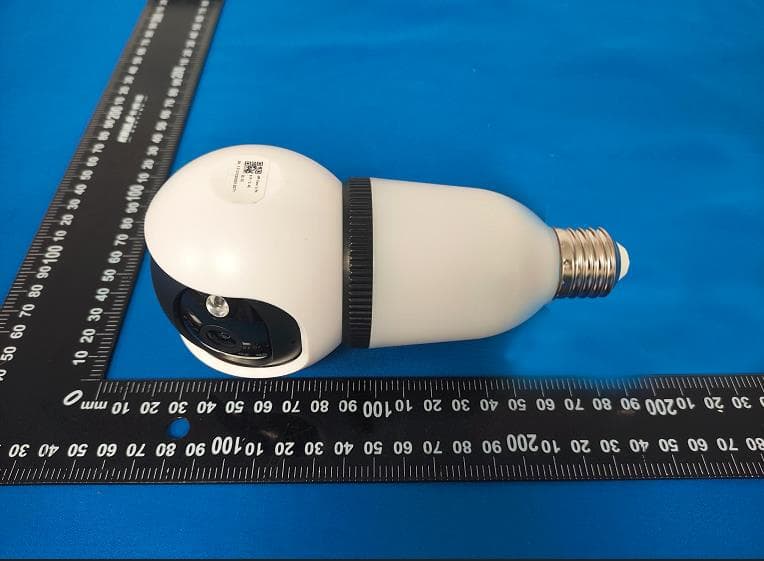
Click to zoom
Application Details
- Equipment Class
- DTS - Digital Transmission System
- Date of Grant
- Jul 22, 2024
- Application Purpose
- Original Equipment
- Date of Application
- Jul 22, 2024
- Equipment Note
- Security Camera
- Frequency Range
- 2412.00000000 - 2462.00000000
- Country
- China
Documents & Files
Document Text
Text extracted from the exhibit documents filed with the FCC. Open a document above to read the original.
Users Manual
Wi-Fi camera Manual Please read the user's guide carefully before using the product and keep it properly. — 1 — 1. Packing list Please unpack the camera carefully and check whether the following accessories are included in the box. ① Camera*1 ② Screw lamp plug *1 ③ Screw lamp holder *1 ④ Screw package *1 ⑤ User's Guide *1 — 2 — 2. Structure diagram Lens White light Speaker Infrared lamp Microphone SD card slot Reset Screw holder Bulb curtain Floodlight — 3 — 3. Download APP 1)Download the O-KAM Pro app from the APP Store or Google Play. You can also download the app by scanning the QR code above using the QR code scanner in your smartphone. O-KAM Pro — 4 — 4.Add camera 4.1Connecting method 1: WiFi connection 1) Plug in the power supply to power on the camera, wait fo r the self-check of the device to be completed, and the voice will broadcast "Please use the APP for WiFi configuration". If not, please press and hold the reset button for 3-5 seconds to reset. — 5 — 2)Enter the name and password of the Wi-Fi network. To keep the connection of WiFi, please put the camera near the router. The camera supports 2.4Ghz Wi-Finetworks. Please make sure that the account password entered is correct before click "Next".And wait patiently for the camera to connect to the WiFi router. During the connection, the camera will give a voice prompt. — 6 — 3)it's available to edit the name to distinguish the cameras in different places, and please click "get started". After adding successfully, you can click "Play" sign to view the picture. — 7 — 4.2 Connecting Method 2: Two-dimensional code distribution network 1)Plug in the power supply to power on the camera. Please wait for the self-check of the device to be completed, and the voice will broadcast "Please use APP for WiFi configuration". If not, please press and hold the reset button for 3-5 seconds to reset. Click the "+Add" button to scan the QR code on the camera. — 8 — 2)Enter the name and password of the Wi-Fi network you want the camera to connect to. To keep the connection of WiFi, please put the camera near the router. The camera supports 2.4Ghz networks. Please ensure that the account password entered is correct before click "Next" to generate a QR code for pairing the camera. — 9 — 3)Aim the lens of the camera at the QR code to scan with a distance of about 15~30CM.The camera will makes a dripping sound to show that the code has been successfully scanned and pairing has started. Then click "Bind Now", and click Play to view the picture after adding successfully. — 10 — 5.PTZ and lighting control Light switch control: Turn on the function switch and find the "Floodlight" button. Rotation control Live screen zoom — 11 — 6.Share the camera Find the camera you want to share on the homepage of the APP or on the settings page. Click "Share" and generate a QR code, so that the members you want to share can scan with 'O-KAM Pro'. By sharing the opening authority, the sharer can set the function of the device; If the permission is turned off, the sharer can only watch videos, but can't set functions. — 12 — 7. Product specifications 8. Installation guide 1) Choose a suitable location for installation. Please install the camera in a place won't blocked the field of vision, and make sure that the location of camera has a good Wi-Fi signal. Type Specification parameter Visual angle Diagonal angle 102 Video resolution 2K(2304*1296P/15fps) at most storage medium Support 128G Micro SD at most Maximum power 5W Power Supply AC 110V~240V Measure 75*75*169(MM) — 13 — 9. Common problems and solution Q1、Unable to add camera for the first time. A:Please make sure the camera is turned on and the self-check of camera is completed. And the camera will broadcast "Please use the App for Wi-Fi configuration" when the self-check complete. 1、 Make sure the account and password of Wi-Fi are correct. 2、 Please make sure the network is smooth when adding a camera. And it is recommended to operate near the router. 3、 If it's failed to connect the WiFi with QR code, please try AP distribution network. (After connecting to the WiFi hotspot sent by the camera by phone, return to the App and it will be added automatically); Try to avoid setting the password too complicated, and it shouldn't contain special characters such as '\' . 4、 If using the two methods still couldn't match the network, please restart the router and try again. Q2、Can't recognize TF card? A:After inserting the TF card into the TF card slot of the camera, check whether the capacity of the TF card will be displayed in the "System Settings"-"TF Card Video Settings" of the device in the APP. If "TF card not detected" is prompted, it means that TF card identification failed. 1、Please use brand TF card. 2、TF card can be recognized by computer normally. — 14 — 3、Only support FAT32 format. 4、It is suggested that the capacity of TF card is between 2-128G. Q3、How to deal with equipment failure? A:Please restart the power supply of the camera; If it still doesn't work, press and hold the reset button for 3-5 seconds to reset, delete the original camera and add it to the APP again. FCC warning statements: This equipment has been tested and found to comply with the limits for a Class B digital device, pursuant to part 15 of the FCC Rules. These limits are designed to provide reasonable protection against harmful interference in a residential installation. This equipment generates, uses and can radiate radio frequency energy and, if not installed and used in accordance with the instructions, may cause harmful interference to radio communications. However, there is no guarantee that interference will not occur in a particular installation. If this equipment does cause harmful interference to radio or television reception, which can be determined by turning the equipment off and on, the user is encouraged to try to correct the interference by one or more of the following measures: • Reorient or relocate the receiving antenna. •…
Text truncated - open the document above for the full version.
Attestation Statements
1/1 USAgentforServiceofProcessLETTEROFATTESTATION TO: OfficeofEngineeringTechnology FederalCommunicationsCommission 7435OaklandMillsRoad Columbia,MD21046 USAgentforServiceofProcess: Companyname:HOPEKCORPORATIONINC FRN:0034562900 ContactName:PeterDavis Address:4358SBANNOCKSTENGLEWOOD,CO80110UnitedStates TelephoneNo:561-235-6113 Email:[email protected] Applicant: Companyname:ShenzhenXinyushengTechnologyCo.,Ltd. GranteeCode:2BHJ3 FCCID:2BHJ3-EC-Q01S,2BHJ3-EC-D05D,2BHJ3-EC-D01D,2BHJ3-EC-Q05D, 2BHJ3-EC-Q01D FRN:0035676055 ContactName:XiaoguangYu Address:302,No.1Building,JindiweixinTechnologyPark,No.11Baolong1st Road,Longgang,Shenzhen,China TelephoneNo: +86-13686825242 FaxNo: / Email: [email protected] ShenzhenXinyushengTechnologyCo.,Ltd.certifiesthat,asofthedateofthisfilingofthe applicationwiththeTCB,[HOPEKCORPORATIONINC]isourdesignatedUSagentforservice ofprocessfortheabovereferencedFCCID.ShenzhenXinyushengTechnologyCo.,Ltd. acceptstomaintainanagentfornolessthanoneyearafterthegranteehasterminatedall marketingandimportationortheconclusionofanycommissionrelatedproceedinginvolving equipment.[HOPEKCORPORATIONINC]accepts,asofthedateofthefilingoftheapplication, theobligationofthedesignatedUSagentforserviceofprocessfortheabovereferenceFCCID. TheUSAgentforServiceofProcessisawareofandagreestocomplywiththerequirements outlinedintheFCCEquipmentAuthorizationProgram,ReportandOrderFCC22-84,and clause§2.911. TheApplicantisawareofandagreestocomplywiththerequirementsoutlinedintheFCC EquipmentAuthorizationProgram,ReportandOrderFCC22-84,andclause§2.911. Date:2024-07-23 Applicant’sName:XiaoguangYuUSAgent’sName:PeterDavis Title:ManagerTitle:CEO Signature:Signature:
Attestation Statements
C5266091_X24_Ed.2 1/1 “Attestation Statements” TO: Office of Engineering Technology Federal Communications Commission 7435 Oakland Mills Road Columbia, MD 21046 The Commission adopted rules that prohibit equipment authorization for “covered” telecommunications equipment and video surveillance equipment produced by entities identified on the Commission’s Covered List 1 , which is periodically updated. See the Covered List for more details. This Attestation Statement is to confirm that we follow the Section 2.911(d)(5)(i)-(ii) Applicant Company name: Shenzhen Xinyusheng Technology Co., Ltd. Grantee Code: 2BHJ3 FCC ID: 2BHJ3-EC-D05D FRN: 0035676055 Contact Name: Xiaoguang Yu Address: 302, No.1 Building, Jindiweixin Technology Park, No.11 Baolong 1st Road, Longgang, Shenzhen, China Telephone No: +86-13686825242 Fax No: / Email: [email protected] Product Name: Security Camera Model Number: EC-D05D-01 i. [Shenzhen Xinyusheng Technology Co., Ltd.] (“the applicant”) certifies that the equipment for which authorization is sought is not “covered” equipment prohibited from receiving an equipment authorization pursuant to section 2.903 of the FCC rules. The applicant must sign this certification. ii. [Shenzhen Xinyusheng Technology Co., Ltd.] (“the applicant”) certifies that, as of the date of the filing of the application, the applicant is not (as a specifically named entity or any of its subsidiaries or affiliates) identified on the Covered List as an entity producing “covered” equipment. The applicant must sign this certification. [Shenzhen Xinyusheng Technology Co., Ltd.] (“the applicant”) certifies that, as of the date of the filing of the application, the applicant is not identified on the Covered List as an entity producing “covered” equipment . Signature: July 16, 2024 Name Xiaoguang Yu Position Manager Company Name Shenzhen Xinyusheng Technology Co., Ltd. Address 302, No.1 Building, Jindiweixin Technology Park, No.11 Baolong 1st Road, Longgang, Shenzhen, China Tel +86-13686825242 Fax / Email [email protected] The Commission’s Covered List is published by the Public Safety and Homeland Security Bureau and posted on the Commission’s website. This Covered List, which is periodically updated, identifies particular equipment, produced by particular entities, that constitutes “covered” equipment. https://www.fcc.gov/supplychain/coveredlist
Cover Letter(s)
C5266091_X8_Ed.1 1/1 Letter of Authorization Shenzhen Xinyusheng Technology Co., Ltd. Company name: Shenzhen Xinyusheng Technology Co., Ltd. Grantee Code: 2BHJ3 FCC ID: 2BHJ3-EC-D05D FRN: 0035676055 Contact Name: Xiaoguang Yu Address: 302, No.1 Building, Jindiweixin Technology Park, No.11 Baolong 1st Road, Longgang, Shenzhen, China Telephone No: +86-13686825242 Fax No: / Email: [email protected] Product Name: Security Camera Model Number: EC-D05D-01 We authorize LGAI Technological Center S.A., Ronda de la Font del Carme, s/n, 08193 Bellaterra, Spain, to act on our behalf on all matters concerning the above named equipment. Any individual within LGAI Technological Center S.A. is authorized to act on our behalf and take action on the application. We declare that authorize LGAI Technological Center S.A., Ronda de la Font del Carme, s/n, 08193 Bellaterra, Spain, is allowed to forward all information related to the approval project to the Federal Communication Commission and to discuss any issues concerning the approval application. Any and all acts carried out by LGAI Technological Center S.A. on our behalf shall have the same effect as acts of our own. Signature: July 16, 2024 Name Xiaoguang Yu Position Manager Company Name Shenzhen Xinyusheng Technology Co., Ltd. Address 302, No.1 Building, Jindiweixin Technology Park, No.11 Baolong 1st Road, Longgang, Shenzhen, China Tel +86-13686825242 Fax / Email [email protected]
Cover Letter(s)
C5266091_X10_Ed.2 1/1 Shenzhen Xinyusheng Technology Co., Ltd. Office of Engineering Technology Federal Communications Commission 7435 Oakland Mills Road Columbia, MD 21046 Date: 18 July 2024 Subject: Request for Confidentiality FCC ID: 2BHJ3-EC-D05D To Whom It May Concern, Pursuant to the provisions of Sections 0.457 and 0.459 of Commission's rules (47CFR0.457, 0.459), we are requesting the Commission to withhold the following attachment(s) as confidential document from public disclosure. Exhibits Long-Term Confidentiality Short-Term Confidentiality NOTE 2 ID Label/Location No No Attestation Statement No No External Photos No ☐ Block Diagram ☒ ☐ Schematics ☒ ☐ Test Report No No Test Setup Photos No ☐ User’s Manual ☐ NOTE 1 ☐ Internal Photos ☐ NOTE 1 ☐ Parts List / Tune Up ☐ ☐ RF Exposure Info No No Operational Description ☒ ☐ Cover Letter(s) No No SDR Software / Security Info No No NOTE 1: Long-Term Confidentiality may be permitted under special conditions (See II. LONG-TERM CONFIDENTIALITY, Section 3 of KDB 726920, use last in force) NOTE 2: Short-Term Confidentiality can be requested for a maximum of 180 days from the date of the grant. Above mentioned document contains detailed system and equipment description are considered as proprietary information in operation of the equipment. The public disclosure of above documents might be harmful to our company and would give competitor an unfair advantage in the market. In case of short-term Confidentiality, the applicant requests the exhibits selected above are withheld from public view for a period of ______ days from the date of the Grant of Equipment Authorization and prior to marketing. It is our understanding that all measurement test reports, FCC ID label format and correspondent during certification review process cannot be granted as confidential documents and those information will be available for public review once the grant of equipment authorization is issued. Sincerely, C5266091_X10_Ed.2 1/1 Signature: July 18, 2024 Name Xiaoguang Yu Position Manager Company Name Shenzhen Xinyusheng Technology Co., Ltd. Address 302, No.1 Building, Jindiweixin Technology Park, No.11 Baolong 1st Road, Longgang, Shenzhen, China Tel +86-13686825242 Fax / Email [email protected]
External Photos
Page 1 of 3 Report No.: psi2406044-C01-R08 Shenzhen PSI Testing Co., Ltd. Tel: 0755-23011775 | E-mail: [email protected] | http://www.psi-lab.com Add: 1-2/F., Building 5, Yudafu Industrial Park, No.10, Xingye West Road, Shajing Subdistrict, Bao'an District, Shenzhen, Guangdong, China Appendix II external photos FCC ID: 2BHJ3-EC-D05D Page 2 of 3 Report No.: psi2406044-C01-R08 Shenzhen PSI Testing Co., Ltd. Tel: 0755-23011775 | E-mail: [email protected] | http://www.psi-lab.com Add: 1-2/F., Building 5, Yudafu Industrial Park, No.10, Xingye West Road, Shajing Subdistrict, Bao'an District, Shenzhen, Guangdong, China Page 3 of 3 Report No.: psi2406044-C01-R08 Shenzhen PSI Testing Co., Ltd. Tel: 0755-23011775 | E-mail: [email protected] | http://www.psi-lab.com Add: 1-2/F., Building 5, Yudafu Industrial Park, No.10, Xingye West Road, Shajing Subdistrict, Bao'an District, Shenzhen, Guangdong, China ------End------
ID Label/Location Info
Label: FCC ID: 2BHJ3-EC-D05D Label location
Internal Photos
Page 1 of 9 Report No.: psi2406044-C01-R08 Shenzhen PSI Testing Co., Ltd. Tel: 0755-23011775 | E-mail: [email protected] | http://www.psi-lab.com Add: 1-2/F., Building 5, Yudafu Industrial Park, No.10, Xingye West Road, Shajing Subdistrict, Bao'an District, Shenzhen, Guangdong, China Appendix III internal photos FCC ID: 2BHJ3-EC-D05D Antenna interface location Page 2 of 9 Report No.: psi2406044-C01-R08 Shenzhen PSI Testing Co., Ltd. Tel: 0755-23011775 | E-mail: [email protected] | http://www.psi-lab.com Add: 1-2/F., Building 5, Yudafu Industrial Park, No.10, Xingye West Road, Shajing Subdistrict, Bao'an District, Shenzhen, Guangdong, China Page 3 of 9 Report No.: psi2406044-C01-R08 Shenzhen PSI Testing Co., Ltd. Tel: 0755-23011775 | E-mail: [email protected] | http://www.psi-lab.com Add: 1-2/F., Building 5, Yudafu Industrial Park, No.10, Xingye West Road, Shajing Subdistrict, Bao'an District, Shenzhen, Guangdong, China 2.4G WIFI ANT Page 4 of 9 Report No.: psi2406044-C01-R08 Shenzhen PSI Testing Co., Ltd. Tel: 0755-23011775 | E-mail: [email protected] | http://www.psi-lab.com Add: 1-2/F., Building 5, Yudafu Industrial Park, No.10, Xingye West Road, Shajing Subdistrict, Bao'an District, Shenzhen, Guangdong, China Page 5 of 9 Report No.: psi2406044-C01-R08 Shenzhen PSI Testing Co., Ltd. Tel: 0755-23011775 | E-mail: [email protected] | http://www.psi-lab.com Add: 1-2/F., Building 5, Yudafu Industrial Park, No.10, Xingye West Road, Shajing Subdistrict, Bao'an District, Shenzhen, Guangdong, China Page 6 of 9 Report No.: psi2406044-C01-R08 Shenzhen PSI Testing Co., Ltd. Tel: 0755-23011775 | E-mail: [email protected] | http://www.psi-lab.com Add: 1-2/F., Building 5, Yudafu Industrial Park, No.10, Xingye West Road, Shajing Subdistrict, Bao'an District, Shenzhen, Guangdong, China Page 7 of 9 Report No.: psi2406044-C01-R08 Shenzhen PSI Testing Co., Ltd. Tel: 0755-23011775 | E-mail: [email protected] | http://www.psi-lab.com Add: 1-2/F., Building 5, Yudafu Industrial Park, No.10, Xingye West Road, Shajing Subdistrict, Bao'an District, Shenzhen, Guangdong, China Page 8 of 9 Report No.: psi2406044-C01-R08 Shenzhen PSI Testing Co., Ltd. Tel: 0755-23011775 | E-mail: [email protected] | http://www.psi-lab.com Add: 1-2/F., Building 5, Yudafu Industrial Park, No.10, Xingye West Road, Shajing Subdistrict, Bao'an District, Shenzhen, Guangdong, China Page 9 of 9 Report No.: psi2406044-C01-R08 Shenzhen PSI Testing Co., Ltd. Tel: 0755-23011775 | E-mail: [email protected] | http://www.psi-lab.com Add: 1-2/F., Building 5, Yudafu Industrial Park, No.10, Xingye West Road, Shajing Subdistrict, Bao'an District, Shenzhen, Guangdong, China ------End------
RF Exposure Info
FCC ID: 2BHJ3-EC-D05D Shenzhen PSI Testing Co., Ltd. Tel: 0755-23011775 | E-mail: [email protected] | http://www.psi-lab.com Add: 1-2/F., Building 5, Yudafu Industrial Park, No.10, Xingye West Road, Shajing Subdistrict, Bao'an District, Shenzhen, Guangdong, China Prediction of MPE at a given distance 1. Limits The criteria listed in the following table shall be used to evaluate the environment impact of human exposure to radio frequency (RF) radiation as specified in 1.1307(b) KDB Test Methodology: KDB 447498 D01 v06. 2. Test Procedure Equation from page 18 of OET Bulletin 65, Edition 97-01 Where: S = power density P = power input to the antenna G = numeric gain of the antenna in the direction of interest relative to an isotropic radiator R = distance to the centre of radiation of the antenna FCC ID: 2BHJ3-EC-D05D Shenzhen PSI Testing Co., Ltd. Tel: 0755-23011775 | E-mail: [email protected] | http://www.psi-lab.com Add: 1-2/F., Building 5, Yudafu Industrial Park, No.10, Xingye West Road, Shajing Subdistrict, Bao'an District, Shenzhen, Guangdong, China 3. Result Mode Frequency (MHz) Prediction distance (cm) RF output power(Max) (dBm) Tune-up power (Max) MPE (mW/cm 2 ) Limit (mW/cm 2 ) SAR Test Exclusion dBm mW 2.4G WIFI 2412-2462 20 14.97 16 39.811 0.0134 1 Yes 2.4G WiFi Antenna Gain: max gain 2.24dBi, 1.67(numeric) Then SAR evaluation is not required.
Test Report
Shenzhen PSI Testing Co., Ltd. Tel: 0755-23011775 | E-mail: [email protected] | http://www.psi-lab.com Add: 1-2/F., Building 5, Yudafu Industrial Park, No.10, Xingye West Road, Shajing Subdistrict, Bao'an District, Shenzhen, Guangdong, China FCC TEST REPORT FCC ID: 2BHJ3-EC-D05D On Behalf of Shenzhen Xinyusheng Technology Co., Ltd. Security Camera Model No.: EC-D05D-01 Prepared for : Shenzhen Xinyusheng Technology Co., Ltd. Address : 302, No.1 Building, Jindiweixin Technology Park, No.11 Baolong 1st Road, Baolong Community, Baolong Street, Longgang Dist., Shenzhen, China Prepared By : Shenzhen PSI Testing Co., Ltd. Address : 1-2/F., Building 5, Yudafu Industrial Park, No.10, Xingye West Road, Shajing Subdistrict, Bao'an District, Shenzhen, Guangdong, China Report Number : psi2406044-C01-R08 Date of Receipt : June 12, 2024 Date of Test : June 13, 2024-June 20, 2024 Date of Report : June 21, 2024 Version Number : V0 Page 2 of 67 Report No.: psi2406044-C01-R08 Shenzhen PSI Testing Co., Ltd. Tel: 0755-23011775 | E-mail: [email protected] | http://www.psi-lab.com Add: 1-2/F., Building 5, Yudafu Industrial Park, No.10, Xingye West Road, Shajing Subdistrict, Bao'an District, Shenzhen, Guangdong, China TABLE OF CONTENTS Description Page 1. Summary Of Standards And Results ----------------------------------------------------------------------------------- 6 1.1. Description of Standards and Results --------------------------------------------------------------------------- 6 2. General Information --------------------------------------------------------------------------------------------------------- 7 2.1. Description of Device (EUT) --------------------------------------------------------------------------------------- 7 2.2. Accessories of Device (EUT) -------------------------------------------------------------------------------------- 8 2.3. Tested Supporting System Details-------------------------------------------------------------------------------- 8 2.4. Block Diagram of Connection Between EUT and Simulators ---------------------------------------------- 8 2.5. Test Mode Description ----------------------------------------------------------------------------------------------- 9 2.6. Test Conditions ------------------------------------------------------------------------------------------------------ 10 2.7. Test Facility ----------------------------------------------------------------------------------------------------------- 10 2.8. Measurement Uncertainty ---------------------------------------------------------------------------------------- 10 2.9. Test Equipment List ------------------------------------------------------------------------------------------------ 11 3. Spurious Emission --------------------------------------------------------------------------------------------------------- 12 3.1. Test Limits ------------------------------------------------------------------------------------------------------------ 12 3.2. Block Diagram of Test setup ------------------------------------------------------------------------------------- 13 3.3. Test Procedure ------------------------------------------------------------------------------------------------------ 14 3.4. Test Results ---------------------------------------------------------------------------------------------------------- 15 4. Power Line Conducted Emission ------------------------------------------------------------------------------------- 23 4.1. Test Limits ------------------------------------------------------------------------------------------------------------ 23 4.2. Test Procedure ------------------------------------------------------------------------------------------------------ 23 4.3. Test Setup ------------------------------------------------------------------------------------------------------------ 23 4.4. Test Results ---------------------------------------------------------------------------------------------------------- 24 5. Out-of-band Emissions --------------------------------------------------------------------------------------------------- 27 5.1. Test Limits ------------------------------------------------------------------------------------------------------------ 27 5.2. Test Procedure ------------------------------------------------------------------------------------------------------ 27 5.3. Test Setup ------------------------------------------------------------------------------------------------------------ 27 5.4. Test Results ---------------------------------------------------------------------------------------------------------- 27 6. Conducted Maximum Output Power --------------------------------------------------------------------------------- 43 6.1. Test limits ------------------------------------------------------------------------------------------------------------- 43 6.2. Test Procedure ------------------------------------------------------------------------------------------------------ 43 6.3. Test Setup ------------------------------------------------------------------------------------------------------------ 43 6.4. Test Results ---------------------------------------------------------------------------------------------------------- 44 7. Peak Power Spectral Density ------------------------------------------------------------------------------------------- 45 7.1. Test limits ------------------------------------------------------------------------------------------------------------- 45 7.2. Test Procedure ------------------------------------------------------------------------------------------------------ 45 7.3. Test Setup ------------------------------------------------------------------------------------------------------------ 45 7.4. Test Results ---------------------------------------------------------------------------------------------------------- 46 8. Bandwidth -------------------------------------------------------------------------------------…
Text truncated - open the document above for the full version.
Test Setup Photos
Page 1 of 2 Report No.: psi2406044-C01-R08 Shenzhen PSI Testing Co., Ltd. Tel: 0755-23011775 | E-mail: [email protected] | http://www.psi-lab.com Add: 1-2/F., Building 5, Yudafu Industrial Park, No.10, Xingye West Road, Shajing Subdistrict, Bao'an District, Shenzhen, Guangdong, China Appendix I Test Setup Photo FCC ID: 2BHJ3-EC-D05D Spurious Radiation Emissions Test (<1G) Spurious Radiation Emissions Test (>1G) Page 2 of 2 Report No.: psi2406044-C01-R08 Shenzhen PSI Testing Co., Ltd. Tel: 0755-23011775 | E-mail: [email protected] | http://www.psi-lab.com Add: 1-2/F., Building 5, Yudafu Industrial Park, No.10, Xingye West Road, Shajing Subdistrict, Bao'an District, Shenzhen, Guangdong, China Conducted emission Test ------End------
Contact Information
Applicant
Xiaoguang Yu
Technical Contact
Test Firm
Shenzhen PSI Testing Co., Ltd.Simple Guan
[email protected]+86 0755-23019820
Technical Specifications
| # | Rule Parts | Frequency Range | Power Output |
|---|---|---|---|
| 1 | 15C | 2.41 GHz - 2.46 GHz | 31.41 mW |
Other Applications from Shenzhen Xinyusheng Technology Co., Ltd.
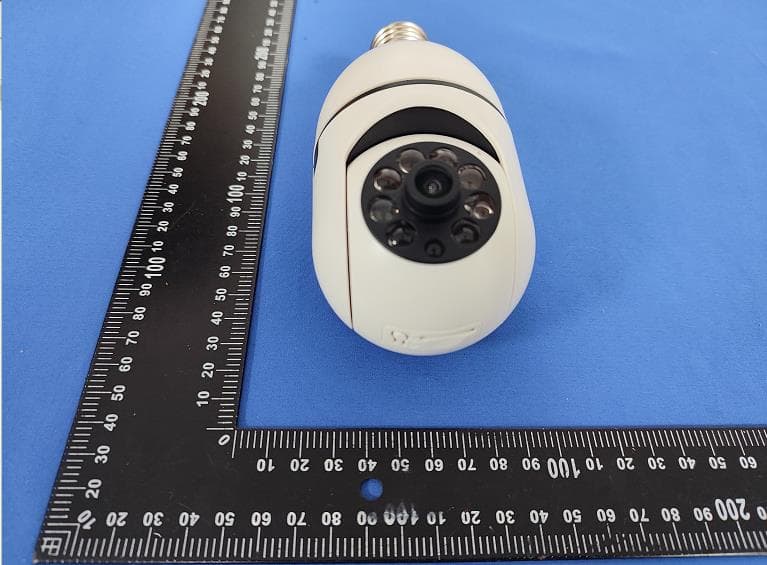
2BHJ3-EC-D01D
Jul 22, 2024Security Camera
Equipment Class
DTS - Digital Transmission System