2BHWU-KP01Find My Tracker
Dongguan Weimei Clothing and Apparel Co., Ltd.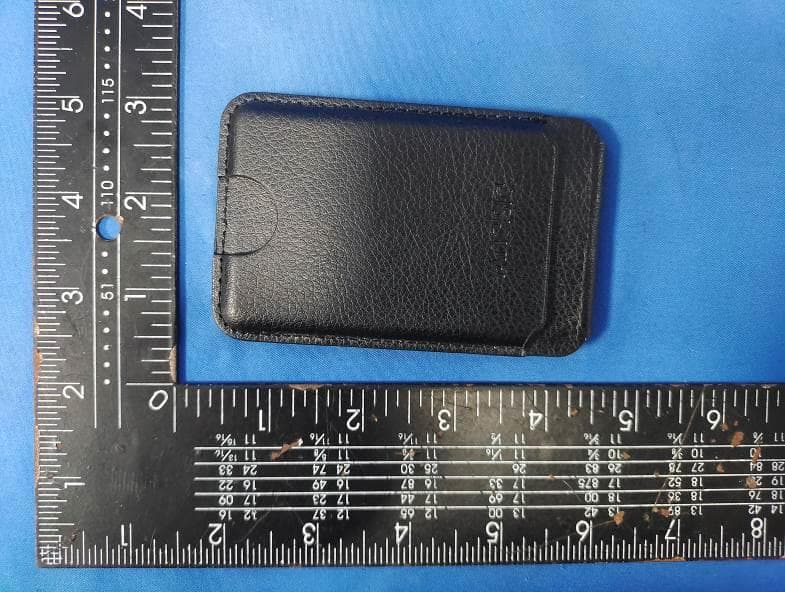
Click to zoom
Application Details
- Equipment Class
- DTS - Digital Transmission System
- Date of Grant
- Aug 18, 2024
- Application Purpose
- Original Equipment
- Date of Application
- Aug 18, 2024
- Equipment Note
- Find My Tracker
- Frequency Range
- 2402.00000000 - 2480.00000000
- Country
- China
Documents & Files
Document Text
Text extracted from the exhibit documents filed with the FCC. Open a document above to read the original.
Users Manual
Wireless charge Press the power button 3seconds,after the ringtonerings and the Controlling light blinks in white,the DS Wallet is ready. 2.Turn on the Apple "Find My" AppClick "Add Item" , then click "Other Supported ltem" . 1.Turn on the Apple "Find My" AppClick "ltems" , then Swipe left on the item you want to remove. 2.After removal , DS Lable will sound a tone and a white light will flash 3.Bring the DS Lable close to iPhoneidentify the locator then click "Connect" 4.Customize the "name" and "emoji" of the DS Lable,then the setting is complete. *To use the Apple Find My app to locate this item, the latest version iOS, iPadOS, or macOS is recommended. First make sure WiFi and Bluetooth are turned on Make the DS Lable discovered following the steps: How to set up the locator DS Wallet Operating Instructions How to remove the locator *DS Holder supports wireless charging function, youcan use wireless charger to charge it. The earth is our common home and DISIDUW attaches great importance to protecting thecleanliness of the environment and avoiding its pollution. 1. This product is not a toy or edible. 2. Obstacles or large metal objects can interfere with the Bluetooth signal. 3. This product has a built-in lithium battery. Please do not put this product directly on fire or any place near heat or fire. Otherwise,the product may be damaged or malfunctioned,or even be dangerous. This is neither an anti-theft nor an anti-lost device. This device provides the last detected location. DISIDUW offers a one-year limited warranty against product defects, effective from the time of delivery. Product defects do not include those resulting from accidents, product modification,or failure to follow instructions for use. 1.Keep dry and avoid damp environments to prevent leather mold. 2.Avoid direct sunlight to prevent aging, discoloration, and cracking. 3.Avoid contact with alcohol, vinegar, lemon juice, and detergents to prevent leather corrosion. 4.Use a damp towel or soft cloth to clean surface stains, then air dry in a ventilated area. Click the power button four times, and then press the power button for some seconds long;When the ringtone sounds, the light flashes in white quickly. That is completed. When your device reaches the end of their useful life, please dispose of at your locale-wastecenter to be recycled and properly discarded. 1.Align the battery coil position with the wireless charger. 2.When the DS Holder starts charging, it will sound a bell and light a red light. 3.When the DS Holder is fully charged, it lights green, then please remove it from the charger. How to charge the locatorSafe electronical disposal Warning Disclaimer Limited warranty Leather Care Tips How to restoring the factory setting Side ASide BSide CSide D Side CSide D Lighting area Lighting area Switch Side CSide DSide A Lighting area FCC Warnning: This equipment has been tested and found to comply with the limits for a Class B digital device, pursuant to part 15 of the FCC Rules. These limits are designed to provide reasonable protection againstharmful interference in a residential installation. This equipment generates, uses and can radiateradio frequency energy and, if not installed and used in accordance with the instructions, maycause harmful interference to radio communications. However, there is no guarantee thatinterference will not occur in a particular installation. If this equipment does cause harmfulinterference to radio or television reception, which can be determined by turning the equipmentoff and on, the user is encouraged to try to correct the interference by one or more of thefollowing measures: • Reorient or relocate the receiving antenna. • Increase the separation between the equipment and receiver. • Connect the equipment into an outlet on a circuit different from that to which the receiver is connected. • Consult the dealer or an experienced radio/TV technician for help. Caution: Any changes or modifications to this device not explicitly approved by manufacturer could void your authority to operate this equipment. This device complies with part 15 of the FCC Rules. Operation is subject to the following two conditions: (1)This device may not cause harmful interference, and (2) this device must accept any interference received, including interference that may cause undesired operation. This equipment complies with FCC radiation exposure limits set forth for an uncontrolled environment. This equipment should be installed and operated with minimum distance 0cm between the radiator and your body.
Users Manual
Instructions FCC Warnning: This equipment has been tested and found to comply with the limits for a Class B digital device, pursuant to part 15 of the FCC Rules. These limits are designed to provide reasonable protection againstharmful interference in a residential installation. This equipment generates, uses and can radiateradio frequency energy and, if not installed and used in accordance with the instructions, maycause harmful interference to radio communications. However, there is no guarantee thatinterference will not occur in a particular installation. If this equipment does cause harmfulinterference to radio or television reception, which can be determined by turning the equipmentoff and on, the user is encouraged to try to correct the interference by one or more of thefollowing measures: • Reorient or relocate the receiving antenna. • Increase the separation between the equipment and receiver. • Connect the equipment into an outlet on a circuit different from that to which the receiver is connected. • Consult the dealer or an experienced radio/TV technician for help. Caution: Any changes or modifications to this device not explicitly approved by manufacturer could void your authority to operate this equipment. This device complies with part 15 of the FCC Rules. Operation is subject to the following two conditions: (1)This device may not cause harmful interference, and (2) this device must accept any interference received, including interference that may cause undesired operation. This equipment complies with FCC radiation exposure limits set forth for an uncontrolled environment. This equipment should be installed and operated with minimum distance 0cm between the radiator and your body.
Users Manual
Wireless charge Switch Lighting area Side ASide BSide C Side DSide ESide F Side GSide HSide I Press the power button 3 seconds,after the ringtonerings and the Controlling light blinks in white,the DS Passport Cover is ready 2.Turn on the Apple "Find My" AppClick "Add Item" , then click "Other Supported ltem" . 1.Turn on the Apple "Find My" AppClick "ltems" , then Swipe left on the item you want to remove. 2.After removal , DS Passport Cover will sound a tone and a white light will flash 3.Bring the DS Lable close to iPhoneidentify the locator then click "Connect" 4.Customize the "name" and "emoji" of the DS Lable,then the setting is complete. *To use the Apple Find My app to locate this item, the latest version iOS, iPadOS, or macOS is recommended. First make sure WiFi and Bluetooth are turned on Make the DS Lable discovered following the steps: How to set up the locator DS Wallet Operating Instructions How to remove the locator *DS Wallet supports wireless charging function, you can use wireless charger to charge it. The earth is our common home and DISIDUW attaches great importance to protecting thecleanliness of the environment and avoiding its pollution. 1. This product is not a toy or edible. 2. Obstacles or large metal objects can interfere with the Bluetooth signal. 3. This product has a built-in lithium battery. Please do not put this product directly on fire or any place near heat or fire. Otherwise,the product may be damaged or malfunctioned,or even be dangerous. This is neither an anti-theft nor an anti-lost device. This device provides the last detected location. DISIDUW offers a one-year limited warranty against product defects, effective from the time of delivery. Product defects do not include those resulting from accidents, product modification,or failure to follow instructions for use. 1.Keep dry and avoid damp environments to prevent leather mold. 2.Avoid direct sunlight to prevent aging, discoloration, and cracking. 3.Avoid contact with alcohol, vinegar, lemon juice, and detergents to prevent leather corrosion. 4.Use a damp towel or soft cloth to clean surface stains, then air dry in a ventilated area. Click the power button four times, and then press the power button for some seconds long;When the ringtone sounds, the light flashes in white quickly. That is completed. When your device reaches the end of their useful life, please dispose of at your locale-wastecenter to be recycled and properly discarded. 1.Align the battery coil position with the wireless charger. 2.When the DS Wallet starts charging, it will sound a bell and light a red light. 3.When the DS Wallet is fully charged, it lights green, then please remove it from the charger. How to charge the locatorSafe electronical disposal Warning Disclaimer Limited warranty Leather Care Tips How to restoring the factory setting Wireless charge Switch Lighting area Side A Side B Side C Side DSide ESide F Side GSide HSide I Switch Lighting area Side DSide ESide F Side GSide HSide I FCC Warnning: This equipment has been tested and found to comply with the limits for a Class B digital device, pursuant to part 15 of the FCC Rules. These limits are designed to provide reasonable protection againstharmful interference in a residential installation. This equipment generates, uses and can radiateradio frequency energy and, if not installed and used in accordance with the instructions, maycause harmful interference to radio communications. However, there is no guarantee thatinterference will not occur in a particular installation. If this equipment does cause harmfulinterference to radio or television reception, which can be determined by turning the equipmentoff and on, the user is encouraged to try to correct the interference by one or more of thefollowing measures: • Reorient or relocate the receiving antenna. • Increase the separation between the equipment and receiver. • Connect the equipment into an outlet on a circuit different from that to which the receiver is connected. • Consult the dealer or an experienced radio/TV technician for help. Caution: Any changes or modifications to this device not explicitly approved by manufacturer could void your authority to operate this equipment. This device complies with part 15 of the FCC Rules. Operation is subject to the following two conditions: (1)This device may not cause harmful interference, and (2) this device must accept any interference received, including interference that may cause undesired operation. This equipment complies with FCC radiation exposure limits set forth for an uncontrolled environment. This equipment should be installed and operated with minimum distance 0cm between the radiator and your body.
Users Manual
Switch 1.Press the power button 3 seconds,after the ringtonerings and the Controlling light blinks in white,the DS Lable is ready 2.Turn on the Apple "Find My" AppClick "Add Item" , then click "Other Supported ltem" . 1.Turn on the Apple "Find My" AppClick "ltems" , then Swipe left on the item you want to remove. 2.After removal , DS Lable will sound a tone and a white light will flash 3.Bring the DS Lable close to iPhoneidentify the locator then click "Connect" 4.Customize the "name" and "emoji" of the DS Lable,then the setting is complete. *To use the Apple Find My app to locate this item, the latest version iOS, iPadOS, or macOS is recommended. First make sure WiFi and Bluetooth are turned on Make the DS Lable discovered following the steps: How to set up the locator DS Luggage Lable Operating Instructions How to remove the locator *DS Lable supports wireless charging function, you can use wireless charger to charge it. The earth is our common home and DISIDUW attaches great importance to protecting thecleanliness of the environment and avoiding its pollution. 1. This product is not a toy or edible. 2. Obstacles or large metal objects can interfere with the Bluetooth signal. 3. This product has a built-in lithium battery. Please do not put this product directly on fire or any place near heat or fire. Otherwise,the product may be damaged or malfunctioned,or even be dangerous. This is neither an anti-theft nor an anti-lost device. This device provides the last detected location. DISIDUW offers a one-year limited warranty against product defects, effective from the time of delivery. Product defects do not include those resulting from accidents, product modification,or failure to follow instructions for use. Click the power button four times, and then press the power button for some seconds long;When the ringtone sounds, the light flashes in white quickly. That is completed. When your device reaches the end of their useful life, please dispose of at your locale-wastecenter to be recycled and properly discarded. 1.Align the battery coil position with the wireless charger. 2.When the DS Lable starts charging, it will sound a bell and light a red light. 3.When the DS Holder is fully charged, it lights green, then please remove it from the charger. How to charge the locatorSafe electronical disposal Warning Disclaimer Limited warranty How to restoring the factory setting Lighting area Wireless charge Wireless charge Side A Side A Side B Lighting area Lighting area Side B Side B 1.Keep dry and avoid damp environments to prevent leather mold. 2.Avoid direct sunlight to prevent aging, discoloration, and cracking. 3.Avoid contact with alcohol, vinegar, lemon juice, and detergents to prevent leather corrosion. 4.Use a damp towel or soft cloth to clean surface stains, then air dry in a ventilated area. Leather Care Tips FCC Warnning: This equipment has been tested and found to comply with the limits for a Class B digital device, pursuant to part 15 of the FCC Rules. These limits are designed to provide reasonable protection againstharmful interference in a residential installation. This equipment generates, uses and can radiateradio frequency energy and, if not installed and used in accordance with the instructions, maycause harmful interference to radio communications. However, there is no guarantee thatinterference will not occur in a particular installation. If this equipment does cause harmfulinterference to radio or television reception, which can be determined by turning the equipmentoff and on, the user is encouraged to try to correct the interference by one or more of thefollowing measures: • Reorient or relocate the receiving antenna. • Increase the separation between the equipment and receiver. • Connect the equipment into an outlet on a circuit different from that to which the receiver is connected. • Consult the dealer or an experienced radio/TV technician for help. Caution: Any changes or modifications to this device not explicitly approved by manufacturer could void your authority to operate this equipment. This device complies with part 15 of the FCC Rules. Operation is subject to the following two conditions: (1)This device may not cause harmful interference, and (2) this device must accept any interference received, including interference that may cause undesired operation. This equipment complies with FCC radiation exposure limits set forth for an uncontrolled environment. This equipment should be installed and operated with minimum distance 0cm between the radiator and your body.
Users Manual
Press the power button 3seconds,after the ringtonerings and the Controlling light blinks in white,the DS Holder is ready. 2.Turn on the Apple "Find My" AppClick "Add Item" , then click "Other Supported ltem" . 1.Turn on the Apple "Find My" AppClick "ltems" , then Swipe left on the item you want to remove. 2.After removal , DS Lable will sound a tone and a white light will flash 3.Bring the DS Lable close to iPhoneidentify the locator then click "Connect" 4.Customize the "name" and "emoji" of the DS Lable,then the setting is complete. *To use the Apple Find My app to locate this item, the latest version iOS, iPadOS, or macOS is recommended. First make sure WiFi and Bluetooth are turned on Make the DS Lable discovered following the steps: How to set up the locator DS Holder Operating Instructions How to remove the locator *DS Holder supports wireless charging function, youcan use wireless charger to charge it. The earth is our common home and DISIDUW attaches great importance to protecting thecleanliness of the environment and avoiding its pollution. 1. This product is not a toy or edible. 2. Obstacles or large metal objects can interfere with the Bluetooth signal. 3. This product has a built-in lithium battery. Please do not put this product directly on fire or any place near heat or fire. Otherwise,the product may be damaged or malfunctioned,or even be dangerous. This is neither an anti-theft nor an anti-lost device. This device provides the last detected location. DISIDUW offers a one-year limited warranty against product defects, effective from the time of delivery. Product defects do not include those resulting from accidents, product modification,or failure to follow instructions for use. 1.Keep dry and avoid damp environments to prevent leather mold. 2.Avoid direct sunlight to prevent aging, discoloration, and cracking. 3.Avoid contact with alcohol, vinegar, lemon juice, and detergents to prevent leather corrosion. 4.Use a damp towel or soft cloth to clean surface stains, then air dry in a ventilated area. Click the power button four times, and then press the power button for some seconds long;When the ringtone sounds, the light flashes in white quickly. That is completed. When your device reaches the end of their useful life, please dispose of at your locale-wastecenter to be recycled and properly discarded. Align the battery coil position with the wireless charger. 2.When the DS Holder starts charging, it will sound a bell and light a red light. 3.When the DS Holder is fully charged, it lights green, then please remove it from the charger. How to charge the locatorSafe electronical disposal Warning Disclaimer Limited warranty Leather Care Tips How to restoring the factory setting Wireless charge Switch Lighting area Side ASide B Side CSide D Side C Lighting area Side B FCC Warnning: This equipment has been tested and found to comply with the limits for a Class B digital device, pursuant to part 15 of the FCC Rules. These limits are designed to provide reasonable protection againstharmful interference in a residential installation. This equipment generates, uses and can radiateradio frequency energy and, if not installed and used in accordance with the instructions, maycause harmful interference to radio communications. However, there is no guarantee thatinterference will not occur in a particular installation. If this equipment does cause harmfulinterference to radio or television reception, which can be determined by turning the equipmentoff and on, the user is encouraged to try to correct the interference by one or more of thefollowing measures: • Reorient or relocate the receiving antenna. • Increase the separation between the equipment and receiver. • Connect the equipment into an outlet on a circuit different from that to which the receiver is connected. • Consult the dealer or an experienced radio/TV technician for help. Caution: Any changes or modifications to this device not explicitly approved by manufacturer could void your authority to operate this equipment. This device complies with part 15 of the FCC Rules. Operation is subject to the following two conditions: (1)This device may not cause harmful interference, and (2) this device must accept any interference received, including interference that may cause undesired operation. This equipment complies with FCC radiation exposure limits set forth for an uncontrolled environment. This equipment should be installed and operated with minimum distance 0cm between the radiator and your body.
Attestation Statements
Dongguan Weimei Clothing and Apparel Co., Ltd. Room 101, No. 10 Bolan Avenue, Houjie Town,Dongguan City, Guangdong Province China Federal Communications Commission Authorization and Evaluation Division Equipment Authorization Branch 7435 Oakland Mills Road Columbia, MD 21046 2024-8-3 To whom it may concern: We, Dongguan Weimei Clothing and Apparel Co., Ltd., hereby certify that the equipment for which authorization is sought (FCC ID: 2BHWU-KP01) is not “covered” equipment prohibited from receiving an equipment authorization pursuant to § 2.903 of the FCC rules. We also certify that, as of the date of the filing of the application, we are not identified on the Covered List (https://www.fcc.gov/supplychain/coveredlist) as an entity producing “covered” equipment. By signing this form, we confirm the above and that we are aware of the application requirements listed under § 2.911(b) and (d)(5) and (6). The information provided in this letter is based on the referenced rule parts of Title 47 of the CFR as well as KDB 986446 D01. Sincerely, Signature Zhenbin Qian director Dongguan Weimei Clothing and Apparel Co., Ltd. 62_[model] CoveredEqu_2.911(d)(5)(i) and (ii) - U, V03
Attestation Statements
Dongguan Weimei Clothing and Apparel Co., Ltd. Room 101, No. 10 Bolan Avenue, Houjie Town, Dongguan City, Guangdong Province, China Federal Communications Commission Authorization and Evaluation Division Equipment Authorization Branch 7435 Oakland Mills Road Columbia, MD 21046 2024/07/31 U.S. Agent Designation Dongguan Weimei Clothing and Apparel Co., Ltd. acknowledges their consent for the following contact located in the United States to act as their agent for service of process for the equipment for which authorization is sought (FCC ID: 2BHWU-KP01): Name and company of U.S. agent: GSS SERVICE INC Physical U.S. address of agent: 6547 N Academy Blvd #2266 Colorado Springs COLORADO 80918 United States FRN of U.S. agent: 0033402082 Email address of U.S. agent: [email protected] GSS SERVICE INC acknowledges their obligation to accept service of process on behalf of Dongguan Weimei Clothing and Apparel Co., Ltd. Dongguan Weimei Clothing and Apparel Co., Ltd. with the FRN [0035737022] accepts its obligation to maintain an agent for service of process in the United States for no less than one year after either the grantee has permanently terminated all marketing and importation of the applicable equipment within the U.S., or the conclusion of any Commission-related administrative or judicial proceeding involving the equipment, whichever is later. By signing this form, we confirm the above and that we are aware of the application requirements listed under § 2.911(d)(7). The information provided in this letter is based on the referenced rule parts of Title 47 of the CFR as well as KDB 986446 D01. An expiration date for this letter does not exist. In case the U.S. agent changes, the grantee is obligated to notify the FCC within 30 days via the granting TCB. Sincerely, Signature Zhenbin Qian Director Dongguan Weimei Clothing and Apparel Co., Ltd. Signature Michoux Logan PM GSS SERVICE INC 48_[mo del] US_Agent_2.911(d)(7) - U, V0 5
Cover Letter(s)
Dongguan Weimei Clothing and Apparel Co., Ltd. Add: Room 101, No. 10 Bolan Avenue, Houjie Town,Dongguan City, Guangdong Province China Date: 2024-8-3 FCC ID: 2BHWU-KP01 Dear Sir/Madam, We, Dongguan Weimei Clothing and Apparel Co., Ltd. Hereby declares the following statement for Federal Communications Commission, PCB board, circuit, structure and internal of these model(s) are the same, Only model number and exterior shape different for these model: Product name: Find My Tracker Model no.: KP01, CK01, XL01, HZ01, QB01, QB02 Sincerely, Name/Title: Zhenbin Qian/director Company: Dongguan Weimei Clothing and Apparel Co., Ltd. Address: Room 101, No. 10 Bolan Avenue, Houjie Town,Dongguan City, Guangdong Province China Phone: 13715251832 Fax: N/A E-Mail: [email protected]
Cover Letter(s)
CONFIDENTIALITY REQUEST for Certification Service in USA Federal Communication Commission Equipment Authorization Division, Application Processing Branch 7435 Oakland Mills Road Columbia, MD 21046 Date:<2024-8-3> Pursuant to Paragraphs §0.457 and 0.459 of the Commission’s Rules (47 C.F.R.) and Section §552(b)(4) of the Freedom of Information Act, we requests confidentiality for the following products: FCC ID Model name 2BHWU-KP01 KP01 For the product stated above, we request that the following information be held confidential; Exhibits Long-Term Confidentiality Short-Term Confidentiality Short-Term Confidentiality Days External Photos Internal Photos Block Diagram Schematics Test Setup Photos User’s Manual Parts List Tune Up Operational Descriptions The long-term confidentiality exhibits contain our trade secrets and proprietary information that could be of benefit to our competitors. The short-term confidentiality on the basis of ensuring that business sensitive information remains confidential until the actual marketing of our new device. If you have any questions, please feel free to contact me at the address shown below. Sincerely, Name/Title: Zhenbin Qian/director Company: Dongguan Weimei Clothing and Apparel Co., Ltd. Address: Room 101, No. 10 Bolan Avenue, Houjie Town,Dongguan City, Guangdong Province China Phone: 13715251832 Fax: N/A E-Mail: [email protected]
Cover Letter(s)
Dongguan Weimei Clothing and Apparel Co., Ltd. Room 101, No. 10 Bolan Avenue, Houjie Town,Dongguan City, Guangdong Province China Federal Communications Commission Authorization and Evaluation Division Equipment Authorization Branch 7435 Oakland Mills Road Columbia, MD 21046 2024-8-3 To whom it may concern: We, the undersigned, hereby authorize Eurofins Product Service GmbH to act on our behalf in all matters relating to applications for equipment authorization FCC ID: 2BHWU-KP01 including the signing of all documents related to these matters. Any and all acts carried out by Eurofins Product Service GmbH on our behalf shall have the same effect as acts of our own. By signing this application form, we agree to Eurofins’ current valid General Terms and Conditions (AGB),Testing and Certification Regulations (PZO) which can be viewed on following website www.eurofins.de/ee or retrieved on request. We also hereby certify that no party to this application is subject to a denial of benefits, including FCC benefits, pursuant to Section 5301 of the Anti-Drug Abuse Act of 1988, 21 U.S.C. 862. Sincerely, Name/Title: Zhenbin Qian/director Company: Dongguan Weimei Clothing and Apparel Co., Ltd. Address: Room 101, No. 10 Bolan Avenue, Houjie Town,Dongguan City, Guangdong Province China Phone: 13715251832 Fax: N/A E-Mail: [email protected]
External Photos
FCC ID: 2BHWU-KP01 External Photos of the EUT KP01 FCC ID: 2BHWU-KP01 FCC ID: 2BHWU-KP01 CK01 FCC ID: 2BHWU-KP01 FCC ID: 2BHWU-KP01 QB01 FCC ID: 2BHWU-KP01 FCC ID: 2BHWU-KP01 FCC ID: 2BHWU-KP01 HZ01 FCC ID: 2BHWU-KP01 FCC ID: 2BHWU-KP01 XL01 FCC ID: 2BHWU-KP01 FCC ID: 2BHWU-KP01 QB02 FCC ID: 2BHWU-KP01 FCC ID: 2BHWU-KP01
ID Label/Location Info
Label and Location Size: L: 1.0cm*W: 0.2cm Label and Location FCC ID : 2BHWU-KP01 Label and Location Label and Location Label and Location Label and Location Label and Location
Internal Photos
FCC ID: 2BHWU-KP01 Internal Photos of the EUT KP01 FCC ID: 2BHWU-KP01 CK01 ANT FCC ID: 2BHWU-KP01 FCC ID: 2BHWU-KP01 FCC ID: 2BHWU-KP01 ANT FCC ID: 2BHWU-KP01 QB01 FCC ID: 2BHWU-KP01 FCC ID: 2BHWU-KP01 FCC ID: 2BHWU-KP01 HZ01 ANT FCC ID: 2BHWU-KP01 FCC ID: 2BHWU-KP01 ANT FCC ID: 2BHWU-KP01 XL01 FCC ID: 2BHWU-KP01 ANT FCC ID: 2BHWU-KP01 QB02 FCC ID: 2BHWU-KP01 FCC ID: 2BHWU-KP01
RF Exposure Info
RF Exposure evaluation FCC ID: 2BHWU-KP01 1.1. Applicable Standard According to §1.1307(b)(1), systems operating under the provisions of this section shall be operated in a manner that ensures that the public is not exposed to radio frequency energy level in excess of the Commission’s guidelines. According to §1.1310 and §2.1093 RF exposure requirement KDB447498 v06: Mobile and Portable Devices RF Exposure Procedures and Equipment Authorization Policies 1.2. Requirement According to KDB447498 D01 General RF Exposure Guidance v06 Section 4.3.1 Standalone SAR test exclusion considerations: “Unless specifically required by the published RF exposure KDB procedures, standalone 1-g head or body and 10-g extremity SAR evaluation for general population exposure conditions, by measurement or numerical simulation, is not required when the corresponding SAR Test Exclusion Threshold condition, listed below, is satisfied. These test exclusion conditions are based on source-based time-averaged maximum conducted output power of the RF channel requiring evaluation, adjusted for tune-up tolerance, and the minimum test separation distance required for the exposure conditions.22 The minimum test separation distance is determined by the smallest distance from the antenna and radiating structures or outer surface of the device, according to the host form factor, exposure conditions and platform requirements, to any part of the body or extremity of a user or bystander (see 5) of section 4.1). To qualify for SAR test exclusion, the test separation distances applied must be fully explained and justified by the operating configurations and exposure conditions of the transmitter and applicable host platform requirements, typically in the SAR measurement or SAR analysis report, according to the required published RF exposure KDB procedures. When no other RF exposure testing or reporting is required, a statement of justification and compliance must be included in the equipment approval, in lieu of the SAR report, to qualify for the SAR test exclusion. When required, the device specific conditions described in the other published RF exposure KDB procedures must be satisfied before applying these SAR test exclusion provisions; for example, handheld PTT two-way radios, handsets, laptops & tablets etc.23 “ [(max. power of channel,…
Text truncated - open the document above for the full version.
Contact Information
Applicant
Zhenbin Qian(director)
Test Firm
SHENZHEN CTA TESTING TECHNOLOGY CO., LTD.Eric Wang
[email protected]+86 755 2322 5875
Technical Specifications
| # | Rule Parts | Frequency Range | Power Output |
|---|---|---|---|
| 1 | 15C | 2.40 GHz - 2.48 GHz | 700.00 µW |