2BU5AIC1A1B1CGolf Ball with Embedded Electronics
Chip'D Inc.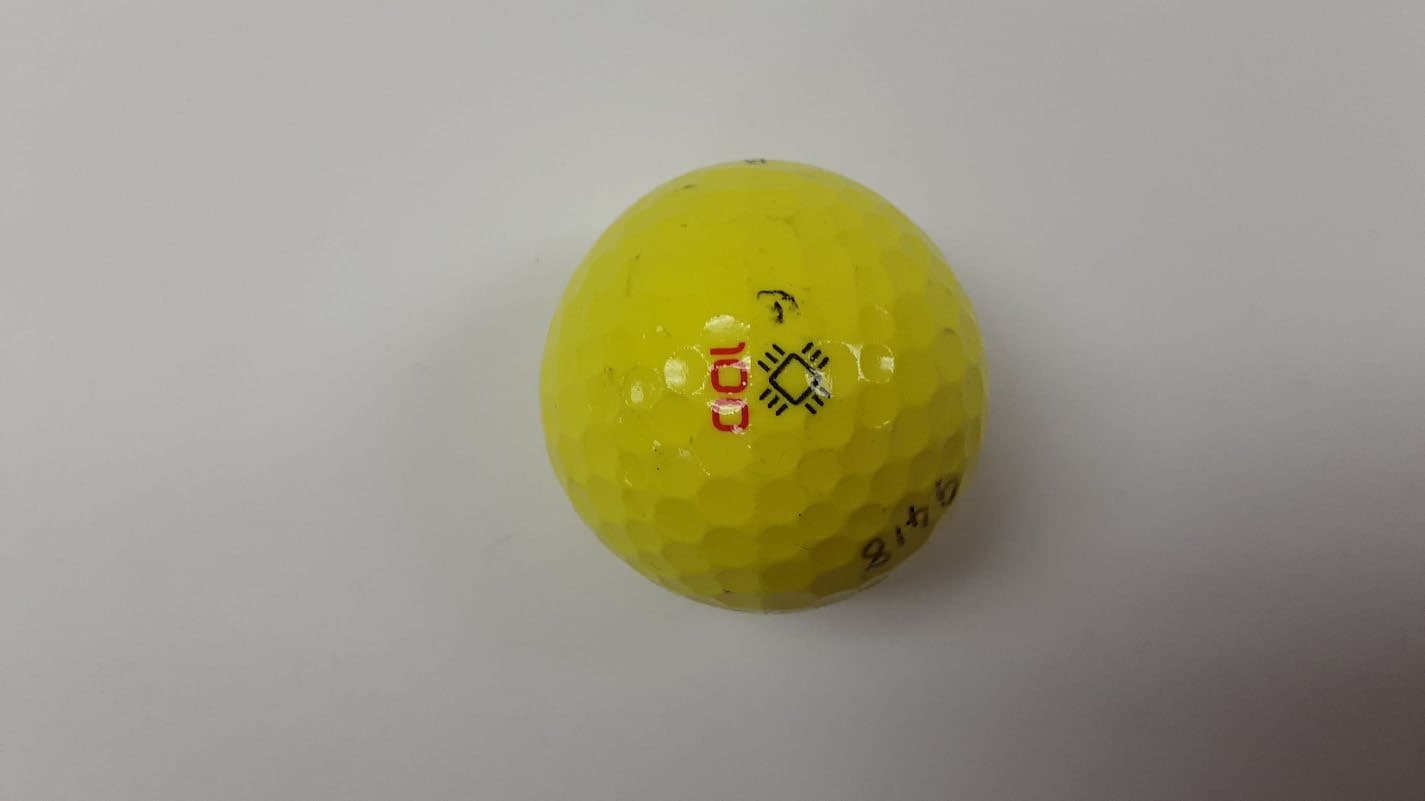
Click to zoom
Application Details
- Equipment Class
- DTS - Digital Transmission System
- Date of Grant
- Jun 05, 2026
- Application Purpose
- Original Equipment
- Equipment Note
- Golf Ball with Embedded Electronics
- Frequency Range
- 2402.00000000 - 2480.00000000
- Company
- Chip'D Inc.
- Country
- United States
Documents & Files
Document Text
Text extracted from the exhibit documents filed with the FCC. Open a document above to read the original.
Users Manual
User Guide Welcome to CHIP’d. We’re excited to have you here. Your CHIP’d Smart Golf Ball is designed to bring real-time performance data and insights to your putting practice. This guide will walk you through setting up your account, connecting your balls, and getting started. 1 Getting Started with you CHIP’d Golf balls Before you begin... Make sure you have the following: ● Your set of 3 CHIP’d Golf balls in-hand ● Compatible mobile device ○ iPhone (iOS X.X or higher) ○ Android (Android X.X or higher) ● Bluetooth enabled 2 Step 1: Set Up the CHIP’d Golf App Download the App Download the CHIP’d Golf app on your smartphone. ● On mobile, tap here to Download CHIP’d Golf for iOS ● On mobile, tap here to Download CHIP’d Golf for Android Create Your Account 1. Open the app and select Create Account. 2. Enter your First Name, Last Name and Email Address and create a password 3. A six-digit verification code will be sent to your email address. 4. Enter the code in the app to verify your account. Complete Your Profile Follow the in-app prompts to complete your setup: ● Add a profile image (optional) ● Select your player type (e.g., Professional, Coach, Amateur) ● Choose your handedness (Left or Right) 3 Add Your Putter (Optional) You may add one or more putters to your profile: ● Select brand (or add other) ● Enter model (customizable) ● Assign a nickname (customizable) This step is optional and can be skipped. Register Your Golf Balls Each set of balls includes a QR code and a six-digit alphanumeric code located inside the packaging. 1. Scan the QR code or manually enter the code in the app. 2. This will register the three unique ball IDs to your account. Note: This step does not activate or connect the balls. It simply assigns ownership of the balls to your account. Verify Ball Connectivity To complete setup: 1. Shake a ball to wake it. 2. The ball will begin broadcasting via Bluetooth. 3. The app will automatically detect and connect to balls assigned to your account. Repeat this step for each ball to confirm all devices are functioning. Once all balls have been verified, setup is complete. 4 Step 2: Using Your CHIP’d Golf Ball Start a Session From the home screen, select a session type: ● Launch Monitor (Live data mode) ● Challenges (with instructions and objectives) ● Skills (with instructions and objectives) Each activity includes on-screen guidance explaining how it works. Ball Status & Feedback During use, the app provides real-time status of the ball: ● Ready (Green Screen) ○ The ball is at rest and ready to be hit. ● Rolling - A putt is in progress ○ The ball is actively tracking and transmitting data. ● In Motion ○ The ball is moving but not in a valid putting state (e.g., being picked up). When the ball comes to rest after a putt, results will be displayed in the app. 5 Ending a Session There are different ways to end a session depending on the activity you are using. Launch Monitor Mode 1. Tap Pause during the session. 2. Select End Session or Resume. You can end a session at any time while in Launch Monitor mode. Guided Activities (Drills, Challenges, Skills) Guided activities include a defined goal. There are two ways to end a session: 1. Complete the Activity a. Finish the task and reach the defined goal to automatically complete the session. 2. End Early a. Tap Pause during the activity b. Select End Session. c. Confirm that you want to end the session before completing the activity. 6 Step 3: Finish and Store Your Ball When you are finished practicing, follow these steps to properly disconnect and store your balls. Disconnect and Power Down 1. Open the Balls screen from the main navigation panel ○ You can also access this screen by going to your Profile and select My Balls 2. Select the connected ball within the app 3. Tap Disconnect Once disconnected, the ball will automatically return to sleep mode and stop Bluetooth transmission. Note: To preserve battery life, ensure that balls are disconnected and powered down when not in use. Store Your Balls Place your balls back into the EVA foam case provided. The case is designed to protect your balls and keep them organized when not in use. 7 FCC Regulatory Information Where Can I Find My FCC ID for My CHIP’d Golf Balls? You can find your unique FCC ID for your CHIP’d Golf balls within the CHIP’d Golf app. Steps to Find Your FCC ID 1. Open the CHIP’d Golf app 2. Starting from the Main Screen, tap your profile picture in the lower right corner. 8 3. From the list of menu items, select Legal & Regulatory 9 4. The FCC ID for the CHIP’d Golf balls will be displayed under Regulatory Certification. CHIP’d Golf Ball - FCC Regulations FCC Authorization Label This device complies with part 15 of the FCC Rules. Operation is subject to the following two conditions: 1. This device may not cause harmful interference. 2 This device must accept any interference received, including interference that may cause undesired operation. 10 This device has been tested and found to comply with the limits for a Class B digital device, pursuant to part 15 of the FCC Rules. These limits are designed to provide reasonable protection against harmful interference in a residential installation. This equipment generates, uses and can radiate radio frequency energy and if not used in accordance with the instructions, may cause harmful interference to radio communications. However, there is no guarantee that interference will not occur in a particular installation. If this device does cause harmful interference to radio or television reception, the user is encouraged to try to correct the interference by one or more of the following measures: • Reorient or relocate the receiving antenna. • Increase or decrease the separation between the device and receiver. This device has been verified to comply with the limits for a Class B computing device, pursuant to FCC Rules. The user is cautioned that changes and modifications made to the device without the approval of manuf…
Text truncated - open the document above for the full version.
External Photos
Front Right Back Left Top Bottom
ID Label/Location Info
CHIP’d Golf Ball: FCC & ISED e-Labeling Access Part 1: Product Description The CHIP’d Golf Ball, model IntelliCore One, is a battery-powered electronic device designed to track and analyze putting performance. The device contains embedded sensors and a Bluetooth Low Energy (BLE) radio. The device does not have an integrated display. A compatible smartphone or tablet is required to operate the device via the CHIP’d Golf mobile application. The mobile application is the primary interface through which users view data, manage settings, and interact with the device. The connection between the golf ball and the user’s mobile device is established locally via Bluetooth Low Energy (BLE) under the control of the end user. The device remains in a low-power sleep state when not in use and is activated by motion (shake), at which point Bluetooth communication is enabled. As such, this product qualifies for electronic labeling under the criteria set forth in FCC publication number 784748 D02 and ISED Notice 2014-DRS1003. Part 2: User Steps to Access Regulatory Information 1. Open the CHIP’d Golf app 2. Starting from the Main Screen, tap your profile picture in the lower right corner. 3. From the list of menu items, select Legal & Regulatory 4. The FCC ID for the CHIP’d Golf balls will be displayed under Regulatory Certification. Part 3: Security of Regulatory Information The regulatory information, including the FCC ID, is displayed within the CHIP’d mobile application in a dedicated Legal and Regulatory section. The FCC ID applies to all CHIP’d Golf Balls of the same model and is presented consistently within the application. This information is fixed and cannot be modified by the end user. Access to the regulatory information is controlled by the application interface. The information is displayed in a read-only format and is not user-editable. The regulatory information is managed by the application and remains consistent across sessions, ensuring that users can reliably access the required compliance information at any time.
Internal Photos
CHIP’d Internal Photos (page 1 of 3) 3/26/2026Chip'D Confidential 1 Top Bottom Side 1 Side 2 Side 1 Rotated 180 Deg Side 2 Rotated 180 Deg CHIP’d Internal Photos (page 2 of 3) 3/26/2026Chip'D Confidential 2 Bluetooth Antenna Trace GPS Antenna Trace Module with BatteryModule inside the ShellPCBA With Components CHIP’d Internal Photos (page 3 of 3) 3/26/2026Chip'D Confidential 3 Intellicore Module inside the Golf Ball Antenna External Contact Points Antenna Internal Contact Points Hex Carrier Assembly Hex Carrier Assembly Removed PCB Top PCB Bottom
Operational Description
CHIP’d Antenna Design (page 1 of 2) 5/26/2026Chip'D Confidential 1 CHIP’d Antenna Design (page 2 of 2) 5/26/2026Chip'D Confidential 2 CHIP’d Antenna Report LDS Design 5/26/2026Chip'D Confidential 3 CHIP’d Antenna Report S11 5/26/2026Chip'D Confidential 4 CHIP’d Antenna Report Efficiency 5/26/2026Chip'D Confidential 5 CHIP’d Antenna Peak Gain 5/26/2026Chip'D Confidential 6 CHIP’d Antenna Report 3D Radiation Pattern 5/26/2026Chip'D Confidential 7
RF Exposure Info
Compatible Electronics, Inc. https://celectronics.com 20621 Pascal Way Lake Forest, CA 92630 This device FCC ID: Prepared By: Date: 1.0 mWApplied duty cycle?no Using the following formula from section 4.3.1 of KDB 447498at test separation distances ≤ 50 mm [(max. power of channel, including tune-up tolerance, mW) / (min. test separation distance, mm)] * [√f(GHz)] Duty Cycle 50.00% Value1-g (mW) 10-g (mW) 0.3100(353)-208 "Value" shall be ≤ 3.0 for 1-g SAR and ≤ 7.5 for 10-g extremity SAR 1-g power limit10-g power limit 97242 2BU5AIC1A1B1C Max Peak Power (dBm)Min Separation distance (mm)*Frequency (GHz) < 50mm power limits for above frequency and distance When the minimum test separation distance is < 5 mm, a distance of 5 mm according to 5) in section 4.1 is applied to determine SAR test exclusion. 2.4025.0-18.05 Tom Szynal 5/4/2026 The maximum power that the transmitter is capable of, rounded to the nearest mW and mm from section 4.3.1 of KDB 447498 is SAREXJUST-B-0-43D02/27/2020
Test Report
Report Number: D60501R1 Page 1 of 25 20621 PASCAL WAY, LAKE FOREST, CALIFORNIA, 92630 • PH: (949) 587-0400 FX: (949) 587-0476 FCC PART 15 SUBPART B & SUBPART C SECTION 15.247 RSS GEN, RSS 247 TEST REPORT For GOLF BALL WITH EMBEDDED ELECTRONICS MODEL: CS GOLF ONE FCC ID: 2BU5AIC1A1B1C HVIN: IC1A1B1C IC: 35407-IC1A1B1C Prepared for CHIP'd, INC. 29970 TECHNOLOGY DRIVE, SUITE 102 MURRIETA, CA 92563 Prepared by: _____________________ ANDREW NIMEH Approved by: ____________________ TOM SYZNAL COMPATIBLE ELECTRONICS, INC. 20621 PASCAL WAY LAKE FOREST, CA 92630 (949) 587-0400 DATE: MAY 1 , 2026 REPORT APPENDICES TOTAL BODY A B C D E PAGES 25 2 2 2 14 49 94 This report shall not be reproduced, except in full, without the written approval of Compatible Electronics. Report Number: D60501R1 Page 2 of 25 20621 PASCAL WAY, LAKE FOREST, CALIFORNIA, 92630 • PH: (949) 587-0400 FX: (949) 587-0476 TABLE OF CONTENTS Section / Title PAGE GENERAL REPORT SUMMARY 4 SUMMARY OF TEST RESULTS 5 1. PURPOSE 6 1.1 Decision Rule & Risk 7 2. ADMINISTRATIVE DATA 8 2.1 Location of Testing 8 2.2 Traceability Statement 8 2.3 Cognizant Personnel 8 2.4 Date Test Sample was received 8 2.5 Disposition of the Test Sample 8 2.6 Abbreviations and Acronyms 8 3. APPLICABLE DOCUMENTS 9 4. DESCRIPTION OF TEST CONFIGURATION 10 4.1 Description of Test Configuration – EMI 10 5. LISTS OF EUT, ACCESSORIES AND TEST EQUIPMENT 13 5.1 EUT and Accessory List 13 5.2 EMI Test Equipment 14 5.3 Test Software 14 6. TEST SITE DESCRIPTION 15 6.1 Test Facility Description 15 6.2 EUT Mounting, Bonding and Grounding 15 6.3 Facility Environmental Characteristics 15 6.4 Measurement Uncertainty 15 7. CHARACTERISTICS OF THE TRANSMITTER 16 7.1 Channel Number and Frequencies 16 7.2 Antenna Gain 16 8. Test Procedures 17 8.1 RF Emissions 17 8.2 DTS Bandwidth 21 8.3 Maximum Peak Conducted Output Power 21 8.4 Emissions in Non-Restricted Bands 22 8.5 RF Band Edges and Out of Band Emissions 22 8.6 Spectral Density Test 23 8.7 99 % Bandwidth 24 8.8 Variation of the Input Power 24 9. TEST PROCEDURE DEVIATIONS 25 10. CONCLUSIONS 25 Report Number: D60501R1 Page 3 of 25 20621 PASCAL WAY, LAKE FOREST, CALIFORNIA, 92630 • PH: (949) 587-0400 FX: (949) 587-0476 LIST OF APPENDICES APPENDIX TITLE A Laboratory Accreditations B Modifications to the EUT C Additional Models D Diagrams, Charts and Photos • Test Setup Diagrams • Antenna and Amplifier Gain Factors • Emissions Photos E Data Sheets and FCC Compliance Information Statement LIST OF TABLES TABLE TITLE 1 Spurious Emissions Test Results LIST OF FIGURES FIGURE TITLE 1 Low Frequency Test Setup 2 Radiated Emissions 3-Meter Semi-Anechoic Test Chamber 3 High Frequency Test Volume Report Number: D60501R1 Page 4 of 25 20621 PASCAL WAY, LAKE FOREST, CALIFORNIA, 92630 • PH: (949) 587-0400 FX: (949) 587-0476 GENERAL REPORT SUMMARY This electromagnetic emission report is generated by Compatible Electronics Inc., which is an independent testing and consulting firm. The test report is based on testing performed by Compatible Electronics personnel according to the measurement procedures described in the test specifications given below and in the "Test Procedures" section of this report. The measurement data and conclusions appearing herein relate only to the sample tested and this report may not be reproduced in any form except in full, without the written permission of Compatible Electronics. This report must not be used by the client to claim product certification, approval, or endorsement by NVLAP, NIST, or any agency of the U.S. government. Device Tested: Golf Ball with Embedded Electronics Model: CS Golf One FCC ID: 2BU5AIC1A1B1C IC: 35407-IC1A1B1C Product Description: The IntellicCore One is a handheld sports sensor that measures motion and impact data and transmits this information to a paired smartphone or tablet using Bluetooth Low Energy in the 2.4 GHz ISM band. Dimensions: 1" diameter Clock Frequency: 38.4 MHz Modifications: The EUT was not modified during the testing in order to comply with the specifications. Manufacturer: CHIP'd, Inc 29970 Technology Drive, Suite 102 Muririeta, CA 92563 Test Date: April 15, May 01, 08, 11 and 13, 2026 Test Specifications Covered by Accreditation: Test Specifications: EMI requirements FCC CFR Title 47, Part 15 Subpart B, FCC CFR Title 47, Subpart C Sections 15.205, 15.207, 15.209 and 15.247 RSS GEN, RSS 247 Test Procedure: ANSI C63.4 & C63.10. Report Number: D60501R1 Page 5 of 25 20621 PASCAL WAY, LAKE FOREST, CALIFORNIA, 92630 • PH: (949) 587-0400 FX: (949) 587-0476 SUMMARY OF TEST RESULTS TEST DESCRIPTION RESULTS 1 Conducted RF Emissions, 150 kHz – 30 MHz This test was not performed because the EUT operates on battery power only 2 Spurious Radiated RF Emissions, 30 MHz – 1000 MHz The EUT complies with the Class B limits of CFR Title 47, Part 15 Subpart B; the limits of CFR Title 47, Part 15, Subpart C, section 15.209; RSS-247 and RSS-GEN See section 6.4 for Measurement Uncertainty 3 Spurious Radiated RF Emissions, 9 kHz – 30 MHz and 1000 MHz – 25000 MHz The EUT complies with the Class B limits of CFR Title 47, Part 15, Subpart B; CFR Title 47, Part 15, Subpart C, section 15.247(d); RSS-247 and RSS-GEN See section 6.4 for Measurement Uncertainty 4 Fundamental and Emissions produced by the intentional radiator in non-restricted bands, 9 kHz – 25 GHz Complies with the relevant requirements of CFR Title 47, Part 15, Subpart C, section 15.247(d); RSS-247 and RSS- GEN 5 Emissions produced by the intentional radiator in restricted bands, 9 kHz – 25 GHz Complies with the relevant requirements of CFR Title 47, Part 15, Subpart C, section 15.205, 15.209, section 15.247 (d); RSS-247 and RSS-GEN 6 DTS Bandwidth Complies with the relevant requirements of FCC Title 47, Part 15, Subpart C, section 15.247 (a)(2); RSS-247 7 Maximum Conducted Output Power Complies with the relevant requirements of FCC Title 47, Part 15, Subpart C, section 15.247 (b)(3); RSS-247 8 RF Conducted Antenna Test Complies with the r…
Text truncated - open the document above for the full version.
Test Setup Photos
FRONT VIEW CHIP’d, Inc Golf Ball with Embedded Electronics MODEL: CS Golf One RADIATED EMISSIONS – BELOW 1 GHz PHOTOGRAPH SHOWING THE EUT CONFIGURATION FOR MAXIMUM EMISSIONS REAR VIEW CHIP’d, Inc Golf Ball with Embedded Electronics MODEL: CS Golf One RADIATED EMISSIONS – BELOW 1 GHz PHOTOGRAPH SHOWING THE EUT CONFIGURATION FOR MAXIMUM EMISSIONS FRONT VIEW CHIP’d, Inc Golf Ball with Embedded Electronics MODEL: CS Golf One RADIATED EMISSIONS – ABOVE 1 GHz PHOTOGRAPH SHOWING THE EUT CONFIGURATION FOR MAXIMUM EMISSIONS REAR VIEW CHIP’d, Inc Golf Ball with Embedded Electronics MODEL: CS Golf One RADIATED EMISSIONS – ABOVE 1 GHz PHOTOGRAPH SHOWING THE EUT CONFIGURATION FOR MAXIMUM EMISSIONS
Contact Information
Applicant
Anil K Agarwal
[email protected]Fax: 6198234512
Technical Contact
Chip'D Inc.Anil Agarwal
29970 Technology Drive · Murrieta, California, 92563 · United States
Test Firm
Compatible Electronics, Inc.Thomas Szynal
Technical Specifications
| # | Rule Parts | Frequency Range | Power Output |
|---|---|---|---|
| 1 | 15C | 2.40 GHz - 2.48 GHz | 16.00 µW |